

We value your privacy

By clicking "Allow", you agree to the storing of cookies on your device to enhance site navigation, analyze site usage, and assist in our marketing efforts.

Consent Selection
Details
  • Necessary cookies help make a website usable by enabling basic functions like page navigation and access to secure areas of the website. The website cannot function properly without these cookies.
    • Learn more about this provideropens in a new window

      Some of the data collected by this provider is for the purposes of personalization and measuring advertising effectiveness. The provider may use the IP Addresses for ads measurement and ads personalization.

      test_cookieUsed to check if the user's browser supports cookies.
      Maximum Storage Duration: 1 dayType: HTTP Cookie
    • Learn more about this provideropens in a new window
      bcookieUsed in order to detect spam and improve the website's security.
      Maximum Storage Duration: 1 yearType: HTTP Cookie
      li_gcStores the user's cookie consent state for the current domain
      Maximum Storage Duration: 180 daysType: HTTP Cookie
    • Learn more about this provideropens in a new window
      datadomeUsed in context with the website's BotManager. The BotManager detects, categorizes and compiles reports on potential bots trying to access the website.
      Maximum Storage Duration: SessionType: HTTP Cookie
    • studio-web-language-keyPending
      Maximum Storage Duration: SessionType: HTML Local Storage
    • _cfuvid [x2]This cookie is a part of the services provided by Cloudflare - Including load-balancing, deliverance of website content and serving DNS connection for website operators.
      Maximum Storage Duration: SessionType: HTTP Cookie
    • __cf_bm [x5]This cookie is used to distinguish between humans and bots. This is beneficial for the website, in order to make valid reports on the use of their website.
      Maximum Storage Duration: 1 dayType: HTTP Cookie
    • CookieConsent [x2]Stores the user's cookie consent state for the current domain
      Maximum Storage Duration: 1 yearType: HTTP Cookie
    • guidPreserves users states across page requests.
      Maximum Storage Duration: 1 yearType: HTTP Cookie
    • ttRegisters the website's speed and performance. This function can be used in context with statistics and load-balancing.
      Maximum Storage Duration: 1 yearType: HTTP Cookie
    • sc_anonymous_idUsed in context with the 3D-view-function on the website.
      Maximum Storage Duration: 10 yearsType: HTTP Cookie
  • Preference cookies enable a website to remember information that changes the way the website behaves or looks, like your preferred language or the region that you are in.
    • Learn more about this provideropens in a new window
      lidcRegisters which server-cluster is serving the visitor. This is used in context with load balancing, in order to optimize user experience.
      Maximum Storage Duration: 1 dayType: HTTP Cookie
  • Statistic cookies help website owners to understand how visitors interact with websites by collecting and reporting information anonymously.
    • Learn more about this provideropens in a new window
      geoSaves the user's current geographical location based on the user's IP address.
      Maximum Storage Duration: SessionType: HTTP Cookie
    • Learn more about this provideropens in a new window
      ajs_anonymous_idThis cookie is used to identify a specific visitor - this information is used to identify the number of specific visitors on a website.
      Maximum Storage Duration: 1 yearType: HTTP Cookie
      ajs_anonymous_idThis cookie is used to count how many times a website has been visited by different visitors - this is done by assigning the visitor an ID, so the visitor does not get registered twice.
      Maximum Storage Duration: PersistentType: HTML Local Storage
    • Learn more about this provideropens in a new window
      _tt_enable_cookieUsed by the social networking service, TikTok, for tracking the use of embedded services.
      Maximum Storage Duration: 1 yearType: HTTP Cookie
    • Learn more about this provideropens in a new window
      personalization_idThis cookie is set by Twitter - The cookie allows the visitor to share content from the website onto their Twitter profile.
      Maximum Storage Duration: 400 daysType: HTTP Cookie
    • FPGSIDRegisters statistical data on users' behaviour on the website. Used for internal analytics by the website operator.
      Maximum Storage Duration: 1 dayType: HTTP Cookie
      FPIDRegisters statistical data on users' behaviour on the website. Used for internal analytics by the website operator.
      Maximum Storage Duration: 400 daysType: HTTP Cookie
      FPLCRegisters a unique ID that is used to generate statistical data on how the visitor uses the website.
      Maximum Storage Duration: 1 dayType: HTTP Cookie
      sajssdk_2015_cookie_access_testPending
      Maximum Storage Duration: 73000 daysType: HTTP Cookie
      sajssdk_2015_cross_new_userCollects statistics on the user's visits to the website, such as the number of visits, average time spent on the website and what pages have been read.
      Maximum Storage Duration: 1 dayType: HTTP Cookie
      sensorsdata_domain_testPending
      Maximum Storage Duration: SessionType: HTTP Cookie
      sensorsdata2015jssdkcrossCollects statistics on the user's visits to the website, such as the number of visits, average time spent on the website and what pages have been read.
      Maximum Storage Duration: 2 yearsType: HTTP Cookie
    • sentryReplaySessionRegisters data on visitors' website-behaviour. This is used for internal analysis and website optimization.
      Maximum Storage Duration: SessionType: HTML Local Storage
    • u_scsidRegisters data on visitors' website-behaviour. This is used for internal analysis and website optimization.
      Maximum Storage Duration: SessionType: HTML Local Storage
      X-ABThis cookie is used by the website’s operator in context with multi-variate testing. This is a tool used to combine or change content on the website. This allows the website to find the best variation/edition of the site.
      Maximum Storage Duration: 1 dayType: HTTP Cookie
    • SERVERCORSIDPending
      Maximum Storage Duration: SessionType: HTTP Cookie
      SERVERIDThis cookie is used to assign the visitor to a specific server - this function is necessary for the functionality of the website.
      Maximum Storage Duration: SessionType: HTTP Cookie
    • number(#)Used to track user’s interaction with embedded content.
      Maximum Storage Duration: SessionType: HTML Local Storage
  • Marketing cookies are used to track visitors across websites. The intention is to display ads that are relevant and engaging for the individual user and thereby more valuable for publishers and third party advertisers.
    • Learn more about this provideropens in a new window
      _fbpUsed by Facebook to deliver a series of advertisement products such as real time bidding from third party advertisers.
      Maximum Storage Duration: 3 monthsType: HTTP Cookie
      lastExternalReferrerDetects how the user reached the website by registering their last URL-address.
      Maximum Storage Duration: PersistentType: HTML Local Storage
      lastExternalReferrerTimeDetects how the user reached the website by registering their last URL-address.
      Maximum Storage Duration: PersistentType: HTML Local Storage
    • Learn more about this provideropens in a new window
      mtClientConfig_cachedSource_xp_amp_music_webplayerUsed to implement iTunes content and presentation of covers.
      Maximum Storage Duration: PersistentType: HTML Local Storage
    • Learn more about this provideropens in a new window
      __tld__Used to track visitors on multiple websites, in order to present relevant advertisement based on the visitor's preferences.
      Maximum Storage Duration: SessionType: HTTP Cookie
      ajs_user_idThis cookie is used to collect data on the visitor's behavior on the website - this information can be used to assign the visitor to a visitor segment, based on common preferences.
      Maximum Storage Duration: SessionType: HTTP Cookie
      ajs_user_idCollects data on visitors' preferences and behaviour on the website - This information is used make content and advertisement more relevant to the specific visitor.
      Maximum Storage Duration: PersistentType: HTML Local Storage
    • Learn more about this provideropens in a new window

      Some of the data collected by this provider is for the purposes of personalization and measuring advertising effectiveness. The provider may use the IP Addresses for ads measurement and ads personalization.

      IDEUsed by Google DoubleClick to register and report the website user's actions after viewing or clicking one of the advertiser's ads with the purpose of measuring the efficacy of an ad and to present targeted ads to the user.
      Maximum Storage Duration: 400 daysType: HTTP Cookie
      ads/ga-audiencesUsed by Google AdWords to re-engage visitors that are likely to convert to customers based on the visitor's online behaviour across websites.
      Maximum Storage Duration: SessionType: Pixel Tracker
      pagead/1p-user-list/#Tracks if the user has shown interest in specific products or events across multiple websites and detects how the user navigates between sites. This is used for measurement of advertisement efforts and facilitates payment of referral-fees between websites.
      Maximum Storage Duration: SessionType: Pixel Tracker
    • Learn more about this provideropens in a new window
      _uetsidCollects data on visitor behaviour from multiple websites, in order to present more relevant advertisement - This also allows the website to limit the number of times that they are shown the same advertisement.
      Maximum Storage Duration: 1 dayType: HTTP Cookie
      _uetvidUsed to track visitors on multiple websites, in order to present relevant advertisement based on the visitor's preferences.
      Maximum Storage Duration: 1 yearType: HTTP Cookie
      _uetsidUsed to track visitors on multiple websites, in order to present relevant advertisement based on the visitor's preferences.
      Maximum Storage Duration: PersistentType: HTML Local Storage
      _uetsid_expContains the expiry-date for the cookie with corresponding name.
      Maximum Storage Duration: PersistentType: HTML Local Storage
      _uetvidUsed to track visitors on multiple websites, in order to present relevant advertisement based on the visitor's preferences.
      Maximum Storage Duration: PersistentType: HTML Local Storage
      _uetvid_expContains the expiry-date for the cookie with corresponding name.
      Maximum Storage Duration: PersistentType: HTML Local Storage
      MUIDUsed widely by Microsoft as a unique user ID. The cookie enables user tracking by synchronising the ID across many Microsoft domains.
      Maximum Storage Duration: 1 yearType: HTTP Cookie
    • Learn more about this provideropens in a new window
      _rdt_uuidUsed to track visitors on multiple websites, in order to present relevant advertisement based on the visitor's preferences.
      Maximum Storage Duration: 3 monthsType: HTTP Cookie
      rp.gifNecessary for the implementation of the Reddit.com's share-button function.
      Maximum Storage Duration: SessionType: Pixel Tracker
    • Learn more about this provideropens in a new window
      sc_atUsed by Snapchat to implement advertisement content on the website - The cookie detects the efficiency of the ads and collects visitor data for further visitor segmentation.
      Maximum Storage Duration: 1 yearType: HTTP Cookie
      pUsed to track visitors on multiple websites, in order to present relevant advertisement based on the visitor's preferences.
      Maximum Storage Duration: SessionType: Pixel Tracker
    • Learn more about this provideropens in a new window
      dd_testcookiePending
      Maximum Storage Duration: SessionType: HTTP Cookie
      ddSession_datadomePending
      Maximum Storage Duration: PersistentType: HTML Local Storage
    • Learn more about this provideropens in a new window
      sp_landingUsed to implement audio-content from Spotify on the website. Can also be used to register user interaction and preferences in context with audio-content - This can serve statistics and marketing purposes.
      Maximum Storage Duration: 1 dayType: HTTP Cookie
      sp_tUsed to implement audio-content from Spotify on the website. Can also be used to register user interaction and preferences in context with audio-content - This can serve statistics and marketing purposes.
      Maximum Storage Duration: 1 yearType: HTTP Cookie
    • Learn more about this provideropens in a new window
      _ttp [x2]Used by the social networking service, TikTok, for tracking the use of embedded services.
      Maximum Storage Duration: 1 yearType: HTTP Cookie
      ttcsidUsed to track visitors on multiple websites, in order to present relevant advertisement based on the visitor's preferences.
      Maximum Storage Duration: 1 yearType: HTTP Cookie
      ttcsid_#Tracks the conversion rate between the user and the advertisement banners on the website - This serves to optimise the relevance of the advertisements on the website.
      Maximum Storage Duration: 1 yearType: HTTP Cookie
      tt_appInfoUsed by the social networking service, TikTok, for tracking the use of embedded services.
      Maximum Storage Duration: SessionType: HTML Local Storage
      tt_pixel_session_indexUsed by the social networking service, TikTok, for tracking the use of embedded services.
      Maximum Storage Duration: SessionType: HTML Local Storage
      tt_sessionIdUsed by the social networking service, TikTok, for tracking the use of embedded services.
      Maximum Storage Duration: SessionType: HTML Local Storage
    • Learn more about this provideropens in a new window
      1/i/adsct [x2]Collects data on user behaviour and interaction in order to optimize the website and make advertisement on the website more relevant.
      Maximum Storage Duration: SessionType: Pixel Tracker
      muc_adsCollects data on user behaviour and interaction in order to optimize the website and make advertisement on the website more relevant.
      Maximum Storage Duration: 400 daysType: HTTP Cookie
      guest_idCollects data related to the user's visits to the website, such as the number of visits, average time spent on the website and which pages have been loaded, with the purpose of personalising and improving the Twitter service.
      Maximum Storage Duration: 400 daysType: HTTP Cookie
      guest_id_adsCollects information on user behaviour on multiple websites. This information is used in order to optimize the relevance of advertisement on the website.
      Maximum Storage Duration: 400 daysType: HTTP Cookie
      guest_id_marketingCollects information on user behaviour on multiple websites. This information is used in order to optimize the relevance of advertisement on the website.
      Maximum Storage Duration: 400 daysType: HTTP Cookie
    • Learn more about this provideropens in a new window
      __Secure-ROLLOUT_TOKENUsed to track user’s interaction with embedded content.
      Maximum Storage Duration: 180 daysType: HTTP Cookie
      __Secure-YECStores the user's video player preferences using embedded YouTube video
      Maximum Storage Duration: SessionType: HTTP Cookie
      __Secure-YNIDUsed to track user’s interaction with embedded content.
      Maximum Storage Duration: 180 daysType: HTTP Cookie
      LAST_RESULT_ENTRY_KEYUsed to track user’s interaction with embedded content.
      Maximum Storage Duration: SessionType: HTTP Cookie
      LogsDatabaseV2:V#||LogsRequestsStoreUsed to track user’s interaction with embedded content.
      Maximum Storage Duration: PersistentType: IndexedDB
      ServiceWorkerLogsDatabase#SWHealthLogNecessary for the implementation and functionality of YouTube video-content on the website.
      Maximum Storage Duration: PersistentType: IndexedDB
      TESTCOOKIESENABLEDUsed to track user’s interaction with embedded content.
      Maximum Storage Duration: 1 dayType: HTTP Cookie
      VISITOR_INFO1_LIVETries to estimate the users' bandwidth on pages with integrated YouTube videos.
      Maximum Storage Duration: 180 daysType: HTTP Cookie
      YSCRegisters a unique ID to keep statistics of what videos from YouTube the user has seen.
      Maximum Storage Duration: SessionType: HTTP Cookie
      yt-icons-last-purgedNecessary for the implementation and functionality of YouTube video-content on the website.
      Maximum Storage Duration: PersistentType: HTML Local Storage
      ytidb::LAST_RESULT_ENTRY_KEYUsed to track user’s interaction with embedded content.
      Maximum Storage Duration: PersistentType: HTML Local Storage
      YtIdbMeta#databasesUsed to track user’s interaction with embedded content.
      Maximum Storage Duration: PersistentType: IndexedDB
    • _gaUsed to send data to Google Analytics about the visitor's device and behavior. Tracks the visitor across devices and marketing channels.
      Maximum Storage Duration: 2 yearsType: HTTP Cookie
      _ga_#Used to send data to Google Analytics about the visitor's device and behavior. Tracks the visitor across devices and marketing channels.
      Maximum Storage Duration: 2 yearsType: HTTP Cookie
      _gcl_auUsed by Google AdSense for experimenting with advertisement efficiency across websites using their services.
      Maximum Storage Duration: 3 monthsType: HTTP Cookie
      _/set_cookieUsed by server-side Google Tag Manager to set or update cookies required for analytics or marketing tags.
      Maximum Storage Duration: SessionType: Pixel Tracker
      _gcl_lsTracks the conversion rate between the user and the advertisement banners on the website - This serves to optimise the relevance of the advertisements on the website.
      Maximum Storage Duration: PersistentType: HTML Local Storage
    • _schn1Sets a unique ID for the visitor, that allows third party advertisers to target the visitor with relevant advertisement. This pairing service is provided by third party advertisement hubs, which facilitates real-time bidding for advertisers.
      Maximum Storage Duration: 1 dayType: HTTP Cookie
      _scidSets a unique ID for the visitor, that allows third party advertisers to target the visitor with relevant advertisement. This pairing service is provided by third party advertisement hubs, which facilitates real-time bidding for advertisers.
      Maximum Storage Duration: 13 monthsType: HTTP Cookie
      _scid_rSets a unique ID for the visitor, that allows third party advertisers to target the visitor with relevant advertisement. This pairing service is provided by third party advertisement hubs, which facilitates real-time bidding for advertisers.
      Maximum Storage Duration: 13 monthsType: HTTP Cookie
      _screloadUsed by Snapchat to implement advertisement content on the website - The cookie detects the efficiency of the ads and collects visitor data for further visitor segmentation.
      Maximum Storage Duration: SessionType: HTTP Cookie
      u_sclidSets a unique ID for the visitor, that allows third party advertisers to target the visitor with relevant advertisement. This pairing service is provided by third party advertisement hubs, which facilitates real-time bidding for advertisers.
      Maximum Storage Duration: PersistentType: HTML Local Storage
      u_sclid_rSets a unique ID for the visitor, that allows third party advertisers to target the visitor with relevant advertisement. This pairing service is provided by third party advertisement hubs, which facilitates real-time bidding for advertisers.
      Maximum Storage Duration: PersistentType: HTML Local Storage
      u_scsid_rSets a unique ID for the visitor, that allows third party advertisers to target the visitor with relevant advertisement. This pairing service is provided by third party advertisement hubs, which facilitates real-time bidding for advertisers.
      Maximum Storage Duration: SessionType: HTML Local Storage
  • Unclassified cookies are cookies that we are in the process of classifying, together with the providers of individual cookies.
    • Learn more about this provideropens in a new window
      _rdt_pnPending
      Maximum Storage Duration: 3 monthsType: HTTP Cookie
    • Learn more about this provideropens in a new window
      tt_pixel_is_enrich_ipv6_triggered_by_enrich_amPending
      Maximum Storage Duration: SessionType: HTML Local Storage
    • adjust-sdk#asPending
      Maximum Storage Duration: PersistentType: IndexedDB
      adjust-sdk#edPending
      Maximum Storage Duration: PersistentType: IndexedDB
      adjust-sdk#gpPending
      Maximum Storage Duration: PersistentType: IndexedDB
      adjust-sdk#qPending
      Maximum Storage Duration: PersistentType: IndexedDB
      adjust-sdk.pPending
      Maximum Storage Duration: PersistentType: HTML Local Storage
      redirectPathPending
      Maximum Storage Duration: SessionType: HTML Local Storage
      studio-web-web-uuidPending
      Maximum Storage Duration: PersistentType: HTML Local Storage
    • __oaiq_domain_probePending
      Maximum Storage Duration: SessionType: HTTP Cookie
      __obrefPending
      Maximum Storage Duration: SessionType: HTTP Cookie
      oaiq_cs:TMBW9u3qWVchcyxjFU4gVQPending
      Maximum Storage Duration: SessionType: HTML Local Storage
    • _vbPending
      Maximum Storage Duration: SessionType: HTTP Cookie
    • _twpidPending
      Maximum Storage Duration: SessionType: HTTP Cookie
    • pixel/sPending
      Maximum Storage Duration: SessionType: Pixel Tracker
Cookie declaration last updated on 8/17/26 by Cookiebot
[#IABV2_TITLE#]
[#IABV2_BODY_INTRO#]
[#IABV2_BODY_LEGITIMATE_INTEREST_INTRO#]
[#IABV2_BODY_PREFERENCE_INTRO#]
[#IABV2_BODY_PURPOSES_INTRO#]
[#IABV2_BODY_PURPOSES#]
[#IABV2_BODY_FEATURES_INTRO#]
[#IABV2_BODY_FEATURES#]
[#IABV2_BODY_PARTNERS_INTRO#]
[#IABV2_BODY_PARTNERS#]
About
Cookies are small text files that can be used by websites to make a user's experience more efficient.

The law states that we can store cookies on your device if they are strictly necessary for the operation of this site. For all other types of cookies we need your permission.

This site uses different types of cookies. Some cookies are placed by third party services that appear on our pages.

You can at any time change or withdraw your consent from the Cookie Declaration on our website.

Learn more about who we are, how you can contact us and how we process personal data in our Privacy Policy.

Please state your consent ID and date when you contact us regarding your consent.
Get Started

MIDI to Vocal AI: Create Realistic Singing Voices with ACE Studio

Turn MIDI and lyrics into realistic vocal performances with ACE Studio’s AI. Compose, customize, and export professional-quality vocals without a singer. Control every detail, from melody to expression, and streamline your workflow with intuitive, flexible tools for music creators of all levels.

MIDI to Vocal AI: Create Realistic Singing Voices with ACE Studio

Turning MIDI and lyrics into polished vocal performances once required advanced tools — ACE Studio now does it in one streamlined workflow.

Designed for producers, songwriters, and creators of all levels, ACE Studio gives you full control over every element of your vocal line — from melody and phrasing to tone and expression.

In this guide, we'll explore how to generate AI vocals inside the platform by composing from scratch using MIDI and lyrics, turning your ideas into a fully editable performance.

This method is intuitive and flexible, enabling you to preview different voices, adjust articulation, and export production-ready results — all without the need for a singer or recording session.

Generate Vocals from MIDI & Lyrics in ACE Studio

Creating AI-generated vocals from MIDI is one of the most flexible and customizable ways to bring a vocal performance to life using artificial intelligence. In this approach, you provide two essential inputs: the MIDI notes (which define the melody and rhythm) and the lyrics (which are synced to those notes). ACE Studio handles the rest — interpreting your MIDI and lyrics to generate a complete vocal line performed by a virtual AI singer.
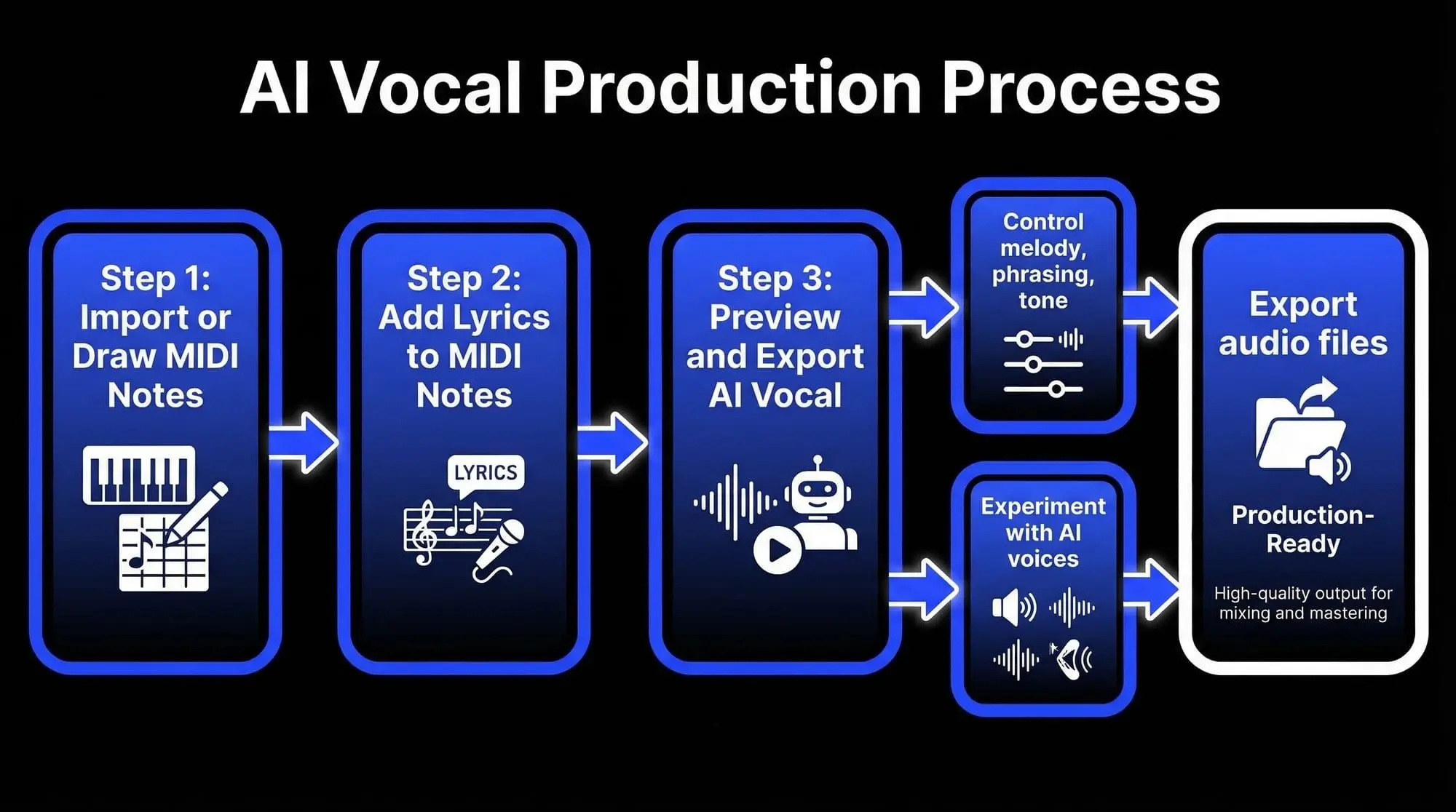
Generate Vocals from MIDI & Lyrics

This method is ideal for producers and songwriters who want to start from scratch and define every element of the vocal performance, from phrasing and timing to pronunciation and style. It allows you to experiment with harmonies, refine melodies before recording real vocals, or even complete full vocal demos without a human singer.

Let’s walk through the process step by step.

Step 1 – Import or Draw MIDI Notes

To get started, you need a melody. You can either import an existing MIDI file or create one manually inside ACE Studio.

If you already have a MIDI file prepared, importing it is simple. Just right-click on the singer track in the timeline and choose the import option, or drag and drop the MIDI file directly into the singer track. The notes will appear aligned to the piano roll, ready for editing.

If you're composing from scratch, ACE Studio also lets you draw MIDI notes manually. First, double-click on the singer's track to create a new clip. Once the clip is selected, the lower editing area becomes active, showing a grid where you can place notes.
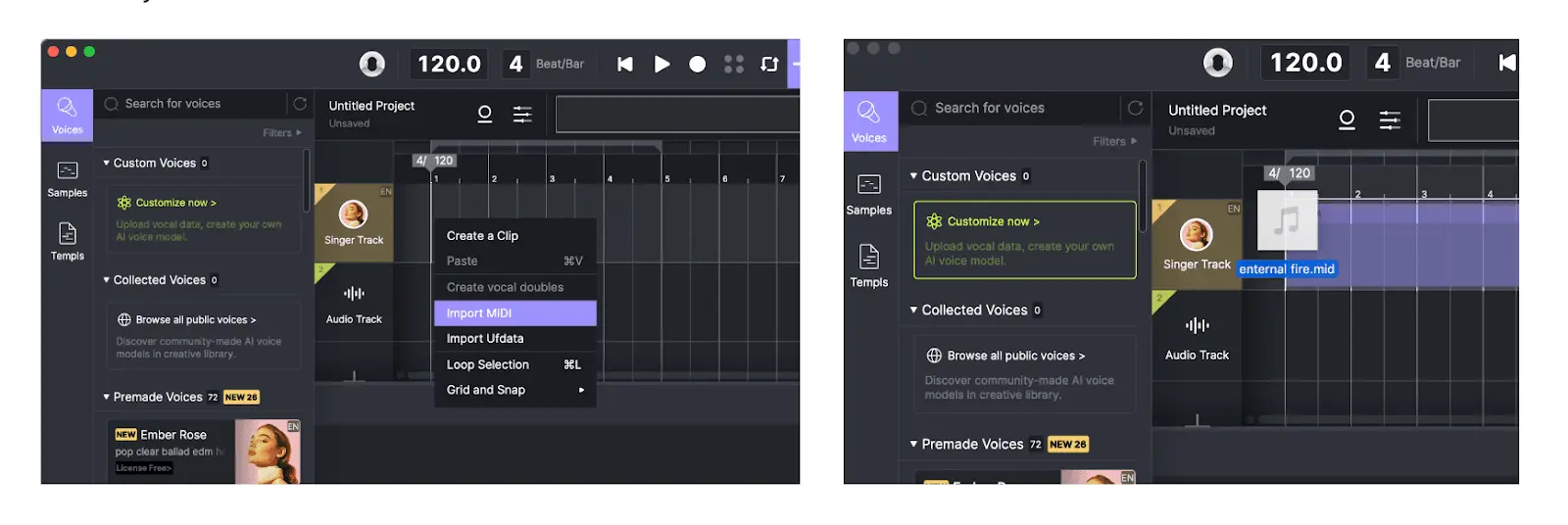
Import a MIDI file or draw MIDI directly in ACE Studio.

You can double-click on the grid to create individual notes or switch to the draw note tool, which lets you click and drag to shape note length more easily. Whether you’re building a complex melody or a simple vocal line, the piano roll gives you full control over the pitch, timing, and structure of your vocal part.

Create a clip in ACE Studio.

One important detail to keep in mind: make sure that MIDI notes on the same track do not overlap. Overlapping notes can confuse the AI engine and lead to unpredictable vocal output, especially when assigning lyrics.                              

 Double-click to create notes in ACE Studio.
Draw note tool- ACE Studio.

Step 2 – Add Lyrics to Your MIDI Notes

Once your MIDI melody is in place, the next step is to assign lyrics to the notes. This is where your vocal line truly begins to take shape — the AI singer won't just hum a melody but will actually perform the lyrics you've written.

Edit lyrics in a phrase - ACE Studio.

By default, ACE Studio assigns the syllable “da” to each MIDI note. To replace this placeholder with your lyrics, select individual notes or entire phrases and type in the words directly. If notes are grouped together in a sequence, they’ll form a phrase, which makes it easier to input full lyrical lines at once. For more precision, you can double-click on a single note to edit the lyric assigned to that particular syllable.

Double-click on a specific note to modify the lyrics corresponding to that note.

There are two important things to keep in mind when syncing lyrics to MIDI notes:

The first is that each note can hold only one syllable or phoneme. If you enter a word with multiple syllables — like “melody” — ACE Studio will automatically break it down and assign each syllable to a separate note: “melody#1,” “melody#2,” and “melody#3.” This creates a smoother, more natural-sounding delivery, allowing the AI singer to pronounce the word with proper pacing and inflection.

Multiple-syllable lyrics will be automatically distributed across several consecutive notes in ACE Studio.

The second is how to handle a single-syllable word that needs to stretch across multiple notes. In this case, type the word on the first note and use the sustain symbol (“-”) on the following notes. For example, if you want to extend the word “sky” over three notes, you would enter: sky – –. This tells the AI to hold the vowel sound across the entire sequence, creating a connected, legato feel.

These two techniques — syllable splitting and sustained syllables — give you precise control over how your lyrics align with the melody. The way you assign words to notes has a direct impact on how natural and expressive your AI vocal sounds, from fast, rhythmically complex lines to slow, emotional phrasing.

A sustain symbol "-" to make multiple notes sing a single-syllable word in the ACE Studio.

Step 3 – Preview and Export the AI Vocal

Once your MIDI notes and lyrics are in place, you’re ready to hear your AI singer bring everything to life.

In ACE Studio, generating the performance is instant. Just click the play button to listen. The AI singer will interpret your note placements, syllables, timing, and phrasing — delivering a fully sung version of your composition.
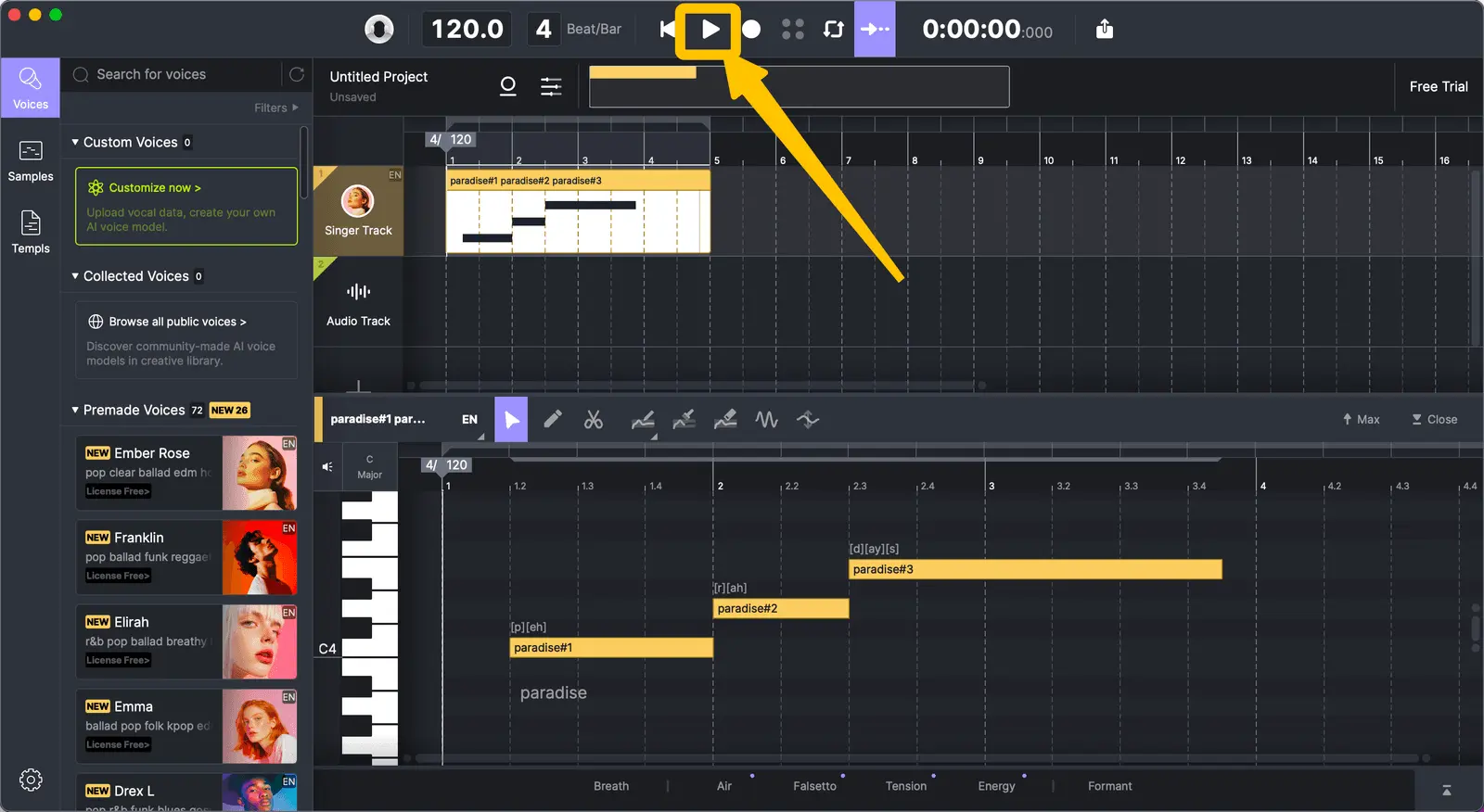
Click the play button to hear the AI singer perform - ACE Studio.

If you're curious about different vocal styles or tones, you can easily switch between AI singers. Drag a different voice from the voice list onto the same track, and the system will regenerate the vocal using that voice. This makes it easy to explore different moods or find the tone that fits your track best.

Once you’re happy with the result, you can export your vocals directly. ACE Studio allows you to bounce the audio to a standard audio file format, so you can bring it into your DAW or mix it into your larger project.
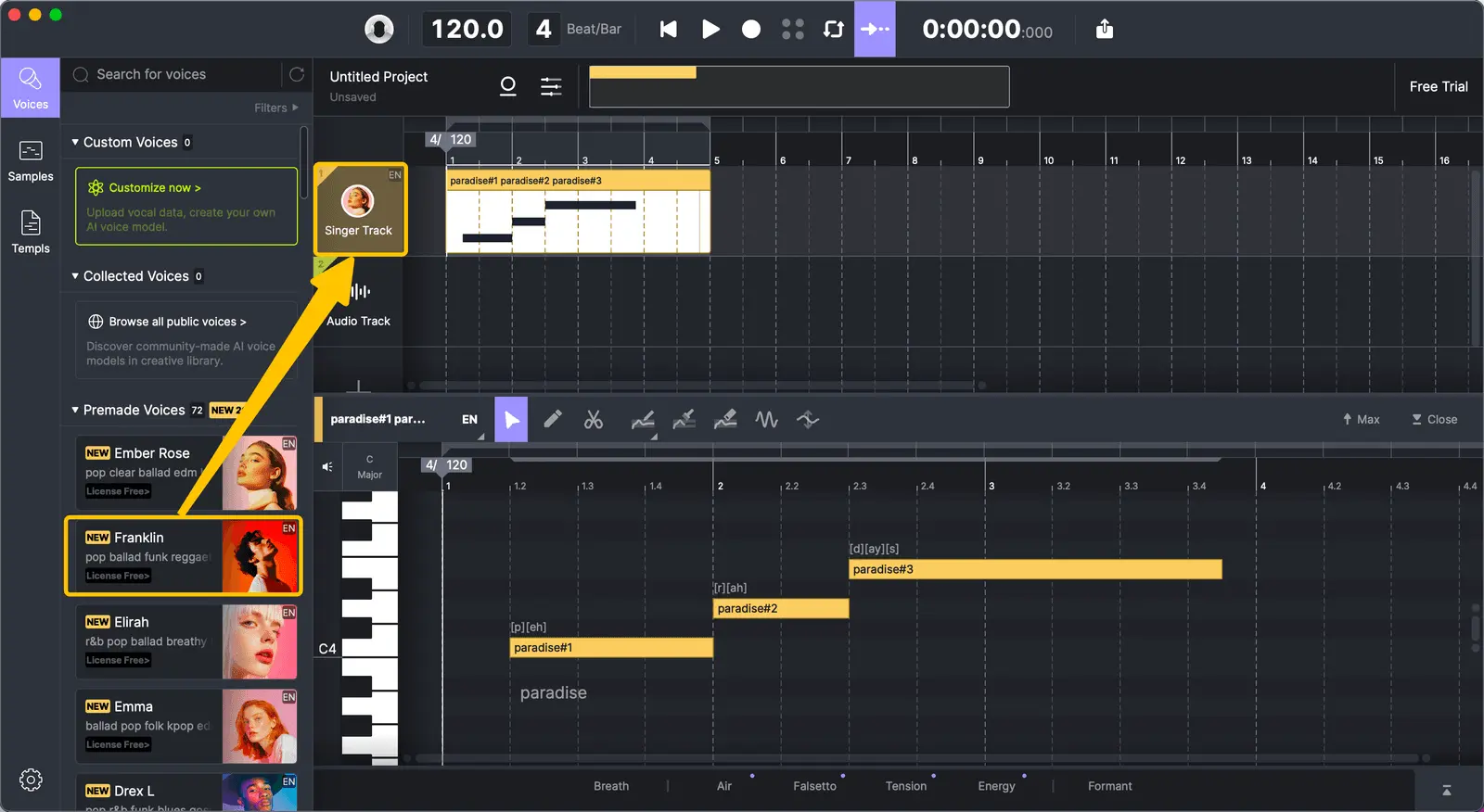
Drag another AI singer from the voice list to hear different versions of the performance.

This export feature is especially helpful for producers building demos, composers working on game or film projects, or anyone who wants a quick and expressive vocal track without a recording session.
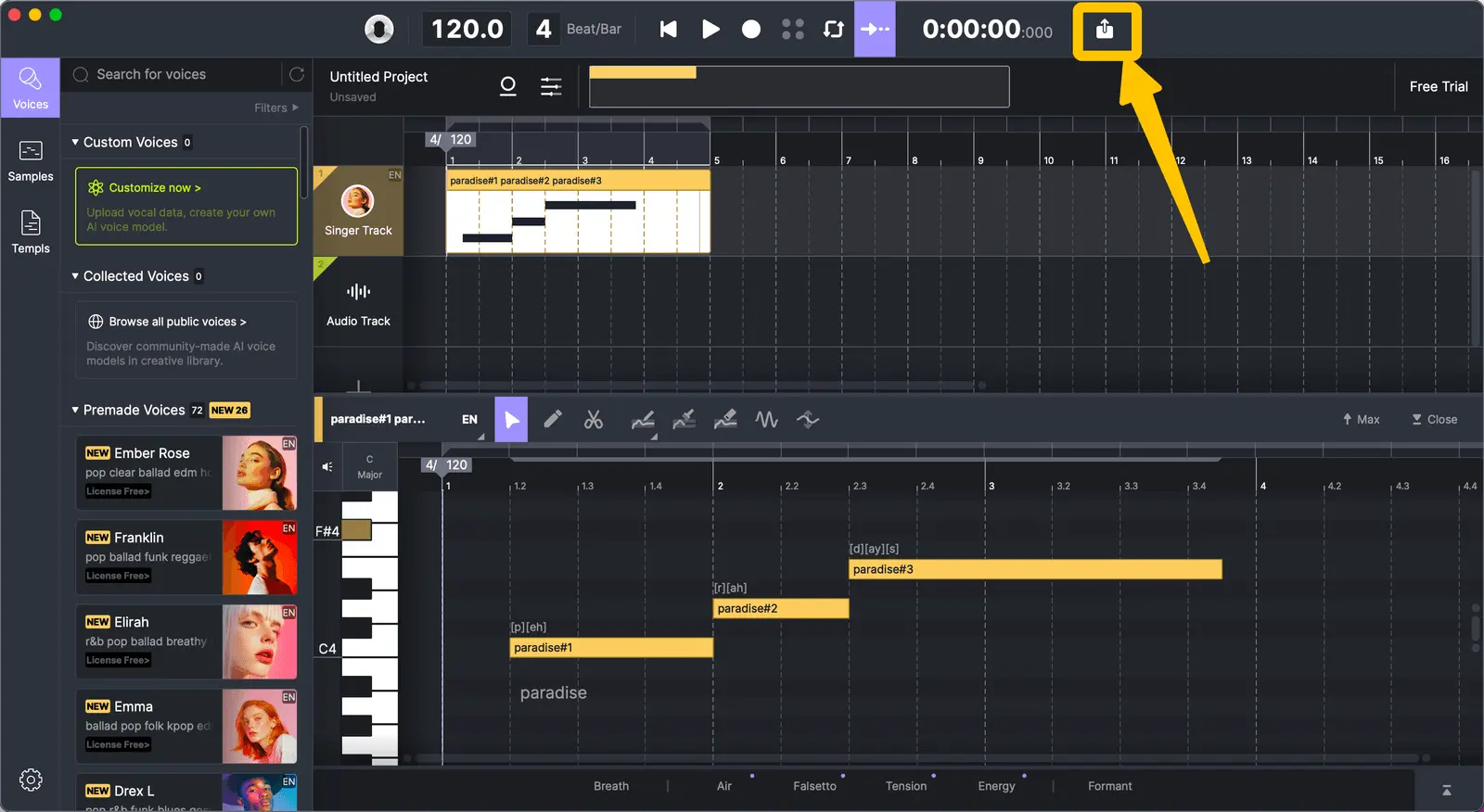
Export audio

Why MIDI to Vocal AI Is the Right Choice for Full Creative Control

MIDI to Vocal AI is a powerful approach for creators who want to shape every detail of their vocal performance — from melody and rhythm to tone, pacing, and articulation. This method gives you complete control over how your vocals sound, making it ideal for producers and songwriters who prefer to build every element from the ground up.

By starting with MIDI and lyrics, you're not adapting to a vocal recording — you're designing the performance from scratch. You decide where each syllable lands, how phrases flow, and how emotion is expressed across the vocal line. It’s a process that supports quick edits, creative exploration, and detailed refinement, giving you professional-quality results without the need for a singer or studio setup.

Creating vocals this way allows you to move quickly from idea to execution, stay in full control of your sound, and produce expressive performances that match your exact musical vision.

How to Make AI Vocals Sound More Natural

One of the most common questions after generating an AI vocal is, "How do I make this sound less robotic?" While ACE Studio does a remarkable job of producing lifelike performances straight out of the box, a few thoughtful adjustments can make your AI singer sound even more expressive and human.

Start by paying attention to timing. Human vocals aren’t perfectly aligned to a grid — they breathe, stretch, and lag ever so slightly behind the beat. If your notes feel too stiff, try shifting a few slightly forward or backward in the timeline. Letting a phrase start a little early or end just a bit late can make a surprising difference in how alive the performance feels.

Another important area is vibrato and dynamics. ACE Studio allows you to control vibrato depth and speed, which means you don’t need vibrato on every note — just where it adds expression. Apply it more intentionally, especially at the end of long, sustained notes or emotionally charged phrases. You can also shape intensity through velocity and automation curves, adding natural rises and falls in volume that mimic real singers.

Lyrics and syllable placement also play a significant role. If something sounds off rhythmically, check how the syllables are mapped to the notes. Break longer words into appropriate syllables, and use the sustain symbol where a short word needs to flow across multiple notes. This fine-tuning helps preserve the natural cadence of the language and avoids awkward pronunciation.

For even more depth, consider layering vocals. You can duplicate a vocal line and slightly offset its timing or pitch to create that subtle, imperfect texture that real harmonies produce. Or use a second AI voice with a different tone to create call-and-response or blended harmonies.

Lastly, don’t underestimate the power of silence. Real singers pause for breath, emphasis, and emotion. Leave intentional space between phrases or before a chorus drops. These quiet moments add shape and contrast to your vocal line, drawing the listener in.

The key is to think like a vocalist, not just someone arranging notes on a grid. With just a little extra attention to phrasing, expression, and flow, your AI vocals can move from technically correct to emotionally resonant.

Ready to Try MIDI to Vocal AI? Start Creating with ACE Studio

Whether you're building vocal lines from scratch or reshaping a rough demo, ACE Studio gives you the tools to take full creative control — no recording booth required. With support for both MIDI-based and audio-based AI vocal generation, it adapts to your workflow, not the other way around.

You can start with a blank grid and craft every note and syllable manually using MIDI to Vocal AI, or drag in a recorded vocal and let the software help you turn it into something new. Either way, you'll have the power to experiment, revise, and produce vocals that sound expressive, clear, and human — all within an intuitive interface.

No matter your level of experience, ACE Studio is built to get you from idea to final vocal faster — and more creatively — than ever before.

Try ACE Studio today and see how easily AI can transform your ideas into vocals.

FAQ about Midi to Vocal

How can I make my AI vocals sound more natural?

Start by looking at the timing of your notes — vocals that are too perfectly on-grid can sound mechanical. Try nudging notes slightly earlier or later, and don’t be afraid to let a word stretch a bit longer than expected. Next, use vibrato and dynamics with intention. ACE Studio allows you to adjust vibrato depth, speed, and intensity, helping you shape a more human performance. Also, pay close attention to syllable placement — clean lyric phrasing goes a long way in avoiding that “robotic” effect.

How do I make sure the AI vocals stay in sync with my music?

Synchronization involves matching your project’s tempo and making sure your MIDI notes align with the rhythm of your instrumental track. If something feels slightly off, use ACE Studio’s editing tools or your DAW to make manual timing adjustments. Quantizing or shifting the MIDI notes slightly can help you lock everything into place.

Can I use ACE Studio even if I don’t know how to work with MIDI?

Absolutely. ACE Studio is designed to be beginner-friendly. You can draw notes visually, use intuitive drag-and-drop tools, and enter lyrics directly into the interface. Even if you’ve never worked with MIDI before, you’ll be able to start creating vocals within minutes. And as you get more comfortable, you’ll discover advanced features that let you refine your vocals with more detail and precision.

Is MIDI-based vocal generation better than using audio?

It depends on your workflow. If you want total control over the vocal performance — from melody and rhythm to exact lyric placement — MIDI is the way to go. But if you already have a vocal recording and just want to enhance or transform it, the audio-based method may be faster. The beauty of ACE Studio is that you don’t have to choose one or the other — it supports both approaches seamlessly.

What is MIDI to Vocal AI?

MIDI to Vocal AI is a technology that uses artificial intelligence to convert MIDI note data and lyrics into realistic, sung vocals. Instead of recording a human voice, you provide a melody (via MIDI) and words, and an AI-generated voice performs the vocal line. It gives producers full control over timing, pitch, phrasing, and expression — ideal for songwriting, demos, and professional music production.

What is the best software for MIDI to Vocal AI?

One of the best software tools for MIDI to Vocal AI is ACE Studio. It lets you convert MIDI notes and lyrics into expressive, realistic vocal performances using advanced AI singers. With intuitive controls and high-quality voice models, ACE Studio is ideal for both beginners and professionals creating demo or final vocals without recording a human singer.

How does MIDI to Vocal AI work?

MIDI to Vocal AI works by analyzing MIDI note data, which defines pitch and rhythm, and matching it with lyrics you provide. The AI engine then generates a sung vocal line using a virtual singer, interpreting timing, phrasing, and syllables to create a natural-sounding performance. Tools like ACE Studio make this process fast, editable, and production-ready.


Maxine Zhang
Written by
Maxine Zhang
Maxine Zhang is Head of Operations at ACE Studio, where she bridges AI technology and creative music applications. With deep expertise in user experience and product development, she champions the needs of musicians in the age of AI.
View full profile →