
We value your privacy

By clicking "Allow", you agree to the storing of cookies on your device to enhance site navigation, analyze site usage, and assist in our marketing efforts.

Consent Selection
Details
  • Necessary cookies help make a website usable by enabling basic functions like page navigation and access to secure areas of the website. The website cannot function properly without these cookies.
    • Learn more about this provideropens in a new window

      Some of the data collected by this provider is for the purposes of personalization and measuring advertising effectiveness. The provider may use the IP Addresses for ads measurement and ads personalization.

      test_cookieUsed to check if the user's browser supports cookies.
      Maximum Storage Duration: 1 dayType: HTTP Cookie
    • Learn more about this provideropens in a new window
      bcookieUsed in order to detect spam and improve the website's security.
      Maximum Storage Duration: 1 yearType: HTTP Cookie
      li_gcStores the user's cookie consent state for the current domain
      Maximum Storage Duration: 180 daysType: HTTP Cookie
    • Learn more about this provideropens in a new window
      _cfuvid [x2]This cookie is a part of the services provided by Cloudflare - Including load-balancing, deliverance of website content and serving DNS connection for website operators.
      Maximum Storage Duration: SessionType: HTTP Cookie
    • Learn more about this provideropens in a new window
      datadomeUsed in context with the website's BotManager. The BotManager detects, categorizes and compiles reports on potential bots trying to access the website.
      Maximum Storage Duration: SessionType: HTTP Cookie
    • studio-web-language-keyPending
      Maximum Storage Duration: SessionType: HTML Local Storage
    • __cf_bm [x5]This cookie is used to distinguish between humans and bots. This is beneficial for the website, in order to make valid reports on the use of their website.
      Maximum Storage Duration: 1 dayType: HTTP Cookie
    • CookieConsent [x2]Stores the user's cookie consent state for the current domain
      Maximum Storage Duration: 1 yearType: HTTP Cookie
    • guidPreserves users states across page requests.
      Maximum Storage Duration: 1 yearType: HTTP Cookie
      rtThis cookie is used to identify the visitor through an application. This allows the visitor to login to a website through their LinkedIn application for example.
      Maximum Storage Duration: 1 yearType: HTTP Cookie
    • ttRegisters the website's speed and performance. This function can be used in context with statistics and load-balancing.
      Maximum Storage Duration: 1 yearType: HTTP Cookie
    • sc_anonymous_idUsed in context with the 3D-view-function on the website.
      Maximum Storage Duration: 10 yearsType: HTTP Cookie
  • Preference cookies enable a website to remember information that changes the way the website behaves or looks, like your preferred language or the region that you are in.
    • Learn more about this provideropens in a new window
      lidcRegisters which server-cluster is serving the visitor. This is used in context with load balancing, in order to optimize user experience.
      Maximum Storage Duration: 1 dayType: HTTP Cookie
  • Statistic cookies help website owners to understand how visitors interact with websites by collecting and reporting information anonymously.
    • Learn more about this provideropens in a new window
      geoSaves the user's current geographical location based on the user's IP address.
      Maximum Storage Duration: SessionType: HTTP Cookie
    • Learn more about this provideropens in a new window
      ajs_anonymous_idThis cookie is used to identify a specific visitor - this information is used to identify the number of specific visitors on a website.
      Maximum Storage Duration: 1 yearType: HTTP Cookie
      ajs_anonymous_idThis cookie is used to count how many times a website has been visited by different visitors - this is done by assigning the visitor an ID, so the visitor does not get registered twice.
      Maximum Storage Duration: PersistentType: HTML Local Storage
    • Learn more about this provideropens in a new window
      _tt_enable_cookieUsed by the social networking service, TikTok, for tracking the use of embedded services.
      Maximum Storage Duration: 1 yearType: HTTP Cookie
    • Learn more about this provideropens in a new window
      personalization_idThis cookie is set by Twitter - The cookie allows the visitor to share content from the website onto their Twitter profile.
      Maximum Storage Duration: 400 daysType: HTTP Cookie
    • FPGSIDRegisters statistical data on users' behaviour on the website. Used for internal analytics by the website operator.
      Maximum Storage Duration: 1 dayType: HTTP Cookie
      FPIDRegisters statistical data on users' behaviour on the website. Used for internal analytics by the website operator.
      Maximum Storage Duration: 400 daysType: HTTP Cookie
      FPLCRegisters a unique ID that is used to generate statistical data on how the visitor uses the website.
      Maximum Storage Duration: 1 dayType: HTTP Cookie
      sajssdk_2015_cookie_access_testPending
      Maximum Storage Duration: 73000 daysType: HTTP Cookie
      sajssdk_2015_cross_new_userCollects statistics on the user's visits to the website, such as the number of visits, average time spent on the website and what pages have been read.
      Maximum Storage Duration: 1 dayType: HTTP Cookie
      sensorsdata_domain_testPending
      Maximum Storage Duration: SessionType: HTTP Cookie
      sensorsdata2015jssdkcrossCollects statistics on the user's visits to the website, such as the number of visits, average time spent on the website and what pages have been read.
      Maximum Storage Duration: 2 yearsType: HTTP Cookie
    • sentryReplaySessionRegisters data on visitors' website-behaviour. This is used for internal analysis and website optimization.
      Maximum Storage Duration: SessionType: HTML Local Storage
    • u_scsidRegisters data on visitors' website-behaviour. This is used for internal analysis and website optimization.
      Maximum Storage Duration: SessionType: HTML Local Storage
      X-ABThis cookie is used by the website’s operator in context with multi-variate testing. This is a tool used to combine or change content on the website. This allows the website to find the best variation/edition of the site.
      Maximum Storage Duration: 1 dayType: HTTP Cookie
    • SERVERCORSIDPending
      Maximum Storage Duration: SessionType: HTTP Cookie
      SERVERIDThis cookie is used to assign the visitor to a specific server - this function is necessary for the functionality of the website.
      Maximum Storage Duration: SessionType: HTTP Cookie
    • number(#)Used to track user’s interaction with embedded content.
      Maximum Storage Duration: SessionType: HTML Local Storage
  • Marketing cookies are used to track visitors across websites. The intention is to display ads that are relevant and engaging for the individual user and thereby more valuable for publishers and third party advertisers.
    • Learn more about this provideropens in a new window
      _fbpUsed by Facebook to deliver a series of advertisement products such as real time bidding from third party advertisers.
      Maximum Storage Duration: 3 monthsType: HTTP Cookie
      lastExternalReferrerDetects how the user reached the website by registering their last URL-address.
      Maximum Storage Duration: PersistentType: HTML Local Storage
      lastExternalReferrerTimeDetects how the user reached the website by registering their last URL-address.
      Maximum Storage Duration: PersistentType: HTML Local Storage
    • Learn more about this provideropens in a new window
      mtClientConfig_cachedSource_xp_amp_music_webplayerUsed to implement iTunes content and presentation of covers.
      Maximum Storage Duration: PersistentType: HTML Local Storage
    • Learn more about this provideropens in a new window
      __tld__Used to track visitors on multiple websites, in order to present relevant advertisement based on the visitor's preferences.
      Maximum Storage Duration: SessionType: HTTP Cookie
      ajs_user_idThis cookie is used to collect data on the visitor's behavior on the website - this information can be used to assign the visitor to a visitor segment, based on common preferences.
      Maximum Storage Duration: SessionType: HTTP Cookie
      ajs_user_idCollects data on visitors' preferences and behaviour on the website - This information is used make content and advertisement more relevant to the specific visitor.
      Maximum Storage Duration: PersistentType: HTML Local Storage
    • Learn more about this provideropens in a new window

      Some of the data collected by this provider is for the purposes of personalization and measuring advertising effectiveness. The provider may use the IP Addresses for ads measurement and ads personalization.

      IDEUsed by Google DoubleClick to register and report the website user's actions after viewing or clicking one of the advertiser's ads with the purpose of measuring the efficacy of an ad and to present targeted ads to the user.
      Maximum Storage Duration: 400 daysType: HTTP Cookie
      ads/ga-audiencesUsed by Google AdWords to re-engage visitors that are likely to convert to customers based on the visitor's online behaviour across websites.
      Maximum Storage Duration: SessionType: Pixel Tracker
      pagead/1p-user-list/#Tracks if the user has shown interest in specific products or events across multiple websites and detects how the user navigates between sites. This is used for measurement of advertisement efforts and facilitates payment of referral-fees between websites.
      Maximum Storage Duration: SessionType: Pixel Tracker
    • Learn more about this provideropens in a new window
      _uetsidCollects data on visitor behaviour from multiple websites, in order to present more relevant advertisement - This also allows the website to limit the number of times that they are shown the same advertisement.
      Maximum Storage Duration: 1 dayType: HTTP Cookie
      _uetvidUsed to track visitors on multiple websites, in order to present relevant advertisement based on the visitor's preferences.
      Maximum Storage Duration: 1 yearType: HTTP Cookie
      _uetsidUsed to track visitors on multiple websites, in order to present relevant advertisement based on the visitor's preferences.
      Maximum Storage Duration: PersistentType: HTML Local Storage
      _uetsid_expContains the expiry-date for the cookie with corresponding name.
      Maximum Storage Duration: PersistentType: HTML Local Storage
      _uetvidUsed to track visitors on multiple websites, in order to present relevant advertisement based on the visitor's preferences.
      Maximum Storage Duration: PersistentType: HTML Local Storage
      _uetvid_expContains the expiry-date for the cookie with corresponding name.
      Maximum Storage Duration: PersistentType: HTML Local Storage
      MUIDUsed widely by Microsoft as a unique user ID. The cookie enables user tracking by synchronising the ID across many Microsoft domains.
      Maximum Storage Duration: 1 yearType: HTTP Cookie
    • Learn more about this provideropens in a new window
      __oaiq_domain_probeTracks the conversion rate between the user and the advertisement banners on the website - This serves to optimise the relevance of the advertisements on the website.
      Maximum Storage Duration: SessionType: HTTP Cookie
      __obrefTracks the conversion rate between the user and the advertisement banners on the website - This serves to optimise the relevance of the advertisements on the website.
      Maximum Storage Duration: SessionType: HTTP Cookie
      oaiq_cs:#Tracks the conversion rate between the user and the advertisement banners on the website - This serves to optimise the relevance of the advertisements on the website.
      Maximum Storage Duration: SessionType: HTML Local Storage
    • Learn more about this provideropens in a new window
      _rdt_uuidUsed to track visitors on multiple websites, in order to present relevant advertisement based on the visitor's preferences.
      Maximum Storage Duration: 3 monthsType: HTTP Cookie
    • Learn more about this provideropens in a new window
      sc_atUsed by Snapchat to implement advertisement content on the website - The cookie detects the efficiency of the ads and collects visitor data for further visitor segmentation.
      Maximum Storage Duration: 1 yearType: HTTP Cookie
      pUsed to track visitors on multiple websites, in order to present relevant advertisement based on the visitor's preferences.
      Maximum Storage Duration: SessionType: Pixel Tracker
    • Learn more about this provideropens in a new window
      dd_testcookiePending
      Maximum Storage Duration: SessionType: HTTP Cookie
      ddSession_datadomePending
      Maximum Storage Duration: PersistentType: HTML Local Storage
    • Learn more about this provideropens in a new window
      sp_landingUsed to implement audio-content from Spotify on the website. Can also be used to register user interaction and preferences in context with audio-content - This can serve statistics and marketing purposes.
      Maximum Storage Duration: 1 dayType: HTTP Cookie
      sp_tUsed to implement audio-content from Spotify on the website. Can also be used to register user interaction and preferences in context with audio-content - This can serve statistics and marketing purposes.
      Maximum Storage Duration: 1 yearType: HTTP Cookie
    • Learn more about this provideropens in a new window
      _ttp [x2]Used by the social networking service, TikTok, for tracking the use of embedded services.
      Maximum Storage Duration: 1 yearType: HTTP Cookie
      ttcsidUsed to track visitors on multiple websites, in order to present relevant advertisement based on the visitor's preferences.
      Maximum Storage Duration: 1 yearType: HTTP Cookie
      ttcsid_#Tracks the conversion rate between the user and the advertisement banners on the website - This serves to optimise the relevance of the advertisements on the website.
      Maximum Storage Duration: 1 yearType: HTTP Cookie
      tt_appInfoUsed by the social networking service, TikTok, for tracking the use of embedded services.
      Maximum Storage Duration: SessionType: HTML Local Storage
      tt_pixel_session_indexUsed by the social networking service, TikTok, for tracking the use of embedded services.
      Maximum Storage Duration: SessionType: HTML Local Storage
      tt_sessionIdUsed by the social networking service, TikTok, for tracking the use of embedded services.
      Maximum Storage Duration: SessionType: HTML Local Storage
    • Learn more about this provideropens in a new window
      1/i/adsct [x2]Collects data on user behaviour and interaction in order to optimize the website and make advertisement on the website more relevant.
      Maximum Storage Duration: SessionType: Pixel Tracker
      muc_adsCollects data on user behaviour and interaction in order to optimize the website and make advertisement on the website more relevant.
      Maximum Storage Duration: 400 daysType: HTTP Cookie
      guest_idCollects data related to the user's visits to the website, such as the number of visits, average time spent on the website and which pages have been loaded, with the purpose of personalising and improving the Twitter service.
      Maximum Storage Duration: 400 daysType: HTTP Cookie
      guest_id_adsCollects information on user behaviour on multiple websites. This information is used in order to optimize the relevance of advertisement on the website.
      Maximum Storage Duration: 400 daysType: HTTP Cookie
      guest_id_marketingCollects information on user behaviour on multiple websites. This information is used in order to optimize the relevance of advertisement on the website.
      Maximum Storage Duration: 400 daysType: HTTP Cookie
    • Learn more about this provideropens in a new window
      __Secure-BUCKETPending
      Maximum Storage Duration: 180 daysType: HTTP Cookie
      __Secure-ROLLOUT_TOKENUsed to track user’s interaction with embedded content.
      Maximum Storage Duration: 180 daysType: HTTP Cookie
      __Secure-YECStores the user's video player preferences using embedded YouTube video
      Maximum Storage Duration: SessionType: HTTP Cookie
      __Secure-YNIDUsed to track user’s interaction with embedded content.
      Maximum Storage Duration: 180 daysType: HTTP Cookie
      LAST_RESULT_ENTRY_KEYUsed to track user’s interaction with embedded content.
      Maximum Storage Duration: SessionType: HTTP Cookie
      LogsDatabaseV2:V#||LogsRequestsStoreUsed to track user’s interaction with embedded content.
      Maximum Storage Duration: PersistentType: IndexedDB
      ServiceWorkerLogsDatabase#SWHealthLogNecessary for the implementation and functionality of YouTube video-content on the website.
      Maximum Storage Duration: PersistentType: IndexedDB
      TESTCOOKIESENABLEDUsed to track user’s interaction with embedded content.
      Maximum Storage Duration: 1 dayType: HTTP Cookie
      VISITOR_INFO1_LIVETries to estimate the users' bandwidth on pages with integrated YouTube videos.
      Maximum Storage Duration: 180 daysType: HTTP Cookie
      YSCRegisters a unique ID to keep statistics of what videos from YouTube the user has seen.
      Maximum Storage Duration: SessionType: HTTP Cookie
      yt-icons-last-purgedNecessary for the implementation and functionality of YouTube video-content on the website.
      Maximum Storage Duration: PersistentType: HTML Local Storage
      ytidb::LAST_RESULT_ENTRY_KEYUsed to track user’s interaction with embedded content.
      Maximum Storage Duration: PersistentType: HTML Local Storage
      YtIdbMeta#databasesUsed to track user’s interaction with embedded content.
      Maximum Storage Duration: PersistentType: IndexedDB
    • _gaUsed to send data to Google Analytics about the visitor's device and behavior. Tracks the visitor across devices and marketing channels.
      Maximum Storage Duration: 2 yearsType: HTTP Cookie
      _ga_#Used to send data to Google Analytics about the visitor's device and behavior. Tracks the visitor across devices and marketing channels.
      Maximum Storage Duration: 2 yearsType: HTTP Cookie
      _gcl_auUsed by Google AdSense for experimenting with advertisement efficiency across websites using their services.
      Maximum Storage Duration: 3 monthsType: HTTP Cookie
      _/set_cookieUsed by server-side Google Tag Manager to set or update cookies required for analytics or marketing tags.
      Maximum Storage Duration: SessionType: Pixel Tracker
      _gcl_lsTracks the conversion rate between the user and the advertisement banners on the website - This serves to optimise the relevance of the advertisements on the website.
      Maximum Storage Duration: PersistentType: HTML Local Storage
    • _schn1Sets a unique ID for the visitor, that allows third party advertisers to target the visitor with relevant advertisement. This pairing service is provided by third party advertisement hubs, which facilitates real-time bidding for advertisers.
      Maximum Storage Duration: 1 dayType: HTTP Cookie
      _scidSets a unique ID for the visitor, that allows third party advertisers to target the visitor with relevant advertisement. This pairing service is provided by third party advertisement hubs, which facilitates real-time bidding for advertisers.
      Maximum Storage Duration: 13 monthsType: HTTP Cookie
      _scid_rSets a unique ID for the visitor, that allows third party advertisers to target the visitor with relevant advertisement. This pairing service is provided by third party advertisement hubs, which facilitates real-time bidding for advertisers.
      Maximum Storage Duration: 13 monthsType: HTTP Cookie
      _screloadUsed by Snapchat to implement advertisement content on the website - The cookie detects the efficiency of the ads and collects visitor data for further visitor segmentation.
      Maximum Storage Duration: SessionType: HTTP Cookie
      u_sclidSets a unique ID for the visitor, that allows third party advertisers to target the visitor with relevant advertisement. This pairing service is provided by third party advertisement hubs, which facilitates real-time bidding for advertisers.
      Maximum Storage Duration: PersistentType: HTML Local Storage
      u_sclid_rSets a unique ID for the visitor, that allows third party advertisers to target the visitor with relevant advertisement. This pairing service is provided by third party advertisement hubs, which facilitates real-time bidding for advertisers.
      Maximum Storage Duration: PersistentType: HTML Local Storage
      u_scsid_rSets a unique ID for the visitor, that allows third party advertisers to target the visitor with relevant advertisement. This pairing service is provided by third party advertisement hubs, which facilitates real-time bidding for advertisers.
      Maximum Storage Duration: SessionType: HTML Local Storage
  • Unclassified cookies are cookies that we are in the process of classifying, together with the providers of individual cookies.
    • Learn more about this provideropens in a new window
      _rdt_pnPending
      Maximum Storage Duration: 3 monthsType: HTTP Cookie
      _rdt_cfgPending
      Maximum Storage Duration: SessionType: HTML Local Storage
    • Learn more about this provideropens in a new window
      tt_pixel_is_enrich_ipv6_triggered_by_enrich_amPending
      Maximum Storage Duration: SessionType: HTML Local Storage
    • _mpxl_guidPending
      Maximum Storage Duration: SessionType: HTTP Cookie
      adjust-sdk#asPending
      Maximum Storage Duration: PersistentType: IndexedDB
      adjust-sdk#edPending
      Maximum Storage Duration: PersistentType: IndexedDB
      adjust-sdk#gpPending
      Maximum Storage Duration: PersistentType: IndexedDB
      adjust-sdk#qPending
      Maximum Storage Duration: PersistentType: IndexedDB
      adjust-sdk.pPending
      Maximum Storage Duration: PersistentType: HTML Local Storage
      redirectPathPending
      Maximum Storage Duration: SessionType: HTML Local Storage
      studio-web-web-uuidPending
      Maximum Storage Duration: PersistentType: HTML Local Storage
    • _vbPending
      Maximum Storage Duration: SessionType: HTTP Cookie
    • _twpidPending
      Maximum Storage Duration: SessionType: HTTP Cookie
      _twsidPending
      Maximum Storage Duration: SessionType: HTTP Cookie
    • pixel/sPending
      Maximum Storage Duration: SessionType: Pixel Tracker
Cookie declaration last updated on 10/16/26 by Cookiebot
[#IABV2_TITLE#]
[#IABV2_BODY_INTRO#]
[#IABV2_BODY_LEGITIMATE_INTEREST_INTRO#]
[#IABV2_BODY_PREFERENCE_INTRO#]
[#IABV2_BODY_PURPOSES_INTRO#]
[#IABV2_BODY_PURPOSES#]
[#IABV2_BODY_FEATURES_INTRO#]
[#IABV2_BODY_FEATURES#]
[#IABV2_BODY_PARTNERS_INTRO#]
[#IABV2_BODY_PARTNERS#]
About
Cookies are small text files that can be used by websites to make a user's experience more efficient.

The law states that we can store cookies on your device if they are strictly necessary for the operation of this site. For all other types of cookies we need your permission.

This site uses different types of cookies. Some cookies are placed by third party services that appear on our pages.

You can at any time change or withdraw your consent from the Cookie Declaration on our website.

Learn more about who we are, how you can contact us and how we process personal data in our Privacy Policy.

Please state your consent ID and date when you contact us regarding your consent.
Would you like to switch to English?
Confirm
close
Comenzar

¿Qué es un DAW? Guía para principiantes sobre las Estaciones de Trabajo de Audio Digital

Un DAW es el software donde las canciones se convierten en canciones: graba audio, programa MIDI, edita tomas, mezcla con plugins, automatiza efectos y exporta un master final que funciona.

¿Qué es un DAW? Guía para principiantes sobre las Estaciones de Trabajo de Audio Digital

Puntos Clave

  • Un DAW (Digital Work Station), o Estación de Trabajo de Audio Digital, es un entorno de software principal donde grabas, editas, organizas, mezclas y exportas música o audio de principio a fin.
  • Un DAW es mucho más que software de grabación. Actúa como un estudio completo en un solo lugar, combinando una línea de tiempo, mezclador, instrumentos virtuales, plugins y herramientas de automatización.
  • El núcleo del flujo de trabajo del DAW se basa en tres cosas: organizar ideas en una línea de tiempo, procesar sonido a través del motor de audio, y dar forma al equilibrio y espacio en el mezclador.
  • Los DAWs soportan todo el proceso de producción, incluyendo grabar audio, programar MIDI, editar interpretaciones, agregar efectos, mezclar pistas y exportar archivos finales.
  • Incluso con las herramientas modernas de música IA y compañeros creativos, el DAW sigue siendo el centro donde los productores toman las decisiones finales de arreglo, sonido y mezcla que definen el disco terminado.

Por qué un DAW es el corazón de tu flujo de trabajo

Si alguna vez te has preguntado "¿Qué es un DAW?", ya estás más cerca de terminar música de lo que piensas. Un DAW – abreviatura de Estación de Trabajo de Audio Digital – es el software donde la mayoría de las canciones modernas realmente se convierten en canciones. Es donde grabas tomas, programas baterías, apilas armonías, ajustas el timing, das forma al tono, automatizas efectos y exportas un máster final que funciona en audífonos, parlantes de auto y sistemas de club.

Un error de principiante es pensar que el DAW es "software de grabación." La grabación es parte de ello, pero un DAW es más como tu estudio completo en un lugar: máquina de cinta, secuenciador MIDI, mezclador, rack de efectos y tablero de arreglos – todo viviendo en una línea de tiempo. Puedes construir una pista desde cero con instrumentos virtuales, o tratar el DAW como un espacio de trabajo limpio para editar voces y mezclar audio que grabaste en otro lugar.

Y aquí está la realidad moderna: tu DAW no tiene que hacer todo solo. Muchos productores usan herramientas enfocadas junto con él – para diseño de sonido, producción vocal y generación de ideas – luego traen los resultados de vuelta al DAW para las decisiones que importan: arreglo, equilibrio, espacio y emoción. El DAW sigue siendo el centro. Tú mantienes el control. Todo lo demás es solo otro instrumento en tu flujo de trabajo.

¿Qué es una estación de trabajo de audio digital?

Una Estación de Trabajo de Audio Digital (DAW) es una aplicación de software que te permite grabar, editar, organizar, mezclar y exportar audio – a menudo junto con MIDI (datos de notas) usado para controlar instrumentos virtuales. En términos prácticos, es el entorno principal donde los productores construyen sesiones: pistas corriendo verticalmente, tiempo moviéndose de izquierda a derecha, y toda tu canción viviendo dentro de un archivo de proyecto.

Un DAW típicamente incluye:

  • Pistas de audio para grabaciones (voces, guitarra, batería, grabaciones de campo, etc.)
  • Pistas MIDI/de instrumentos para instrumentos virtuales (sintetizadores, samplers, cajas de ritmo)
  • Un mezclador para volumen, paneo, ruteo, envíos y procesamiento de bus
  • Plugins para EQ, compresión, reverb, saturación, herramientas de pitch y más
  • Automatización para que tu mezcla pueda moverse y respirar a lo largo del tiempo (barridos de filtro, ajustes vocales, delays que florecen solo en el coro)

La razón por la que los DAWs importan es la consistencia. Una vez que entiendes lo básico – pistas, clips, transport, grid y ruteo – puedes traducir ese conocimiento entre plataformas. La interfaz puede verse diferente, pero la idea central es la misma: estás construyendo una interpretación en una línea de tiempo, dándole forma hasta convertirla en un disco.

¿Cómo funciona un DAW?

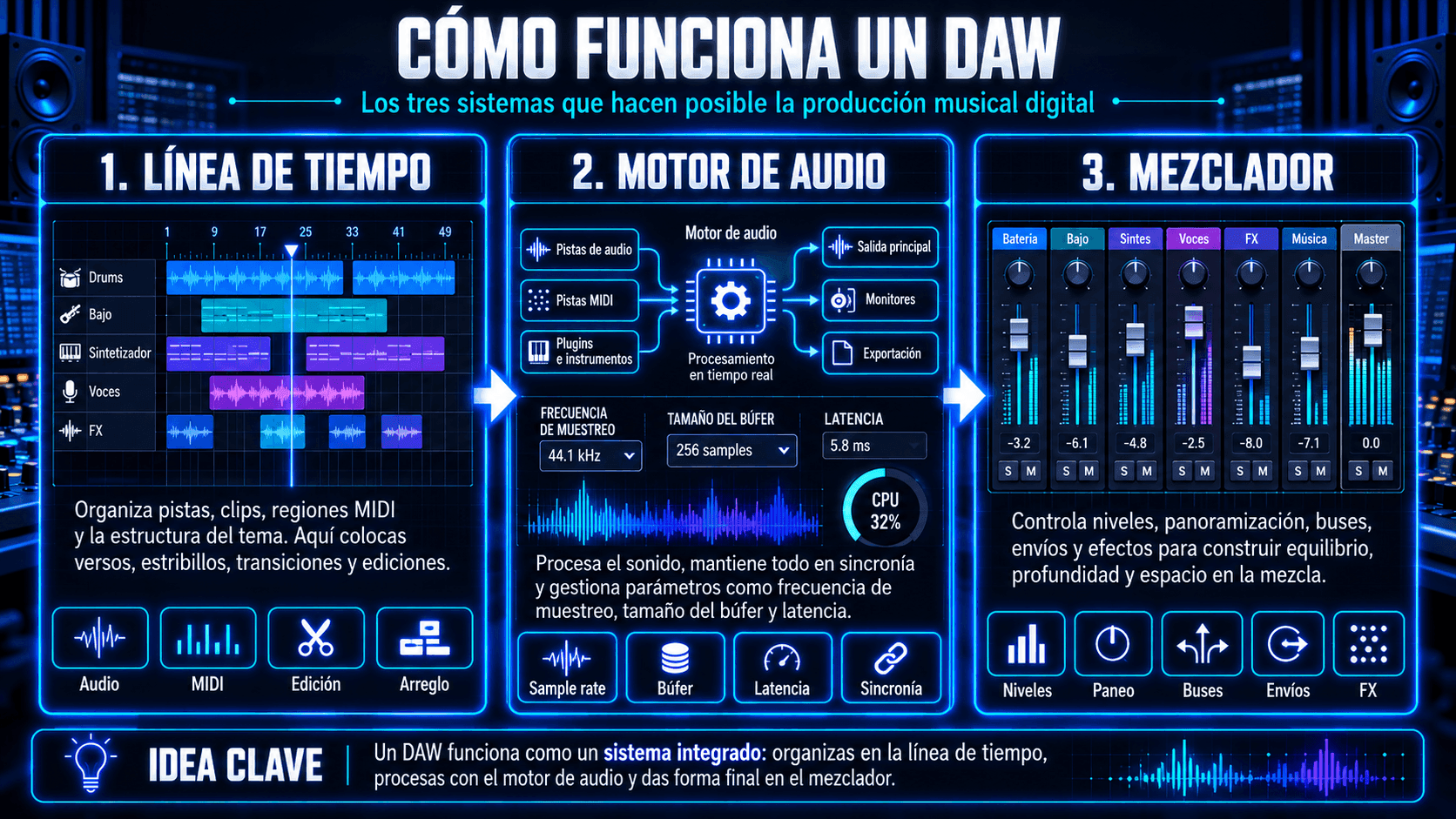
Piensa en un DAW como tres sistemas trabajando juntos:

  1. La línea de tiempo (vista de arreglo) Aquí es donde viven los clips – regiones de audio, patrones MIDI y ediciones. Aquí colocas versos, coros, drops y transiciones. Puedes cortar, copiar, estirar y mover partes hasta que la estructura de la canción se sienta inevitable.
  2. El motor de audio Bajo el capó, el DAW está constantemente transmitiendo audio, calculando procesamiento de plugins y manteniendo todo en sincronía con la grilla de tempo. Por esto existen configuraciones como sample rate, buffer size y latencia – afectan qué tan suavemente reproduce tu sistema y qué tan responsivo se siente al grabar.
  3. El mezclador (flujo de señal) Cada pista fluye a algún lugar: a la salida máster, a un bus, a un envío de reverb, hacia compresión paralela, o hacia hardware. El mezclador es donde construyes espacio y jerarquía: qué está adelante, qué está atrás, qué se siente amplio, qué se mantiene apretado en el centro.

    Imagen de ChatGPT 11 oct 2026, 19_32_35-1.png

Una vez que comprendes esos, el resto es detalle. Las pistas MIDI le dicen a los instrumentos qué notas tocar. Las pistas de audio capturan sonido real. Los plugins dan forma a ambos. La automatización hace que todo se mueva con intención.

Por esto también existen "compañeros de flujo de trabajo". Podrías esbozar una parte en otra herramienta, luego regresar al DAW para confirmar, editar y mezclar. Eso no es hacer trampa – es producción normal. El DAW es tu sala de toma de decisiones final: arreglo, elecciones sónicas y formato de entrega.

¿Qué puedes hacer con un DAW?

Un DAW está construido para el ciclo de vida completo de una pista – desde "primera idea" hasta "exportación final." Así es como se ve eso en términos reales.
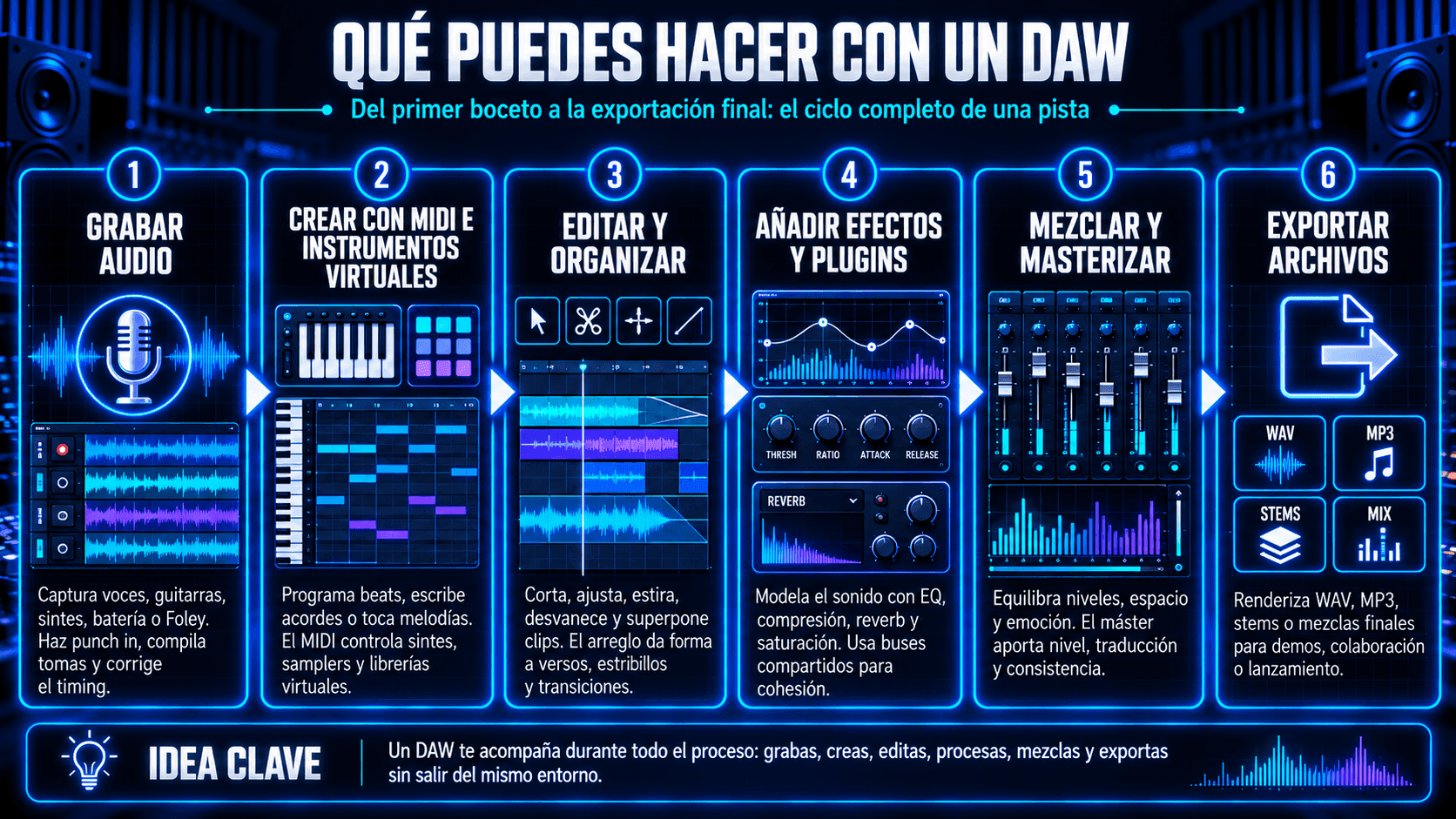
Infografía sobre el flujo de trabajo completo de un DAW, desde grabar audio y crear con MIDI e instrumentos virtuales hasta editar, aplicar efectos, mezclar, masterizar y exportar archivos.
Qué puedes hacer con un DAW: del primer boceto a la exportación final en seis etapas clave.

Grabar audio

Puedes capturar voces, guitarras, sintetizadores, batería, Foley – cualquier cosa que puedas microfoner o conectar. Un DAW te permite hacer punch in, compilar tomas, arreglar timing y construir una interpretación limpia a partir de momentos reales. Incluso si aún no estás grabando, saber cómo funcionan las pistas de audio te ayuda a entender la mezcla y arreglo más rápido.

Crear música con MIDI e instrumentos virtuales

MIDI son datos de notas – no sonido. En un DAW, MIDI controla instrumentos: sintetizadores, samplers, cajas de ritmo, librerías orquestales. Puedes programar un beat, escribir acordes, o tocar una melodía en un teclado, luego editar el timing, velocity y feel de cada nota.

Aquí también es donde viven los flujos de trabajo híbridos modernos. Si usas una herramienta que genera partes expresivas desde MIDI (por ejemplo, instrumentos IA o síntesis vocal), aún te beneficias de escribir la intención musical en MIDI primero – luego refinar el resultado dentro de la sesión del DAW.

Editar y organizar audio

Aquí es donde las producciones se vuelven precisas. Puedes cortar, ajustar, estirar, desvanecer y superponer hasta que el groove se sienta correcto. El arreglo es edición: cuándo golpea el coro, cuánto respira el drop, dónde importa el silencio.

Agregar efectos de audio y plugins

Los plugins dan forma al tono y espacio: EQ para claridad, compresión para control, reverb para profundidad, saturación para peso. Puedes apilar efectos por pista, o rutear múltiples pistas a buses compartidos para cohesión.

Mezclar y masterizar pistas

La mezcla es equilibrio más emoción: qué lidera, qué apoya, qué se sienta amplio, qué se mantiene íntimo. El mastering es el pulido final: nivel, traducción y consistencia a través de sistemas de reproducción.

Exportar música y archivos de audio

Un DAW renderiza tu trabajo en entregables: WAV para mastering, MP3 para demos, stems para colaboradores, o mezclas completas para lanzamiento. Es el último paso – y es por eso que el DAW sigue siendo el centro incluso cuando usas herramientas extra upstream.

Las funciones principales de una estación de trabajo de audio digital

Si quitas los nombres de marca y características, cada DAW está construido alrededor de unas pocas funciones principales. Aprende estas, y puedes moverte entre plataformas sin empezar de cero.
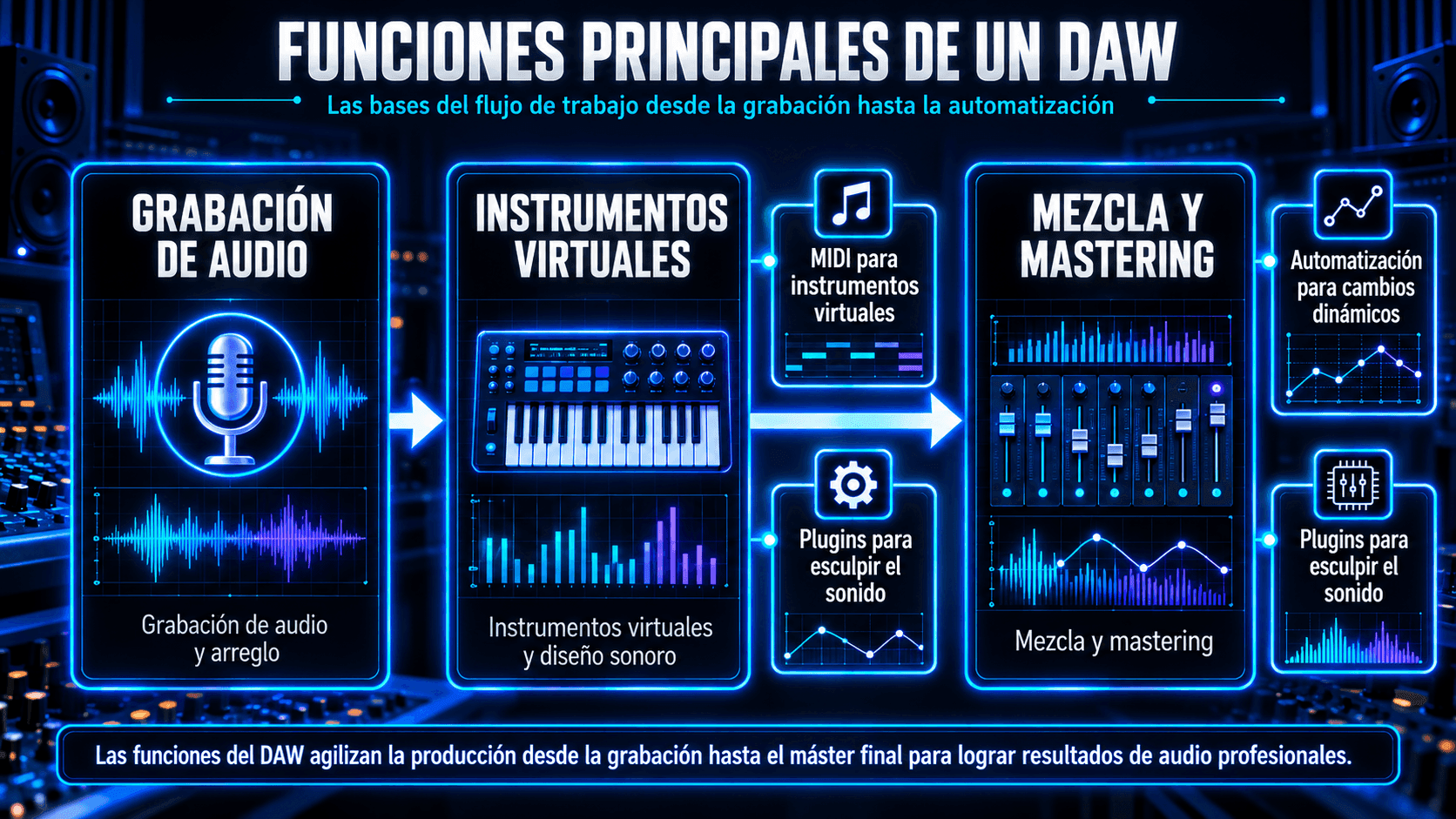
Imagen de ChatGPT 11 oct 2026, 19_32_18-2.png
Un DAW agiliza la producción musical con grabación, instrumentos virtuales, MIDI, plugins, mezcla, mastering y automatización.

Grabación de audio y arreglo

El audio es sonido real: voces grabadas, instrumentos en vivo, samples. Tu DAW captura audio a pistas, lo coloca en la línea de tiempo, y te permite darle forma con ediciones. Las herramientas de arreglo – marcadores, grids, configuraciones de snap, regiones de loop – te ayudan a convertir ideas dispersas en una canción estructurada.

Un buen hábito de principiante: organiza antes de obsesionarte. Obtén primero un layout rugoso de verso/coro. Incluso un arreglo desordenado te dice qué necesitas grabar después.

Instrumentos virtuales y diseño de sonido

El diseño de sonido es donde una pista obtiene identidad. Los instrumentos virtuales pueden ser simples (un piano) o complejos (sintetizadores wavetable, samplers granulares). El DAW se convierte en un centro de control: las notas MIDI activan el instrumento, la automatización modula parámetros, y los efectos dan forma al tono.

Aquí también es donde las "herramientas de interpretación" pueden conectarse a tu proceso. Si puedes generar un instrumento expresivo o línea vocal desde MIDI y luego ajustarlo finamente, eso se convierte en otra forma de diseñar sonido – sin reemplazar la toma de decisiones musicales.

Mezcla y mastering

La mezcla es el arte de hacer que todo encaje. Estás esculpiendo:

  • Frecuencia (qué obtiene espacio, qué se talla)
  • Dinámicas (qué se controla, qué está vivo)
  • Campo estéreo (qué es amplio vs centrado)
  • Profundidad (qué se siente cerca vs lejos)

El mastering es la pasada final: traduce la mezcla a la escucha del mundo real, maneja el loudness, y asegura que la pista se mantenga unida a través de sistemas. Muchos principiantes tratan de masterizar demasiado temprano. La mejor jugada es aprender gain staging limpio y EQ/compresión básicos primero – el mastering se vuelve más fácil cuando la mezcla es honesta.

DAW vs herramientas de música IA – cómo incorporar ACE Studio en tu flujo de trabajo

Un DAW sigue siendo donde el disco se convierte en disco. Es el lugar donde organizas tensión y liberación, ajustas niveles vocales hacia el coro, automatizas el throw de delay en la última palabra, y confirmas la mezcla a un solo archivo que se siente terminado. Incluso cuando usas herramientas extra, el DAW es la sala donde tomas las decisiones que los oyentes realmente escuchan.

ACE Studio encaja mejor como una sala creativa lateral conectada a ese espacio principal. Entras cuando necesitas dar forma a una parte – voces, coros, instrumentos, stems, extracción MIDI, bocetos basados en prompts – luego traes el resultado de vuelta a tu sesión y lo produces como todo lo demás. El punto no es "deja que la IA lo haga." El punto es "dame más formas de esculpir lo que ya escucho en mi cabeza."
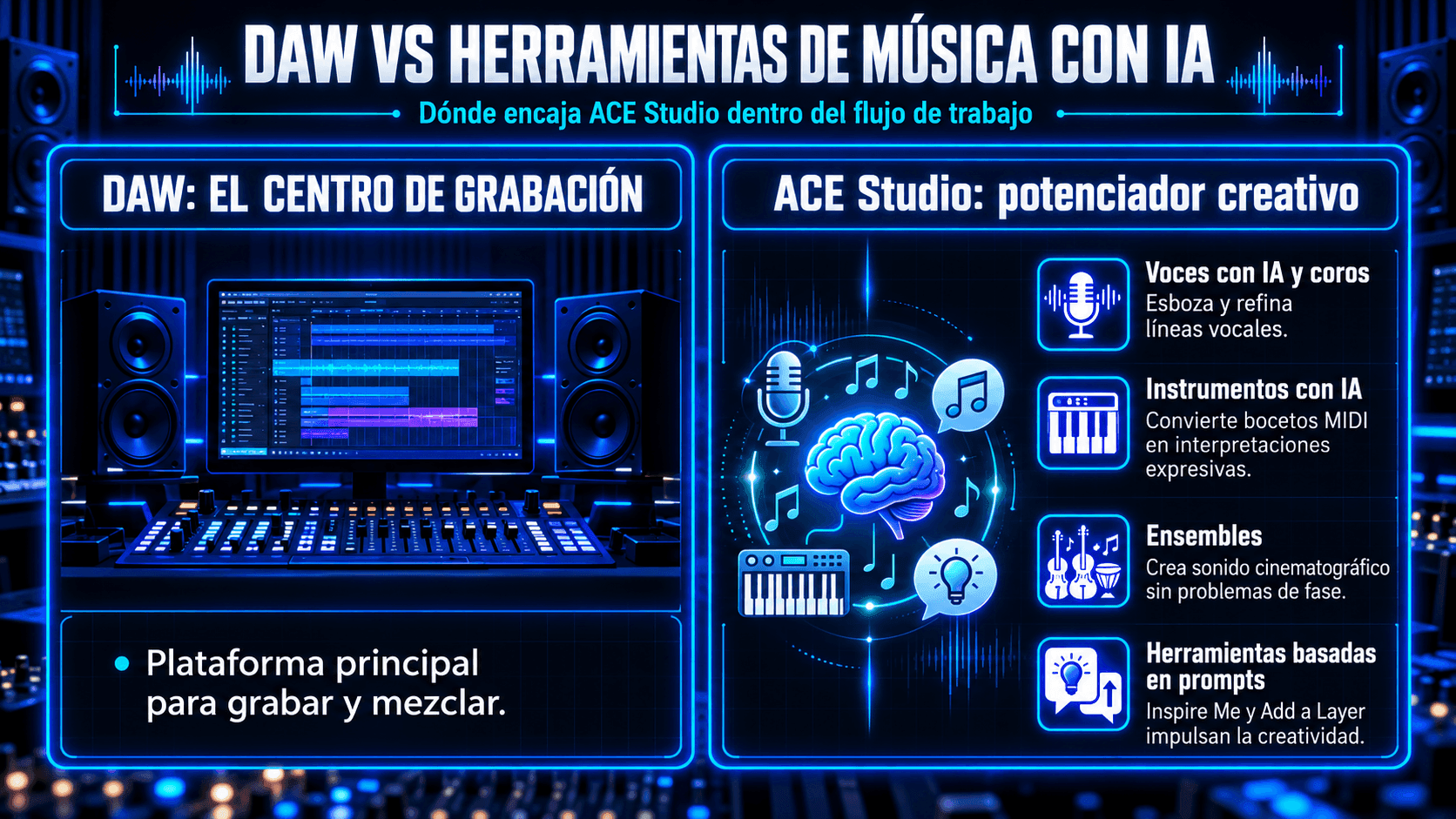
Infografía comparando DAWs y herramientas de música AI, mostrando un DAW como el centro principal de grabación y ACE Studio como un potenciador creativo para voces AI, instrumentos, ensambles y prompts.
Los DAWs manejan grabación y mezcla, mientras las herramientas de música AI mejoran la creatividad con voces, instrumentos, ensambles e ideas basadas en prompts.

Vocales IA, coros y cambio de voz

Estás en tu DAW, la pista se está moviendo, y puedes escuchar lo que debería hacer la topline – pero no quieres detener toda la sesión esperando la toma "perfecta" antes de poder construir el coro. ACE Studio te da una forma amigable para el productor de esbozar y refinar vocales desde notas y letras, luego dar forma a la interpretación como lo harías con cualquier parte real: ajustar una frase, suavizar una curva de pitch, agregar un toque de respiración donde la línea necesita intimidad, o retroceder intensidad donde debería sentirse frágil.

El objetivo no es reemplazar un cantante. Es seguir escribiendo y produciendo mientras la canción aún está caliente. Cuando trabajas junto con tu DAW, el plugin ACE Bridge te ayuda a auditar voces en contexto, así estás tomando decisiones contra la batería real, acordes y espacio de mezcla – no en aislamiento.

Una vez que el lead está sentado correctamente, puedes construir profundidad de la misma manera que lo harías con sesiones reales: dobles, armonías y pilas estilo coro que agregan amplitud sin convertirse en papilla. Las pequeñas diferencias importan – timing, spread, densidad y fraseo.

Y cuando quieres un nuevo color sin reescribir la idea musical, el cambiador de voz, Voice Changer es una opción útil: mantén el ritmo y melodía, cambia el timbre a otro carácter, luego tráelo de vuelta al DAW y mézclalo como si perteneciera al disco.

Instrumentos IA y ensambles

La mayoría del MIDI comienza la vida como un boceto – las notas están bien, pero el feel está rígido. Los instrumentos IA de ACE Studio tienen más sentido en el siguiente paso: cuando ya conoces la parte, y quieres que hable con intención. Le das MIDI, luego diriges cómo interpreta para que deje de sonar como "notas en una grilla" y comience a sonar como fraseo: una línea que se inclina hacia el compás, una nota sostenida que florece en lugar de solo sustentar, una parte que tiene tensión y liberación.

Esa es la diferencia clave en un flujo de trabajo saludable: tú aún escribes la música. Tú decides la armonía, ritmo y forma. La herramienta te ayuda a explorar opciones de interpretación más rápido, luego confirmas la versión que apoya la pista.

Los ensambles es donde esto se vuelve amplio y cinemático sin volverse desordenado. En lugar de apilar partes idénticas y pelear con phase después, construyes una sección que se comporta más como múltiples intérpretes – amplitud, profundidad y equilibrio interno que sigue siendo mezclable.

Con el plugin ACE Bridge, puedes auditar ese ensamble contra tu batería y acordes dentro de la sesión, luego terminar el trabajo en el DAW: tallar espacio con EQ, pegar con compresión de bus, automatizar el lift hacia el coro, y hacer que golpee exactamente donde la canción lo pide.

Funcionalidades generativas basadas en prompts: Inspire Me y Add a Layer

A veces no te falta habilidad – te falta momentum. Conoces la dirección, pero la página está en blanco: no hay cama bajo la letra, no hay idea de puente, no hay contra-melodía que mantenga vivo el verso.

Inspire Me es útil en ese momento específico porque te da algo a lo que reaccionar. Le das prompt a la dirección en lenguaje simple – mood, estilo, instrumentación, incluso letras – y obtienes algunos puntos de partida que puedes auditar rápido. La jugada de productor es tratarlo como un cuaderno de bocetos: mantén el que tiene el pocket correcto, luego dale nueva forma en tu DAW hasta que suene como tu pista, no como una plantilla.

Ventana Inspire Me de ACE Studio mostrando un prompt de texto para instrumentación estilo funk, ideas de canciones generadas y opciones de audición para comenzar una pista.
Inspire Me convierte prompts de música en lenguaje simple en puntos de partida rápidos que los productores pueden auditar y remodelar en su DAW.

Add a Layer es la opción más quirúrgica – para cuando la canción ya está funcionando, pero una sección necesita movimiento. Tal vez el coro necesita lift, el verso necesita una textura rítmica sutil, o el drop necesita un nuevo pulso. Generas una capa de apoyo para un agujero específico en el arreglo, eliges la variación que realmente sirve a la vocal, luego la produces apropiadamente de vuelta en el DAW: decides dónde aparece, qué tan amplia se sienta, y cómo evoluciona a lo largo del tiempo.

Y si estás empezando desde un archivo mezclado único, Stem Splitter es una forma rápida de convertir "un bounce de audio" en partes trabajables que realmente puedes organizar y mezclar.

¿Para quién es un DAW?

Un DAW no es "solo para productores". Es para cualquiera que necesite control sobre el audio, ya sea una canción, un podcast o una banda sonora de película.

Principiantes y aficionados

Si eres nuevo, tu DAW es donde aprendes cómo se construye la música: tempo, compases, bucles, capas y edición. No necesitas equipo caro para empezar. Una laptop, auriculares y una interfaz simple pueden ponerte en marcha.

Un enfoque amigable para principiantes: comienza con bucles cortos (8-16 compases), luego expande. Aprende un plugin a la vez. Aprende cómo exportar una mezcla preliminar y escúchala en diferentes altavoces.

Productores musicales y artistas

Para los productores, el DAW es el hogar. Es donde construyes arreglos, controlas la mezcla y exportas versiones. También es donde ocurre la colaboración: stems, archivos de proyecto, mapas de tempo y revisiones.

Aquí es donde las herramientas híbridas pueden ayudar sin apoderarse. Por ejemplo, si quieres esbozar stacks de coro, capas instrumentales o transformar stems en partes editables, eso puede acelerar la experimentación, pero el DAW sigue siendo donde confirmas decisiones y elaboras el disco final.
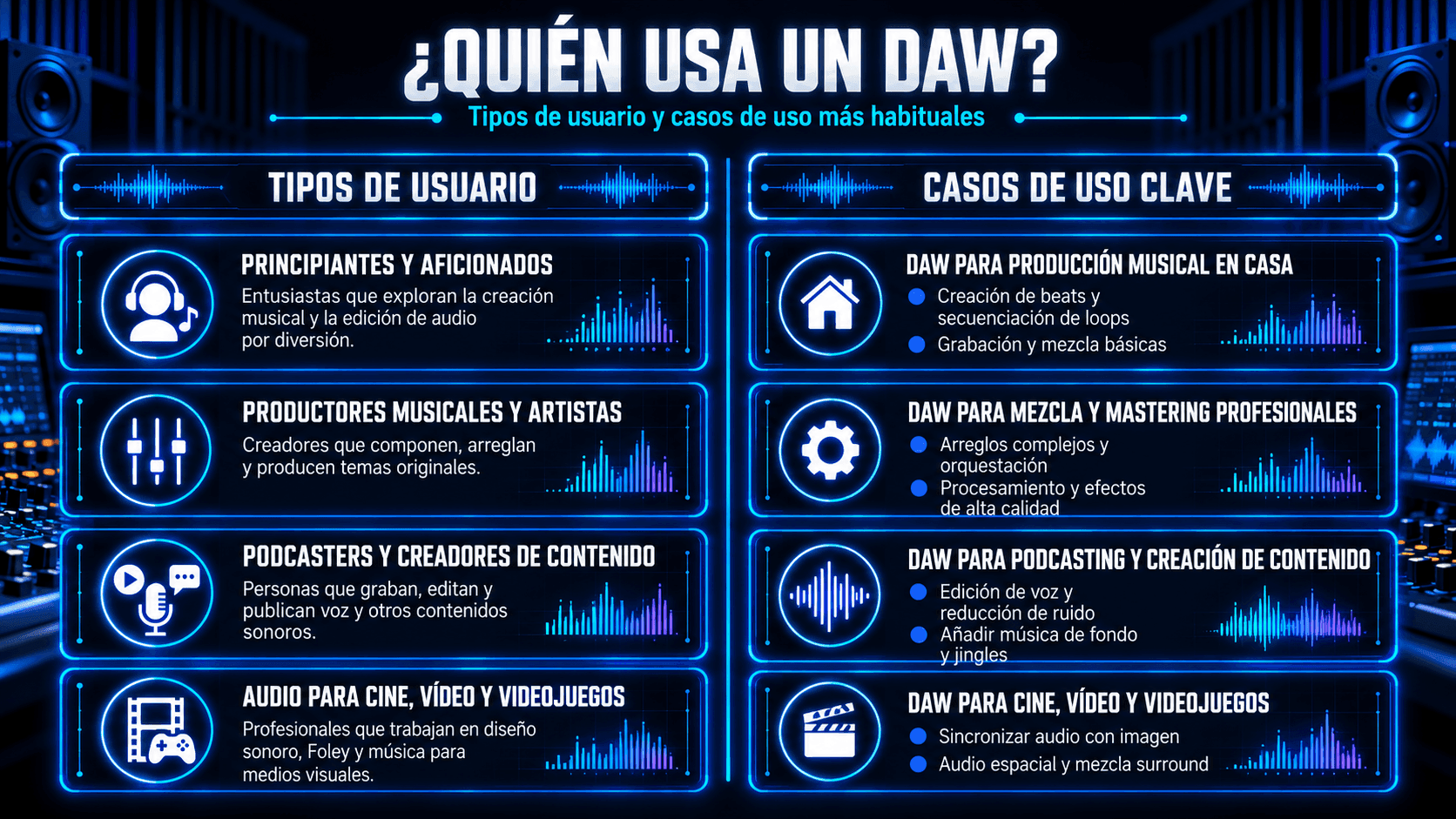
Infografía que muestra quién usa un DAW, incluyendo principiantes, productores, podcasters, creadores de contenido y profesionales de audio para cine, video y videojuegos.
Los DAWs son utilizados por aficionados, productores, podcasters y profesionales de audio de medios para grabación, edición, mezcla y masterización.

Podcasters y creadores de contenido

Los DAWs son excelentes para audio hablado: limpieza de ruido, EQ, compresión, camas musicales y estándares de volumen. Incluso un "DAW musical" puede manejar podcasts hermosamente una vez que aprendas el enrutamiento y procesamiento básico.

Audio para cine, video y videojuegos

Para trabajo con imagen, los DAWs manejan sincronización, diseño de sonido, edición de diálogos, atmósferas y música. La precisión de línea de tiempo importa aquí. Te apoyarás constantemente en marcadores, mapeo de tempo y automatización.

¿Necesitas un DAW para hacer música o audio?

No siempre, pero depende de lo que quieras decir con "hacer música".

Si tu objetivo es esbozar ideas rápidamente, puedes comenzar con herramientas simples: aplicaciones de teléfono, creadores de beats basados en bucles o software de notación. Incluso puedes generar o transformar material musical en herramientas especializadas, luego exportar audio.

Pero cuando quieres terminar algo, un arreglo completo con múltiples partes, ediciones limpias, mezcla apropiada y exportaciones confiables, un DAW se convierte en el lugar más práctico para hacerlo. Es donde puedes manejar toda la sesión: tempo, estructura, edición, gain staging, buses y formatos de salida final.

Un buen modelo mental es:

  • Las herramientas te ayudan a crear o transformar partes.
  • El DAW es donde ensamblas y finalizas la grabación.

Por eso importa la integración del DAW. Si usas herramientas que generan voces/instrumentos, convierten audio a MIDI o separan stems, aún quieres una forma limpia de traer esos resultados de vuelta a tu sesión y mezclarlos como todo lo demás.

Además, los principiantes a menudo se preocupan: "¿Si no tengo un DAW, no soy un músico real?" Ignora eso. El DAW es solo un espacio de trabajo. La musicalidad sigues siendo tú: tu gusto, tu fraseo, tus decisiones, tu moderación.

DAWs gratuitos vs pagados: ¿cuál es la diferencia?

Los DAWs gratuitos pueden ser genuinamente poderosos. Los DAWs pagados generalmente ganan en profundidad, pulimiento, ecosistema y escalabilidad a largo plazo. La mejor opción depende de tus objetivos.

Aquí hay una comparación práctica:

Característica

DAWs gratuitos (típicos)

DAWs pagados (típicos)

Límites de pistas

A veces limitados

Generalmente ilimitados o altos

Instrumentos/efectos incluidos

Básicos a moderados

Paquetes más grandes y refinados

Herramientas de edición

Básicos buenos

Comping más profundo, warping, flujos avanzados

Soporte de plugins

A menudo bueno

A menudo estabilidad y soporte de primera clase

Actualizaciones/soporte

Impulsado por la comunidad o limitado

Soporte dedicado, actualizaciones frecuentes

Colaboración

Exportación básica

Mejor intercambio de sesiones, flujos profesionales

Un buen movimiento para principiantes: comienza gratis, aprende los fundamentos, luego actualiza cuando encuentres una limitación específica (no porque te sientas "atrasado"). El objetivo no es poseer un "DAW profesional". El objetivo es construir hábitos repetibles: grabar limpiamente, arreglar claramente y mezclar con intención.

¿Cuál es el mejor DAW para principiantes?

El mejor DAW para principiantes es el que realmente abrirás, aprenderás y terminarás canciones. No elijas basándote en argumentos de internet. Elige basándote en tu computadora, tus objetivos musicales y el flujo de trabajo que tenga sentido para tu cerebro.

Aquí hay una selección rápida de opciones populares:

  • GarageBand
  • FL Studio
  • Ableton Live
  • Logic Pro
  • Pro Tools
  • Reaper
  • Cubase
  • Reason

Cómo elegir el DAW correcto para tus necesidades

Elegir un DAW es menos sobre "el mejor" y más sobre el ajuste. Esto es lo que realmente importa.
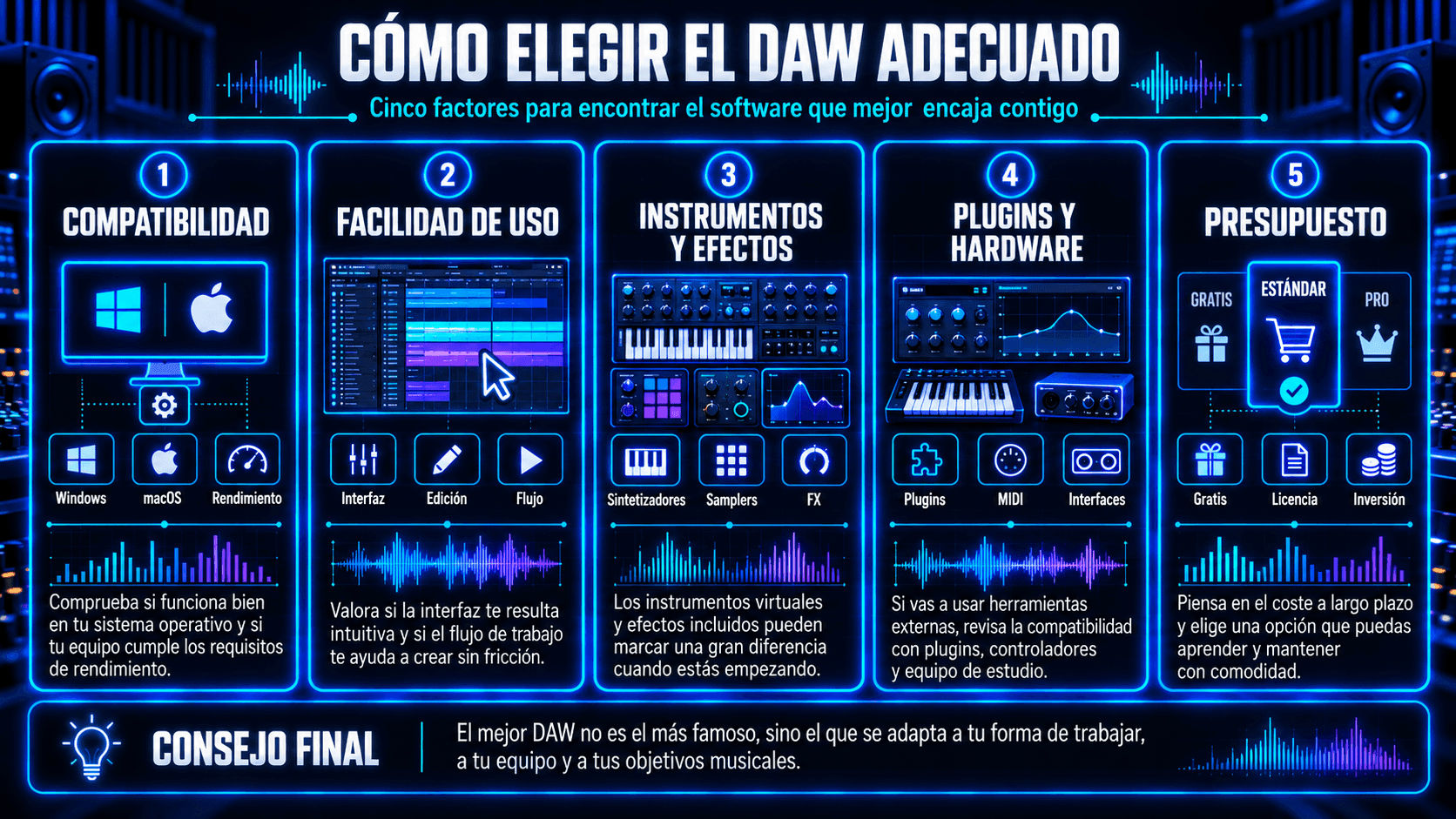
Infografía con cinco criterios para elegir un DAW: compatibilidad, facilidad de uso, instrumentos y efectos, plugins y hardware, y presupuesto.
Cinco factores clave para elegir el DAW que mejor se adapta a tus necesidades.

Compatibilidad del sistema operativo

Algunos DAWs son específicos de plataforma. Si estás en Windows, asegúrate de que tus opciones principales lo soporten completamente. En macOS, tienes opciones adicionales. No elijas un DAW que fuerce toda tu decisión de computadora a menos que ya quisieras esa plataforma.

Facilidad de uso y flujo de trabajo

Mira a alguien construir una pista en el DAW que estás considerando. ¿Se siente intuitivo o molesto el flujo de trabajo? La fricción pequeña se acumula. Quieres un DAW que te ayude a mantener el flujo creativo: bucles rápidos, edición fácil y exportación simple.

Instrumentos y efectos incluidos

Si estás comenzando desde cero, importan los instrumentos stock y efectos. Un DAW con batería sólida, sintetizadores y herramientas de mezcla básicas te llevará más lejos antes de que necesites plugins adicionales.

Soporte de plugins y hardware

Si planeas usar plugins de terceros o integrar herramientas especializadas a través de formatos de plugin, verifica la compatibilidad. Algunas herramientas de producción se integran a través de formatos de plugin comunes y conexiones DAW en tiempo real, lo cual es útil cuando quieres mantener todo dentro de una sesión.

Presupuesto y precios

Piensa en términos de uso a largo plazo. Pasarás más tiempo aprendiendo de lo que gastarás dinero. Elige algo a lo que puedas comprometerte por un año. Eso generalmente es suficiente para superar la confusión de principiante y entrar en progreso real.

Preguntas Frecuentes sobre DAWs

¿Qué significa DAW?

DAW significa Digital Audio Workstation (Estación de Trabajo de Audio Digital) – software usado para grabar, editar, arreglar, mezclar y exportar audio (a menudo con soporte MIDI).

¿Puedes hacer música profesional con un DAW?

Sí. Un DAW es la herramienta estándar para producción profesional. Lo que hace una pista "profesional" son las decisiones: interpretación, arreglo, selección de sonidos y traducción de mezcla, no la marca del DAW.

¿Es un DAW lo mismo que software de grabación?

El software de grabación es parte de un DAW. Un DAW completo también incluye MIDI, instrumentos, mezcla, automatización, cadenas de plugins, enrutamiento y flujos de exportación.

¿Son difíciles de aprender los DAWs?

Pueden sentirse abrumadores al principio, pero la curva de aprendizaje es manejable si te enfocas en fundamentos como pistas y clips, la grilla y tempo, edición básica, mezcla simple, y construyes desde ahí.


Maxine Zhang
Escrito por
Maxine Zhang
Maxine Zhang es Directora de Operaciones en ACE Studio, conectando la tecnología de IA con aplicaciones musicales creativas. Experta en experiencia de usuario y desarrollo de productos, defiende las necesidades de los músicos en la era de la IA.
Ver perfil completo →
Copyright © 2026 Timedomain Inc.
Términos de Uso
Política de Privacidad