What is Reverb in music production?
If you’ve ever searched what reverb in music is, you’re really asking a practical question: why do some recordings feel close and “in your face,” while others feel like they’re happening inside a room, a hall, or a cathedral? Reverb is the sound of space – and in production, it is one of the most direct ways to control depth, distance, and emotion.
Reverb is also one of the easiest effects to overdo. A little ambience can glue a mix together. A little too much can blur the groove, smear lyrics, and push your lead out of focus. The goal is not “more vibe.” The goal is intentional placement: deciding how close the singer feels, how wide the instruments sit, and how big the track’s world should be.
This guide breaks reverb down in musician language: what it is, what it sounds like, how it works, and how to use it without losing clarity. And because a lot of modern productions involve stacked vocals, harmonies, and choral layers, you’ll also see practical notes on how to audition space quickly inside ACE Studio – using the built-in Reverb (Room, Hall, Church, Cinematic) and the choir-focused Room Effect, where you can literally place singers in a virtual room by dragging their positions.
What is Reverb?
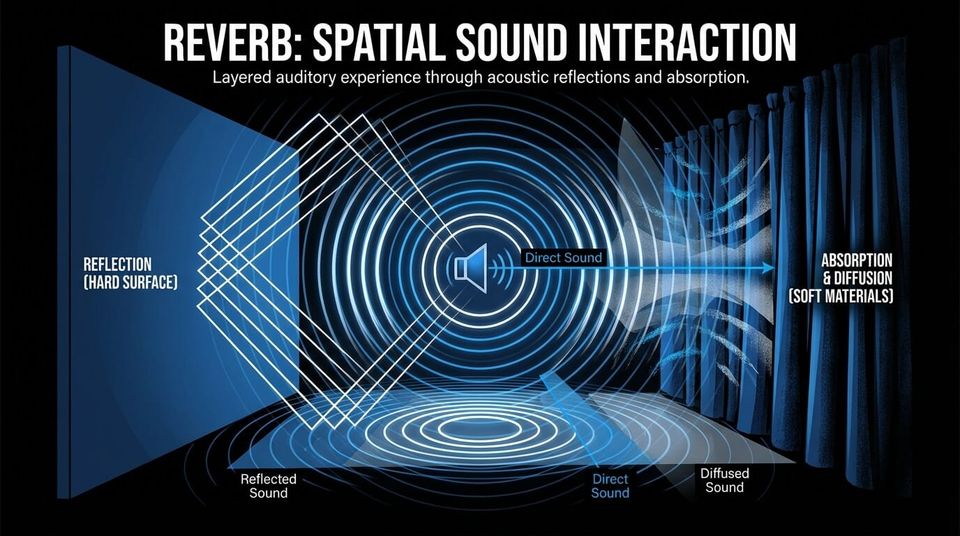
Reverb (reverberation) is the dense collection of reflections you hear after a sound happens in a space. When a voice, snare, or guitar plays in a room, you hear:
- Direct sound – the signal traveling straight to your ears (or microphone)
- Reflected sound – the same signal bouncing off surfaces and arriving slightly later
Those reflections aren’t a single repeat like an echo. They’re thousands of tiny overlaps that your brain reads as space: size, distance, and material. Hard walls reflect bright and fast. Soft surfaces absorb highs. Big rooms create longer tails. Small rooms create tight, quick ambience.
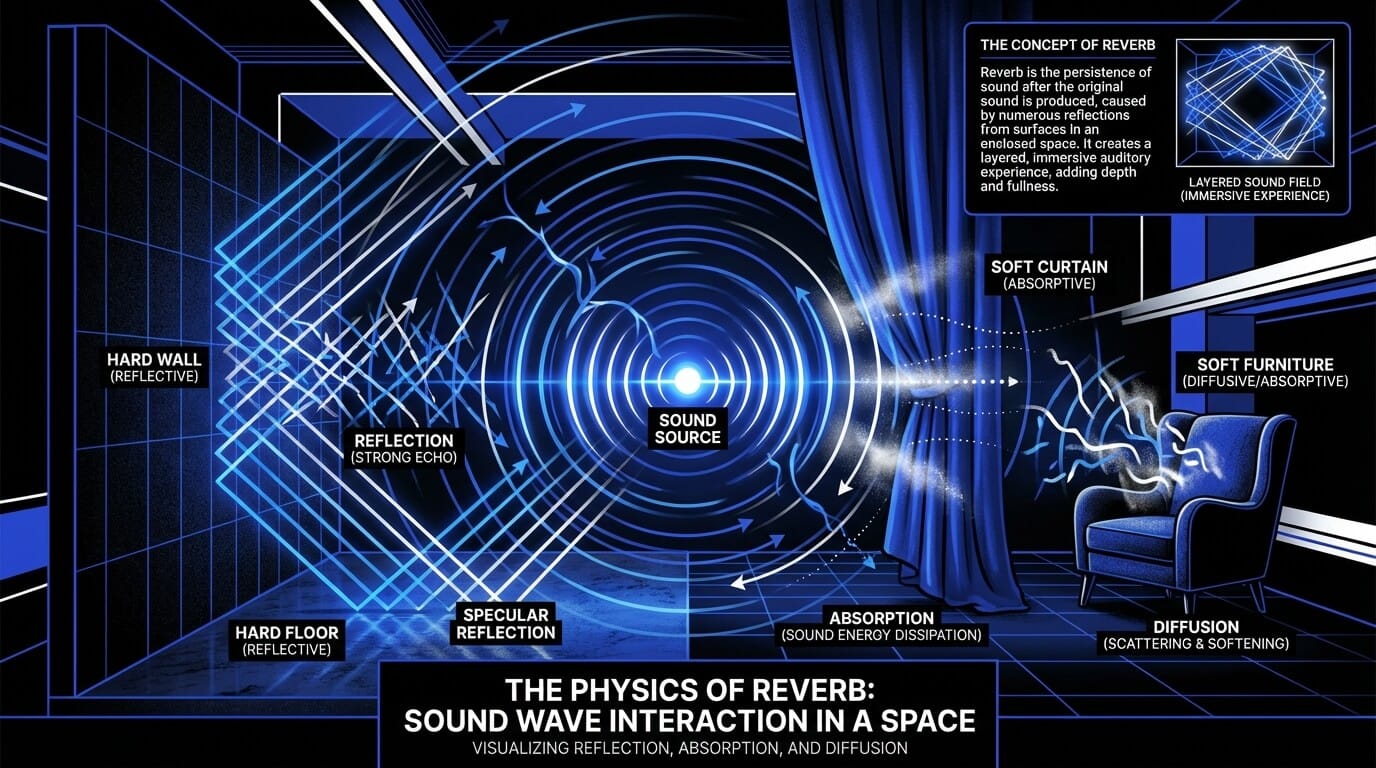
In production, reverb becomes a design tool. You can keep a vocal dry and intimate, add a subtle room for realism, or wash a chorus in a longer hall to make it feel wider and more emotional. Most importantly: reverb changes where a sound appears to sit – up close, mid-depth, or far back.
A practical way to think about reverb
Reverb answers questions like:
- Where is this instrument placed in the depth of the mix?
- How “big” is the world of the song?
- Is this performance intimate, cinematic, nostalgic, airy, or distant?
- Do separate takes feel like they share the same room?
ACE Studio workflow note: start with a controlled source
If you’re using ACE Studio for vocals, harmonies, or choir parts, you’re already working in a DAW-like environment where you can shape the sound using Basic Effects (EQ, compression, de-essing, reverb) before you commit to any big ambience choices.
That matters because reverb exaggerates whatever the source is doing – harsh consonants, messy timing, uneven vowels. Getting the performance and tone clean first gives you more control later, whether you keep the reverb inside ACE Studio or export to your DAW.
What does reverb sound like?
Reverb sounds like a sound continuing after it stops – not as a clear repeat, but as a fading “field” around it. The same vocal line can feel:
- Tight and real (short room) – like a singer in a booth or small studio
- Smooth and lush (hall) – sustained, blended, emotional
- Huge and cinematic (large space) – dramatic tail, wider sense of distance
- Distant and washed (too much) – transients soften, lyrics blur, groove feels slower
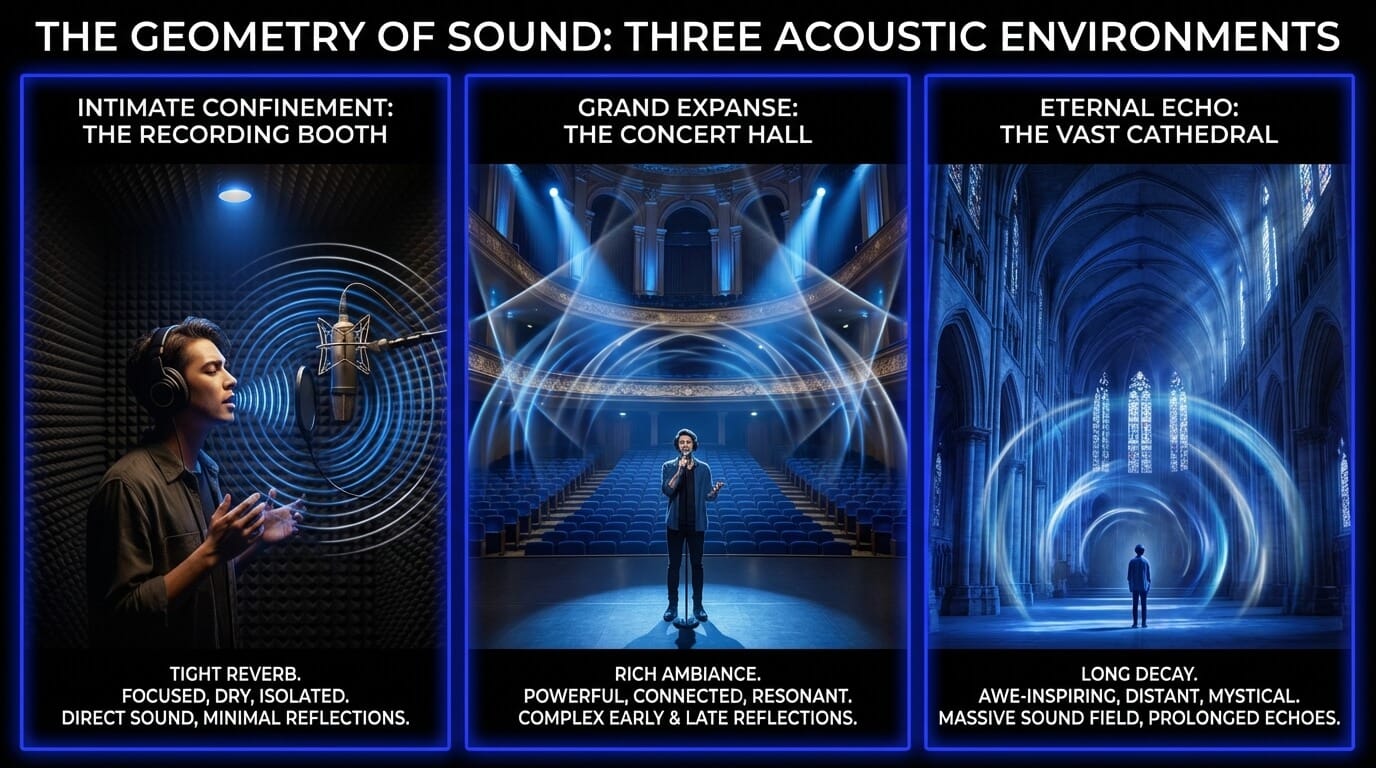
A good ear-training trick is to focus on what changed, not whether it sounds “pretty.”
A listening test that actually works
Take a dry vocal phrase. Add reverb. Then mute the reverb return and ask:
- Distance – did the vocal move backwards?
- Size – did the track suddenly feel like it has walls?
- Tail – are word endings overlapping the next phrase?
- Clarity – do consonants (t, k, s) still read clearly?
If the answer is “it just sounds nicer,” you’re still treating reverb like decoration. If the answer is “it changed depth and emotion,” you’re using it like a mix tool.
Try it quickly inside ACE Studio
ACE Studio’s built-in Reverb is designed for fast decisions: you can cycle four presets (Room, Hall, Church, Cinematic) and control the balance with a single Dry/Wet knob. That’s a great way to train your ear:
- Set Dry/Wet low (subtle).
- Cycle presets while listening for distance and tail length.
- Stop when the vocal feels placed, not “covered.”
Because it’s simple, it encourages the right habit: choose the space by feel, then keep it controlled.
How does reverb work?
Reverb happens in stages:
- Early reflections – the first bounces, arriving quickly after the direct sound. These give your ear clues about size and shape.
- Late reflections (tail) – the dense build-up that continues after the early reflections. This creates the decay you perceive as reverb length.
In a physical room, that’s acoustics. In a mix, it’s either captured or simulated. The important part is that reverb is time-based: it occupies time, frequency, and stereo space. That’s why it’s so powerful and so easy to overuse.
Why “pre-delay” changes everything (in general)
Many reverbs include pre-delay – a short gap before the reverb starts. That single detail can keep a lead vocal clear while still sounding huge. The direct signal arrives first (so lyrics stay readable), then the space blooms behind it.
Reverb interacts with tempo and arrangement
A long decay that feels gorgeous on a slow ballad can turn a fast verse into mush. The more rhythmic and dense your arrangement is, the shorter and tighter your reverbs often need to be.
What’s really happening in a mix
Reverb competes for:
- Low-mids (where mud builds quickly)
- Stereo width (reverb spreads)
- Forward focus (too much pushes things back)
So a good reverb isn’t “add it and forget it.” It’s selecting the space, then shaping it so the performance stays in control.
What does reverb do in music production?
Reverb has three main jobs:
- Depth – placing sounds front-to-back
- Cohesion – making separate recordings feel like they belong together
- Emotion – shaping the listener’s sense of intimacy, distance, and mood
In a vocal-heavy production, reverb decisions are basically arrangement decisions. A dry lead can feel vulnerable and direct. A longer tail can feel cinematic and “bigger than life.” A shared room on backing vocals can glue stacks together. Separate spaces can create layering: lead up front, harmonies behind.
This is especially relevant if you’re building harmonies or choral textures in ACE Studio. Since ACE Studio can generate vocals from MIDI and lyrics, you can write clean harmonic movement, then decide how much space the stack needs to feel unified. That’s a big advantage: your harmony is already precise, so you can use reverb for depth and emotion, not to hide instability.
Reverb vs delay: what’s the difference?
Delay is repeatable reflections – you hear distinct repeats (often rhythmic). Reverb is dense reflections – a continuous tail. In modern vocal mixes, a common approach is:
- delay for rhythmic width and movement
- reverb for depth and realism
When reverb helps (and when it hurts)
Reverb helps when you want:
- a believable environment
- glue across layers
- a softer, more blended performance
- a chorus to open up emotionally
Reverb hurts when:
- transients lose punch
- low-mids build up
- lyrics blur
- tails overlap fast phrases
A simple rule: if you’re unsure, lower the wet level first, then shorten the decay, then filter the return. The best reverb usually supports the mix quietly.
Types of reverb (and what they’re best for)
Different reverbs are different behaviors, not just different “colors.” Here’s how producers usually think about them:
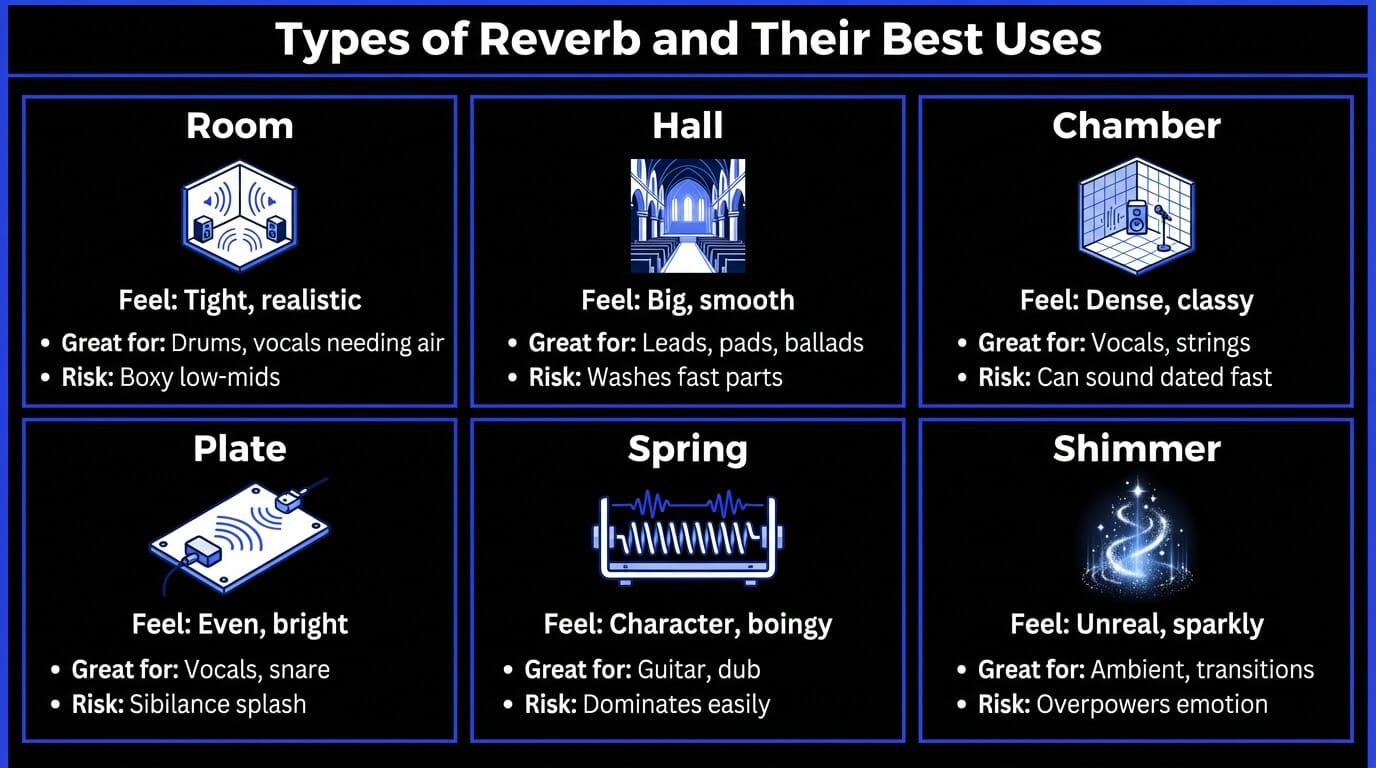
A practical shortcut inside ACE Studio
If you don’t want to dive into a long plugin menu while you’re writing or arranging, ACE Studio’s Reverb preset selector gives you four clear spaces: Room, Hall, Church, Cinematic. Those aren’t “types” in the traditional engineering sense (plate vs spring), but they map cleanly to what your ear needs to decide early:
- Room – realism and closeness
- Hall – lush blend and length
- Church – long tail and strong depth cue
- Cinematic – exaggerated size for dramatic moments
Use the presets to decide the role of reverb in the song, then refine later if needed.
Where the choir-specific Room Effect fits
When you’re building choir sections, you often want something more physical than a generic reverb tail. ACE Studio’s Room Effect is a specialized reverb for Singer Tracks that simulates placing virtual singers in a recording space – not just adding tail, but controlling perceived position and room size.
Digital reverb vs real reverb
Real reverb is what happens in physical spaces: rooms, halls, chambers. Digital reverb is how we recreate or simulate those spaces in a mix. Neither is automatically better. What matters is whether the reverb supports the performance and arrangement.
In production, you’ll usually run into two digital approaches:
Algorithmic reverb
Algorithmic reverbs are built from math – they synthesize reflections and tails. They’re flexible and tweakable, and often great for musical or stylized spaces.
Convolution reverb
Convolution reverbs use impulse responses (IRs) – snapshots of real rooms or hardware. They can sound extremely realistic, especially for early reflections and room tone.
Plugins vs hardware vs real rooms
- Plugins: recallable, flexible, quick to audition
- Hardware: character, sometimes a unique depth
- Real rooms: unbeatable realism if recorded well, but you commit to it
Where ACE Studio fits in a modern workflow
ACE Studio is useful because you can do both:
- keep things simple with built-in Reverb presets and Dry/Wet while writing and arranging
- or treat space as a mixing decision and move to your DAW via ACE Bridge 2 integration or exports
And for choirs, the Room Effect gives you a more “real-world” approach: you can set a studio room (8m × 8m), choir hall (16m × 16m), or church (30m × 30m) and drag singer positions for depth and mic distance cues.
Reverb controls explained
Most reverbs share a core set of controls. Learning them turns reverb from a preset gamble into a deliberate tool.
The ACE Studio version: keep it simple, keep it honest
In ACE Studio’s built-in Reverb, you get two primary controls:
- Preset Selector (Room, Hall, Church, Cinematic)
- Dry/Wet balance
That simplicity is actually a strength while arranging vocals. It forces you to answer the important questions first: How big is the space? How far back should this part feel? Then you can decide whether you need more detailed controls later.
De-ess before reverb (this is not optional on modern vocals)
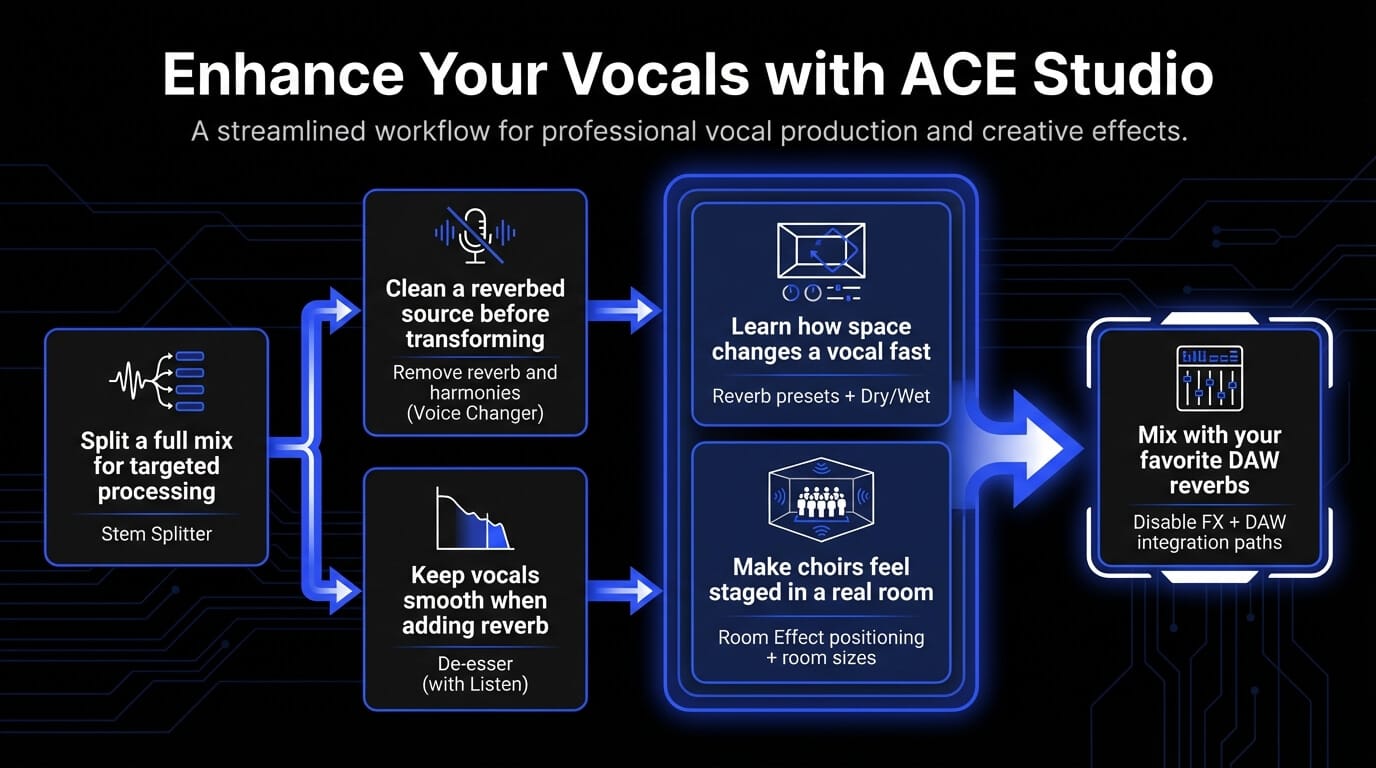
Reverb exaggerates sibilance. If “s” and “t” splash into the tail, your vocal can feel harsh even when the dry track is fine. ACE Studio includes a De-esser as part of Basic Effects, and it even has a Listen function to audition what it’s removing so you can set it precisely. De-ess first, then add space. You’ll often use less reverb and get more clarity.
How to use reverb in a mix
Reverb works best when you treat it like an arrangement choice, not a finishing polish. A reliable approach is:
- Pick one main space for cohesion (often a short room).
- Add one feature space for emotion (plate or hall style behavior).
- Filter and balance so the reverb supports, not smothers.
If you’re building vocal stacks or choirs, you also want consistency: multiple takes feel more convincing when they share a common “room,” even if the lead stays drier.
Reverb on vocals
Start subtle. If you can clearly “hear the reverb” in the verse, it’s probably too loud.
- Keep wet low until the vocal feels placed.
- Use darker tails if the track is bright.
- Automate bigger reverb moments at phrase endings.
ACE Studio advantage for vocal stacks: you can generate harmonies from MIDI and lyrics, then shape space quickly with built-in Reverb and Dry/Wet while you’re still composing.
ACE Studio advantage for choirs: enable the choir-focused Room Effect and literally place voices in a virtual room by dragging their positions, choosing the room size (8m × 8m studio room, 16m × 16m choir hall, 30m × 30m church). That turns “reverb” into staging: closer singers feel intimate, farther singers feel like they’re behind the lead.
Reverb on drums
Short rooms can add realism. Plates can add snare sustain. Longer tails can soften punch.
- Keep the kick mostly dry (or filter reverb aggressively).
- If the groove loses impact, shorten the space.
Reverb on guitars, keys, and synths
These sources already sustain, so reverb stacks quickly.
- Shorter spaces for rhythmic parts.
- Longer spaces for pads and transitions.
- Consider darker reverbs to avoid harsh top build-up.
Reverb on bass
Most bass does not need reverb. If you do add it:
- keep it extremely subtle
- high-pass the reverb return
- aim for “air,” not tail
Using reverb as an effect
Use contrast. A dramatic reverb throw works because the rest of the track stays controlled.
And if you prefer mixing all effects in your DAW, ACE Studio can still fit cleanly: you can integrate with your DAW using the ACE Bridge plugin (real-time syncing and drag-and-drop transfers are specifically called out in documentation-style content).
Popular reverb effects
Gated reverb
Big reverb that cuts off abruptly. Punchy on snares and toms.
Use it when you want size without wash:
- bright, short-ish reverb feeding a gate
- release timed to the groove
Reverse reverb
A swell that rises into the sound. Great for transitions, lead-ins, and vocal spotlights.
Workflow conceptually:
- print a reverb tail
- reverse it
- fade it into the hit
Use it sparingly. Reverse reverb is strongest when it’s clearly a moment, not constant texture.
Common reverb mistakes (and fixes)
Reverb problems usually come from three things: too much level, too long decay, or too much low-mid energy.
Too much reverb (washy mix)
Symptoms: vocals feel far away, drums lose punch, lyrics blur.
Fixes:
- lower wet level first
- shorten decay
- darken or filter the return
- automate: less in verses, more in choruses
ACE Studio quick fix: cycle reverb presets and keep Dry/Wet conservative. If you need extra control later, you can keep composing with built-in FX, then switch to your DAW.
Muddy low end
Symptoms: cloudiness around low-mids, reduced vocal clarity.
Fixes:
- high-pass the reverb return
- cut low-mids on the return
- choose darker spaces
Pushing sounds too far back
Symptoms: lead disappears behind instrumentation.
Fixes:
- reduce wet level
- increase separation (conceptually: pre-delay, early reflection control)
- use delay for width instead of more reverb
ACE Studio's option for external mixing: if you want to avoid committing to built-in effects, ACE Studio explicitly supports disabling built-in FX via a “Disable FX” button in the Track Control Panel (so you can process elsewhere).
Reverb for post-production (film, dialogue, podcasts)
In post, reverb is realism, not vibe. If dialogue doesn’t match the room, it feels wrong immediately.
Matching room tone and space
You’re trying to keep a consistent environment across cuts:
- short, believable room reflections
- minimal tails
- careful EQ so speech stays intelligible
When to use subtle reverb
Spoken word can tolerate very little reverb before clarity drops. A tiny ambience can reduce the “dry booth” feel, but tails can make edits obvious.
ACE Studio note for creators working from full mixes: if you start with a full song file and need cleaner elements, ACE Studio includes a Stem Splitter that can separate a full mix into components like vocals, drums, bass, and other instruments. That can be useful before you try to match ambience or clean up a vocal for a new context.
Can you remove reverbs from audio?
Sometimes. But there’s a difference between “reduce” and “erase.” If reverb is baked into a recording, removal tools can help, but they often introduce artifacts. A practical expectation is:
- reduce room sound enough to regain clarity
- then add a controlled, intentional space that fits the mix
If the original reverb is heavy, the best result is often a compromise: less reverb, not zero reverb.
ACE Studio advantage for cleanup before transformation: in the Voice Changer settings, ACE Studio includes a checkbox to “Remove reverb and harmonies” from the source content before conversion. This is especially useful if you’re converting a vocal that already has room sound or stacked layers and you want a cleaner starting point.
Pair that with Stem Splitter (when you only have the full mix) and you can often get to a cleaner vocal foundation faster than doing everything manually.
Where ACE Studio fits without forcing a “one-place” workflow
ACE Studio can be your vocal and harmony creation environment, then you decide where final mixing happens:
- Use built-in Reverb presets and Dry/Wet for quick placement while arranging
- If you want your favorite third-party reverbs, disable built-in FX and process in your DAW
- For DAW integration, ACE Studio supports ACE Bridge 2 (install/uninstall, reinstall, update notifications are explicitly referenced in settings documentation).
Also, ACE Studio’s broader ecosystem explicitly supports syncing with a DAW using the ACE Bridge plugin for workflow continuity (especially when your mix is already living in a DAW).
Reverb FAQs
Is reverb an echo?
Not exactly. Echo is a repeat you can count. Reverb is a dense field of reflections that blends into a continuous tail.
How much reverb should I use?
Enough that the track has depth, not so much that clarity drops. A good habit: set it, then pull it down until you barely miss it, then bring it up slightly.
If you’re learning, use a simple tool: pick a space and set a low wet amount. ACE Studio’s Dry/Wet explanation is very literal: 10% wet means the final sound is 90% dry and 10% reverb – that’s a useful mental anchor when you’re avoiding wash.
What reverb is best for vocals?
Short rooms and smooth reverbs tend to work well. The key is keeping consonants readable and controlling the tail.
What are good beginner reverb settings?
Start with:
- a short room or moderate hall
- low wet level
- darker tails if the mix is bright
Then adjust based on tempo and arrangement density.
What’s the difference between Room and Hall reverb?
Room is tight and realistic. Hall is longer and smoother, creating more depth and emotion. In ACE Studio’s simplified preset world, the same idea applies when you switch between Room and Hall: you’re choosing closeness vs blend and tail length.