

We value your privacy

By clicking "Allow", you agree to the storing of cookies on your device to enhance site navigation, analyze site usage, and assist in our marketing efforts.

Consent Selection
Details
  • Necessary cookies help make a website usable by enabling basic functions like page navigation and access to secure areas of the website. The website cannot function properly without these cookies.
    • Learn more about this provideropens in a new window

      Some of the data collected by this provider is for the purposes of personalization and measuring advertising effectiveness. The provider may use the IP Addresses for ads measurement and ads personalization.

      test_cookieUsed to check if the user's browser supports cookies.
      Maximum Storage Duration: 1 dayType: HTTP Cookie
    • Learn more about this provideropens in a new window
      bcookieUsed in order to detect spam and improve the website's security.
      Maximum Storage Duration: 1 yearType: HTTP Cookie
      li_gcStores the user's cookie consent state for the current domain
      Maximum Storage Duration: 180 daysType: HTTP Cookie
    • Learn more about this provideropens in a new window
      datadomeUsed in context with the website's BotManager. The BotManager detects, categorizes and compiles reports on potential bots trying to access the website.
      Maximum Storage Duration: SessionType: HTTP Cookie
    • studio-web-language-keyPending
      Maximum Storage Duration: SessionType: HTML Local Storage
    • _cfuvid [x2]This cookie is a part of the services provided by Cloudflare - Including load-balancing, deliverance of website content and serving DNS connection for website operators.
      Maximum Storage Duration: SessionType: HTTP Cookie
    • __cf_bm [x5]This cookie is used to distinguish between humans and bots. This is beneficial for the website, in order to make valid reports on the use of their website.
      Maximum Storage Duration: 1 dayType: HTTP Cookie
    • CookieConsent [x2]Stores the user's cookie consent state for the current domain
      Maximum Storage Duration: 1 yearType: HTTP Cookie
    • guidPreserves users states across page requests.
      Maximum Storage Duration: 1 yearType: HTTP Cookie
    • ttRegisters the website's speed and performance. This function can be used in context with statistics and load-balancing.
      Maximum Storage Duration: 1 yearType: HTTP Cookie
    • sc_anonymous_idUsed in context with the 3D-view-function on the website.
      Maximum Storage Duration: 10 yearsType: HTTP Cookie
  • Preference cookies enable a website to remember information that changes the way the website behaves or looks, like your preferred language or the region that you are in.
    • Learn more about this provideropens in a new window
      lidcRegisters which server-cluster is serving the visitor. This is used in context with load balancing, in order to optimize user experience.
      Maximum Storage Duration: 1 dayType: HTTP Cookie
  • Statistic cookies help website owners to understand how visitors interact with websites by collecting and reporting information anonymously.
    • Learn more about this provideropens in a new window
      geoSaves the user's current geographical location based on the user's IP address.
      Maximum Storage Duration: SessionType: HTTP Cookie
    • Learn more about this provideropens in a new window
      ajs_anonymous_idThis cookie is used to identify a specific visitor - this information is used to identify the number of specific visitors on a website.
      Maximum Storage Duration: 1 yearType: HTTP Cookie
      ajs_anonymous_idThis cookie is used to count how many times a website has been visited by different visitors - this is done by assigning the visitor an ID, so the visitor does not get registered twice.
      Maximum Storage Duration: PersistentType: HTML Local Storage
    • Learn more about this provideropens in a new window
      _tt_enable_cookieUsed by the social networking service, TikTok, for tracking the use of embedded services.
      Maximum Storage Duration: 1 yearType: HTTP Cookie
    • Learn more about this provideropens in a new window
      personalization_idThis cookie is set by Twitter - The cookie allows the visitor to share content from the website onto their Twitter profile.
      Maximum Storage Duration: 400 daysType: HTTP Cookie
    • FPGSIDRegisters statistical data on users' behaviour on the website. Used for internal analytics by the website operator.
      Maximum Storage Duration: 1 dayType: HTTP Cookie
      FPIDRegisters statistical data on users' behaviour on the website. Used for internal analytics by the website operator.
      Maximum Storage Duration: 400 daysType: HTTP Cookie
      FPLCRegisters a unique ID that is used to generate statistical data on how the visitor uses the website.
      Maximum Storage Duration: 1 dayType: HTTP Cookie
      sajssdk_2015_cookie_access_testPending
      Maximum Storage Duration: 73000 daysType: HTTP Cookie
      sajssdk_2015_cross_new_userCollects statistics on the user's visits to the website, such as the number of visits, average time spent on the website and what pages have been read.
      Maximum Storage Duration: 1 dayType: HTTP Cookie
      sensorsdata_domain_testPending
      Maximum Storage Duration: SessionType: HTTP Cookie
      sensorsdata2015jssdkcrossCollects statistics on the user's visits to the website, such as the number of visits, average time spent on the website and what pages have been read.
      Maximum Storage Duration: 2 yearsType: HTTP Cookie
    • sentryReplaySessionRegisters data on visitors' website-behaviour. This is used for internal analysis and website optimization.
      Maximum Storage Duration: SessionType: HTML Local Storage
    • u_scsidRegisters data on visitors' website-behaviour. This is used for internal analysis and website optimization.
      Maximum Storage Duration: SessionType: HTML Local Storage
      X-ABThis cookie is used by the website’s operator in context with multi-variate testing. This is a tool used to combine or change content on the website. This allows the website to find the best variation/edition of the site.
      Maximum Storage Duration: 1 dayType: HTTP Cookie
    • SERVERCORSIDPending
      Maximum Storage Duration: SessionType: HTTP Cookie
      SERVERIDThis cookie is used to assign the visitor to a specific server - this function is necessary for the functionality of the website.
      Maximum Storage Duration: SessionType: HTTP Cookie
    • number(#)Used to track user’s interaction with embedded content.
      Maximum Storage Duration: SessionType: HTML Local Storage
  • Marketing cookies are used to track visitors across websites. The intention is to display ads that are relevant and engaging for the individual user and thereby more valuable for publishers and third party advertisers.
    • Learn more about this provideropens in a new window
      _fbpUsed by Facebook to deliver a series of advertisement products such as real time bidding from third party advertisers.
      Maximum Storage Duration: 3 monthsType: HTTP Cookie
      lastExternalReferrerDetects how the user reached the website by registering their last URL-address.
      Maximum Storage Duration: PersistentType: HTML Local Storage
      lastExternalReferrerTimeDetects how the user reached the website by registering their last URL-address.
      Maximum Storage Duration: PersistentType: HTML Local Storage
    • Learn more about this provideropens in a new window
      mtClientConfig_cachedSource_xp_amp_music_webplayerUsed to implement iTunes content and presentation of covers.
      Maximum Storage Duration: PersistentType: HTML Local Storage
    • Learn more about this provideropens in a new window
      __tld__Used to track visitors on multiple websites, in order to present relevant advertisement based on the visitor's preferences.
      Maximum Storage Duration: SessionType: HTTP Cookie
      ajs_user_idThis cookie is used to collect data on the visitor's behavior on the website - this information can be used to assign the visitor to a visitor segment, based on common preferences.
      Maximum Storage Duration: SessionType: HTTP Cookie
      ajs_user_idCollects data on visitors' preferences and behaviour on the website - This information is used make content and advertisement more relevant to the specific visitor.
      Maximum Storage Duration: PersistentType: HTML Local Storage
    • Learn more about this provideropens in a new window

      Some of the data collected by this provider is for the purposes of personalization and measuring advertising effectiveness. The provider may use the IP Addresses for ads measurement and ads personalization.

      IDEUsed by Google DoubleClick to register and report the website user's actions after viewing or clicking one of the advertiser's ads with the purpose of measuring the efficacy of an ad and to present targeted ads to the user.
      Maximum Storage Duration: 400 daysType: HTTP Cookie
      ads/ga-audiencesUsed by Google AdWords to re-engage visitors that are likely to convert to customers based on the visitor's online behaviour across websites.
      Maximum Storage Duration: SessionType: Pixel Tracker
      pagead/1p-user-list/#Tracks if the user has shown interest in specific products or events across multiple websites and detects how the user navigates between sites. This is used for measurement of advertisement efforts and facilitates payment of referral-fees between websites.
      Maximum Storage Duration: SessionType: Pixel Tracker
    • Learn more about this provideropens in a new window
      _uetsidCollects data on visitor behaviour from multiple websites, in order to present more relevant advertisement - This also allows the website to limit the number of times that they are shown the same advertisement.
      Maximum Storage Duration: 1 dayType: HTTP Cookie
      _uetvidUsed to track visitors on multiple websites, in order to present relevant advertisement based on the visitor's preferences.
      Maximum Storage Duration: 1 yearType: HTTP Cookie
      _uetsidUsed to track visitors on multiple websites, in order to present relevant advertisement based on the visitor's preferences.
      Maximum Storage Duration: PersistentType: HTML Local Storage
      _uetsid_expContains the expiry-date for the cookie with corresponding name.
      Maximum Storage Duration: PersistentType: HTML Local Storage
      _uetvidUsed to track visitors on multiple websites, in order to present relevant advertisement based on the visitor's preferences.
      Maximum Storage Duration: PersistentType: HTML Local Storage
      _uetvid_expContains the expiry-date for the cookie with corresponding name.
      Maximum Storage Duration: PersistentType: HTML Local Storage
      MUIDUsed widely by Microsoft as a unique user ID. The cookie enables user tracking by synchronising the ID across many Microsoft domains.
      Maximum Storage Duration: 1 yearType: HTTP Cookie
    • Learn more about this provideropens in a new window
      _rdt_uuidUsed to track visitors on multiple websites, in order to present relevant advertisement based on the visitor's preferences.
      Maximum Storage Duration: 3 monthsType: HTTP Cookie
      rp.gifNecessary for the implementation of the Reddit.com's share-button function.
      Maximum Storage Duration: SessionType: Pixel Tracker
    • Learn more about this provideropens in a new window
      sc_atUsed by Snapchat to implement advertisement content on the website - The cookie detects the efficiency of the ads and collects visitor data for further visitor segmentation.
      Maximum Storage Duration: 1 yearType: HTTP Cookie
      pUsed to track visitors on multiple websites, in order to present relevant advertisement based on the visitor's preferences.
      Maximum Storage Duration: SessionType: Pixel Tracker
    • Learn more about this provideropens in a new window
      dd_testcookiePending
      Maximum Storage Duration: SessionType: HTTP Cookie
      ddSession_datadomePending
      Maximum Storage Duration: PersistentType: HTML Local Storage
    • Learn more about this provideropens in a new window
      sp_landingUsed to implement audio-content from Spotify on the website. Can also be used to register user interaction and preferences in context with audio-content - This can serve statistics and marketing purposes.
      Maximum Storage Duration: 1 dayType: HTTP Cookie
      sp_tUsed to implement audio-content from Spotify on the website. Can also be used to register user interaction and preferences in context with audio-content - This can serve statistics and marketing purposes.
      Maximum Storage Duration: 1 yearType: HTTP Cookie
    • Learn more about this provideropens in a new window
      _ttp [x2]Used by the social networking service, TikTok, for tracking the use of embedded services.
      Maximum Storage Duration: 1 yearType: HTTP Cookie
      ttcsidUsed to track visitors on multiple websites, in order to present relevant advertisement based on the visitor's preferences.
      Maximum Storage Duration: 1 yearType: HTTP Cookie
      ttcsid_#Tracks the conversion rate between the user and the advertisement banners on the website - This serves to optimise the relevance of the advertisements on the website.
      Maximum Storage Duration: 1 yearType: HTTP Cookie
      tt_appInfoUsed by the social networking service, TikTok, for tracking the use of embedded services.
      Maximum Storage Duration: SessionType: HTML Local Storage
      tt_pixel_session_indexUsed by the social networking service, TikTok, for tracking the use of embedded services.
      Maximum Storage Duration: SessionType: HTML Local Storage
      tt_sessionIdUsed by the social networking service, TikTok, for tracking the use of embedded services.
      Maximum Storage Duration: SessionType: HTML Local Storage
    • Learn more about this provideropens in a new window
      1/i/adsct [x2]Collects data on user behaviour and interaction in order to optimize the website and make advertisement on the website more relevant.
      Maximum Storage Duration: SessionType: Pixel Tracker
      muc_adsCollects data on user behaviour and interaction in order to optimize the website and make advertisement on the website more relevant.
      Maximum Storage Duration: 400 daysType: HTTP Cookie
      guest_idCollects data related to the user's visits to the website, such as the number of visits, average time spent on the website and which pages have been loaded, with the purpose of personalising and improving the Twitter service.
      Maximum Storage Duration: 400 daysType: HTTP Cookie
      guest_id_adsCollects information on user behaviour on multiple websites. This information is used in order to optimize the relevance of advertisement on the website.
      Maximum Storage Duration: 400 daysType: HTTP Cookie
      guest_id_marketingCollects information on user behaviour on multiple websites. This information is used in order to optimize the relevance of advertisement on the website.
      Maximum Storage Duration: 400 daysType: HTTP Cookie
    • Learn more about this provideropens in a new window
      __Secure-ROLLOUT_TOKENUsed to track user’s interaction with embedded content.
      Maximum Storage Duration: 180 daysType: HTTP Cookie
      __Secure-YECStores the user's video player preferences using embedded YouTube video
      Maximum Storage Duration: SessionType: HTTP Cookie
      __Secure-YNIDUsed to track user’s interaction with embedded content.
      Maximum Storage Duration: 180 daysType: HTTP Cookie
      LAST_RESULT_ENTRY_KEYUsed to track user’s interaction with embedded content.
      Maximum Storage Duration: SessionType: HTTP Cookie
      LogsDatabaseV2:V#||LogsRequestsStoreUsed to track user’s interaction with embedded content.
      Maximum Storage Duration: PersistentType: IndexedDB
      ServiceWorkerLogsDatabase#SWHealthLogNecessary for the implementation and functionality of YouTube video-content on the website.
      Maximum Storage Duration: PersistentType: IndexedDB
      TESTCOOKIESENABLEDUsed to track user’s interaction with embedded content.
      Maximum Storage Duration: 1 dayType: HTTP Cookie
      VISITOR_INFO1_LIVETries to estimate the users' bandwidth on pages with integrated YouTube videos.
      Maximum Storage Duration: 180 daysType: HTTP Cookie
      YSCRegisters a unique ID to keep statistics of what videos from YouTube the user has seen.
      Maximum Storage Duration: SessionType: HTTP Cookie
      yt-icons-last-purgedNecessary for the implementation and functionality of YouTube video-content on the website.
      Maximum Storage Duration: PersistentType: HTML Local Storage
      ytidb::LAST_RESULT_ENTRY_KEYUsed to track user’s interaction with embedded content.
      Maximum Storage Duration: PersistentType: HTML Local Storage
      YtIdbMeta#databasesUsed to track user’s interaction with embedded content.
      Maximum Storage Duration: PersistentType: IndexedDB
    • _gaUsed to send data to Google Analytics about the visitor's device and behavior. Tracks the visitor across devices and marketing channels.
      Maximum Storage Duration: 2 yearsType: HTTP Cookie
      _ga_#Used to send data to Google Analytics about the visitor's device and behavior. Tracks the visitor across devices and marketing channels.
      Maximum Storage Duration: 2 yearsType: HTTP Cookie
      _gcl_auUsed by Google AdSense for experimenting with advertisement efficiency across websites using their services.
      Maximum Storage Duration: 3 monthsType: HTTP Cookie
      _/set_cookieUsed by server-side Google Tag Manager to set or update cookies required for analytics or marketing tags.
      Maximum Storage Duration: SessionType: Pixel Tracker
      _gcl_lsTracks the conversion rate between the user and the advertisement banners on the website - This serves to optimise the relevance of the advertisements on the website.
      Maximum Storage Duration: PersistentType: HTML Local Storage
    • _schn1Sets a unique ID for the visitor, that allows third party advertisers to target the visitor with relevant advertisement. This pairing service is provided by third party advertisement hubs, which facilitates real-time bidding for advertisers.
      Maximum Storage Duration: 1 dayType: HTTP Cookie
      _scidSets a unique ID for the visitor, that allows third party advertisers to target the visitor with relevant advertisement. This pairing service is provided by third party advertisement hubs, which facilitates real-time bidding for advertisers.
      Maximum Storage Duration: 13 monthsType: HTTP Cookie
      _scid_rSets a unique ID for the visitor, that allows third party advertisers to target the visitor with relevant advertisement. This pairing service is provided by third party advertisement hubs, which facilitates real-time bidding for advertisers.
      Maximum Storage Duration: 13 monthsType: HTTP Cookie
      _screloadUsed by Snapchat to implement advertisement content on the website - The cookie detects the efficiency of the ads and collects visitor data for further visitor segmentation.
      Maximum Storage Duration: SessionType: HTTP Cookie
      u_sclidSets a unique ID for the visitor, that allows third party advertisers to target the visitor with relevant advertisement. This pairing service is provided by third party advertisement hubs, which facilitates real-time bidding for advertisers.
      Maximum Storage Duration: PersistentType: HTML Local Storage
      u_sclid_rSets a unique ID for the visitor, that allows third party advertisers to target the visitor with relevant advertisement. This pairing service is provided by third party advertisement hubs, which facilitates real-time bidding for advertisers.
      Maximum Storage Duration: PersistentType: HTML Local Storage
      u_scsid_rSets a unique ID for the visitor, that allows third party advertisers to target the visitor with relevant advertisement. This pairing service is provided by third party advertisement hubs, which facilitates real-time bidding for advertisers.
      Maximum Storage Duration: SessionType: HTML Local Storage
  • Unclassified cookies are cookies that we are in the process of classifying, together with the providers of individual cookies.
    • Learn more about this provideropens in a new window
      _rdt_pnPending
      Maximum Storage Duration: 3 monthsType: HTTP Cookie
    • Learn more about this provideropens in a new window
      tt_pixel_is_enrich_ipv6_triggered_by_enrich_amPending
      Maximum Storage Duration: SessionType: HTML Local Storage
    • adjust-sdk#asPending
      Maximum Storage Duration: PersistentType: IndexedDB
      adjust-sdk#edPending
      Maximum Storage Duration: PersistentType: IndexedDB
      adjust-sdk#gpPending
      Maximum Storage Duration: PersistentType: IndexedDB
      adjust-sdk#qPending
      Maximum Storage Duration: PersistentType: IndexedDB
      adjust-sdk.pPending
      Maximum Storage Duration: PersistentType: HTML Local Storage
      redirectPathPending
      Maximum Storage Duration: SessionType: HTML Local Storage
      studio-web-web-uuidPending
      Maximum Storage Duration: PersistentType: HTML Local Storage
    • __oaiq_domain_probePending
      Maximum Storage Duration: SessionType: HTTP Cookie
      __obrefPending
      Maximum Storage Duration: SessionType: HTTP Cookie
      oaiq_cs:TMBW9u3qWVchcyxjFU4gVQPending
      Maximum Storage Duration: SessionType: HTML Local Storage
    • _vbPending
      Maximum Storage Duration: SessionType: HTTP Cookie
    • _twpidPending
      Maximum Storage Duration: SessionType: HTTP Cookie
    • pixel/sPending
      Maximum Storage Duration: SessionType: Pixel Tracker
Cookie declaration last updated on 8/17/26 by Cookiebot
[#IABV2_TITLE#]
[#IABV2_BODY_INTRO#]
[#IABV2_BODY_LEGITIMATE_INTEREST_INTRO#]
[#IABV2_BODY_PREFERENCE_INTRO#]
[#IABV2_BODY_PURPOSES_INTRO#]
[#IABV2_BODY_PURPOSES#]
[#IABV2_BODY_FEATURES_INTRO#]
[#IABV2_BODY_FEATURES#]
[#IABV2_BODY_PARTNERS_INTRO#]
[#IABV2_BODY_PARTNERS#]
About
Cookies are small text files that can be used by websites to make a user's experience more efficient.

The law states that we can store cookies on your device if they are strictly necessary for the operation of this site. For all other types of cookies we need your permission.

This site uses different types of cookies. Some cookies are placed by third party services that appear on our pages.

You can at any time change or withdraw your consent from the Cookie Declaration on our website.

Learn more about who we are, how you can contact us and how we process personal data in our Privacy Policy.

Please state your consent ID and date when you contact us regarding your consent.
Get Started

What is MIDI? A beginner’s guide to musical data

MIDI isn’t sound. It’s musical control data: notes, timing, velocity, and CC messages that tell instruments what to play. Learn MIDI vs audio, controllers, channels, and ACE Studio workflows right now.

What is MIDI? A beginner’s guide to musical data

Key Takeaways

  • MIDI is not sound. It is performance data that tells an instrument what to play, when to play it, and how to play it, which is why it stays so editable inside a DAW.
  • The biggest advantage of MIDI is flexibility. You can change notes, timing, chord voicings, dynamics, and even swap instruments without re-recording the part.
  • MIDI and audio serve different purposes in production. MIDI is best for writing, arranging, and experimenting, while audio is the recorded result you usually commit to when moving toward mixing and finalizing.
  • MIDI powers far more than keyboard parts. It is used for drums, synths, automation, live performance control, film scoring, game audio, and other workflows where musical ideas need to stay editable.
  • In modern workflows, MIDI remains central because it preserves creative control. In ACE Studio, it can drive vocals, choir parts, and AI instruments while still letting the musician define the actual musical intent.

MIDI explained simply: Why there’s no sound yet

If you’ve ever dragged a piano-roll clip around in a DAW and thought, Wait… where’s the sound? you’ve already bumped into the core idea behind what is MIDI?.
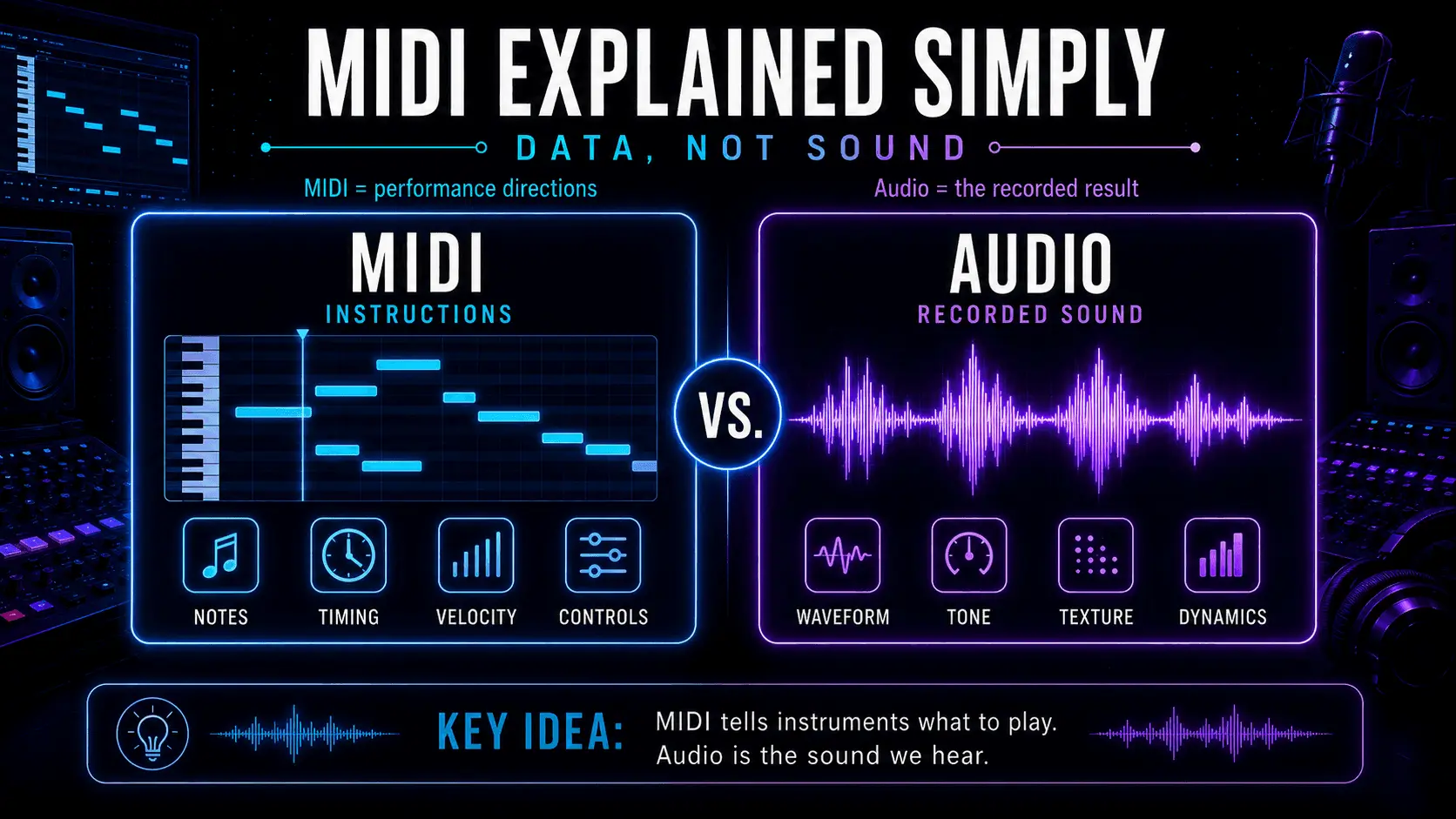
MIDI versus audio infographic comparing MIDI notes, timing, velocity, and controls with an audio waveform, tone, texture, and dynamics.
MIDI stores editable performance instructions, while audio contains the recorded sound.

MIDI is musical control data, not audio. It’s the set of instructions that tells an instrument (hardware or software) what to play, when to play it, and how to perform it – while you stay in charge of every note, every timing choice, every edit. In plain terms: MIDI = performance directions, and Audio = the recorded result.

This guide will walk you through the essentials – from MIDI definition and how it works, to MIDI controllers, MIDI vs audio, and real-world workflows.

And because a lot of modern production blends DAWs with specialist tools, you’ll also see where MIDI fits inside ACE Studio – including vocals, choir writing, and AI instruments – without handing your creative decisions to “automation.”

What is MIDI?

MIDI stands for Musical Instrument Digital Interface. But the part that matters is “interface” – MIDI is a common language that lets gear and software talk about music performance.

MIDI is not sound

A MIDI clip doesn’t contain a waveform. It contains events like:

  • Note number (which key)
  • Start time (when it happens)
  • Duration (how long it lasts)
  • Velocity (how hard it’s played – often mapped to volume or brightness)
  • Control changes (like mod wheel, sustain pedal, filter cutoff)
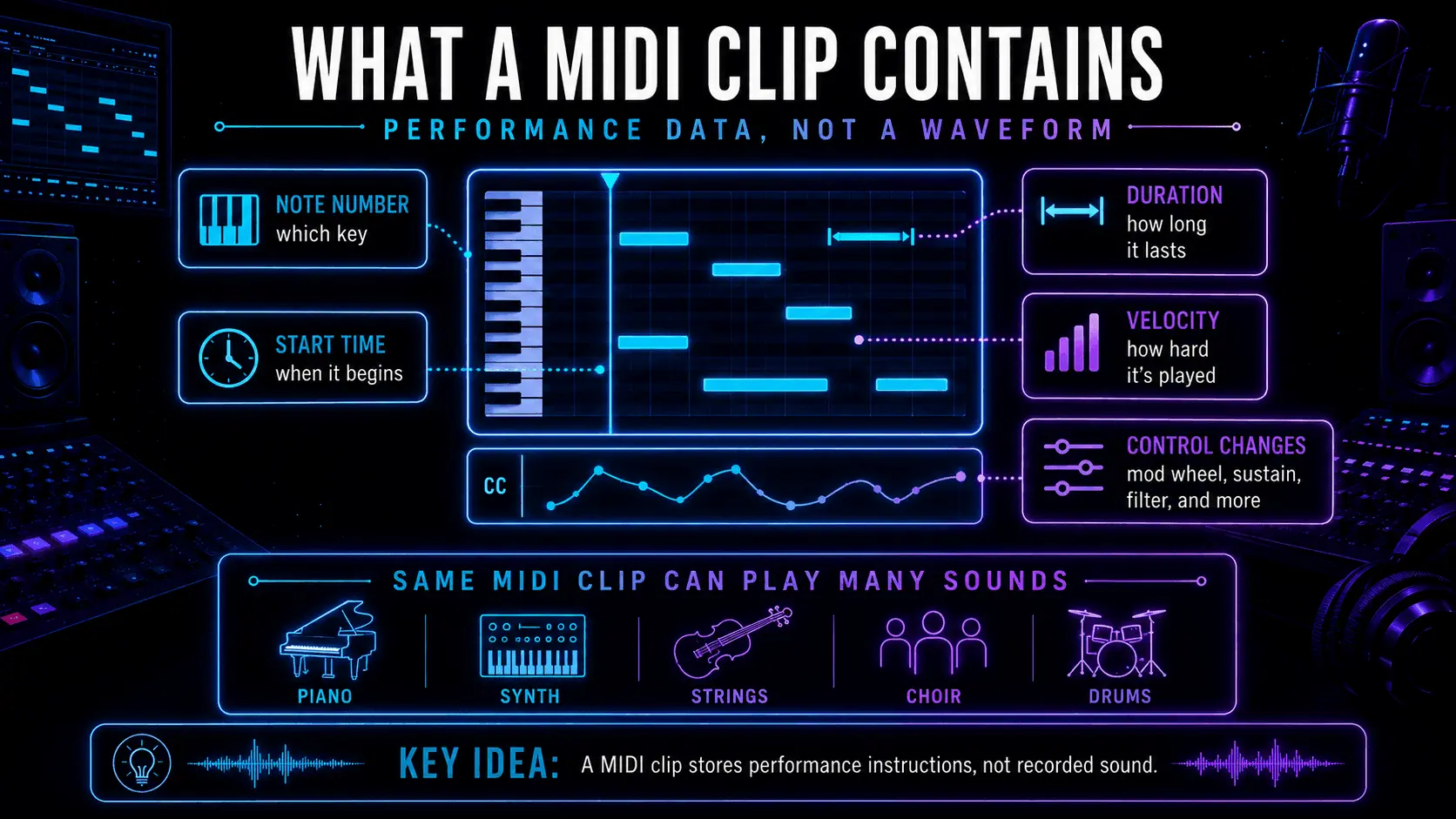
Infographic showing the contents of a MIDI clip, including note number, start time, duration, velocity, and control-change data.
A MIDI clip stores notes, timing, duration, velocity, and performance controls.

That’s why “midi music” can mean very different things depending on the instrument receiving it. The same MIDI file can trigger a soft felt piano, a huge synth stack, a string ensemble, or a choral patch – because the sound lives in the instrument, not the MIDI.

What is a MIDI device?

A “MIDI device” is anything that sends, receives, or processes MIDI data: keyboards, pad controllers, wind controllers, grooveboxes, DAWs, and even lighting rigs. If it can interpret musical messages, it can be part of a MIDI setup.

What is a MIDI file?

A MIDI file (usually .mid) is a portable container for those performance instructions. It’s like a score for machines: notes, timing, tempo info (sometimes), and track/channel data. You can move it between apps to keep the musical intent while swapping the sound source.

How MIDI works

At the heart of “how does MIDI work” is a simple loop:

  1. A performer or sequencer creates MIDI events
  2. Those events travel through a connection (USB, DIN, network, virtual MIDI)
  3. A receiving instrument or plugin translates events into sound
  4. You edit the data to refine the performance
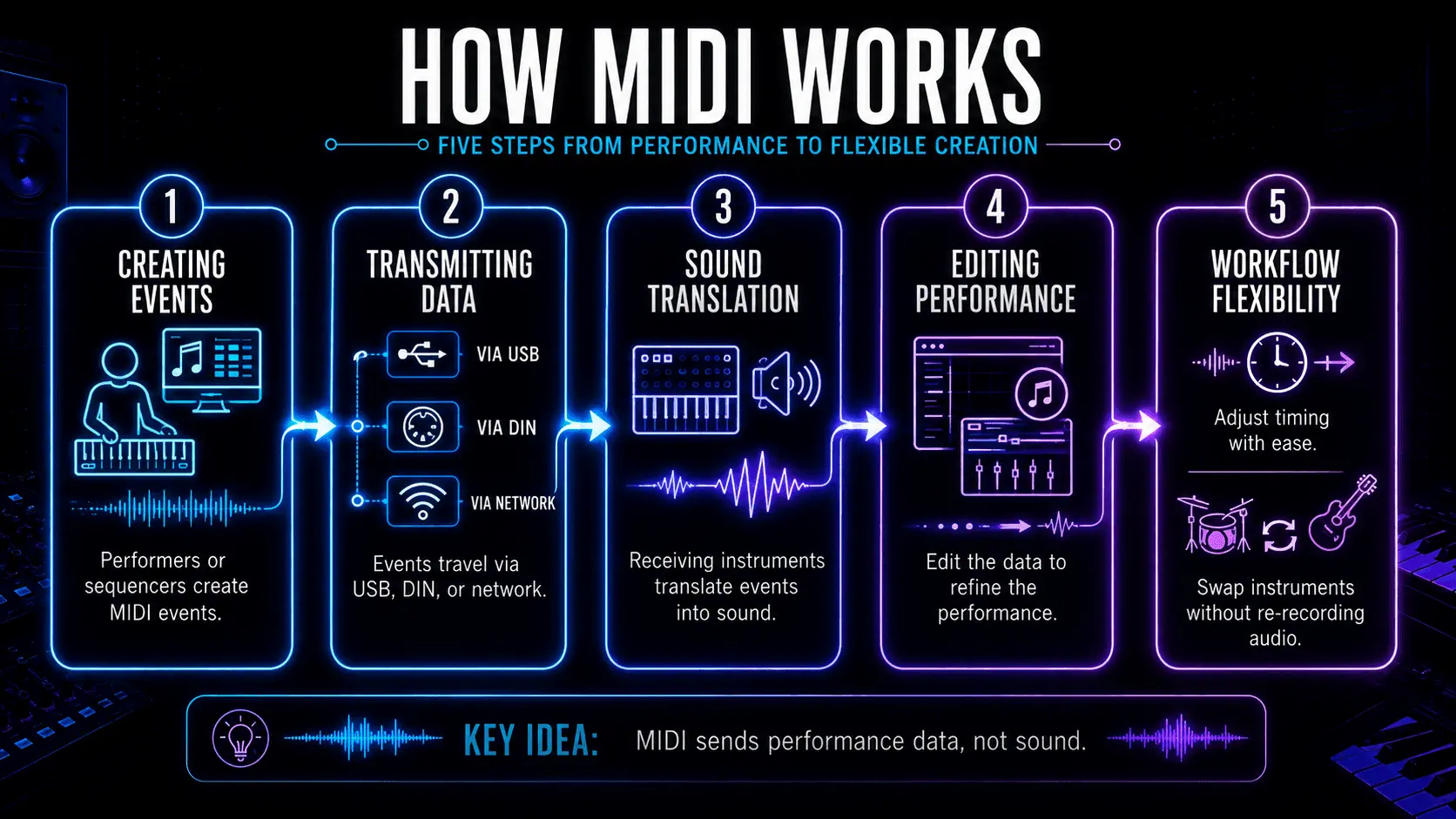
Infographic explaining how MIDI works, from creating events and transmitting data to sound translation, performance editing, and workflow flexibility.
How MIDI turns performance data into editable sound and flexible music production workflows.

In production, this is why MIDI is so powerful: you can rewrite the performance after recording. Tighten timing, re-voice chords, change the groove, or completely swap the instrument – without re-tracking audio.

MIDI messages explained

MIDI messages are the “sentences” MIDI uses. The most common:

  • Note On / Note Off: start and stop a note
  • Velocity: attached to Note On – often mapped to dynamics
  • CC (Control Change): knobs/sliders like mod wheel (CC1), expression (CC11), sustain pedal (CC64)
  • Pitch Bend: continuous pitch movement (great for slides and vibrato-style moves)
  • Program Change: switch presets/sounds

MIDI channels explained

Classic MIDI has 16 channels. Channels help you route different parts:

  • Channel 1: lead
  • Channel 2: bass
  • Channel 10: drums (a common convention)
  • Channel 3–4: pads and harmony layers

In a DAW, channels can matter a lot when you’re driving multi-timbral instruments (one plugin hosting multiple sounds). In bigger setups, channels keep your rig organized – especially live.
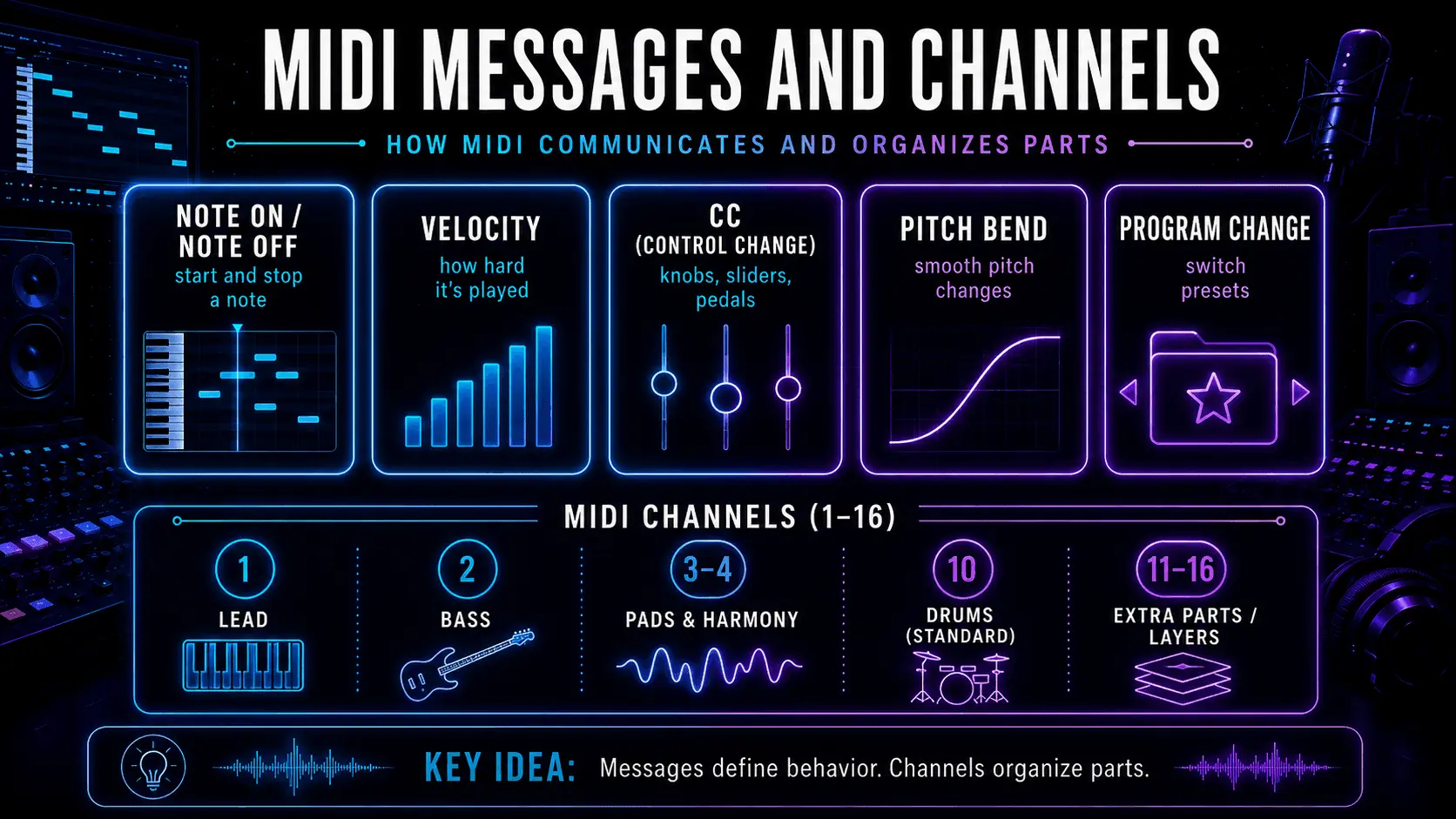
MIDI messages and channels infographic covering Note On and Off, velocity, control changes, pitch bend, program changes, and channels 1 to 16.
MIDI messages control musical behaviour, while channels keep instrument parts organised.

MIDI vs audio

This is the fork in the road every beginner hits: MIDI vs audio is not “which is better,” it’s “which stage of the process are you in?”

MIDI and audio represent two different “layers” of a track. MIDI doesn’t contain sound – it’s just instructions: which notes to play, when to play them, how hard they hit (velocity), and any performance controls (like sustain or modulation). That’s why MIDI is so flexible.

If you decide the chord voicing is off, the bass note should move, or the groove needs tightening, you can change it directly in the piano roll. You can also swap the instrument instantly, because the sound isn’t baked in yet – the same MIDI can drive a piano, a synth, or a string library without re-recording anything. MIDI can capture nuance too, but only if you perform or program that nuance (velocity, CC automation, timing). In other words, MIDI gives you editable intent.
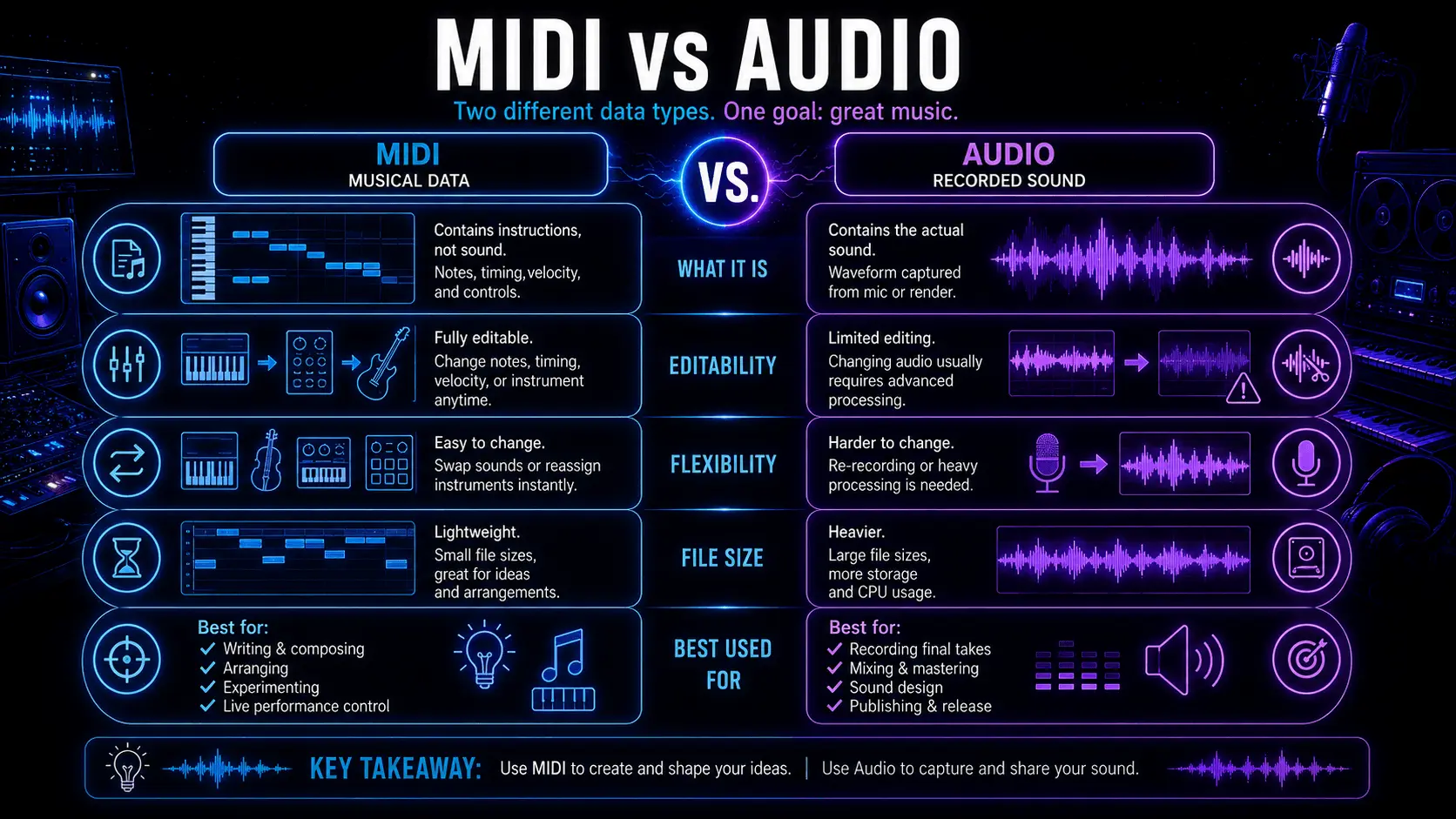
MIDI vs audio comparison chart showing differences in sound, editing, nuance, instrument swapping, and production use.
MIDI is best for flexible note editing, while audio captures the full recorded sound.

Audio is the result – a recorded waveform. It’s the “printed” version of a performance, whether it came from a microphone or from bouncing a virtual instrument. Because audio is literally a recording, it captures full detail: micro-dynamics, tone, texture, and all the messy realism that makes things feel alive.

The tradeoff is that you can’t just “change a note” the way you can in MIDI. You can manipulate audio with tools (time-stretching, pitch correction, slicing, resampling), but it’s a different kind of editing — more like sculpting sound than rewriting the performance.

That’s why producers often write and arrange in MIDI, then commit to audio when they’re ready to mix, design, and finalize. This lets them keep creative flexibility early, and stability later.

What is MIDI used for?

MIDI shows up everywhere because it’s small, flexible, and speaks the same language across gear and software. It lets you write and rewrite musical ideas fast – notes, chords, groove, dynamics, and automation – without committing to a final sound too early. That’s why MIDI powers everything from DAW piano rolls and drum programming to live rigs, synth hardware, and even lighting cues: you keep the performance editable, and choose the instrument (or sound) later.
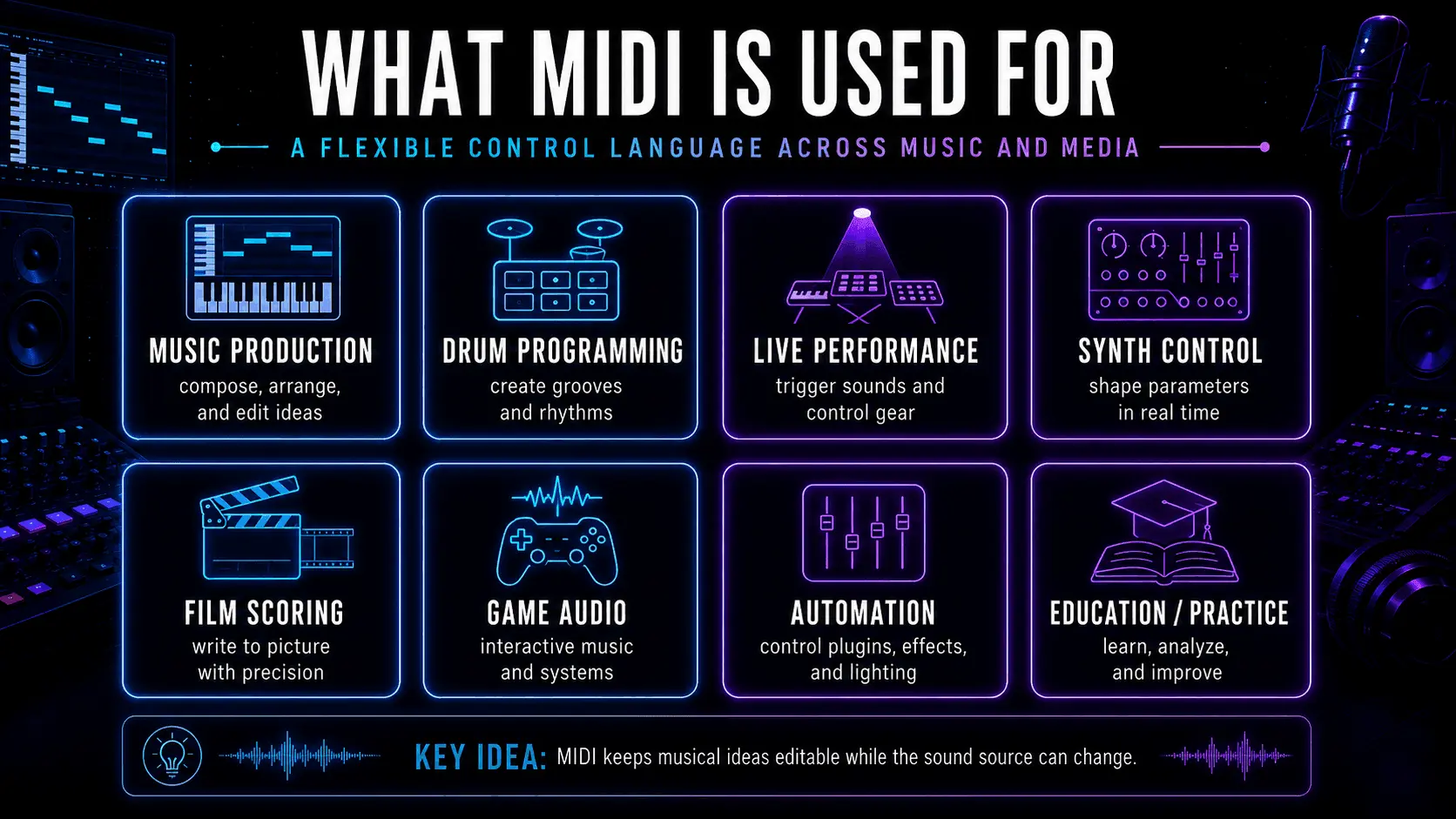
Infographic showing MIDI applications in music production, drum programming, live performance, synth control, film scoring, game audio, automation, and education.
MIDI supports music production, performance, scoring, automation, gaming, and education.

MIDI in music production

In the studio, MIDI is your control layer:

  • Writing chord progressions fast
  • Auditioning different synths and samplers
  • Building drum patterns and fills
  • Driving arpeggiators, step sequencers, and generative tools
  • Automating movement (filters, reverb sends, saturation drive)

A small mindset shift helps: record MIDI like you’re capturing a rough performance – then refine it like an editor. You decide where it’s tight, where it breathes, where it pushes.

MIDI in live performance

Live, MIDI is routing and control:

  • Changing patches across multiple instruments
  • Triggering clips or backing parts
  • Syncing tempo-based effects (delays, LFOs)
  • Controlling lights/visuals with notes or CC data

This is where MIDI’s “no-audio” nature is a feature: it’s stable and predictable, and it keeps your performance system modular.

MIDI in film, games, and automation

In media scoring and interactive audio, MIDI often controls:

  • Orchestral mockups before recording
  • Layered instrument switching (soft vs aggressive articulations)
  • Adaptive music systems (game states triggering musical changes)
  • Automation systems tied to timeline events

Even when the final delivery is audio, MIDI is frequently the sketchpad that gets you there.

What is a MIDI controller?

A MIDI controller is any device built to perform or shape MIDI data. It might feel like an instrument, but its main job is sending messages – you choose what receives them.

MIDI keyboards

Keyboard controllers are the standard entry point because they map naturally to harmony and melody. Useful features:

  • Velocity-sensitive keys
  • Mod wheel / pitch wheel
  • Aftertouch (on some models)
  • Transport controls for your DAW

Even a basic 25-key controller can handle writing basslines, chord stabs, and toplines.

Pad controllers

Pads are built for rhythm and triggering:

  • Finger drumming
  • Clip launching
  • One-shot samples
  • Mute/solo performance control

Pads can also be mapped to chords or scales for faster writing if you’re not a pianist.

Control surfaces

These are mix-oriented controllers – faders, knobs, transport. The power here is tactile mixing and automation writing:

  • Ride a vocal send into a chorus
  • Push a filter sweep by hand
  • Automate mutes and transitions like a performance

Other MIDI controllers

This category keeps growing:

  • Wind controllers
  • MPE controllers (for expressive, per-note control)
  • Guitar MIDI systems
  • Foot controllers
  • Custom MIDI knobs and DIY devices

The best controller is the one that disappears when you’re in flow – it should feel like an extension of your decisions.

What you need to use MIDI

You don’t need a big setup – you just need a clear path for MIDI data to travel from your input to something that makes sound.

  • A way to enter notes: a MIDI controller is optional but speeds things up, and you can also program notes with a mouse in the piano roll or use a computer keyboard as a virtual controller.
  • Something to record and edit MIDI: a DAW is where MIDI gets captured and edited, so you can adjust timing, change notes/chords, and shape dynamics.
  • Something that turns MIDI into sound: a virtual instrument (or hardware synth) interprets MIDI and generates audio – this is where your “MIDI instruments” live, like synths, samplers, drum machines, and orchestral libraries.
  • A connection for MIDI to travel:
    • USB MIDI (most modern controllers)
    • 5-pin DIN (older hardware + many pro rigs)
    • Bluetooth MIDI (some devices)
    • Virtual MIDI (routing inside your computer between apps)
  • Basic routing + monitoring: make sure the device is recognized, routed to the correct track, and monitoring is on – then you’re ready to play and record

How to use MIDI

Instead of wrestling with settings, you’re probably just trying to get from idea to a playable track. The good news is the workflow is basically the same in every DAW: you set up a MIDI/instrument track, route your controller (or draw notes), record a rough performance, then edit timing, notes, and expression until it feels right.
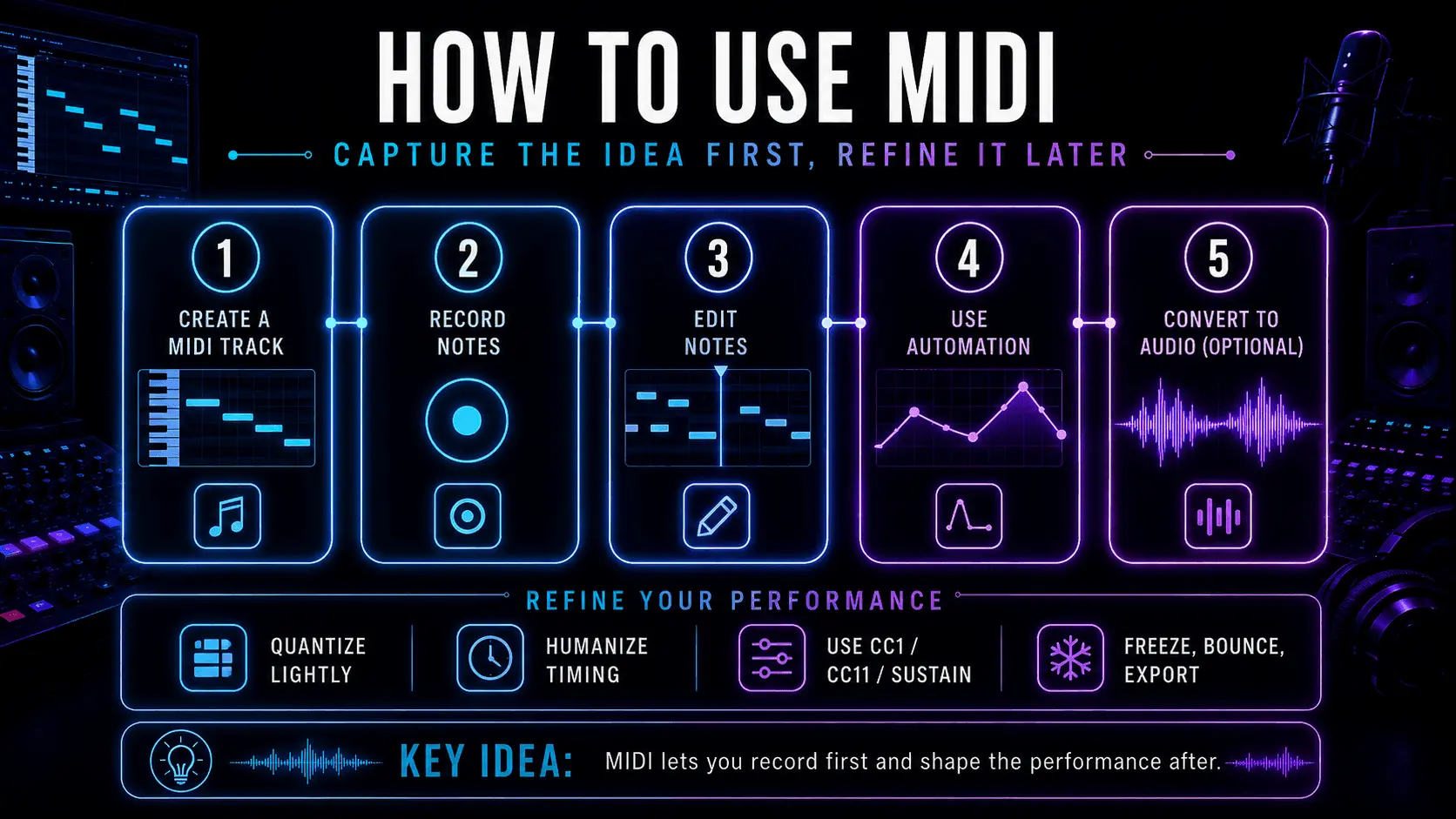
Five-step MIDI workflow infographic showing how to create a track, record notes, edit notes, add automation, and convert MIDI to audio.
Create, record, edit, automate, and convert MIDI through one flexible workflow.

Once the part is doing what you want musically, you can keep it as MIDI for flexibility – or commit it to audio when you’re ready to mix and finalize.

  1. Create a MIDI track

Create a MIDI/instrument track, insert your instrument plugin, and set the input (controller or “all inputs”). Arm the track.

  1. Record MIDI notes

Hit record and play. Don’t chase perfection on the first pass. Capture the idea, then shape the feel.

  1. Edit MIDI notes

This is the “producer’s advantage” of MIDI:

  • Fix wrong notes
  • Re-voice chords
  • Adjust note lengths to tighten groove
  • Quantize lightly (or not at all)
  • Humanize timing where it needs breath
  1. Use MIDI automation

Automation is how MIDI becomes expressive:

  • CC1 (mod wheel) for dynamics
  • CC11 (expression) for shaping phrases
  • Sustain pedal (CC64) for performance realism
  • Filter sweeps, delay throws, reverb rides

Write automation like a performance, not like a math problem.

  1. Convert MIDI to audio

When you’re ready to commit:

  • Freeze/flatten the instrument track (DAW feature)
  • Bounce in place
  • Export stems

This is where you lock the sound and move into mix decisions.

MIDI in ACE Studio workflows

ACE Studio is a useful example of why MIDI still matters – because MIDI keeps control in the hands of the musician.
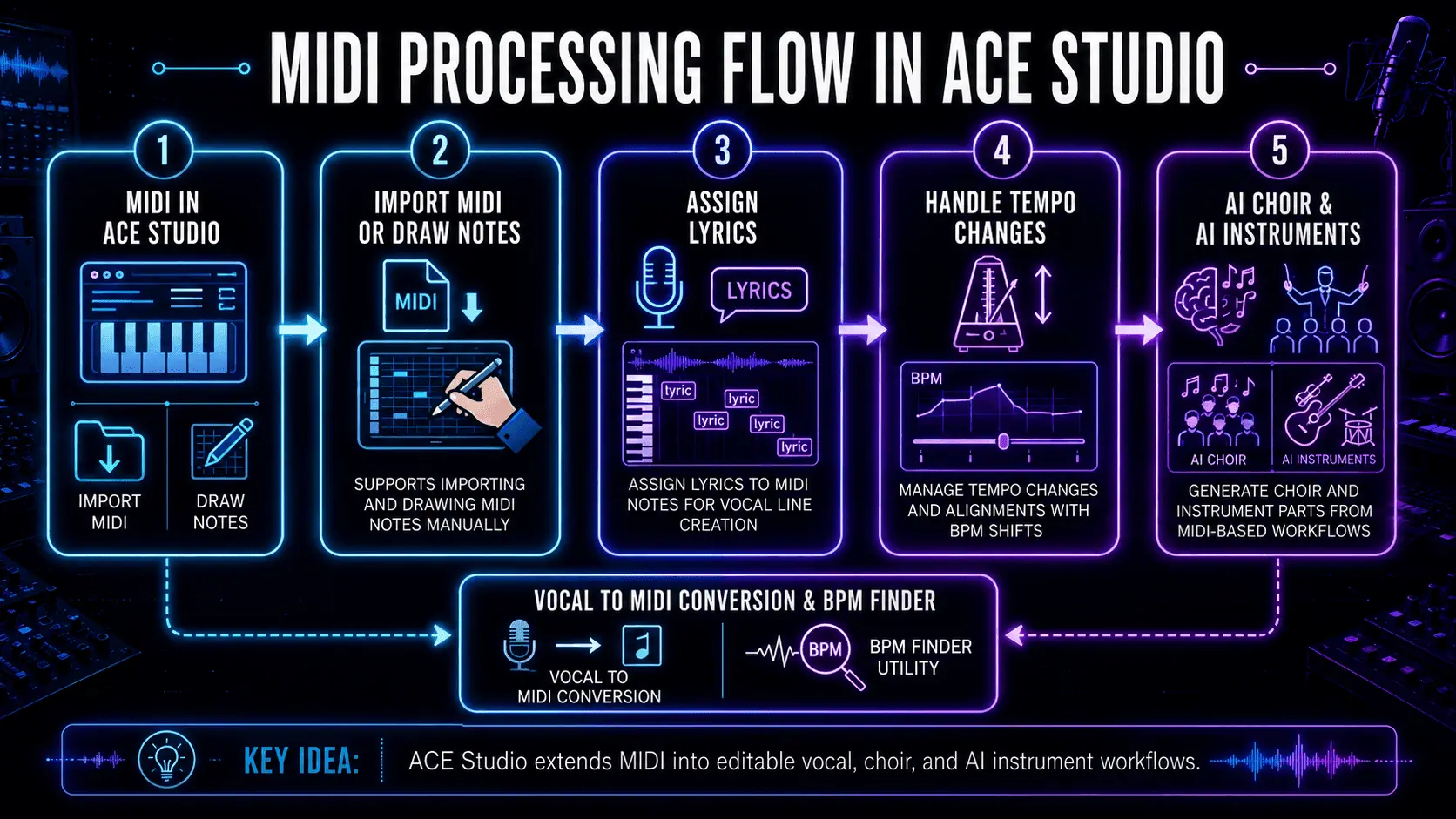
Infographic showing the MIDI processing flow in Ace Studio, including MIDI import, note drawing, lyric assignment, tempo changes, AI choir, AI instruments, vocal to MIDI conversion, and BPM finder tools.
Ace Studio turns MIDI into vocal, choir, and instrument parts through lyric assignment, tempo handling, and conversion tools.

MIDI and lyrics as performance input

ACE Studio supports building performances directly from MIDI and lyrics: you can import an existing MIDI file or draw notes manually, then assign lyrics to those notes so the vocal line follows your written melody and rhythm.

A detail worth remembering: overlapping notes on the same track can cause messy results, so keeping MIDI clean helps the engine interpret phrasing predictably.

Tempo handling that stays aligned

If you’re working with tempo changes, ACE Studio can place tempo tags at different points in the timeline for instant BPM shifts, and exported stems stay aligned when brought into a DAW at the same BPM. Gradual tempo ramps aren’t supported natively, so those are typically handled in the DAW and synced.

When importing MIDI, ACE Studio can also apply the tempo and time signature from the MIDI file, which is useful for anything with non-standard meters or changing sections.

Not only vocals – choir and AI instruments

ACE Studio’s toolset includes AI Choir (generate chorals from MIDI and lyrics) and AI Instrument capabilities for generating instrument tracks, plus utilities like Vocal to MIDI (convert vocal into MIDI and lyrics) and a BPM Finder for tempo analysis.

For producers who want to mock up strings without loading huge sample libraries, the AI violin is designed to interpret MIDI input with performance nuance, and can be integrated with DAWs using the ACE Bridge plugin.

The big takeaway: MIDI lets you specify intent, ACE Studio helps translate intent into editable performance – and you stay the one deciding what’s musical.

MIDI 1.0 vs MIDI 2.0

MIDI 1.0 is the classic standard most gear supports. It’s reliable, simple, and everywhere.

MIDI 2.0 expands the idea with higher resolution and richer expression. The biggest practical improvements include:

  • More detailed control (higher-resolution messages)
  • Per-note expression (useful for expressive controllers and nuanced performances)
  • Profiles and property exchange (devices can describe what they support more clearly)

Here’s the real-world truth: you don’t need MIDI 2.0 to make great music. But if you’re using expressive controllers or want smoother, more detailed automation, MIDI 2.0 is a step forward. Adoption is gradual – so most producers still live comfortably in MIDI 1.0 with modern workflow tricks.

Common MIDI problems and fixes

MIDI device not recognized

Typical fixes:

  • Unplug/replug the USB cable
  • Try a different port (avoid unpowered hubs if possible)
  • Restart the DAW
  • Confirm the device is enabled in MIDI settings
  • Update driver/firmware if required

If it’s a class-compliant controller, it should usually “just work,” but OS permissions can still block it.

No sound from MIDI

Remember: MIDI is data. No sound means one of these is missing:

  • No instrument loaded
  • Track input isn’t routed correctly
  • Monitoring is off
  • Output is going to the wrong device
  • Volume on the instrument/mixer is down

A quick test: draw a note in the piano roll. If it still makes no sound, it’s not your playing – it’s your routing.

Latency and timing issues

Latency is mostly about buffer size and monitoring:

  • Lower buffer for recording
  • Higher buffer for mixing
  • Use direct monitoring when tracking audio
  • Keep heavy plugins off the record chain

For MIDI timing, also check if your controller or plugin is adding delay compensation weirdness. Some DAWs let you offset MIDI track timing to compensate.

Frequently Asked Questions 

Is MIDI sound or data?

MIDI is data. It’s the performance plan, not the recording. The sound comes from whatever instrument receives the MIDI.

Can MIDI control any instrument?

MIDI can control any instrument that understands MIDI – hardware synths, samplers, drum machines, and software plugins. For acoustic instruments, MIDI can still be used to control sampled versions, modeling instruments, or performance systems (like triggering articulations and dynamics).

Is MIDI still relevant today?

Yes, because nothing else is as editable for musical intent. Even when you’re using audio-first workflows, MIDI is still the fastest way to:

  • sketch ideas
  • arrange
  • audition sounds
  • keep options open until you commit

Modern tools haven’t replaced MIDI – they’ve mostly made MIDI even more central.

Is MIDI hard to learn?

Not really. The learning curve is mostly about routing and the first-time setup. Once you understand “MIDI is control data,” everything clicks. Start simple: one controller, one instrument, one track – then add layers.

Maxine Zhang
Written by
Maxine Zhang
Maxine Zhang is Head of Operations at ACE Studio, where she bridges AI technology and creative music applications. With deep expertise in user experience and product development, she champions the needs of musicians in the age of AI.
View full profile →