
We value your privacy

By clicking "Allow", you agree to the storing of cookies on your device to enhance site navigation, analyze site usage, and assist in our marketing efforts.

Consent Selection
Details
  • Necessary cookies help make a website usable by enabling basic functions like page navigation and access to secure areas of the website. The website cannot function properly without these cookies.
    • Learn more about this provideropens in a new window

      Some of the data collected by this provider is for the purposes of personalization and measuring advertising effectiveness. The provider may use the IP Addresses for ads measurement and ads personalization.

      test_cookieUsed to check if the user's browser supports cookies.
      Maximum Storage Duration: 1 dayType: HTTP Cookie
    • Learn more about this provideropens in a new window
      bcookieUsed in order to detect spam and improve the website's security.
      Maximum Storage Duration: 1 yearType: HTTP Cookie
      li_gcStores the user's cookie consent state for the current domain
      Maximum Storage Duration: 180 daysType: HTTP Cookie
    • Learn more about this provideropens in a new window
      datadomeUsed in context with the website's BotManager. The BotManager detects, categorizes and compiles reports on potential bots trying to access the website.
      Maximum Storage Duration: SessionType: HTTP Cookie
    • studio-web-language-keyPending
      Maximum Storage Duration: SessionType: HTML Local Storage
    • _cfuvid [x2]This cookie is a part of the services provided by Cloudflare - Including load-balancing, deliverance of website content and serving DNS connection for website operators.
      Maximum Storage Duration: SessionType: HTTP Cookie
    • __cf_bm [x5]This cookie is used to distinguish between humans and bots. This is beneficial for the website, in order to make valid reports on the use of their website.
      Maximum Storage Duration: 1 dayType: HTTP Cookie
    • CookieConsent [x2]Stores the user's cookie consent state for the current domain
      Maximum Storage Duration: 1 yearType: HTTP Cookie
    • guidPreserves users states across page requests.
      Maximum Storage Duration: 1 yearType: HTTP Cookie
    • ttRegisters the website's speed and performance. This function can be used in context with statistics and load-balancing.
      Maximum Storage Duration: 1 yearType: HTTP Cookie
    • sc_anonymous_idUsed in context with the 3D-view-function on the website.
      Maximum Storage Duration: 10 yearsType: HTTP Cookie
  • Preference cookies enable a website to remember information that changes the way the website behaves or looks, like your preferred language or the region that you are in.
    • Learn more about this provideropens in a new window
      lidcRegisters which server-cluster is serving the visitor. This is used in context with load balancing, in order to optimize user experience.
      Maximum Storage Duration: 1 dayType: HTTP Cookie
  • Statistic cookies help website owners to understand how visitors interact with websites by collecting and reporting information anonymously.
    • Learn more about this provideropens in a new window
      geoSaves the user's current geographical location based on the user's IP address.
      Maximum Storage Duration: SessionType: HTTP Cookie
    • Learn more about this provideropens in a new window
      ajs_anonymous_idThis cookie is used to identify a specific visitor - this information is used to identify the number of specific visitors on a website.
      Maximum Storage Duration: 1 yearType: HTTP Cookie
      ajs_anonymous_idThis cookie is used to count how many times a website has been visited by different visitors - this is done by assigning the visitor an ID, so the visitor does not get registered twice.
      Maximum Storage Duration: PersistentType: HTML Local Storage
    • Learn more about this provideropens in a new window
      _tt_enable_cookieUsed by the social networking service, TikTok, for tracking the use of embedded services.
      Maximum Storage Duration: 1 yearType: HTTP Cookie
    • Learn more about this provideropens in a new window
      personalization_idThis cookie is set by Twitter - The cookie allows the visitor to share content from the website onto their Twitter profile.
      Maximum Storage Duration: 400 daysType: HTTP Cookie
    • FPGSIDRegisters statistical data on users' behaviour on the website. Used for internal analytics by the website operator.
      Maximum Storage Duration: 1 dayType: HTTP Cookie
      FPIDRegisters statistical data on users' behaviour on the website. Used for internal analytics by the website operator.
      Maximum Storage Duration: 400 daysType: HTTP Cookie
      FPLCRegisters a unique ID that is used to generate statistical data on how the visitor uses the website.
      Maximum Storage Duration: 1 dayType: HTTP Cookie
      sajssdk_2015_cookie_access_testPending
      Maximum Storage Duration: 73000 daysType: HTTP Cookie
      sajssdk_2015_cross_new_userCollects statistics on the user's visits to the website, such as the number of visits, average time spent on the website and what pages have been read.
      Maximum Storage Duration: 1 dayType: HTTP Cookie
      sensorsdata_domain_testPending
      Maximum Storage Duration: SessionType: HTTP Cookie
      sensorsdata2015jssdkcrossCollects statistics on the user's visits to the website, such as the number of visits, average time spent on the website and what pages have been read.
      Maximum Storage Duration: 2 yearsType: HTTP Cookie
    • sentryReplaySessionRegisters data on visitors' website-behaviour. This is used for internal analysis and website optimization.
      Maximum Storage Duration: SessionType: HTML Local Storage
    • u_scsidRegisters data on visitors' website-behaviour. This is used for internal analysis and website optimization.
      Maximum Storage Duration: SessionType: HTML Local Storage
      X-ABThis cookie is used by the website’s operator in context with multi-variate testing. This is a tool used to combine or change content on the website. This allows the website to find the best variation/edition of the site.
      Maximum Storage Duration: 1 dayType: HTTP Cookie
    • SERVERCORSIDPending
      Maximum Storage Duration: SessionType: HTTP Cookie
      SERVERIDThis cookie is used to assign the visitor to a specific server - this function is necessary for the functionality of the website.
      Maximum Storage Duration: SessionType: HTTP Cookie
    • number(#)Used to track user’s interaction with embedded content.
      Maximum Storage Duration: SessionType: HTML Local Storage
  • Marketing cookies are used to track visitors across websites. The intention is to display ads that are relevant and engaging for the individual user and thereby more valuable for publishers and third party advertisers.
    • Learn more about this provideropens in a new window
      _fbpUsed by Facebook to deliver a series of advertisement products such as real time bidding from third party advertisers.
      Maximum Storage Duration: 3 monthsType: HTTP Cookie
      lastExternalReferrerDetects how the user reached the website by registering their last URL-address.
      Maximum Storage Duration: PersistentType: HTML Local Storage
      lastExternalReferrerTimeDetects how the user reached the website by registering their last URL-address.
      Maximum Storage Duration: PersistentType: HTML Local Storage
    • Learn more about this provideropens in a new window
      mtClientConfig_cachedSource_xp_amp_music_webplayerUsed to implement iTunes content and presentation of covers.
      Maximum Storage Duration: PersistentType: HTML Local Storage
    • Learn more about this provideropens in a new window
      __tld__Used to track visitors on multiple websites, in order to present relevant advertisement based on the visitor's preferences.
      Maximum Storage Duration: SessionType: HTTP Cookie
      ajs_user_idThis cookie is used to collect data on the visitor's behavior on the website - this information can be used to assign the visitor to a visitor segment, based on common preferences.
      Maximum Storage Duration: SessionType: HTTP Cookie
      ajs_user_idCollects data on visitors' preferences and behaviour on the website - This information is used make content and advertisement more relevant to the specific visitor.
      Maximum Storage Duration: PersistentType: HTML Local Storage
    • Learn more about this provideropens in a new window

      Some of the data collected by this provider is for the purposes of personalization and measuring advertising effectiveness. The provider may use the IP Addresses for ads measurement and ads personalization.

      IDEUsed by Google DoubleClick to register and report the website user's actions after viewing or clicking one of the advertiser's ads with the purpose of measuring the efficacy of an ad and to present targeted ads to the user.
      Maximum Storage Duration: 400 daysType: HTTP Cookie
      ads/ga-audiencesUsed by Google AdWords to re-engage visitors that are likely to convert to customers based on the visitor's online behaviour across websites.
      Maximum Storage Duration: SessionType: Pixel Tracker
      pagead/1p-user-list/#Tracks if the user has shown interest in specific products or events across multiple websites and detects how the user navigates between sites. This is used for measurement of advertisement efforts and facilitates payment of referral-fees between websites.
      Maximum Storage Duration: SessionType: Pixel Tracker
    • Learn more about this provideropens in a new window
      _uetsidCollects data on visitor behaviour from multiple websites, in order to present more relevant advertisement - This also allows the website to limit the number of times that they are shown the same advertisement.
      Maximum Storage Duration: 1 dayType: HTTP Cookie
      _uetvidUsed to track visitors on multiple websites, in order to present relevant advertisement based on the visitor's preferences.
      Maximum Storage Duration: 1 yearType: HTTP Cookie
      _uetsidUsed to track visitors on multiple websites, in order to present relevant advertisement based on the visitor's preferences.
      Maximum Storage Duration: PersistentType: HTML Local Storage
      _uetsid_expContains the expiry-date for the cookie with corresponding name.
      Maximum Storage Duration: PersistentType: HTML Local Storage
      _uetvidUsed to track visitors on multiple websites, in order to present relevant advertisement based on the visitor's preferences.
      Maximum Storage Duration: PersistentType: HTML Local Storage
      _uetvid_expContains the expiry-date for the cookie with corresponding name.
      Maximum Storage Duration: PersistentType: HTML Local Storage
      MUIDUsed widely by Microsoft as a unique user ID. The cookie enables user tracking by synchronising the ID across many Microsoft domains.
      Maximum Storage Duration: 1 yearType: HTTP Cookie
    • Learn more about this provideropens in a new window
      _rdt_uuidUsed to track visitors on multiple websites, in order to present relevant advertisement based on the visitor's preferences.
      Maximum Storage Duration: 3 monthsType: HTTP Cookie
      rp.gifNecessary for the implementation of the Reddit.com's share-button function.
      Maximum Storage Duration: SessionType: Pixel Tracker
    • Learn more about this provideropens in a new window
      sc_atUsed by Snapchat to implement advertisement content on the website - The cookie detects the efficiency of the ads and collects visitor data for further visitor segmentation.
      Maximum Storage Duration: 1 yearType: HTTP Cookie
      pUsed to track visitors on multiple websites, in order to present relevant advertisement based on the visitor's preferences.
      Maximum Storage Duration: SessionType: Pixel Tracker
    • Learn more about this provideropens in a new window
      dd_testcookiePending
      Maximum Storage Duration: SessionType: HTTP Cookie
      ddSession_datadomePending
      Maximum Storage Duration: PersistentType: HTML Local Storage
    • Learn more about this provideropens in a new window
      sp_landingUsed to implement audio-content from Spotify on the website. Can also be used to register user interaction and preferences in context with audio-content - This can serve statistics and marketing purposes.
      Maximum Storage Duration: 1 dayType: HTTP Cookie
      sp_tUsed to implement audio-content from Spotify on the website. Can also be used to register user interaction and preferences in context with audio-content - This can serve statistics and marketing purposes.
      Maximum Storage Duration: 1 yearType: HTTP Cookie
    • Learn more about this provideropens in a new window
      _ttp [x2]Used by the social networking service, TikTok, for tracking the use of embedded services.
      Maximum Storage Duration: 1 yearType: HTTP Cookie
      ttcsidUsed to track visitors on multiple websites, in order to present relevant advertisement based on the visitor's preferences.
      Maximum Storage Duration: 1 yearType: HTTP Cookie
      ttcsid_#Tracks the conversion rate between the user and the advertisement banners on the website - This serves to optimise the relevance of the advertisements on the website.
      Maximum Storage Duration: 1 yearType: HTTP Cookie
      tt_appInfoUsed by the social networking service, TikTok, for tracking the use of embedded services.
      Maximum Storage Duration: SessionType: HTML Local Storage
      tt_pixel_session_indexUsed by the social networking service, TikTok, for tracking the use of embedded services.
      Maximum Storage Duration: SessionType: HTML Local Storage
      tt_sessionIdUsed by the social networking service, TikTok, for tracking the use of embedded services.
      Maximum Storage Duration: SessionType: HTML Local Storage
    • Learn more about this provideropens in a new window
      1/i/adsct [x2]Collects data on user behaviour and interaction in order to optimize the website and make advertisement on the website more relevant.
      Maximum Storage Duration: SessionType: Pixel Tracker
      muc_adsCollects data on user behaviour and interaction in order to optimize the website and make advertisement on the website more relevant.
      Maximum Storage Duration: 400 daysType: HTTP Cookie
      guest_idCollects data related to the user's visits to the website, such as the number of visits, average time spent on the website and which pages have been loaded, with the purpose of personalising and improving the Twitter service.
      Maximum Storage Duration: 400 daysType: HTTP Cookie
      guest_id_adsCollects information on user behaviour on multiple websites. This information is used in order to optimize the relevance of advertisement on the website.
      Maximum Storage Duration: 400 daysType: HTTP Cookie
      guest_id_marketingCollects information on user behaviour on multiple websites. This information is used in order to optimize the relevance of advertisement on the website.
      Maximum Storage Duration: 400 daysType: HTTP Cookie
    • Learn more about this provideropens in a new window
      __Secure-ROLLOUT_TOKENUsed to track user’s interaction with embedded content.
      Maximum Storage Duration: 180 daysType: HTTP Cookie
      __Secure-YECStores the user's video player preferences using embedded YouTube video
      Maximum Storage Duration: SessionType: HTTP Cookie
      __Secure-YNIDUsed to track user’s interaction with embedded content.
      Maximum Storage Duration: 180 daysType: HTTP Cookie
      LAST_RESULT_ENTRY_KEYUsed to track user’s interaction with embedded content.
      Maximum Storage Duration: SessionType: HTTP Cookie
      LogsDatabaseV2:V#||LogsRequestsStoreUsed to track user’s interaction with embedded content.
      Maximum Storage Duration: PersistentType: IndexedDB
      ServiceWorkerLogsDatabase#SWHealthLogNecessary for the implementation and functionality of YouTube video-content on the website.
      Maximum Storage Duration: PersistentType: IndexedDB
      TESTCOOKIESENABLEDUsed to track user’s interaction with embedded content.
      Maximum Storage Duration: 1 dayType: HTTP Cookie
      VISITOR_INFO1_LIVETries to estimate the users' bandwidth on pages with integrated YouTube videos.
      Maximum Storage Duration: 180 daysType: HTTP Cookie
      YSCRegisters a unique ID to keep statistics of what videos from YouTube the user has seen.
      Maximum Storage Duration: SessionType: HTTP Cookie
      yt-icons-last-purgedNecessary for the implementation and functionality of YouTube video-content on the website.
      Maximum Storage Duration: PersistentType: HTML Local Storage
      ytidb::LAST_RESULT_ENTRY_KEYUsed to track user’s interaction with embedded content.
      Maximum Storage Duration: PersistentType: HTML Local Storage
      YtIdbMeta#databasesUsed to track user’s interaction with embedded content.
      Maximum Storage Duration: PersistentType: IndexedDB
    • _gaUsed to send data to Google Analytics about the visitor's device and behavior. Tracks the visitor across devices and marketing channels.
      Maximum Storage Duration: 2 yearsType: HTTP Cookie
      _ga_#Used to send data to Google Analytics about the visitor's device and behavior. Tracks the visitor across devices and marketing channels.
      Maximum Storage Duration: 2 yearsType: HTTP Cookie
      _gcl_auUsed by Google AdSense for experimenting with advertisement efficiency across websites using their services.
      Maximum Storage Duration: 3 monthsType: HTTP Cookie
      _/set_cookieUsed by server-side Google Tag Manager to set or update cookies required for analytics or marketing tags.
      Maximum Storage Duration: SessionType: Pixel Tracker
      _gcl_lsTracks the conversion rate between the user and the advertisement banners on the website - This serves to optimise the relevance of the advertisements on the website.
      Maximum Storage Duration: PersistentType: HTML Local Storage
    • _schn1Sets a unique ID for the visitor, that allows third party advertisers to target the visitor with relevant advertisement. This pairing service is provided by third party advertisement hubs, which facilitates real-time bidding for advertisers.
      Maximum Storage Duration: 1 dayType: HTTP Cookie
      _scidSets a unique ID for the visitor, that allows third party advertisers to target the visitor with relevant advertisement. This pairing service is provided by third party advertisement hubs, which facilitates real-time bidding for advertisers.
      Maximum Storage Duration: 13 monthsType: HTTP Cookie
      _scid_rSets a unique ID for the visitor, that allows third party advertisers to target the visitor with relevant advertisement. This pairing service is provided by third party advertisement hubs, which facilitates real-time bidding for advertisers.
      Maximum Storage Duration: 13 monthsType: HTTP Cookie
      _screloadUsed by Snapchat to implement advertisement content on the website - The cookie detects the efficiency of the ads and collects visitor data for further visitor segmentation.
      Maximum Storage Duration: SessionType: HTTP Cookie
      u_sclidSets a unique ID for the visitor, that allows third party advertisers to target the visitor with relevant advertisement. This pairing service is provided by third party advertisement hubs, which facilitates real-time bidding for advertisers.
      Maximum Storage Duration: PersistentType: HTML Local Storage
      u_sclid_rSets a unique ID for the visitor, that allows third party advertisers to target the visitor with relevant advertisement. This pairing service is provided by third party advertisement hubs, which facilitates real-time bidding for advertisers.
      Maximum Storage Duration: PersistentType: HTML Local Storage
      u_scsid_rSets a unique ID for the visitor, that allows third party advertisers to target the visitor with relevant advertisement. This pairing service is provided by third party advertisement hubs, which facilitates real-time bidding for advertisers.
      Maximum Storage Duration: SessionType: HTML Local Storage
  • Unclassified cookies are cookies that we are in the process of classifying, together with the providers of individual cookies.
    • Learn more about this provideropens in a new window
      _rdt_pnPending
      Maximum Storage Duration: 3 monthsType: HTTP Cookie
    • Learn more about this provideropens in a new window
      tt_pixel_is_enrich_ipv6_triggered_by_enrich_amPending
      Maximum Storage Duration: SessionType: HTML Local Storage
    • adjust-sdk#asPending
      Maximum Storage Duration: PersistentType: IndexedDB
      adjust-sdk#edPending
      Maximum Storage Duration: PersistentType: IndexedDB
      adjust-sdk#gpPending
      Maximum Storage Duration: PersistentType: IndexedDB
      adjust-sdk#qPending
      Maximum Storage Duration: PersistentType: IndexedDB
      adjust-sdk.pPending
      Maximum Storage Duration: PersistentType: HTML Local Storage
      redirectPathPending
      Maximum Storage Duration: SessionType: HTML Local Storage
      studio-web-web-uuidPending
      Maximum Storage Duration: PersistentType: HTML Local Storage
    • __oaiq_domain_probePending
      Maximum Storage Duration: SessionType: HTTP Cookie
      __obrefPending
      Maximum Storage Duration: SessionType: HTTP Cookie
      oaiq_cs:TMBW9u3qWVchcyxjFU4gVQPending
      Maximum Storage Duration: SessionType: HTML Local Storage
    • _vbPending
      Maximum Storage Duration: SessionType: HTTP Cookie
    • _twpidPending
      Maximum Storage Duration: SessionType: HTTP Cookie
    • pixel/sPending
      Maximum Storage Duration: SessionType: Pixel Tracker
Cookie declaration last updated on 8/17/26 by Cookiebot
[#IABV2_TITLE#]
[#IABV2_BODY_INTRO#]
[#IABV2_BODY_LEGITIMATE_INTEREST_INTRO#]
[#IABV2_BODY_PREFERENCE_INTRO#]
[#IABV2_BODY_PURPOSES_INTRO#]
[#IABV2_BODY_PURPOSES#]
[#IABV2_BODY_FEATURES_INTRO#]
[#IABV2_BODY_FEATURES#]
[#IABV2_BODY_PARTNERS_INTRO#]
[#IABV2_BODY_PARTNERS#]
About
Cookies are small text files that can be used by websites to make a user's experience more efficient.

The law states that we can store cookies on your device if they are strictly necessary for the operation of this site. For all other types of cookies we need your permission.

This site uses different types of cookies. Some cookies are placed by third party services that appear on our pages.

You can at any time change or withdraw your consent from the Cookie Declaration on our website.

Learn more about who we are, how you can contact us and how we process personal data in our Privacy Policy.

Please state your consent ID and date when you contact us regarding your consent.
Would you like to switch to English?
Confirm
close
Comenzar

¿Qué es MIDI? Una guía para principiantes

MIDI no es sonido. Son datos de control musical: notas, tiempo, velocidad y mensajes CC que le dicen a los instrumentos qué tocar. Aprende MIDI vs audio, controladores, canales y flujos de trabajo de ACE Studio ahora mismo.

¿Qué es MIDI? Una guía para principiantes

Puntos Clave

  • MIDI no es sonido. Es información de interpretación que le dice a un instrumento qué tocar, cuándo tocarlo y cómo tocarlo, razón por la cual permanece tan editable dentro de un DAW.
  • La mayor ventaja del MIDI es la flexibilidad. Puedes cambiar notas, tiempo, posiciones de acordes, dinámicas e incluso intercambiar instrumentos sin volver a grabar la parte.
  • MIDI y audio sirven para propósitos diferentes en la producción. MIDI es mejor para escribir, arreglar y experimentar, mientras que audio es el resultado grabado al que usualmente te comprometes cuando te diriges hacia la mezcla y finalización.
  • MIDI impulsa mucho más que partes de teclado. Se usa para batería, sintetizadores, automatización, control de interpretación en vivo, composición para cine, audio para juegos y otros flujos de trabajo donde las ideas musicales necesitan permanecer editables.
  • En los flujos de trabajo modernos, MIDI permanece central porque preserva el control creativo. En ACE Studio, puede impulsar voces, partes de coro e instrumentos AI mientras aún permite al músico definir la intención musical real.

MIDI explicado simplemente: Por qué aún no hay sonido

Si alguna vez has arrastrado un clip de piano-roll en un DAW y pensaste, "Espera... ¿dónde está el sonido?" ya te has topado con la idea central detrás de qué es MIDI.
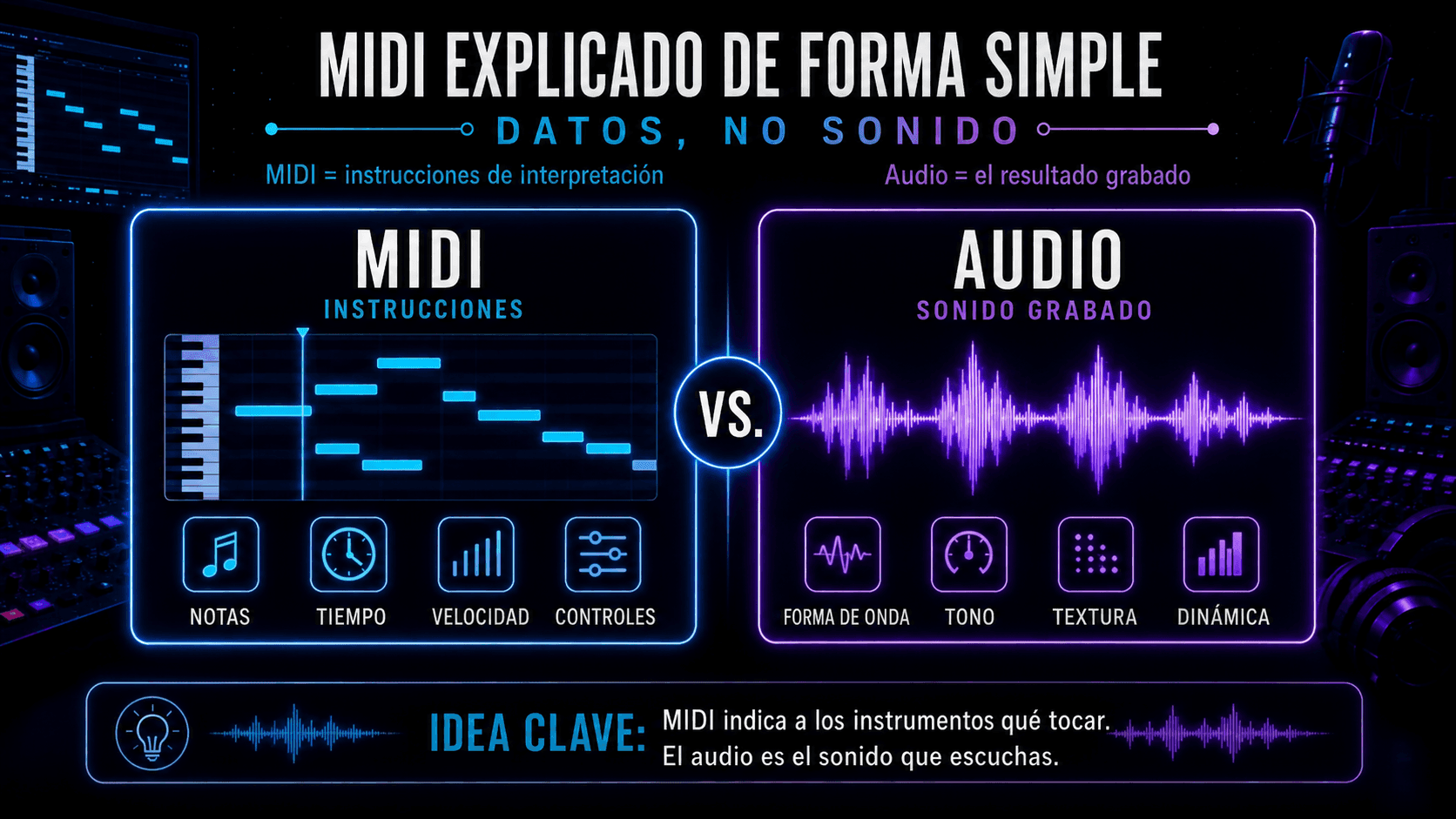
Comparación entre datos MIDI con notas, tiempo, velocidad y controles, y audio con forma de onda, tono, textura y dinámica.
MIDI almacena instrucciones editables, mientras que el audio contiene el sonido grabado.

MIDI es información de control musical, no audio. Es el conjunto de instrucciones que le dice a un instrumento (hardware o software) qué tocar, cuándo tocarlo y cómo interpretarlo – mientras tú mantienes el control de cada nota, cada decisión de tiempo, cada edición. En términos simples: MIDI = direcciones de interpretación, y Audio = el resultado grabado.

Esta guía te llevará a través de los aspectos esenciales – desde la definición de MIDI y cómo funciona, hasta controladores MIDI, MIDI vs audio, y flujos de trabajo del mundo real.

Y porque mucha producción moderna combina DAWs con herramientas especializadas, también verás dónde encaja MIDI dentro de ACE Studio – incluyendo voces, escritura coral e instrumentos AI – sin entregar tus decisiones creativas a la "automatización".

¿Qué es MIDI?

MIDI significa Musical Instrument Digital Interface (Interfaz Digital de Instrumentos Musicales). Pero la parte que importa es "interfaz" – MIDI es un lenguaje común que permite que el equipo y software hablen sobre interpretación musical.

MIDI no es sonido

Un clip MIDI no contiene una forma de onda. Contiene eventos como:

  • Número de nota (qué tecla)
  • Tiempo de inicio (cuándo sucede)
  • Duración (cuánto tiempo dura)
  • Velocidad (qué tan fuerte se toca – a menudo mapeado a volumen o brillo)
  • Cambios de control (como rueda de modulación, pedal de sustain, corte de filtro)
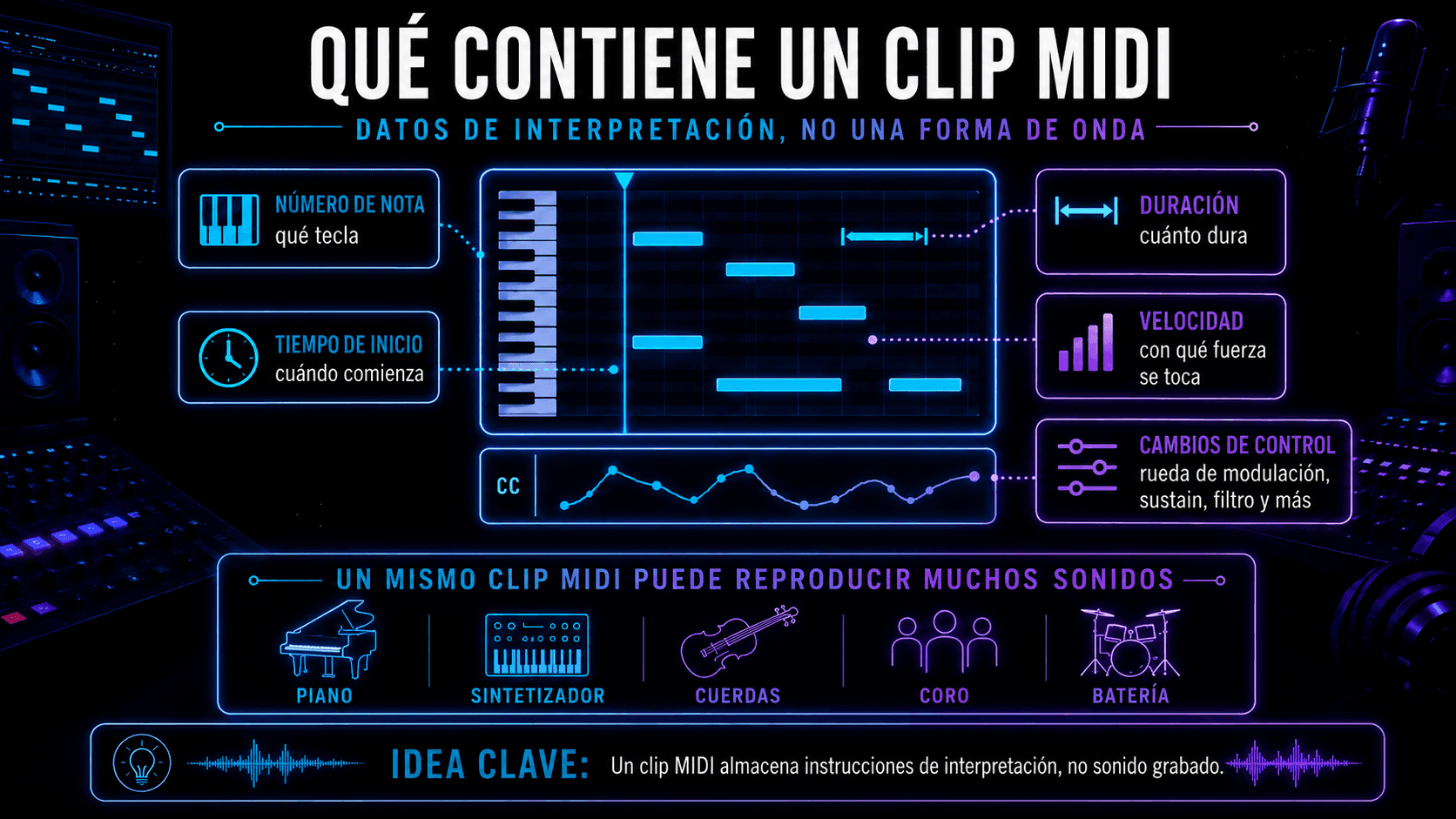
Infografía que muestra los datos contenidos en un clip MIDI y los diferentes sonidos que puede reproducir.
Un clip MIDI almacena notas, tiempo, duración, velocidad y cambios de control.

Por eso "música midi" puede significar cosas muy diferentes dependiendo del instrumento que la reciba. El mismo archivo MIDI puede activar un piano suave de fieltro, una gran pila de sintetizadores, un ensamble de cuerdas o un parche coral – porque el sonido vive en el instrumento, no en el MIDI.

¿Qué es un dispositivo MIDI?

Un "dispositivo MIDI" es cualquier cosa que envíe, reciba o procese datos MIDI: teclados, controladores de pads, controladores de viento, grooveboxes, DAWs e incluso sistemas de iluminación. Si puede interpretar mensajes musicales, puede ser parte de una configuración MIDI.

¿Qué es un archivo MIDI?

Un archivo MIDI (usualmente .mid) es un contenedor portátil para esas instrucciones de interpretación. Es como una partitura para máquinas: notas, tiempo, información de tempo (a veces) y datos de pista/canal. Puedes moverlo entre aplicaciones para mantener la intención musical mientras cambias la fuente de sonido.

Cómo funciona MIDI

En el corazón de "cómo funciona MIDI" hay un bucle simple:

  1. Un intérprete o secuenciador crea eventos MIDI
  2. Esos eventos viajan a través de una conexión (USB, DIN, red, MIDI virtual)
  3. Un instrumento o plugin receptor traduce eventos en sonido
  4. Editas los datos para refinar la interpretación
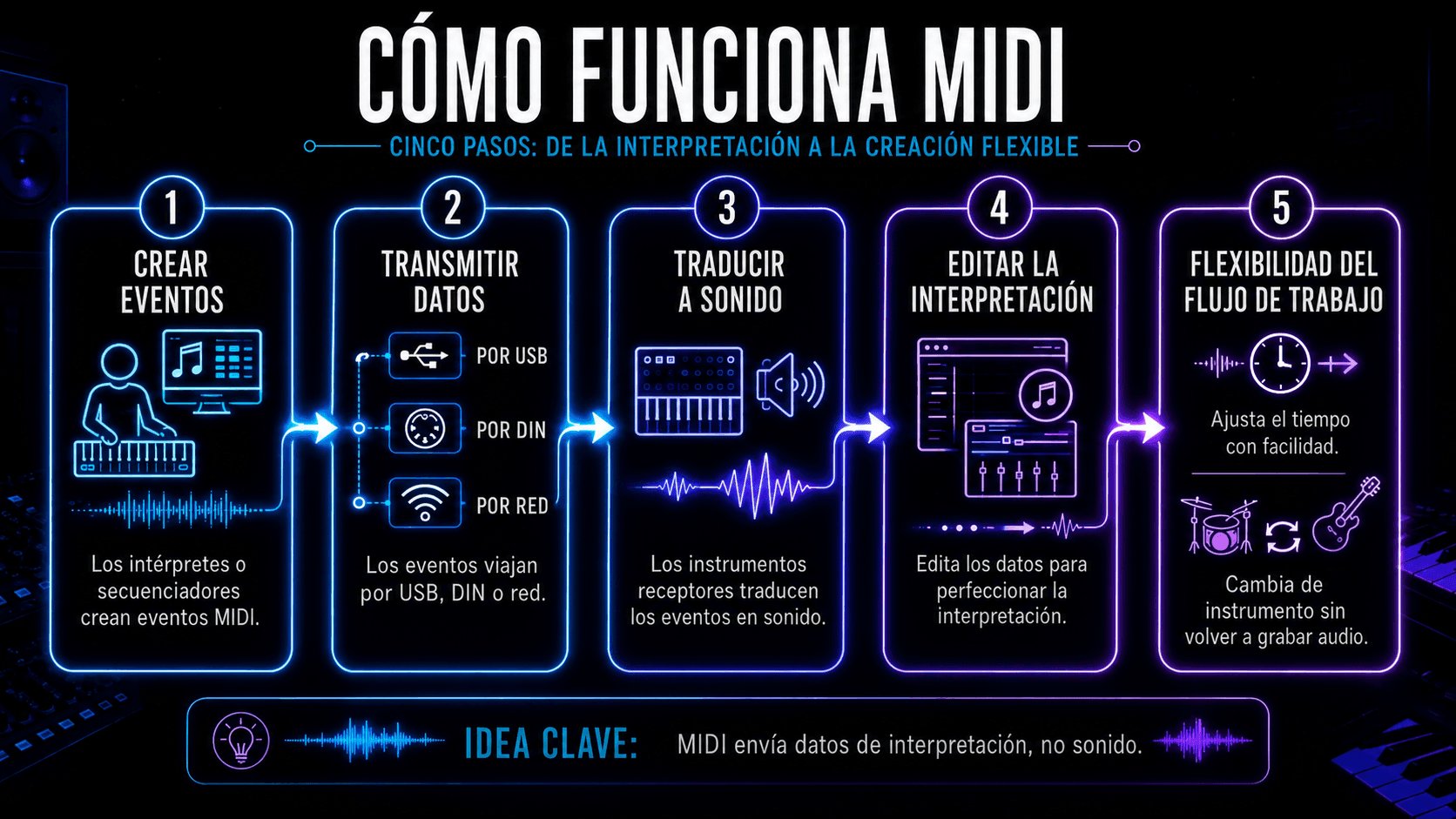
Flujo de cinco pasos que explica la creación, transmisión, reproducción y edición de datos MIDI.
MIDI convierte eventos de interpretación en sonido mediante un flujo editable de cinco pasos.
 

En producción, por eso MIDI es tan poderoso: puedes reescribir la interpretación después de grabar. Ajustar tiempo, re-arreglar acordes, cambiar el groove o completamente intercambiar el instrumento – sin re-grabar audio.

Mensajes MIDI explicados

Los mensajes MIDI son las "oraciones" que MIDI usa. Los más comunes:

  • Note On / Note Off: iniciar y detener una nota
  • Velocity: adjunta a Note On – a menudo mapeado a dinámicas
  • CC (Control Change): perillas/deslizadores como rueda de modulación (CC1), expresión (CC11), pedal de sustain (CC64)
  • Pitch Bend: movimiento continuo de tono (genial para deslizamientos y movimientos tipo vibrato)
  • Program Change: cambiar presets/sonidos

Canales MIDI explicados

MIDI clásico tiene 16 canales. Los canales te ayudan a enrutar diferentes partes:

  • Canal 1: melodía principal
  • Canal 2: bajo
  • Canal 10: batería (una convención común)
  • Canal 3–4: pads y capas de armonía

En un DAW, los canales pueden importar mucho cuando estás manejando instrumentos multi-tímbrales (un plugin alojando múltiples sonidos). En configuraciones más grandes, los canales mantienen tu equipo organizado – especialmente en vivo.
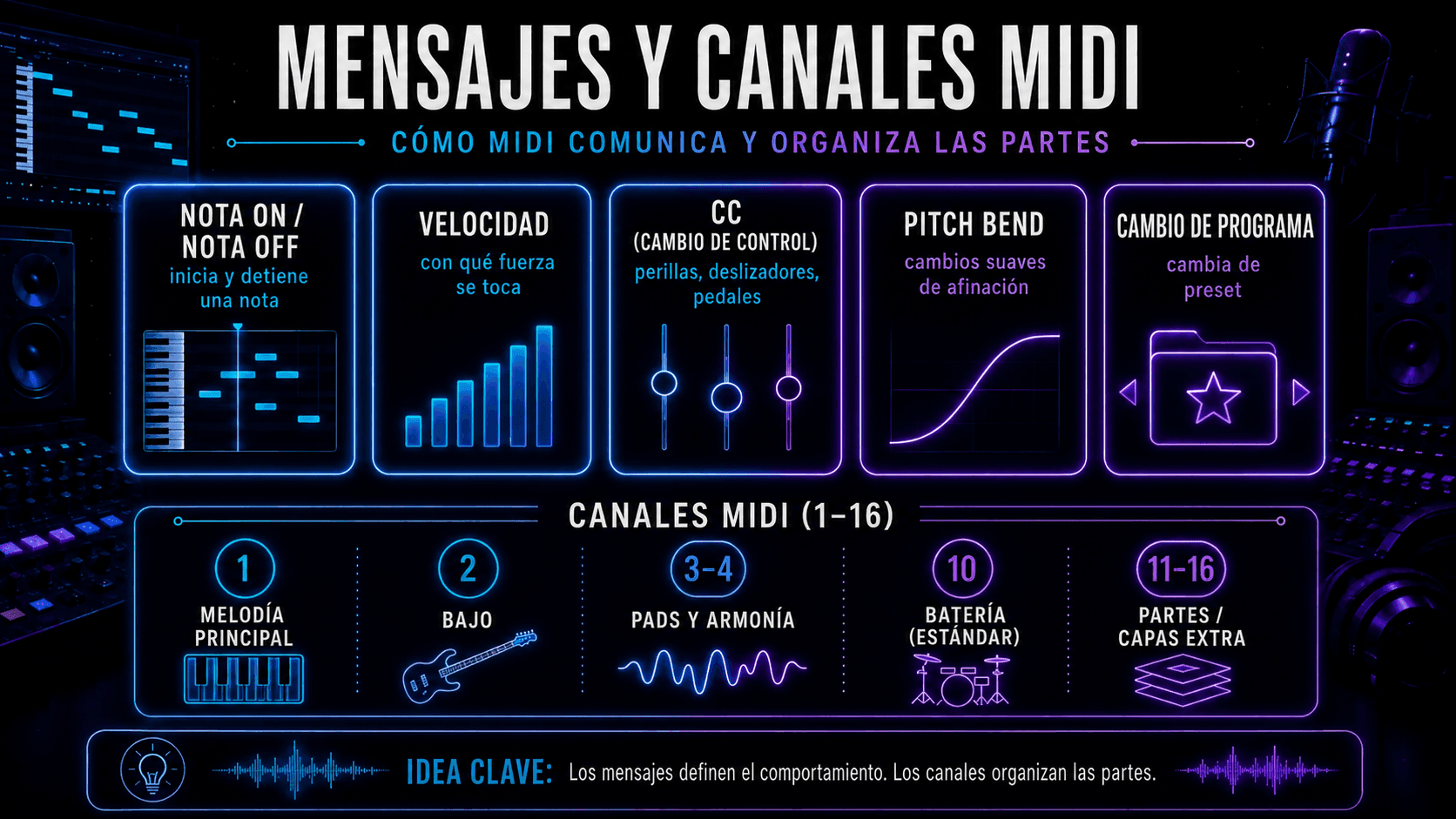
Infografía sobre mensajes MIDI, cambios de control y distribución de instrumentos entre los 16 canales MIDI.
Los mensajes MIDI controlan el comportamiento y los canales organizan cada parte musical.

MIDI vs audio

Esta es la encrucijada que todo principiante encuentra: MIDI vs audio no es "cuál es mejor", es "¿en qué etapa del proceso estás?"

MIDI y audio representan dos "capas" diferentes de una pista. MIDI no contiene sonido – son solo instrucciones: qué notas tocar, cuándo tocarlas, qué tan fuerte golpean (velocidad) y cualquier control de interpretación (como sustain o modulación). Por eso MIDI es tan flexible.

Si decides que la posición del acorde está mal, la nota del bajo debería moverse o el groove necesita ajuste, puedes cambiarlo directamente en el piano roll. También puedes intercambiar el instrumento instantáneamente, porque el sonido aún no está grabado – el mismo MIDI puede manejar un piano, un sintetizador o una librería de cuerdas sin volver a grabar nada. MIDI también puede capturar matices, pero solo si interpretas o programas ese matiz (velocidad, automatización CC, tiempo). En otras palabras, MIDI te da intención editable.
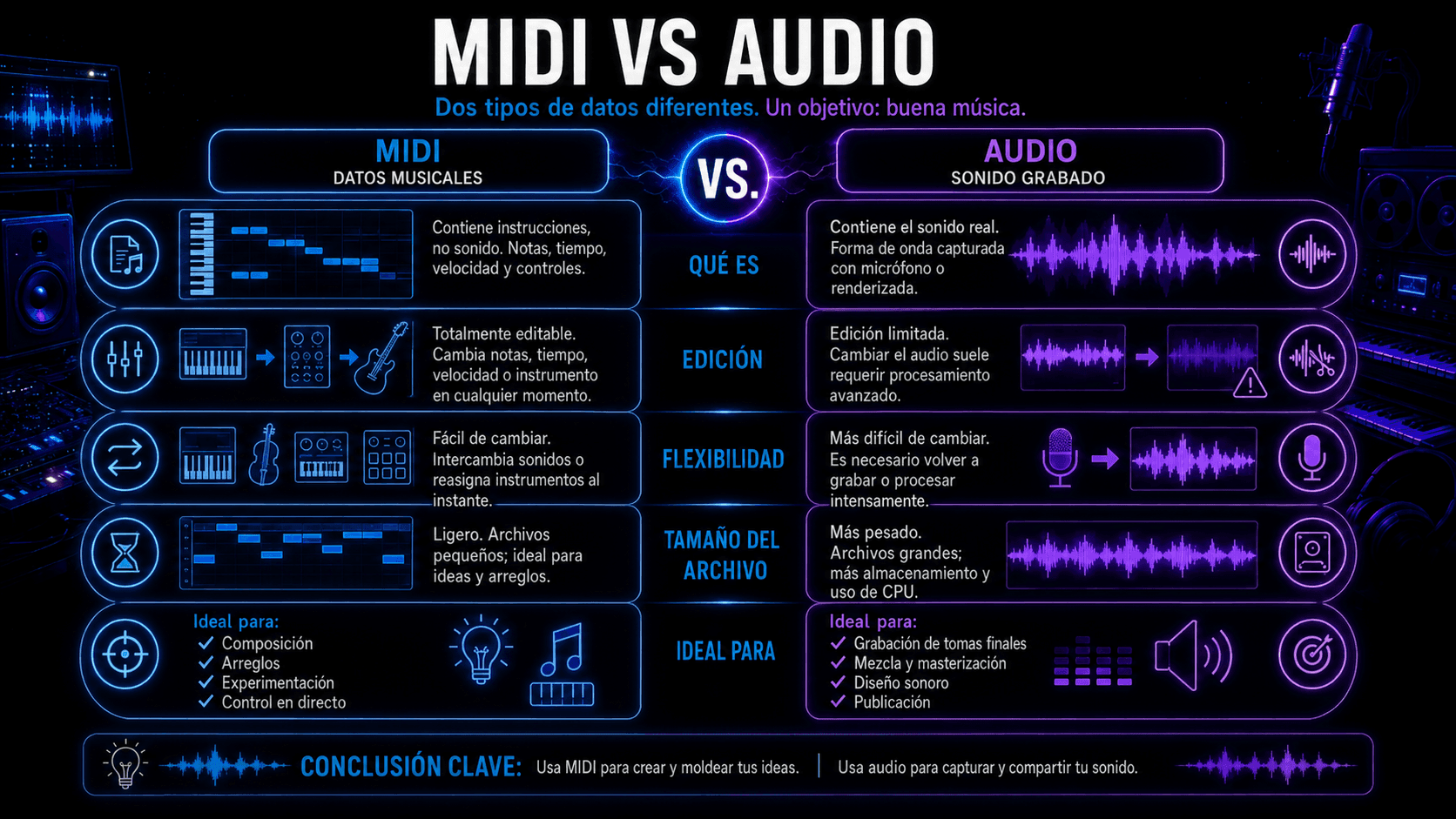
Comparación de MIDI y audio según contenido, edición, flexibilidad, tamaño de archivo y usos principales.
MIDI facilita la composición y edición; el audio conserva el sonido final grabado.

Audio es el resultado – una forma de onda grabada. Es la versión "impresa" de una interpretación, ya sea que venga de un micrófono o de renderizar un instrumento virtual. Porque audio es literalmente una grabación, captura detalles completos: micro-dinámicas, tono, textura y todo el realismo desordenado que hace que las cosas se sientan vivas.

El compromiso es que no puedes simplemente "cambiar una nota" como puedes en MIDI. Puedes manipular audio con herramientas (estiramiento de tiempo, corrección de tono, corte, remuestreo), pero es un tipo diferente de edición — más como esculpir sonido que reescribir la interpretación.

Por eso los productores a menudo escriben y arreglan en MIDI, luego se comprometen con audio cuando están listos para mezclar, diseñar y finalizar. Esto les permite mantener flexibilidad creativa temprano, y estabilidad después.

¿Para qué se usa MIDI?

MIDI aparece en todas partes porque es pequeño, flexible y habla el mismo idioma a través de equipos y software. Te permite escribir y reescribir ideas musicales rápidamente – notas, acordes, groove, dinámicas y automatización – sin comprometerte con un sonido final demasiado temprano. Por eso MIDI impulsa todo desde piano rolls de DAW y programación de batería hasta sistemas en vivo, hardware de sintetizadores e incluso señales de iluminación: mantienes la interpretación editable y eliges el instrumento (o sonido) después.
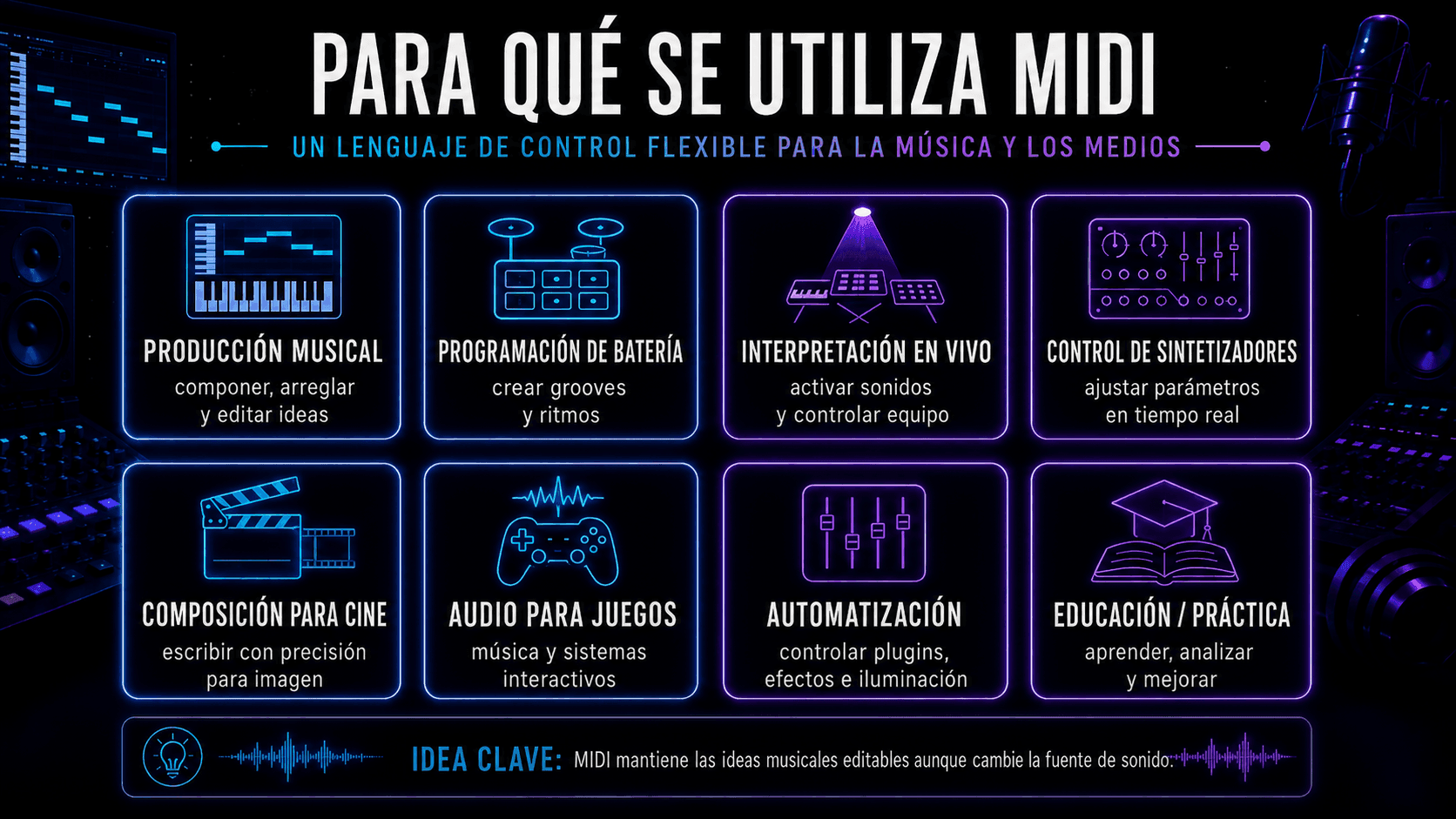
Ocho usos del MIDI, desde producción musical y programación de batería hasta cine, videojuegos y educación.
MIDI se utiliza para producir, interpretar, automatizar y crear música para distintos medios.

MIDI en producción musical

En el estudio, MIDI es tu capa de control:

  • Escribir progresiones de acordes rápido
  • Auditar diferentes sintetizadores y samplers
  • Construir patrones y fills de batería
  • Manejar arpegiadores, secuenciadores de pasos y herramientas generativas
  • Automatizar movimiento (filtros, envíos de reverb, drive de saturación)

Un pequeño cambio de mentalidad ayuda: graba MIDI como si estuvieras capturando una interpretación aproximada – luego refinala como un editor. Tú decides dónde está ajustado, dónde respira, dónde empuja.

MIDI en interpretación en vivo

En vivo, MIDI es enrutamiento y control:

  • Cambiar patches a través de múltiples instrumentos
  • Disparar clips o partes de acompañamiento
  • Sincronizar efectos basados en tempo (delays, LFOs)
  • Controlar luces/visuales con datos de notas o CC

Aquí es donde la naturaleza "sin-audio" de MIDI es una característica: es estable y predecible, y mantiene tu sistema de interpretación modular.

MIDI en cine, juegos y automatización

En composición para medios y audio interactivo, MIDI a menudo controla:

  • Maquetas orquestales antes de grabar
  • Cambio de instrumentos en capas (articulaciones suaves vs agresivas)
  • Sistemas de música adaptiva (estados de juego disparando cambios musicales)
  • Sistemas de automatización ligados a eventos de línea de tiempo

Incluso cuando la entrega final es audio, MIDI es frecuentemente el borrador que te lleva allí.

¿Qué es un controlador MIDI?

Un controlador MIDI es cualquier dispositivo construido para interpretar o dar forma a datos MIDI. Puede sentirse como un instrumento, pero su trabajo principal es enviar mensajes – tú eliges qué los recibe.

Teclados MIDI

Los controladores de teclado son el punto de entrada estándar porque se mapean naturalmente a armonía y melodía. Características útiles:

  • Teclas sensibles a velocidad
  • Rueda de modulación / rueda de tono
  • Aftertouch (en algunos modelos)
  • Controles de transporte para tu DAW

Incluso un controlador básico de 25 teclas puede manejar escribir líneas de bajo, acordes puntuales y melodías principales.

Controladores de pads

Los pads están construidos para ritmo y disparo:

  • Batería con dedos
  • Lanzamiento de clips
  • Muestras de un solo disparo
  • Control de interpretación mute/solo

Los pads también pueden mapearse a acordes o escalas para escritura más rápida si no eres pianista.

Superficies de control

Estos son controladores orientados a mezcla – faders, perillas, transporte. El poder aquí es mezcla táctil y escritura de automatización:

  • Manejar un envío vocal hacia un coro
  • Empujar un barrido de filtro a mano
  • Automatizar mutes y transiciones como una interpretación

Otros controladores MIDI

Esta categoría sigue creciendo:

  • Controladores de viento
  • Controladores MPE (para control expresivo por nota)
  • Sistemas MIDI para guitarra
  • Controladores de pie
  • Perillas MIDI personalizadas y dispositivos DIY

El mejor controlador es el que desaparece cuando estás en flujo – debería sentirse como una extensión de tus decisiones.

Lo que necesitas para usar MIDI

No necesitas una gran configuración – solo necesitas un camino claro para que los datos MIDI viajen desde tu entrada hasta algo que produzca sonido.

  • Una forma de ingresar notas: un controlador MIDI es opcional pero acelera las cosas, y también puedes programar notas con un ratón en el piano roll o usar un teclado de computadora como controlador virtual.
  • Algo para grabar y editar MIDI: un DAW es donde el MIDI se captura y edita, para que puedas ajustar el tiempo, cambiar notas/acordes y moldear las dinámicas.
  • Algo que convierta MIDI en sonido: un instrumento virtual (o sintetizador de hardware) interpreta MIDI y genera audio – aquí es donde viven tus "instrumentos MIDI", como sintetizadores, samplers, cajas de ritmos y librerías orquestales.
  • Una conexión para que viaje el MIDI:
    • USB MIDI (la mayoría de controladores modernos)
    • 5-pin DIN (hardware más antiguo + muchos equipos profesionales)
    • Bluetooth MIDI (algunos dispositivos)
    • MIDI Virtual (enrutamiento dentro de tu computadora entre aplicaciones)
  • Enrutamiento básico + monitoreo: asegúrate de que el dispositivo sea reconocido, enrutado a la pista correcta, y que el monitoreo esté encendido – entonces estarás listo para tocar y grabar

Cómo usar MIDI

En lugar de luchar con configuraciones, probablemente solo estés tratando de ir de la idea a una pista reproducible. La buena noticia es que el flujo de trabajo es básicamente el mismo en cada DAW: configuras una pista MIDI/instrumento, enrutas tu controlador (o dibujas notas), grabas una interpretación aproximada, luego editas el tiempo, las notas y la expresión hasta que se sienta bien.
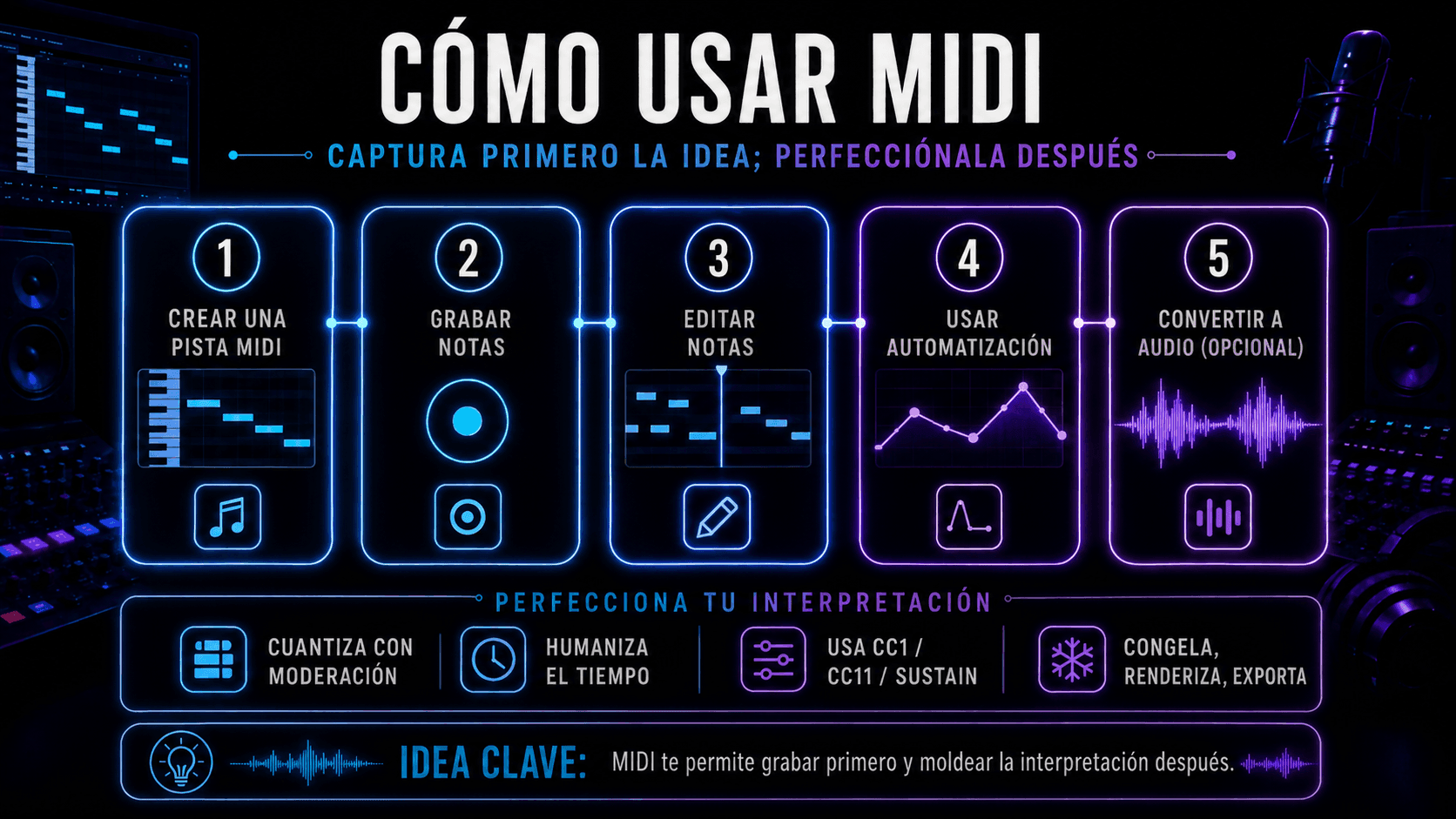
Proceso para crear, grabar, editar, automatizar y convertir una pista MIDI en audio.
El flujo MIDI permite capturar una idea primero y perfeccionar después cada detalle.

Una vez que la parte esté haciendo lo que quieres musicalmente, puedes mantenerla como MIDI para flexibilidad – o convertirla a audio cuando estés listo para mezclar y finalizar.

  1. Crear una pista MIDI

Crea una pista MIDI/instrumento, inserta tu plugin de instrumento y configura la entrada (controlador o "todas las entradas"). Arma la pista.

  1. Grabar notas MIDI

Presiona grabar y toca. No busques la perfección en la primera pasada. Captura la idea, luego moldea la sensación.

  1. Editar notas MIDI

Esta es la "ventaja del productor" del MIDI:

  • Corregir notas incorrectas
  • Re-voicear acordes
  • Ajustar la duración de las notas para mejorar el groove
  • Cuantizar ligeramente (o no hacerlo en absoluto)
  • Humanizar el tiempo donde necesite respirar
  1. Usar automatización MIDI

La automatización es como el MIDI se vuelve expresivo:

  • CC1 (rueda de modulación) para dinámicas
  • CC11 (expresión) para moldear frases
  • Pedal de sustain (CC64) para realismo de interpretación
  • Barridos de filtro, lanzamientos de delay, paseos de reverb

Escribe automatización como una interpretación, no como un problema matemático.

  1. Convertir MIDI a audio

Cuando estés listo para confirmar:

  • Congela/aplana la pista de instrumento (función del DAW)
  • Rebota en el lugar
  • Exporta stems

Aquí es donde bloqueas el sonido y pasas a decisiones de mezcla.

MIDI en flujos de trabajo de ACE Studio

ACE Studio es un ejemplo útil de por qué MIDI todavía importa – porque MIDI mantiene el control en manos del músico.
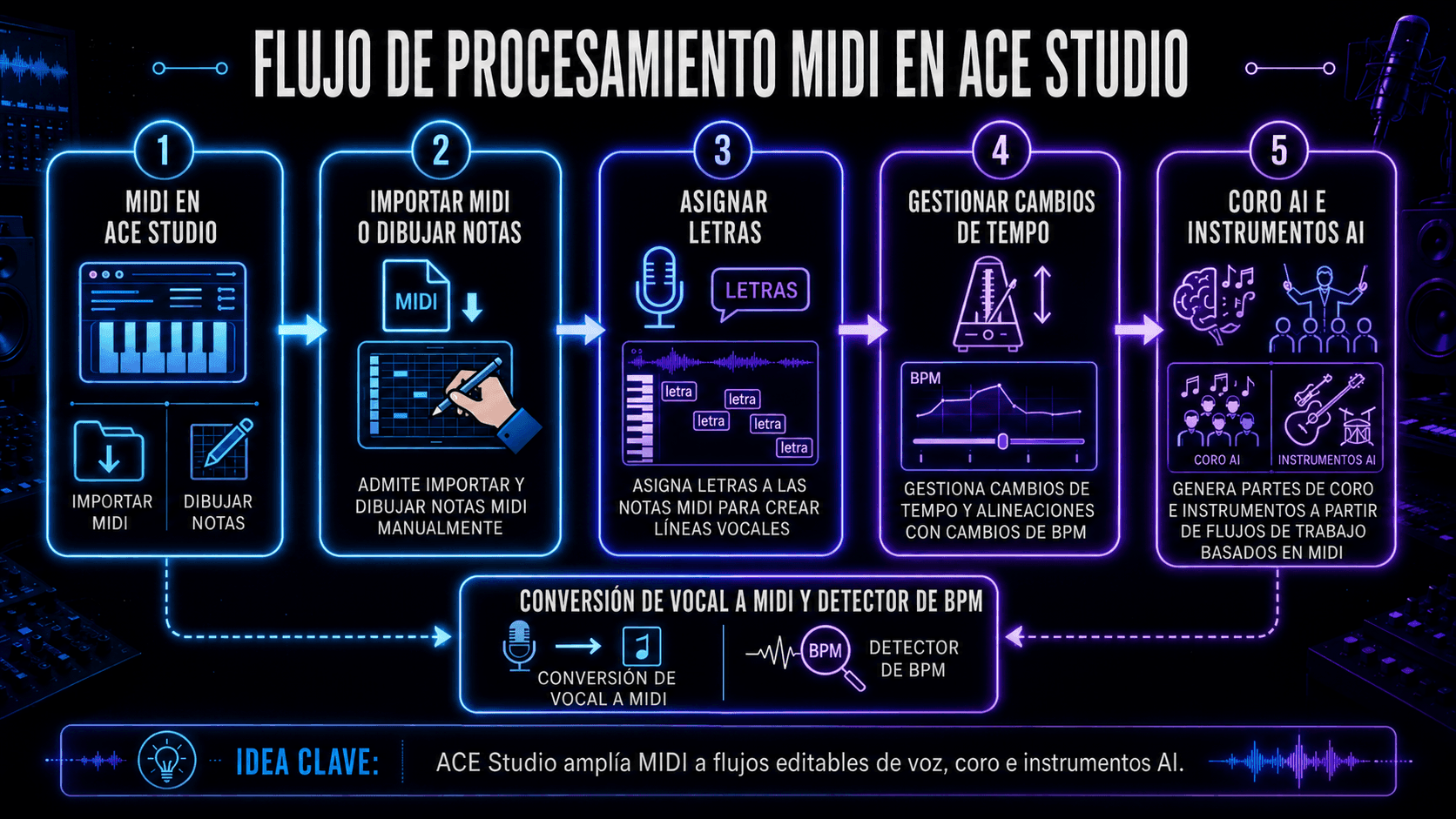
Flujo de procesamiento MIDI en ACE Studio con importación de notas, letras, tempo, coro AI e instrumentos AI.
ACE Studio amplía el MIDI con letras, tempo, voces, coros e instrumentos AI editables.

MIDI y letras como entrada de interpretación

ACE Studio soporta la construcción de interpretaciones directamente desde MIDI y letras: puedes importar un archivo MIDI existente o dibujar notas manualmente, luego asignar letras a esas notas para que la línea vocal siga tu melodía y ritmo escritos.

Un detalle que vale la pena recordar: las notas superpuestas en la misma pista pueden causar resultados confusos, así que mantener el MIDI limpio ayuda al motor a interpretar el fraseo de manera predecible.

Manejo de tempo que se mantiene alineado

Si estás trabajando con cambios de tempo, ACE Studio puede colocar etiquetas de tempo en diferentes puntos de la línea de tiempo para cambios instantáneos de BPM, y los stems exportados se mantienen alineados cuando se llevan a un DAW al mismo BPM. Las rampas graduales de tempo no están soportadas nativamente, así que típicamente se manejan en el DAW y se sincronizan.

Al importar MIDI, ACE Studio también puede aplicar el tempo y la signatura de tiempo del archivo MIDI, lo cual es útil para cualquier cosa con métricas no estándar o secciones cambiantes.

No solo vocales – coro e instrumentos AI

El conjunto de herramientas de ACE Studio incluye AI Choir (generar corales desde MIDI y letras) y capacidades de AI Instrument para generar pistas de instrumentos, además de utilidades como Vocal to MIDI (convertir vocal en MIDI y letras) y un BPM Finder para análisis de tempo.

Para productores que quieren hacer maquetas de cuerdas sin cargar enormes librerías de samples, el violín AI está diseñado para interpretar entrada MIDI con matices de interpretación, y puede integrarse con DAWs usando el plugin ACE Bridge.

La conclusión principal: MIDI te permite especificar intención, ACE Studio ayuda a traducir intención en interpretación editable – y tú sigues siendo quien decide qué es musical.

MIDI 1.0 vs MIDI 2.0

MIDI 1.0 es el estándar clásico que la mayoría del equipo soporta. Es confiable, simple y está en todas partes.

MIDI 2.0 expande la idea con mayor resolución y expresión más rica. Las mejoras prácticas más grandes incluyen:

  • Control más detallado (mensajes de mayor resolución)
  • Expresión por nota (útil para controladores expresivos e interpretaciones matizadas)
  • Perfiles e intercambio de propiedades (los dispositivos pueden describir lo que soportan más claramente)

Aquí está la verdad del mundo real: no necesitas MIDI 2.0 para hacer gran música. Pero si estás usando controladores expresivos o quieres automatización más suave y detallada, MIDI 2.0 es un paso adelante. La adopción es gradual – así que la mayoría de productores todavía viven cómodamente en MIDI 1.0 con trucos de flujo de trabajo modernos.

Problemas comunes de MIDI y soluciones

Dispositivo MIDI no reconocido

Soluciones típicas:

  • Desconectar/reconectar el cable USB
  • Probar un puerto diferente (evitar hubs sin alimentación si es posible)
  • Reiniciar el DAW
  • Confirmar que el dispositivo esté habilitado en configuraciones MIDI
  • Actualizar driver/firmware si es requerido

Si es un controlador compatible con la clase, debería funcionar "simplemente", pero los permisos del OS aún pueden bloquearlo.

Sin sonido desde MIDI

Recuerda: MIDI son datos. Sin sonido significa que falta uno de estos:

  • No hay instrumento cargado
  • La entrada de la pista no está enrutada correctamente
  • El monitoreo está apagado
  • La salida va al dispositivo incorrecto
  • El volumen en el instrumento/mezclador está bajo

Una prueba rápida: dibuja una nota en el piano roll. Si aún no hace sonido, no es tu interpretación – es tu enrutamiento.

Problemas de latencia y tiempo

La latencia es principalmente sobre el tamaño del buffer y el monitoreo:

  • Buffer más bajo para grabar
  • Buffer más alto para mezclar
  • Usar monitoreo directo al grabar audio
  • Mantener plugins pesados fuera de la cadena de grabación

Para el tiempo MIDI, también revisa si tu controlador o plugin está agregando rarezas de compensación de retraso. Algunos DAWs te permiten desplazar el tiempo de la pista MIDI para compensar.

FAQ MIDI

¿MIDI es sonido o datos?

MIDI son datos. Es el plan de interpretación, no la grabación. El sonido viene de cualquier instrumento que reciba el MIDI.

¿Puede MIDI controlar cualquier instrumento?

MIDI puede controlar cualquier instrumento que entienda MIDI – sintetizadores de hardware, samplers, cajas de ritmos y plugins de software. Para instrumentos acústicos, MIDI aún puede usarse para controlar versiones sampleadas, instrumentos de modelado o sistemas de interpretación (como activar articulaciones y dinámicas).

¿MIDI sigue siendo relevante hoy?

Sí, porque nada más es tan editable para la intención musical. Incluso cuando estás usando flujos de trabajo que priorizan el audio, MIDI sigue siendo la forma más rápida de:

  • bosquejar ideas
  • arreglar
  • auditar sonidos
  • mantener opciones abiertas hasta que te comprometas

Las herramientas modernas no han reemplazado MIDI – principalmente han hecho MIDI aún más central.

¿Es difícil aprender MIDI?

No realmente. La curva de aprendizaje es principalmente sobre enrutamiento y la configuración inicial. Una vez que entiendes "MIDI son datos de control," todo hace clic. Comienza simple: un controlador, un instrumento, una pista – luego agrega capas.

Maxine Zhang
Escrito por
Maxine Zhang
Maxine Zhang es Directora de Operaciones en ACE Studio, conectando la tecnología de IA con aplicaciones musicales creativas. Experta en experiencia de usuario y desarrollo de productos, defiende las necesidades de los músicos en la era de la IA.
Ver perfil completo →