
Key takeaways
- Sample rate defines how many times per second audio is captured, with 44.1 kHz and 48 kHz being the most common standards for music and video production.
- A higher sample rate does not automatically make audio sound better. Its main benefit is giving converters, plugins, and editing tools more room to process sound cleanly.
- 44.1 kHz is a strong choice for music streaming and CD-style delivery, while 48 kHz is usually better for podcasts, video, film, YouTube, and broadcast work.
- High sample rates like 96 kHz or 192 kHz can help with sound design, pitch-shifting, archiving, and advanced studio work, but they also increase file size, CPU load, and storage needs.
- Tools like ACE Studio can help producers create cleaner vocals, instruments, stems, and MIDI-based parts before exporting them at the sample rate that best matches the final project.
What is sample rate? Defining the core metric
To understand digital audio, one must first understand how continuous physical phenomena are translated into data structures that computing systems can process. The audio sample rate is the foundational temporal metric of this translation layer.
The mechanism of analog-to-digital conversion
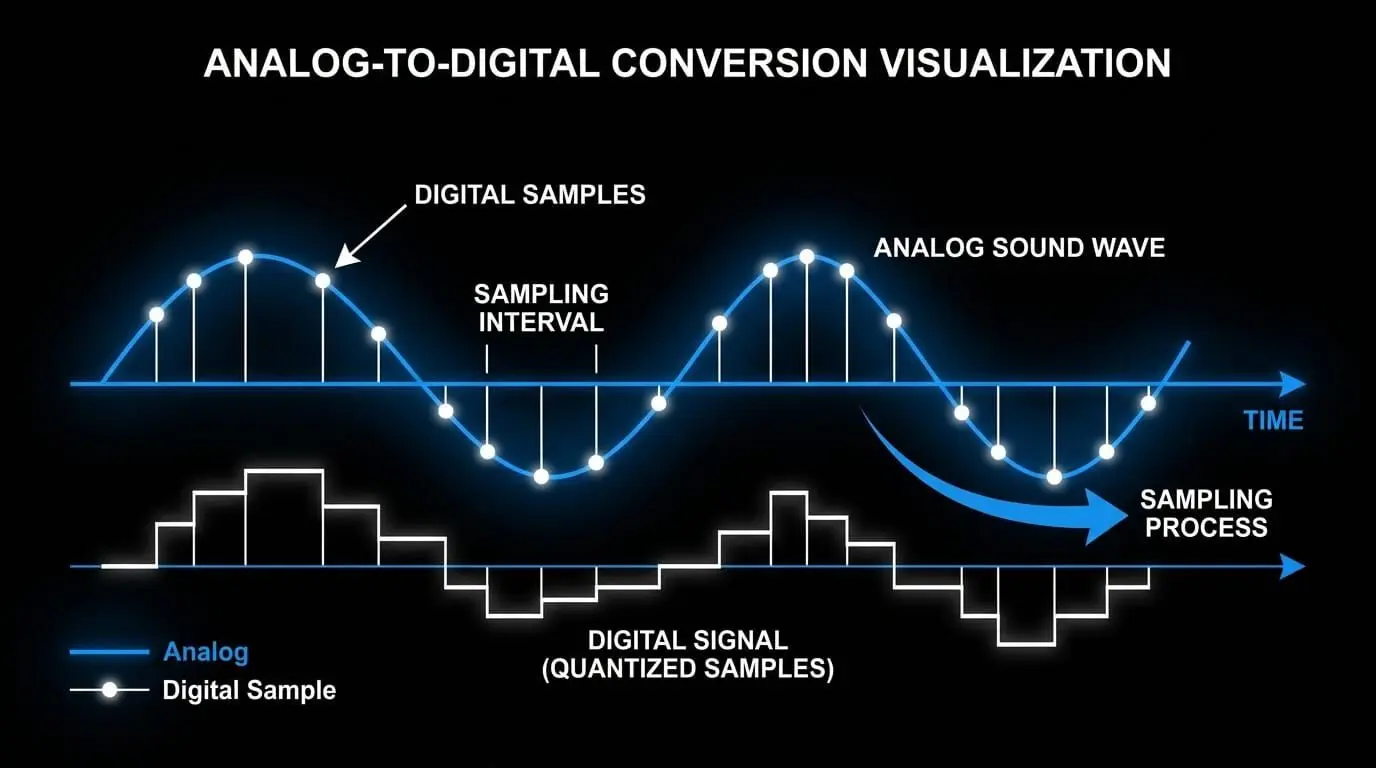
A sound wave traveling through the air is a continuous, analog signal defined by fluctuations in acoustic pressure. When this wave encounters a microphone capsule, it is transformed into a continuous electrical voltage waveform. Computing systems, however, cannot process infinitely variable analog voltage signals; they require discrete numerical values.
This translation occurs within an analog-to-digital converter (ADC). The ADC performs two primary tasks: sampling and quantization. While quantization measures the amplitude of the signal at a specific moment—governed by bit depth—sampling captures the timing of those measurements. The audio sample rate is the exact frequency with which the ADC measures the voltage of the incoming analog wave. If a system is configured to a digital sampling rate of 44.1 kHz, the ADC records exactly 44,100 discrete voltage snapshots per second.
Sampling frequency and time-domain discretization
The concept of discretization in the time domain can be compared to visual film capture. A motion picture camera does not record continuous movement; instead, it captures a sequence of static photographs at a specific frame rate, such as 24 or 60 frames per second. When played back in rapid succession, the human visual system perceives these frames as continuous motion.
In digital audio, the sampling frequency functions as the temporal frame rate of the sound. Each individual snapshot is an instantaneous measurement of the analog waveform. When these data points are processed sequentially during digital-to-analog conversion, the original continuous electrical signal is reconstructed. If the sampling frequency is too low, the intervals between measurements become too wide, preventing the system from accurately capturing rapid fluctuations in the audio signal. This limitation impacts the overall digital audio quality.
Why does sample rate matter?
Selecting a sample rate is not just a theoretical choice; it has a noticeable impact of sample rate on quality throughout the production and playback chain. Choosing the wrong rate can lead to phase misalignment, filtering artifacts, or unnecessary consumption of system resources.
Waveform reconstruction and sound reproduction
A common misconception is that digital audio looks like a jagged staircase, where each sample represents a sharp step. This visual misunderstanding leads many to believe that higher sample rates produce a smoother staircase, resulting in a more natural sound.
In reality, the output of a properly designed digital-to-analog converter (DAC) is a perfectly smooth, continuous analog wave. According to the Whittaker-Shannon interpolation formula, a DAC uses a low-pass reconstruction filter to convert discrete data points back into a continuous signal. This filter uses mathematical interpolation to find the exact path between the points, eliminating any staircase shapes or sharp angles.
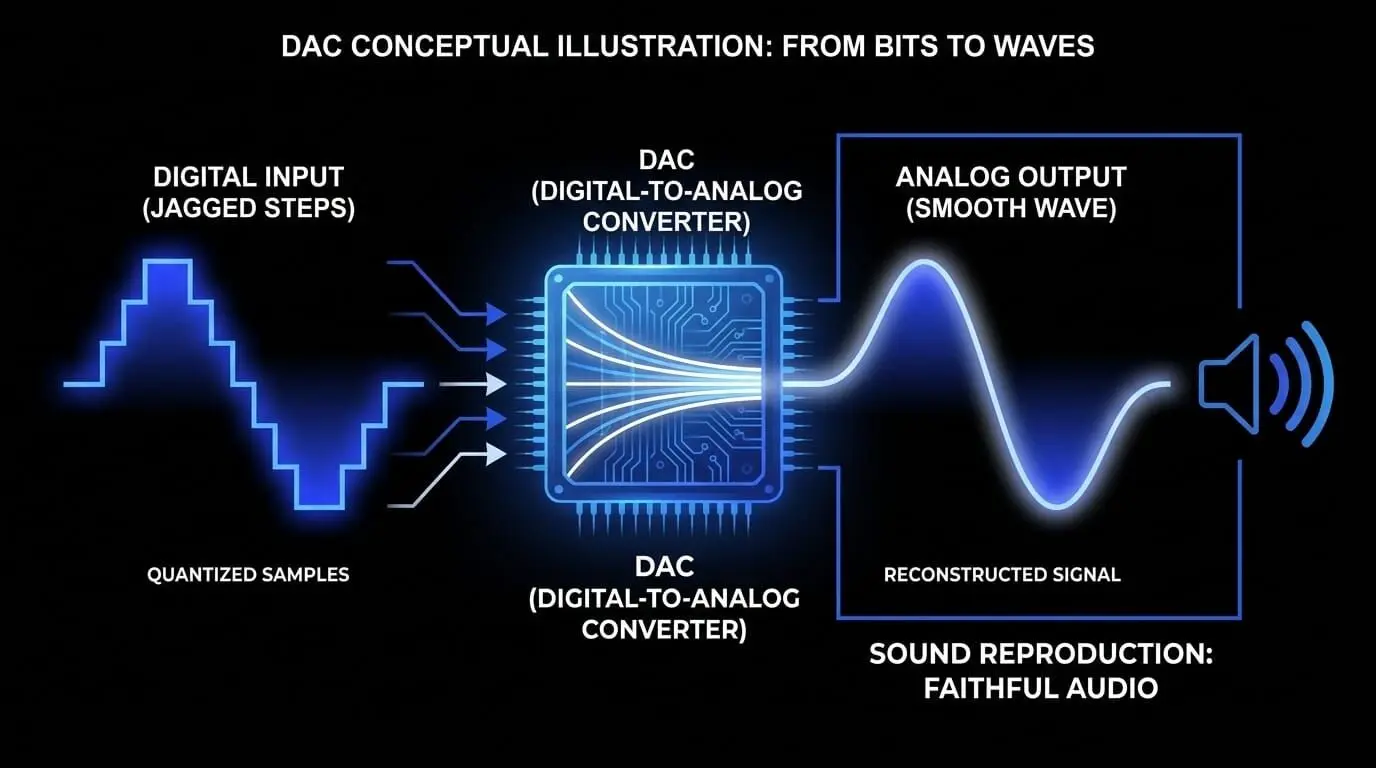
Therefore, increasing the sample rate does not change the smoothness of the reconstructed wave within the human hearing range. Instead, its primary benefit is providing a wider transition band for the system's anti-aliasing and reconstruction filters.
Sample rate and resolution
To understand digital audio performance, it helps to separate the concepts of sample rate and resolution. In video production, increasing the resolution adds pixels horizontally and vertically, making the overall image sharper. In digital audio, however, increasing the audio resolution requires managing a balance between two independent axes:
- Temporal Resolution: Controlled by the sampling frequency, this determines the maximum frequency that can be captured.
- Amplitude Resolution: Controlled by the bit depth, this determines the accuracy of each volume measurement and sets the system's noise floor.
A higher sample rate does not make transient sounds sharper or provide finer detail between points in the audible spectrum. Instead, its real value lies in moving the filter cutoff frequency far above the limits of human hearing, which helps preserve phase linearity across the audible frequency range.
The interplay between sample rate and bit depth
Achieving true high-fidelity sound reproduction requires understanding how sample rate and bit depth work together within digital systems.
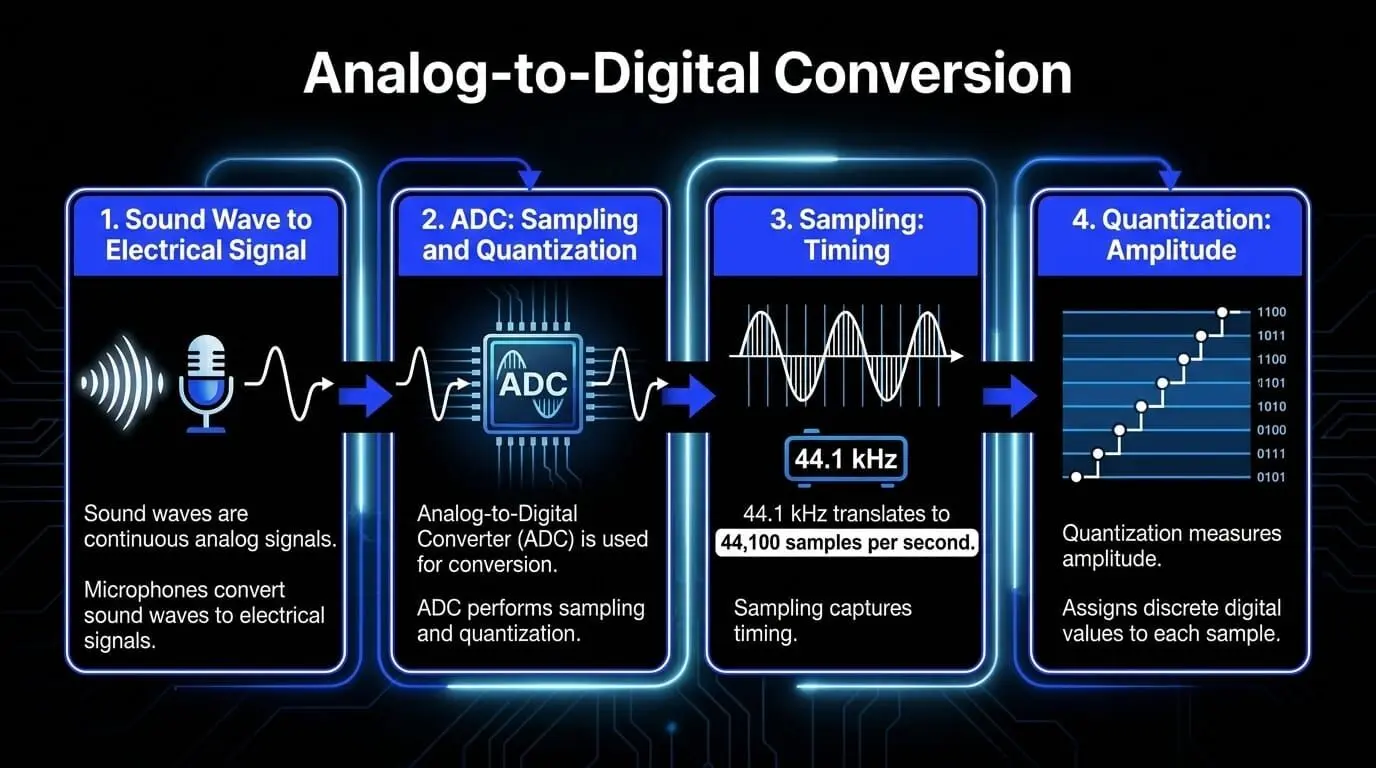
When these parameters are combined, they determine the overall data rate and fidelity of a digital stream. For example, a standard CD audio track uses a combination of a 44.1 kHz sample rate and a 16-bit depth, which requires processing 705,600 bits of data per second for a single mono channel. Upgrading to a professional 24-bit/96 kHz configuration increases that requirement to 2,304,000 bits per second per channel, capturing more data while requiring significantly more processing power.
What is the difference between common sample rates?
The digital audio landscape includes several standardized sample rates, each optimized for specific playback formats, production environments, and technical requirements.
44.1 kHz: the consumer audio baseline
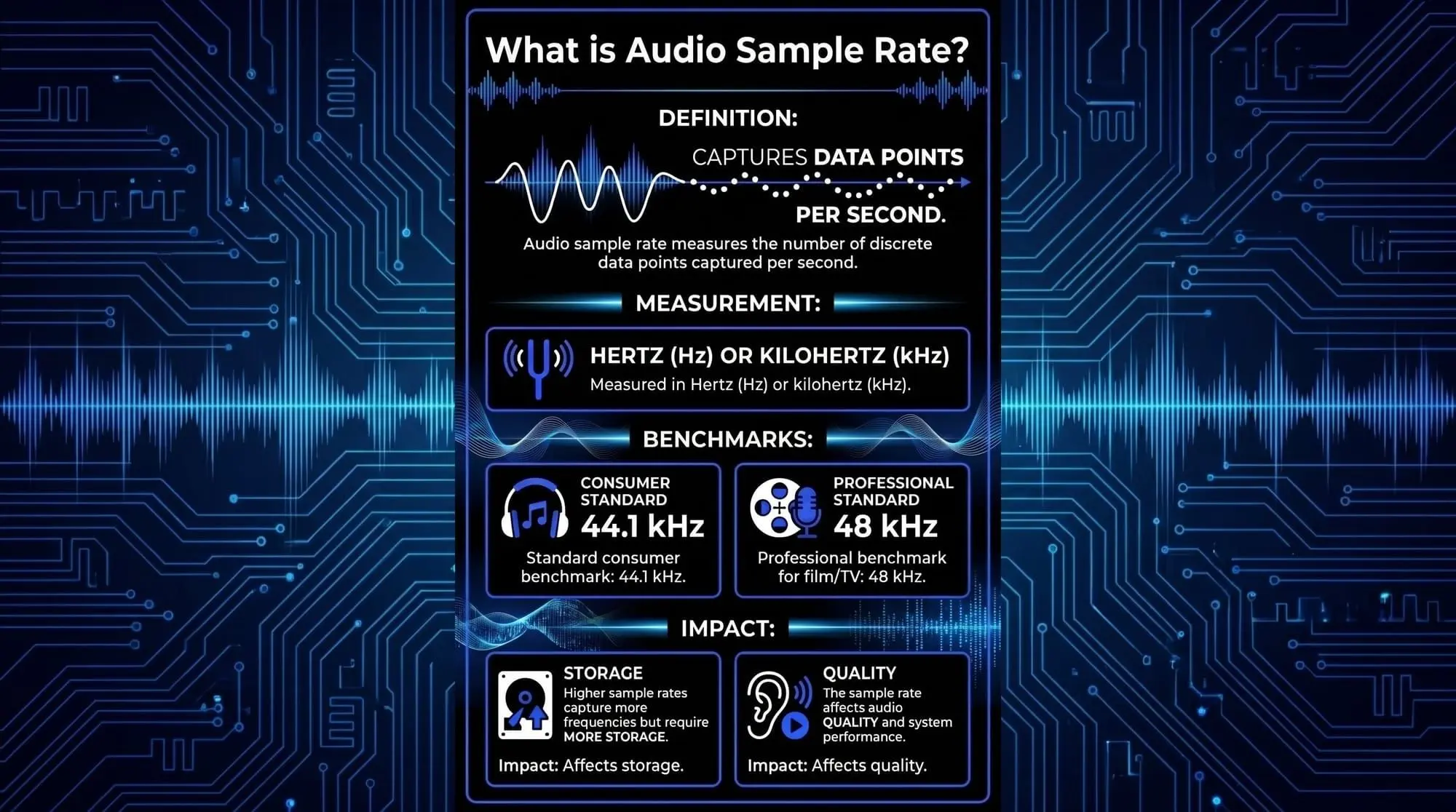
The 44.1 kHz standard remains the foundation for consumer music distribution. It is the core format for Red Book compact discs, MP3 files, and many consumer streaming platforms.
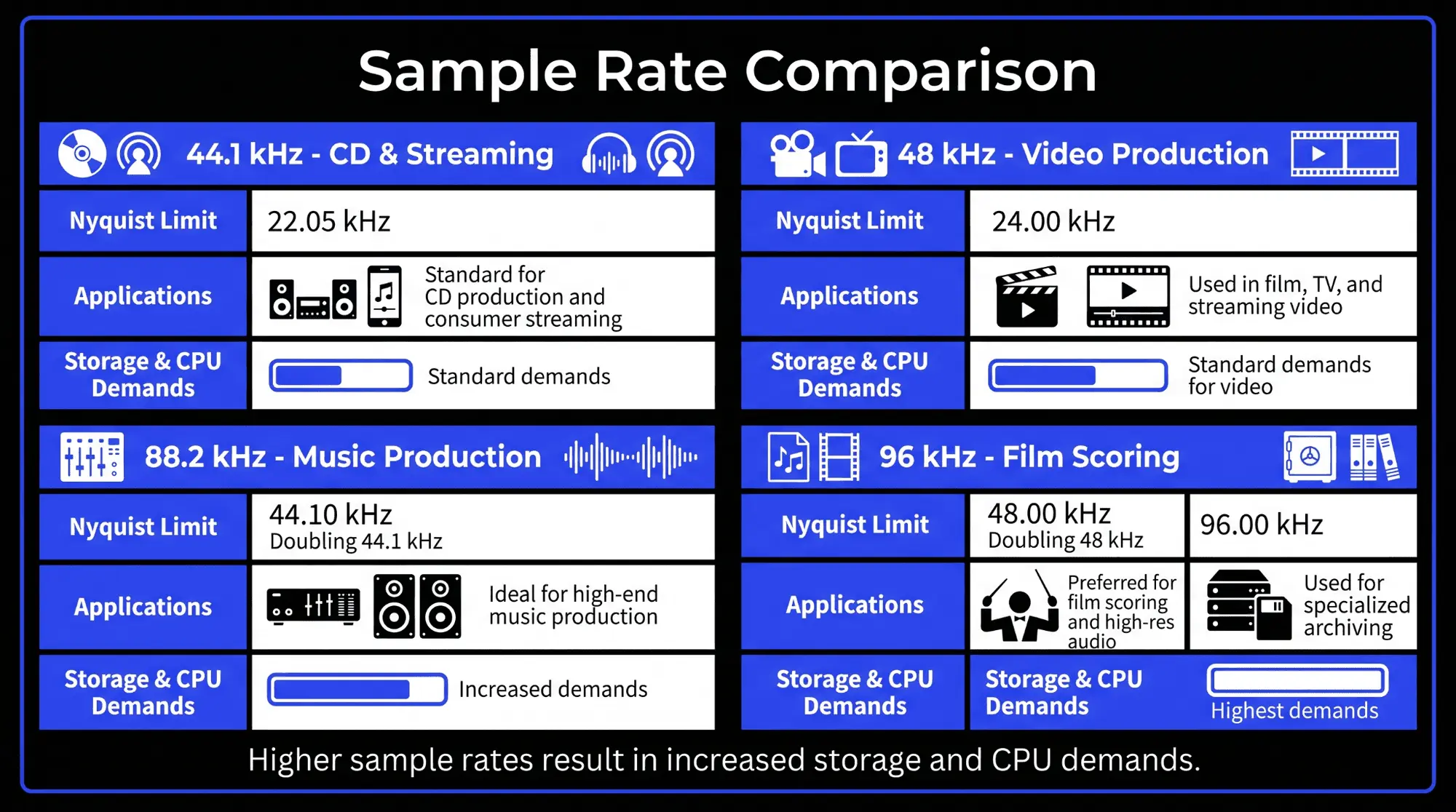
Because it provides a frequency response up to 22.05 kHz, it fully covers the range of human hearing. For projects intended solely for music streaming or CD release, working at 44.1 kHz avoids the need for a final downsampling stage, preserving the integrity of the mix during delivery.
48 kHz: The audiovisual and broadcast benchmark
The 48 kHz rate is the absolute standard for video production, television broadcast, film post-production, and digital streaming video platforms.
This standard was chosen because 48,000 divides cleanly into all major video frame rates, including 24 frames per second (cinema), 25 frames per second (PAL), and 30 frames per second (NTSC). This clean division allows for frame-accurate synchronization between audio samples and video frames, preventing timing drift over long formats.
88.2 kHz and 96 kHz: Professional studio capture
The 88.2 kHz and 96 kHz rates represent the first tier of high-resolution professional audio production.
- 88.2 kHz: Chosen by music producers because it is an exact multiple of 44.1 kHz ($44.1 \times 2$). This mathematical relationship simplifies the process of downsampling to consumer CD formats, minimizing conversion errors.
- 96 kHz: The standard high-resolution choice for film scoring, advanced sound design, and premium audio archiving, offering an exact double of the 48 kHz video standard.
176.4 kHz and 192 kHz: Ultra-high-resolution archiving
The highest standard sampling frequencies available in commercial audio interfaces are 176.4 kHz and 192 kHz. These ultra-high rates are rarely used in standard tracking or mixing environments. Instead, they are primarily used for high-fidelity archival preservation, master analog tape transfers, and specialized acoustic measurement systems where capturing ultrasonic information is necessary.
Technical specifications by sample rate
The feature sheet below breaks down how different sample rates impact technical performance, hardware resource demands, and storage capacity across a standard mono recording session.
Is a higher audio sample rate better or not? The great debate
The choice between standard sample rates (44.1 kHz or 48 kHz) and high-resolution options (96 kHz or 192 kHz) remains a subject of ongoing discussion among audio engineers and acoustic scientists. Determining the right rate requires weighing clear technical trade-offs against the practical needs of production.
The benefits of high-resolution tracking
While high-resolution sample rates do not extend what the human ear can hear, they offer significant advantages during the recording and processing stages inside a DAW:
- Relaxed Filter Slopes: Working at 96 kHz moves the Nyquist frequency up to 48 kHz. This gives the digital converters a wide 28 kHz transition band (from 20 kHz to 48 kHz) to filter out unwanted frequencies. This wide margin allows designers to use gentler filters that preserve phase linearity within the audible spectrum.
- Pitch-Shifting and Time-Stretching Flexibility: For sound designers working on films or video games, pitch-shifting a recorded sound downward is a common technique. When an audio file recorded at 44.1 kHz is slowed down, its upper frequencies drop, which can make the sound lose its clarity and crispness. If the original sound was captured at 96 kHz, it contains rich ultrasonic details up to 48 kHz. Slowing that file down shifts those hidden high-frequency details into the audible range, keeping the sound sharp and realistic even when pitched down significantly.
- Reduced Non-Linear Processing Distortion: Digital processing tools like saturation, distortion, and compression plugins can introduce subtle high-frequency harmonic distortion. In a standard 44.1 kHz environment, these extra frequencies can easily exceed the Nyquist limit and fold back into the audible range as aliasing artifacts. Working at a higher sample rate provides a clean digital workspace that safely holds these harmonics, preventing them from distorting the audible mix.
The disadvantages: CPU overhead, bandwidth constraints, and storage requirements
Opting for high sample rates introduces several practical challenges that can impact production efficiency:
- Storage Demands: Recording at 96 kHz more than doubles the storage space needed compared to 44.1 kHz. For large multi-track sessions with 60 or more concurrent tracks, a project can quickly grow to hundreds of gigabytes, making file management and cloud backups much more challenging.
- CPU and Memory Strain: Every audio sample requires real-time mathematical calculations from the computer's CPU. Running a project at 96 kHz forces the system to process more than double the data points every second. This increased workload reduces the number of plugins, virtual instruments, and mixing tools that can run simultaneously before the system encounters buffer underruns, clicks, or dropouts.
The necessity of high-quality sample rate conversion
Most professional projects must eventually be converted to standard consumer formats like 44.1 kHz for streaming music or 48 kHz for video platforms. This requires passing the audio through a sample rate conversion (SRC) algorithm.
If the SRC algorithm is poorly designed, the reduction sample frequency stage can introduce subtle rounding errors, high-frequency phase shifts, or low-level noise. To maintain pristine effects of sample rate on sound, engineers must use high-quality, linear-phase SRC tools during final mastering to ensure the downsampled audio retains its clarity.
What sample rate is best for recording? Application-specific guidelines
There is no single best sample rate for every situation. Instead, professionals choose the optimal setting based on their specific content type, delivery format, and hardware limitations.
Music production and recording engineers
For standard modern music production intended for streaming platforms like Spotify, Apple Music, or Amazon Music, a setting of 24-bit/44.1 kHz or 24-bit/48 kHz serves as an excellent operational baseline. This configuration provides a clean, flat frequency response across the entire human hearing range while keeping project files manageable and maximizing CPU performance for plugins and virtual instruments.
If the project involves acoustic instruments, classical ensembles, or high-end jazz setups where maintaining absolute phase fidelity is a priority, stepping up to 24-bit/96 kHz is a common choice, provided the recording computer has the processing power to handle the increased data load.
Podcast creators and dialogue editors
Dialogue recording has relatively narrow frequency demands compared to music production. The human voice rarely produces meaningful frequency information above 12 kHz to 15 kHz.
Therefore, standard speech projects are typically recorded at 24-bit/48 kHz or 16-bit/48 kHz. Using 48 kHz ensures the voice tracks align perfectly with video formats without creating massive files, making it the ideal choice for podcasters and interview editors.
Sound designers and film composers
Professionals creating sound assets for film, television, or video games regularly use high-resolution settings like 24-bit/96 kHz or even 24-bit/192 kHz.
Because these formats capture rich ultrasonic data well above the human hearing threshold, they allow designers to radically stretch, slow down, or pitch-shift audio assets without losing high-frequency detail or introducing digital artifacts. This makes them highly valuable for building creature noises, cinematic explosions, and immersive atmospheres.
Live sound and broadcast engineers
In live sound reinforcement and broadcast environments, keeping latency as low as possible is critical. Every digital conversion stage introduces a slight processing delay.
Running modern digital mixing consoles at 48 kHz or 96 kHz reduces this internal converter latency, helping live sound teams keep audio tightly synced with live video feeds and performances.
How ACE Studio helps producers make smarter sample-rate decisions
Sample rate becomes easier to manage when your source material is clean, editable, and prepared with a clear destination in mind. ACE Studio gives producers a controlled way to create and refine vocals, instruments, stems, and musical layers before they commit those parts to a larger production session.
This matters because sample rate is not only a setting inside an audio interface. It affects how much data your session carries, how much CPU your system needs, how cleanly your files convert, and how stable your final delivery will be. A vocal, instrument layer, or stem that is already shaped with intention is easier to export, mix, archive, and convert without wasting processing power on unnecessary corrections.
For vocal production, ACE Studio lets you create singing parts from MIDI and lyrics, then refine pitch, timing, phrasing, breaths, pronunciation, vibrato, and expression. Instead of recording multiple rough vocal takes just to test an idea, you can shape the performance first, then bring the finished part into your DAW at the sample rate your project actually needs. For a streaming-focused song, that may be 44.1 kHz or 48 kHz. For a video, film, or scoring project, 48 kHz keeps the audio aligned with the visual standard.
AI Instruments let you create expressive MIDI-based parts for instruments such as strings, brass, saxophone, trumpet, cello, viola, violin, and duduk. This is practical when you are arranging a song, building a cinematic layer, or testing an instrumental idea before deciding whether it needs to be printed as audio. You still decide the notes, timing, expression, and final placement. ACE Studio simply gives you stronger source material to work from.
The same advantage applies to editing existing audio. With Stem Splitter, you can separate a full mix into workable parts, making it easier to rebuild a section, isolate a vocal, clean up an arrangement, or prepare material for remixing. With Audio to MIDI and vocal conversion tools, you can turn recorded ideas into editable musical data, which helps when a rough performance has the right feeling but needs tighter timing or clearer note movement.
For high-resolution projects, ACE Studio can also help you avoid unnecessary bloat. Not every idea needs to be rendered at 96 kHz or 192 kHz from the start. You can build and refine musical parts first, then export them at the sample rate that matches the final target. That keeps your session lighter while preserving the creative control that matters most.
Practical uses include:
- Creating lead vocals from MIDI and lyrics before exporting them into a 44.1 kHz or 48 kHz music session
- Building backing vocals or choir layers without recording repeated scratch takes
- Creating string, brass, or woodwind parts from MIDI before printing them as audio
- Separating stems from a rough mix before remixing, cleaning, or rebuilding the arrangement
- Converting a vocal melody into MIDI so the phrasing can be refined before final rendering
- Testing musical layers before deciding whether the project truly needs a higher sample rate
- Preparing audio for video projects where 48 kHz delivery is expected
- Keeping large productions more manageable by exporting only the parts that are ready to become audio
ACE Studio does not choose the sample rate for you. You still decide whether the project belongs at 44.1 kHz, 48 kHz, 96 kHz, or another format. The benefit is that you can make that decision with cleaner parts, better control, and fewer technical compromises. For producers, songwriters, and composers, that means less time fighting messy source audio and more time shaping the sound, emotion, and arrangement of the track.
Frequently Asked Questions about sample rates
Does changing the sample rate alter the pitch of recorded audio?
If an audio file is played back at the same sample rate used to record it, the pitch will remain perfectly correct. However, if a file recorded at 44.1 kHz is forced to play back on a system configured to 48 kHz without being converted first, the audio will play faster and sound higher in pitch. Converting the file correctly prevents this issue.
What is the exact difference between sample rate and sample rate reduction?
The audio sample rate is the timing setting used to capture audio accurately during recording. In contrast, sample rate reduction is a creative digital effect used to intentionally lower the quality of an audio file. This effect introduces aliasing distortion on purpose, creating a crunchy, retro sound popular in electronic and lo-fi music production.
Can I mix audio files with different sample rates inside the same project?
Most modern digital audio workstations allow you to import files with different sample rates into the same timeline. The DAW will convert those files in the background to match the project's master sample rate. However, on larger sessions, relying on real-time background conversion can slow down your computer's CPU. It is best practice to manually convert your files before mixing to keep your session running smoothly.
Why is 44.1 kHz still used when 48 kHz is the video standard?
The 44.1 kHz rate remains popular because it is the native format for legacy CDs and is deeply embedded in consumer music distribution systems. Because it fully covers human hearing, it continues to serve as an efficient, reliable format for projects that do not need to line up with video frames.
How does sample rate relate to the file size of an uncompressed audio track?
The overall file size of uncompressed audio (like a WAV file) is calculated by multiplying three core numbers: the sample rate, the bit depth, and the total duration in seconds. Because this relationship is direct, doubling your sample rate from 44.1 kHz to 88.2 kHz will double the resulting file size on your hard drive.