
Key Takeaways
- A music sequencer records, edits, and plays back musical instructions such as notes, timing, velocity, and duration, rather than recording raw audio.
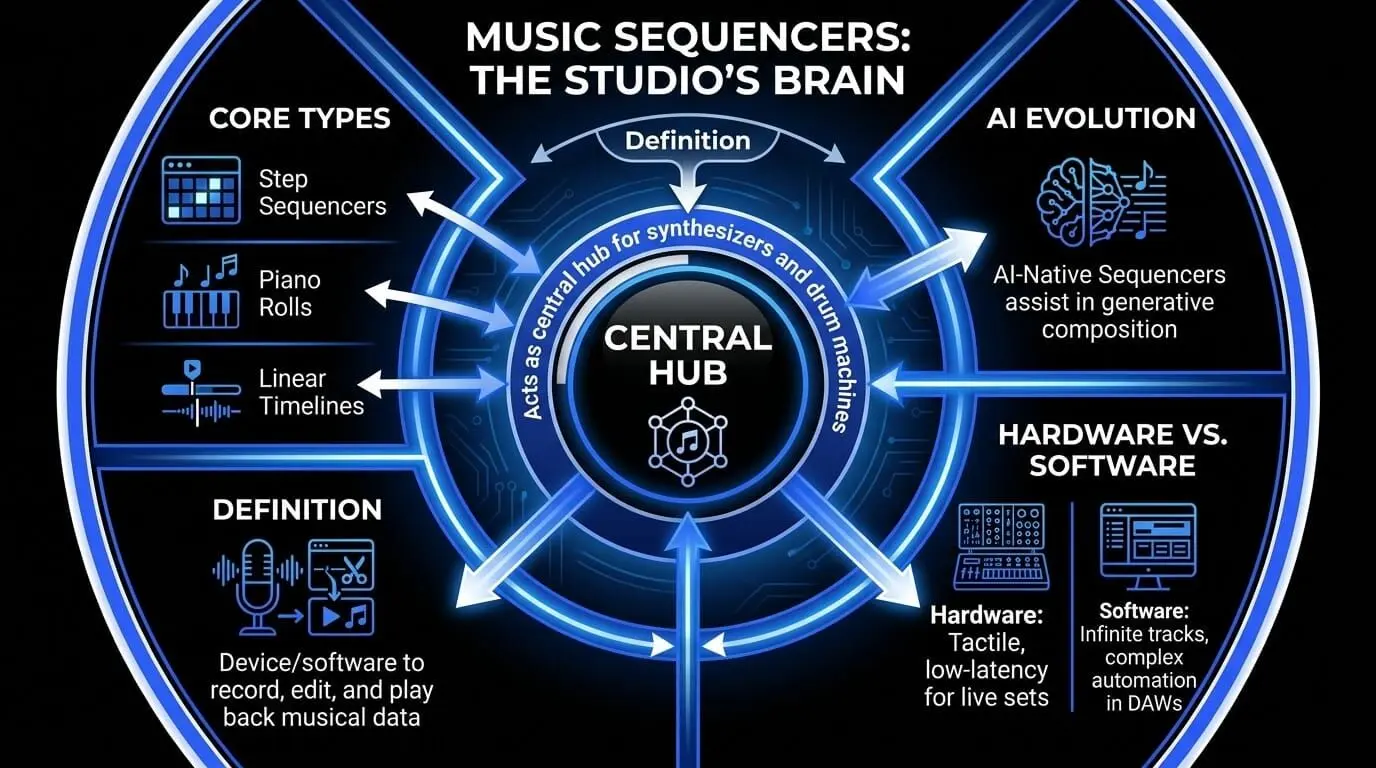
- Sequencers act as the “brain” of a modern studio, controlling synthesizers, drum machines, samplers, virtual instruments, and full DAW arrangements.
- Different sequencer types serve different creative needs: step sequencers are ideal for beats, piano rolls are better for melodies, and linear timelines help build full songs.
- Professional sequencing depends on timing accuracy, with concepts like MIDI data, PPQN, clock synchronization, latency, and jitter shaping how tight or human a track feels.
- Modern AI-augmented sequencers can help producers generate variations, overcome creative blocks, and speed up composition while still leaving the final creative decisions to the human producer.
What is a sequencer in music?
The sequencer is far more than a utility; it is the fundamental architecture upon which modern sound is built. Whether you are listening to the precise, driving pulse of a techno track, the intricate layers of a cinematic score, or the rhythmic complexity of modern trap, you are hearing the work of a sequencer.
At its most basic level, a music sequencer is a tool that stores and plays back a sequence of events. However, to the professional producer, it is the brain of the studio environment. Unlike a digital audio recorder, which captures the actual vibrations of a sound wave, a sequencer captures the intent of the performance. It records the "instructions"—the pitch, the velocity, the timing, and the duration—and sends those instructions to a sound source, such as a synthesizer or a sampler.
The evolution of the sequencer mirrors the evolution of music technology itself. We have moved from the rigid, mechanical limitations of the early 20th century to a digital frontier where Artificial Intelligence now acts as a collaborative partner. In this guide, we will deconstruct the technical nuances of sequencing, explore the historical milestones that brought us here, and look ahead at how AI is redefining the boundaries of human creativity.
How sequencers work: The technical architecture
A professional understanding of sequencing requires a deep dive into how data is processed within a system. The distinction between a sequencer and a digital audio recorder is fundamental to the production workflow.
MIDI data vs. audio data
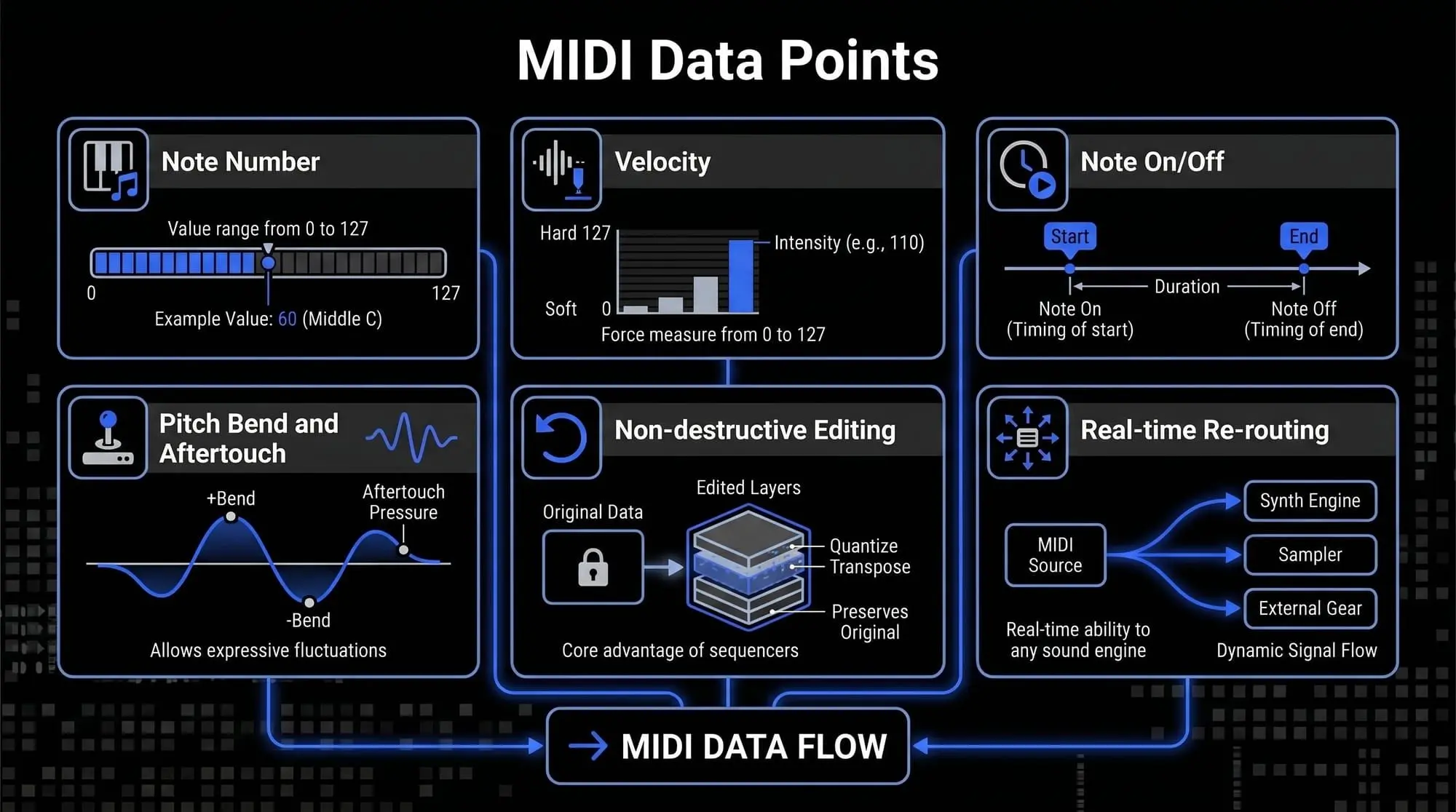
When a producer records into a sequencer using a MIDI controller, the software is not capturing a sound wave. It is capturing a series of discrete data packets. These packets typically include:
- Note Number: The frequency or pitch, assigned a value from 0 to 127.
- Velocity: The force with which a key was struck, also measured on a scale of 0 to 127.
- Note On/Off: The precise timing of the start and end of the musical event.
- Pitch Bend and Aftertouch: Continuous data streams that allow for expressive fluctuations in frequency and pressure.
Because these are merely instructions, the sequencer can re-route this data to any sound engine in real-time. This is the core advantage of music sequencer software: it allows for total non-destructive editing.
Resolution and timing precision: PPQN
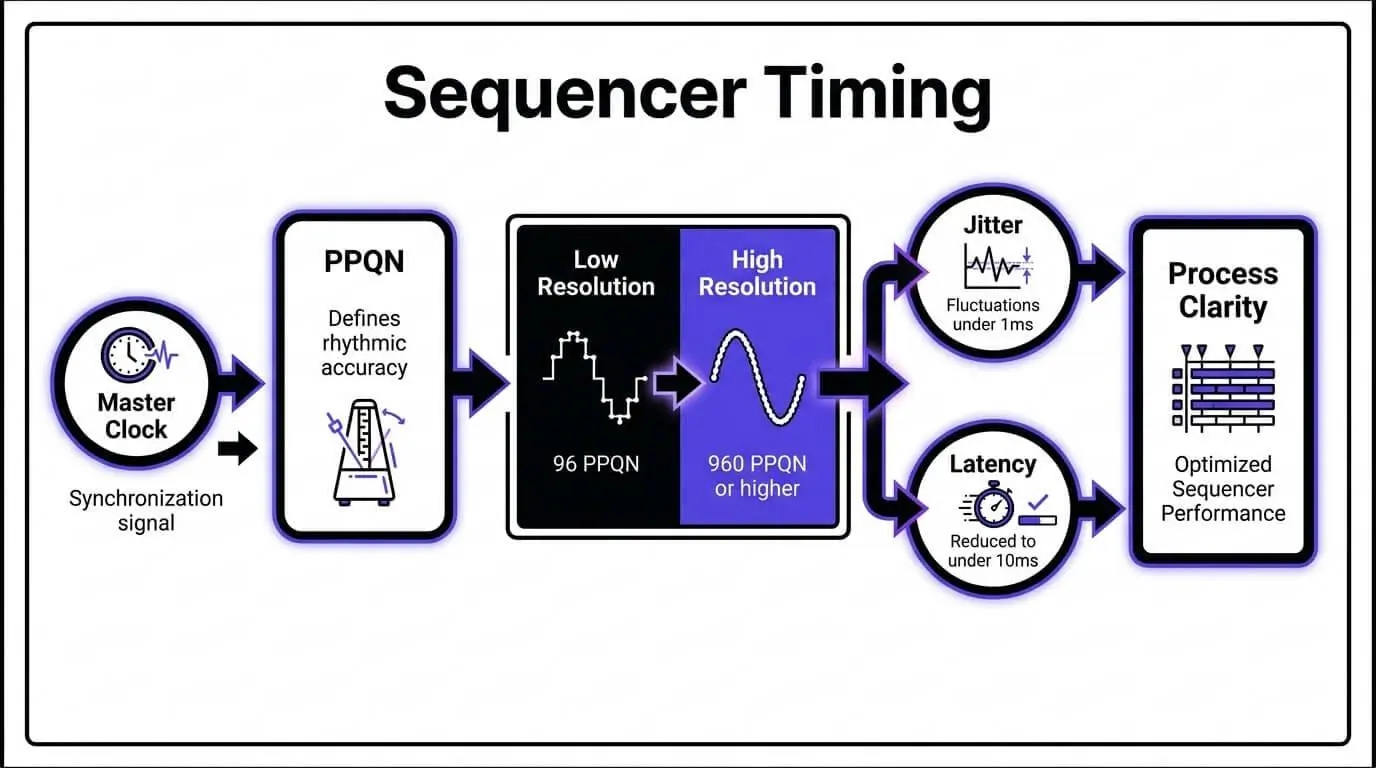
The rhythmic accuracy of a sequencer is determined by its PPQN (Pulses Per Quarter Note). This metric defines the number of internal divisions available for every beat.
- Low Resolution: Early sequencers might have a resolution of 96 PPQN, which can result in a rigid, mechanical feel.
- High Resolution: Professional DAWs in 2026 typically operate at 960 PPQN or higher.This high resolution is what allows the sequencer to capture the subtle, infinitesimal timing variations of a human performer, a process known as capturing the groove or swing of a piece.
Clock synchronization and jitter
For a sequencer to operate within a studio ecosystem, it must serve as the Master Clock. This involves sending a synchronization signal—such as MIDI Clock or MTC (MIDI Time Code)—to all external hardware and internal plugins.
A critical challenge in sequencing is Jitter, which refers to small, unintended fluctuations in the timing of these signals. Professional SaaS platforms and high-end hardware utilize sophisticated buffer management and hardware-level timing to ensure that jitter remains below $1$ms, maintaining perfect rhythmic alignment across hundreds of tracks.
The clock and synchronization
Every sequencer relies on a Master Clock. This clock ensures that all connected devices—whether software plugins or external hardware—stay in perfect rhythmic alignment.
- BPM (Beats Per Minute): The global tempo of the sequence.
- PPQN (Pulses Per Quarter Note): This is the "resolution" of the sequencer. A higher PPQN (e.g., 960 PPQN) allows for a more "human" feel, capturing the subtle timing nuances of a live keyboardist. Lower resolutions result in a more rigid, "robotic" feel.
- Jitter and Latency: In digital systems, latency is the delay between a command being sent and the sound being heard. Professional sequencing software utilizes advanced buffer management to reduce this delay to imperceptible levels (under 10ms).
Linear vs. pattern-based sequencing
There are two primary ways to organize musical time within a sequencer:
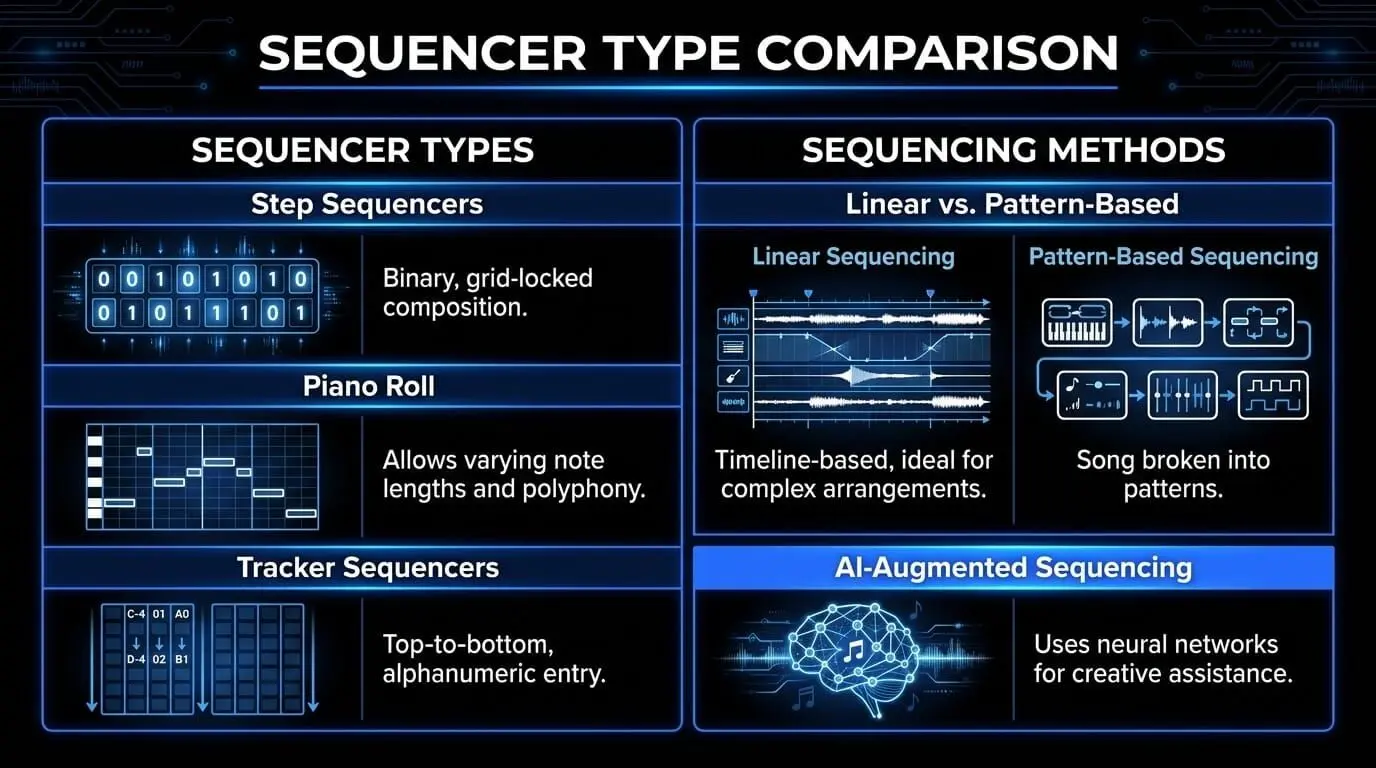
- Linear sequencing: This follows a timeline, much like a film editor’s workspace. You start at 0:00 and move toward the end of the song. This is ideal for complex arrangements and film scoring.
- Pattern-based sequencing: The song is broken into small "chunks" or patterns (e.g., a 4-bar verse, a 2-bar drum fill). These patterns are then triggered in different orders. This is the workflow favored by electronic producers and beatmakers, popularized by the FL Studio "Step Sequencer" and Ableton Live’s "Session View."
The taxonomy of sequencers
To the uninitiated, all sequencers might look like a grid of buttons or a series of lines. However, the architecture of a sequencer dictates the "flavor" of the music produced. Choosing between a step sequencer and a piano roll is not just a matter of interface; it is a choice of compositional philosophy.
Step sequencers
The step sequencer is the most recognizable interface in electronic music. It typically consists of a row of 16 buttons, representing a single measure of 16th notes.
- The Workflow: You toggle steps "on" or "off." It is a binary approach to composition. Because it is mathematically locked to the grid, it is the industry standard for drum programming and driving rhythmic basslines.
- Classic Example: The Roland TR-808 and TR-909. These machines defined the sound of Techno and House because their sequencers forced a certain rhythmic rigidity that happens to be perfect for the dance floor.
- Modern Adaptation: Most modern DAWs, notably FL Studio, use a step sequencer as their primary entry point. It allows a producer to "draw" a beat in seconds, fostering a rapid-fire creative workflow.
Piano roll sequencers
If the step sequencer is a drum machine, the Piano Roll is a digital canvas for melodic expression. It represents time on the horizontal axis and pitch on the vertical axis (arranged like a piano keyboard).
- Note Manipulation: Unlike the step sequencer, a piano roll allows for varying note lengths (sustain) and complex overlapping (polyphony).
- Velocity and Articulation: Producers use the piano roll to "draw" velocity curves, mimicking the soft and hard strikes of a real pianist.
- Micro-Quantization: Within the piano roll, a producer can nudge a note slightly off the grid—known as Humanization—to add "swing" or "groove" that feels less robotic.
Tracker sequencers
A "Tracker" is a unique breed of sequencer that originated in the 1980s Amiga scene. Unlike linear DAWs that move left-to-right, Trackers move top-to-bottom.
- Alphanumeric Entry: Music is entered as a series of codes (e.g., C-4 01 v64).
- The Advantage: Trackers are incredibly efficient for complex, glitchy programming. They allow for per-step commands, such as changing the volume or pitch of a single note instantly. Modern hardware like the Polyend Tracker has revitalized this "vertical" workflow for a new generation.
How sequencers are used in professional music production
The application of a sequencer extends far beyond the simple input of notes. It is a tool for sound design, arrangement, and mixing automation.
Programming and humanizing drums
The primary use case for sequencers is the creation of rhythmic foundations. Professional producers use the sequencer to escape the robotic feel of a standard grid.
- Micro-timing: By nudging specific hits—such as a snare—slightly off the grid, a producer can create swing.
- Layering: Sequencers allow for the simultaneous triggering of multiple samples on a single note, enabling the creation of complex, hybrid drum sounds.
Composition and arrangement
In the DAW Timeline, the sequencer is used to manage the macro-structure of a song. This involves sequencing large blocks of data, known as clips or regions.
- Non-Linear Arrangement: Modern sequencers allow producers to experiment with different song structures—moving a chorus before a verse or extending an intro—without having to re-record any audio.
Mix automation and sound design
A sequencer can also be used to sequence the parameters of a plugin or hardware device. This is known as Automation Sequencing.
- Dynamic Textures: A producer can sequence the filter cutoff of a synthesizer, ensuring the sound becomes brighter or darker in sync with the rhythm.
- Rhythmic FX: By sequencing the bypass switch of an effect like a delay or distortion, a producer can create intricate, rhythmic textures that are perfectly timed to the BPM of the track.
The frontier of ai-augmented sequencing
The transition from deterministic sequencing to probabilistic and generative sequencing represents the most significant shift in music technology since the advent of MIDI. While traditional sequencers rely on explicit user input for every note and velocity value, AI-augmented sequencers utilize neural networks and machine learning to assist in the creative process.
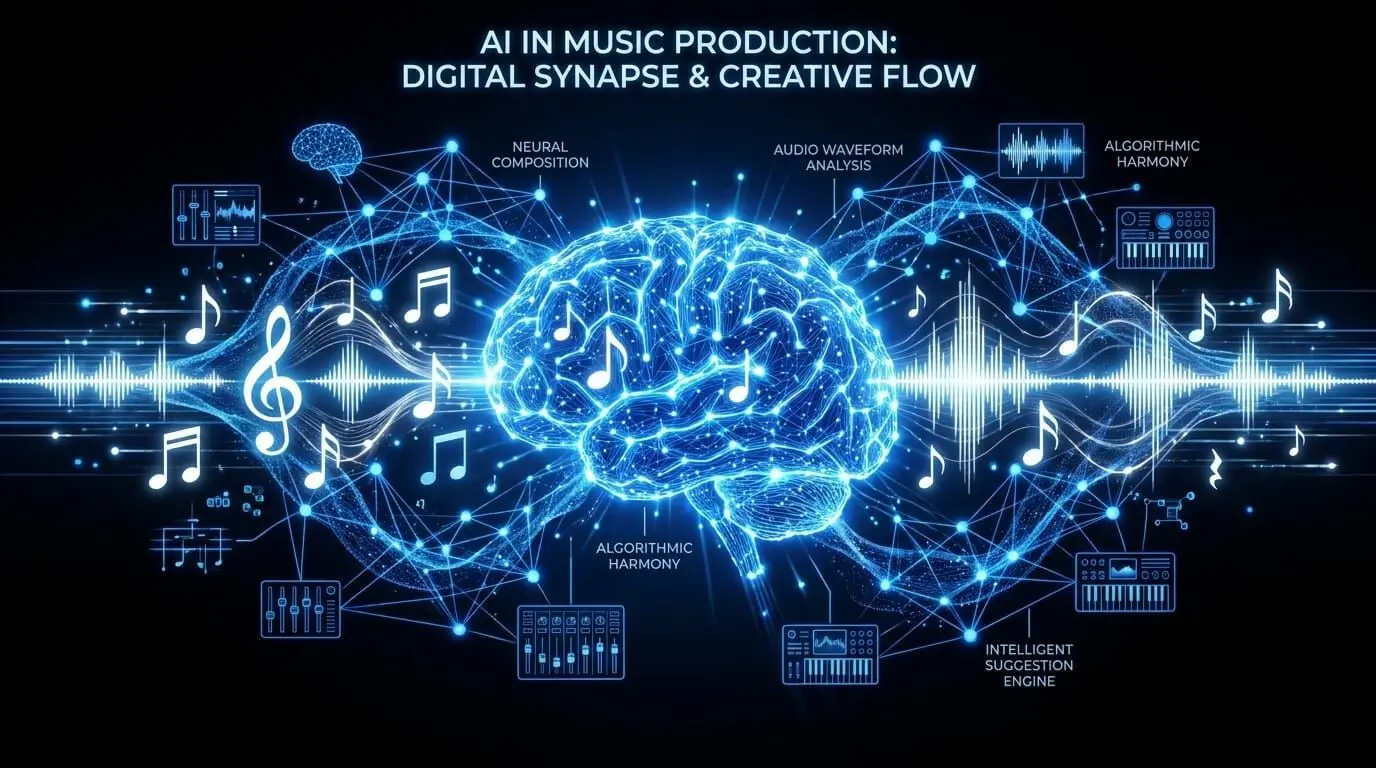
In 2026, industry-standard music SaaS platforms integrate Transformer-based models, similar to those used in natural language processing, but trained on vast datasets of musical theory and performance. These models do not simply randomize notes; they analyze the latent space of musical composition to understand genre-specific structures, harmonic progressions, and rhythmic nuances.
- Pattern Recognition: AI sequencers can identify the rhythmic DNA of a user-provided motif and suggest variations that maintain the same aesthetic profile.
- Harmonic Contextualization: By analyzing the existing tracks in a project, an AI-native sequencer can highlight scale-correct notes or suggest chord extensions—such as 9th or 13th chords—that align with the established tonality.
Generative composition vs. human intent
A critical distinction in modern sequencing is the balance between automation and agency. AI-augmented sequencing serves as a collaborative partner rather than a replacement.
- Predictive Input: As a producer draws a melody, the system predicts the most likely subsequent notes based on voice-leading principles.
- Generative Seeds: A producer may provide a seed—a simple four-bar phrase—and instruct the AI to generate ten variations. The producer then curates the results, maintaining creative control while accelerating the workflow.
Technical challenges and professional solutions
While the benefits of sequencing are extensive, professional production environments often face specific technical hurdles. Addressing these is critical for maintaining a high-fidelity output.
Latency and buffer management
Digital sequencing introduces a delay between the command and the sound, known as latency. In a professional SaaS environment, managing this is paramount.
The Solution: Producers must balance buffer size. A lower buffer (e.g., 64 samples) reduces latency for recording but increases CPU load. AI-native sequencers often utilize predictive latency compensation to align generative playback with existing audio tracks.
Clock jitter in hybrid setups
When synchronizing software sequencers with external analog hardware, jitter can occur. This is a variation in the timing of the clock signal.
The Solution: Using a dedicated hardware clock provider or a high-stability MIDI interface ensures that the jitter remains negligible. In 2026, network-based MIDI protocols like RTP-MIDI have largely solved these issues for cloud-integrated studios.
Future trends in sequencer technology
As we look toward the next decade, sequencing will become increasingly integrated with other forms of media and more intuitive in its interface.
Predictive arrangement and song mapping
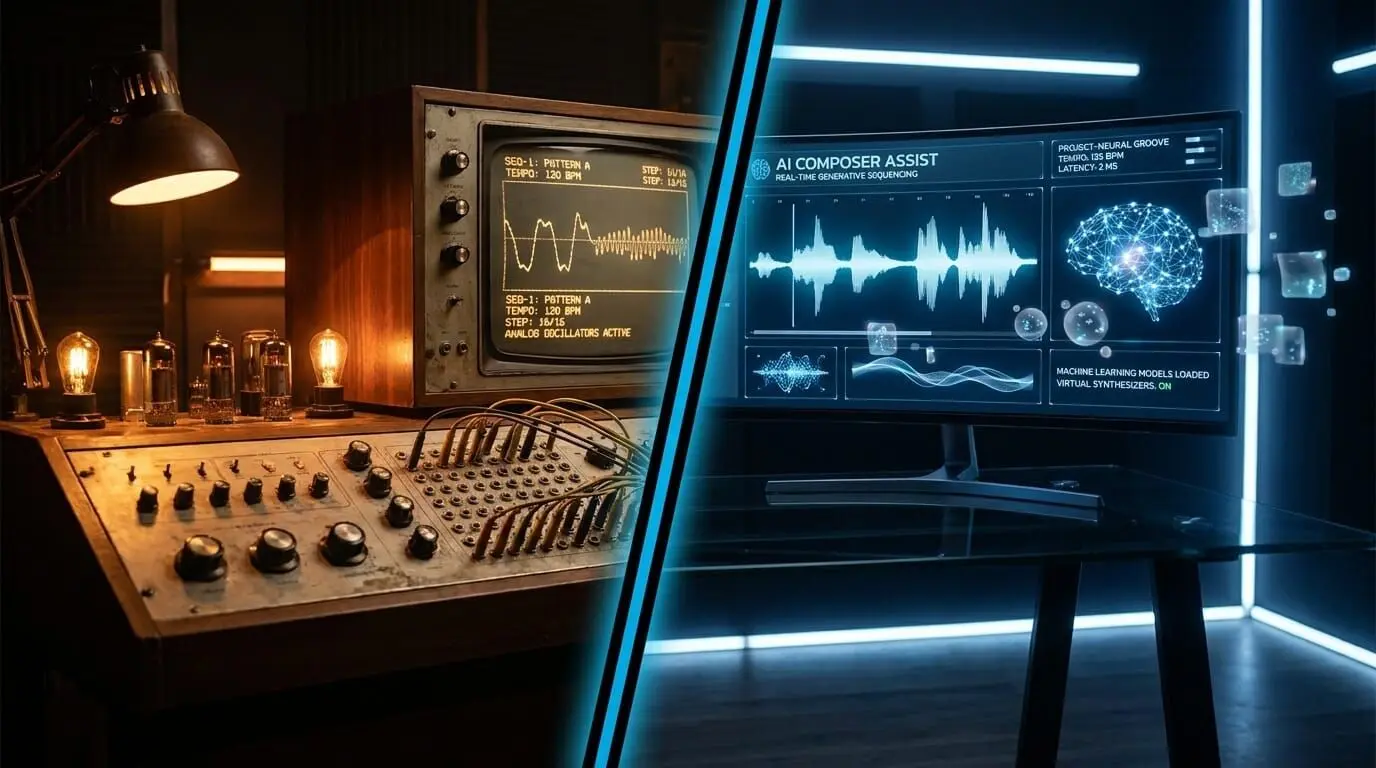
The next generation of sequencers will move beyond patterns and notes to manage entire song structures. Predictive arrangement engines will analyze the emotional arc of a project and suggest where to place builds, drops, and transitions. This level of macro-sequencing will allow producers to focus on high-level creative decisions while the software handles the tedious aspects of arrangement.
Cloud-Based collaborative sequencing
The rise of SaaS in music production has enabled real-time, multi-user sequencing. Similar to collaborative document editing, multiple producers can now manipulate the same MIDI grid simultaneously from different locations. This requires sophisticated version control and conflict resolution algorithms to ensure that the master sequence remains coherent.
Spatial audio sequencing
With the expansion of Dolby Atmos and immersive audio, sequencers are now being designed to handle three-dimensional spatial data. Instead of just sequencing volume and pan, producers can sequence the height, depth, and movement of a sound source within a 3D environment. This is particularly vital for film scoring and VR game development.
Choosing the right sequencer: a strategic buyer’s guide
Selecting a sequencer depends heavily on the intended workflow and the specific requirements of the producer.
Category | Recommended Tool Type | Primary Benefit |
Electronic Music & Beats | Step Sequencer / SaaS | Rapid pattern creation and rhythmic precision. |
Orchestral & Cinematic | Piano Roll / Linear DAW | Detailed melodic control and long-form arrangement. |
Live Performance | Hardware / Clip-based | Tactile control and low-latency stability. |
Experimental & Glitch | Tracker / Modular | Surgical control over per-step parameters. |
Rapid Prototyping | AI-Augmented SaaS | Overcoming creative blocks with generative suggestions. |
Frequently asked questions
What is the primary difference between a sequencer and MIDI?
It is critical to distinguish between the language and the translator. MIDI (Musical Instrument Digital Interface) is a communication protocol—a universal digital language that transmits performance data. A sequencer is the hardware or software environment that records, stores, and organizes that MIDI data. In short, MIDI is the information, while the sequencer is the architect that arranges that information in time.
How does a sequencer differ from an arpeggiator?
While both tools generate rhythmic patterns, their operation differs in terms of user agency. An arpeggiator is a real-time processor that takes a static chord input and breaks it into a repeating sequence of individual notes based on a set pattern (e.g., up, down, or random). A sequencer allows for the manual programming of every specific note, velocity, and duration. A sequencer offers total compositional control, whereas an arpeggiator is typically used for generative rhythmic textures.
What is a sequence in the context of music theory?
In technical terms, a sequence is a succession of musical motifs or patterns that are repeated at different pitch levels. Within a digital sequencer, a sequence refers to a specific block of recorded performance data—often a four or eight-bar phrase—that can be looped, transposed, or arranged on a timeline to construct a full composition.
Is hardware sequencing superior to software sequencing?
The choice between hardware and software is subjective and depends on the production requirements. Hardware sequencers (such as the Cirklon or Akai MPC) are favored for their tactile interface and dedicated timing chips, which offer a stable, low-jitter environment ideal for live performance. Software sequencers (DAWs) provide virtually unlimited track counts, complex visual automation, and seamless integration with AI-native generative tools, making them the standard for modern studio arrangement and film scoring.
Can a sequencer be used with analog synthesizers?
Yes, provided the sequencer supports the appropriate interface. Many modern sequencers include CV/Gate (Control Voltage) outputs specifically designed to communicate with vintage or modular analog hardware. For software-based sequencers, a MIDI-to-CV converter or a DC-coupled audio interface is required to translate digital instructions into the electrical voltages that analog oscillators and filters require.
How do I resolve latency issues when using a software sequencer?
Latency is the temporal delay between a MIDI trigger and the resulting audio output. This is typically managed by adjusting the Audio Buffer Size within the DAW. A smaller buffer (e.g., 128 samples) reduces latency for real-time tracking, while a larger buffer (e.g., 1024 samples) is used during the mixing phase to provide more CPU overhead for plugins and automation. Professional AI SaaS platforms often utilize advanced latency compensation algorithms to ensure that generative sequences remain perfectly aligned with recorded audio.
What are the best sequencers for beginners in 2026?
For individuals entering the field, software environments that offer an intuitive visual interface are recommended. FL Studio remains a premier choice due to its robust step sequencer, while Ableton Live is highly regarded for its clip-launching workflow. For those seeking an AI-first approach, our SaaS platform provides a streamlined entry point, using natural language processing to help beginners translate musical ideas into structured MIDI sequences without requiring extensive initial technical knowledge.