
Most indie games ship with forgettable audio. Not because the developers don't care, but because music and sound design sit at the bottom of the priority list until the very end of production. By then, there's no budget left, no time to learn a DAW, and the game launches with stock loops that sound like every other title on the Steam new releases page.
That's a problem, because audio is one of the biggest factors in whether a game feels polished or unfinished. Players might not consciously notice a great soundtrack, but they absolutely notice a bad one. Or worse, the absence of one. The good news is that creating original game audio has never been more accessible. Whether you're a solo developer or a small team, you can build a complete, original sound identity for your game without hiring a composer or spending months learning music production. Here's how.
Why Game Audio Matters More Than Most Developers Think
There's a reason AAA studios spend millions on audio. Sound does things that visuals can't:
Music sets emotional context. A quiet piano melody tells the player this is a safe space. A low drone with dissonant strings tells them something is wrong. Players process these cues instinctively, often before they've consciously registered what they're seeing on screen.
Sound effects create feedback loops. Every action in a game needs an audio response. A sword swing without a whoosh feels weightless. A door that opens silently feels broken. UI clicks, footsteps on different surfaces, environmental ambience: these tiny details are what make a game world feel reactive and real.
Voice brings characters to life. Even simple NPC barks ("Watch your step!" or "Come back anytime") add personality that text alone can't deliver. For narrative games, voice acting is often the difference between a story that lands and one that falls flat.
Most indie developers understand this intuitively. The problem has never been awareness. It's been the access.
The Traditional Options (and Why They Fall Short)
Before we get into the new approach, it's worth understanding why indie game audio has been so hard to get right.
Stock music libraries are the most common fallback. They're affordable and fast, but the selection is generic by design. You'll find "epic orchestral battle theme" and "cheerful village music," but you won't find something that captures the specific mood of your game's abandoned space station or your character's moment of quiet realization. Worse, other developers are buying the same tracks, so your game's emotional identity isn't actually yours.
Hiring freelance composers solves the quality problem but creates a budget problem. A custom game soundtrack from a professional composer typically runs $500 to $5,000+ depending on scope. Sound effects packages add more. Voice acting adds even more. For a solo developer funding their game out of savings, these numbers don't work.
Learning music production yourself is theoretically free, but the time investment is enormous. Becoming competent enough to produce game-quality music takes months or years of practice. Most indie developers are already stretched thin across programming, design, art, and marketing. Adding "learn music production" to that list is unrealistic.
The AI music generation has opened up a fourth option that didn't exist a few years ago.
Building Your Game's Soundtrack with AI
The core idea is simple: instead of composing music from scratch or licensing generic tracks, you use AI tools to generate original music that's tailored to your game. The output is yours, it's unique, and the process is fast enough to actually fit into an indie development timeline.
Here's what the practical workflow looks like.
Step 1: Define Your Audio Direction
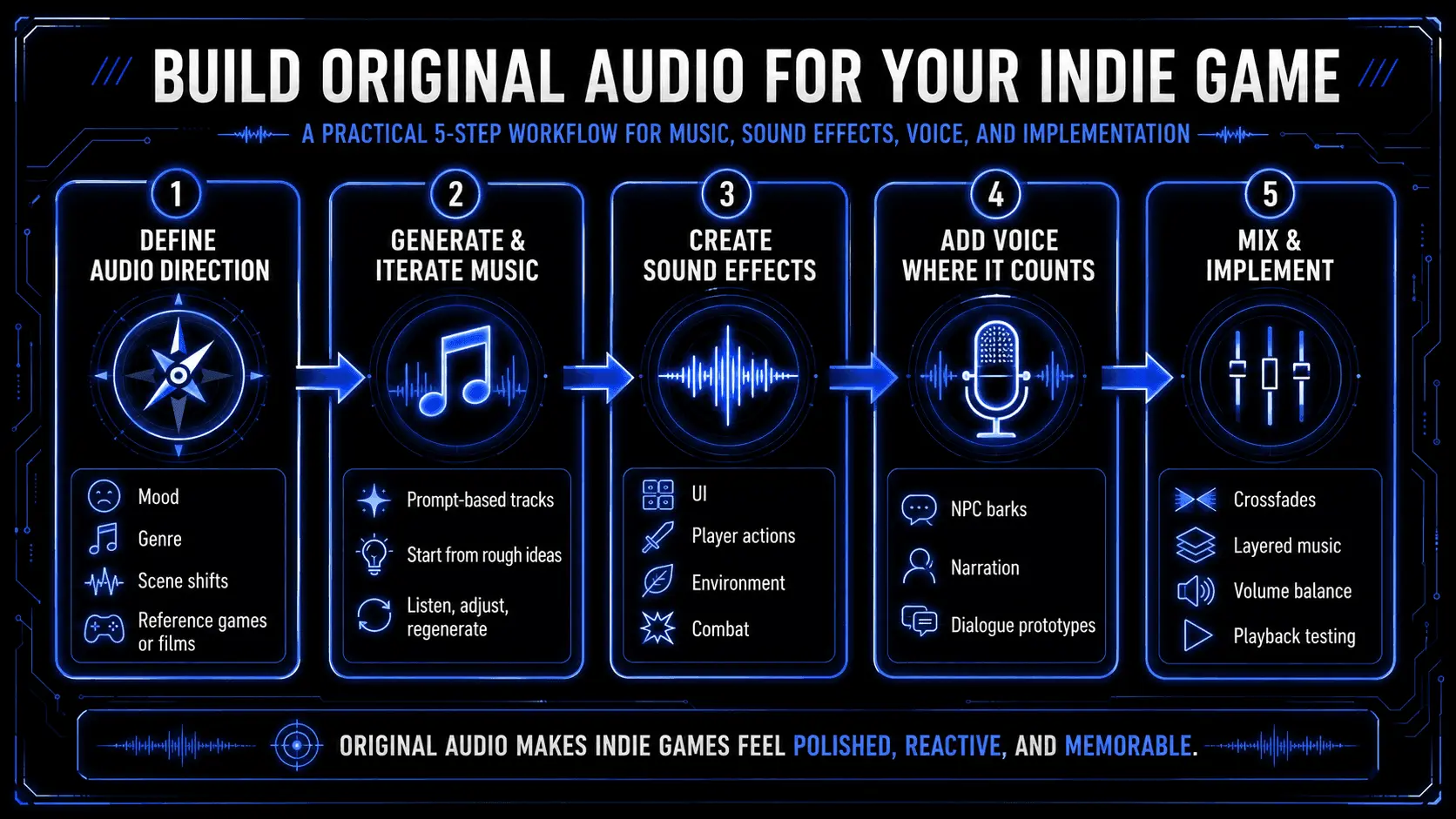
Before you generate anything, spend time thinking about what your game sounds like. This doesn't require musical knowledge. It requires creative direction. Ask yourself:
- What's the overall mood? (Tense, peaceful, melancholic, energetic)
- What genre fits? (Orchestral, electronic, acoustic, hybrid)
- How does the mood shift between areas or scenes?
- What real games or films have audio that feels similar to what you want?
Write this down as an audio brief, even if it's just a few bullet points per area. "Forest zone: calm, acoustic guitar, nature sounds, Stardew Valley vibes" is enough to work with. Having a clear direction before you start generating saves hours of iteration later.
Step 2: Generate and Iterate on Music
This is where AI tools change the game. Instead of staring at a blank DAW project or learning music theory, you can describe what you want in plain language and get a fully produced track back in seconds.
The most accessible approach is prompt-based generation. You type a description like "dark ambient electronic track, slow tempo, sci-fi horror mood" and the AI generates a complete piece of music. No musical knowledge required.
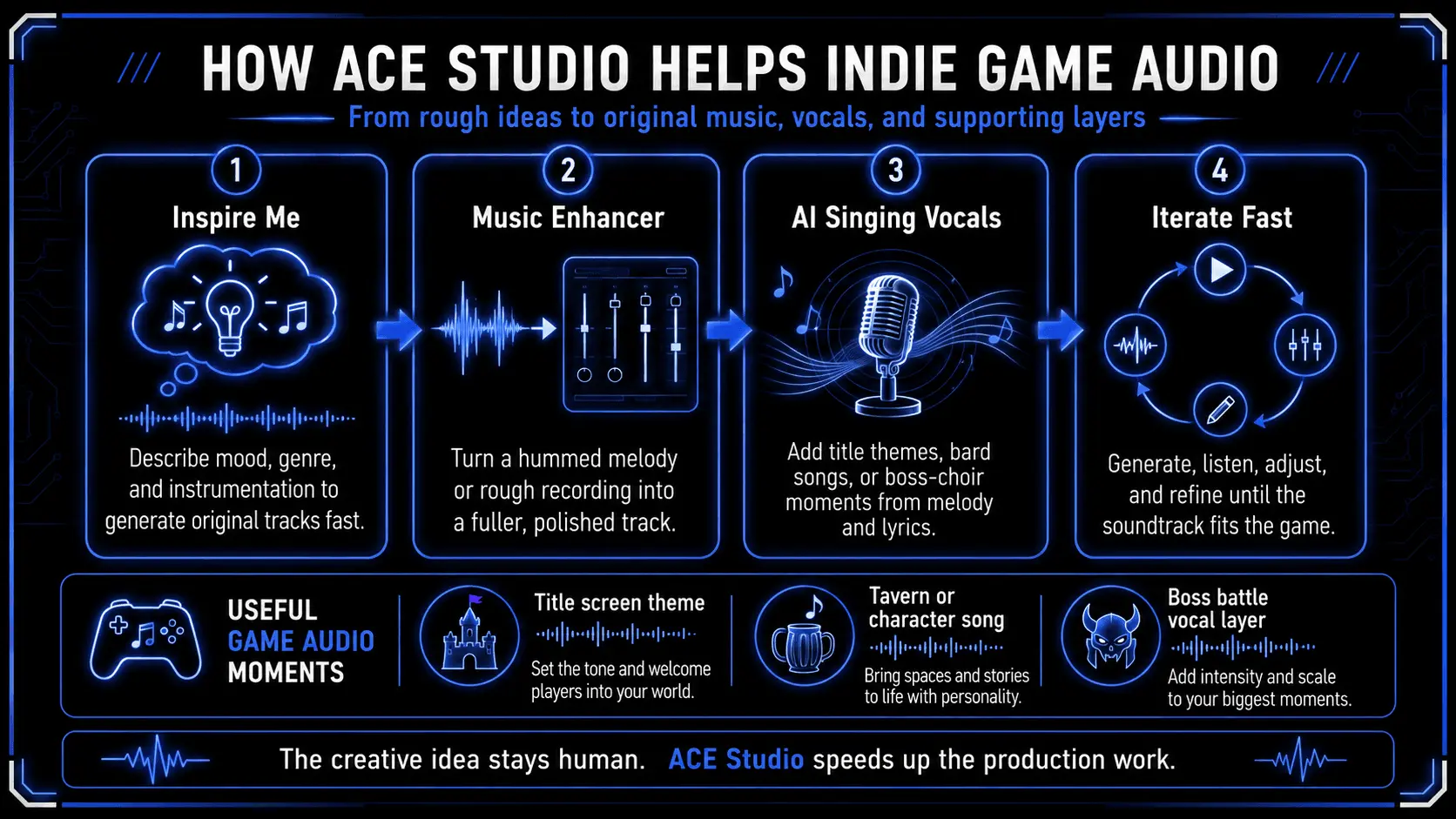
ACE Studio's Inspire Me feature works exactly this way: describe the mood, genre, and instrumentation you're after, and it generates original tracks that you can use directly or refine further. This is the fastest path from "I need music" to "I have music."
But generation is just the starting point. What makes AI music tools truly powerful for game development is the ability to build on rough ideas. Maybe you have a melody stuck in your head. You hum it into your phone, or tap it out on a keyboard. It sounds rough, maybe even embarrassing. That's fine.
Tools like ACE Studio's Music Enhancer can take a simple recording of you humming or playing a basic melody and transform it into a fully arranged, polished track. It fills in the instrumentation, adds harmonic depth, and produces something that sounds professionally composed, all starting from your raw creative idea.
This matters because it means the music still comes from you. You're not just rolling the dice on random AI output. You're providing the creative seed, the core melody or vibe that makes your game's soundtrack feel intentional, and letting the AI handle the production work you don't have the skills or time for.
For games that need vocal elements, whether that's a title screen theme with singing, a bard performing in a tavern, or a choir behind a boss fight, AI vocal synthesis tools can generate expressive singing performances. You provide the melody and lyrics, choose a voice, and get a result that would otherwise require booking a studio session with a vocalist.
The key workflow principle: generate, listen, adjust, regenerate. Treat every output as a draft. The first version is rarely the final version, but it gets you to a strong starting point in minutes instead of days.
Step 3: Create Your Sound Effects
Sound effects are less glamorous than music but equally important. A typical indie game needs dozens to hundreds of individual effects:
- UI sounds: Menu clicks, hover effects, notification pings, error buzzes
- Player actions: Footsteps (on grass, stone, wood, metal), jumping, landing, attacks
- Environmental: Wind, rain, fire crackling, water flowing, machinery humming
- Interactive objects: Doors opening, chests unlocking, items being picked up, switches toggling
- Combat: Weapon swings, impacts, projectiles, shields blocking, health pickups
Recording these yourself requires a microphone, a quiet space, and a lot of creativity with household objects. Stock sound effect libraries exist, but searching through thousands of files to find the right "wooden door creaking open" is tedious work.
AI sound effect generation lets you describe what you need in text and get a custom result. "Heavy stone door sliding open in a dungeon" gives you something more specific than any library search would.
The advantage isn't just speed. It's that every effect is generated fresh, so your game's audio fingerprint is genuinely unique.
Step 4: Add Voice Where It Counts
Not every indie game needs voice acting, but even minimal voice work can elevate the experience significantly. Consider these use cases:
NPC barks and ambient dialogue. Shopkeepers greeting the player, guards issuing warnings, townspeople chatting. These don't need award-winning performances. They need to be functional, consistent, and varied enough to not become annoying after the tenth time.
Narrator or tutorial voice. A voice guiding the player through mechanics or telling the story. This needs to be clean and easy to understand, but doesn't require the emotional range of a full voice performance.
Character dialogue in narrative games. This is where quality matters most, and where AI speech synthesis is most useful as a prototyping tool. Generate placeholder voice lines during development, test how dialogue flows in-game, then decide which characters warrant professional voice actors for the final release.
AI text-to-speech and voice synthesis tools have improved dramatically in recent years. Many now offer natural-sounding output with emotional range, consistent character voices, and the ability to generate hundreds of lines quickly. Voice cloning features mean a character sounds like the same person throughout the game, which is essential for believability.
It's worth noting that AI voice tools for spoken dialogue are a separate category from AI singing tools. Dialogue generation uses text-to-speech technology, while tools like ACE Studio specialize in singing voice synthesis for music and vocal tracks. For game dialogue, look at dedicated speech synthesis platforms that focus on natural-sounding spoken output.
Step 5: Mix and Implement
Having great individual audio assets is only half the battle. Implementation is where everything comes together.
Music implementation tips:
- Create smooth transitions between area themes using crossfades
- Have separate layers (melody, bass, percussion) that you can enable or disable based on gameplay state
- Use quieter, simpler tracks for exploration and more intense tracks for combat or key moments
- Test volume balance between music, sound effects, and voice early and often
Sound effect implementation tips:
- Randomize pitch and volume slightly on repeated sounds (footsteps, attacks) to avoid robotic repetition
- Layer multiple effects for impactful moments (explosion = boom + debris + rumble + echo)
- Pay attention to spatial audio if your game uses 3D space
- Don't forget UI sounds, as they're the most frequently heard audio in your game
General audio tips:
- Silence is a tool. Not every moment needs music or ambient sound
- Test your audio on multiple output devices (headphones, speakers, laptop speakers)
- Get feedback from playtesters specifically about audio. Ask "how did the game sound?" as a separate question
The Bigger Picture: AI Tools Across the Pipeline
Audio is one piece of the indie game production puzzle that AI is making more accessible, but it's not the only one. The other major bottleneck for indie developers has always been 3D assets, and AI is transforming that side of the pipeline just as dramatically.
On the visual side, AI 3D generation tools now let developers create game-ready models from text descriptions or reference images, skipping the traditional cycle of manual modeling, UV mapping, and texturing in tools like Blender or Maya.
In early-stage development, these tools are often used more as a rapid ideation layer than a production replacement. For example, rough concepts can be quickly turned into placeholder 3D assets using platforms such as Tripo, helping teams block out scenes, test proportions, and explore different visual directions without committing to full asset production.
As this workflow evolves, generated assets are frequently iterated or replaced entirely, but the value lies in speed rather than final output quality. The ability to quickly visualise an idea in-engine changes how early decisions are made and validated.
In many cases, this visual prototyping loop also influences other parts of production. When early environments or characters are generated this way—whether through Tripo or similar tools—it becomes easier to align audio design with visual direction much earlier in the pipeline.
The key value here is not in replacing traditional pipelines, but in compressing iteration time. A rough idea can become a visible in-engine object within minutes, which changes how quickly creative decisions can be validated.
For indie developers, this means the two historically hardest parts of game production—3D art and audio—are both becoming more accessible to non-specialists. A solo developer who can code and design can now realistically generate early visual assets using tools like Tripo and build an initial soundtrack, iterating quickly without waiting on external production cycles or relying entirely on generic asset libraries.
The broader trend is clear: the parts of game development that used to require specialized skills and large budgets are gradually becoming more accessible to smaller teams. The creative vision and design thinking that make a game worth playing remain entirely human. But the production layer that turns ideas into assets is becoming significantly faster and more flexible.
Conclusion
Your indie game deserves better than stock loops and silence. Original audio is what transforms a functional prototype into something that feels alive, and the tools to create it are now within reach of every developer.
Start with your audio direction. Generate, iterate, and refine. Treat your soundtrack and sound design with the same care you give your code and visuals. Players will notice the difference, even if they can't articulate exactly why your game feels more polished than the one they played yesterday.
The technology is ready. The question is whether you'll use it.
FAQ
How much does AI-generated game audio cost compared to traditional methods?
AI audio tools typically cost between $15 and $25 per month for a subscription, compared to $500 to $5,000+ for a freelance composer and $100+ per hour for voice actors. For indie developers on tight budgets, this makes original audio economically viable for the first time.
Can I use AI-generated audio in a commercial game?
Yes. Most AI audio generation tools, including ACE Studio, produce royalty-free output that you own and can use commercially. Always verify the specific license terms for each tool, but commercial use is standard.
Will players be able to tell the audio is AI-generated?
Quality varies by tool and by how much effort you put into selection and post-processing. Well-curated AI audio that fits the game's mood is indistinguishable from traditionally produced audio for most players. The key is iteration: don't use the first thing you generate. Treat AI output as a starting point and refine it.
Should I still hire a composer for some parts of my game?
If your budget allows it, professional composers bring creative interpretation and emotional nuance that AI can't fully replicate. A practical approach is to use AI for the bulk of your soundtrack and environmental audio, then invest in a composer for hero moments: your main theme, critical story beats, or a credits song.