

Key Takeaways
- Digital signal processing converts sound into numerical data, allowing producers to edit, analyze, and reshape audio with precision inside modern music software.
- Core DSP tools like EQ, compression, reverb, delay, noise reduction, pitch correction, and spatial audio are essential to almost every stage of music production.
- Sampling rate, bit depth, aliasing, quantization noise, and dither all affect how accurately analog sound is captured, processed, and exported.
- Hardware DSP can reduce latency during recording and monitoring, while native software processing offers flexibility for mixing, editing, sound design, and creative workflows.
- ACE Studio shows how DSP can move beyond correction by helping producers turn rough vocals, MIDI ideas, stems, and instrument sketches into editable, expressive musical performances.
Core Concepts of Digital Signal Processing
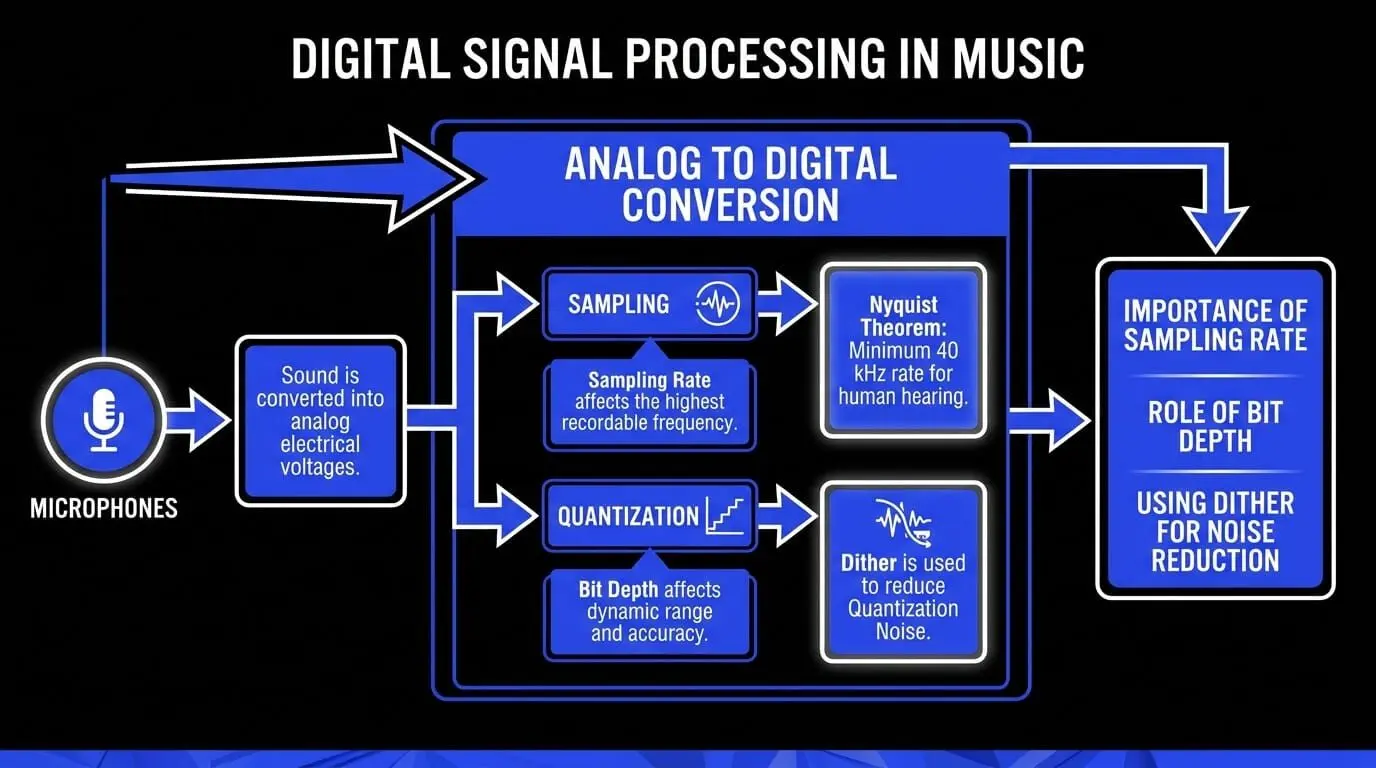
Sound travels as acoustic pressure waves. A microphone converts these into analog electrical voltages, which must be digitized for computer processing.
From Analog Voltage to Binary Data
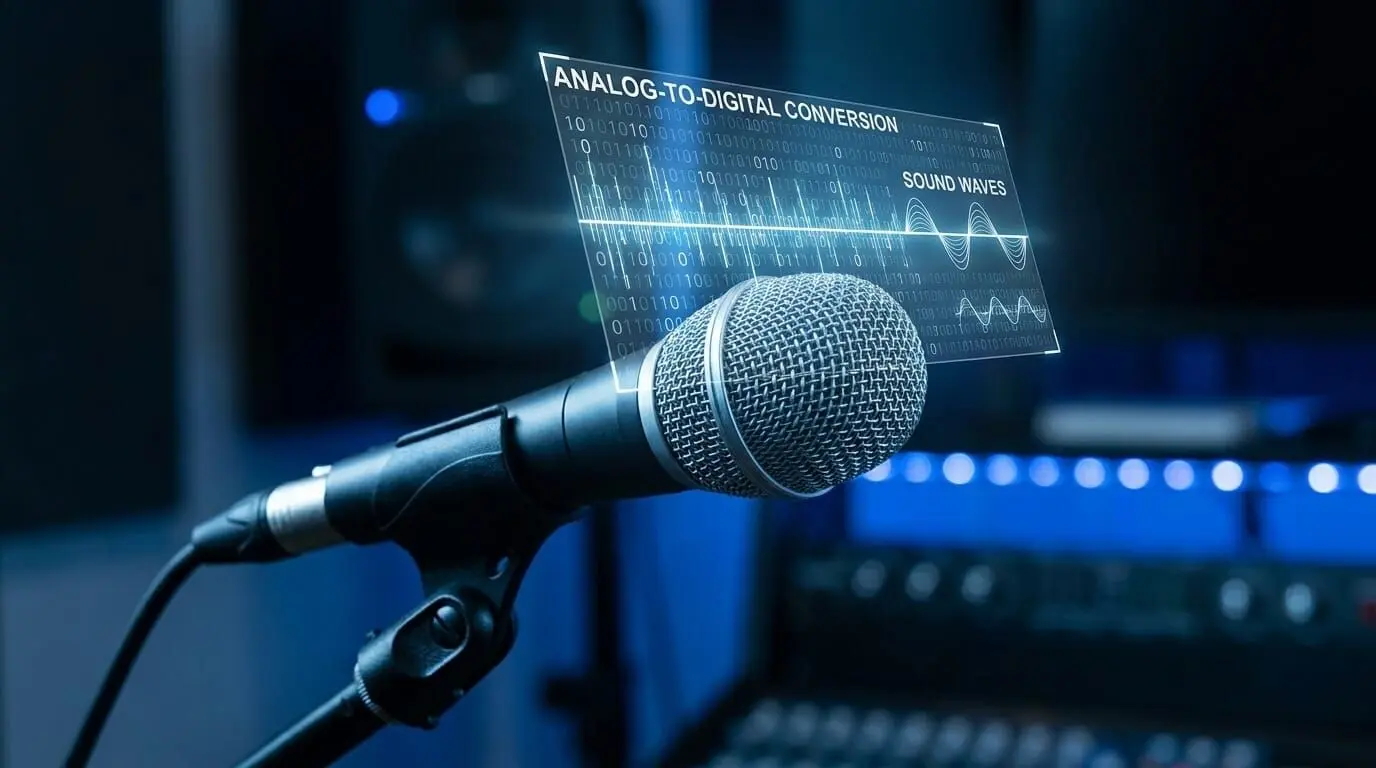
Computers process finite data, so analog signals are converted via an Analog-to-Digital Converter (ADC) through two key steps:
- Sampling: Measuring amplitude at precise time intervals.
- Quantization: Assigning numerical values to those measurements.
Sampling Rate and Nyquist Theorem
The Sampling Rate (measured in Hertz) determines the highest recordable frequency, governed by the Nyquist-Shannon Theorem:
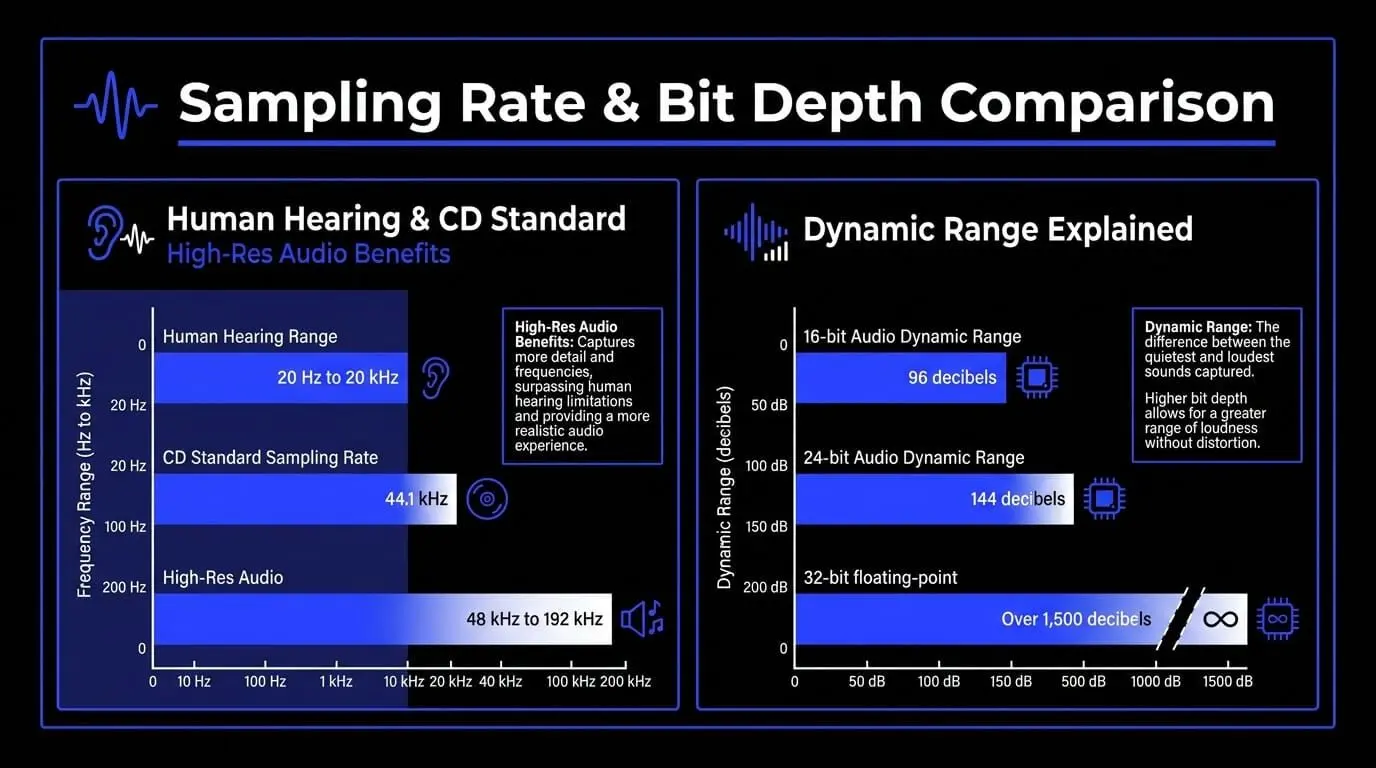
- Human Hearing: 20 Hz to 20 kHz; requires a minimum 40 kHz rate.
- CD Standard: 44.1 kHz to provide a safety margin.
- High-Res Audio: 48 kHz to 192 kHz reduces phase distortion and improves analysis accuracy.
Exceeding half the sampling rate causes Aliasing (inharmonic distortion). This is prevented using an anti-aliasing low-pass filter before conversion.
Bit Depth and Quantization Noise
Quantization maps signal amplitude to numerical steps. Accuracy depends on Bit Depth.
Bit depth determines the total number of amplitude levels available to represent the signal:
- 16-bit audio provides 2^16 or 65,536 distinct amplitude steps, yielding a theoretical dynamic range of 96 decibels.
- 24-bit audio expands this to 2^24 or 16,777,216 distinct levels, which delivers a theoretical dynamic range of 144 decibels.
- 32-bit floating-point processing uses a mathematical representation that supports an immense dynamic range exceeding 1,500 decibels. This makes it virtually impossible to distort or clip audio signals during internal software processing.
Rounding errors cause Quantization Noise. To mitigate this, developers use Dither—low-level random noise that masks harsh artifacts.
How Audio Algorithms Process Waveforms
Every plugin and virtual instrument uses mathematical audio algorithms. Key tools like the Fourier Transform enable frequency analysis and manipulation in real-time.

Digital Signal Processing as the Core of Modern Music Production
Every production phase in a modern studio depends on real-time data manipulation. Without these mathematical audio algorithms, it would be impossible to run software tools, design digital instruments, or mix tracks inside a computer.
Equalization and Spectral Filtering Techniques
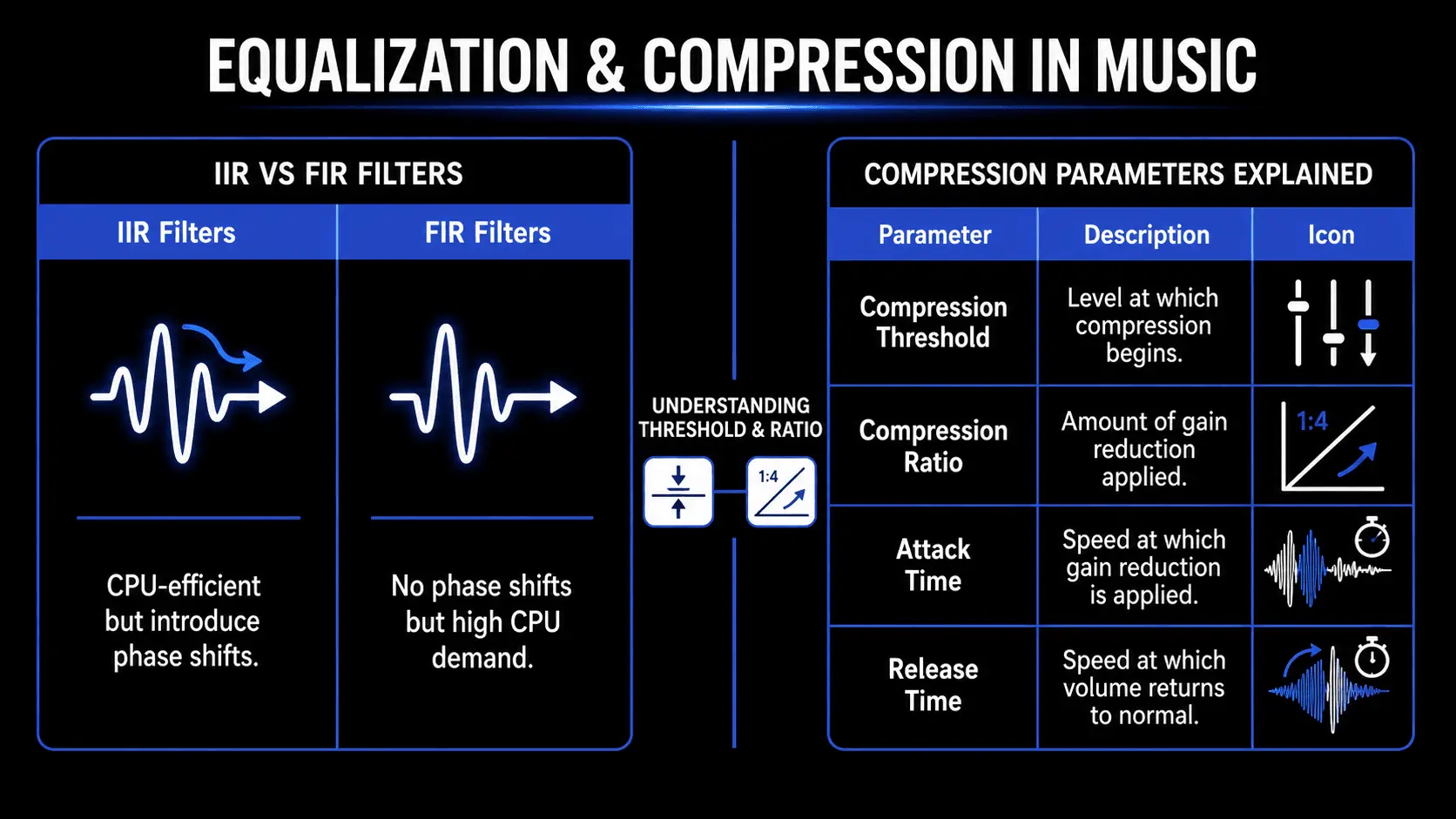
Equalization is the process of altering the balance of frequency components within an audio signal. Digital equalizers implement specialized filter algorithms to change the amplitude of specific frequency bands without affecting others.
Digital EQs generally utilize two primary types of filter designs:
- Infinite Impulse Response (IIR) Filters: These algorithms mimic traditional analog equalizers by using a feedback loop that feeds a portion of the processed output back into the filter input. This makes them highly CPU-efficient and ideal for low-latency recording applications. However, IIR filters introduce phase shifts, which can subtly alter the timing of different frequencies and introduce color to the sound.
- Linear Phase (FIR) Filters: Finite Impulse Response filters process audio without introducing any phase shifts. They achieve this by analyzing a fixed block of samples and applying a calculated time delay across the entire frequency spectrum. While linear phase equalizers preserve the precise alignment of transients, they demand significantly more processing power and can introduce pre-ringing artifacts, which can soften the punch of percussive sounds like drums.
Dynamic Range Compression and Processing
Dynamic range compression regulates the volume fluctuations of an audio signal, bringing down the loudest peaks and boosting the quietest details to achieve a more balanced mix.
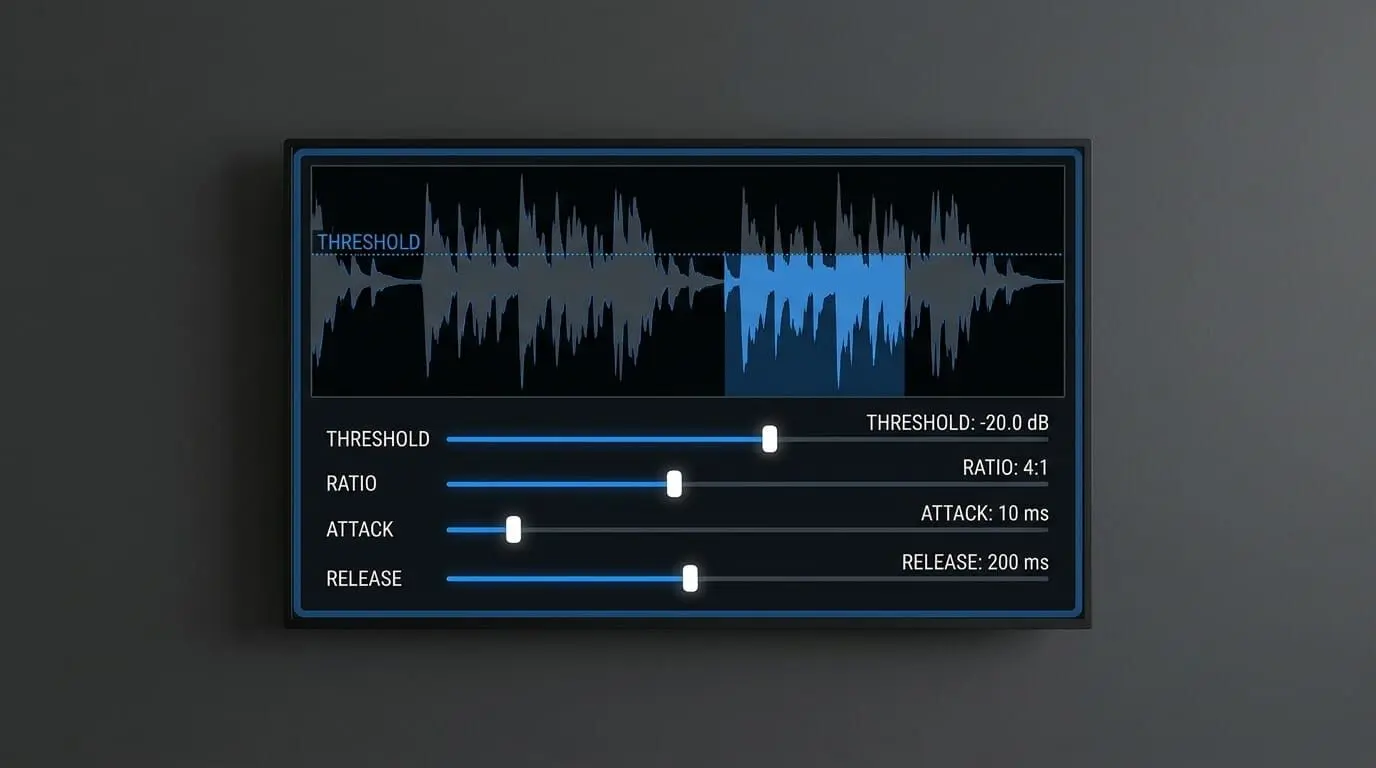
The processing engine analyzes incoming sample values against a set of user parameters:
- Threshold: The amplitude level at which the compressor begins working.
- Ratio: The amount of gain reduction applied once the signal crosses the threshold.
- Attack: The speed at which the algorithm applies gain reduction.
- Release: The speed at which the algorithm restores the signal to its original volume.
Advanced mastering tools often use multiband compression. This splits the incoming audio signal into multiple distinct frequency bands using a series of crossover filters. Each band is then processed by an independent compressor engine. This allows a mastering engineer to control a boomy low-end frequency around 60 Hz without affecting the dynamics of a lead vocal in the midrange or the brightness of cymbals in the high frequencies.
Time-Based Audio Effects and Spatial Simulation
Time-based audio effects like reverb, delay, chorus, and flanging are created by storing digital audio samples inside a temporary memory buffer and playing them back at calculated intervals.
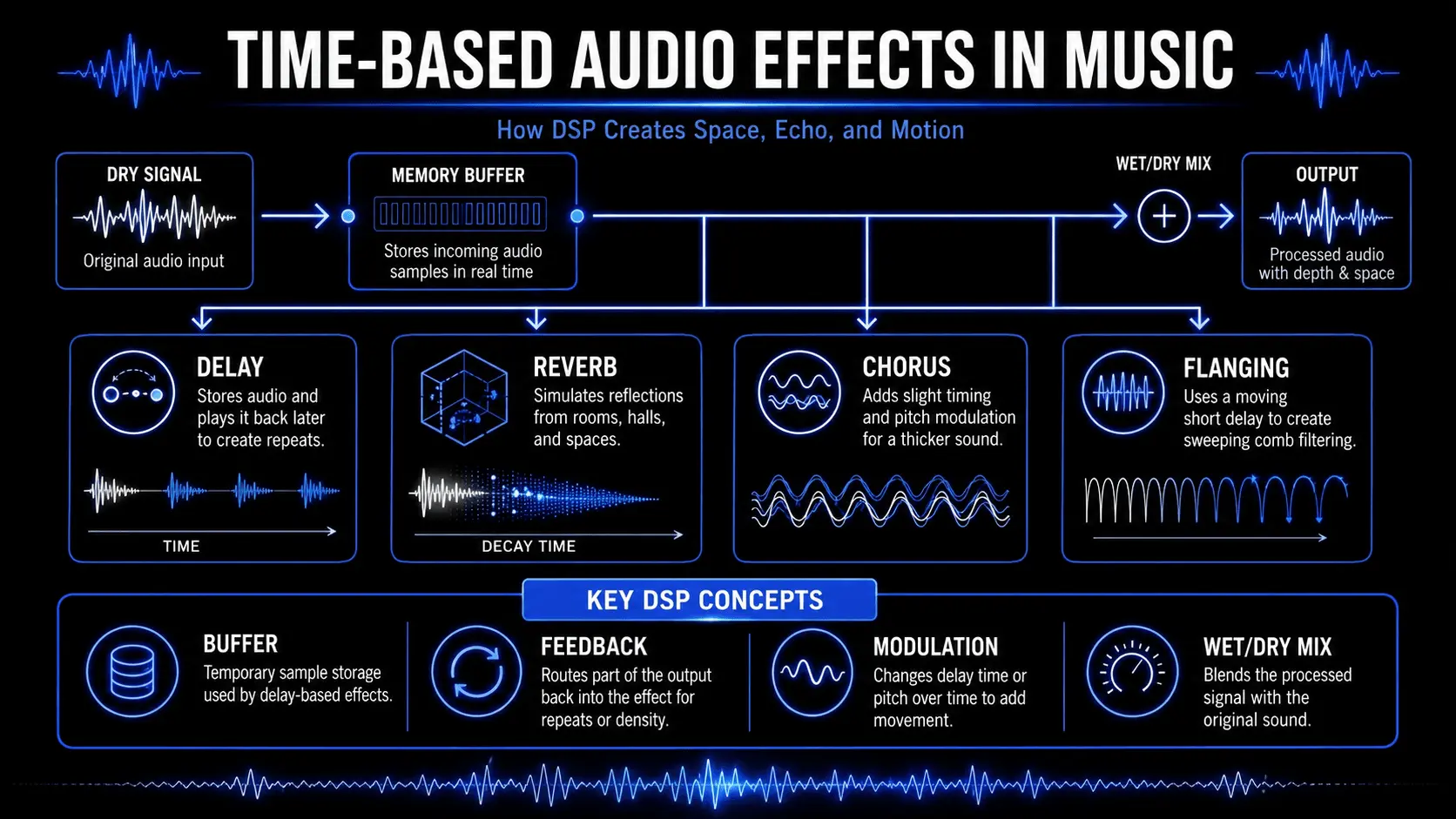
A simple digital delay copies the incoming sample stream, retains it in memory for a specified duration (such as 250 milliseconds), and mixes it back with the original dry signal. By routing a portion of that delayed output back into the processor input, the algorithm generates a series of repeating echoes.
Digital reverb processors fall into two primary categories:
- Algorithmic Reverbs: These plugins use complex networks of delay lines, feedback loops, and filtering algorithms to simulate the dense reflections of an acoustic space. They are highly customizable, allowing producers to adjust parameters like room size, decay time, damping, and diffusion.
- Convolution Reverbs: These processors utilize a technique called convolution to apply the acoustic characteristics of a real physical space to an audio track. This process requires an impulse response recording, which captures how a sharp burst of acoustic energy behaves in a specific room. The convolution engine performs a mathematical multiplication of every sample of the source audio with the impulse response, creating a highly realistic simulation of that physical environment.
Noise Reduction and Audio Restoration
Audio restoration tools rely on advanced signal manipulation to isolate and remove unwanted background noises like air conditioning rumble, tape hiss, electrical hum, and sudden clicks or pops.
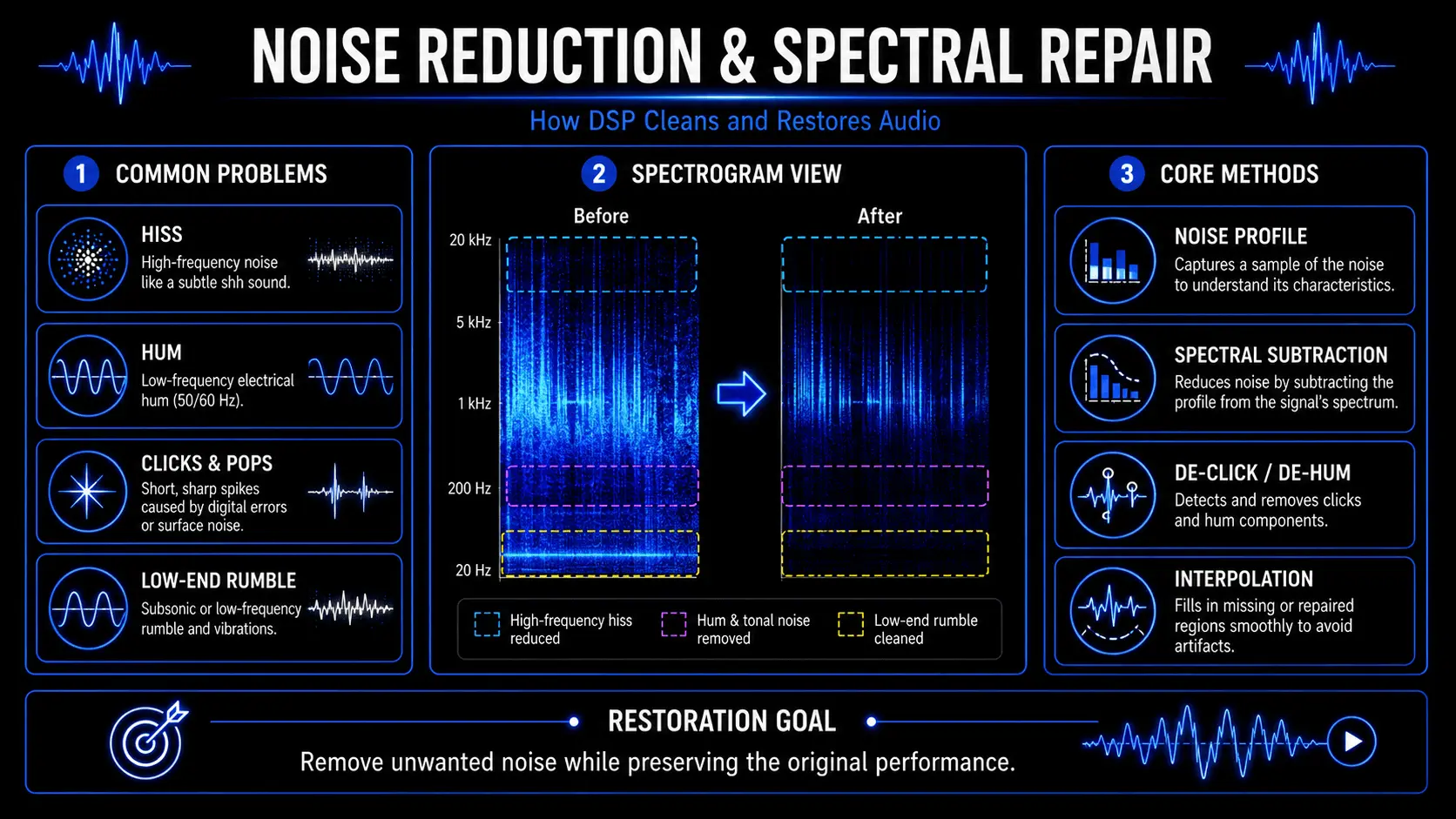
Modern restoration suites perform a spectral analysis of the incoming audio, converting the data from the time domain into the frequency domain. This allows the software to display audio as a visual spectrogram, mapping time across the horizontal axis, frequency across the vertical axis, and energy level via color intensity.
To remove steady background noise, the user feeds the software a short sample of pure noise. The algorithm analyzes this sample to establish a noise profile. It then applies spectral subtraction across the track, attenuating only the frequencies and energy levels that match the noise profile while leaving the desired performance intact.
Immersive Spatial Audio and Three-Dimensional Sound Design
The shift from standard stereo mixing toward immersive, object-based formats like Dolby Atmos and Ambisonics has created a need for advanced spatial audio processing.
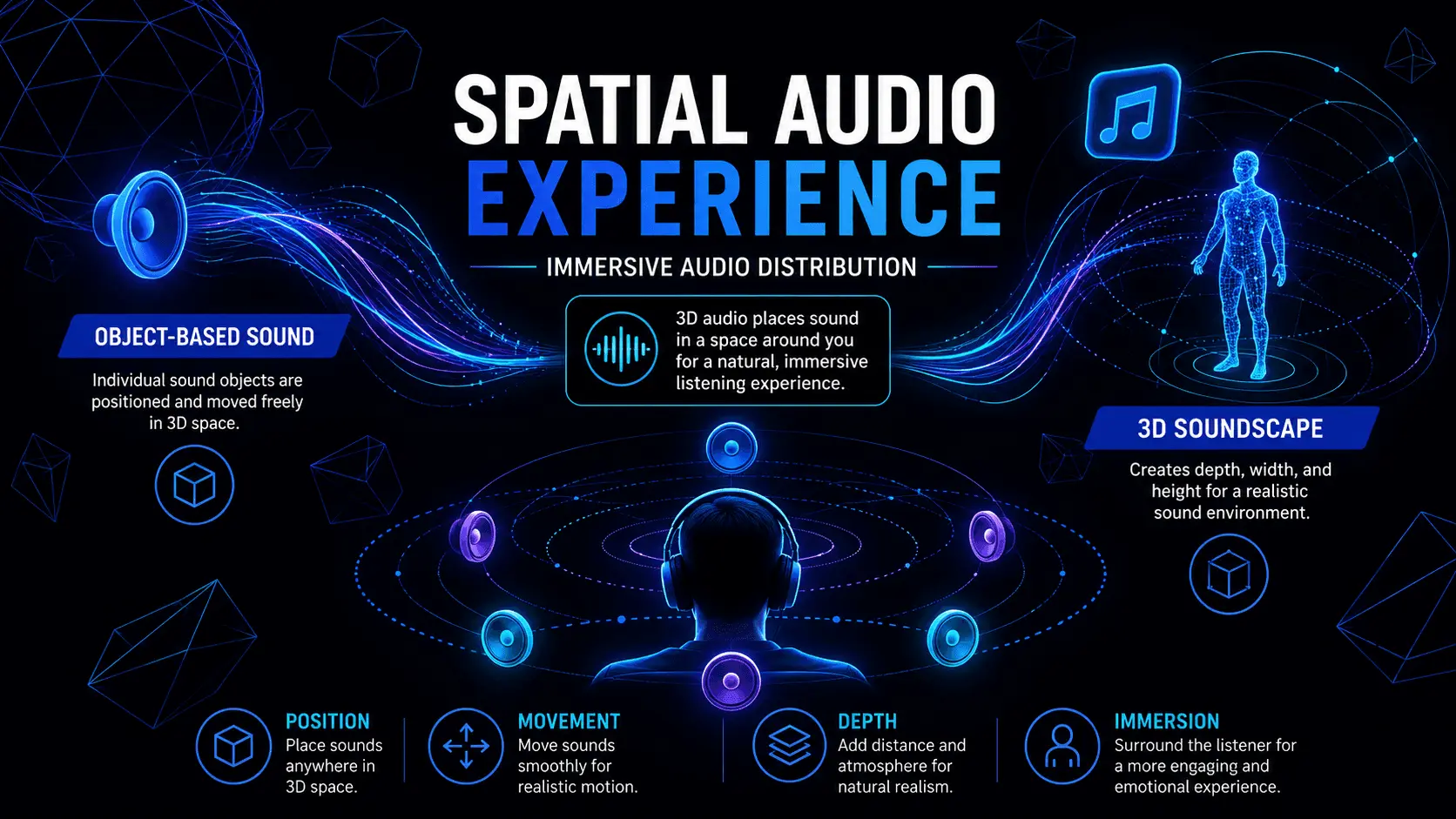
Instead of simply panning an audio signal between a left and right speaker channel, modern spatial processing software treats individual audio tracks as objects positioned within a three-dimensional virtual space. The processing engine calculates exactly how that sound should be distributed across an array of physical speakers to create an accurate sense of location, height, and movement.
When rendering immersive audio for standard headphones, the processor uses a Head-Related Transfer Function (HRTF). These algorithms mimic how human ears perceive sound placement in the real world. The processor applies precise frequency modifications, phase adjustments, and micro-delays to simulate how sound waves reflect off a listener's shoulders and outer ears. This allows a standard pair of headphones to replicate a full three-dimensional sound field.
Pitch Correction, Auto-Tuning, and Formant Manipulation
Pitch correction software has fundamentally transformed vocal production across modern commercial music genres. These tools use pitch-detection algorithms to analyze the fundamental frequency of an incoming audio signal in real time.
When a vocal note drifts away from the intended musical scale, the pitch correction algorithm shifts the waveform samples to align with the correct note. This adjustment can be applied transparently using gradual transitions, or aggressively to create the instantaneous, hard-quantized pitch shifts common in modern pop and hip-hop music.
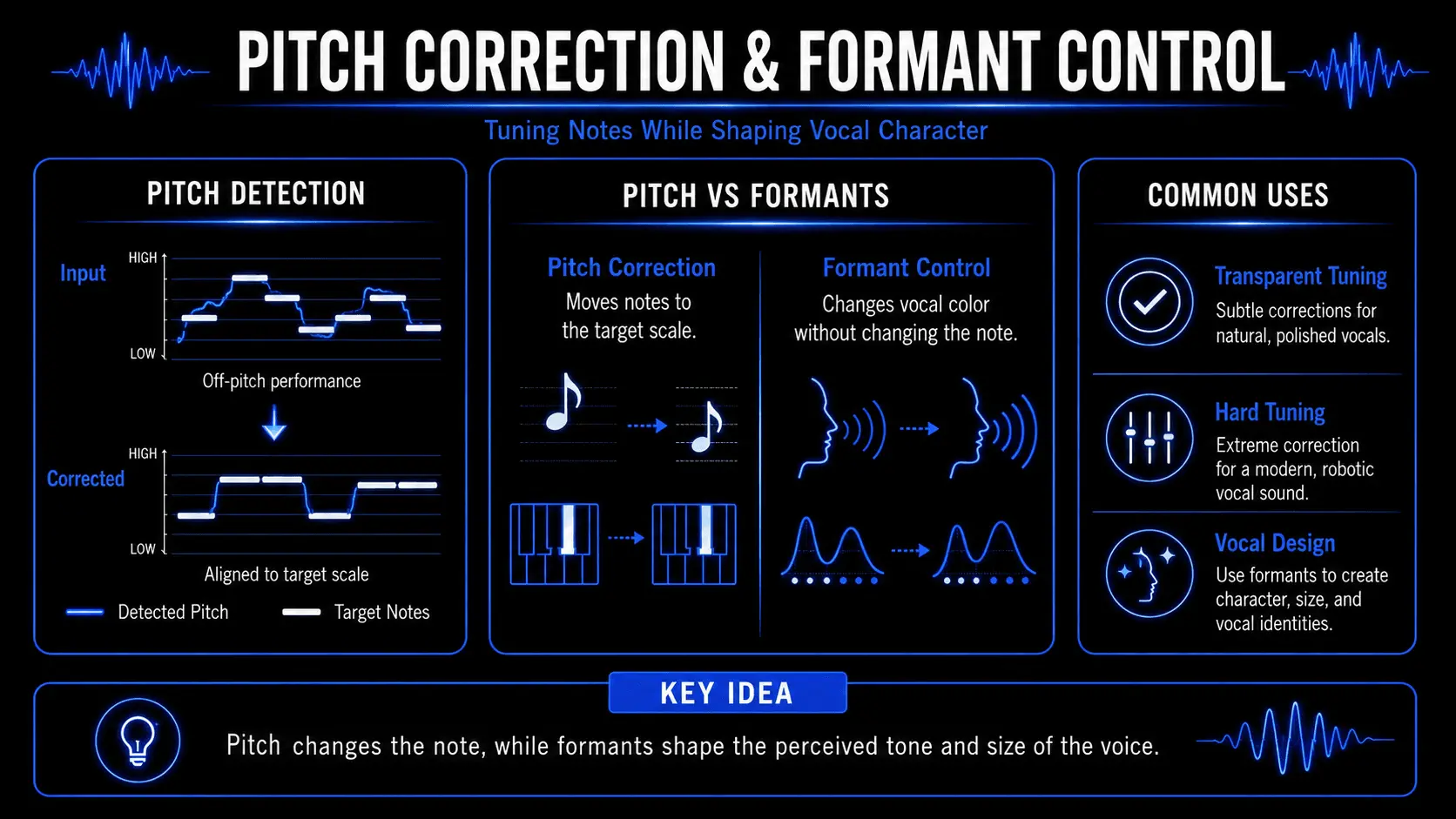
Advanced pitch processing tools also allow for independent manipulation of formants. Formants are the fixed frequency resonances determined by the physical shape of a singer's vocal tract and throat.
By shifting the pitch of a vocal performance while holding the formants steady, the processor keeps the natural character of the singer's voice intact. Conversely, modifying the formants while keeping the pitch constant allows producers to alter the apparent physical size and gender characteristics of the vocalist for creative effect.
Hardware vs. Software Architecture in Music Processing
DSP is executed via two main architectures:
- Native Processing: Handled by the computer's CPU. While flexible, overloads can cause latency or audio dropouts.
- Hardware Acceleration: Uses dedicated DSP chips to offload audio calculations, helping reduce latency and maintain stable real-time monitoring.
Hardware-accelerated processing is now common in many studio and live production setups, especially where low-latency monitoring is important. Many modern interfaces feature built-in processing chips that allow users to run equalizers, compressors, and vintage preamp emulations directly inside the interface's internal mixer application.
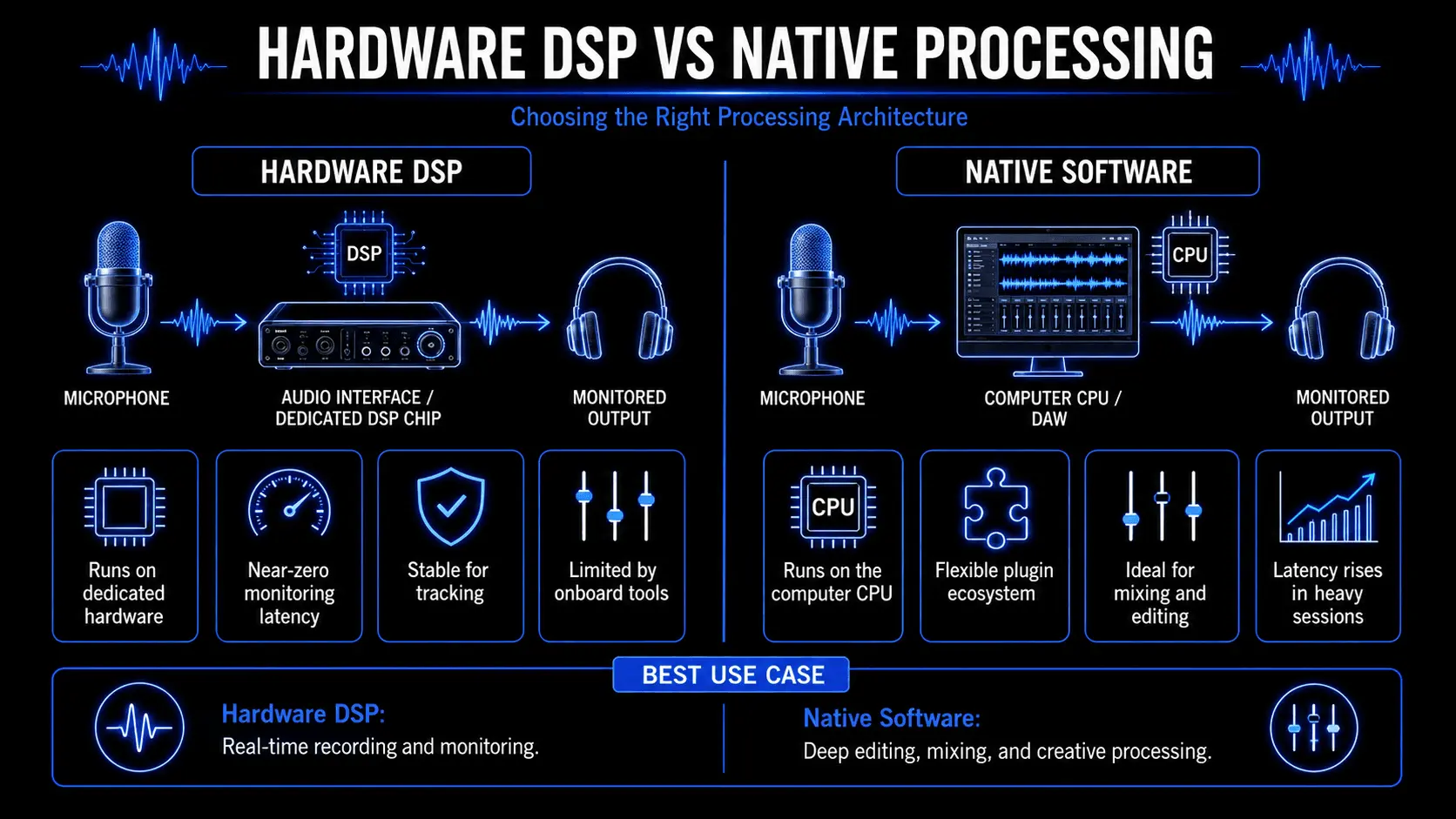
This layout allows musicians to monitor their performances with professional studio effects applied in real time, featuring latency figures below two milliseconds. This performance is impossible to achieve with native software processing when working inside a dense mixing project. The processed signal can be recorded directly into the digital audio workstation or used solely for monitoring purposes while tracking a clean, uncompressed performance.
Concrete Case Studies of Signal Processing Impact
To understand how these mathematical tools have reshaped the creative arts, let's explore two real-world examples where advanced processing changed traditional studio and live performance workflows.
Case Study 1: Transforming Live Guitar Performance with Neural Component Modeling
For decades, rock, metal, and blues guitarists relied entirely on heavy, expensive vacuum-tube amplifiers to achieve their signature tones. Early attempts to digitize these amplifiers using basic static equalizers and waveshaping distortion models often sounded flat, harsh, and failed to replicate the dynamic touch response of physical tubes.
Modern neural modeling allows producers and guitarists to recreate the behavior of analog amplifiers, cabinets, tubes, transformers, and speaker systems inside digital software or hardware processors. Instead of relying only on static EQ curves or basic distortion models, these systems analyze how real equipment responds to different input levels and playing dynamics. This gives musicians access to realistic amp-style tones, responsive saturation, and complex non-linear behavior without needing to record through large physical amplifier setups.
Case Study 2: Pristine Restoration of Archival Audio Recordings
In the early 2000s, audio preservationists faced a massive challenge when attempting to digitize and preserve historic recordings cut onto fragile wax cylinders, acetate discs, and deteriorating magnetic tapes. These priceless historical recordings were often plagued by severe surface noise, mold damage, deep scratches, and tape speed fluctuations.
The development of modern spectral repair software completely transformed the field of audio preservation. A prominent example occurred during the restoration of early jazz recordings from the 1920s.
Using traditional analog filters to cut out surface hiss would inadvertently remove the bright frequencies of brass trumpets and vocals, leaving the recording sounding muffled and muddy.
By converting these historic audio files into high-resolution visual spectrograms, restoration engineers used advanced spectral repair tools to isolate specific audio artifacts.
The software analyzed the visual thumbprint of a deep needle scratch and used pattern-matching algorithms to erase the artifact, seamlessly interpolating the missing musical data using surrounding spectral information.
This process allowed archival teams to remove decades of environmental degradation without altering the underlying musical performance, preserving historical cultural artifacts for future generations with pristine clarity.
Actionable Framework for Starting with Signal Processing
For musicians, engineers, and content creators looking to incorporate professional audio processing into their workflows, building a reliable setup requires careful consideration of both software and hardware tools.
Selecting Essential Music Production Software
Your software selection forms the core environment where digital audio processing happens. A strong production setup should support recording, editing, MIDI sequencing, mixing, automation, restoration, and final export without forcing unnecessary complexity into the workflow.
The first essential component is a digital audio workstation. This is where audio tracks are recorded, arranged, edited, processed, and mixed. The right DAW depends on the type of work being done. Some producers need fast MIDI programming and loop-based arrangement, while others need detailed multitrack recording, advanced audio editing, or complex routing for larger sessions.
Beyond the DAW, most workflows rely on a reliable set of core processing tools. Parametric equalizers help shape the frequency balance of individual tracks and full mixes. Compressors and limiters control dynamic range, reduce sudden peaks, and create a more stable listening experience. Reverbs, delays, modulation effects, saturation, and distortion processors add depth, space, movement, and character.
For more detailed editing, producers may also use pitch correction, time alignment, spectral repair, and noise reduction tools. These processors make it possible to fix tuning issues, tighten performances, remove unwanted sounds, and restore recordings that would be difficult to repair with basic editing alone.
The best software setup is not necessarily the largest one. A focused collection of well-understood tools is usually more effective than a crowded plugin folder. Producers should start with essential processors, learn how each one affects the signal, and expand only when a specific workflow problem requires a new tool.
ACE Studio and Digital Signal Processing in Music Creation
Digital signal processing in music is often discussed through technical tools: EQ, compression, pitch correction, reverb, stem separation, and audio restoration. ACE Studio works in that same technical space, but it brings the processing closer to the creative decision.
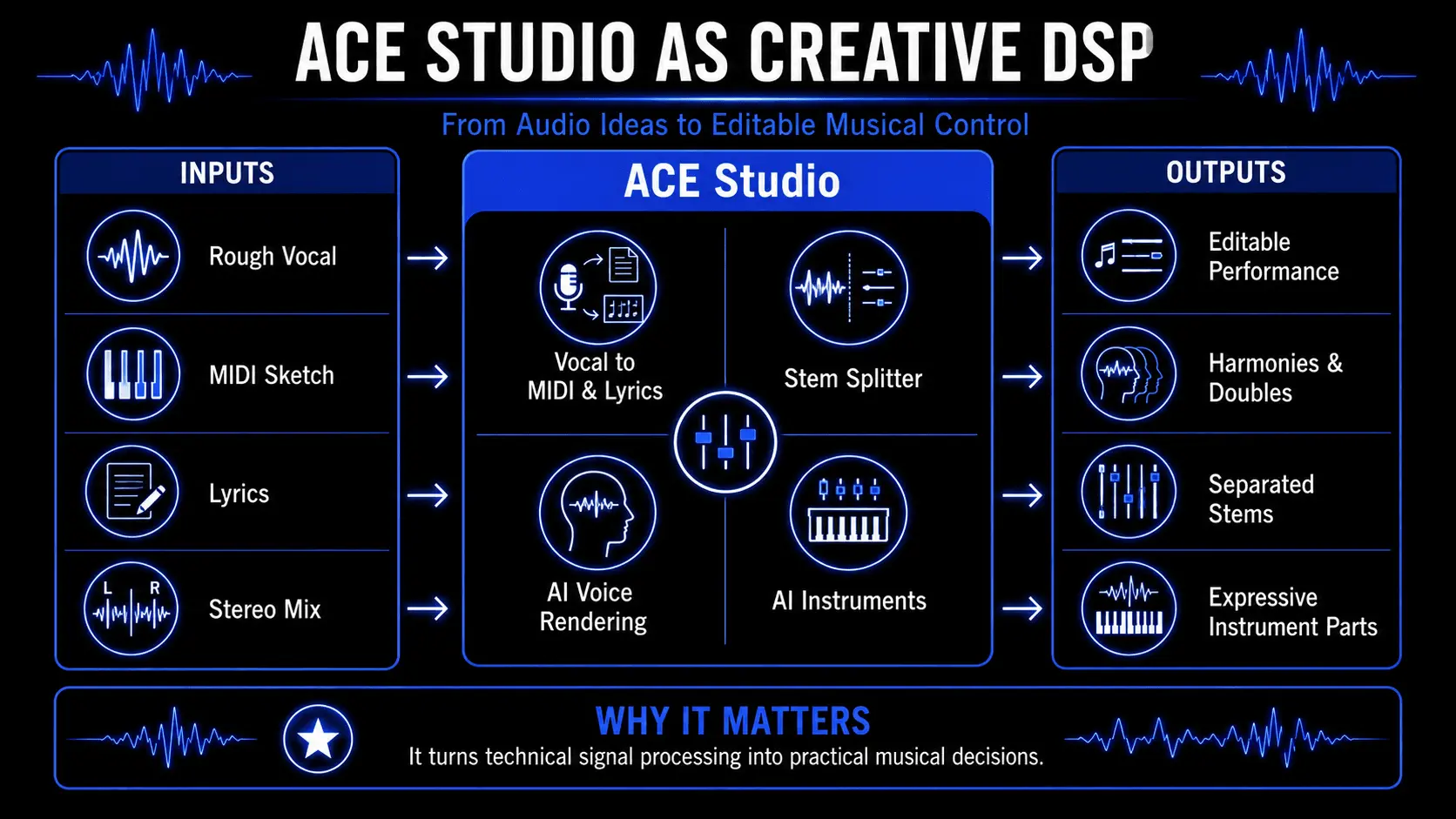
Instead of treating audio as something you only fix after recording, ACE Studio lets you turn musical ideas into editable performances. A rough vocal, a MIDI melody, a lyric phrase, or an instrumental sketch can become material you shape with pitch, timing, articulation, tone, and expression.
That matters because many production problems are not only mix problems. Sometimes the vocal feels stiff because the phrasing is too exact. Sometimes the harmony feels crowded because the syllables land too tightly together. Sometimes a MIDI string part sounds flat because the notes are correct, but the movement lacks breath and tension. ACE Studio gives producers a way to adjust those musical details before they become problems in the final mix.
From Rough Vocal Audio to Editable Performance
One of the clearest examples is vocal production. A songwriter may record a quick melody into a phone, a laptop microphone, or a basic studio setup. The idea may be strong, but the recording itself might not be ready for production. Traditional DSP tools can tune the pitch, reduce noise, compress the level, and smooth the tone. ACE Studio goes a step earlier in the process.
With Vocal to MIDI & Lyrics, a sung line can be converted into editable MIDI and lyric information. The producer can refine the melody, clean up note lengths, adjust timing, and reshape the phrase as musical data. From there, the part can be performed by an ACE Studio AI voice, with control over pitch curves, breaths, vibrato, phonemes, and vocal expression.
This is useful when the song idea is clear, but the original take is only a sketch. The producer does not have to force a weak recording to carry the final track. They can preserve the musical intent, rebuild the performance, and shape the vocal until it supports the song naturally.
Vocal Control Before Heavy Processing
A lot of vocal mixing depends on solving issues that begin in the performance itself. Harsh consonants, uneven phrase endings, rushed syllables, flat emotional delivery, and crowded doubles can all lead to heavier EQ, compression, de-essing, or editing later.
ACE Studio gives producers more control before that stage. You can adjust how a lyric is pronounced, where a breath enters, how a note bends into pitch, and how strongly a phrase is delivered. That kind of detail changes how the vocal responds to later processing.
A smoother phrase may need less corrective EQ. A more controlled consonant may need less de-essing. A better-shaped harmony may sit in the track without aggressive compression. The result is not just a cleaner vocal. It is a performance that gives the mix more room to breathe.
AI Instruments That Respond to Musical Intention
ACE Studio is not only a vocal tool. Its AI Instruments let producers create expressive instrument performances from MIDI, including parts such as strings, brass, saxophone, and other melodic instruments.
This is important in a DSP context because MIDI alone does not create expression. MIDI can tell a note when to start, when to stop, and how hard it was triggered, but musical realism comes from movement: articulation, transitions, dynamics, timing, and tone.
ACE Studio helps turn a MIDI sketch into a more responsive performance. A string line can feel more connected. A brass phrase can carry more lift. A saxophone part can move with more natural phrasing. For producers and composers, this makes it easier to test arrangement ideas without getting trapped in stiff placeholder sounds.
The benefit is practical. You can sketch a counter-melody, support a chorus, add a cinematic layer, or build a richer instrumental section while still controlling the notes and direction yourself.
Stem Separation for Remixing, Study, and Repair
Stem separation is another direct application of digital signal processing in music. ACE Studio’s Stem Splitter can separate elements from a full mix, giving producers more access to the parts inside a stereo file.
That can help in several real production situations. A remixer can isolate a vocal and build a new arrangement around it. A producer can study how a reference track balances drums, bass, vocals, and instruments. A songwriter can remove a part from a demo to make space for a new idea. A mixer can identify whether a problem is coming from the vocal, the low end, the drums, or a dense instrumental layer.
Stem separation does not replace the producer’s ear. It gives the ear better access to the material.
Turning DSP Into a Creative Tool, Not Just a Corrective One
The deeper value of ACE Studio is that it makes digital signal processing feel musical. The technology is still doing complex work under the surface: analyzing pitch, separating audio sources, converting vocal lines into MIDI, rendering AI voices, shaping instrument performances, and syncing material with a production session.
But the producer does not experience it as math. They experience it as control.
You can take a rough melody and make it sing clearly. You can turn a MIDI line into an expressive instrument part. You can separate a mix into usable pieces. You can build doubles, harmonies, choirs, and supporting layers without losing control of the arrangement. You can shape the performance before the final mix asks EQ and compression to do all the work.
That is where ACE Studio belongs in modern production. It helps musicians move between signal, structure, and performance with more precision. The artist still writes, edits, chooses, rejects, and refines. ACE Studio simply gives those decisions a wider set of musical surfaces to work on.
Choosing Optimal Hardware for Low Latency Performance
Audio interfaces with onboard DSP can help when musicians need to monitor vocals or instruments with effects applied in real time. This is useful during recording because performers can hear compression, EQ, or reverb without waiting for the computer to process everything natively.
For fully native workflows, the computer’s CPU, RAM, audio driver, and buffer size become more important. A powerful multi-core machine with enough memory helps producers run virtual instruments, algorithmic reverbs, mastering processors, and AI-assisted music tools more smoothly.
Practical Strategies for Sound Design and Mixing
Once your studio tools are set up, use these structured production strategies to maintain a clean, balanced mix:
- Apply High-Pass Filtering Early: Unwanted low-frequency rumble from traffic, air conditioners, or microphone handling can quickly mud up a mix. Use a high-pass filter to roll off unnecessary frequencies below 80 Hz on non-bass instruments like vocals, acoustic guitars, and hi-hats. This cleans up valuable headroom for your kick drum and bass line.
- Embrace Parallel Processing: Instead of inserting a heavy compressor directly onto a vocal or drum track, duplicate the signal or route it to an auxiliary bus. Apply aggressive compression to this parallel track, and blend it subtly underneath the clean, uncompressed performance. This lets you inject power, density, and sustain into your mix while fully preserving the natural transients and dynamics of the original performance.
Frequently Asked Questions
What does DSP mean in the context of music production?
In music production, this term stands for Digital Signal Processing. It refers to the use of mathematical algorithms to alter, filter, manipulate, or analyze audio signals once they have been converted from analog electrical voltages into digital numerical data streams inside a computer or hardware chip.
Is it better to use hardware DSP or native software plugins?
Neither is inherently superior; it depends entirely on your studio workflow requirements. Dedicated hardware processing chips eliminate system latency and offload computational tasks from your computer, which is ideal for real-time tracking and monitoring.
What is the difference between an IIR and an FIR filter?
Infinite Impulse Response (IIR) filters utilize an internal feedback loop to mimic traditional analog circuit behavior, making them highly CPU-efficient and ideal for real-time use, though they introduce minor phase shifts.
Finite Impulse Response (FIR) filters process blocks of audio without any phase distortion, making them perfect for precise mastering applications, though they require significantly more processing power and introduce system latency.
How does bit depth affect the quality of a digital audio recording?
Bit depth determines the dynamic range and amplitude accuracy of your digital audio. A higher bit depth provides more digital steps to capture changes in volume. 16-bit audio provides 96 dB of dynamic range, while 24-bit audio increases this to 144 dB. This significantly lowers the quantization noise floor, allowing you to capture quiet details without introducing digital distortion or hiss.
Why do some audio interfaces feature built-in processing chips?
Interfaces feature built-in processing chips to handle internal audio mixing and run studio effects like equalizers, compressors, and reverbs directly on the hardware. This layout allows musicians to monitor their performances with professional studio effects applied in real time with near-zero latency, without straining the host computer CPU.
What is aliasing in digital audio, and how is it prevented?
Aliasing is a harsh digital distortion that occurs when an incoming analog frequency exceeds half of the digital sampling rate. The system misinterprets this excessively high frequency as a lower, inharmonic frequency. It is prevented by choosing higher sampling rates and using an anti-aliasing low-pass filter on the audio interface inputs to block problematic high frequencies before conversion.
What is an impulse response in convolution reverb?
An impulse response is an audio recording that captures how a short, sharp burst of acoustic energy behaves inside a physical room or through an analog hardware unit. A convolution engine uses this recording to perform a continuous mathematical multiplication of your audio track with the impulse response, replicating the exact acoustic traits of that physical space.
How does dither work when exporting audio?
Dither is a low-level, random acoustic noise injected into your audio signal right before lowering its bit depth (such as exporting a 24-bit mixing project down to a 16-bit file for CD distribution). This random noise masks predictable quantization errors, converting harsh harmonic digital distortion into a steady, benign background hiss that is far less noticeable to human ears.
How do spatial audio processors mimic 3D sound on standard headphones?
Spatial audio processors utilize a Head-Related Transfer Function (HRTF). These algorithms apply precise frequency cuts, phase shifts, and micro-delays to simulate how physical sound waves bounce off a listener's shoulders and outer ears in the real world. This fools the brain into perceiving direction, height, and depth through a standard pair of left and right headphones.