
Key akeaways
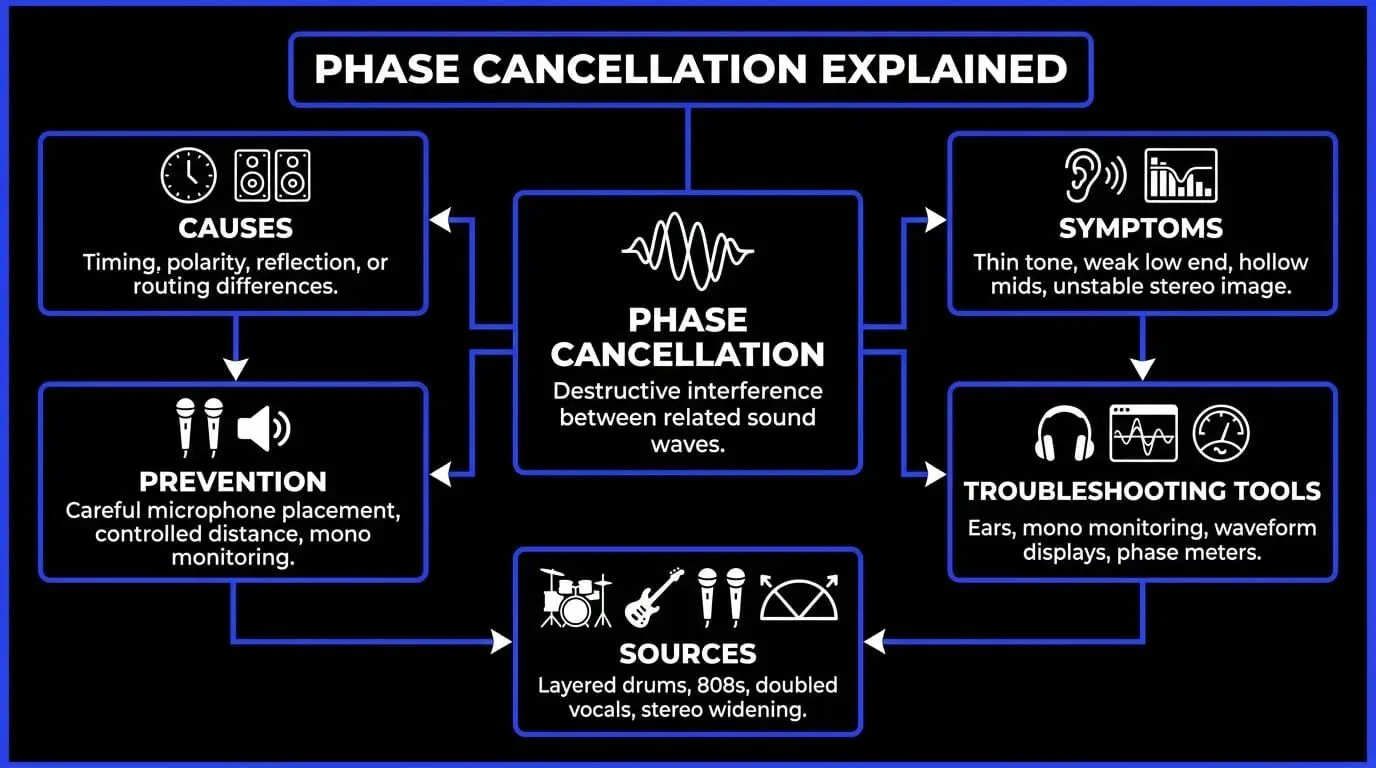
- Phase cancellation happens when related sound waves interfere with each other, often causing weak bass, hollow mids, smeared transients, or unstable stereo width.
- The most common causes are timing differences, polarity issues, microphone distance, room reflections, layered samples, stereo widening, and parallel processing.
- Mono checking is one of the fastest ways to reveal phase problems because important elements may become thin, quiet, or disappear when stereo signals are summed.
- Phase inversion can help diagnose polarity problems, but true phase alignment often requires timing adjustments, better mic placement, level changes, or arrangement decisions.
- A strong mix keeps essential elements like kick, bass, snare, lead vocal, and main hooks phase-coherent while using width and movement more carefully on supporting layers.
Why phase cancellation can make or break your sound
Phase cancellation is one of the most important audio engineering principles because it can decide whether a recording feels powerful, clear, and stable or thin, hollow, and unreliable. It is not only a technical issue for studio engineers. It affects music producers layering samples, podcasters using more than one microphone, filmmakers recording dialogue, live sound engineers managing stage microphones, and mastering engineers checking whether a mix survives mono playback.
At its simplest, phase cancellation happens when two related sound waves combine in a way that reduces part of the sound instead of reinforcing it. The result can be subtle audio interference, obvious sound cancellation, weak bass, smeared transients, unstable stereo sound, or phase distortion that changes the tone of a source. The core problem is usually waveform alignment. When two versions of the same or similar signal arrive at different times, their peaks and dips do not line up. Some parts add together. Other parts pull against each other.
Audio phase explained
How sound waves relate in time
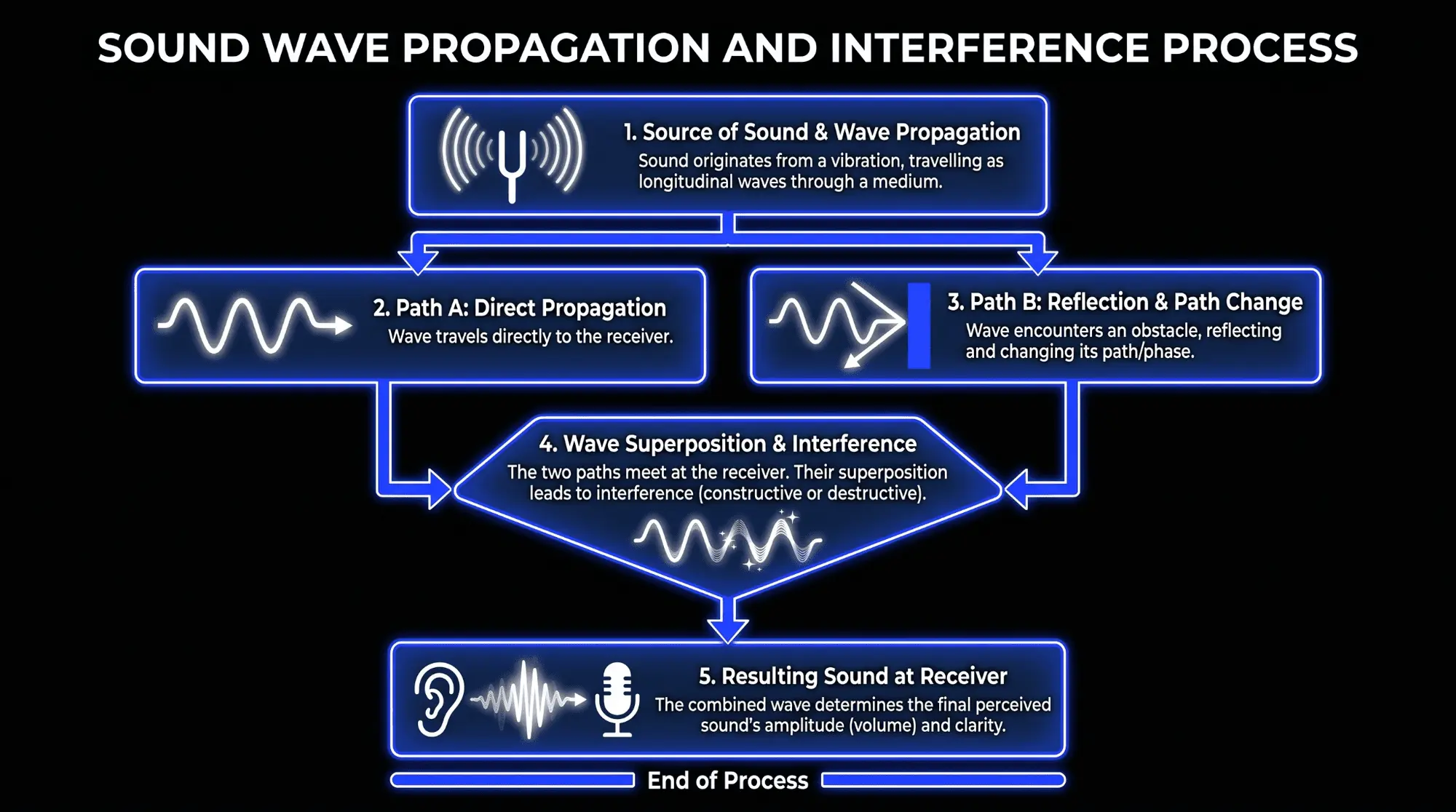
A sound wave is a repeating change in air pressure. When a microphone captures that pressure change, it becomes an electrical or digital waveform. The waveform rises and falls over time. The position of that rise and fall within its cycle is called the audio phase. If two waveforms begin their cycle at the same point and move together, they are in phase. If one waveform is delayed, inverted, reflected, processed, or captured from a different distance, its cycle can be shifted compared with the other signal.
Phase is best understood as a time relationship. When a snare drum is recorded with a close microphone and also appears in the overhead microphones, the overhead version reaches the microphones slightly later because the sound travels farther. Both signals contain the snare, but they do not reach the recording system at exactly the same moment. When those tracks are mixed together, the shared snare energy can reinforce in some frequency areas and cancel in others. That is one of the most common audio phase issues in real recordings.
The same principle applies outside drum recording. A vocal captured by two microphones, a guitar recorded with a microphone and a direct input, a bass cabinet blended with a DI, a doubled synth patch, and a stereo sample with poorly controlled widening can all create sound wave interference. The signals do not have to be identical to create problems. They only need to contain enough similar information for interference to become audible.
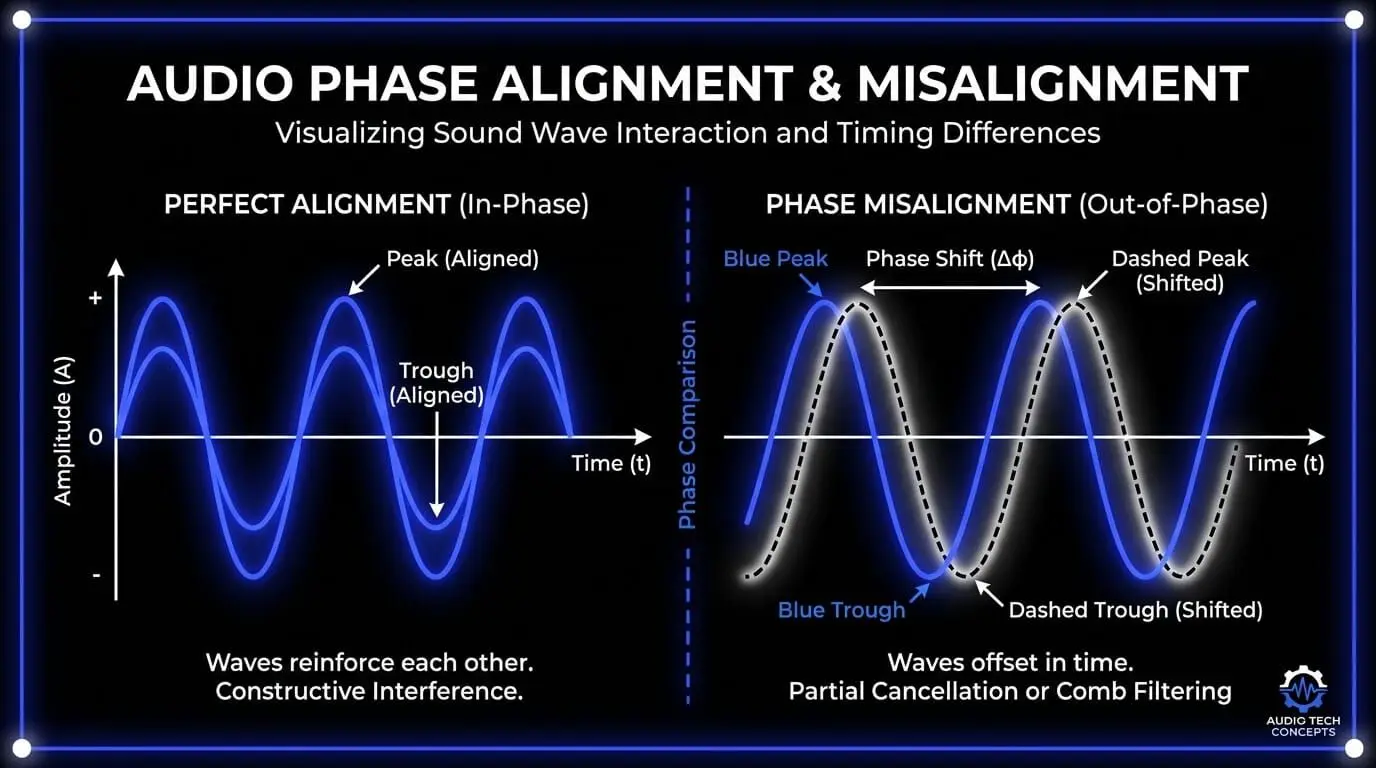
Constructive and destructive interference
When related waves combine, they can create two broad types of interference. Constructive interference happens when waveforms support each other. Peaks align with peaks and troughs align with troughs, so the combined sound becomes stronger. This is why a well-aligned kick drum sample layer can make the low end feel larger, tighter, and more confident.
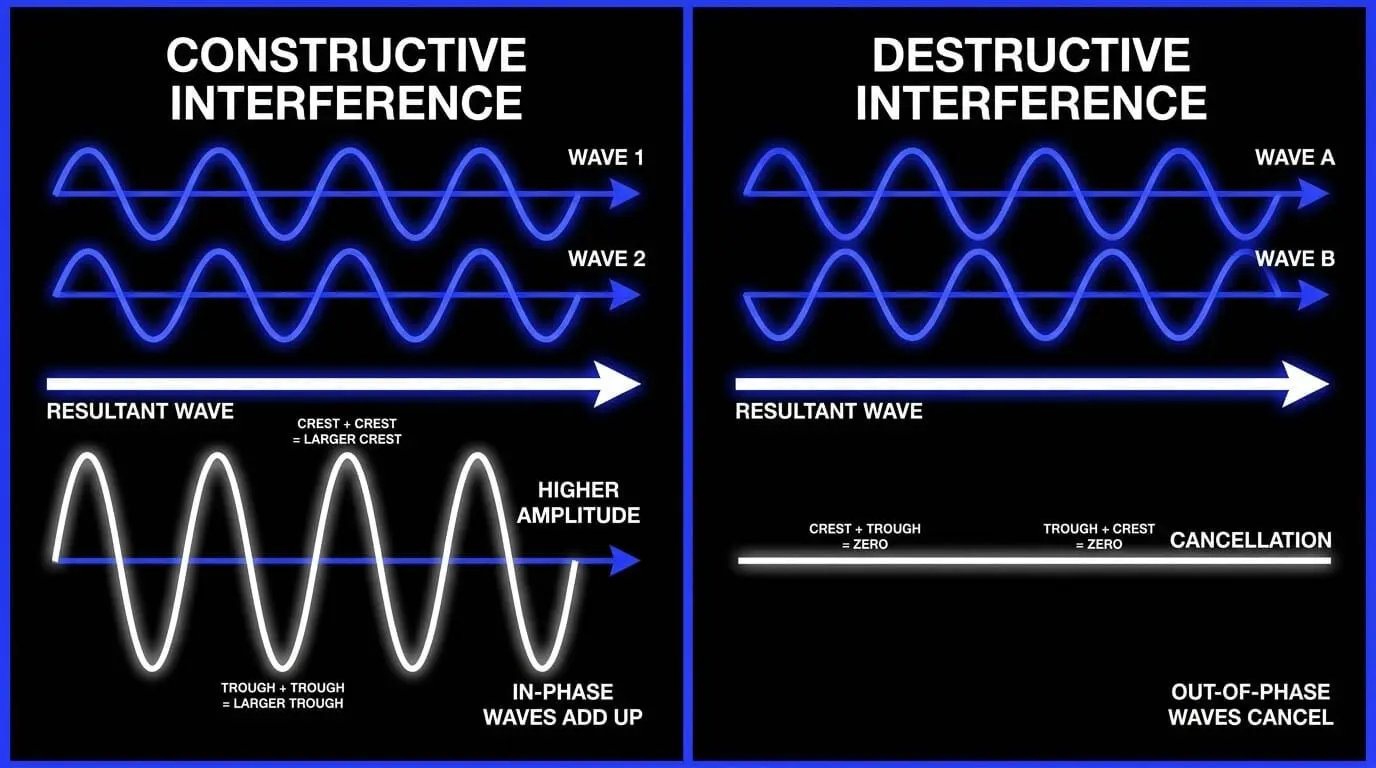
Destructive interference happens when one waveform pushes in the opposite direction of another. Peaks meet troughs, and part of the energy is reduced. In an extreme case, two identical signals with opposite polarity can cancel almost completely. In practical audio production, full cancellation is less common than partial cancellation. Partial cancellation creates tonal unevenness, usually called comb filtering, where some frequencies are reduced while others remain or become exaggerated.
This is why phase cancellation can be confusing. It is not always a clear mute or obvious sound cancellation. More often, it feels like a source lost body, a stereo track became unstable, or a mix became smaller when another layer was added. A producer may add a second kick sample expecting more impact, then hear less punch because the low-frequency cycles are fighting each other.
Phase shift, polarity, and timing are related but different
Many beginners treat phase, polarity, and timing as the same thing, but they are different concepts. Understanding the difference makes troubleshooting phase cancellation much easier.
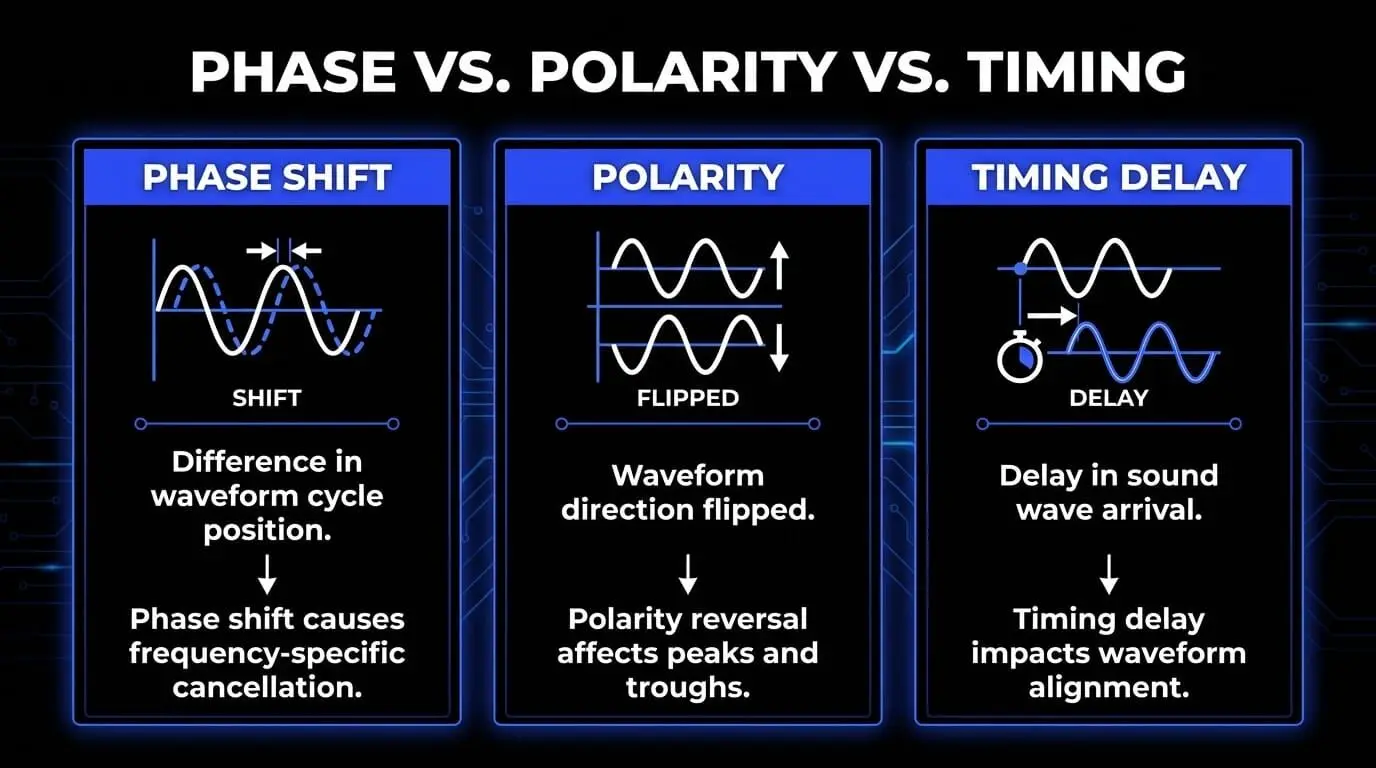
| Concept | What it means | Why it matters |
|---|---|---|
| Phase shift | A difference in where two waveforms are within a repeating cycle. | Can cause frequency-specific cancellation, especially between related signals. |
| Polarity | The positive and negative direction of the waveform is flipped. | A polarity reversal can make peaks move downward and troughs move upward, often tested with phase inversion. |
| Timing delay | One signal arrives later than another in milliseconds or samples. | Can cause waveform misalignment, comb filtering, and weak transients when signals are combined. |
| Phase coherence | Multiple signals maintain a supportive relationship over time. | Helps a mix sound solid, focused, and reliable across stereo and mono playback. |
A polarity flip is often called a phase flip in software, but the button usually inverts polarity. It changes the waveform direction rather than moving it forward or backward in time. True phase alignment often requires smaller timing adjustments, source balancing, mic movement, or specialized tools that adjust phase differently across frequency ranges.
How phase cancellation works
The cancellation effect in plain language
Imagine recording the same clap with two microphones. One microphone is close to the hands. The other is several feet away. The close microphone captures the clap first. The distant microphone captures it slightly later. When you play both recordings together, the clap exists twice, but one copy is delayed. If the delay is short enough, you do not hear it as an echo. Instead, you hear a tonal change. Some frequencies become louder, while others become quieter. That tonal change is the cancellation effect created by signal interference between the two captured versions of the same event.
The amount of cancellation depends on the delay time, the frequency content, the similarity between the two signals, their relative levels, and whether one signal has inverted polarity. Low frequencies are especially sensitive in a different way than high frequencies because their wave cycles are longer. A tiny timing shift may be only a small fraction of a low-frequency wave but a large fraction of a high-frequency wave. This is why phase problems can create complex frequency response changes rather than one simple volume drop.
Complete and partial sound cancellation
Complete sound cancellation requires two nearly identical signals at the same level with opposite polarity or a specific phase relationship. In a controlled test, duplicate a track, invert the polarity of the duplicate, and play both tracks at equal volume. The result can be silence or near silence because every positive movement in one waveform is matched by an equal negative movement in the other.
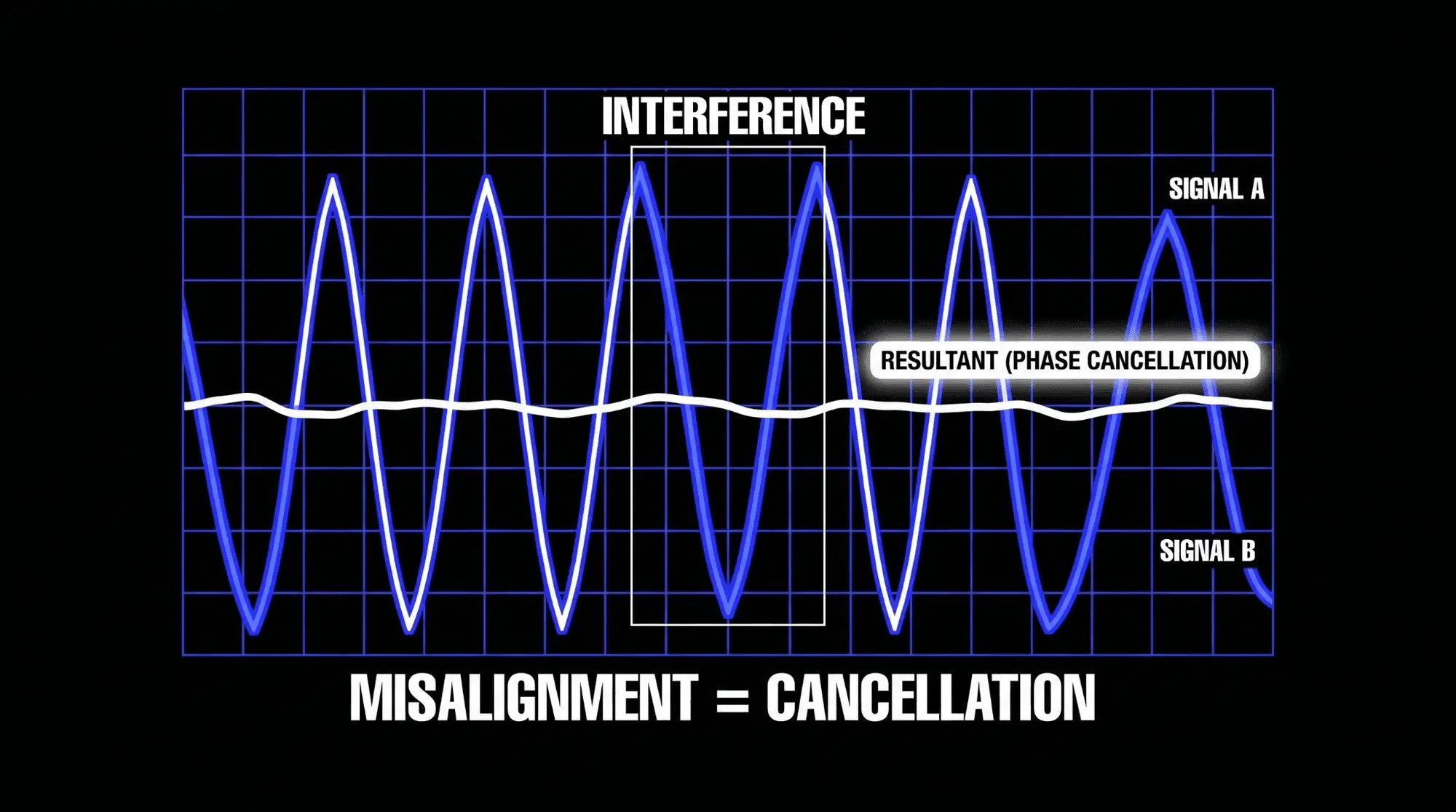
Real-world recordings are rarely that perfect. Reflections, room tone, microphone character, performance variation, and level differences usually prevent total cancellation. Instead, engineers deal with partial sound cancellation. Partial cancellation is often more dangerous because it can hide inside a mix. A track may not vanish, but it may lose the exact range that gives it authority. The low end may become soft. The snare may lose crack. The vocal may lose focus. The stereo image may feel wide but hollow.
Comb filtering and frequency-dependent cancellation
Comb filtering is one of the clearest results of phase cancellation. It happens when a signal is mixed with a delayed version of itself. The delay creates repeating peaks and dips across the frequency spectrum. On a graph, the response can resemble a comb, with notches where frequencies are reduced. To the ear, comb filtering can sound hollow, papery, metallic, distant, or nasal.
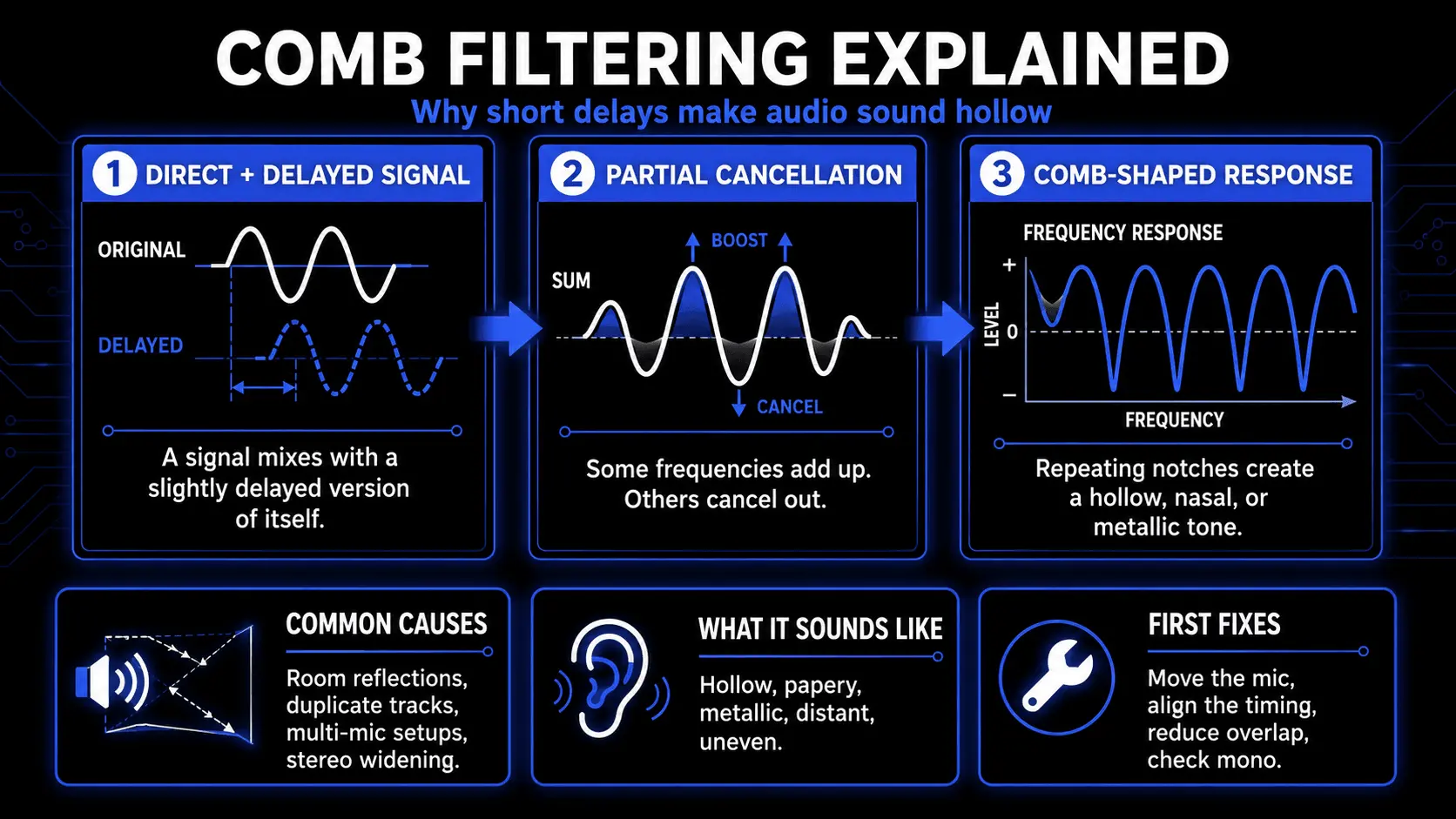
Comb filtering often appears when a microphone captures both direct sound and strong reflections from a wall, desk, floor, ceiling, or glass surface. It also appears when two microphones capture one source from different distances. In mixing, comb filtering can be introduced by duplicate tracks, modulation effects, artificial stereo widening, or parallel processing with latency that is not properly compensated.
Because comb filtering changes the tone rather than simply lowering volume, it can be mistaken for an EQ problem. An engineer may boost the low mids on a guitar, but if the real issue is phase cancellation between two guitar microphones, EQ may only make the problem louder. The better solution is to improve waveform alignment, change the mic blend, adjust timing, or choose the better single microphone as the main tone.
Why phase problems happen in real sessions
Multiple microphones on one source
The most classic cause of phase cancellation is multi-microphone recording. When several microphones capture the same instrument, each microphone receives a slightly different version of the source. This is unavoidable. The goal is not perfect mathematical alignment. The goal is a musical phase relationship that supports the tone.
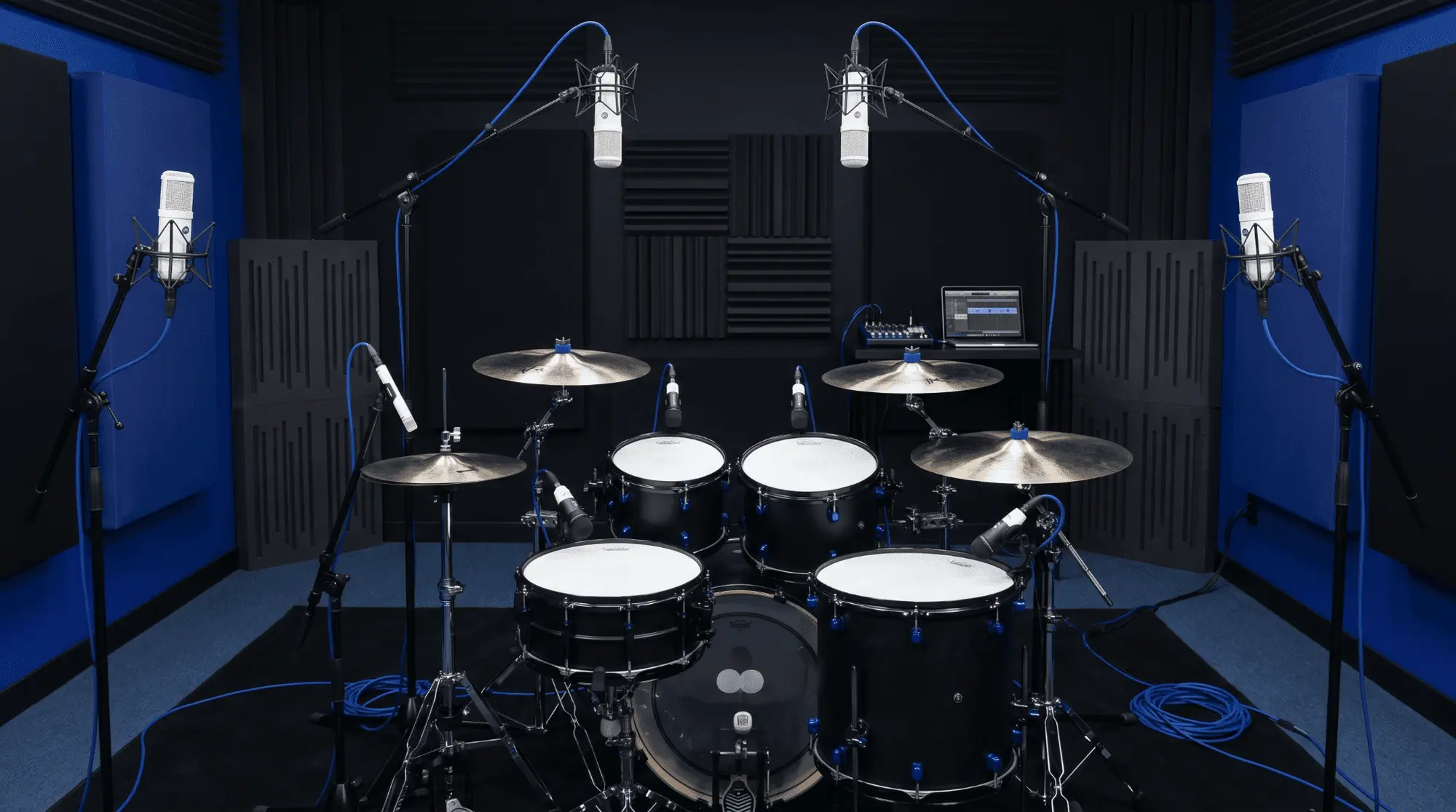
Common multi-mic situations include drum kits, acoustic guitar, piano, guitar cabinets, bass cabinets, choirs, room microphones, horn sections, and vocal groups. Each microphone adds perspective, but each microphone also adds risk. If the microphones are placed casually, the combined sound may be weaker than the best single microphone. A professional engineer listens to the blend, not only to each channel in solo.
Stereo miking and distance choices
Stereo miking techniques are useful because they create width, space, and realism. They also require careful distance and angle decisions. Coincident stereo methods place capsules close together, which reduces timing differences and usually improves mono compatibility. Spaced stereo methods can sound larger and more open, but they create bigger timing differences and therefore a higher risk of phase cancellation when collapsed to mono.
A spaced pair on acoustic guitar, piano, drums, percussion, or choir can be beautiful when the spacing fits the source and room. It can also create weak center information, uneven frequency response, or a stereo image that disappears on smaller playback systems. This does not mean spaced recording is wrong. It means the engineer must check the result in mono and choose spacing intentionally.
Distance and angle considerations
Distance affects arrival time. Angle affects both tone and arrival time. When a microphone is moved a few inches, the direct signal and room reflections change together. A small change can improve phase coherence more effectively than a plugin because the problem is being solved before it enters the recording.
For multi-mic sources, the practical process is simple: choose the most important microphone first, then add the second microphone while listening to the combined sound. Move the second microphone until the source becomes fuller, not thinner. If adding the second microphone makes the tone smaller, phase cancellation is likely. In that case, adjust the position before recording rather than hoping to repair the problem later.
The 3 to 1 rule
The 3 to 1 rule is a traditional microphone placement guideline used to reduce sound wave interference between microphones. The idea is that the distance between microphones should be at least three times the distance from each microphone to its primary source. For example, if a microphone is one foot from a guitar, another microphone capturing a different nearby source should ideally be at least three feet away from the first microphone.
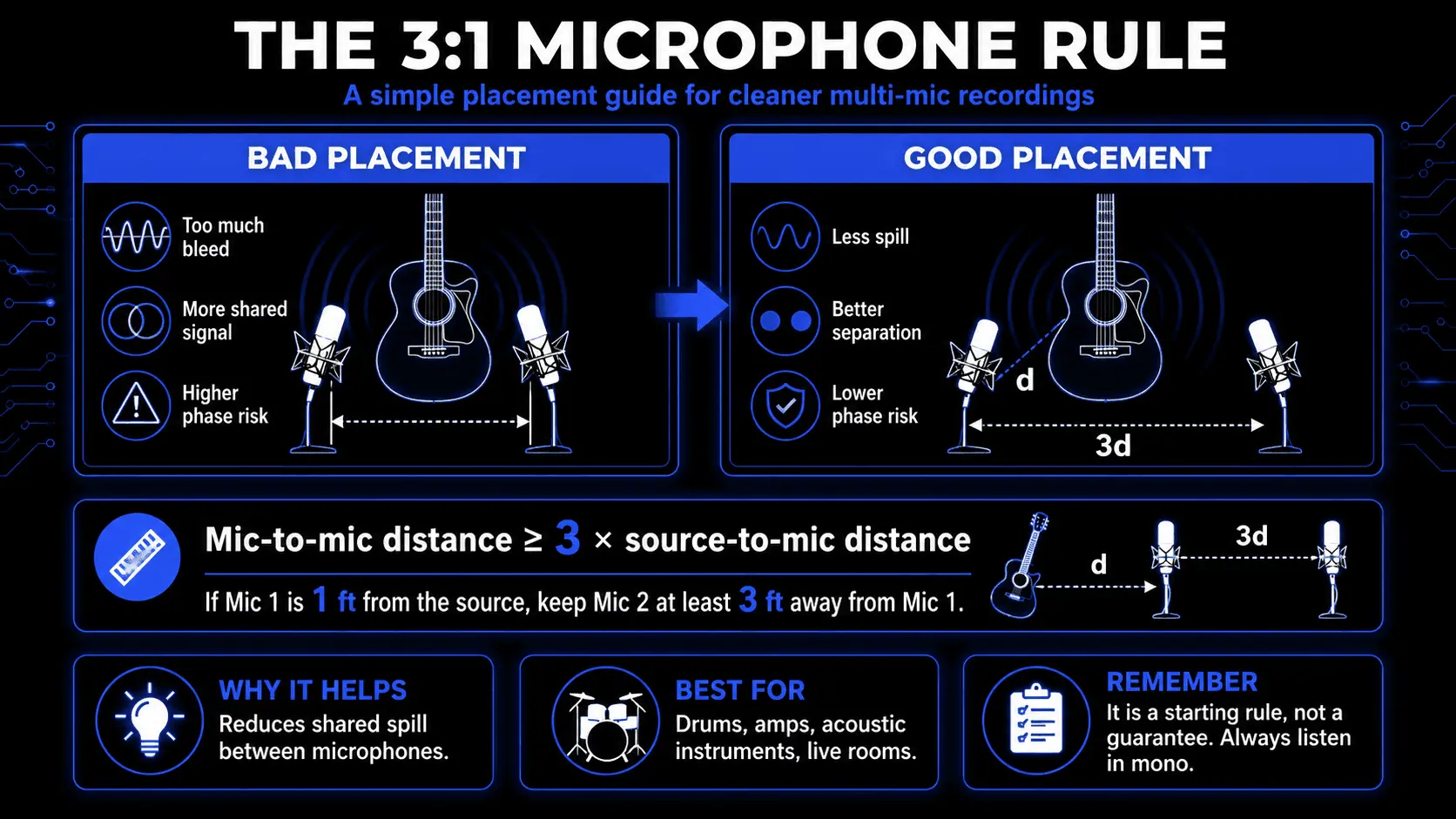
This rule is not a law, and it does not guarantee perfect phase alignment. It is a useful starting point because it reduces the level of unwanted spill captured by each microphone. Lower spill means less shared material between channels, which reduces the amount of destructive interference. In dense sessions with drums, amps, live vocals, and room reflections, that can make the recording easier to mix.
Layered samples and virtual instruments
Modern producers often create phase issues without using any microphones. Layered samples and virtual instruments can interfere when they contain similar transients or overlapping frequency content. A kick layered with an 808, two claps stacked together, several supersaws playing the same line, or duplicate bass patches can all create audio interference if their waveforms do not support each other.
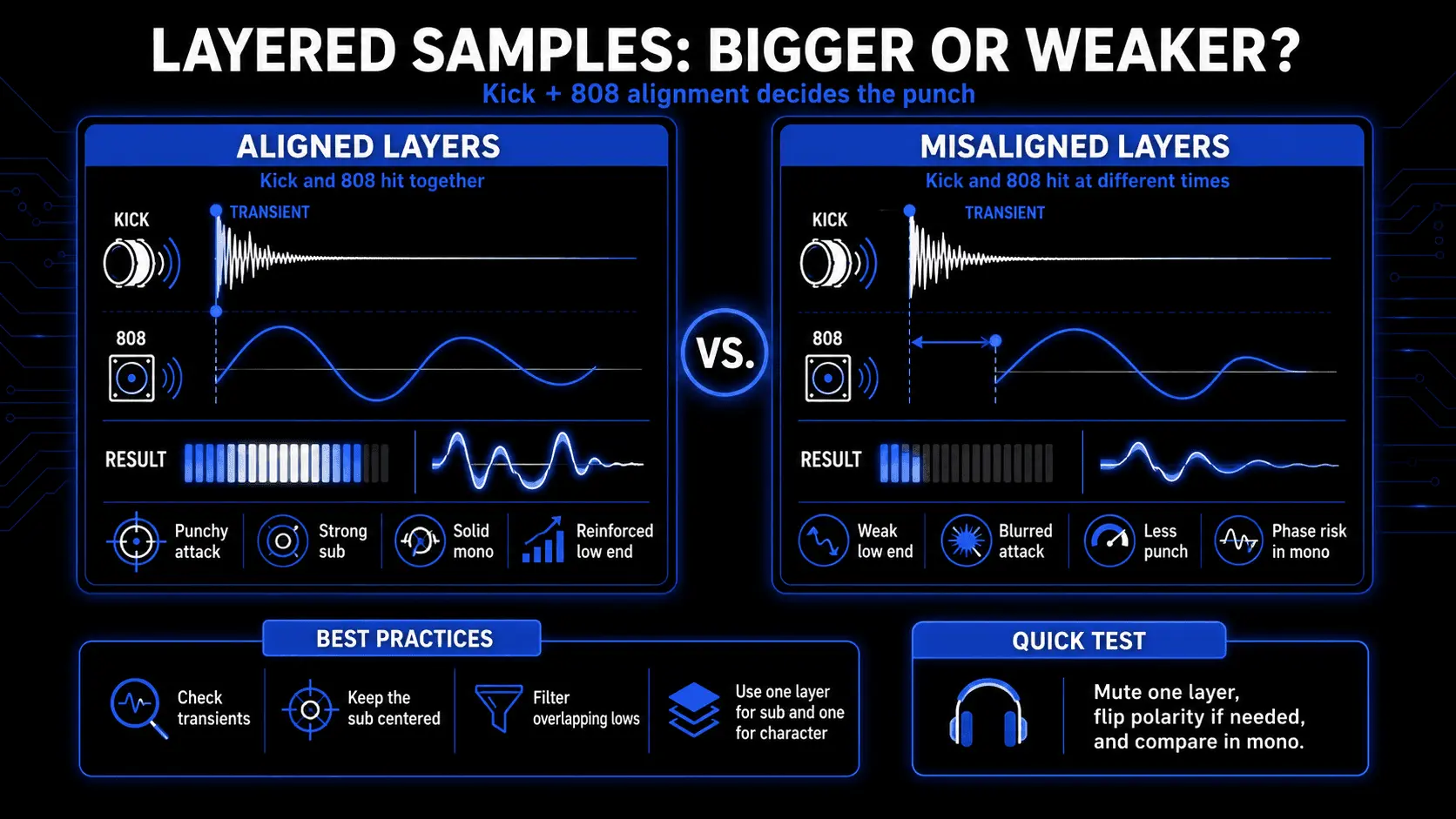
In electronic music, phase cancellation can be most obvious in the low end. Two bass layers may sound large in solo but lose power together because the fundamental cycles are misaligned. A sub-bass layer and a mid-bass layer should usually be checked in mono, with attention to transient alignment and low-frequency phase coherence. The aim is not to make every waveform visually identical. The aim is to keep the emotional and rhythmic impact intact.
Using ACE Studio to create layers that do not fight each other
A lot of phase cancellation starts with a good intention. You want the chorus to feel wider, so you duplicate a vocal. You want the bass to feel heavier, so you add another low-end layer. You want a hook to feel more expensive, so you stack a second synth, a pad, a harmony, or a stereo texture. The problem is that more layers do not always create more size. When two parts carry the same timing, the same frequency range, or a near-identical waveform shape, the mix can become smaller instead of bigger.
ACE Studio is useful here because it gives you another way to build size. Instead of copying the same audio and hoping it blends, you can create a supporting part that has its own musical reason to exist.
For phase cancellation, that distinction matters.
A duplicated vocal double can sound impressive for a moment, but if it is too close to the lead, it can make the vocal feel filtered or cloudy. A copied synth layer can widen the stereo image, but it may fall apart in mono. A second bass patch can seem powerful in solo, then weaken the low end when it plays against the kick. These are not only mixing problems. They are arrangement problems.
ACE Studio helps by letting you shape new material from MIDI, lyrics, stems, and instrument parts rather than depending only on duplicated audio.
For vocals, this means a backing part can become a real harmony, response, choir layer, or alternate phrase instead of a near-copy of the lead. You can adjust the notes, lyric timing, phrasing, pitch movement, breaths, and expression so the part supports the song without sitting directly on top of the main vocal. That is a cleaner way to create width because the layer is musically different, not just delayed, widened, or phase-shifted.
For instruments, ACE Studio gives you a similar advantage. Its AI Instruments let you turn MIDI into expressive performances such as strings, saxophone, trumpet, and duduk. In a phase-sensitive mix, that can be more useful than stacking another similar synth patch. If the low mids are crowded, you might write a violin line above the vocal instead of adding another pad. If the chorus needs lift, a short brass answer may work better than a widened duplicate of the main hook. If the bass and kick are already fighting, a higher rhythmic texture can add movement without disturbing the sub foundation.
This is where ACE Studio connects directly to phase-conscious production: it helps you add contrast instead of conflict.
Add a Layer is especially relevant when the instinct is to duplicate something that already exists. In phase-sensitive production, that duplicate can become the problem. A copied pad, vocal chop, synth hook, or percussion loop may feel bigger in stereo, but it can also introduce timing overlap, comb filtering, or mono instability.
A better move is to create a layer with a different musical job. In ACE Studio, Add a Layer lets you prompt the type of part you need and generate it directly in the selected area of the Canvas. That makes it useful for adding contrast rather than simply adding more of the same thing.
For example, instead of duplicating a wide synth pad, you might prompt a short upper-register string texture that supports the chorus without crowding the low mids. Instead of copying a vocal chop, you might create a lighter rhythmic layer that sits around the lead vocal rather than directly on top of it. Instead of adding another sub-heavy bass layer, you might generate a percussive or harmonic layer that adds movement while leaving the low end centered.
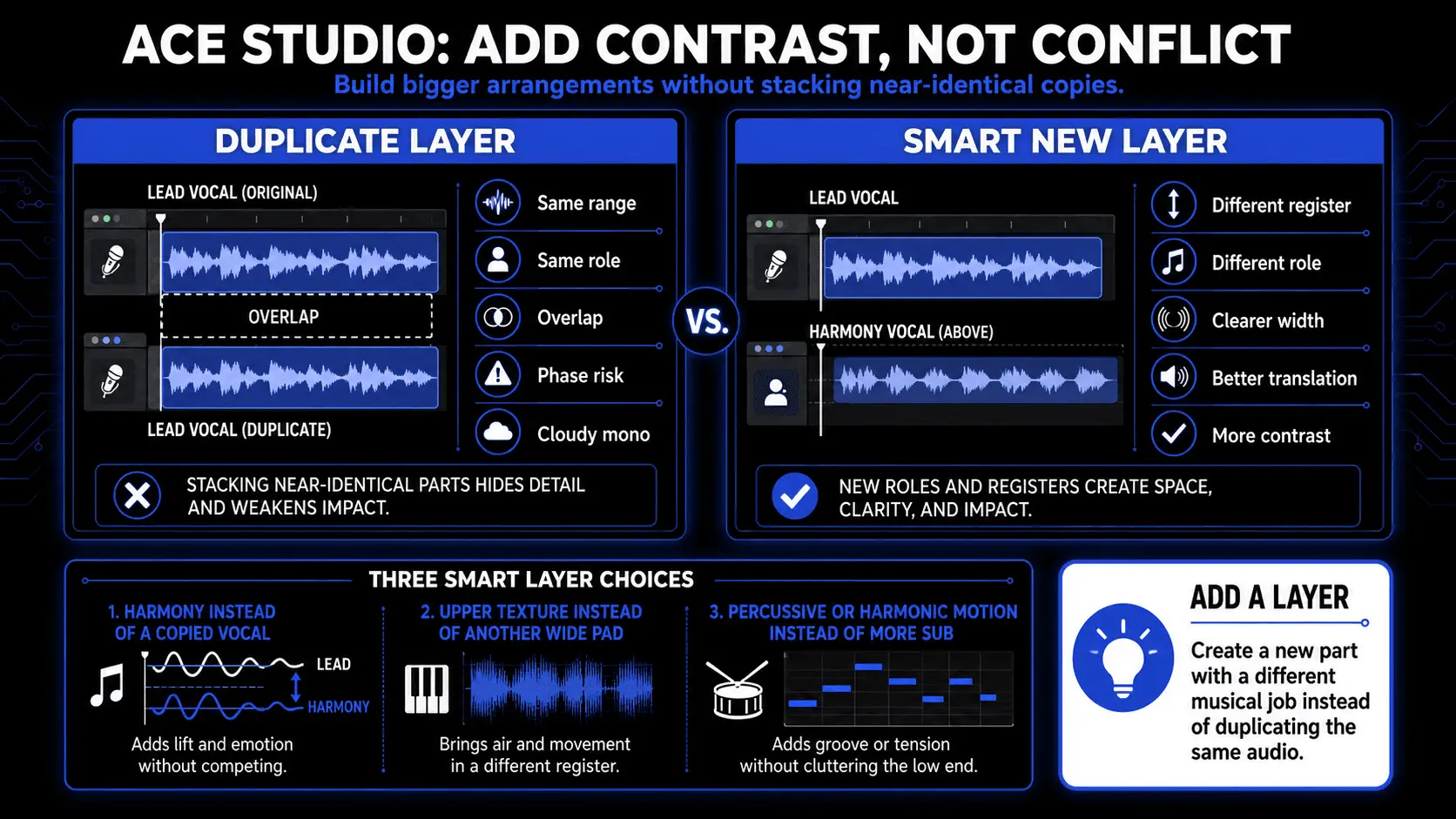
That distinction matters. Phase cancellation often happens when similar material occupies the same space with slightly different timing. Add a Layer gives you a way to build around the existing part instead of cloning it. You still need to check mono, control the low end, and listen for hollow or unstable tone. But starting with a fresh, purpose-built layer can reduce the need for risky widening tricks later.
Stem Splitter is especially helpful when the phase issue is hidden inside a finished loop, demo, or reference mix. If a stereo sample sounds wide but weak, the problem may come from the bass, drums, vocal effects, or a spread instrumental layer. Splitting the track into stems gives you a clearer way to hear what is actually causing the instability. You can keep the part that works and replace or rebuild the part that fights the mix.
Vocal to MIDI is useful for a different reason. It lets you take a sung idea and turn it into editable notes with lyrics. That matters when the emotional idea is right, but the audio itself is not the best foundation for layering. Instead of stacking more effects on a rough take, you can refine the melody, adjust phrasing, choose a voice, build harmonies, and place the part more deliberately around the track.
The goal is not to avoid all phase movement. Some phase movement sounds beautiful. Chorus, flanging, stereo delay, room tone, and widened textures can all add life when they are used with intention. The real goal is to protect the parts that need to stay solid: the lead vocal, kick, bass, snare, and main hook.
ACE Studio gives you more ways to do that. Keep the low end centered. Let the supporting layers live higher. Use harmonies instead of copies. Use instruments with different attacks and registers. Use stems to find the part that is actually causing the problem. Then check the result in mono like you would with any serious production decision.
Phase coherence still comes down to your ears. ACE Studio does not decide what should stay, what should move, or what should be removed. You make those calls. The advantage is that you have more editable musical material to choose from, so “make it bigger” does not have to mean “duplicate it and hope it survives mono.”
Stereo widening, modulation, and phase distortion
Stereo widening tools often create width by delaying, filtering, modulating, or phase-shifting one side of a signal. These techniques can be useful, but they can also create phase distortion and mono compatibility problems. A sound may feel impressive in headphones but become weak or unstable on speakers, club systems, phones, or mono playback.
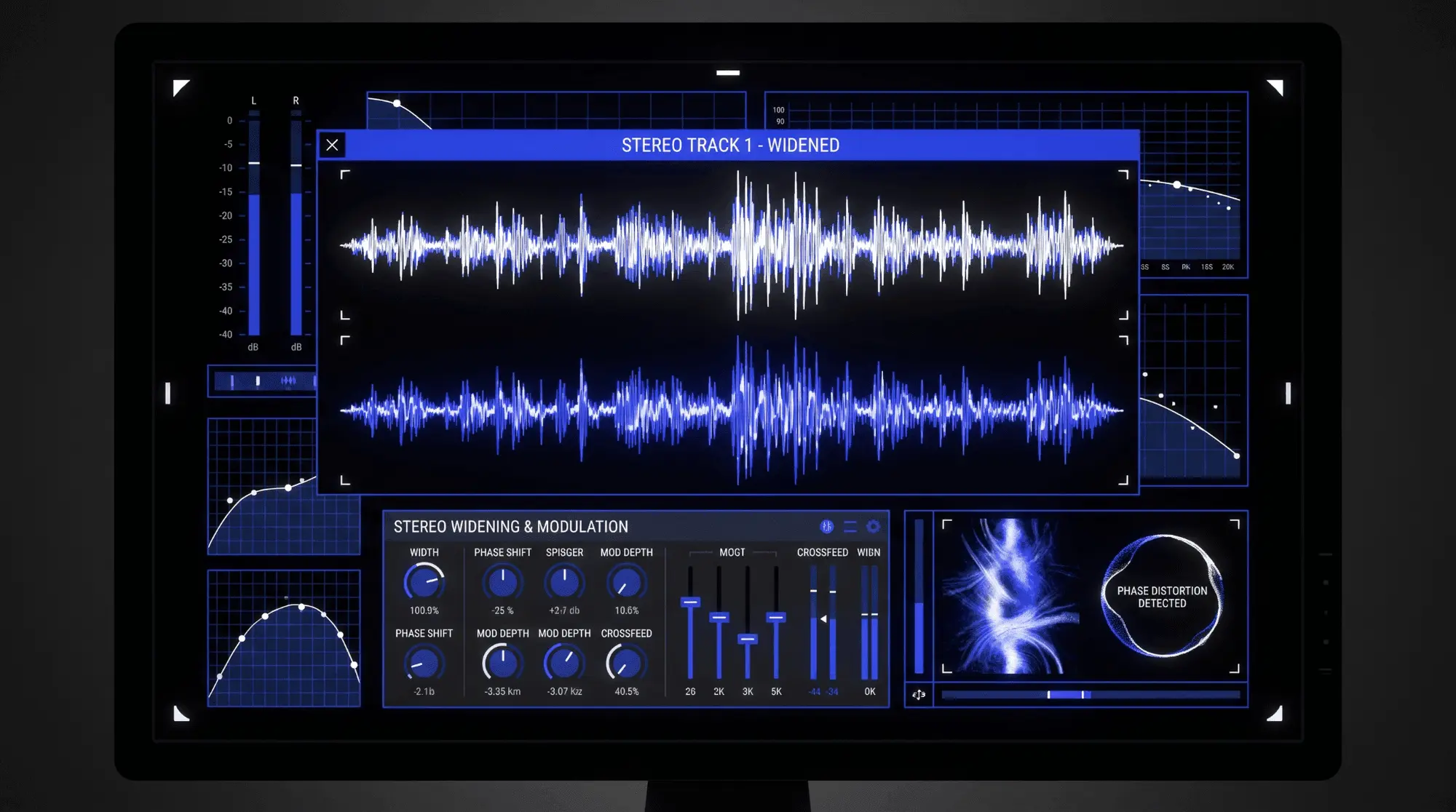
Chorus, flanger, phaser, Haas-style widening, mid-side widening, artificial doubler plugins, and some unison synth settings all work by changing timing and phase relationships. These effects are not bad. They simply need context. Wide pads, backing vocals, textures, and effects returns can often tolerate more phase movement. Kick, bass, lead vocal, snare, and main melodic hooks usually need more controlled phase relationships so the mix remains focused.
Room reflections and acoustics
Acoustics are another major source of phase cancellation. When sound leaves an instrument or speaker, it reaches the microphone directly and also reflects from nearby surfaces. Reflected sound arrives later. If the reflection is strong and close in time to the direct sound, it can create comb filtering. This is common in untreated rooms, small bedrooms, hard offices, glassy podcast spaces, and recording setups near desks or walls.
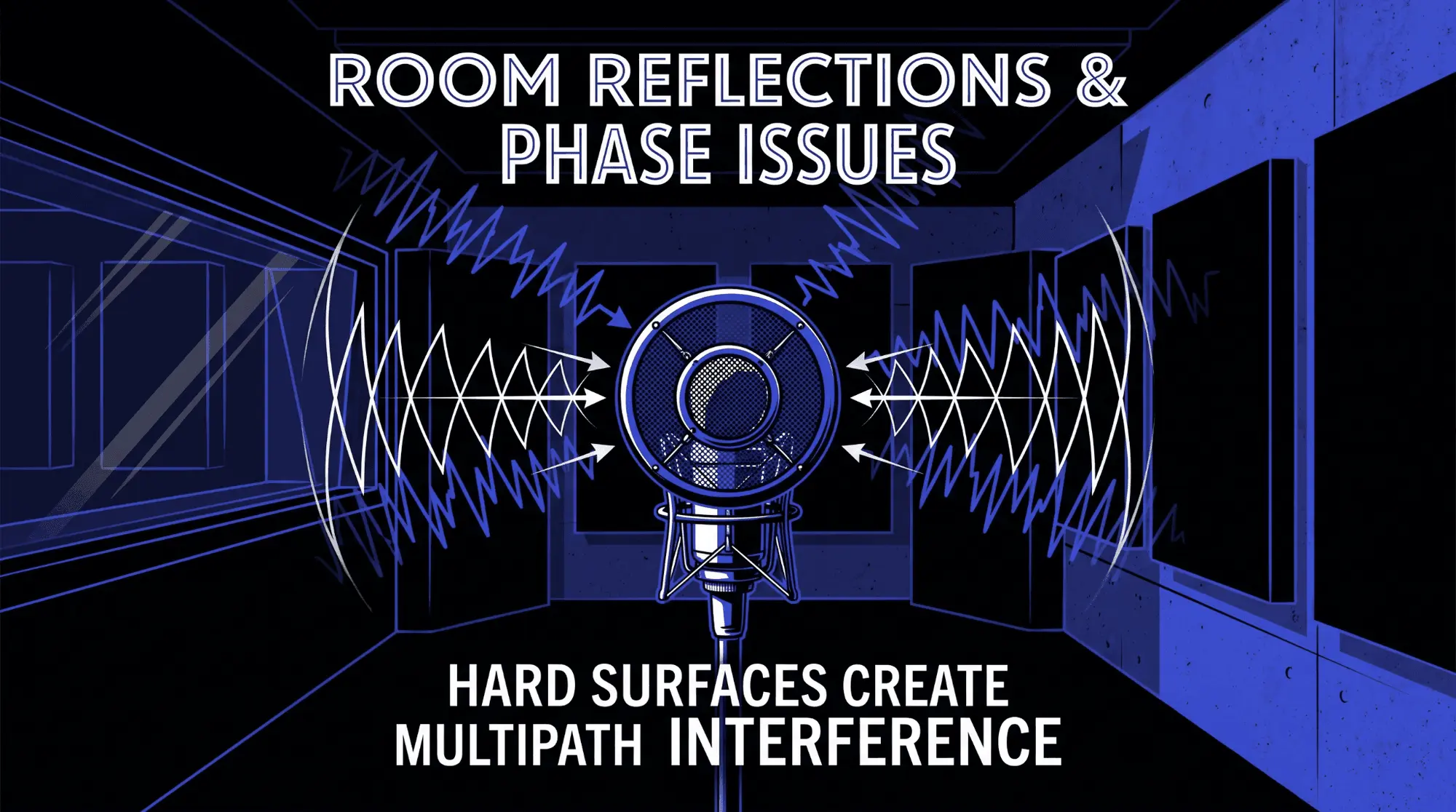
A producer may blame the microphone or EQ when the room is the real cause. Moving the microphone, moving the source, adding absorption at reflection points, raising the mic away from a desk, or changing the angle can reduce signal interference before it becomes part of the recording. In audio engineering, the cleanest fix is often physical, not digital.
Polarity reversal and wiring errors
Polarity problems can come from wiring, routing, hardware, DI boxes, console channels, plugin chains, or accidental polarity inversion inside a DAW. A polarity reversal is especially noticeable when the same source is recorded through two paths, such as bass DI and bass amp microphone, snare top and snare bottom microphones, or a guitar DI blended with a re-amped track.
A polarity button can be useful in these cases. If flipping polarity makes the combined sound fuller, clearer, or more centered, the original relationship was probably working against the source. However, polarity inversion is only a broad correction. If the problem is caused by a time delay, the polarity button may improve one range while making another range worse. Use it as a diagnostic step, not as a universal cure.
Why phase cancellation matters for sound quality
Impact on frequency response
The most measurable impact of phase cancellation is a change in frequency response. Certain frequencies become quieter because the waveforms oppose each other at those points. Other frequencies may become louder because the same signals reinforce each other elsewhere. The result is an uneven tonal balance that can be difficult to fix with EQ.
For drums, this can mean less low-end weight in the kick, less body in the snare, or cymbals that sound washy and disconnected. For guitars, it can mean a hollow midrange or a weak stereo image. For vocals, it can mean reduced intelligibility, especially when doubles, room mics, or artificial widening are used. For bass, it can mean the most serious problem of all: the note is present on the screen but missing in the room.
Frequency response problems caused by phase cancellation are dynamic and relationship-based. They depend on how tracks combine. A soloed channel may sound fine. The problem appears when another related channel is added. This is why experienced engineers avoid making all decisions in solo. They listen to source relationships inside the full production.
Perceptual consequences
The listener does not usually identify phase cancellation by name. The listener hears consequences. The mix may feel smaller than expected. A vocal may seem cloudy even when it is loud. A snare may lack authority. A chorus may feel wide but not emotionally bigger. A podcast voice may sound distant or filtered. A film dialogue recording may feel unnatural because reflections are interacting with the direct voice.
Phase issues also reduce confidence during mixing. When a source changes dramatically between speakers, headphones, phone playback, and mono playback, the engineer keeps correcting symptoms. This creates a cycle of over-EQ, over-compression, and unnecessary layering. Fixing phase coherence often makes fewer plugins necessary because the source begins to work naturally.
Mono compatibility and translation
Mono compatibility still matters. Many listening environments are effectively mono or partially mono: phones, smart speakers, club systems, public address systems, Bluetooth speakers, social media playback, television speakers, and some venue systems. A mix that depends on unstable stereo phase relationships may lose critical elements in these environments.
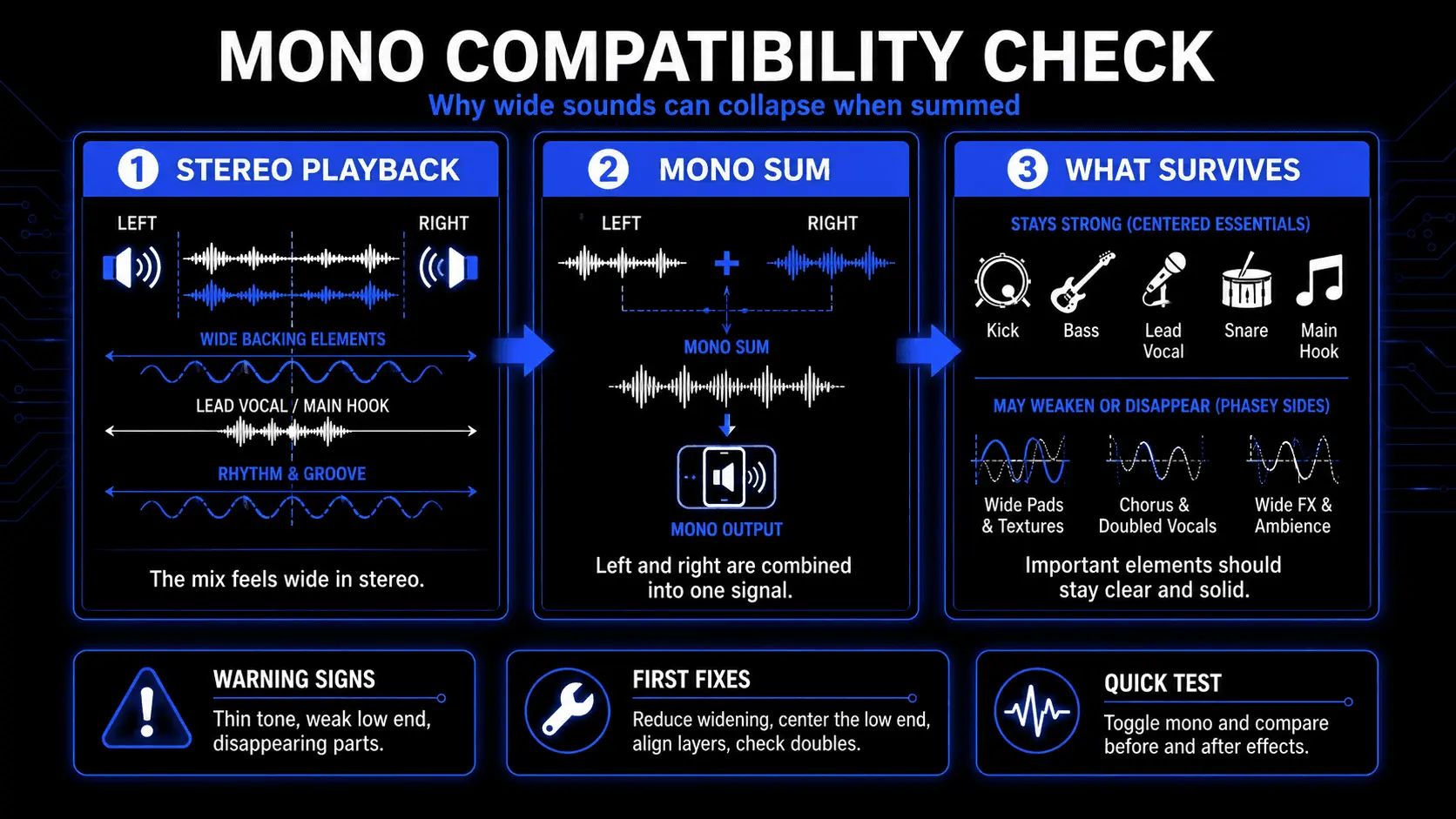
Checking mono does not mean mixing in mono forever. It means confirming that the essential information survives when left and right are combined. Kick, bass, lead vocal, snare, and core musical hooks should remain stable. Wide ear candy can change more, but it should not cause the entire production to collapse. A mono check is one of the fastest ways to reveal hidden phase cancellation.
Feature sheet: audible symptoms and likely causes
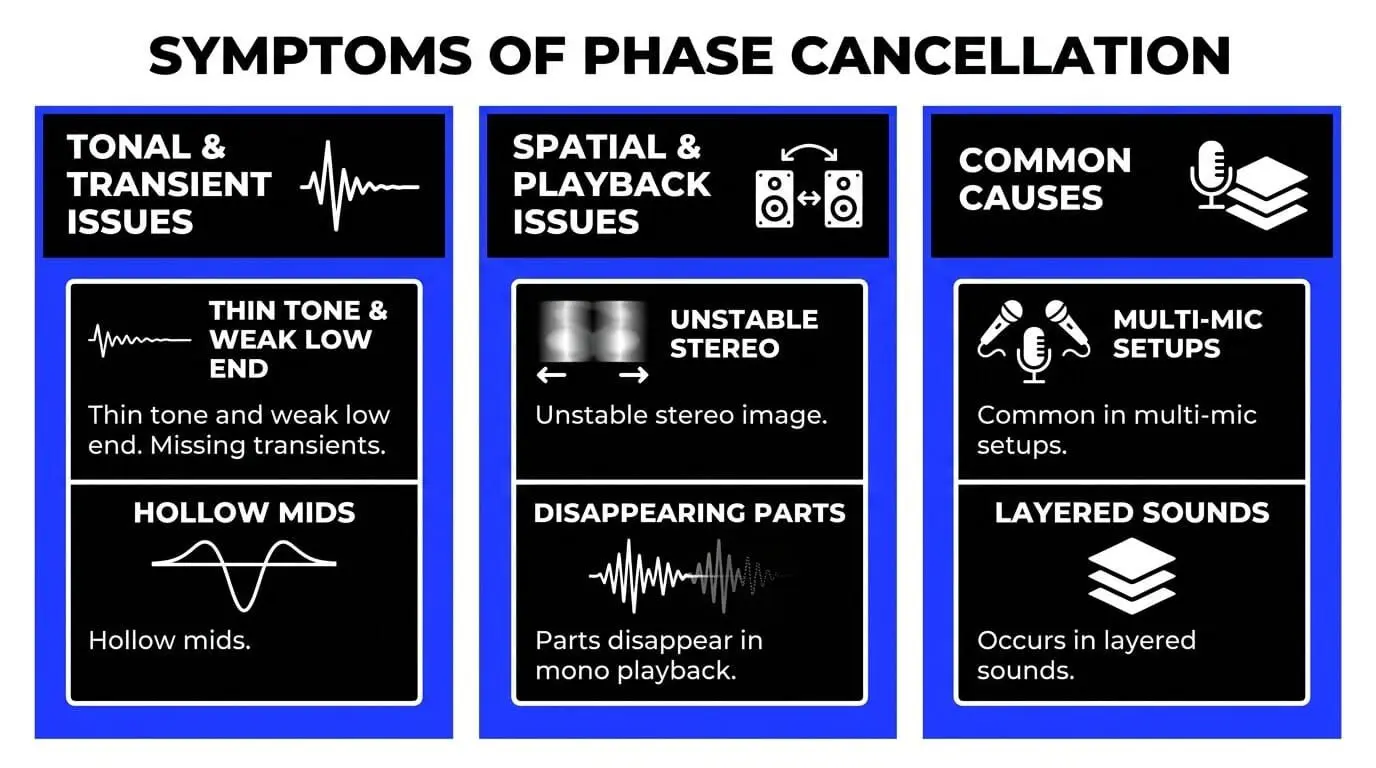
| Symptom | Likely phase-related cause | First move to try |
|---|---|---|
| Thin or hollow sound | Comb filtering from delayed duplicate signals. | Mute related channels one by one and check the combined tone. |
| Weak bass in mono | Low-frequency waveform misalignment between bass, kick, or stereo effects. | Check polarity, align transients, and reduce low-end stereo width. |
| Snare loses body with overheads | Close mic and overhead arrival times are fighting. | Adjust overhead timing or mic balance and test polarity. |
| Wide sound disappears on phone | Stereo widening based on phase shift or delay. | Reduce widening and keep essential content centered. |
| Vocal sounds filtered | Room reflection, double, or parallel track causing interference. | Check mono, bypass doubles, and inspect waveform alignment. |
Visual guide to waveform alignment
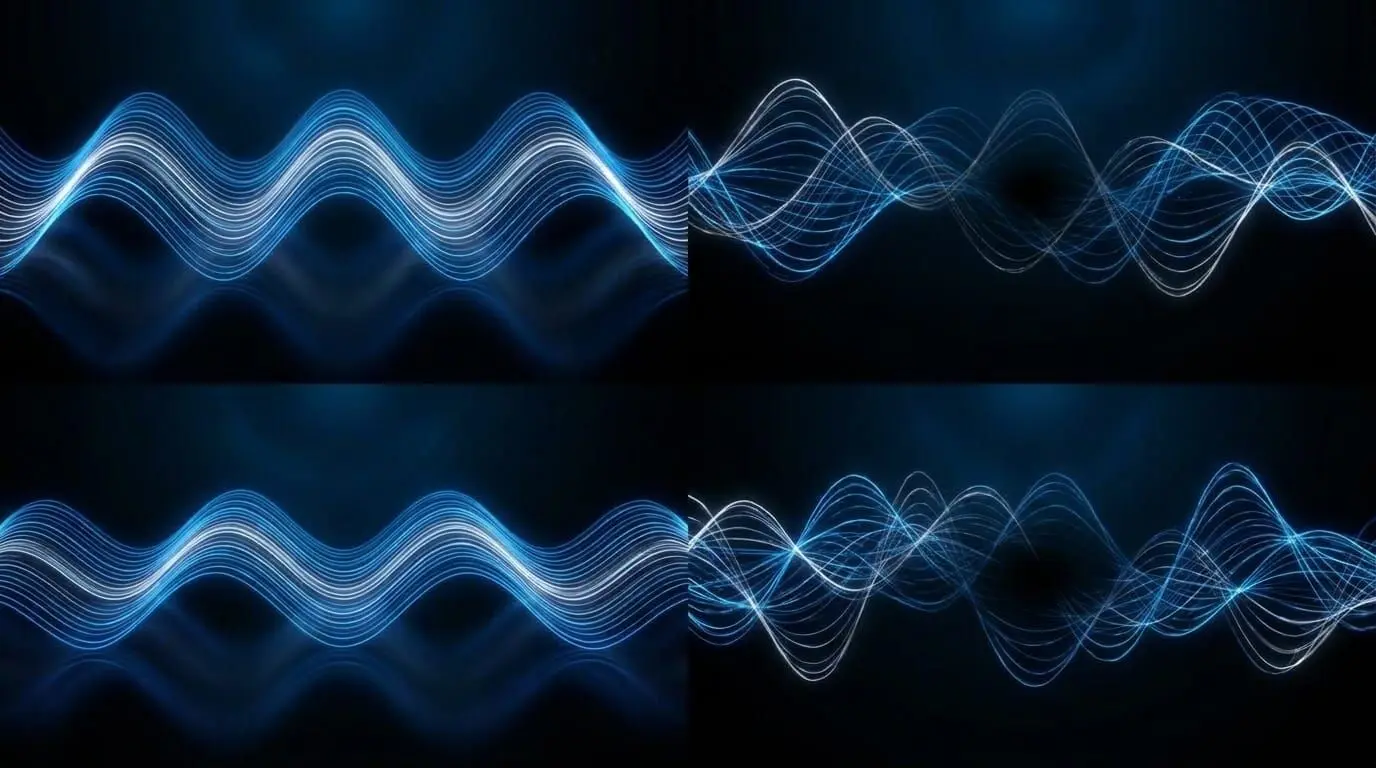
The visual representation below shows three common relationships between two similar sound waves. The first relationship reinforces the sound. The second creates partial cancellation and uneven tone. The third shows a near-opposite relationship where shared energy can cancel strongly. Real recordings are more complex than these simple waveforms, but the principle remains the same: waveform alignment controls whether related signals support or weaken each other.
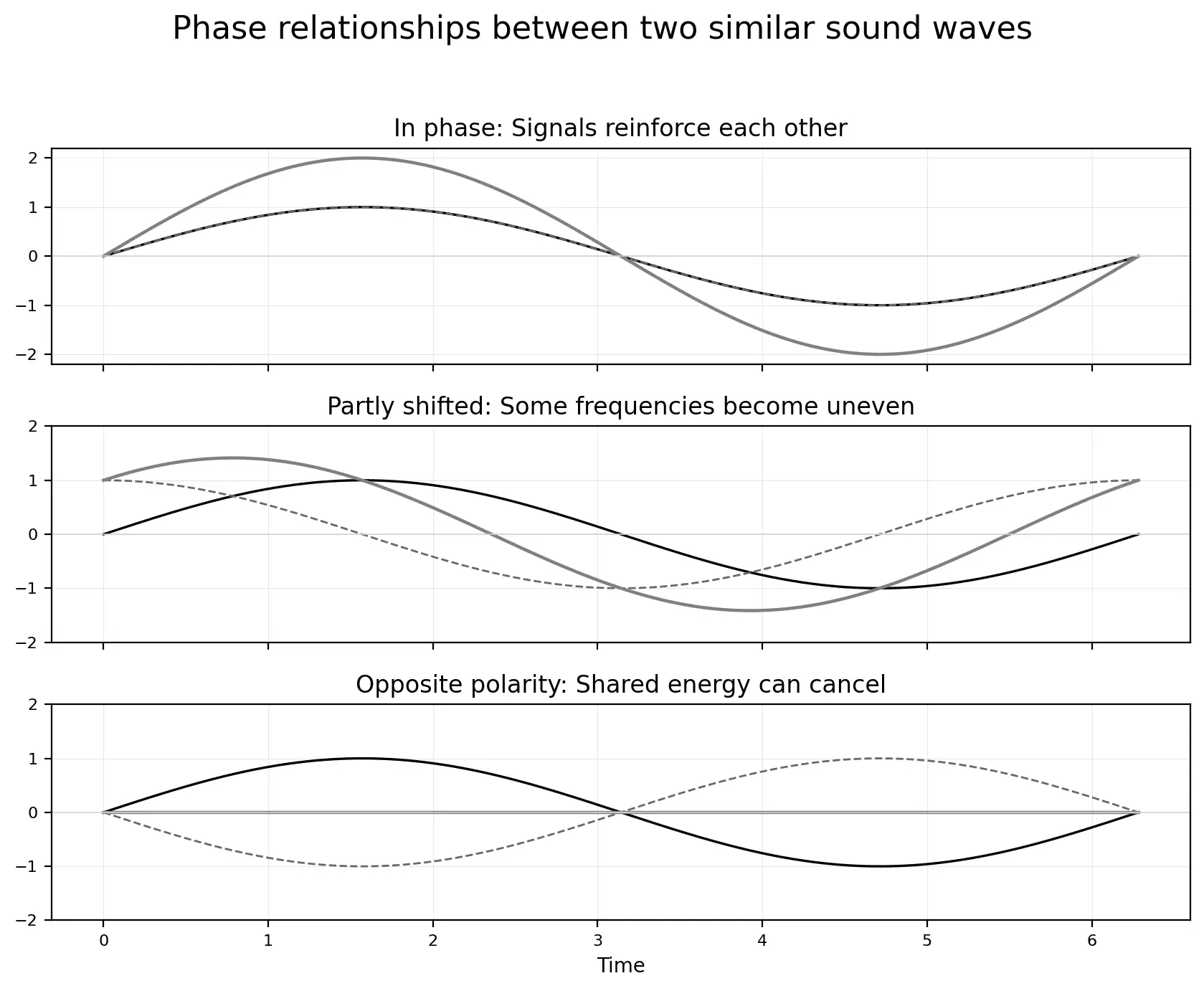
In a DAW, waveform alignment is usually checked around clear transients. Drums, claps, plucked bass, acoustic guitar attacks, consonants in vocals, and percussion hits are easier to inspect than sustained pads. The goal is not to line up every visible wave perfectly. Different microphones and instruments naturally create different shapes. The goal is to make the combined sound stronger, more stable, and more musical.
How to identify audio phase issues
Listening techniques
The first tool is listening. Phase cancellation often announces itself through a specific group of symptoms. Listen for a tone that becomes thinner when another channel is added. Listen for the low end that seems loud on meters but weak in the room. Listen for a stereo image that feels wide yet empty in the center. Listen for cymbals that smear, guitars that feel hollow, vocals that lose intimacy, and percussion that loses attack.
A useful listening method is contrast. Play the main microphone or layer alone. Then add the related microphone or layer. If the sound becomes fuller, the relationship is probably helping. If the sound becomes smaller, phase cancellation may be happening. Do this at matched volume because louder usually feels better. A phase problem can be hidden if the added track simply makes the total signal louder.
Mono checking
Mono checking is the fastest practical test for phase problems in a mix. When the left and right channels are summed, phase differences between them become easier to hear. A sound that was impressive in stereo may become quieter, narrower, or almost vanish. That does not automatically mean the stereo version is unusable, but it tells you that the sound relies heavily on phase difference rather than stable level and tone.
Use mono checks at several stages. Check during recording when using multiple microphones. Check during sound selection when layering samples. Check after adding stereo widening, chorus, phaser, or doubler effects. Check before mastering. Mono monitoring should not be a panic button at the end. It should be a routine quality control step.
Visual tools
Waveform displays
Waveform displays help you see timing relationships between related signals. Zoom in near a transient and compare where the major upward or downward movement begins. If one track begins later, you may have a timing offset. If one track moves downward while the other moves upward, polarity may be involved. For drum editing, sample layering, and DI plus microphone blends, visual waveform alignment can be extremely useful.
Do not rely on visuals alone. A waveform can look aligned but sound wrong because different microphones capture different frequency balances and reflections. Use the display to guide decisions, then judge by listening in context.
Phase correlation meters
A phase correlation meter shows the relationship between left and right channels. Positive readings usually indicate that the stereo signal has strong mono compatibility. Readings near zero suggest a wide or less correlated stereo image. Negative readings suggest that parts of the signal may cancel when summed to mono. The meter is not a creative judge. It is a warning system.
A mix does not need to stay at the maximum positive reading all the time. Natural stereo recordings, reverbs, delays, and modulation effects can move the meter. The concern is sustained negative correlation on important elements, especially low-frequency content or central musical information.
Spectral analysis and goniometers
Spectral analysis shows how frequency energy changes when tracks are combined. If adding a related microphone creates deep notches or unexpected low-end loss, spectral analysis can help confirm that phase cancellation is shaping the tone. This is especially useful when the problem is subtle or when the room makes listening difficult.
A goniometer, also called a vectorscope, shows stereo width and direction. It can reveal whether a signal is strongly centered, wide, unstable, or leaning toward out-of-phase behavior. In mastering and final mix checks, a goniometer can help identify stereo information that may not translate reliably.
Feature sheet: tools for troubleshooting phase cancellation
| Tool | Best use | Limitation |
|---|---|---|
| Your ears | Judging whether the combined sound is musically stronger or weaker. | Room acoustics and loudness differences can mislead. |
| Mono button | Finding elements that disappear or become thin when summed. | Does not identify the exact cause by itself. |
| Waveform display | Checking timing and polarity around transients. | Sustained sounds are harder to judge visually. |
| Correlation meter | Monitoring stereo phase relationship and mono risk. | A creative wide sound can read low without being a problem. |
| Spectral analyzer | Finding frequency notches and tonal loss from interference. | Can encourage overthinking if not paired with listening. |
How to avoid phase cancellation while recording
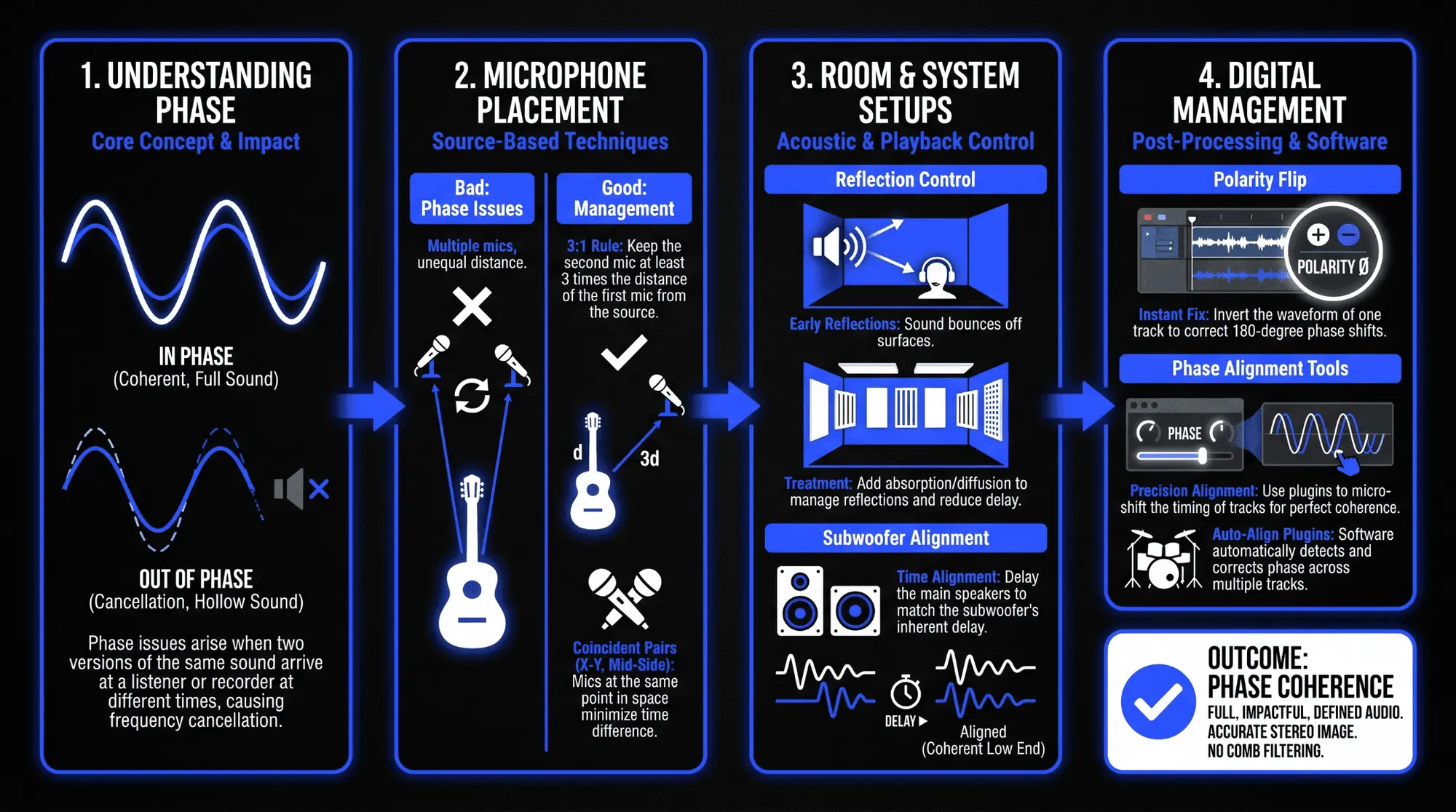
Build the tone from the main microphone
The best prevention strategy is to make one microphone sound good before adding more. Choose the microphone that captures the source with the clearest intention. For a snare, that may be the top microphone. For acoustic guitar, it may be the microphone near the twelfth fret. For a vocal, it may simply be the main vocal microphone in a controlled position. Once the primary tone is working, add supporting microphones only if they improve the combined sound.
This habit prevents a common mistake: using multiple microphones because they are available rather than because they solve a musical problem. Every extra microphone adds options, but it also adds phase relationships. A simple setup with strong phase coherence often sounds more professional than a complex setup with uncontrolled audio interference.
Move microphones while listening to the blend
Microphone placement is not only about solo tone. It is about how the microphones interact. When adding a second microphone, listen to both microphones together. Move the second microphone slowly. Pay attention to body, clarity, transient impact, and low-end stability. The correct position is often the one where the source becomes more complete without needing EQ.
Small movements matter. A few inches can change the arrival time enough to reduce cancellation. Changing the angle can reduce reflections or adjust the balance between direct sound and room sound. Raising a microphone away from a desk or moving it away from a wall can reduce comb filtering. These decisions are basic, but they are the foundation of clean recording.
Use stereo miking intentionally
Coincident pairs
Coincident techniques, such as XY, place microphone capsules close together. Because the capsules are close, timing differences are minimized. The stereo image is created mainly by level differences and microphone direction rather than large arrival-time differences. This often gives better mono compatibility and fewer phase cancellation issues.
Near-coincident pairs
Near-coincident techniques create a balance between width and phase control. They introduce some spacing and angle, which can create a more natural stereo image than a strict coincident pair. The tradeoff is that mono compatibility needs to be checked. These methods can work well for acoustic guitar, percussion, piano, and ensembles when the spacing fits the source.
Spaced pairs
Spaced pairs can sound wide and impressive because the microphones capture timing differences across the source and room. They are also more likely to create phase cancellation when summed to mono. Use spaced pairs when the room sounds good, the source benefits from size, and mono compatibility has been checked. Avoid using spaced pairs casually in small reflective rooms.
Monitor before the performance is final
Phase problems are easiest to fix while the performer is still in the room and the microphones can still move. Monitor through speakers or headphones, switch to mono, and check the blend before committing. Do not wait until editing day to discover that the overheads weaken the snare or the room microphones remove the punch from the kit.
When possible, record a short test pass and review it immediately. Listen to the multi-mic source in solo and in the track context. If the source becomes smaller when microphones are combined, change the placement. This saves far more time than trying to repair damaged phase relationships after the session.
How to fix phase cancellation in mixing
Start with source relationships
When troubleshooting phase cancellation in a mix, start by identifying related signals. Do not randomly flip polarity on every track. Look for tracks that share source material: kick in and kick out, snare top and snare bottom, overheads and close mics, bass DI and bass amp, guitar DI and amp, vocal doubles, layered synths, parallel drum buses, duplicated tracks, and stereo effects.
Mute all related channels except the main one. Then add each related channel one at a time. Listen for improvement or damage. This approach turns a confusing mix problem into a controlled comparison. It also prevents you from treating unrelated tracks as the cause.
Use phase inversion as a test
Phase inversion is one of the quickest troubleshooting tools. Flip the polarity of one related track and listen. If the combined sound becomes fuller, more centered, or more powerful, keep the inversion or investigate the timing relationship further. If the sound becomes weaker, return it to the original polarity.
Phase inversion is especially useful on snare bottom microphones, bass DI and amp blends, kick inside and outside microphones, and any pair of signals captured from opposite physical directions. It is less reliable as a complete fix for room reflections, stereo widening, or complex multi-mic sources because those problems are frequency-dependent and time-dependent.
Use time alignment and waveform alignment
Time alignment means moving one track earlier or later so that important transients work together. In a DAW, this can be done by nudging regions, using sample delay, or using dedicated phase alignment tools. For example, if a close snare microphone hits earlier than the overhead snare image, you can test small adjustments to make the snare body and attack support each other.
Waveform alignment is useful, but it must be musical. Aligning every transient perfectly can remove natural depth from a recording. Room microphones are supposed to arrive later. Overheads are supposed to capture the kit perspective. Sometimes the best choice is not full alignment, but a timing relationship that gives punch while preserving space. Use the waveform as a map and the sound as the decision.
Use EQ, filtering, and arrangement decisions
Not every phase issue needs timing correction. If two layers are fighting only in a certain range, EQ can reduce the overlap. A stereo pad may not need deep low end. A wide backing vocal may not need low-mid buildup. A top kick layer may not need the same sub frequency as the main kick. Filtering unnecessary overlap reduces the opportunity for signal interference.
Arrangement is also a phase tool. If three bass layers play the same rhythm in the same octave, the mix may become unstable. Choosing one layer as the sub foundation, one as the midrange character, and one as occasional texture can create clarity without forcing every layer to compete. Good production choices often prevent technical problems.
Use phase alignment plugins carefully
Phase alignment plugins can be powerful because they analyze related signals and adjust timing or phase relationships. They are often used for drums, multi-mic instruments, and DI plus microphone combinations. Some tools allow broad delay adjustment. Others allow frequency-dependent phase rotation. These tools can save time, especially in large sessions.
However, automatic correction is not always better. A plugin may make a waveform look cleaner while reducing the natural feel of the performance. It may align one hit well and another hit less well. It may make close mics punchier while making room mics feel artificial. Use phase alignment plugins as assistants, not replacements for listening.
Adjust levels and panning
Level balance affects phase cancellation because cancellation is strongest when related signals are similar in level. A room microphone that causes hollow tone may work better when it is lower in the mix. A double track that weakens the lead may work better as a quieter texture. A wide stereo layer that damages mono compatibility may be useful if the low end is reduced and the level is controlled.
Panning also affects perception. Hard-panned related signals can create width, but they can also create problems when summed to mono. Center-panned low-frequency layers usually need stronger phase coherence. Wide upper textures can tolerate more movement. The practical rule is to keep essential energy stable and let decorative energy be more spacious.
Detailed case studies
Drum kit overheads and close microphones
A drummer is recorded with kick, snare, toms, overheads, and room microphones. Each close microphone captures its direct drum, but the overheads also capture the whole kit. The snare appears in the top snare mic, overheads, and room mics at different times. If the overheads are poorly positioned, adding them can make the snare lose body and make cymbals feel disconnected.
A practical fix begins with the overheads. Treat them as a picture of the kit rather than only cymbal microphones. Measure or listen so the snare feels centered and strong. Then bring in the close snare microphone. Try polarity inversion. If needed, nudge the close mic or overheads slightly while listening in context. Do not align so aggressively that the kit loses size unless the production calls for a very tight, sample-like drum sound.
Dual microphone acoustic guitar
An acoustic guitar is recorded with one microphone near the twelfth fret and another near the bridge. Each microphone sounds good alone. Together, the guitar becomes hollow and cloudy. The issue is not that either microphone is bad. The issue is that the two microphones capture overlapping guitar information with timing and tonal differences that create comb filtering.
Possible fixes include moving one microphone, choosing one microphone as the primary tone, reducing the level of the second microphone, narrowing the stereo image, or using time alignment. Often the cleanest choice is to keep the twelfth-fret microphone as the core and use the bridge microphone only for brightness and width. If the two signals fight, less blend can sound more expensive.
Layered kick and 808
A producer layers a punchy kick sample with a long 808. In solo, each sound is strong. Together, the low end loses weight on certain notes. This is a common electronic music phase problem. The kick transient and the 808 fundamental may not line up in a supportive way, especially if the 808 pitch changes or the sample begins with a slow waveform cycle.
Start by checking mono. Then inspect the first waveform cycles. Try moving the 808 slightly later or earlier, changing the sample start point, shortening the kick tail, tuning the 808, or selecting a kick with less conflicting sub energy. EQ can also help by letting the kick own the punch region while the 808 owns the sustained sub. The goal is a single low-end gesture, not two low-end signals fighting for control.
Doubled vocals and wide backgrounds
Vocal doubles can make a chorus sound larger, but they can also create phase issues if they are too similar to the lead and too tightly aligned. When a double is nearly identical but slightly delayed, the lead can sound filtered instead of wider. Artificial doubling plugins can create the same problem if the delay and modulation settings are too aggressive.
A better approach is to decide the role of the double. If it is meant to thicken the lead, keep it controlled, lower in level, and checked in mono. If it is meant to create width, pan it thoughtfully and filter unnecessary low frequencies. If the double weakens intelligibility, reduce it or use a more distinct performance rather than forcing a near-duplicate to work.
Live sound and subwoofer crossover
In live sound, phase cancellation can happen between main speakers and subwoofers, between stage microphones, or between direct and amplified sources. A common issue occurs around the crossover region where subs and mains reproduce overlapping frequencies. If the timing relationship is wrong, the low end may disappear in parts of the room even though the system is loud.
The fix may involve system measurement, delay adjustment, polarity testing, crossover tuning, and physical speaker placement. This is a reminder that phase cancellation is not only a studio concept. It is part of acoustics, signal processing, and playback system design. The listener experiences the combined pressure in the room, not the individual channels on the console.
Common mistakes and how to avoid them
- Mistake: judging every microphone in solo. Avoid it by checking the combined sound as soon as a second microphone is added.
- Mistake: using phase inversion as a default fix. Avoid it by comparing both positions and then checking whether timing alignment is also needed.
- Mistake: layering samples only by tone. Avoid it by checking transient shape, low-end cycles, and mono compatibility.
- Mistake: widening bass or kick energy. Avoid it by keeping sub frequencies centered and using width mainly on upper harmonics or supporting textures.
- Mistake: ignoring room reflections. Avoid it by moving the source, microphone, or nearby reflective surfaces before recording.
- Mistake: trusting meters more than the mix. Avoid it by using meters to find risk and ears to decide musical value.
- Mistake: fixing phase after heavy processing. Avoid it by checking phase relationships before compression, saturation, reverb, and mastering wideners exaggerate the issue.
- Mistake: aligning everything perfectly. Avoid it by preserving natural depth when delay and room sound are part of the desired character.
Phase cancellation and creative sound design
Phase cancellation is not always a mistake. Many creative effects depend on phase shift and interference. Phasers, flangers, chorus, stereo wideners, and some spectral effects use changing phase relationships to create motion. Sound designers may intentionally use phase movement to make pads shimmer, vocals spread, percussion swirl, or transitions feel unstable.
The difference between creative phase movement and destructive phase cancellation is intention. If the movement supports the emotion and the important musical content remains stable, phase manipulation can be useful. If the sound loses power, becomes unreliable in mono, or distracts from the song, the effect is controlling the mix instead of serving it.
A safe creative approach is to keep the foundation stable and apply phase-heavy effects to supporting layers. For example, keep the main bass centered and coherent, then add a filtered wide layer above it. Keep the lead vocal focused, then use widened delays or reverbs around it. This gives the listener both impact and space.
Future outlook for phase management
Phase management is becoming more important, not less. Modern productions use more layers, more stereo processing, more sample replacement, more virtual instruments, and more delivery formats. A track may be heard in headphones, on phone speakers, in cars, on club systems, through spatial audio playback, and inside social platforms that apply their own processing. Any weak phase relationship can become more obvious as the mix moves across formats.
Future tools will likely make phase analysis faster. AI-assisted mixing systems may identify risky relationships between tracks, suggest waveform alignment, and warn when stereo processing threatens mono compatibility. Immersive and spatial audio workflows will also require more careful thinking because phase and time relationships affect the listener experience in three-dimensional playback environments.
Even with better tools, the core skill will remain human. A meter can show correlation. A plugin can move a waveform. A spectral tool can reveal notches. The engineer still decides whether the sound feels better, whether the width is worth the tradeoff, and whether the production communicates with clarity. Phase cancellation is technical, but the final decision is musical.
FAQ
What is phase cancellation in audio?
Phase cancellation in audio is the reduction of sound caused by destructive interference between related sound waves. It happens when similar signals combine with timing, polarity, or phase differences that make parts of the waveform oppose each other. The result can be weak bass, hollow tone, reduced clarity, or elements that disappear in mono.
Is phase cancellation always bad?
No. Phase cancellation is bad when it weakens important sound, damages translation, or creates unwanted tonal change. It can be useful when controlled creatively through phaser, flanger, chorus, widening, or sound design effects. The difference is whether the cancellation effect supports the production or harms it.
How can I hear phase cancellation?
Listen for a source becoming thinner when another related source is added. Check whether low end gets weaker, transients lose punch, or the stereo image becomes hollow. Switch to mono and listen for elements that become quieter or disappear. These listening techniques are often faster than looking at meters first.
What is the difference between phase inversion and phase alignment?
Phase inversion flips the polarity of a signal so positive movement becomes negative and negative movement becomes positive. Phase alignment is broader. It may involve moving tracks in time, adjusting microphone placement, changing delay, rotating phase by frequency, or balancing related signals so they reinforce each other more musically.
Can EQ fix phase cancellation?
EQ can reduce overlap and make phase problems less obvious, but it may not solve the root cause. If two microphones are comb filtering because of timing differences, moving a microphone or aligning timing may work better. EQ is useful when the problem is limited to a range or when two layers do not need to occupy the same frequencies.
Why does my mix sound good in stereo but weak in mono?
This often happens when wide elements rely on phase differences between left and right channels. In stereo, those differences create width. In mono, the channels combine and part of the sound cancels. Reduce phase-heavy widening on essential elements, keep low frequencies centered, and check phase correlation during mixing.
Should I align drum overheads to the snare close mic?
Sometimes, but not always. Aligning overheads can make the snare more focused and punchy, but it can also reduce the natural depth of the kit. Test small timing changes while listening to the whole drum sound. Preserve the relationship that best supports the song rather than aligning visually by default.
Why does my bass disappear on some systems?
Bass can disappear because of phase cancellation between kick and bass, between bass layers, between left and right low-frequency information, or between speakers and room acoustics. Check mono compatibility, low-end stereo width, sample start points, polarity, and timing between kick and bass elements.
Can phase cancellation happen inside plugins?
Yes. Parallel processing, lookahead processing, oversampling, modulation, stereo widening, convolution, and some routing setups can create phase or latency differences. Modern DAWs usually compensate for latency, but unusual routing or certain plugin chains can still create signal interference. Bypass plugins and compare when troubleshooting.
What is phase coherence?
Phase coherence describes how well related signals work together over time. A coherent relationship feels stable, focused, and supportive. Poor phase coherence can feel thin, smeared, hollow, or unstable. Strong phase coherence is especially important for kick, bass, lead vocal, snare, and other central elements.