

Key takeaways
- Audio effects shape how a track feels, helping producers control clarity, depth, dynamics, space, movement, and overall emotional impact.
- Reverb and delay create a sense of space and dimension, while compression, limiting, gates, and expanders control volume and consistency.
- EQ, filters, saturation, distortion, chorus, phaser, flanger, tremolo, and auto pan all serve different roles in tone shaping, texture, and creative sound design.
- The order of an effects chain matters because every processor changes the signal before it reaches the next stage, which can improve or harm the final mix.
- ACE Studio can strengthen the source material before effects are applied by helping producers create editable vocals, separate stems, shape AI instruments, build layers, and start early tone control.
The foundation of professional audio processing
Whether you are working within a professional studio environment or a home-based digital audio workstation (DAW), understanding the mechanics of signal processing is fundamental to achieving a polished, commercial sound.
Audio effects are not merely decorative additions; they are the tools of acoustic processing that allow a producer to sculpt the frequency spectrum, control dynamic range, and place sounds within a three-dimensional virtual space. This guide provides an exhaustive analysis of the types, applications, and technical underpinnings of audio effects, offering a high-authority roadmap for creators looking to master the art of audio manipulation.
What is an audio effect?
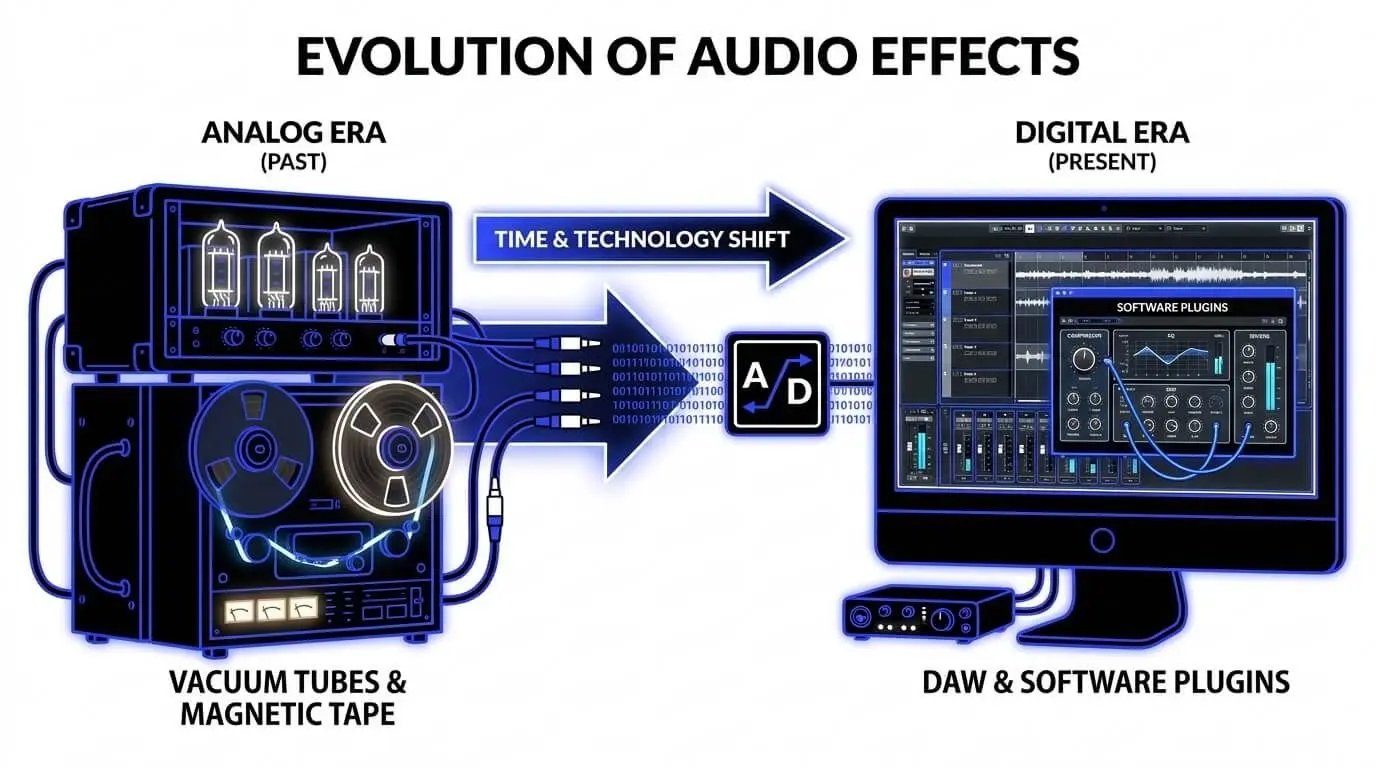
An audio effect is a hardware or software process that alters the characteristics of an audio signal. In the analog era, these were achieved through physical circuits, vacuum tubes, and magnetic tape. Today, most audio processing occurs via audio plugins—software components that run within a DAW to perform complex audio signal analysis and modification in real-time.
At its core, every effect is an exercise in audio engineering. By changing the amplitude, frequency, or time-alignment of a signal, effects allow for both restorative work (such as removing noise) and creative sound design (such as transforming a vocal into a robotic texture).
Why use audio effects?
The primary objective of using effects is to improve the clarity, depth, and emotional impact of a piece of audio. Without effects, a multi-track recording often sounds flat or dry. The use of audio filters and processors provides:
- Cohesion: Helping disparate elements blend into a unified mix.
- Character: Adding warmth or grit through saturation and distortion.
- Spatial Realism: Mimicking the natural acoustic effects of a room or cathedral.
- Correction: Fixing pitch inconsistencies or erratic volume levels.
Time-based effects: Sculpting space and dimension
Time-based effects manipulate the timing of the audio signal to create a sense of space, depth, or rhythmic complexity.
Reverb (reverberation)
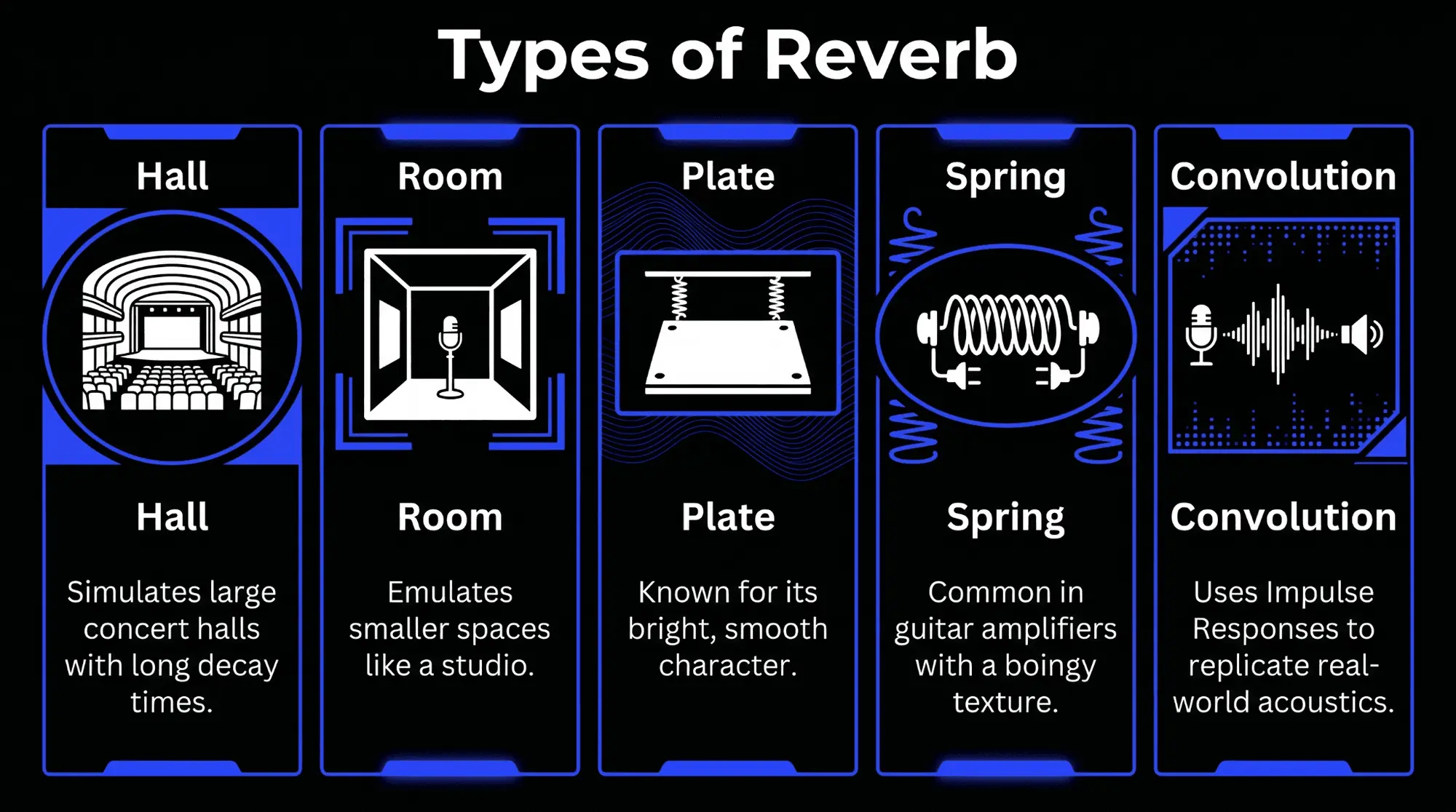
Reverb is perhaps the most essential effect in sound design. It simulates the natural reflections that occur when a sound hits the surfaces of a physical environment.
Types of reverb
- Hall reverb: Simulates large concert halls with long decay times, providing a majestic, orchestral feel.
- Room reverb: Emulates smaller spaces like a studio or living room, offering a sense of intimacy and realism.
- Plate reverb: A classic studio effect created by vibrating a large metal plate. It is known for its bright, smooth character, often used on vocals.
- Spring reverb: Common in guitar amplifiers, it uses a vibrating spring to create a lo-fi, boingy texture.
- Convolution reverb: Uses audio signal analysis of real-world spaces (Impulse Responses or IRs) to replicate the exact acoustics of a specific location, such as the Notre Dame Cathedral.
Delay (Echo)
Delay records an input signal and plays it back after a specific period. It is a foundational tool for adding rhythmic interest and width.
When to use delay
- Slapback: A very short delay (40-120ms) used in rockabilly and surf rock to add thickness to vocals or guitars.
- Ping-pong: Alternates the delayed signal between the left and right speakers, widening the stereo image.
- Feedback/evolving echoes: High feedback settings allow the delay to repeat indefinitely, creating ambient washes and psychedelic textures.
Dynamic effects
Dynamic effects focus on the control of a signal's amplitude over time. These are the workhorse tools of audio engineering, used to ensure that a mix remains consistent, powerful, and intelligible.
Compression
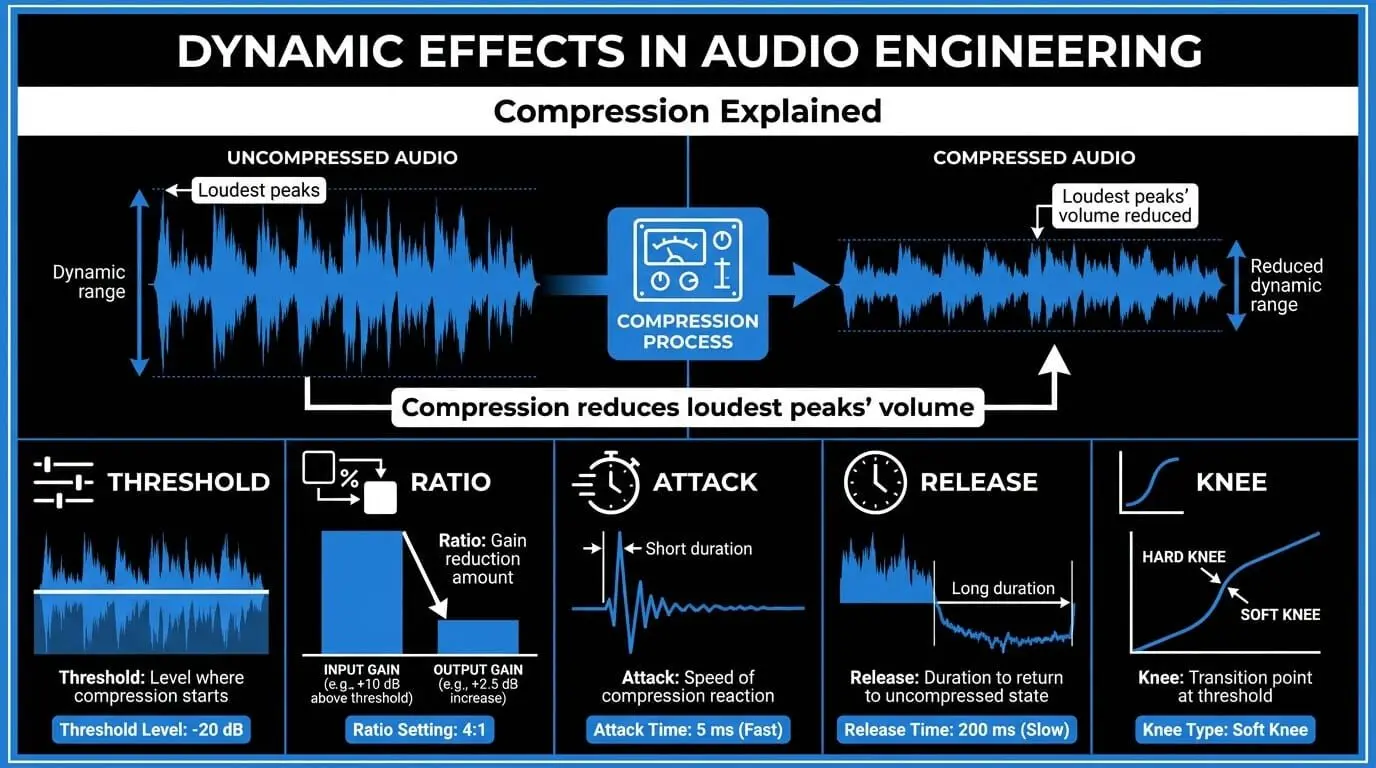
Compression is the most vital dynamic processor. It reduces the volume of the loudest peaks of a signal while allowing the quieter parts to remain audible. This narrows the dynamic range, resulting in a more controlled and impactful sound.
- Threshold: The decibel level at which the compressor begins to act upon the signal.
- Ratio: The amount of gain reduction applied once the signal crosses the threshold (e.g., 4:1 means for every 4dB over the threshold, only 1dB is output).
- Attack: The speed at which the compressor reacts to a peak.
- Release: The duration the compressor takes to return to its uncompressed state.
- Knee: The transition point at the threshold, which can be hard (abrupt) or soft (gradual).
Limiters, gates, and expanders
- Limiter: A compressor with an extremely high ratio (often 20:1 or higher). It acts as a ceiling, preventing any signal from exceeding a set peak level. This is essential in the final stages of audio mixing to prevent digital clipping.
- Noise Gate: A processor that silences the signal when it falls below a certain threshold. It is a staple of audio editing, used to remove background hiss or mic bleed between phrases.
- Expander: The opposite of a compressor, an expander increases the dynamic range by making quiet signals even quieter, often used to add life back into over-compressed recordings.
Spectral effects
Spectral effects allow for the manipulation of the frequency content of an audio signal. These tools are the primary means of achieving tonal balance and clarity within a complex arrangement.
Equalization (EQ)
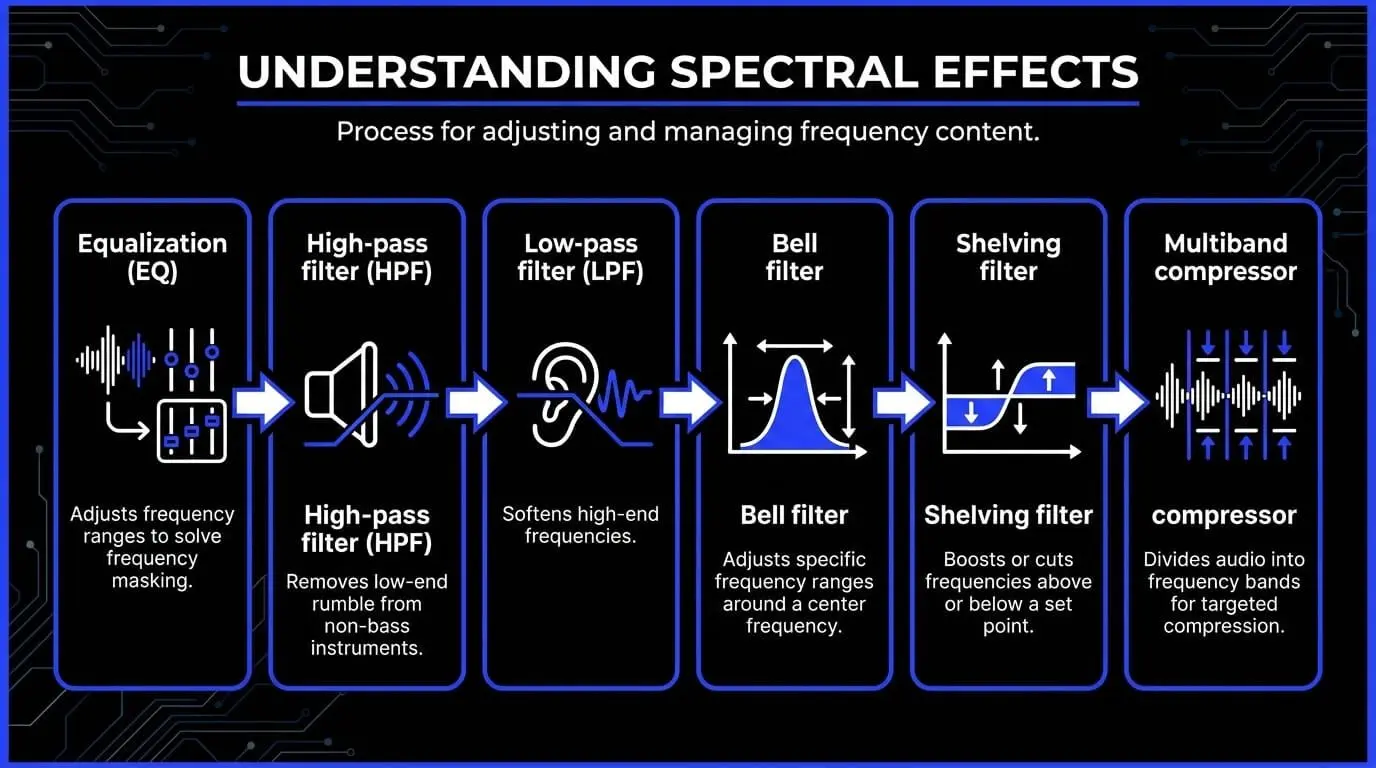
Equalization is the process of boosting or cutting specific frequency ranges. It is the most powerful tool for solving frequency masking, where two instruments occupy the same sonic space and become indistinct.
- High-pass filter (HPF): Attenuates all frequencies below a certain cutoff point. This is essential for removing low-end rumble from non-bass instruments.
- Low-pass filter (LPF): Attenuates all frequencies above a cutoff point, often used to soften harsh high-end or create a muffled effect.
- Bell filter: A parametric filter that affects a specific range around a center frequency. The width of this range is determined by the Q-factor.
- Shelving filter: Boosts or cuts everything above or below a certain frequency by a fixed amount, similar to the bass and treble knobs on a consumer hi-fi system.
Multiband dynamics
A multiband compressor combines spectral and dynamic processing. It divides the audio signal into several frequency bands (typically low, mid, and high) and allows the engineer to apply separate compression settings to each. This is invaluable for controlling a bass-heavy vocal without affecting the clarity of the high frequencies.
Modulation effects
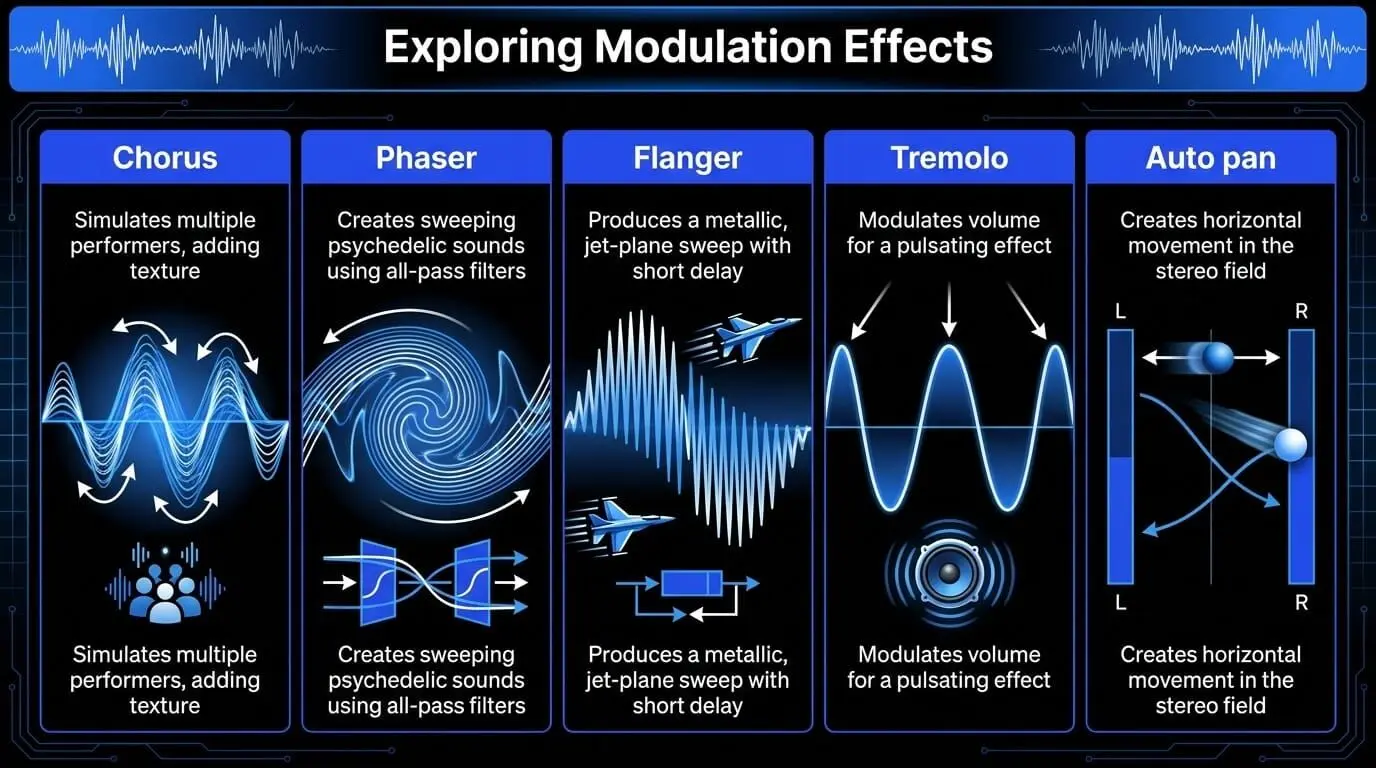
Modulation effects introduce movement and texture by varying parameters—such as pitch, volume, or phase—using a Low-Frequency Oscillator (LFO). These effects are central to creative sound design.
Chorus
The chorus effect simulates the sound of multiple performers playing the same part. By duplicating the signal, delaying it by a few milliseconds, and modulating the pitch of the copy, it creates a thick, shimmering texture. It is a foundational tool for widening synth pads and clean guitars.
Phaser and flanger
- Phaser: Uses all-pass filters to create notches in the frequency spectrum. As the LFO moves these notches, it creates a sweeping, psychedelic sound that feels internal to the source.
- Flanger: Similar to chorus but with a much shorter delay (under 10ms) and high feedback. This produces a metallic, jet-plane sweep that is highly aggressive and harmonically complex.
Tremolo and auto pan
- Tremolo: Rhythmic modulation of the signal's volume. It creates a pulsating effect often found in vintage surf rock and electronic pulses.
- Auto pan: The modulation of the signal's position within the stereo field. This creates horizontal movement, preventing the center of the mix from becoming too cluttered.
Harmonic effects
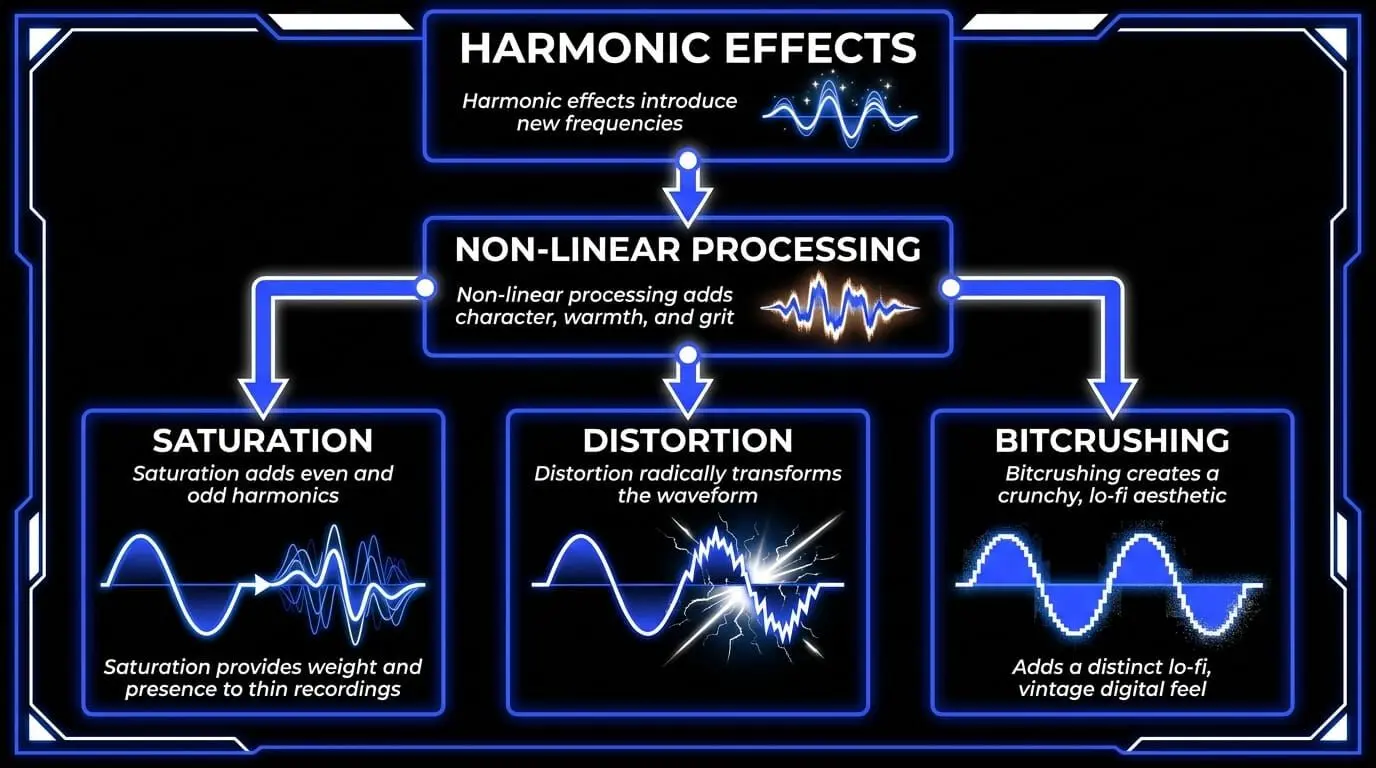
Harmonic effects introduce new frequencies into the signal that were not present in the original recording. This process, known as non-linear processing, adds character, warmth, and grit.
Saturation and soft clipping
Saturation is the subtle form of distortion that occurs when analog hardware is driven slightly beyond its limits. It adds even and odd harmonics that the human ear perceives as musical and pleasing. In digital audio engineering, saturation is used to provide weight and presence to thin digital recordings.
Distortion and bitcrushing
- Distortion: An aggressive form of clipping that radically transforms the waveform. While synonymous with rock guitar, it is also used in small doses to help instruments cut through a dense mix.
- Bitcrushing: A digital-only effect that reduces the sample rate and bit depth of the audio. This introduces aliasing and quantization noise, creating a crunchy, lo-fi aesthetic popularized in electronic music and industrial genres.
Specialized and creative audio manipulation
As audio plugins have evolved, several specialized effects have become industry standards for transformative sound design.
Pitch correction and transformation
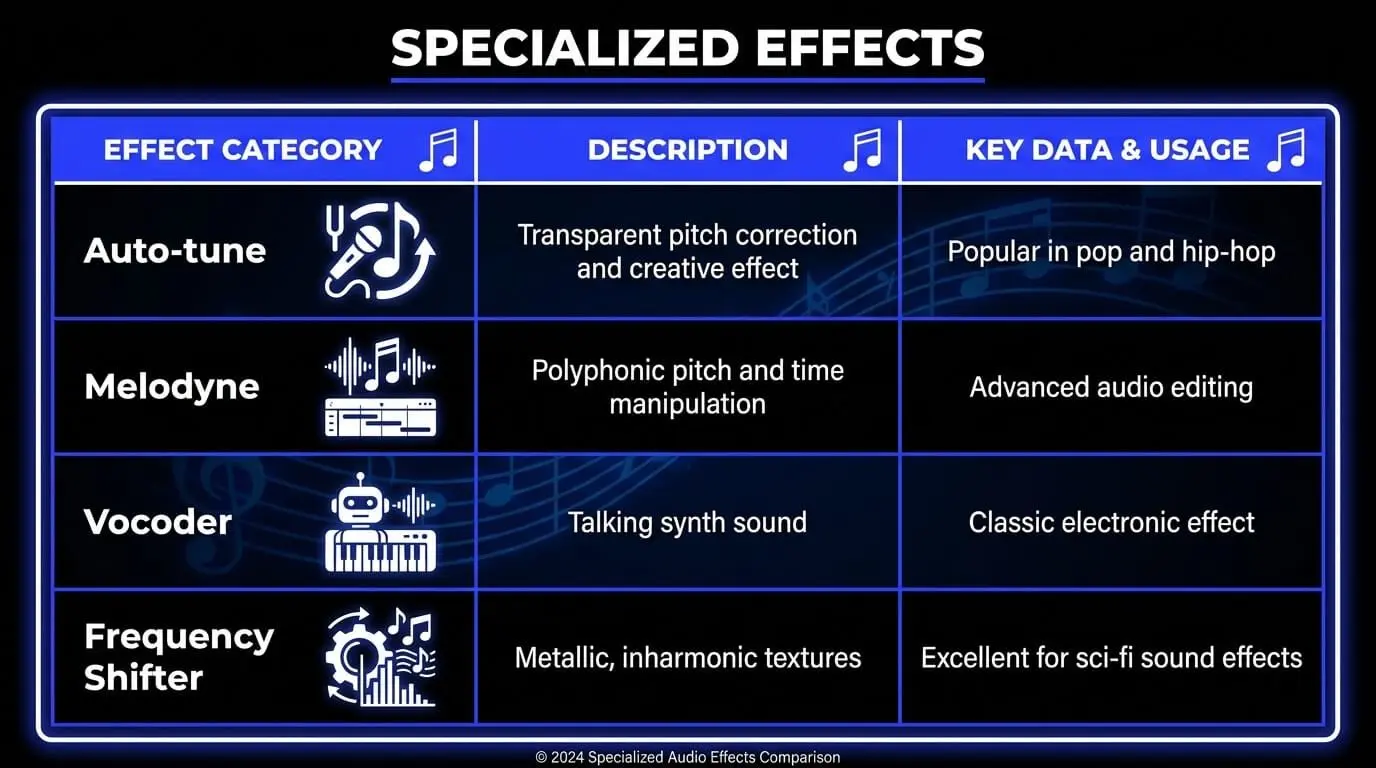
- Auto-tune: Originally designed for transparent pitch correction, it has become a recognizable creative effect in modern pop and hip-hop. It forces the incoming audio to the nearest note in a specified scale.
- Melodyne: Offers polyphonic pitch and time manipulation, allowing an engineer to change individual notes within a recorded piano chord or vocal harmony with surgical precision.
Vocoding and frequency shifting
- Vocoder: A classic tool that uses the frequency characteristics of a modulator (usually a human voice) to shape the sound of a carrier (usually a synthesizer). The result is a talking synth sound.
- Frequency shifter: Unlike a pitch shifter, which maintains harmonic relationships, a frequency shifter moves every frequency by a fixed mathematical amount (e.g., adding 50Hz to every frequency). This results in metallic, inharmonic textures that are excellent for sci-fi sound effects.
Strategies for audio mixing
The order in which audio effects are applied—known as the effects chain—dramatically alters the final result. Successful audio engineering requires a logical approach to signal flow to avoid compounding technical errors.
The standard signal flow
- Corrective EQ: Removing unwanted low-end rumble or resonant frequencies should happen first to ensure the compressor isn't reacting to noise.
- Dynamics: Compression or gating follows to stabilize the volume of the signal.
- Tonal EQ: Now that the signal is stable, an engineer can boost desirable frequencies.
- Saturation: Introducing harmonic content to add character.
- Modulation: Adding movement (chorus or phaser).
- Time-based effects: Reverb and delay are often placed at the very end of the chain or on a parallel bus to ensure the dry signal remains clear.
Serial vs. parallel processing
- Serial processing: Effects are placed one after another. The second effect processes the output of the first.
- Parallel processing: The signal is split. One part remains dry, while the other is heavily processed (e.g., heavy compression or reverb). These are then blended together, allowing for extreme processing without losing the integrity of the original sound.
How ACE Studio helps you shape better audio before and after effects
Start with stronger source material
Audio effects can do a lot, but they work best when the source already has shape, intention, and musical direction. EQ can clear space. Compression can control movement. Reverb can place a sound in a room. But if the vocal phrasing feels stiff, the string part lacks articulation, or the source audio is buried inside a full mix, effects alone can only take the track so far. That is where ACE Studio gives producers a stronger starting point.
ACE Studio is more than an AI vocal tool. It is an AI music generator for creating and refining vocals, instruments, stems, layers, and musical ideas before they move into deeper mixing. This matters in an article about audio effects because many mix decisions become easier when the performance itself is editable first.
Shape vocal performance before mixing
For vocals, ACE Studio lets you generate singing from MIDI and lyrics, then adjust the details that normally affect how effects respond: pitch, phrasing, timing, breath, softness, chest tone, and power.
Instead of using compression to force a weak vocal forward, you can shape the delivery first. Instead of using EQ to rescue a muddy backing stack, you can build cleaner vocal parts and then process them with purpose. This gives the vocal more intention before reverb, delay, saturation, widening, or final dynamics are added.
Use built-in FX tools for early tone control
ACE Studio also includes its own track-level FX tools. The FX Panel gives you direct control over essential processors such as EQ3, EQV, Compressor, De-esser, and Reverb.
EQ3 handles simple low, mid, and high tone shaping. EQV gives vocal-focused presets for lead, bright, backing, and choir parts. The compressor reduces the gap between loud and quiet moments, while the de-esser helps control sharp “s,” “sh,” and “t” sounds. Reverb includes Room, Hall, Church, and Cinematic spaces, with dry/wet control for how much space you want around the sound.
This means ACE Studio is not only helping you create parts. It also gives you practical tools to start shaping tone, dynamics, clarity, and space before you move into final mixing.
Place choirs in a realistic space
For choir production, ACE Studio goes further with a dedicated Room Effect on Singer Tracks. You can place virtual singers inside a simulated room, adjust their positions, and choose different room sizes such as a studio room, choir hall, or church.
This makes the spatial side of vocal production more practical. You are not only adding reverb at the end. You are deciding where the singers sit, how close they feel, and how wide the group should sound. For pop choirs, gospel layers, cinematic stacks, or background harmonies, that kind of placement gives the part more depth before additional effects are applied.
Separate stems for more precise processing
ACE Studio is also useful when you already have audio. Its Stem Splitter can separate a full mix into core elements such as vocals, drums, bass, piano, guitar, and other instruments.
That gives you more control over effects. Instead of applying EQ or compression to a whole stereo file, you can isolate the vocal, clean it, de-ess it, add reverb, or process the drums separately. In Basic and Professional stem modes, ACE Studio can also remove reverb and backing vocals, which is especially useful when preparing a cleaner vocal for editing or replacement.
Create instrument parts that respond naturally to effects
ACE Studio also expands beyond vocals with AI instruments including violins, violas, cellos, saxophones, trumpets, and duduk. These instruments support articulation control, so you can shape performance details before processing them.
For example, you can write a string part with MIDI, adjust the articulation, then use reverb to place it in a cinematic space, EQ to clear the low mids, and compression to keep the section controlled. The same idea applies to brass, woodwinds, or layered ensemble parts. You create the musical performance first, then use audio effects to refine its tone, position, and movement.
Build new layers before final processing
For creative production, prompt-based Generative Kits add more options without overwhelming the process. Add a Layer can generate new audio layers directly on the Canvas from a selected range and a short style description-prompt. Music Enhancer can reimagine selected audio, analyze lyrics and musical style, and let you control how closely the new version follows the original.
These tools are useful when a track needs a new texture, backing layer, or arrangement idea before final effects are applied. You might create a subtle pad under a chorus, add a supporting instrumental layer, or reshape a rough section before treating it with saturation, filters, delay, chorus, or stereo widening.
Practical uses for ACE Studio and audio effects
Practical uses include:
- Split a full mix into stems, then apply EQ and compression to the vocal separately
- Convert a rough vocal into MIDI and lyrics, refine the phrasing, then add reverb and de-essing
Build a choir part, place AI singers with Room Effect, then polish it with EQV and compression
- Create an AI string or brass layer from MIDI, then shape it with reverb, EQ, and dynamics
- Use Add a Layer to create a subtle backing texture, then process it with filters, delay, or saturation
- Use Music Enhancer to reshape a rough section before making final mix decisions
Keep creative control at the center
The benefit is simple: ACE Studio gives producers more control before the effects chain begins. You still decide what the song needs. You still shape the tone, space, movement, and emotion.
ACE Studio gives you cleaner stems, editable performances, stronger musical layers, and built-in tools for the first round of processing, so your audio effects can do more precise and musical work.
Innovative use of audio effects in genre-specific production
Different music genres prioritize different types of signal processing to achieve their signature sounds.
Hip-Hop and urban music
In hip-hop, the focus is on the low-end and the dominance of the vocal.
- 808 Processing: Producers use saturation to add mid-range harmonics to bass frequencies, ensuring they are audible on small speakers.
- Sidechain Compression: This technique ducks the volume of the bass whenever the kick drum hits, creating a rhythmic pumping effect that defines the genre's groove.
Electronic dance music (EDM)
EDM pushes audio manipulation to its limits, often using effects as primary instruments.
- Filter sweeps: Massive low-pass and high-pass filters are automated to create tension and release during transitions.
- Stereo imaging: Using tools like the Haas effect (short delays between left and right) to create a soundstage that feels wider than the physical speakers.
Rock and alternative
Rock production often aims for a sense of raw power and realistic space.
- Drum room enhancement: Parallel compression on room microphones adds explosive energy to drum kits.
- Slapback and spring reverb: These are used on guitars and vocals to pay homage to vintage recording styles while maintaining modern clarity.
Frequently Asked Questions
What is the technical distinction between audio effects and sound effects?
Audio effects are signal processing tools and audio plugins used during the mixing stage to modify the characteristics of a recorded signal. In contrast, sound effects are specific audio assets generated during sound design to represent physical events or environmental textures within a project.
Why are audio filters fundamental to professional sound engineering?
Audio filters are indispensable for frequency-based audio manipulation because they prevent masking between competing instruments. By removing unnecessary low-end or high-end frequencies, an engineer ensures that every element occupies a distinct space, which is a critical aspect of advanced mixing techniques.
How does the sequence of an effects chain impact audio processing?
The order of processors dictates the final output because each plugin alters the signal before it reaches the next. For instance, performing audio editing and equalization before compression ensures that the dynamic processor reacts only to the desired frequency range rather than unwanted noise or rumble.
What differentiates reverb effects from natural acoustic effects?
Acoustic effects are physical phenomena resulting from sound waves interacting with a real-world environment through reflection and absorption. Reverb effects are sophisticated digital or analog emulations designed to recreate these spatial characteristics within a digital audio workstation through complex acoustic processing.
How do audio plugins and audio signal analysis improve modern production workflows?
Audio plugins offer specialized signal processing capabilities that extend the reach of a digital audio workstation, allowing for surgical audio engineering. When combined with audio signal analysis, these tools provide visual feedback that helps producers refine their sound design and ensure their tracks meet commercial loudness standards.