What are stems in music production?
If you’ve ever asked what stems are in music production, you’re usually trying to solve a practical problem: how do I share my song for mixing, remixing, or collaboration without sending a messy session file or dozens of individual tracks? That’s exactly what stems are for. They’re a clean middle ground between a full multitrack session and a single stereo mix – and once you understand them, exporting and delivering audio becomes way less stressful.
Stems matter in everyday producer life: sending a vocalist a “music minus lead” version, giving a mix engineer grouped audio that’s easy to revise, building live playback sessions, or creating alternate versions for sync and mastering.
They’re also useful when you’re using modern vocal tools – for example, if you generate or edit vocals in a standalone environment like ACE Studio, exporting vocals as properly aligned stems makes it painless to drop them into any DAW mix later. ACE Studio’s exports are designed to retain tempo alignment so the vocal stems stay synchronized when you import them into a DAW with the same BPM.
What are stems: simple definition
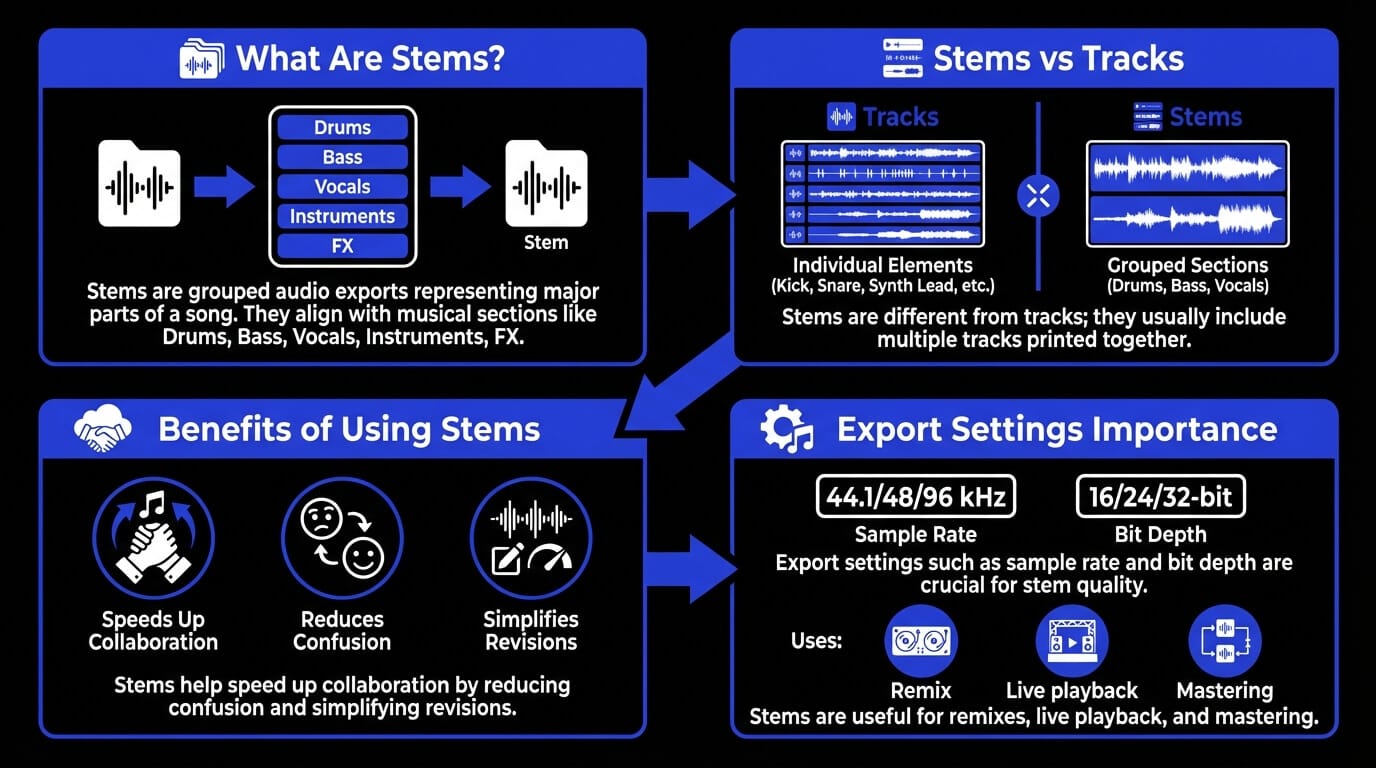
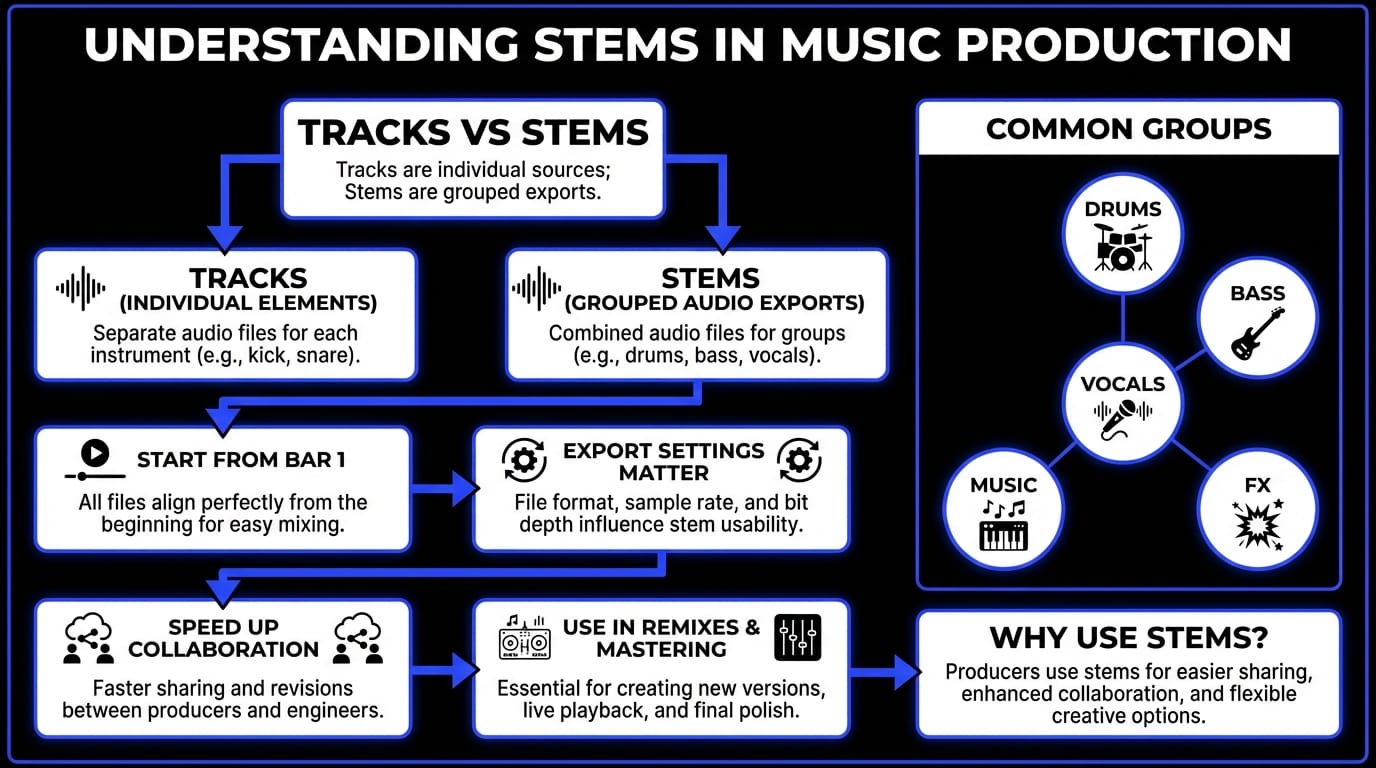
Stems are audio files that contain grouped elements of a mix, exported so they play back in sync when stacked together. Each stem is usually a submix of multiple tracks printed into one file – like a “Drums” stem that includes kick, snare, hats, toms, overheads, rooms, and drum bus processing.
A key detail: stems are usually exported full-length (from the start of the song), even if that group is silent for part of the arrangement. That’s what makes them easy to align and drop into any DAW.
Common stem groups
There’s no single “correct” stem layout, but these are common because they match how we think about a record:
- Drum stems: Often include all drum tracks plus drum bus processing. Some deliver Drums (no FX) and Drum FX/Verb as separate stems if reverb is an important creative element.
- Bass stems: Could include DI + amp + saturation printed together. If the bass sound depends heavily on sidechain or automation, communicate that, or print alternates.
- Vocal stems: Usually lead + doubles + harmonies grouped (or separated into Lead / BGV / Ad-libs stems if the project needs control). When vocals are created or edited outside a DAW, the same stem principle applies: export them full-length, aligned to tempo, and ready to mix. In ACE Studio workflows, exported vocals are intended to retain tempo alignment so they stay synchronized once imported into a DAW session with the same BPM.
- Instrument stems: Sometimes split into Guitars / Keys / Synths / Orchestration. Sometimes it’s just “Music” if the client only needs broad control.
- FX stems: Include risers, impacts, ear candy, and transitional effects. In modern pop and electronic production, this stem can be the difference between a “demo” and a finished-feeling record.
How many stems are in a song?
Typical deliveries:
- 4–6 stems for simple collaboration (Drums, Bass, Music, Vocals, FX).
- 8–12 stems for more control (Lead Vox, BGV, Drums, Bass, Guitars, Keys/Synths, FX, Returns).
- 12+ stems for film/TV or label deliveries where alternates matter.
A helpful rule: export as few stems as possible, but as many as necessary for the next person to do their job without guessing.
What role do stems play in production?
Faster mixing and revisions
Stems speed up revisions because they reduce the surface area of change. Instead of reopening a complex session to tweak one element, you can:
- Nudge vocal level against the instrumental
- Rebalance drums vs music
- Adjust FX density
- Create “TV mix” variations (instrumental, a cappella, clean)
This matters when feedback is frequent. You keep your creative intent intact while staying flexible.
Collaboration between artists and engineers
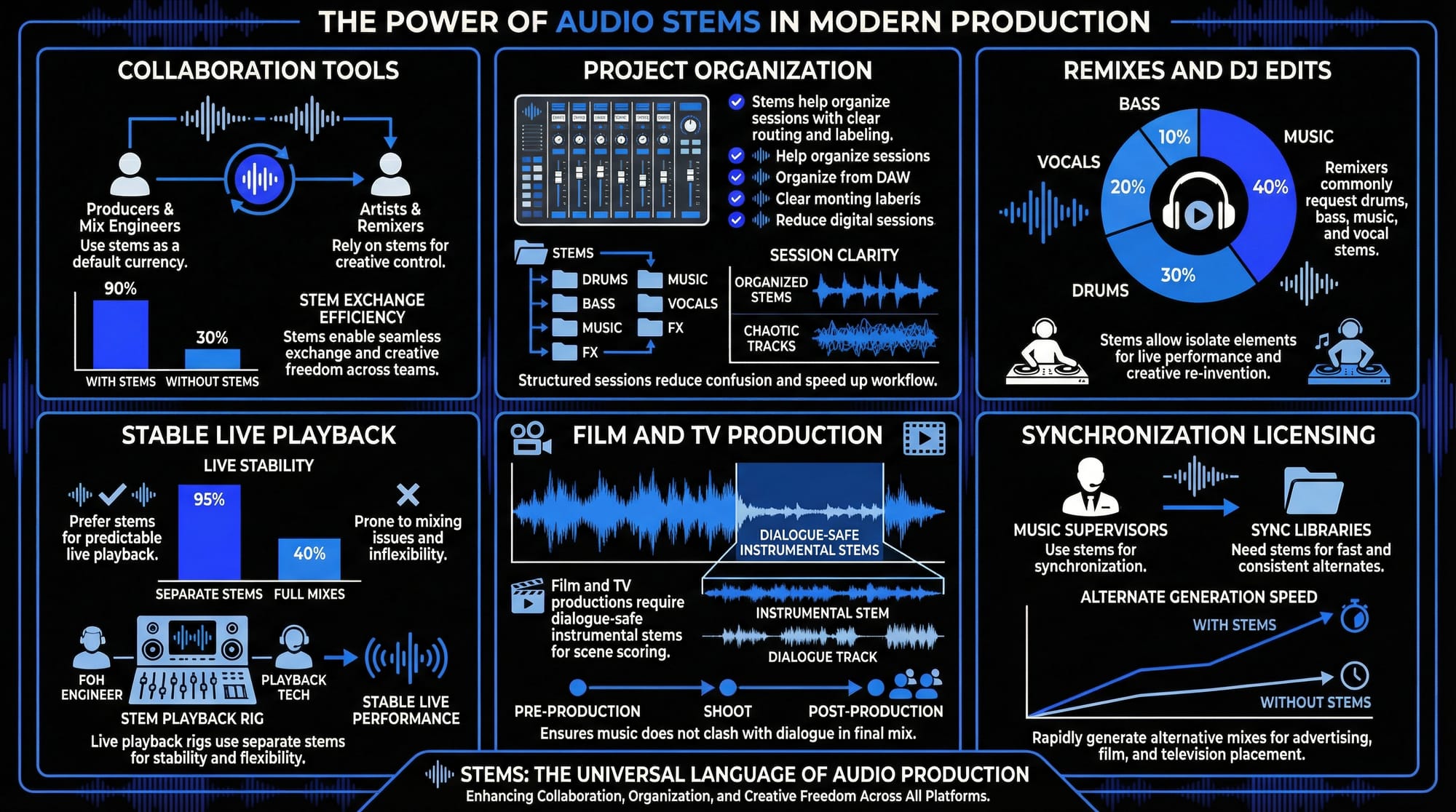
Stems are the default currency between:
- Producers and mix engineers
- Artists and remixers
- Composers and music supervisors
- FOH engineers and playback techs
They’re also a trust tool: you can give someone what they need without giving away everything. A vocalist might get “Instrumental” and “Guide Vox” stems. A mix engineer might get full stem groups. A label might request stems for archiving or future alternate versions.
Project organization
Stems force you to organize your production in a musical way. When you build your session with stem export in mind, you naturally:
- Route related tracks to busses (drum bus, vocal bus)
- Make intentional decisions about FX returns
- Label sections and versions clearly
That organization pays off when you’re moving between tools. If you sketch vocals in one environment and mix in another, clean stem grouping keeps you from losing time.
In ACE Studio, for example, projects can involve tempo tags and multiple BPM sections, then vocals can be exported and rebuilt against the same tempo map in your DAW to keep everything aligned. That’s a good example of stems being less about “export” and more about keeping your arrangement decisions intact across systems.
What are stems used for?
Remixes and DJ edits
Remixers want control without needing your full multitrack chaos. Common requests:
- Drum stems
- Bass stems
- Music stems (all instruments)
- Vocal stems (often split further into Lead and BGV)
For DJ edits, even just acapella and instrumental stems can be enough to create clean transitions and mashups.
Live playback
Live playback rigs often run stems instead of full sessions because they’re stable and predictable. You might deliver:
- Click (sometimes a separate track, not a stem)
- Drums
- Bass
- Music
- BGVs
- FX
Stems also help you build multiple show versions (festival set vs headline set) without rebuilding the mix from scratch.
Film and TV production
Post teams need stems to fit dialogue and sound design. They’ll often request:
- Dialogue-safe instrumental stem
- Percussion stem
- Bass stem
- Melody stem
- Vocal stem (if vocals exist)
- FX stem
Synchronization licensing
Sync libraries frequently ask for stems and alt mixes:
- Full mix
- Instrumental
- No drums
- No melody
- 30s/60s cutdowns
Stems make these alternates fast and consistent.
Mastering and alternate versions
Mastering engineers sometimes request stems if a single element needs gentle correction without remixing the whole track (like slightly taming vocal harshness without touching the instrumental). Even if you never deliver stems externally, printing them for yourself can save a project later when you need an alternate mix and the original session is buried.
A modern workflow note: if you’re creating multiple vocal layers (harmonies, choir stacks, doubles), printing them as stems can preserve your performance choices while keeping mix flexibility. ACE Studio explicitly supports layering multiple vocal tracks for harmonies and exporting in common formats like WAV/MP3, which fits naturally into a stem-based handoff.
Stems vs tracks vs multitracks
What is a track?
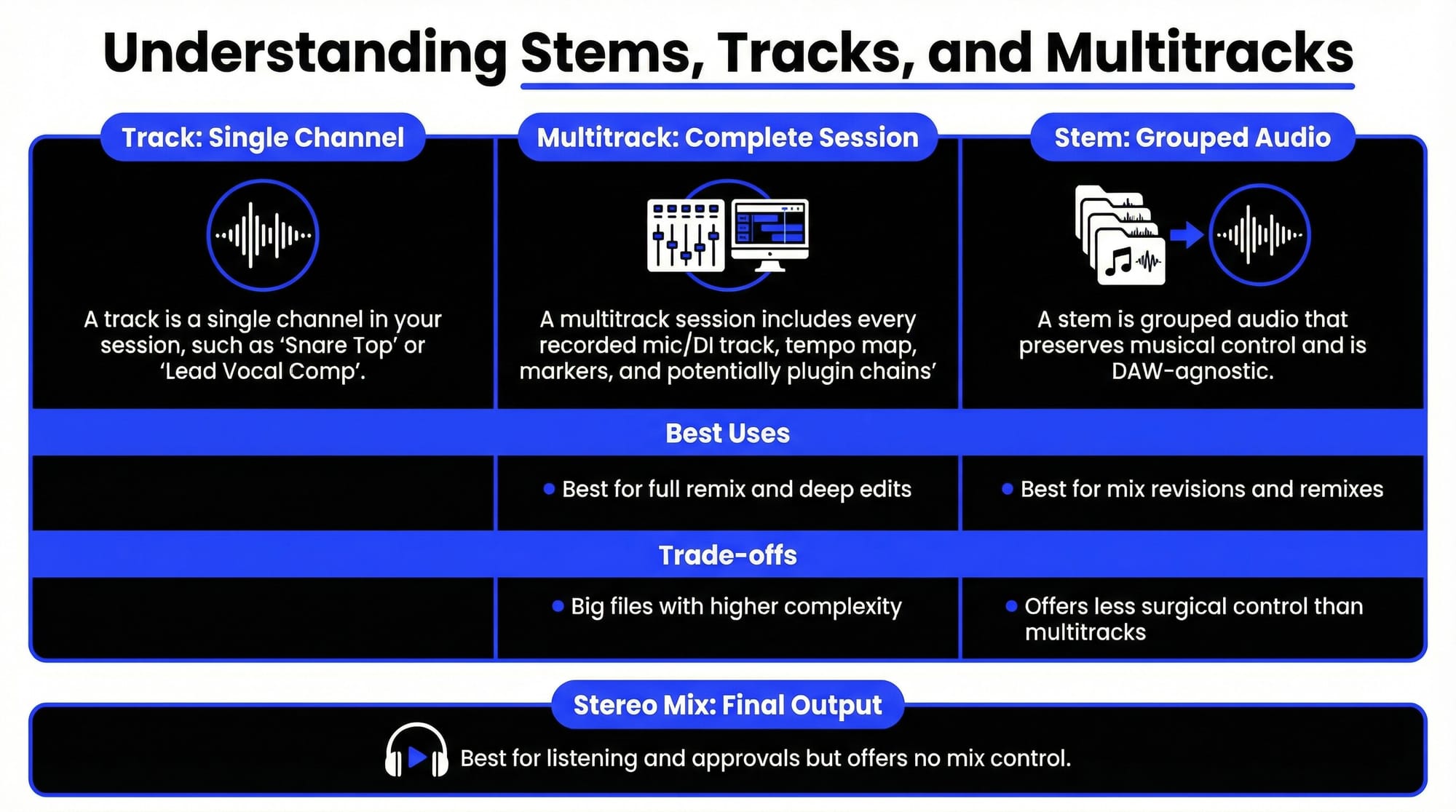
A track is a single channel in your session – one audio or MIDI lane (like “Snare Top” or “Lead Vocal Comp”). Tracks are the most detailed level. They’re what you edit, tune, comp, time-align, and process individually.
What is a multitrack session?
A multitrack session means you’re delivering the whole set of individual tracks (often with raw audio, sometimes consolidated), plus the session file itself. This is the deepest handoff and usually includes:
- Every recorded mic/DI track
- All edits (or sometimes none, depending on the agreement)
- Tempo map, markers, arrangement
- Potentially plugin chains (if the receiver has them)
Multitracks are powerful, but they’re heavy, messy, and DAW-dependent.
Where do stems belong?
A stem sits between those two extremes: it’s grouped audio that preserves musical control without exposing every raw detail. It’s also DAW-agnostic: anyone can import stems into any workstation.
Key differences between stems and multitracks
Here’s the clearest way to compare:
One more practical note: if you’re collaborating with someone who doesn’t share your toolchain, stems are often the friendliest option. And if part of your workflow happens outside your DAW (vocal generation, choir arrangement, or stem splitting utilities), stems are the common language that gets everything back into the mix.
For example, ACE Studio can split a song into layers like lead vocal, drums, bass, and harmonic content, then you can export what you need back to your DAW.
How to export stems from a DAW
Export preparation checklist
Before you export anything, do a quick “stem sanity check.” This is where most problems happen.
- Commit your arrangement: freeze decisions like track muting, comp choices, and edits.
- Check routing: make sure each stem group goes to a clear bus.
- Print from the same start point: usually 0:00 or bar 1, even if silent.
- Confirm tempo: if there are tempo changes, make sure the receiving session can recreate the map.
- Verify phase and mono compatibility: especially for drums and layered synths.
File naming and formats
Use names that a stranger can understand in 10 seconds:
- SongName_Stems_120BPM_48k24b
- 01_Drums.wav
- 02_Bass.wav
- 03_Vox_Lead.wav
WAV is the safest default. If you’re exporting from a tool like ACE Studio, WAV export is supported for high-quality delivery (and MP3 for quick sharing), so you can choose based on the handoff.
Sample rate and bit depth
A common “safe” delivery spec is 48 kHz / 24-bit WAV for video or professional post, and 44.1 kHz / 24-bit for music-only workflows. The key is consistency: all stems should match the same sample rate/bit depth.
Start time alignment
This is non-negotiable. Every stem should:
- Start at the same timestamp
- Be the same total length
- Line up when imported together
If your receiver drops all stems at bar 1, the song should play correctly with no nudging.
Effects handling
Decide what you’re delivering:
- Wet stems (with creative FX printed) – good when FX are part of the identity.
- Dry stems (minimal FX) – good when a mix engineer needs control.
- Both – best for flexibility, but heavier.
For vocals especially, consider printing a version with and without heavy reverb/delay. Some workflows even start earlier than mixing: if you’re using stem-splitting tools and want clean vocal processing, removing reverb before analysis can help. ACE Studio’s stem splitter includes an option to “Remove Reverb for Vocal Track” to reduce interference when extracting a vocal reference.
How to use stems
Importing and organizing stems
When you receive stems, treat them like a mini-session:
- Create a new project at the correct sample rate and BPM.
- Import all stems starting at bar 1.
- Color-coding is optional, but labeling isn’t.
- Create busses similar to how stems are grouped (Drums Bus, Vox Bus, Music Bus).
- Do a quick gain stage pass so nothing clips your mix bus.
If the stems include vocals plus lyric alignment metadata (less common in pure DAW exports), that can be helpful for rehearsal or review. ACE Studio has a “Share” workflow that renders tracks into separated MP3s and provides a link-based stem player where listeners can mute tracks and preview lyrics. Even if you’re not using that exact feature, it highlights a useful stem mindset: make the handoff easy for the next person to audition and understand.
Mixing with stems
Stem mixing is about broad musical moves:
- Balance drums vs music vs vocals
- Shape tone with gentle EQ/compression per stem
- Control space (reverb/delay) so the mix feels consistent
- Automate stem levels for sections (chorus lift, verse intimacy)
Because stems are grouped, you rely more on macro decisions. That’s not a limitation – it can be freeing. You’re mixing the record, not chasing the snare ring for two hours.
Stem mixing vs multitrack mixing
Here’s when each makes sense:
- Choose stem mixing when you need speed, stability, and revisions.
- Choose multitrack mixing when you need surgical control (vocal de-essing per phrase, drum sample replacement, micro-timing edits).
If you’re delivering stems to someone else, give them a heads-up about what’s “baked in.” For example: “Vocal stem includes tuning and delay throws printed.” That clarity prevents revision loops and keeps collaboration respectful.
FAQs about stems in music production
What are the stems of a song?
The stems of a song are grouped audio exports (like Drums, Bass, Vocals, Instruments, FX) that, when played together, recreate the full song. They’re printed to line up in time so they can be imported into any DAW and played back in sync.
Are stems just audio files?
Most of the time, yes – stems are audio files (usually WAV). But in some workflows, you might also deliver supporting files like tempo maps, MIDI, or notes about effects. For example, ACE Studio supports exporting audio (WAV/MP3) and also exporting MIDI with options to include lyrics/phonemes, which can help preserve editability depending on the project.
How do I export stems from a DAW?
Route related tracks to stem busses, then export each bus as an audio file from the same start point. Make sure all stems share the same sample rate, bit depth, and length. Finally, re-import stems into a blank session to verify alignment.
How should stems be mixed?
Start with balance, then tone, then space:
Balance stems so the song feels right at a low monitoring level, use gentle EQ/compression to shape each stem’s role, add reverb/delay intentionally so the mix has one believable “room.”, automate stems for arrangement dynamics.
How many stems should I deliver?
Deliver the minimum set that still gives the receiver control:
- 4–6 stems for basic revisions
- 8–12 stems for detailed work
- More if the client requests specific alternates (Lead Vox separate, BGV separate, FX separate)