


Key Takeaways
- Audio editing is the process of cleaning, cutting, arranging, and improving sound so recordings feel clearer, smoother, and more professional.
- Modern audio editing is non-destructive, which means editors can trim, splice, fade, process, and rearrange clips without permanently damaging the original recording.
- Professional editing goes beyond simple cuts. It includes dialogue cleanup, music timing, vocal comping, noise reduction, spectral editing, sound design, and final export preparation.
- AI tools are making audio editing faster by helping with stem separation, restoration, vocal editing, source cleanup, and creative production tasks, but human choices and judgement still shape the emotional result.
- ACE Studio gives producers more control over vocals, instruments, stems, harmonies, and performance details, making it useful for rebuilding ideas, refining demos, creating arrangements, and shaping musical parts with precision
The role of audio editing in production
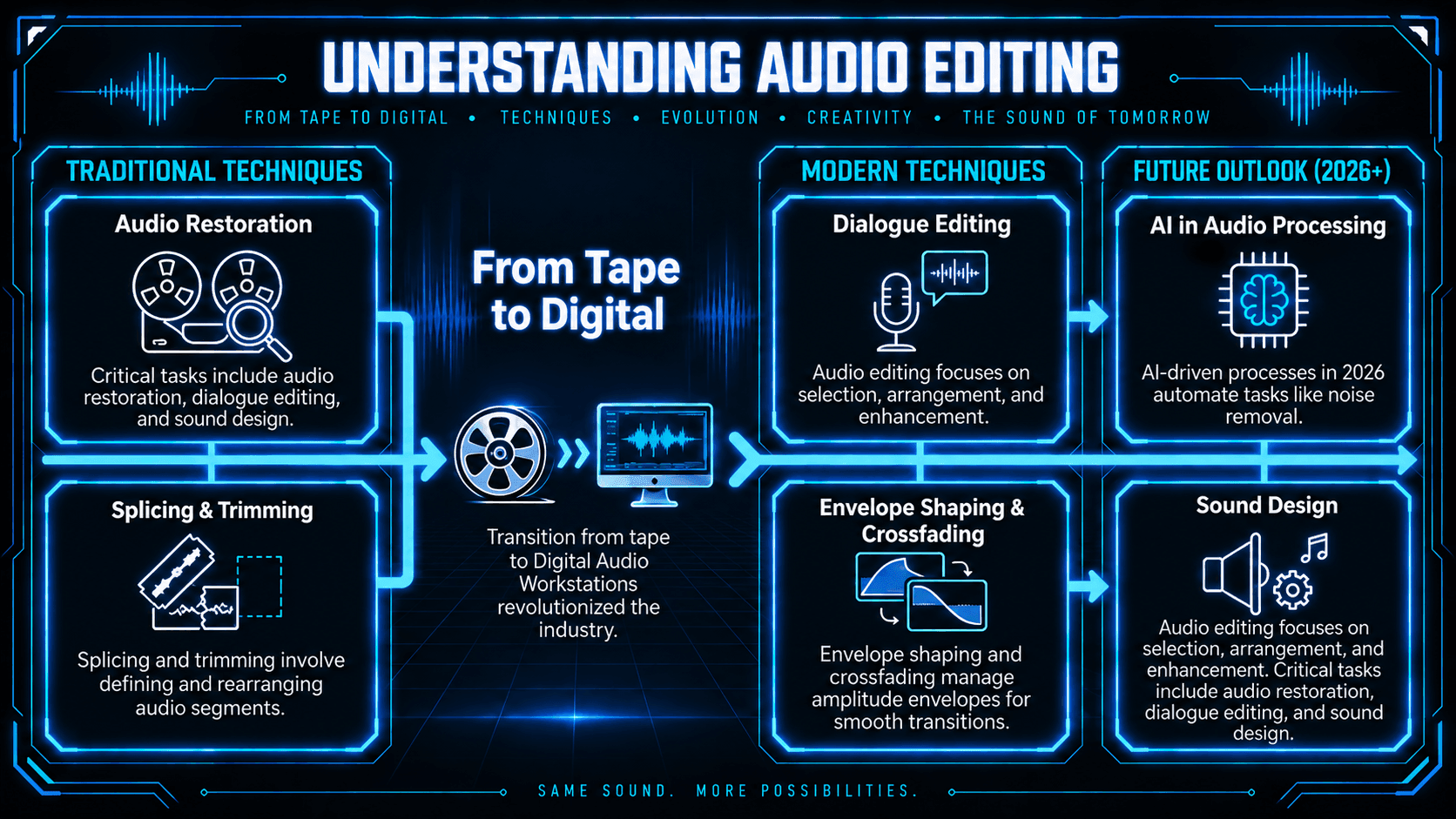
At its core, audio editing involves the selection and arrangement of audio segments, the removal of unwanted artifacts, and the enhancement of sonic characteristics. It is a subset of audio production that focuses specifically on the "cleanup" and "arrangement" phases rather than the initial capture or the final mastering.
The scope of audio editing
The discipline encompasses several critical tasks:
- Audio restoration: Repairing damaged or noisy recordings.
- Dialogue editing: Ensuring speech is intelligible and free of distractions such as unwanted breaths, background interruptions, etc.
- Comp editing: Aligning multiple performances and choosing the best "takes" from a recorded or generated performance.
- Sound design: Creating and layering textures, adding effects and re-editing (reordering) to “sculpt” a sound.
The evolution of sound editing: from tape to AI
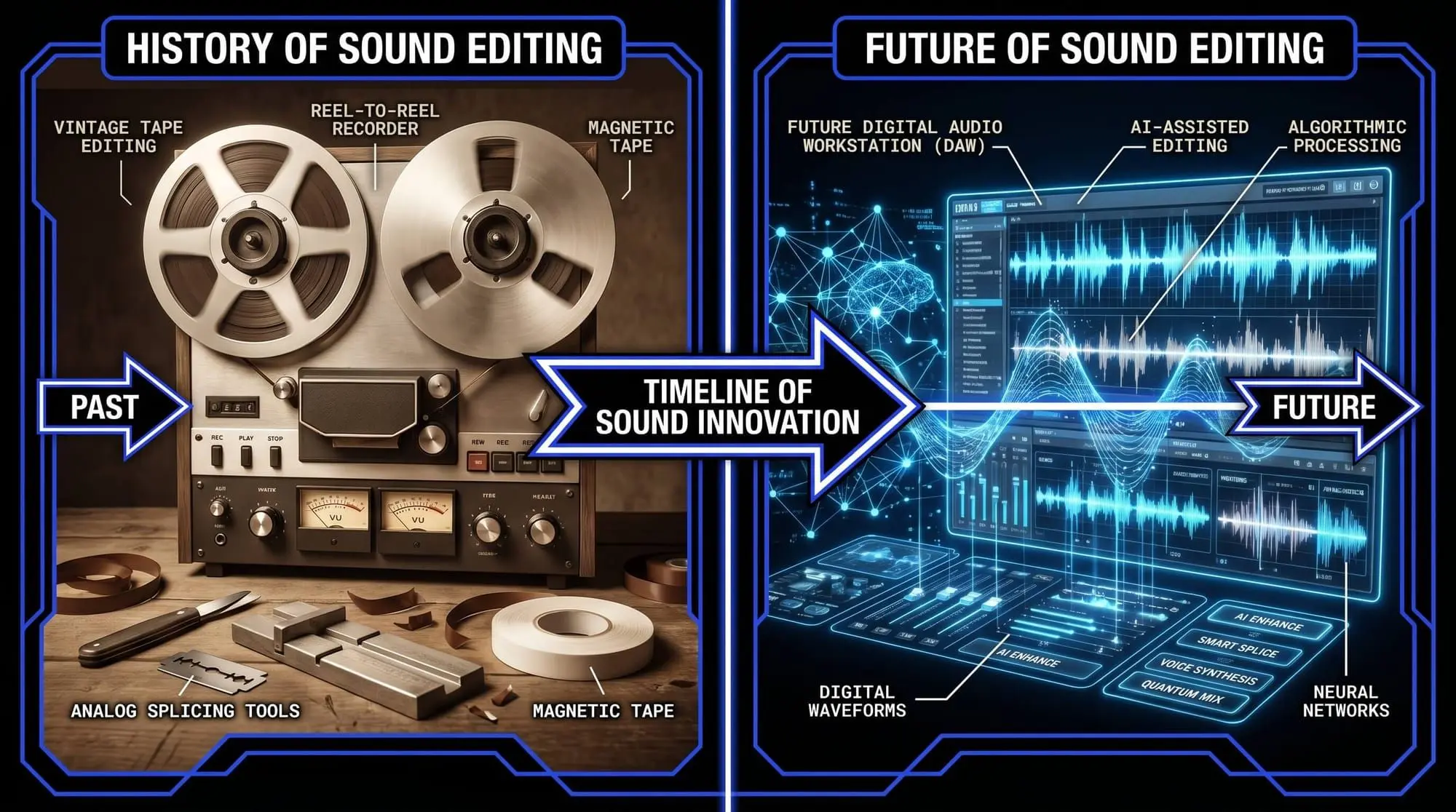
Historically, sound editing was a physical, destructive process. Engineers used razor blades to cut 1/4-inch magnetic tape and adhesive to splice sections together. Errors were sometimes creative, but could also be permanent and costly.
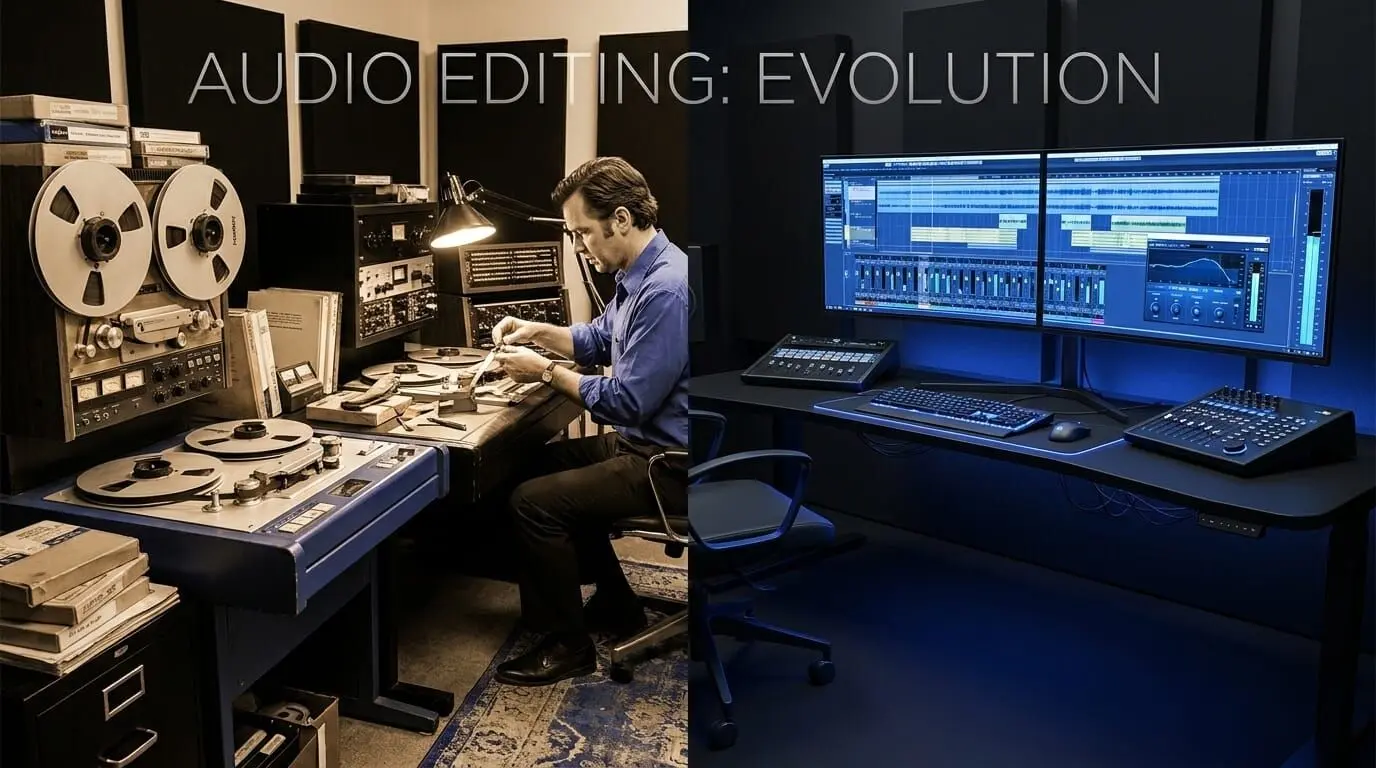
The transition to the Digital Audio Workstation (DAW) revolutionized the industry. Today, editing is non-destructive, meaning the original file remains untouched while the software tracks the changes made in a virtual environment. In 2026, the rise of AI-driven audio processing has further automated tedious tasks, such as noise removal and stem separation, allowing editors to focus on the creative aspects of the craft.
What are the different types of audio editing?
1. Splicing and trimming
In a digital audio workstation, cutting is the act of defining the start and end points of a region.
- Trimming: Shortening the edges of a clip to remove silence or "pre-roll" noise.
- Splicing: Splitting a single audio file into multiple segments to rearrange the sequence or insert new material.
- Technical Note: Modern cutting is non-destructive. The software does not delete the data from the hard drive; it simply creates an instruction to the playback engine to ignore those specific samples.
2. Envelope shaping and crossfading
Fading is more than just volume adjustment; it is about managing the amplitude envelope to avoid technical artifacts or to make recorded audio sound more fluid and natural.
- Linear fades: A constant change in volume. Best for short transitions.
- Logarithmic/Exponential fades: These mimic how the human ear perceives loudness. They are essential for smooth, natural-sounding transitions in music and dialogue.
- Crossfading: The simultaneous fading out of one clip and fading in of another. This is critical for preventing DC offset pops, which occur when an edit happens at a point where the waveform is not at the zero-crossing line.
3. Summing and signal routing
Mixing is the process of combining multiple tracks into a final stereo or surround sound file.
- Summing: The mathematical addition of digital signals. If two signals are too loud, their sum will exceed 0dBFS, resulting in digital clipping.
- Busing: Routing multiple tracks (e.g., all drum microphones) into a single "bus" to edit them as a group.
- Panning: Placing sounds within the stereo field to create a sense of space and prevent frequency masking.
Categorical types of audio editing
To achieve a professional standard, we must look beyond the basic tools and categorize editing by its intended outcome. In the professional world, an editor is rarely just "editing"; they are performing one of the following specialized roles.
Dialogue editing
Dialogue editing is the backbone of film, television, and podcasts. It requires a different set of audio editing techniques than music.
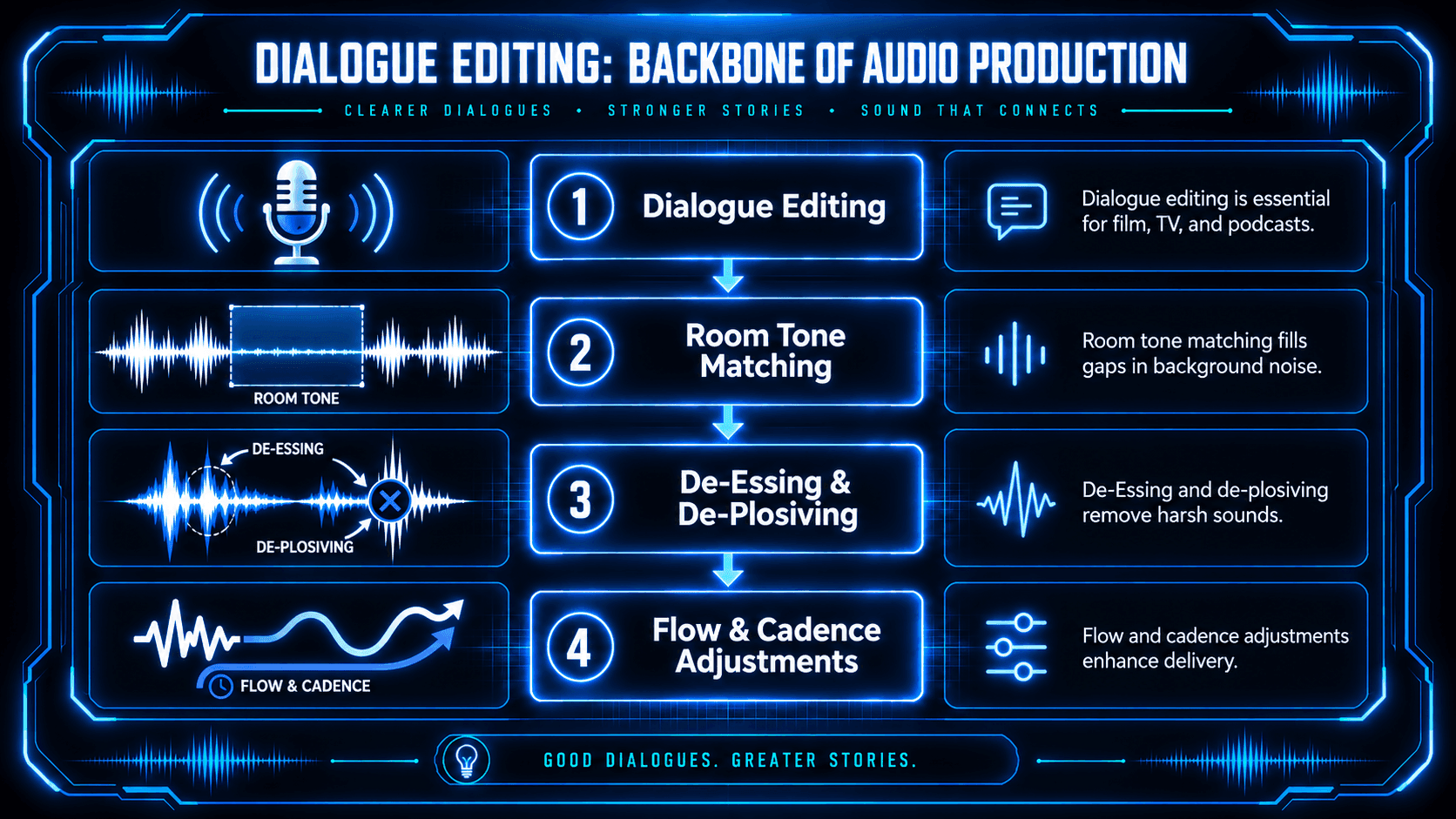
- Room tone matching: When an editor cuts a sentence, there is often a change in the background noise. Dialogue editors use "room tone"—a recording of the silence in a room—to fill those gaps and maintain a seamless sonic floor.
- De-Essing and de-plosiving: Using frequency-dependent compression to remove harsh "S" sounds and low-frequency air blasts from "P" and "B" sounds.
- Flow and cadence: Adjusting the space between words to improve the speaker’s delivery without making it sound unnatural.
Music editing
Music editing focuses on the relationship between sound and time, trying to balance melodic, harmonic ideas with overall compositional structure.
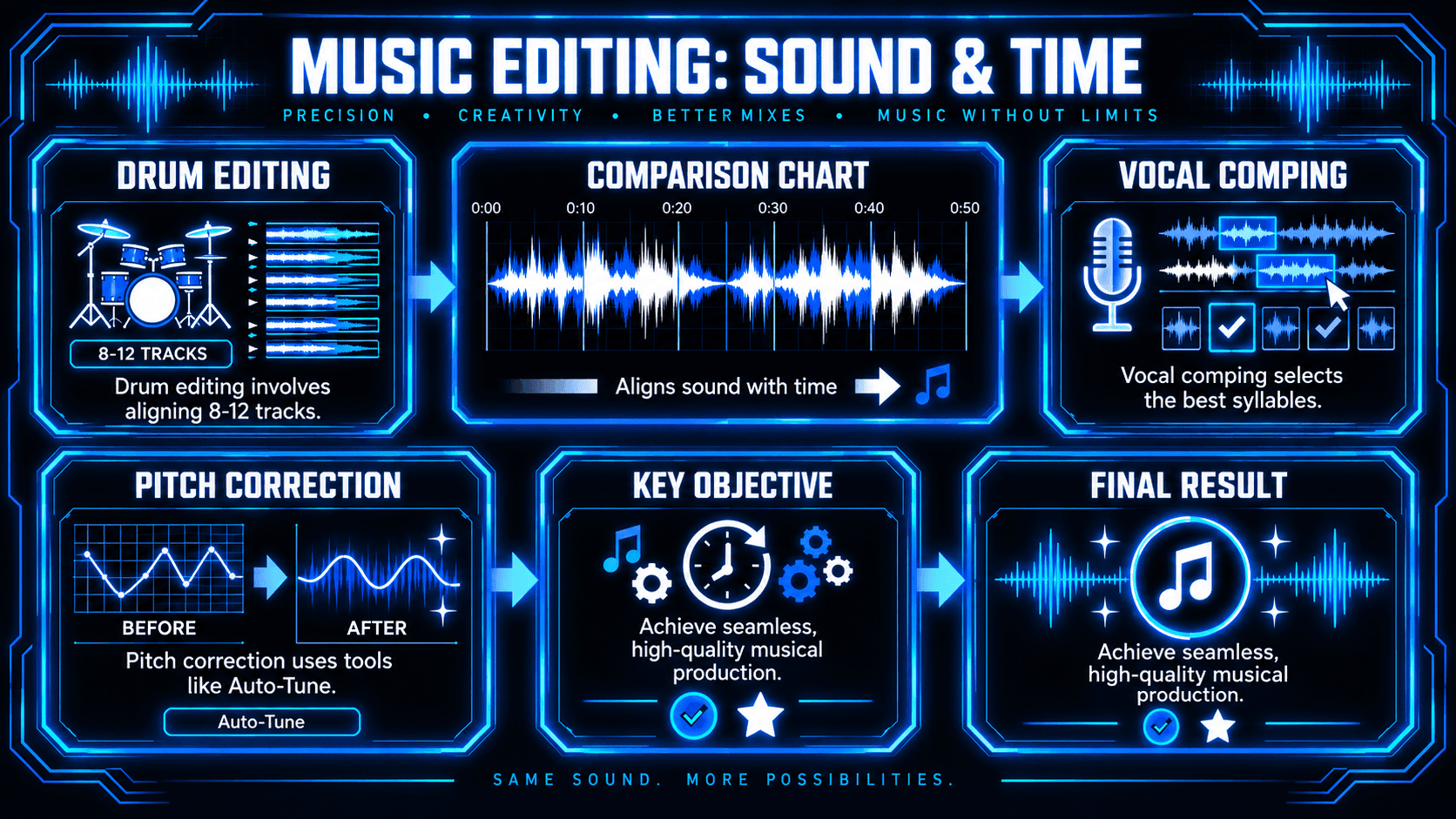
- Drum editing: Aligning multi-track drum recordings to a grid. This is highly complex because an editor must move 8–12 tracks simultaneously to maintain phase coherence.
- Vocal comping: Selecting the best syllables from dozens of different takes to build a "composite" track that represents the artist's best possible performance.
- Pitch correction: Utilizing audio processing tools like Auto-Tune or Melodyne to adjust the intonation of a performance while preserving the original timbre.
Audio restoration
This type of editing is used to "save" audio that has been damaged by the environment or aging hardware.
- Spectral subtraction: Identifying a specific noise profile (like a 60Hz hum) and removing it from the signal.
- De-clipping: Using AI-driven algorithms to reconstruct the peaks of a waveform that were "squashed" due to a recording being too loud.
- De-reverb: Removing the natural echo of a room to make the audio sound "dry", allowing more room for post processing later on.
Sound effect (SFX) editing
This is a creative type of editing where the goal is to build a world.
- Foley editing: Syncing recorded footsteps, clothing rustles, and prop movements to the picture.
- Ambience layering: Combining multiple environmental sounds (e.g., wind, distant traffic, and birds) to create a believable location.
How audio editing works: The technical fundamentals
To understand how to edit audio, one must first understand the medium itself. Digital audio is a representation of sound waves captured through sampling.
Waveform anatomy
When you open an audio editing software, the visual representation you see is a waveform. This graph displays amplitude (volume) on the vertical axis and time on the horizontal axis.
- Transients: These are the initial, high-energy peaks of a sound (e.g., the hit of a drum or the start of a consonant in speech).
- Sustain and Decay: The body and fading tail of the sound.
Digital signal processing (DSP)
Editing involves applying audio processing algorithms to these waveforms. These algorithms can change the gain, alter the frequency spectrum, or shift the timing of the audio data without degrading the signal, provided the bit depth and sample rate are sufficiently high.
Linear vs. non-linear editing
- Linear editing: Following a fixed sequence (rare in modern digital workflows).
- Non-linear editing (NLE): The ability to access any part of the audio file instantly, rearrange clips out of order, and layer multiple tracks simultaneously.
The core audio editing process: A step-by-step framework
A systematic approach prevents errors and ensures a polished sound. A professional editor follows a specific sequence of operations.
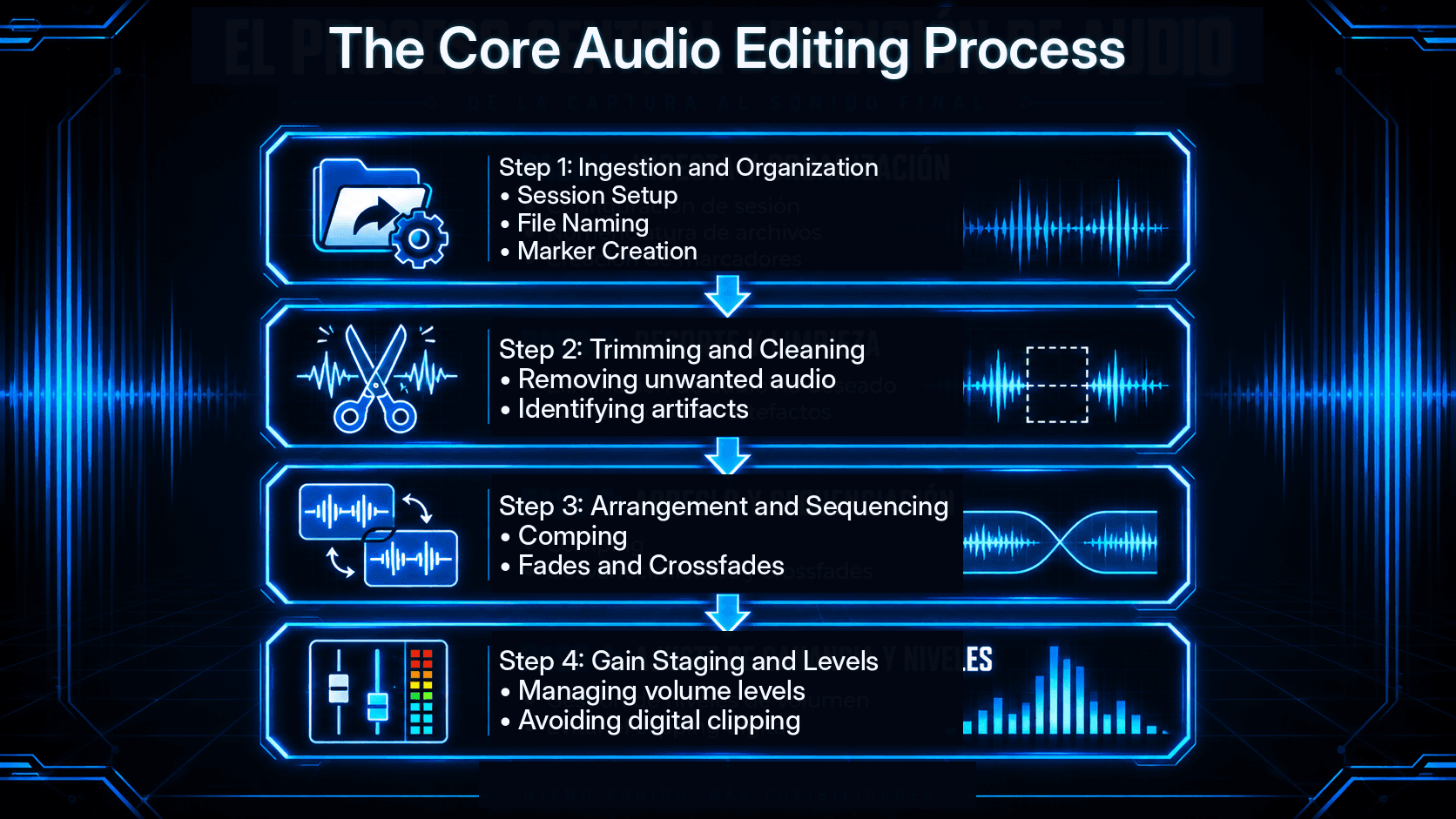
1. Organization
Before a single cut is made, the files must be imported and organized. This involves:
- Session setup: Setting the sample rate (typically 48kHz for film or 44.1kHz for music) and bit depth (24-bit or 32-bit float).
- File naming: Using clear conventions to track different takes and versions.
- Marker creation: Placing markers at key sections (Intro, Verse, Chorus, or Scene 1) for quick navigation.
2. Trimming and cleaning
The first pass of editing is often called the "rough cut."
- Removing unwanted audio: Deleting "dead air," coughs, or microphone bumps.
- Strip silence: A tool used to automatically remove sections of a track that fall below a certain decibel threshold.
- Identifying artifacts: Searching for mouth clicks, plosives (harsh "p" or "b" sounds), and sibilance ("s" sounds).
3. Arrangement and sequencing
Once the clips are clean, they are arranged on the timeline.
- Comping: The process of taking the best parts of multiple performances (takes) and merging them into one "perfect" performance.
- Fades and crossfades: To prevent audible "pops" at the beginning or end of a clip, editors apply fade-ins and fade-outs. A crossfade is used when transitioning between two adjacent clips to ensure the move is seamless.
4. Gain staging and levels
Gain staging is the process of managing the volume levels at every stage of the signal chain. The goal is to ensure the audio is loud enough to be heard clearly but has enough headroom to avoid digital clipping (distortion).
Professional audio editing techniques
Beyond basic cutting, several advanced audio editing techniques distinguish professional work from amateur productions.
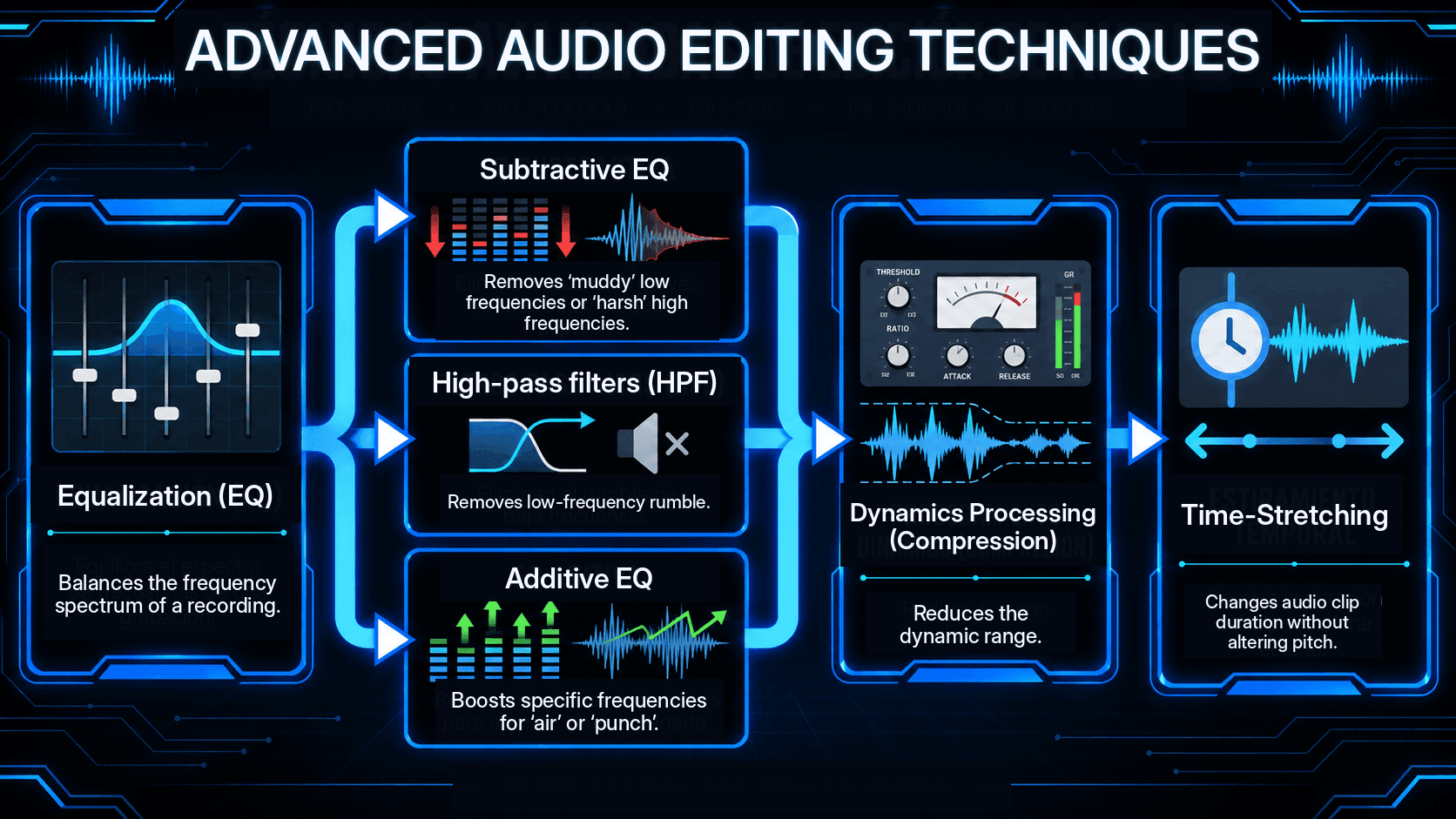
Equalization (EQ)
EQ is used to balance the frequency spectrum of a recording.
- Subtractive EQ: Removing "muddy" low frequencies or "harsh" high frequencies.
- Additive EQ: Boosting specific frequencies to add "air" to a vocal or "punch" to a kick drum.
- High-pass filters (HPF): Crucial for removing low-frequency rumble (e.g., traffic noise or AC hum).
Dynamics processing (compression)
A compressor reduces the dynamic range of an audio signal—the difference between the loudest and quietest parts.
- Threshold: The level at which the compressor starts working.
- Ratio: How much the volume is reduced once it crosses the threshold.
- Attack and Release: How quickly the compressor reacts to the sound.Proper compression ensures that a podcast host's whispers are just as audible as their shouts.
Time-stretching and quantization
In music production, timing issues are corrected using:
- Quantization: Automatically snapping audio transients to the nearest rhythmic grid line.
- Time-stretching: Changing the duration of an audio clip without altering its pitch. This is essential for syncing a vocal recording to a specific tempo.
Advanced processing: Audio restoration and spectral editing
Sometimes, a recording is compromised by environmental factors. This is where audio restoration becomes vital.
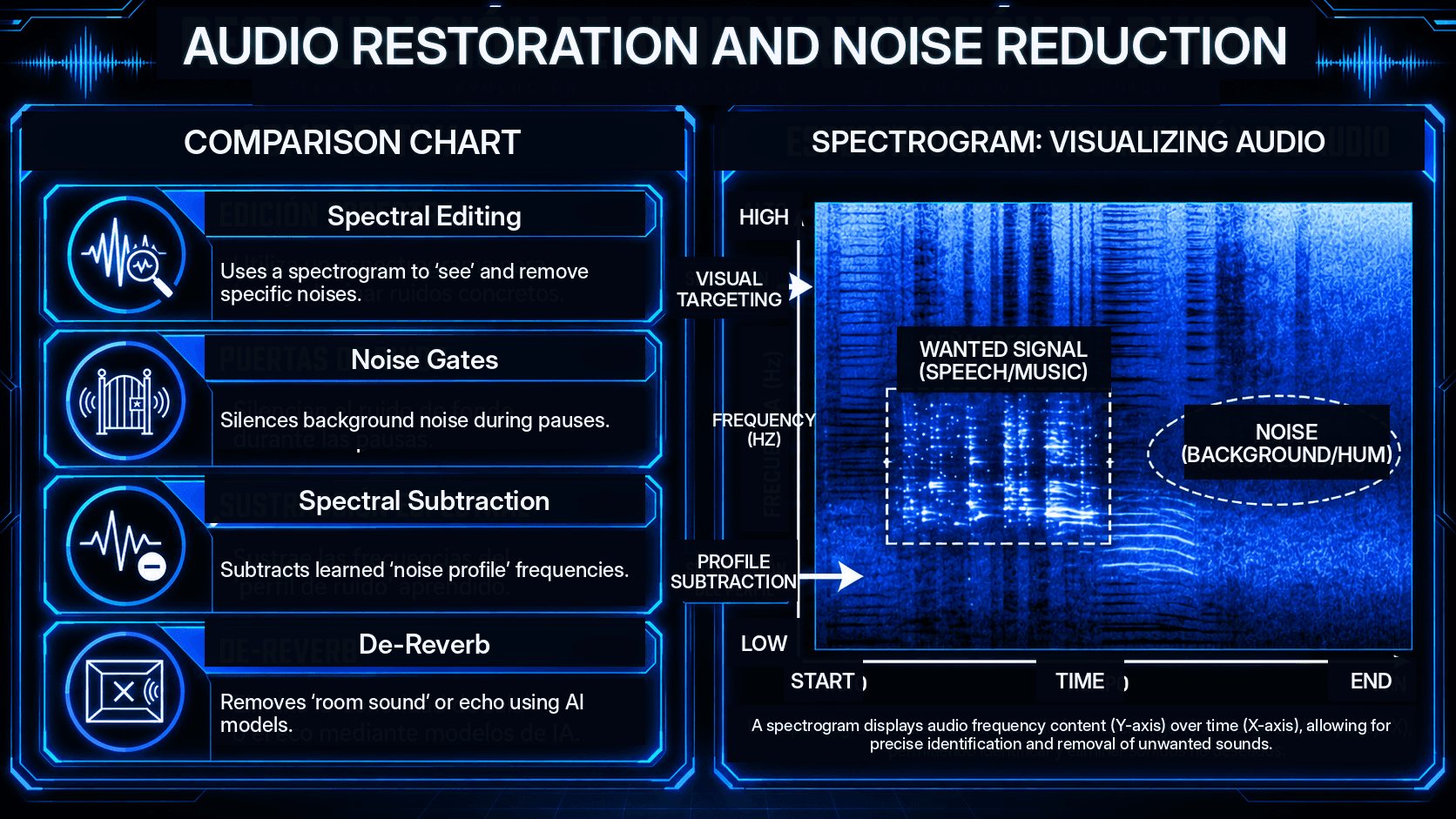
Spectral editing
Unlike standard waveform editing, which shows amplitude over time, spectral editing shows frequency over time using a spectrogram. This allows an editor to "see" a specific noise—like a cell phone ringing during a wedding ceremony—and "paint" it out of the recording without affecting the surrounding audio.
Noise reduction strategies
- Noise gates: A gate allows audio to pass only when it exceeds a certain volume, effectively silencing the background noise during pauses in speech.
- Spectral subtraction: The software learns a "noise profile" (e.g., a constant hiss) and subtracts those frequencies from the entire recording.
- De-reverb: Using AI models to remove the "room sound" or echo from a poorly treated recording space.
Audio post-production for film and media
Audio post-production is a multi-layered process that occurs after the visual elements are edited. It is a specialized form of sound editing that requires frame-accurate precision.
Dialogue editing and ADR
In film, the production audio recorded on set is often noisy. Dialogue editors clean this up or replace it entirely through Automated Dialogue Replacement (ADR), where actors re-record their lines in a studio while watching the film.
Sound design and foley
- Sound design: The creation of non-naturalistic sounds (e.g., a lightsaber or a spaceship engine).
- Foley: The reproduction of everyday sound effects (e.g., footsteps, rustling clothes, clinking glasses) that are added to the film to enhance realism.
The final mix
In the final stage of audio mixing and editing, all elements—dialogue, music, and sound effects—are balanced. The editor must ensure that the dialogue remains the focal point while the music provides emotional weight.
Audio file formats and exporting standards
A critical part of the audio editing process is choosing the correct output format.
Understanding bit depth and sample rate
For professional work, the industry standard is 24-bit / 48kHz.
- Sample rate: Determines the frequency range. According to the Nyquist-Shannon sampling theorem, the sample rate must be at least twice the highest frequency you wish to capture.
- Bit depth: Determines the dynamic range. Each bit adds approximately 6dB of range. A 24-bit file offers a theoretical dynamic range of 144dB.
Common audio editing mistakes to avoid
Even with the best audio editing software, certain pitfalls can ruin a production.
- Over-processing: Applying too much EQ or compression can make audio sound "unnatural" or "fatigued." This is often referred to as "over-squashing" a mix.
- Neglecting fades: Failing to use short (5–10ms) fades at the beginning and end of clips results in audible "ticks" or "pops."
- Ignoring phase issues: When using multiple microphones on one source, the sound waves can cancel each other out. Editors must check for phase alignment to ensure a "full" sound.
- Editing in isolation: Always listen to an edit in the context of the whole mix. A vocal might sound great on its own but disappear once the music starts.
- Destructive editing: Always keep a backup of the original, raw files. Never "save over" your source material.
The impact of AI on audio editing
According to the Capterra 2026 Software Buying Trends Report, there has been a 45% increase in organizations prioritizing AI-integrated audio tools. Artificial intelligence is no longer a novelty; it is a core component of the modern audio editing workflow.
AI-powered automation
- Automated Mixing: Tools like Neutron 5 can analyze a track and suggest an initial EQ and compression setting based on the genre.
- Voice Cloning and Synthesis: AI can now generate "pick-up" lines for voiceovers, matching the tone and inflection of the original speaker.
- Source Separation: The ability to take a finished song and "un-mix" it into separate stems (Vocals, Drums, Bass) with 99% accuracy.
The human element
Despite these advancements, the report highlights that "human intuition remains the primary driver of emotional resonance in audio." AI can fix a technical error, but it cannot yet determine if a specific "vocal fry" or a "slight hesitation" adds to the artistic value of a performance. Choosing how much to edit, when and where to edit, as well as what subtleties remain in a recorded performance, all add to the emotional value.
ACE Studio as a hands-on audio editing and production tool
ACE Studio shows how modern audio editing is moving beyond cutting, cleaning, and correcting recorded sound. It gives producers, songwriters, and composers direct control over vocals, instruments, stems, and performance details, turning audio editing into a more flexible musical process.
Instead of treating a recording as a fixed file, ACE Studio lets you break it open, reshape it, and rebuild it with intention. That is especially useful when a song already has a strong idea but the recorded material needs more control.
For example, the Stem Splitter can separate a finished track into individual parts, such as vocals, drums, bass, and instruments. This makes it easier to study an arrangement, create a remix, clean up a production, or rebuild sections from existing audio. A producer working from a stereo demo can isolate the vocal, remove elements that are no longer needed, or use the separated parts as a cleaner starting point for a new version.
ACE Studio also gives musicians deeper control over vocal editing. With Vocal to MIDI & Lyrics, a recorded vocal can become editable musical data. Once the melody and words are converted, you can adjust the pitch, timing, phrasing, and lyric placement with more precision than standard waveform editing allows. This is useful when a take has the right emotion but needs tighter timing, clearer note movement, or a more refined melodic shape.
Its AI vocal tools are especially strong for producers who want to work with vocals as editable performances. You can enter MIDI and lyrics, choose a voice, and then refine the result through pitch curves, breath, pronunciation, vibrato, timing, and expression controls. The point is not to replace the producer’s judgment. The point is to give the producer more control over the final performance.
This AI music generator is not limited to vocals. With AI Instruments, producers can create expressive instrumental parts from MIDI and shape them with performance detail. This is useful for string parts, melodic lines, ensemble layers, and arrangement ideas that need to sound musical before they are finalized. Instead of relying only on static samples, you can shape the notes and expression directly.
The same idea applies to AI Choir and Ensemble Mode. These tools help create layered performances with more control over voicing, density, and arrangement. A songwriter can build backing vocals for a chorus. A composer can create a choir-like texture for a dramatic section. A producer can test stacked harmonies before deciding what needs to be recorded, replaced, or refined.
ACE Studio 2.0 also includes creative production tools such as Generative Kits, Layer Generator, Music Enhancer, and Inspire Starter. These are useful when a production needs additional musical material, not random filler. You might add a subtle layer under a hook, enhance a rough stem so it sits more clearly in the track, or generate a starting texture that you then edit, trim, arrange, and shape into the song.
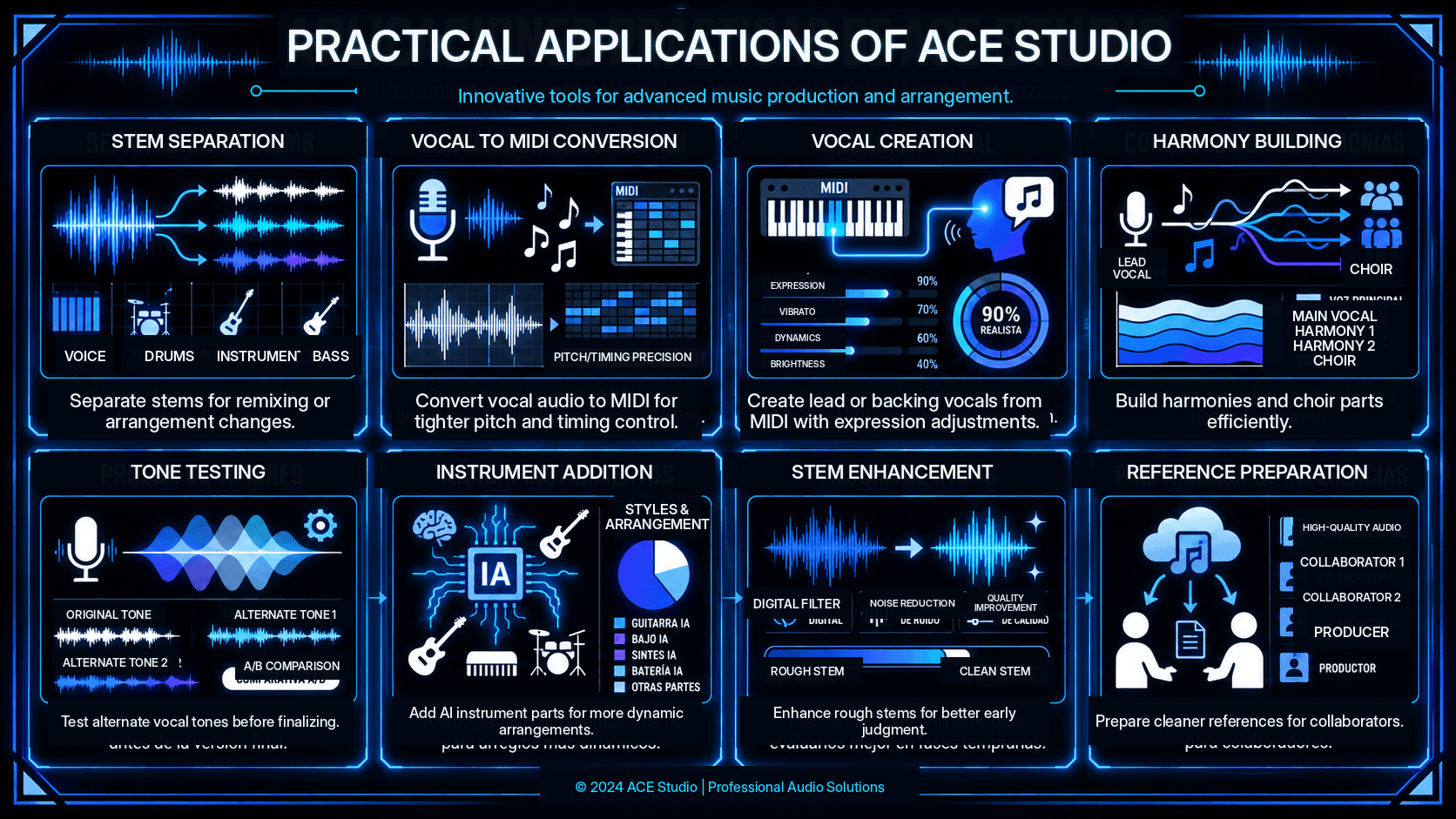
In practical audio editing, ACE Studio can help with:
- Separating stems from a finished mix for remixing, cleanup, or arrangement changes
- Turning vocal audio into editable MIDI and lyrics for tighter pitch and timing control
- Creating lead or backing vocals from MIDI and lyrics with adjustable expression
- Building harmonies and choir parts without manually stacking every voice
- Testing alternate vocal tones before committing to a final sound
- Adding AI instrument parts from MIDI for strings, melodic layers, or ensemble sections
- Enhancing rough stems so early recordings are easier to judge and edit
- Preparing cleaner musical references for collaborators, vocalists, producers, or clients
This makes ACE Studio especially useful in the middle of real production decisions. It can help when a vocal line needs to be rebuilt, when a chorus needs more lift, when a demo needs clearer instrumentation, or when a producer wants to try a new arrangement without starting from zero.
Good audio editing is not only about removing mistakes. It is about shaping timing, tone, space, and emotion until the track communicates clearly. ACE Studio supports that kind of work by giving creators more control over the material itself. You still decide what stays, what changes, and what the final performance should feel like. ACE Studio simply gives you more editable ways to get there.
Step-by-step guide to audio editing for beginners
If you are just starting, follow this simplified workflow to achieve a polished sound:
- Select Your Software: Start with Audacity (free) or Reaper (affordable and professional).
- Import and listen: Listen to the entire recording once without touching anything. Take notes on where the "mistakes" are.
- Perform the rough cut: Remove the obvious errors, long silences, and "ums/ahs."
- Apply noise reduction: Use a gentle "Noise Reduction" filter if there is a constant hiss. Do not overdo it, or the voice will sound "robotic."
- Balance levels: Use a "Compressor" to make the volume consistent.
- Add fades: Ensure every clip has a tiny fade-in and fade-out.
- Export: Save your project as a WAV for backup and an MP3 for sharing.
Frequently Asked Questions
What is the difference between audio editing and audio mixing?
Audio editing is about the "structure" and "cleanliness" of individual tracks (cutting, timing, noise removal). Audio mixing is about how those tracks "blend" together (volume balance, spatial placement, and effects like reverb).
Can I edit audio on a smartphone?
Yes, apps like LumaFusion or Ferrite Recording Studio allow for sophisticated digital audio editing on mobile devices, though they lack the advanced audio processing power of desktop DAWs.
Is noise reduction destructive?
In modern DAWs, it is usually non-destructive. However, excessive noise reduction can introduce "artifacts" (watery or metallic sounds) that cannot be easily removed later.
How do I learn audio editing?
The best way is through practice. Start by recording your own voice, then try to make it sound like a professional radio broadcast. Utilize online resources, documentation for your chosen audio editing software, and community forums.