What is a Synthesizer? Definition, types, and how it works
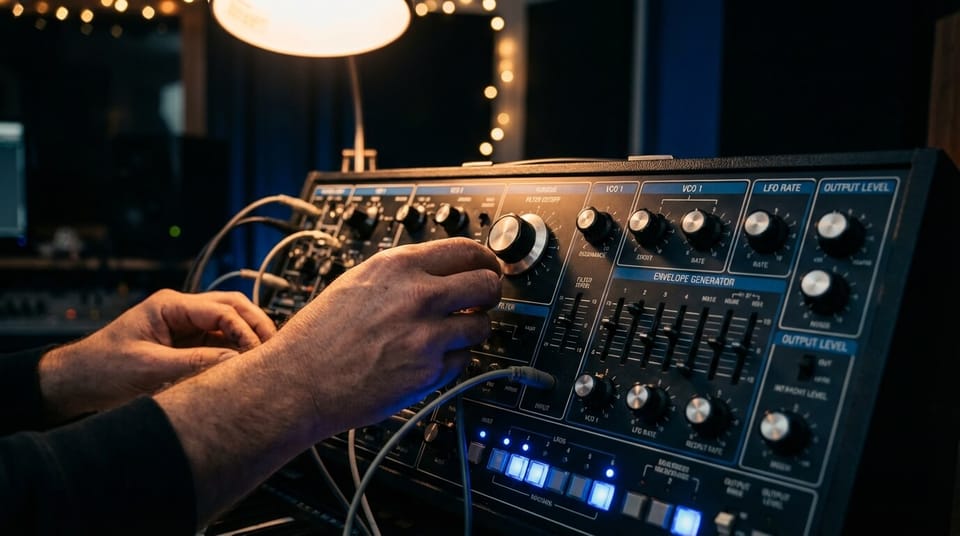
If you’ve ever wondered what a synthesizer really is, you’re usually looking for one thing: a clear, musical explanation – not a physics lecture, not a gear flex. A music synthesizer is simply an instrument (hardware or software) that creates sound by generating and shaping electrical or digital signals. The important part is this: you decide what the sound does. You shape pitch, tone, movement, and expression, often in ways acoustic instruments can’t.
That’s why synthesizers show up everywhere – from basslines and pads to cinematic textures, leads, and even modern “instrument-like” vocal timbres. And in 2026 workflows, the idea of synthesis has also expanded: tools like performance synthesis can turn MIDI into expressive vocals and instruments, while still keeping you in control of phrasing and emotion.
Let’s break down synthesizer meaning, how synths work, the main types, and how to start using one without getting lost in knobs.
What is a synthesizer?
Synthesizer definition
A synthesizer is an instrument that generates sound and then lets you shape that sound using controls like filters, envelopes, and modulation. Unlike a piano (which has a fixed acoustic character), a synth starts with a basic sound source and gives you tools to sculpt it into something personal.
You can think of a synthesizer as a “sound engine + control panel.” The engine creates a raw tone (often a waveform), and the panel lets you carve it into a bass, a pad, a pluck, a string-like swell, or something totally new.
What a synthesizer does in music
In real production terms, a synthesizer can act like:
- A bass player (tight low-end, controlled attack)
- A chord instrument (pads, keys, organs, evolving textures)
- A lead voice (melodies that cut through a mix)
- A rhythmic element (plucks, arps, gated patterns)
- A sound design tool (risers, impacts, movement, atmosphere)
It also teaches you “mix thinking.” When you change a filter cutoff, you’re not just changing tone – you’re deciding where the sound sits against vocals, drums, and guitars.
One more important idea: a synthesizer doesn’t need a piano-style keyboard. Many synths are played via MIDI clips, sequencers, pads, MPE controllers, or even automation lanes. What matters is the relationship between control data (notes, velocity, modulation) and sound output.
How do synthesizers work?
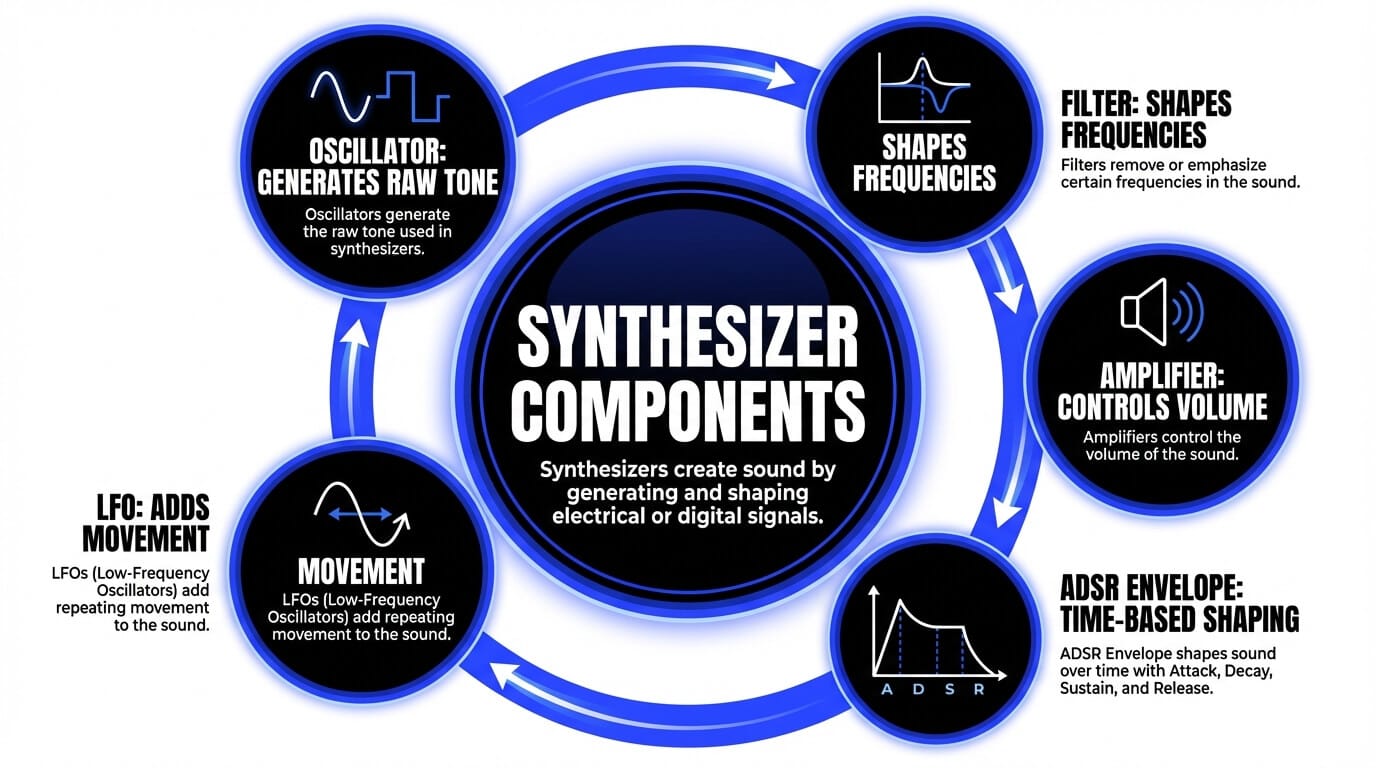
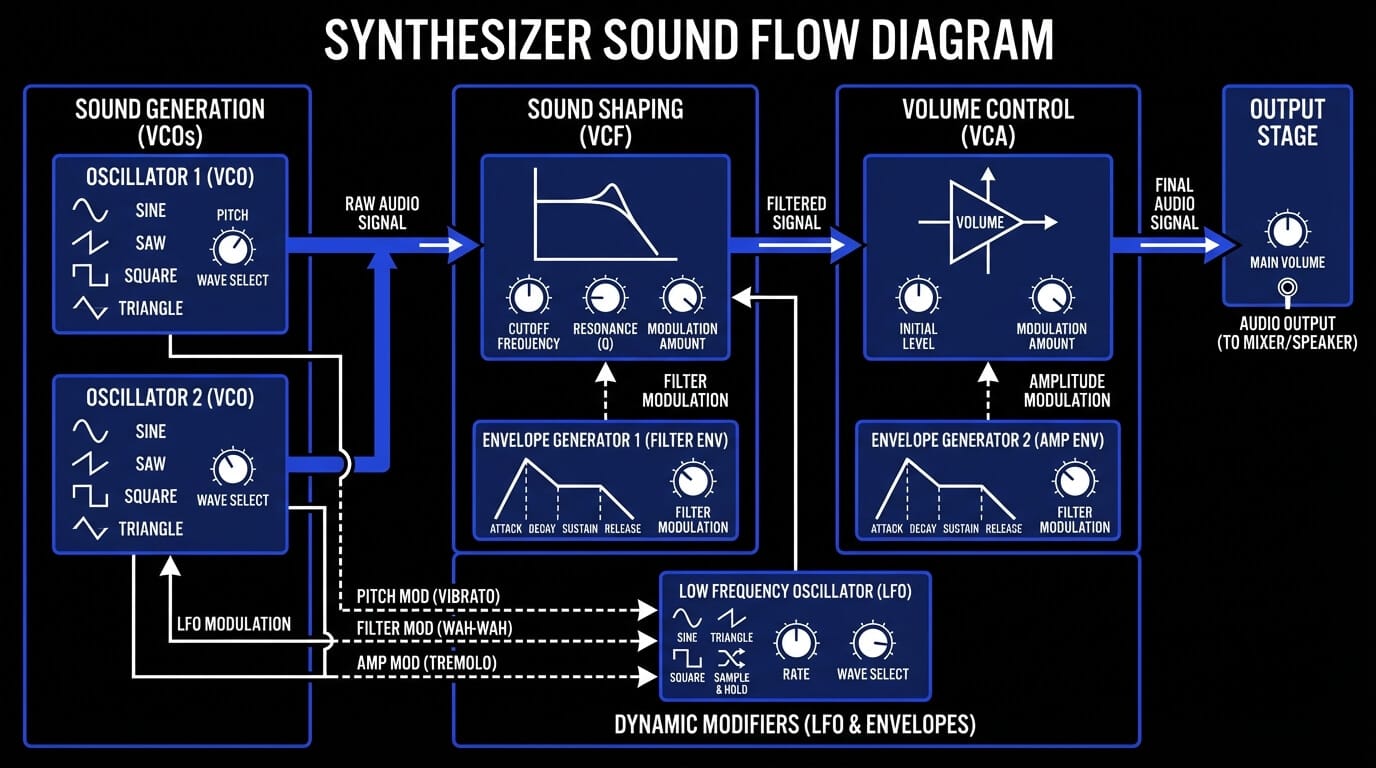
If you’ve been asking how a synthesizer works, the clean answer is: signal flow. A sound starts as a raw tone, then passes through shaping stages that affect brightness, loudness, time, and motion.
Here’s the classic building-block view:
Oscillators
Oscillators are your starting point. A single oscillator might output a sine (pure), triangle (soft), saw (bright), or square (hollow). Stack two oscillators, detune them slightly, and suddenly you get width and tension.
Filters
Filters shape tone by removing frequencies. A low-pass filter is the classic “synth sweep” sound because it reduces brightness as you turn the cutoff down. Resonance adds a focused peak – useful for character, but easy to overdo.
Amplifier
The amplifier stage is where loudness lives. Many synth patches feel “played” or “static” based on how the amp responds to velocity and envelopes.
ADSR envelope
ADSR is how you turn a tone into an instrument-like gesture:
- Attack: how fast it starts
- Decay: how fast it falls after the hit
- Sustain: the held level
- Release: how it fades when you lift the note
A pluck has short attack/decay. A pad has slow attack and longer release.
LFOs and modulation
LFOs (low-frequency oscillators) create motion: vibrato (pitch), tremolo (volume), wobble (filter), panning movement, and more. The real fun is routing – one modulation source controlling multiple destinations.
Synth signal flow
A practical beginner mental model is:
Oscillator → Filter → Amp …and then envelopes and LFOs are “hands” moving those knobs over time.
Once you understand signal flow, most synthesizers (even wildly different ones) start feeling familiar.
Types of synthesizers
Synths get categorized in a few useful ways. None of these categories are “better” – they’re about workflow, sound, and how much control you want at the front end.
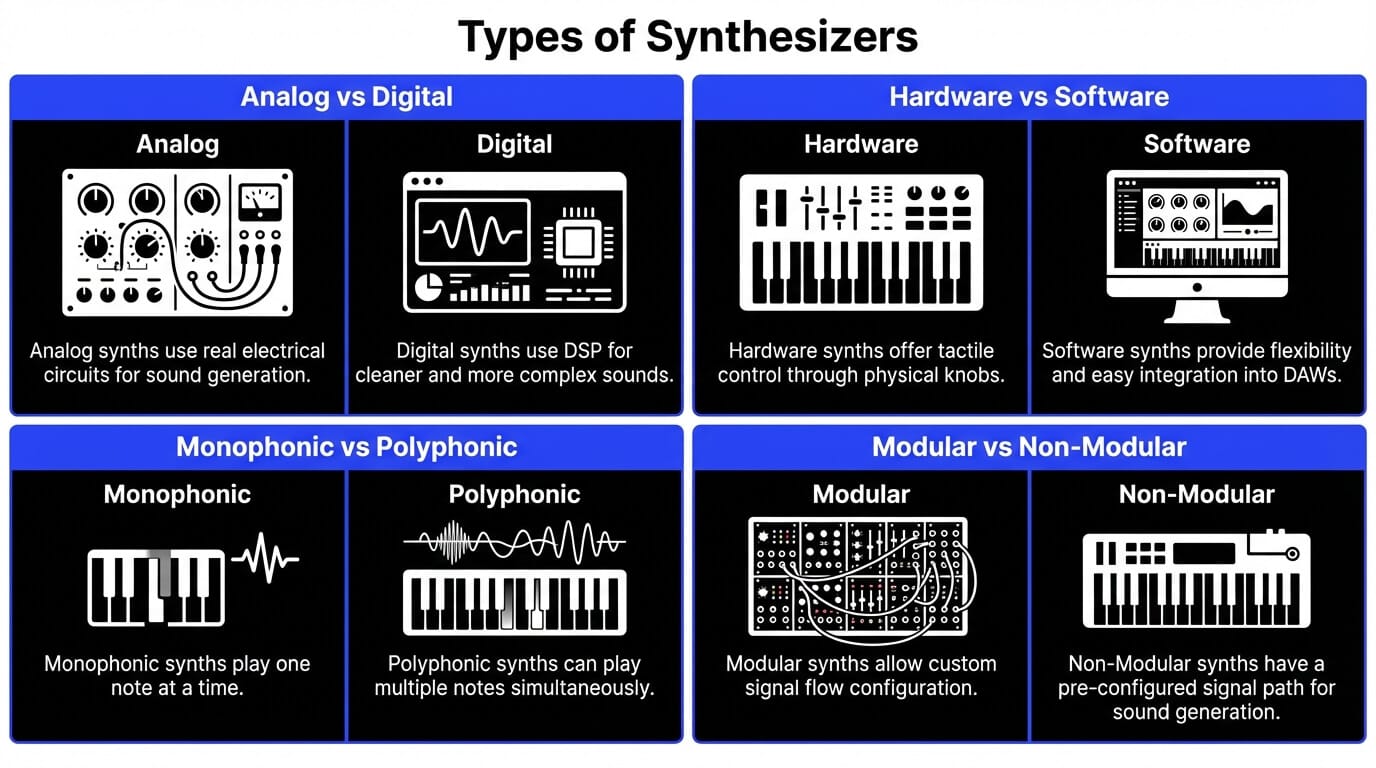
Analog vs digital synthesizers
- Analog synths generate and shape sound using real electrical circuits. They’re often praised for subtle instability and “alive” behavior.
- Digital synths generate sound using DSP and can be cleaner, more complex, and more consistent – especially for modern wavetable, FM, and granular styles.
In practice: you can make warm music with digital synths and sharp music with analog. The difference is often more about the instrument’s design than the buzzwords.
Hardware vs software synthesizers
- Hardware can be immediate and performance-friendly, with knobs you can grab without thinking.
- Software synths are flexible, recallable, and easy to automate inside a DAW. You can run multiple instances, save presets with a project, and integrate deeper with editing.
If you’re learning, software synths are often the fastest path because you can see what’s happening and revisit your patches.
Monophonic vs polyphonic synths
- Monophonic: one note at a time – great for bass and leads.
- Polyphonic: multiple notes – pads, chords, rich harmony.
Monophonic synths often feel “expressive” because they focus on one line, one movement, one story.
Modular vs non-modular synths
- Non-modular synths have fixed signal flow (even if you can modulate a lot).
- Modular synths let you build the flow from scratch – powerful, but easy to disappear down the rabbit hole.
A good rule: learn synthesis concepts on a normal synth first, then go modular if you crave custom routing.
Software synths inside a DAW – where ACE Bridge fits
This is where modern production gets interesting. When your synth lives inside a DAW, you’re not only “playing notes” – you’re sequencing, automating, aligning to tempo maps, and syncing with arrangement changes.
ACE Studio can fit into that same ecosystem via ACE Bridge 2, a plugin connection that links Ace Studio to your DAW for audio streaming, MIDI recording, and synchronization.
It also supports syncing tempo maps and time signatures using an ARA workflow, so Ace Studio can behave like a tightly-linked companion window to your DAW’s timeline.
That matters because “synth workflow” is really “timeline workflow” – your sound design has to land exactly where the music breathes.
Types of synthesis explained
“Synthesis” just means different methods of creating and shaping sound. Most producers end up using several types without even thinking about it.
- Subtractive Synthesis
Start with a harmonically rich waveform (like a saw), then subtract frequencies using a filter. It’s the classic path to basses, pads, and leads. If you want fast wins, start here.
- FM Synthesis
FM uses one oscillator to modulate another at audio rate. It creates bright, complex tones – bells, metallic plucks, glassy keys, futuristic bass. It can feel mathy, but it’s incredible once you learn a few “go-to” ratios.
- Wavetable Synthesis
Wavetable synths scan through a table of wave shapes over time. That scanning motion is a built-in source of movement – great for evolving pads, vocal-like leads, and modern electronic textures.
- Additive Synthesis
Additive builds sound by stacking sine waves (harmonics). It can be very precise and very clean, and it’s powerful for resynthesis-style sounds.
- Granular Synthesis
Granular takes audio and breaks it into tiny grains, then replays them with new timing, pitch, and density. This is where shimmering ambiences and “frozen” textures often come from.
Singing voice synthesis (SVS) – treating voice like an instrument
SVS is worth mentioning because it extends the synth concept: you’re still shaping a performance from control data, but the output is a voice-like instrument.
In Ace Studio, AI Vocal Synth and AI Choir can generate vocals and chorals from MIDI and lyrics – meaning you can sequence harmony like a synth pad, but keep it editable as a performance layer.
The key is the same principle as any good synth: human in the loop. You’re not pressing “make song.” You’re writing the notes, deciding the timing, and refining the delivery.
ACE Studio as an AI performance synth (vocals and instruments)
One helpful way to understand ACE Studio in a synth context is: Ace Studio is performance synthesis – it turns MIDI into expressive audio (vocals and instruments) while keeping your editing control intact.
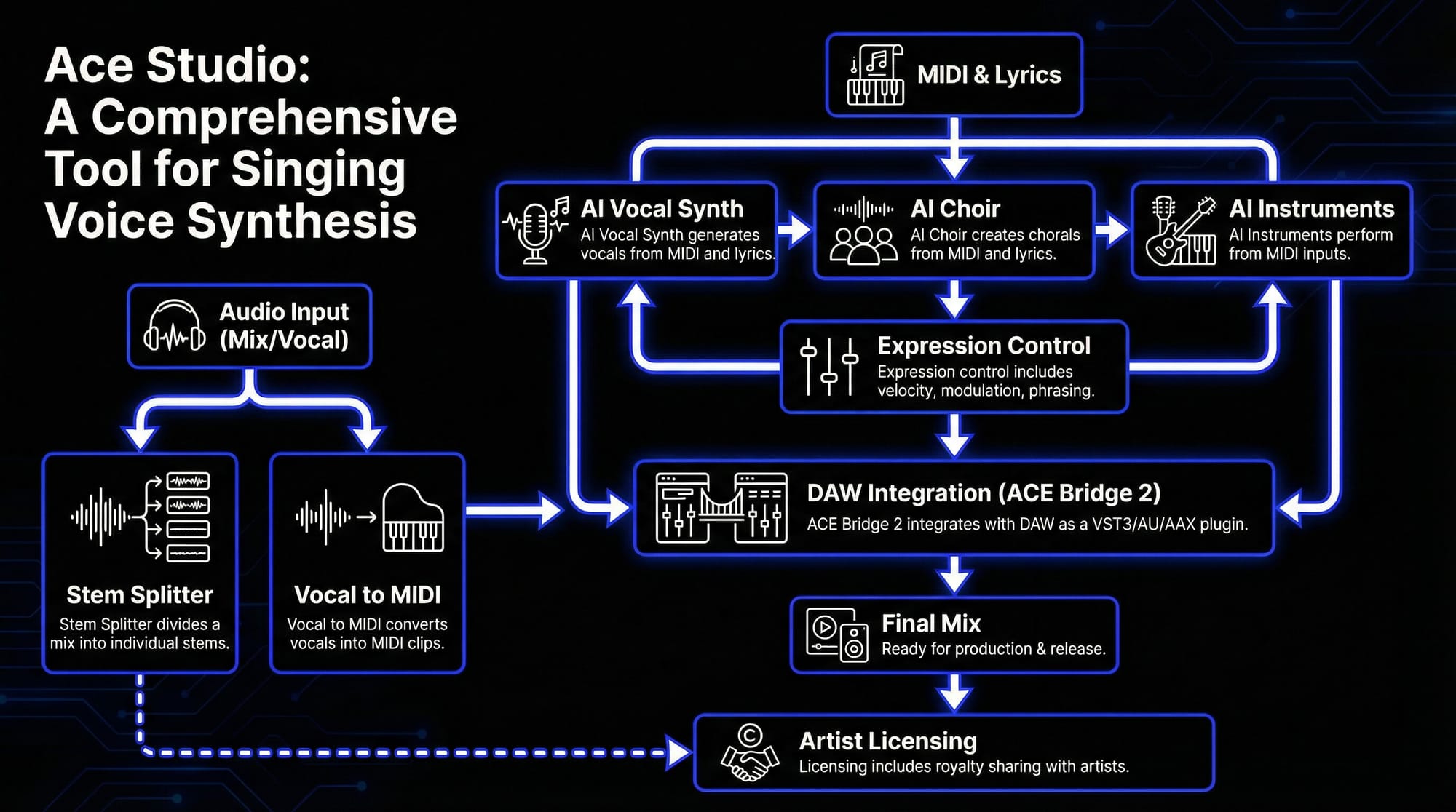
MIDI → performance – vocals, choir, and AI instruments
Ace Studio includes:
- AI Vocal Synth (vocals from MIDI + lyrics)
- AI Choir (chorals from MIDI + lyrics)
- AI Instruments (instrument performances from MIDI)
This is similar to how you’d use a software synth: write MIDI, then shape the sound. The difference is the target: instead of a raw oscillator, you’re shaping a performance model.
Expression control that feels musical
A good synth patch lives or dies by expression – velocity, modulation, articulation, phrasing. Ace Studio leans into that idea for instruments too. Its AI violin example explicitly focuses on performance details like phrasing and tonal color, driven by your MIDI input and refined by your choices.
Audio → MIDI – resynthesizing ideas you already recorded
Classic synth workflow: record something messy, then “resynthesize” it into something controllable. Ace Studio includes tools like:
- Stem Splitter (split a mix into stems like vocals, drums, bass, etc.)
- Vocal to MIDI (convert a vocal track into a MIDI clip with lyrics on each note)
That’s not replacing musicianship – it’s giving you a way to keep your original feel while gaining editability.
DAW integration – keep everything on the timeline
ACE Bridge 2 integrates as a VST3/AU/AAX plugin and supports real-time connection and sync with your DAW workflow. With ARA syncing, it can follow tempo map and time signature changes and keep transport aligned (play/stop/seek).
How to use a synthesizer as a beginner
If you’re searching how to use a synthesizer, here’s the fastest path: build one simple patch repeatedly until your hands understand the cause-and-effect.
- Choose a waveform
Start with a saw wave for a bright base or a square wave for a hollow tone. If your synth has two oscillators, detune the second slightly (a few cents) for width.
Beginner exercise: make a bass with one oscillator first. Add complexity only when you can predict what it will change.
- Shape tone with a filter
Turn the filter cutoff down until it’s darker, then bring it up until it sits in the mix. Add just a touch of resonance for character.
Mix tip: if your synth fights vocals, you often don’t need more EQ – you need less brightness at the source.
- Set an ADSR envelope
Try these starter shapes:
- Pluck: Attack 0–10ms, Decay short, Sustain low, Release short
- Pad: Attack slower (200–800ms), Decay medium, Sustain medium-high, Release longer
- Add modulation for movement
Assign an LFO to:
- Pitch (tiny amount) for vibrato
- Filter cutoff (slow) for gentle breathing
- Amp (subtle) for tremolo
Movement is what turns “a tone” into “a part.”
Save presets and build your first patch
Make three presets you actually use:
- A bass that leaves room for kick
- A pad that supports chords without masking vocals
- A lead that stays focused in the midrange
Practical workflow: build the patch while the track is playing. Synthesis is an arrangement. You’re deciding what emotional role the sound plays.
Common performance features
Performance features are what make a synthesizer feel like an instrument instead of a sound generator.
- Arpeggiator
An arpeggiator turns held chords into rhythmic note patterns. It’s great for building momentum without manually drawing every note. The best tip is to treat it like a drummer – choose a rate and gate length that complements the groove.
- Glide and portamento
Glide creates pitch slides between notes. A small amount adds vocal-like legato; a lot becomes an effect. It’s especially useful on monophonic synth leads and bass.
- Pitch bend and mod wheel
Pitch bend gives you “human” imperfection – scoops, falls, expressive hits. The mod wheel is often mapped to vibrato, filter brightness, or FX depth. If you’re recording synth lines, riding mod wheel is one of the quickest ways to make a part feel performed.
- Velocity and aftertouch
Velocity controls how hard you “hit” a note. Map it to filter cutoff or amp level for dynamics. Aftertouch (pressure after the key is down) is perfect for expressive movement – opening a filter on long notes, adding vibrato, or introducing distortion.
Producer mindset: these features aren’t bonuses – they’re your phrasing tools. They’re the difference between a loop and a performance.
Why use a synthesizer?
Sound design and creativity
A synthesizer is a direct pipeline from imagination to sound. When you learn basic synthesis, you stop hunting for the “perfect preset” and start building parts that match the emotion of the track.
Synthesizers also let you:
- Create sounds that don’t exist acoustically
- Tune the tone to the mix from the start
- Automate movement over time (filters, modulation, texture)
This is why synths are so common in modern production: they’re adaptable. They can be soft or aggressive, intimate or huge, clean or gritty.
Synthesizers in modern music
Synths are everywhere because they solve real arrangement problems:
- Need a bass that locks to the kick? Use a tight envelope and controlled low end.
- Need harmony that doesn’t fight vocals? Use a darker pad with slower attack.
- Need a hook sound? Use movement (wavetable scan, filter automation, modulation).
And now the “synth” idea includes performance-based tools too. If you can drive something from MIDI and shape expression, it’s part of the same creative family – whether it’s a classic subtractive plugin or a performance engine like Ace Studio that turns MIDI into vocals, choir, or instruments while you refine the musical details.
Synthesizer FAQ
What’s the difference between a keyboard and a synthesizer?
A keyboard is a controller format (keys). A synthesizer is a sound engine. Some keyboards contain synth engines, some are just MIDI controllers, and some synths don’t have keys at all.
Are synthesizers hard to learn?
They can feel confusing until you learn signal flow. After that, it’s mostly repetition: oscillator → filter → envelope → modulation. Learn one synth well, and the rest start making sense faster.
What synthesizer should a beginner start with?
Pick a simple subtractive synth with a clear layout. You want to see and hear what every control does. Avoid ultra-deep synths at first, not because they’re bad – because you’ll learn faster with fewer options.
Do I need a MIDI controller for a software synth?
Not strictly. You can draw MIDI notes in your DAW piano roll. A MIDI controller helps with feel, but editing and automation matter just as much.
What type of synthesis is best for beginners?
Subtractive synthesis. It teaches the fundamentals that apply everywhere: waveform choice, filtering, envelopes, and modulation.
Is ACE Studio a synthesizer?
Not in the traditional “oscillator + filter” sense. But it does sit inside the larger synthesis world as performance synthesis: it turns MIDI into editable vocals, choir, and instrument performances, with DAW sync via ACE Bridge 2 and tempo mapping via ARA workflows.