

We value your privacy

By clicking "Allow", you agree to the storing of cookies on your device to enhance site navigation, analyze site usage, and assist in our marketing efforts.

Consent Selection
Details
  • Necessary cookies help make a website usable by enabling basic functions like page navigation and access to secure areas of the website. The website cannot function properly without these cookies.
    • Learn more about this provideropens in a new window

      Some of the data collected by this provider is for the purposes of personalization and measuring advertising effectiveness. The provider may use the IP Addresses for ads measurement and ads personalization.

      test_cookieUsed to check if the user's browser supports cookies.
      Maximum Storage Duration: 1 dayType: HTTP Cookie
    • Learn more about this provideropens in a new window
      bcookieUsed in order to detect spam and improve the website's security.
      Maximum Storage Duration: 1 yearType: HTTP Cookie
      li_gcStores the user's cookie consent state for the current domain
      Maximum Storage Duration: 180 daysType: HTTP Cookie
    • Learn more about this provideropens in a new window
      _cfuvid [x2]This cookie is a part of the services provided by Cloudflare - Including load-balancing, deliverance of website content and serving DNS connection for website operators.
      Maximum Storage Duration: SessionType: HTTP Cookie
    • Learn more about this provideropens in a new window
      datadomeUsed in context with the website's BotManager. The BotManager detects, categorizes and compiles reports on potential bots trying to access the website.
      Maximum Storage Duration: SessionType: HTTP Cookie
    • studio-web-language-keyPending
      Maximum Storage Duration: SessionType: HTML Local Storage
    • __cf_bm [x5]This cookie is used to distinguish between humans and bots. This is beneficial for the website, in order to make valid reports on the use of their website.
      Maximum Storage Duration: 1 dayType: HTTP Cookie
    • CookieConsent [x2]Stores the user's cookie consent state for the current domain
      Maximum Storage Duration: 1 yearType: HTTP Cookie
    • guidPreserves users states across page requests.
      Maximum Storage Duration: 1 yearType: HTTP Cookie
      rtThis cookie is used to identify the visitor through an application. This allows the visitor to login to a website through their LinkedIn application for example.
      Maximum Storage Duration: 1 yearType: HTTP Cookie
    • ttRegisters the website's speed and performance. This function can be used in context with statistics and load-balancing.
      Maximum Storage Duration: 1 yearType: HTTP Cookie
    • sc_anonymous_idUsed in context with the 3D-view-function on the website.
      Maximum Storage Duration: 10 yearsType: HTTP Cookie
  • Preference cookies enable a website to remember information that changes the way the website behaves or looks, like your preferred language or the region that you are in.
    • Learn more about this provideropens in a new window
      lidcRegisters which server-cluster is serving the visitor. This is used in context with load balancing, in order to optimize user experience.
      Maximum Storage Duration: 1 dayType: HTTP Cookie
  • Statistic cookies help website owners to understand how visitors interact with websites by collecting and reporting information anonymously.
    • Learn more about this provideropens in a new window
      geoSaves the user's current geographical location based on the user's IP address.
      Maximum Storage Duration: SessionType: HTTP Cookie
    • Learn more about this provideropens in a new window
      ajs_anonymous_idThis cookie is used to identify a specific visitor - this information is used to identify the number of specific visitors on a website.
      Maximum Storage Duration: 1 yearType: HTTP Cookie
      ajs_anonymous_idThis cookie is used to count how many times a website has been visited by different visitors - this is done by assigning the visitor an ID, so the visitor does not get registered twice.
      Maximum Storage Duration: PersistentType: HTML Local Storage
    • Learn more about this provideropens in a new window
      _tt_enable_cookieUsed by the social networking service, TikTok, for tracking the use of embedded services.
      Maximum Storage Duration: 1 yearType: HTTP Cookie
    • Learn more about this provideropens in a new window
      personalization_idThis cookie is set by Twitter - The cookie allows the visitor to share content from the website onto their Twitter profile.
      Maximum Storage Duration: 400 daysType: HTTP Cookie
    • FPGSIDRegisters statistical data on users' behaviour on the website. Used for internal analytics by the website operator.
      Maximum Storage Duration: 1 dayType: HTTP Cookie
      FPIDRegisters statistical data on users' behaviour on the website. Used for internal analytics by the website operator.
      Maximum Storage Duration: 400 daysType: HTTP Cookie
      FPLCRegisters a unique ID that is used to generate statistical data on how the visitor uses the website.
      Maximum Storage Duration: 1 dayType: HTTP Cookie
      sajssdk_2015_cookie_access_testPending
      Maximum Storage Duration: 73000 daysType: HTTP Cookie
      sajssdk_2015_cross_new_userCollects statistics on the user's visits to the website, such as the number of visits, average time spent on the website and what pages have been read.
      Maximum Storage Duration: 1 dayType: HTTP Cookie
      sensorsdata_domain_testPending
      Maximum Storage Duration: SessionType: HTTP Cookie
      sensorsdata2015jssdkcrossCollects statistics on the user's visits to the website, such as the number of visits, average time spent on the website and what pages have been read.
      Maximum Storage Duration: 2 yearsType: HTTP Cookie
    • sentryReplaySessionRegisters data on visitors' website-behaviour. This is used for internal analysis and website optimization.
      Maximum Storage Duration: SessionType: HTML Local Storage
    • u_scsidRegisters data on visitors' website-behaviour. This is used for internal analysis and website optimization.
      Maximum Storage Duration: SessionType: HTML Local Storage
      X-ABThis cookie is used by the website’s operator in context with multi-variate testing. This is a tool used to combine or change content on the website. This allows the website to find the best variation/edition of the site.
      Maximum Storage Duration: 1 dayType: HTTP Cookie
    • SERVERCORSIDPending
      Maximum Storage Duration: SessionType: HTTP Cookie
      SERVERIDThis cookie is used to assign the visitor to a specific server - this function is necessary for the functionality of the website.
      Maximum Storage Duration: SessionType: HTTP Cookie
    • number(#)Used to track user’s interaction with embedded content.
      Maximum Storage Duration: SessionType: HTML Local Storage
  • Marketing cookies are used to track visitors across websites. The intention is to display ads that are relevant and engaging for the individual user and thereby more valuable for publishers and third party advertisers.
    • Learn more about this provideropens in a new window
      _fbpUsed by Facebook to deliver a series of advertisement products such as real time bidding from third party advertisers.
      Maximum Storage Duration: 3 monthsType: HTTP Cookie
      lastExternalReferrerDetects how the user reached the website by registering their last URL-address.
      Maximum Storage Duration: PersistentType: HTML Local Storage
      lastExternalReferrerTimeDetects how the user reached the website by registering their last URL-address.
      Maximum Storage Duration: PersistentType: HTML Local Storage
    • Learn more about this provideropens in a new window
      mtClientConfig_cachedSource_xp_amp_music_webplayerUsed to implement iTunes content and presentation of covers.
      Maximum Storage Duration: PersistentType: HTML Local Storage
    • Learn more about this provideropens in a new window
      __tld__Used to track visitors on multiple websites, in order to present relevant advertisement based on the visitor's preferences.
      Maximum Storage Duration: SessionType: HTTP Cookie
      ajs_user_idThis cookie is used to collect data on the visitor's behavior on the website - this information can be used to assign the visitor to a visitor segment, based on common preferences.
      Maximum Storage Duration: SessionType: HTTP Cookie
      ajs_user_idCollects data on visitors' preferences and behaviour on the website - This information is used make content and advertisement more relevant to the specific visitor.
      Maximum Storage Duration: PersistentType: HTML Local Storage
    • Learn more about this provideropens in a new window

      Some of the data collected by this provider is for the purposes of personalization and measuring advertising effectiveness. The provider may use the IP Addresses for ads measurement and ads personalization.

      IDEUsed by Google DoubleClick to register and report the website user's actions after viewing or clicking one of the advertiser's ads with the purpose of measuring the efficacy of an ad and to present targeted ads to the user.
      Maximum Storage Duration: 400 daysType: HTTP Cookie
      ads/ga-audiencesUsed by Google AdWords to re-engage visitors that are likely to convert to customers based on the visitor's online behaviour across websites.
      Maximum Storage Duration: SessionType: Pixel Tracker
      pagead/1p-user-list/#Tracks if the user has shown interest in specific products or events across multiple websites and detects how the user navigates between sites. This is used for measurement of advertisement efforts and facilitates payment of referral-fees between websites.
      Maximum Storage Duration: SessionType: Pixel Tracker
    • Learn more about this provideropens in a new window
      _uetsidCollects data on visitor behaviour from multiple websites, in order to present more relevant advertisement - This also allows the website to limit the number of times that they are shown the same advertisement.
      Maximum Storage Duration: 1 dayType: HTTP Cookie
      _uetvidUsed to track visitors on multiple websites, in order to present relevant advertisement based on the visitor's preferences.
      Maximum Storage Duration: 1 yearType: HTTP Cookie
      _uetsidUsed to track visitors on multiple websites, in order to present relevant advertisement based on the visitor's preferences.
      Maximum Storage Duration: PersistentType: HTML Local Storage
      _uetsid_expContains the expiry-date for the cookie with corresponding name.
      Maximum Storage Duration: PersistentType: HTML Local Storage
      _uetvidUsed to track visitors on multiple websites, in order to present relevant advertisement based on the visitor's preferences.
      Maximum Storage Duration: PersistentType: HTML Local Storage
      _uetvid_expContains the expiry-date for the cookie with corresponding name.
      Maximum Storage Duration: PersistentType: HTML Local Storage
      MUIDUsed widely by Microsoft as a unique user ID. The cookie enables user tracking by synchronising the ID across many Microsoft domains.
      Maximum Storage Duration: 1 yearType: HTTP Cookie
    • Learn more about this provideropens in a new window
      __oaiq_domain_probeTracks the conversion rate between the user and the advertisement banners on the website - This serves to optimise the relevance of the advertisements on the website.
      Maximum Storage Duration: SessionType: HTTP Cookie
      __obrefTracks the conversion rate between the user and the advertisement banners on the website - This serves to optimise the relevance of the advertisements on the website.
      Maximum Storage Duration: SessionType: HTTP Cookie
      oaiq_cs:#Tracks the conversion rate between the user and the advertisement banners on the website - This serves to optimise the relevance of the advertisements on the website.
      Maximum Storage Duration: SessionType: HTML Local Storage
    • Learn more about this provideropens in a new window
      _rdt_uuidUsed to track visitors on multiple websites, in order to present relevant advertisement based on the visitor's preferences.
      Maximum Storage Duration: 3 monthsType: HTTP Cookie
    • Learn more about this provideropens in a new window
      sc_atUsed by Snapchat to implement advertisement content on the website - The cookie detects the efficiency of the ads and collects visitor data for further visitor segmentation.
      Maximum Storage Duration: 1 yearType: HTTP Cookie
      pUsed to track visitors on multiple websites, in order to present relevant advertisement based on the visitor's preferences.
      Maximum Storage Duration: SessionType: Pixel Tracker
    • Learn more about this provideropens in a new window
      dd_testcookiePending
      Maximum Storage Duration: SessionType: HTTP Cookie
      ddSession_datadomePending
      Maximum Storage Duration: PersistentType: HTML Local Storage
    • Learn more about this provideropens in a new window
      sp_landingUsed to implement audio-content from Spotify on the website. Can also be used to register user interaction and preferences in context with audio-content - This can serve statistics and marketing purposes.
      Maximum Storage Duration: 1 dayType: HTTP Cookie
      sp_tUsed to implement audio-content from Spotify on the website. Can also be used to register user interaction and preferences in context with audio-content - This can serve statistics and marketing purposes.
      Maximum Storage Duration: 1 yearType: HTTP Cookie
    • Learn more about this provideropens in a new window
      _ttp [x2]Used by the social networking service, TikTok, for tracking the use of embedded services.
      Maximum Storage Duration: 1 yearType: HTTP Cookie
      ttcsidUsed to track visitors on multiple websites, in order to present relevant advertisement based on the visitor's preferences.
      Maximum Storage Duration: 1 yearType: HTTP Cookie
      ttcsid_#Tracks the conversion rate between the user and the advertisement banners on the website - This serves to optimise the relevance of the advertisements on the website.
      Maximum Storage Duration: 1 yearType: HTTP Cookie
      tt_appInfoUsed by the social networking service, TikTok, for tracking the use of embedded services.
      Maximum Storage Duration: SessionType: HTML Local Storage
      tt_pixel_session_indexUsed by the social networking service, TikTok, for tracking the use of embedded services.
      Maximum Storage Duration: SessionType: HTML Local Storage
      tt_sessionIdUsed by the social networking service, TikTok, for tracking the use of embedded services.
      Maximum Storage Duration: SessionType: HTML Local Storage
    • Learn more about this provideropens in a new window
      1/i/adsct [x2]Collects data on user behaviour and interaction in order to optimize the website and make advertisement on the website more relevant.
      Maximum Storage Duration: SessionType: Pixel Tracker
      muc_adsCollects data on user behaviour and interaction in order to optimize the website and make advertisement on the website more relevant.
      Maximum Storage Duration: 400 daysType: HTTP Cookie
      guest_idCollects data related to the user's visits to the website, such as the number of visits, average time spent on the website and which pages have been loaded, with the purpose of personalising and improving the Twitter service.
      Maximum Storage Duration: 400 daysType: HTTP Cookie
      guest_id_adsCollects information on user behaviour on multiple websites. This information is used in order to optimize the relevance of advertisement on the website.
      Maximum Storage Duration: 400 daysType: HTTP Cookie
      guest_id_marketingCollects information on user behaviour on multiple websites. This information is used in order to optimize the relevance of advertisement on the website.
      Maximum Storage Duration: 400 daysType: HTTP Cookie
    • Learn more about this provideropens in a new window
      __Secure-BUCKETPending
      Maximum Storage Duration: 180 daysType: HTTP Cookie
      __Secure-ROLLOUT_TOKENUsed to track user’s interaction with embedded content.
      Maximum Storage Duration: 180 daysType: HTTP Cookie
      __Secure-YECStores the user's video player preferences using embedded YouTube video
      Maximum Storage Duration: SessionType: HTTP Cookie
      __Secure-YNIDUsed to track user’s interaction with embedded content.
      Maximum Storage Duration: 180 daysType: HTTP Cookie
      LAST_RESULT_ENTRY_KEYUsed to track user’s interaction with embedded content.
      Maximum Storage Duration: SessionType: HTTP Cookie
      LogsDatabaseV2:V#||LogsRequestsStoreUsed to track user’s interaction with embedded content.
      Maximum Storage Duration: PersistentType: IndexedDB
      ServiceWorkerLogsDatabase#SWHealthLogNecessary for the implementation and functionality of YouTube video-content on the website.
      Maximum Storage Duration: PersistentType: IndexedDB
      TESTCOOKIESENABLEDUsed to track user’s interaction with embedded content.
      Maximum Storage Duration: 1 dayType: HTTP Cookie
      VISITOR_INFO1_LIVETries to estimate the users' bandwidth on pages with integrated YouTube videos.
      Maximum Storage Duration: 180 daysType: HTTP Cookie
      YSCRegisters a unique ID to keep statistics of what videos from YouTube the user has seen.
      Maximum Storage Duration: SessionType: HTTP Cookie
      yt-icons-last-purgedNecessary for the implementation and functionality of YouTube video-content on the website.
      Maximum Storage Duration: PersistentType: HTML Local Storage
      ytidb::LAST_RESULT_ENTRY_KEYUsed to track user’s interaction with embedded content.
      Maximum Storage Duration: PersistentType: HTML Local Storage
      YtIdbMeta#databasesUsed to track user’s interaction with embedded content.
      Maximum Storage Duration: PersistentType: IndexedDB
    • _gaUsed to send data to Google Analytics about the visitor's device and behavior. Tracks the visitor across devices and marketing channels.
      Maximum Storage Duration: 2 yearsType: HTTP Cookie
      _ga_#Used to send data to Google Analytics about the visitor's device and behavior. Tracks the visitor across devices and marketing channels.
      Maximum Storage Duration: 2 yearsType: HTTP Cookie
      _gcl_auUsed by Google AdSense for experimenting with advertisement efficiency across websites using their services.
      Maximum Storage Duration: 3 monthsType: HTTP Cookie
      _/set_cookieUsed by server-side Google Tag Manager to set or update cookies required for analytics or marketing tags.
      Maximum Storage Duration: SessionType: Pixel Tracker
      _gcl_lsTracks the conversion rate between the user and the advertisement banners on the website - This serves to optimise the relevance of the advertisements on the website.
      Maximum Storage Duration: PersistentType: HTML Local Storage
    • _schn1Sets a unique ID for the visitor, that allows third party advertisers to target the visitor with relevant advertisement. This pairing service is provided by third party advertisement hubs, which facilitates real-time bidding for advertisers.
      Maximum Storage Duration: 1 dayType: HTTP Cookie
      _scidSets a unique ID for the visitor, that allows third party advertisers to target the visitor with relevant advertisement. This pairing service is provided by third party advertisement hubs, which facilitates real-time bidding for advertisers.
      Maximum Storage Duration: 13 monthsType: HTTP Cookie
      _scid_rSets a unique ID for the visitor, that allows third party advertisers to target the visitor with relevant advertisement. This pairing service is provided by third party advertisement hubs, which facilitates real-time bidding for advertisers.
      Maximum Storage Duration: 13 monthsType: HTTP Cookie
      _screloadUsed by Snapchat to implement advertisement content on the website - The cookie detects the efficiency of the ads and collects visitor data for further visitor segmentation.
      Maximum Storage Duration: SessionType: HTTP Cookie
      u_sclidSets a unique ID for the visitor, that allows third party advertisers to target the visitor with relevant advertisement. This pairing service is provided by third party advertisement hubs, which facilitates real-time bidding for advertisers.
      Maximum Storage Duration: PersistentType: HTML Local Storage
      u_sclid_rSets a unique ID for the visitor, that allows third party advertisers to target the visitor with relevant advertisement. This pairing service is provided by third party advertisement hubs, which facilitates real-time bidding for advertisers.
      Maximum Storage Duration: PersistentType: HTML Local Storage
      u_scsid_rSets a unique ID for the visitor, that allows third party advertisers to target the visitor with relevant advertisement. This pairing service is provided by third party advertisement hubs, which facilitates real-time bidding for advertisers.
      Maximum Storage Duration: SessionType: HTML Local Storage
  • Unclassified cookies are cookies that we are in the process of classifying, together with the providers of individual cookies.
    • Learn more about this provideropens in a new window
      _rdt_pnPending
      Maximum Storage Duration: 3 monthsType: HTTP Cookie
      _rdt_cfgPending
      Maximum Storage Duration: SessionType: HTML Local Storage
    • Learn more about this provideropens in a new window
      tt_pixel_is_enrich_ipv6_triggered_by_enrich_amPending
      Maximum Storage Duration: SessionType: HTML Local Storage
    • _mpxl_guidPending
      Maximum Storage Duration: SessionType: HTTP Cookie
      adjust-sdk#asPending
      Maximum Storage Duration: PersistentType: IndexedDB
      adjust-sdk#edPending
      Maximum Storage Duration: PersistentType: IndexedDB
      adjust-sdk#gpPending
      Maximum Storage Duration: PersistentType: IndexedDB
      adjust-sdk#qPending
      Maximum Storage Duration: PersistentType: IndexedDB
      adjust-sdk.pPending
      Maximum Storage Duration: PersistentType: HTML Local Storage
      redirectPathPending
      Maximum Storage Duration: SessionType: HTML Local Storage
      studio-web-web-uuidPending
      Maximum Storage Duration: PersistentType: HTML Local Storage
    • _vbPending
      Maximum Storage Duration: SessionType: HTTP Cookie
    • _twpidPending
      Maximum Storage Duration: SessionType: HTTP Cookie
      _twsidPending
      Maximum Storage Duration: SessionType: HTTP Cookie
    • pixel/sPending
      Maximum Storage Duration: SessionType: Pixel Tracker
Cookie declaration last updated on 10/16/26 by Cookiebot
[#IABV2_TITLE#]
[#IABV2_BODY_INTRO#]
[#IABV2_BODY_LEGITIMATE_INTEREST_INTRO#]
[#IABV2_BODY_PREFERENCE_INTRO#]
[#IABV2_BODY_PURPOSES_INTRO#]
[#IABV2_BODY_PURPOSES#]
[#IABV2_BODY_FEATURES_INTRO#]
[#IABV2_BODY_FEATURES#]
[#IABV2_BODY_PARTNERS_INTRO#]
[#IABV2_BODY_PARTNERS#]
About
Cookies are small text files that can be used by websites to make a user's experience more efficient.

The law states that we can store cookies on your device if they are strictly necessary for the operation of this site. For all other types of cookies we need your permission.

This site uses different types of cookies. Some cookies are placed by third party services that appear on our pages.

You can at any time change or withdraw your consent from the Cookie Declaration on our website.

Learn more about who we are, how you can contact us and how we process personal data in our Privacy Policy.

Please state your consent ID and date when you contact us regarding your consent.
Get Started

How to Make AI Song Covers Using ACE Studio

Create professional AI song covers in ACE Studio with realistic voices, precise pitch control, and a seamless workflow—from vocal isolation to final export—without complex setups or multiple plugins.

How to Make AI Song Covers Using ACE Studio

Creating an AI song cover doesn’t have to sound artificial or feel like a technical maze. With ACE Studio, you can transform any track into a professional-grade vocal reinterpretation using expressive AI voices and a streamlined workflow built for creatives, not coders. Unlike traditional workflows that rely on multiple plugins, ACE Studio brings everything together in one streamlined interface. You can separate tracks, choose expressive voice models, and craft a new vocal layer with precise control over timing and tone. All without leaving your session.

In this guide, we’ll walk you through the full process, from isolating vocals to shaping the performance and exporting your final cover. 

What Is an AI Song Cover?

An AI song cover is a re-recorded vocal track created with a synthetic voice, rather than a live vocalist. Instead of capturing a new performance, the system learns the phrasing, melody, and emotion of the original and reproduces it using a different vocal character, such as a generic voice, a stylized persona, or a customized model.

The rise of AI coverage has less to do with novelty and more to do with accessibility. Studio recording often requires vocalists, specialized equipment, suitable space, and sufficient time. In contrast, synthetic voices offer a flexible way to experiment with sound, reimagining a track in a new language, testing out vocal phrasing, or quickly and affordably prototyping an idea.

You’ll find AI covers in demo reels, creative remixes, early-stage production, and fan-made versions of popular songs. Their appeal lies in how quickly they allow you to iterate and explore, especially before committing to a final take.

The realism of an AI vocal depends on two things: how well the original voice is removed from the mix, and how naturally the new one is shaped. In ACE Studio, both steps are part of the same integrated workflow, helping users maintain clarity and timing throughout the entire process.

How to Make an AI Song Cover in ACE Studio

Creating an AI-powered song cover in ACE Studio follows a precise sequence: isolating the vocal track from the original, selecting a synthetic voice model, and guiding that model to perform the same melody and phrasing in a new timbre. Each of these steps plays a critical role in shaping the realism and musicality of the final result.
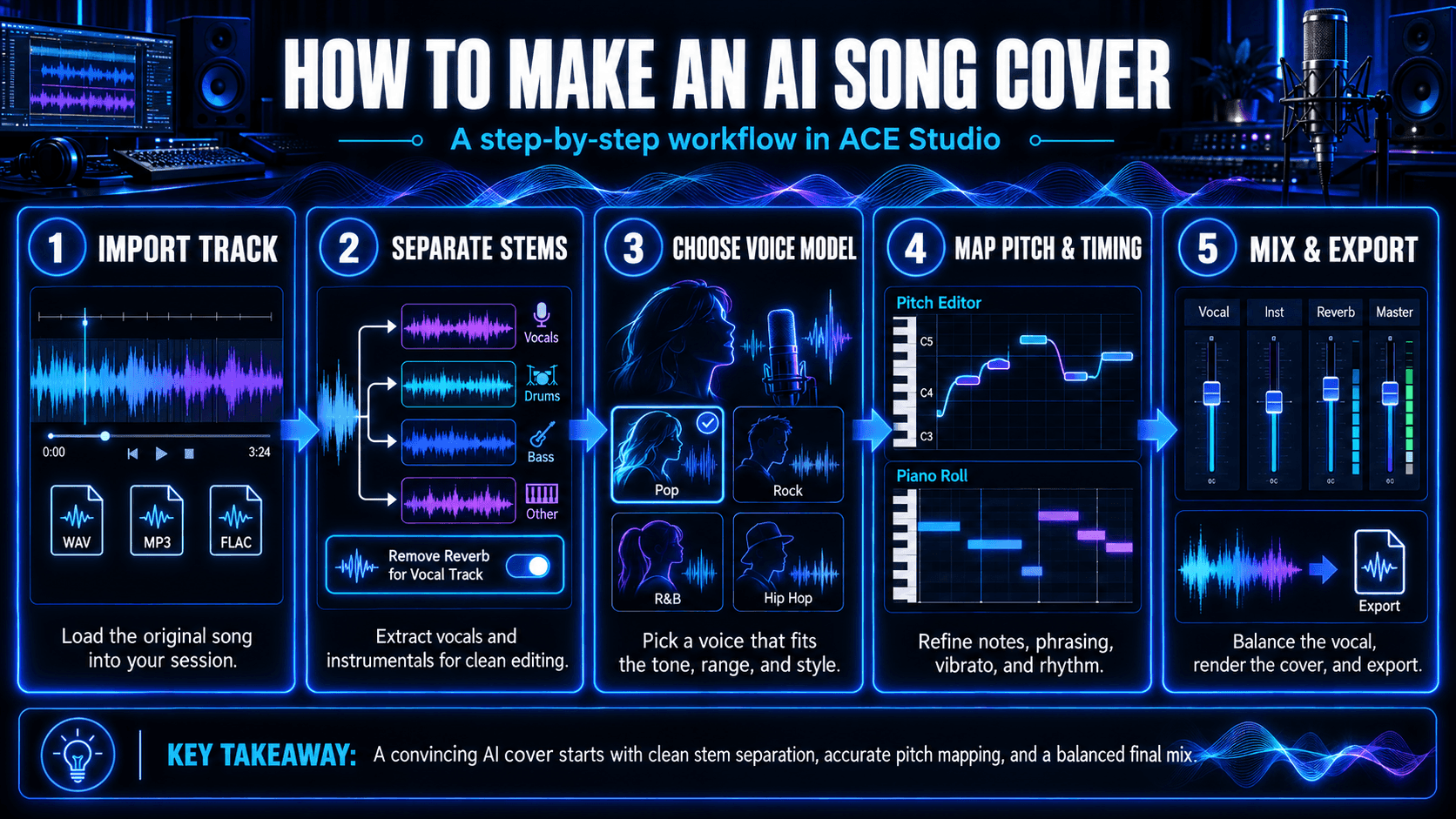
Five-step workflow for making an AI song cover in ACE Studio, including importing audio, separating stems, choosing an AI voice, editing pitch and timing, and exporting the mix.
The five-step AI song cover workflow in ACE Studio, from importing and separating audio to voice selection, pitch editing, and final export.

Step 1 – Import the Track

Begin by opening a session in ACE Studio and loading the song you wish to work with. The platform supports standard formats like WAV, MP3, and FLAC, and imported audio appears directly on the timeline. No additional conversion or plugin setup is needed; everything is integrated within the session.

Step 2 – Separate Vocals and Instrumentals

To replace the original vocal, you’ll first need to extract it. This is handled via ACE Studio’s stem splitter, which divides a song into editable layers such as lead vocal, drums, bass, and harmonic content. If the vocal contains reverb or layered effects, activate the “Remove Reverb for Vocal Track” option to minimize interference and improve pitch detection. The separation process maintains phase and timing integrity, so the track stays musically intact and ready for new vocals.

Step 3 – Choose a Voice Model

Once the vocal stem has been removed, the next step is to select a synthetic voice that will perform the replacement. ACE Studio offers a range of pre-trained models, each with distinct tone, range, and expressive detail. These voices are designed for musical use and respond dynamically to pitch and phrasing guides.

For advanced use cases, like artist emulation or branded projects, it’s possible to train a custom model based on your own vocal data. This allows for full control over vocal color, vibrato, articulation, and stylistic traits.

Step 4 – Map the Vocal Performance

The synthetic voice needs a guide to follow. ACE Studio automatically generates a pitch and timing map from the extracted vocal stem. This guide instructs the voice model on when to enter, what pitch to sing, and how to phrase each syllable. Users can edit this map in the Pitch Editor to refine note lengths, vibrato behavior, or rhythm accuracy, especially in complex or stylistic performances.

Once applied, the AI-generated vocal performs the melody in a new voice while preserving the original performance's flow. Any inconsistencies or unwanted artifacts can be corrected nondestructively within the same session.

Step 5 – Finalize and Export

After confirming the phrasing and mix, you can render the new vocal as an audio file and integrate it with the rest of your session. The timeline supports further editing and mixing, including balance adjustments and subtle effects. ACE Studio also provides loudness monitoring and export options suited for both high-resolution archiving and content-ready publishing.

If your cover is based on a copyrighted composition, remember that usage rights may be required before distribution. For royalty-free material or original works, the output is ready for immediate use.

Common Issues When Making AI Song Covers (And How to Fix Them)

Although ACE Studio streamlines the vocal synthesis process, high-quality output still depends on user awareness of how the system interprets pitch, gain, timing, and vocal phrasing. Some results may fall short not because of technical failure, but due to input inconsistencies or overlooked settings. Below are several challenges that tend to arise, along with practical ways to address them inside ACE Studio.
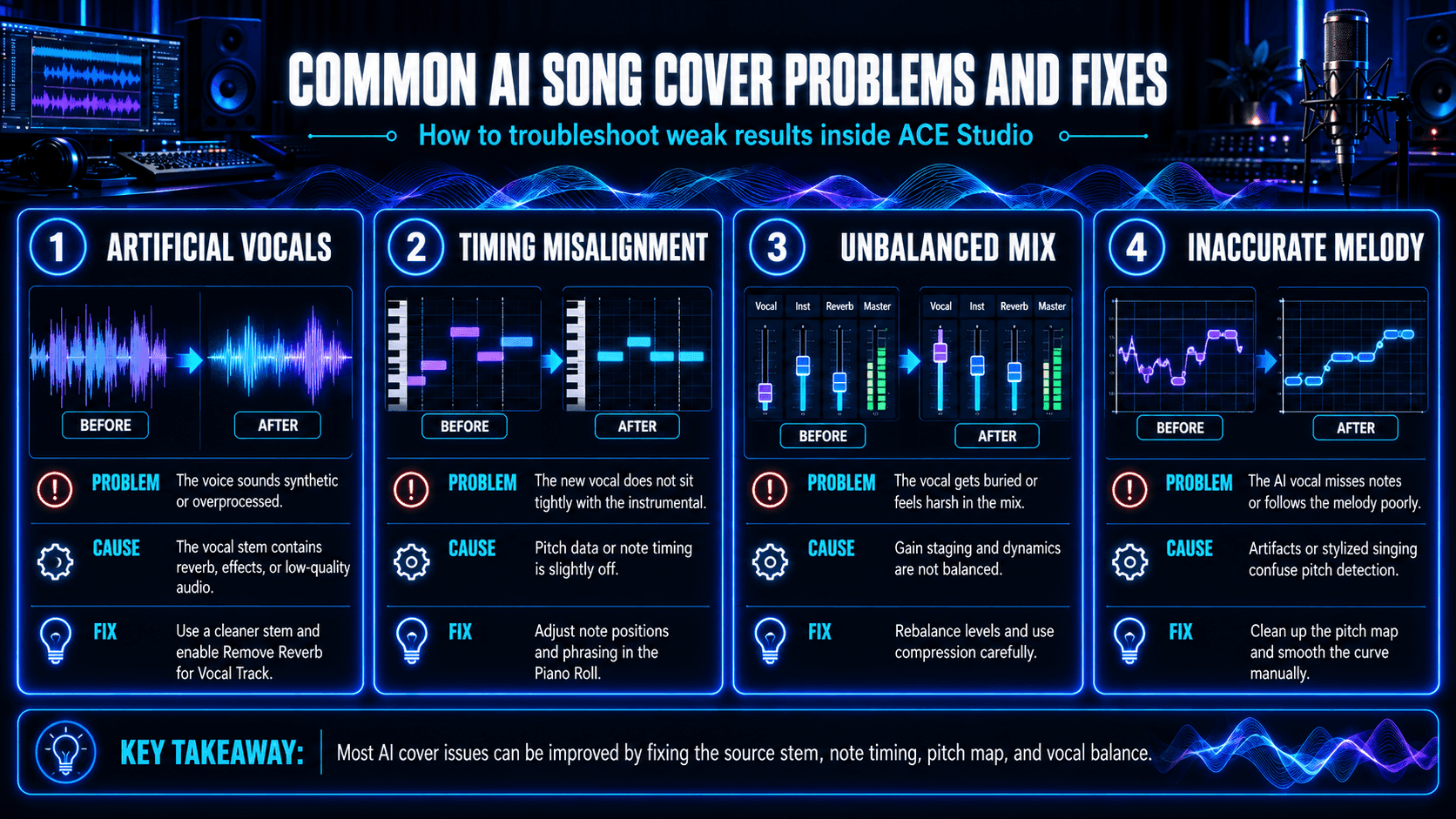
AI song cover troubleshooting infographic showing problems, causes, and fixes for synthetic-sounding vocals, timing misalignment, mix balance, and incorrect pitch detection.
Four common AI song cover problems and their solutions, including artificial vocals, timing errors, unbalanced mixes, and inaccurate melodies.

The Voice Sounds Artificial or Overprocessed

One of the most common issues in vocal synthesis is that the generated voice lacks clarity or sounds overly synthetic. This often stems from the quality of the input vocal stem. When the original track contains layered effects, such as stereo widening, slapback delay (a short echo), or embedded reverb, the system struggles to detect the natural pitch curve, resulting in artifacts in the synthesized result.

To improve clarity and avoid these artifacts, it’s best to address the problem during the stem splitting stage. When setting up the separation, enabling the “Remove Reverb for Vocal Track” option helps suppress spatial effects and background ambiance, giving the system a cleaner vocal reference. It’s also important to avoid compressed formats such as low-bitrate MP3s, which can flatten subtle inflection details and reduce pitch accuracy. A high-resolution stem—preferably in WAV or FLAC format—provides better pitch fidelity and smoother formant transitions during rendering.

Timing Between Stems Is Misaligned

Sometimes the new vocal track doesn’t align rhythmically with the instrumental. Even small delays or inconsistencies can make the output feel disjointed. This often happens when the extracted pitch map doesn’t match the session grid or when imported audio carries tempo drift from a previous production.

While ACE Studio does not currently offer automatic pitch-to-grid alignment, it provides detailed manual control to fix timing issues. In the Piano Roll editor, users can adjust note positions, syllable timing, and phrasing with pitch tools. For example, you can shift note onsets, add or smooth attacks, and refine pitch curves to better match the beat.

What’s important here is to ensure that the underlying tempo remains consistent throughout the session, as misaligned BPMs or tempo automation can cause subtle but noticeable timing discrepancies.

The Final Mix Sounds Unbalanced

It’s not uncommon for synthesized vocals to feel too quiet or too loud compared to the instrumental. In most cases, this has less to do with the synthesis itself and more with how gain staging is handled throughout the session. If the root gain of the voice track is set too low, the vocals may lack presence and get buried in the mix. On the other hand, pushing pitch or formant settings too far from the model’s natural range can introduce sharp transients that sound harsh or even clip during playback.

In ACE Studio, you can adjust gain at multiple stages. The main mixer allows direct control over each track’s root volume, giving you the ability to rebalance elements as you go. For more focused vocal adjustments, the VocalEffect panel features a compressor with built-in gain control, ideal for boosting vocal presence without increasing overall output too aggressively. Visual meters in the mixer provide immediate feedback while you make changes, helping ensure everything stays balanced before export.

Although ACE Studio offers detailed control within the session, it doesn’t currently include a dedicated loudness analyzer or soft limiter during export. For that reason, it’s a good idea to finalize the vocal mix in a DAW if you're preparing for public release. Applying light compression or a limiter after synthesis helps maintain clarity and consistency, especially across different playback platforms.

The Melody Feels Off or Inaccurate

Sometimes the AI-generated vocal doesn’t quite follow the intended melody, and this often stems from issues in the pitch map. These problems can result from vocal bleed during stem extraction or from stylized singing elements, such as heavy vibrato, pitch slides, or overlapping harmonics. Such artifacts can mislead the AI’s pitch detection, causing it to reproduce notes inaccurately or imprecisely.

ACE Studio offers powerful tools for fine-tuning the pitch curve prior to synthesis. In the Pitch Editor, you can manually smooth the curve using the Pitch Brush and Anchors, remove unwanted notes, or adjust transitions—especially helpful in passages with melisma or microtonal shifts. Unpitched syllables, breaths, or glottal noises may appear as incorrect notes; deleting or smoothing these artifacts improves the clean reproduction of the melody.

By clearly defining the melody in your pitch map, smoothing errant curves, and eliminating noise, you ensure the AI voice follows the intended musical line with greater accuracy and expressiveness.

Advanced Tips for More Realistic AI Vocal Results
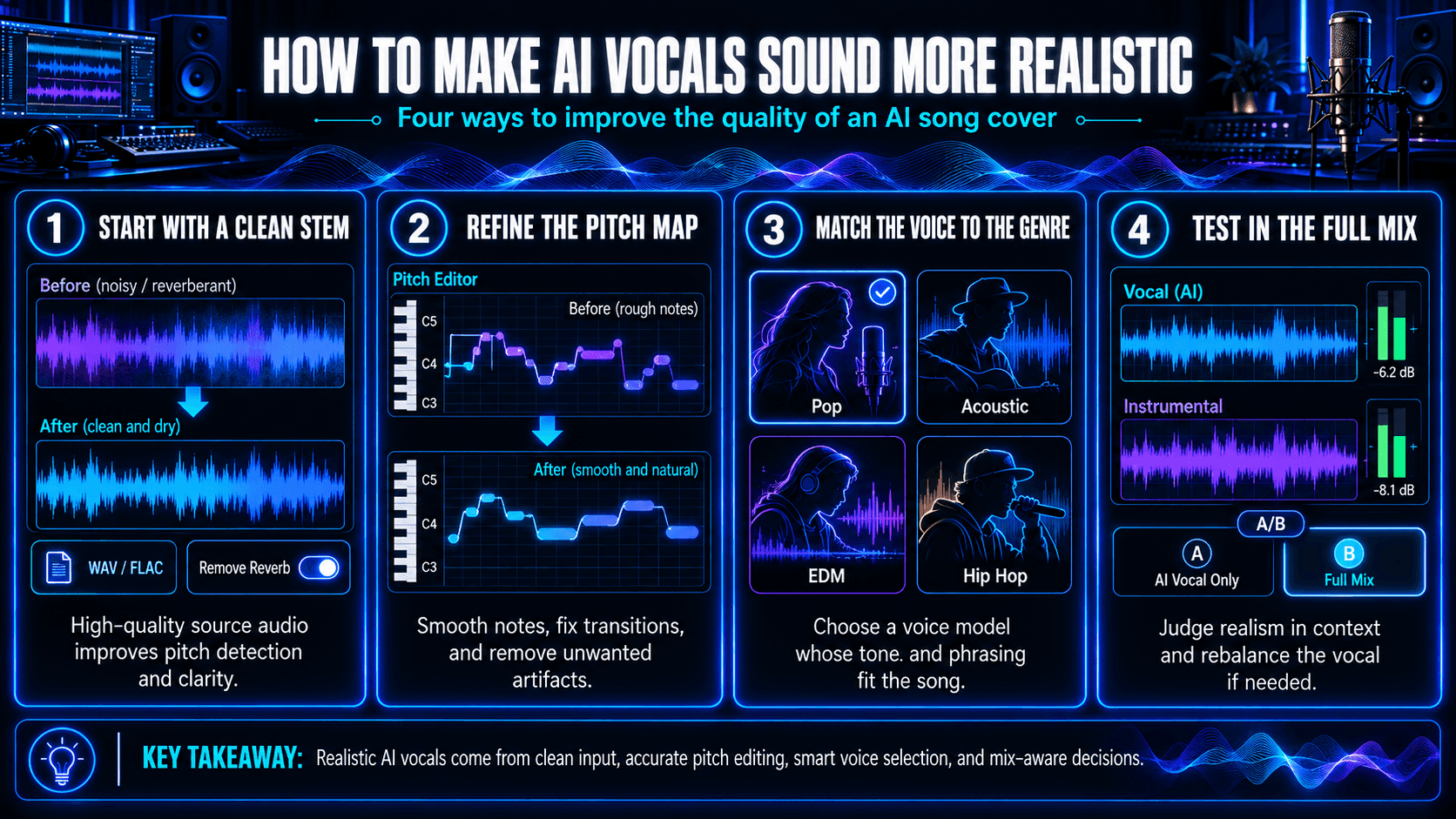
Infographic illustrating four ways to improve AI vocal realism in ACE Studio through vocal stem cleanup, pitch correction, voice model selection, and full-mix testing.
Four techniques for creating more realistic AI song covers: clean vocal stems, refined pitch maps, genre-appropriate voices, and balanced mixing.

Refine the Vocal Stem Before Rendering

The most realistic synthetic vocals start with a clean, well-defined vocal stem. Although ACE Studio’s stem splitter automatically handles separation, the extracted vocal often benefits from further refinement in the Pitch View Editor. Cleaning up unwanted harmonics, background noise, or inaccurately detected pitch data ensures the AI receives clear melodic and phrasing information.

Using high-resolution audio formats, such as WAV or FLAC, also makes a difference. Compressed or mono files can lose the transient and harmonic details needed for natural formant shaping. To minimize interference during pitch detection, enable the “Remove Reverb for Vocal Track” option during stem separation for a cleaner input.

Match Genre and Voice Model Thoughtfully

Not every genre translates equally well to synthetic vocals. Styles with clear diction and predictable phrasing—such as pop, K-pop, or acoustic ballads—tend to produce better results than genres with rapid-fire delivery, distortion, or extreme vocal processing.

When working with fast-paced genres like hip hop or metal, simplify the vocal lines before synthesis. Breaking long phrases into smaller parts and tightening the tempo grid can help with alignment. Choosing a voice model that fits your genre’s tone—such as breathier voices for lo-fi or more controlled dynamics for EDM—adds realism and cohesion to the final result.

Adjust Synthesis Parameters by Section

Treat each section of your song as a unique performance. Choruses might benefit from extended vibrato and smoother transitions, while verses may require sharper articulation and tighter phrasing. ACE Studio enables each region to be edited independently on its own pitch track, providing precise control over note timing, vibrato, and expression.

Subtle tweaks, like adjusting onset timing or modifying vibrato depth, can significantly enhance the natural feel of a synthetic performance, especially at phrase transitions.

Test in Context, Not in Isolation

Editing vocals in solo mode can be misleading. What sounds robotic alone may sit perfectly in the mix, and vice versa. Always A/B test with the instrumental to evaluate balance, masking, and perceived loudness in context.

If the vocal feels buried, try shifting the pitch register slightly or applying harmonic saturation to increase presence without boosting volume. Avoid heavy compression, as it can flatten vocal nuance, which is already more limited in AI-rendered voices compared to human ones.

How to Use, Share, or Publish Your AI Song Cover

Once a song cover has been generated and refined in ACE Studio, the next step is deciding how and where to use it. These vocals are not limited to demonstration purposes; they can support a range of creative, educational, and commercial workflows, depending on the nature of the project and the rights associated with the original composition.

Prototyping and Pre-Production

For music producers, AI song covers offer a practical way to test arrangement choices before committing to studio vocals. You can preview how a composition might sound with different voices, keys, or emotional tones, without hiring talent or setting up live recording sessions. The pitch and timing data used to generate the AI vocal can later be reused with a real singer, ensuring continuity between the draft and final recording.

This approach is especially effective in early-stage demos or songwriting collaborations. Instead of sending written lyrics and chords, collaborators receive a fully voiced version of the song that reflects the intended pacing and phrasing.

Educational and Practice Uses

AI vocals can serve as tools for both teaching and learning. Instructors can generate vocal material for students to use in exercises focused on mixing, harmony, or vocal tuning, without the need to record new takes. The flexibility to alter phrasing or dynamics in ACE Studio also makes it easier to isolate specific musical concepts during practice.

Students, on the other hand, can experiment with vocal arrangement and audio engineering using consistent, clean stems. This allows them to focus on techniques such as EQ balancing or effects routing, without needing to account for unpredictable vocal recordings.

Online Content and Creative Remixing

Content creators working on video, podcast, or short-form media projects can use AI song covers to develop fresh versions of well-known songs, adapt lyrics into different languages, or explore alternative genres. These reinterpretations introduce variety without departing from recognizable melodies.

If the cover is based on a copyrighted song, creators should ensure they have appropriate usage rights. ACE Studio provides full-resolution audio export, which means these covers are immediately suitable for platforms like YouTube, TikTok, or SoundCloud,once legal clearance is handled.

Live Playback and Performance Integration

In live environments, AI-generated vocals can act as placeholders, backing tracks, or harmony layers. For solo performers or DJs, replacing the lead vocal with a custom voice gives more control over timing, pitch, and tonality, especially when a specific vocal aesthetic is needed but unavailable.

Because the system exports aligned stems with consistent timing, the final mix is easily integrated into DAWs or performance rigs. Combined with MIDI control or synced playback systems, AI covers can serve as part of a hybrid live show that blends real-time performance with synthetic elements.

FAQ

Can I use AI song covers for commercial purposes?

Yes, you can monetize AI-generated vocals created in ACE Studio, as the built-in voice models are royalty‑free and licensed for commercial use.But remember: if you're covering a song you didn’t write, you still need the proper composition license (usually a mechanical license). ACE Studio does not handle copyright clearances for published works—securing usage rights is your responsibility.If you're covering your own original work or a track explicitly labeled royalty-free, there are no restrictions on distribution or monetization.

Are ACE Studio voice models copyrighted?

The voice models provided by ACE Studio are licensed for in-platform use and not for extraction or cloning outside the software. If you train a custom voice model with your own recordings using ACE’s tools, you own the rights to that model's output and can use it freely, including for commercial purposes.

Does the AI cover automatically match tempo and pitch?

Yes. ACE Studio uses an internal pitch-and-timing guide that maps your original vocal’s melody and rhythm onto the selected voice model. This synthesized vocal is automatically aligned with your instrumental unless you choose to edit it. You can manually adjust phrasing, shift timing, and edit notes using the Pitch Editor or Piano Roll interface.

Is it possible to make a bilingual or multilingual AI cover?

Yes. ACE Studio supports multiple languages (English, Chinese, Japanese, and Spanish), and its phoneme dictionary handles language switching. You can assign different language codes to sections of your cover, enabling fluid multilingual renditions within a single track.

How is my data handled during processing?

Your project files, including MIDI, lyrics, and other inputs, are stored locally on your device. However, during the vocal synthesis process, ACE Studio’s cloud server temporarily accesses these inputs to generate the AI vocals. This means your MIDI and lyrics are transmitted to the cloud solely for processing purposes. Importantly, none of this data is stored on the server: it is automatically and permanently destroyed immediately after synthesis is completed. If you are working within a logged-in project, you may choose to save the generated results locally. 

What makes a cover “realistic” in the AI context?

A realistic AI cover depends on clean pitch data, precise phoneme transitions, controlled vibrato, and consistent rhythmic timing. ACE Studio offers tools like the Pitch Editor, vibrato control, pitch smoothing, and timing adjustments to help you refine these elements, crucial for creating a believable synthetic vocal.


Maxine Zhang
Written by
Maxine Zhang
Maxine Zhang is Head of Operations at ACE Studio, where she bridges AI technology and creative music applications. With deep expertise in user experience and product development, she champions the needs of musicians in the age of AI.
View full profile →
Copyright © 2026 Timedomain Inc.
Terms of Use
Privacy Policy