

Key Takeaways
- MP3 uses lossy compression and psychoacoustic masking to remove less noticeable audio information, reducing file sizes by roughly 80% to 90% compared with uncompressed formats.
- Bitrate determines the balance between sound quality and file size: 128 kbps suits speech and basic previews, while 320 kbps provides the highest quality available within the MP3 format.
- MP3 remains widely used because it offers near-universal compatibility, fast transfers, low storage requirements, and reliable ID3 metadata support.
- For professional production, record, edit, mix, and master in an uncompressed format such as WAV. Export to MP3 only when preparing lightweight demos, podcasts, reference tracks, or other delivery files.
- MP3 permanently discards audio data and can introduce high-frequency loss, phase issues, inter-sample clipping, and worsening artifacts when files are repeatedly compressed.
How MP3 Compression Transformed Digital Audio
The digital audio landscape changed forever when engineers figured out how to shrink acoustic data down to a fraction of its original footprint without rendering it unlistenable. At the heart of that transformation is a specific file format that completely redefined music distribution, consumption, and storage. For audio engineers, software developers, music producers, and content creators, understanding this foundational format is essential for managing digital audio workflows effectively.
Defining the MP3 File Format
To understand this asset class completely, one must look at both its software layout and its functional performance across modern computational architectures.
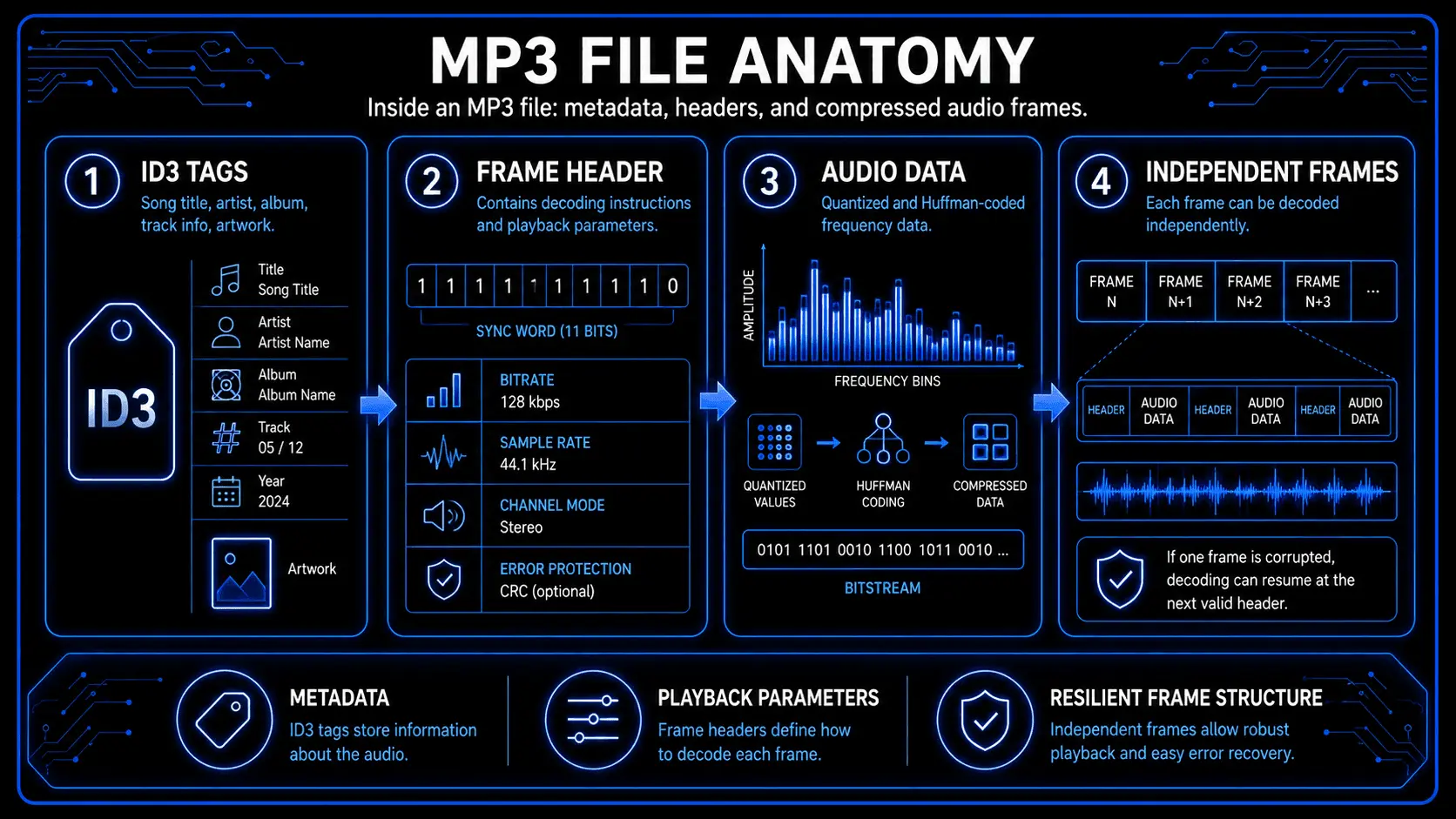
An MP3 file is an encoded bitstream partitioned into distinct, independent segments called frames. Each frame contains its own header information followed by the corresponding compressed audio data blocks. This structural independence means that if a file is corrupted during transmission, a decoder can sync to the next clean frame header and resume playback without crashing.
The data configuration of an MP3 file consists of three primary layers:
- The Metadata Container (ID3 Tags): Located at the absolute beginning or end of the file bitstream, these tags hold descriptive textual data such as song names, creator information, album titles, track sequences, and embedded artwork.
- The Frame Headers: Every audio frame begins with a 4-byte sequence containing a 11-bit or 12-bit sync word, signaling to the media engine that a valid compressed frame has arrived. The header also declares essential execution parameters: the specific audio layer specification, the transmission bit rate, the system sample rate, error protection indicators, and the playback channel layout.
- The Audio Data Blocks: This section holds the actual quantized, Huffman-coded frequency coefficients that represent the acoustic waveform.
Purpose and Core Use Cases
The primary function of this audio file format is to act as an efficient, highly portable medium for storing and streaming digital audio. Uncompressed pulse-code modulation data requires substantial local storage capacity and continuous network throughput. The compressed alternative allows for efficient storage distribution and fast network data transfers.
Key operational environments include:
- Localized Music Libraries: Managing massive archival databases on computing hard drives and specialized solid-state hardware storage arrays.
- Media Distribution Networks: Serving legacy digital download storefronts, electronic distribution systems, and foundational podcast syndication networks.
- Embedded Device Software: Operating within automotive media decks, standard consumer electronics, industrial communication arrays, and targeted standalone consumer appliances.
Identifying and Opening MP3 Files
Opening and executing these files requires zero proprietary software additions on modern computational operating systems. The core framework of every major digital workspace features built-in decoding pipelines:
- Microsoft Windows Platforms: The integrated media player architecture handles native decoding effortlessly. Advanced production environments utilize digital audio workstations to load, edit, and reconstruct the underlying bitstreams.
- Apple macOS and iOS Environments: The native system core audio framework decodes these streams transparently inside Applications like Apple Music, QuickTime Player, or Logic Pro.
- Linux Systems: Open-source architectures execute playback through advanced utilities such as VLC Media Player, Audacious, or command-line media architectures built around the FFmpeg processing suite.
- Mobile Frameworks: Android and mobile ecosystems leverage hardware-level processing decoders to execute playback within any streaming or file-management application, minimizing battery draw and computational overhead.
3. History and Evolution of MP3
The path from laboratory experiments to a global consumer audio standard involves a mix of corporate strategy, engineering breakthroughs, and shifting market dynamics.
The Origins and Invention
The foundational research that yielded the MP3 format commenced in the late 1980s. A pivotal research partnership emerged between the Friedrich-Alexander University Erlangen-Nürnberg and the Fraunhofer Institute for Integrated Circuits. This research initiative was backed by the European Union under the umbrella of the EUREKA EU147 Digital Audio Broadcasting project.
Key engineering pioneers—including Karlheinz Brandenburg, Bernhard Grill, Harald Popp, Heinz Gerhäuser, and Jürgen Herre—focused on compressing digital audio streams without losing perceived fidelity. Brandenburg focused his doctoral thesis on the Optimum Coding in the Frequency Domain algorithm, which pioneered elements that would define modern compression: high-frequency resolution filter banks, non-uniform quantization loops, and entropy reduction.
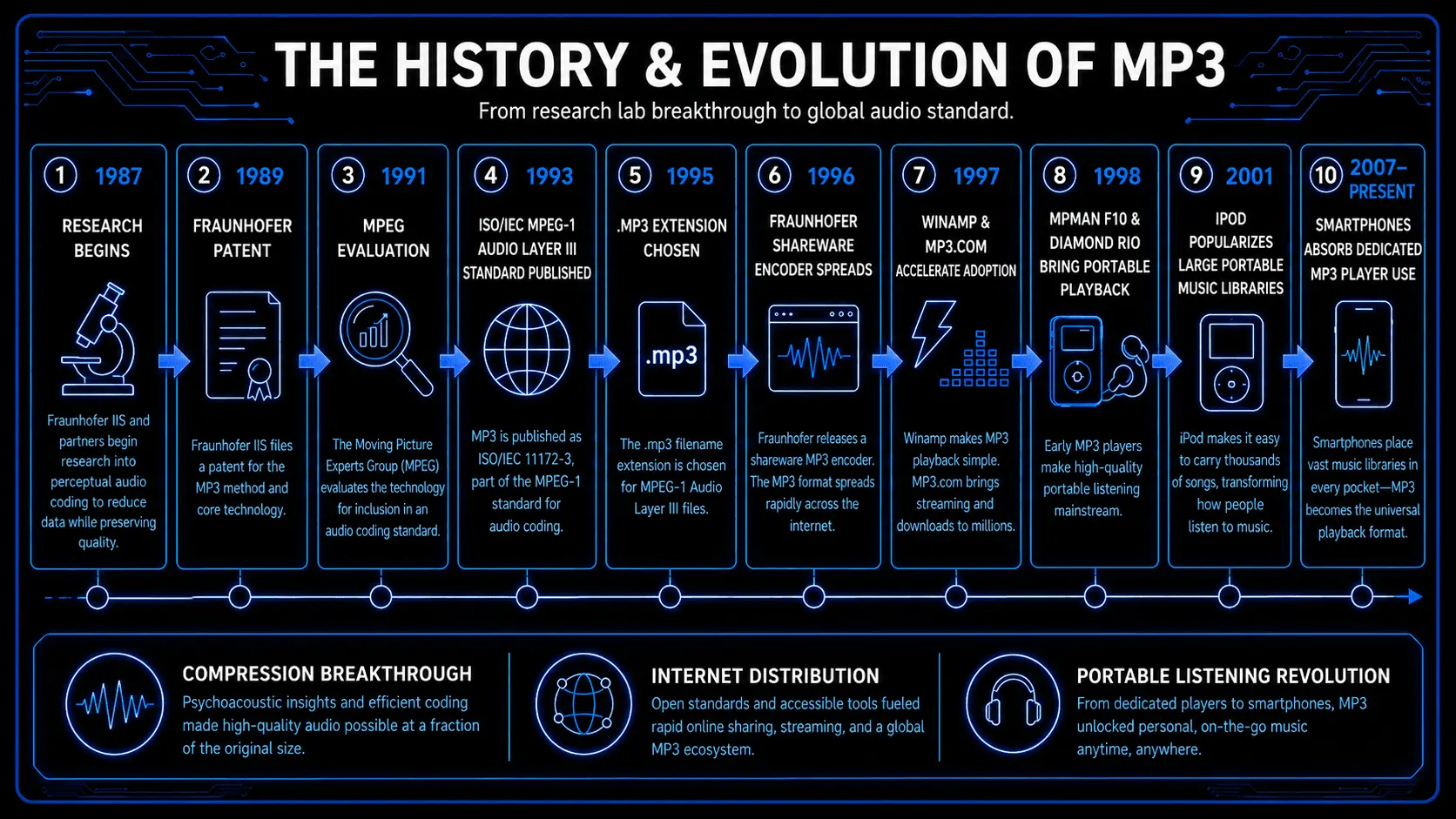
Key Chronological Milestones
- 1987: The formal research collective establishes a real-time testing framework using Low Complexity Adaptive Transform Coding configurations.
- 1989: The Fraunhofer organization secures a defining German patent for the audio compression technology.
- 1991: The Moving Picture Experts Group evaluates multiple submission models. The final specification integrates elements of the MUSICAM design with Fraunhofer's frequency domain coding model.
- 1993: The International Organization for Standardization formally publishes the MPEG-1 Audio Layer III specification under the document code ISO/IEC 11172-3.
- 1995: On July 14, an internal electronic mail poll among Fraunhofer researchers establishes the official .mp3 filename extension, replacing older internal identifiers.
- 1996: Fraunhofer begins distributing a Windows-based software encoder as shareware. An unauthorized entity acquires the application using fraudulent credentials and releases it onto open internet nodes, triggering rapid global adoption.
The Internet Explosion and Software Decoders
The release of the software encoder coincided with the expansion of consumer internet infrastructure. Early dial-up connections lacked the capacity to move massive uncompressed files, but they could transfer a compressed file format in a few minutes.
In 1997, the release of the Nullsoft Winamp media player provided a sleek, accessible graphic user interface that let mainstream computer users manage digital music libraries right from their desktops. Websites like MP3.com quickly cropped up to offer independent music distribution, while peer-to-peer file-sharing ecosystems radically decentralized music discovery worldwide.
The Evolution of Hardware
Portable playback required specialized hardware capable of executing realtime decoding mathematics without a constant connection to a wall outlet.
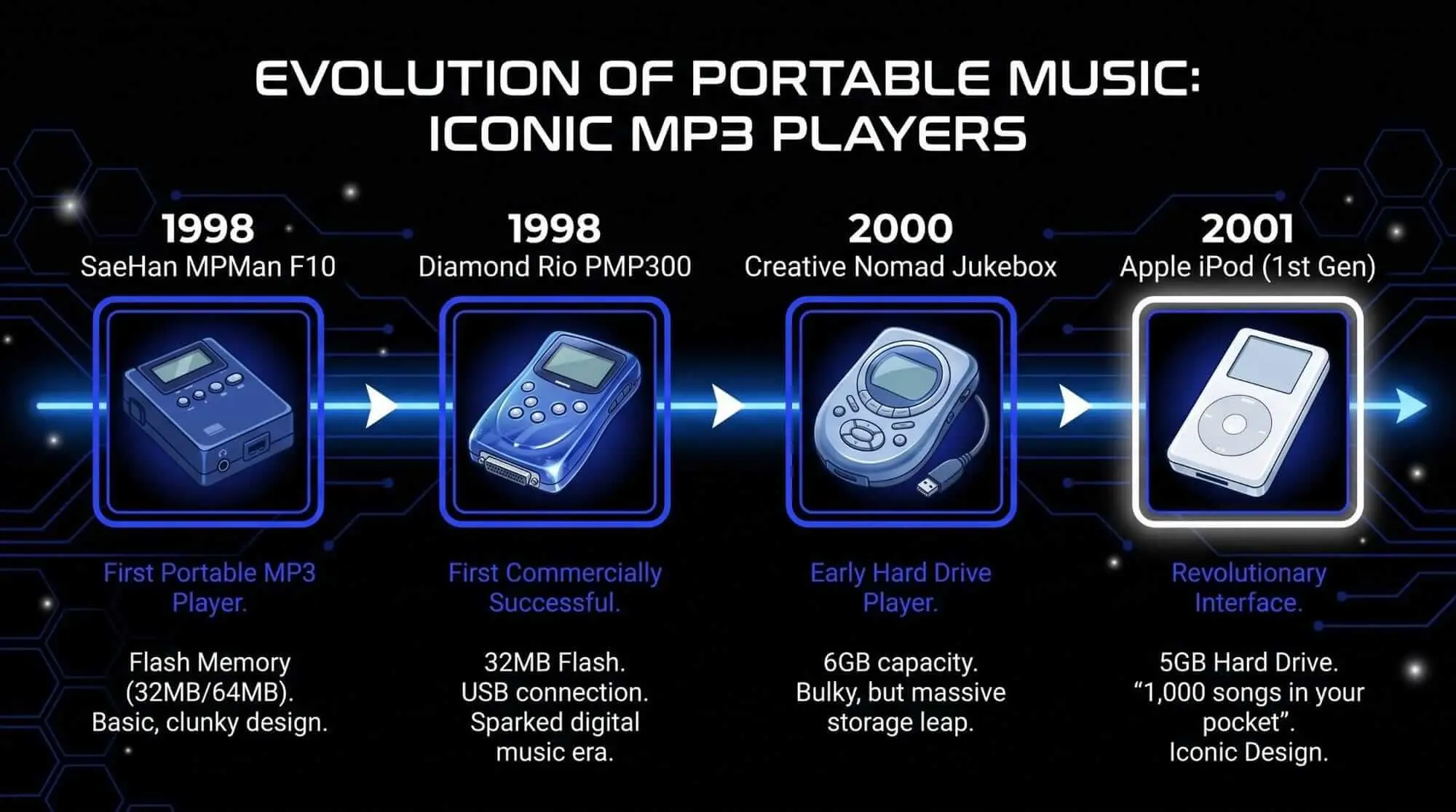
- SaeHan MPMan F10 (1998): Manufactured by SaeHan Information Systems, this device stands as the world's first commercial portable media player. Featuring a mere 32 megabytes of integrated solid-state storage, it could hold approximately six standard tracks.
- Diamond Rio PMP300 (1998): Released shortly after the MPMan, this unit brought the technology to western markets. It triggered an unsuccessful legal challenge from the Recording Industry Association of America, which sought to classify the player as an illicit copying device. The courts ruled in favor of consumer hardware independence, setting a vital legal precedent.
- Apple iPod Series (2001): Apple altered the market balance by mating a mechanical miniature hard drive to a clean interface, packing thousands of songs into a pocket-sized device.
- The Smartphone Consolidation (2007–Present): The integration of dedicated audio processing chips inside mobile phones eliminated the consumer need for secondary standalone playback hardware.
How MP3 Compression Works
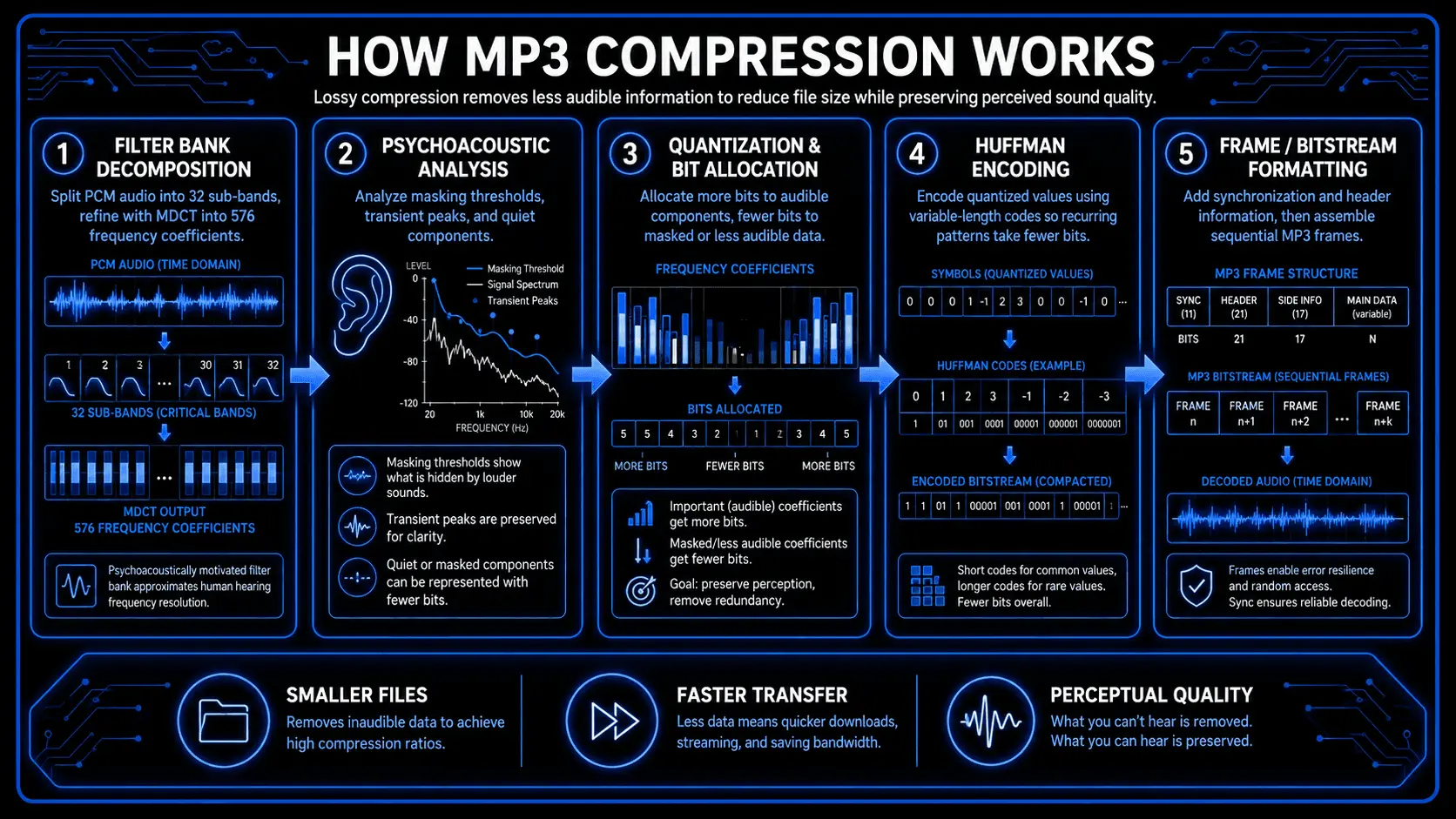
- Filter Bank Decomposition: The incoming raw PCM stream passes through a hybrid filter assembly. First, a polyphase filter bank splits the continuous audio into 32 distinct sub-bands. Next, a Modified Discrete Cosine Transform further refines each sub-band into 18 fine frequency segments, yielding a clean resolution of 576 discrete frequency coefficients for standard frames.
- Psychoacoustic Evaluation: In parallel, a Fast Fourier Transform analyzes the incoming signal to map the current sonic landscape, identifying specific masking thresholds, transient peaks, and quiet components.
- Quantization and Bit Allocation: The encoder matches the frequency resolution profiles with the calculated masking limits. It allocates fewer bits to sections hidden by masking or thresholds, keeping any resulting quantization noise hidden safely underneath the audible sound footprint.
- Huffman Entropy Encoding: The quantized spectral data blocks pass through a lossless Huffman coding pass. This step packs recurring data patterns into shorter bit combinations, reducing the total footprint even further without discarding any more audio fidelity.
- Bitstream Formatting: The compressed packets are stamped with sync words, protected with error-correction tags if configured, and assembled into sequential playback frames.
Space-Saving Stereo Techniques
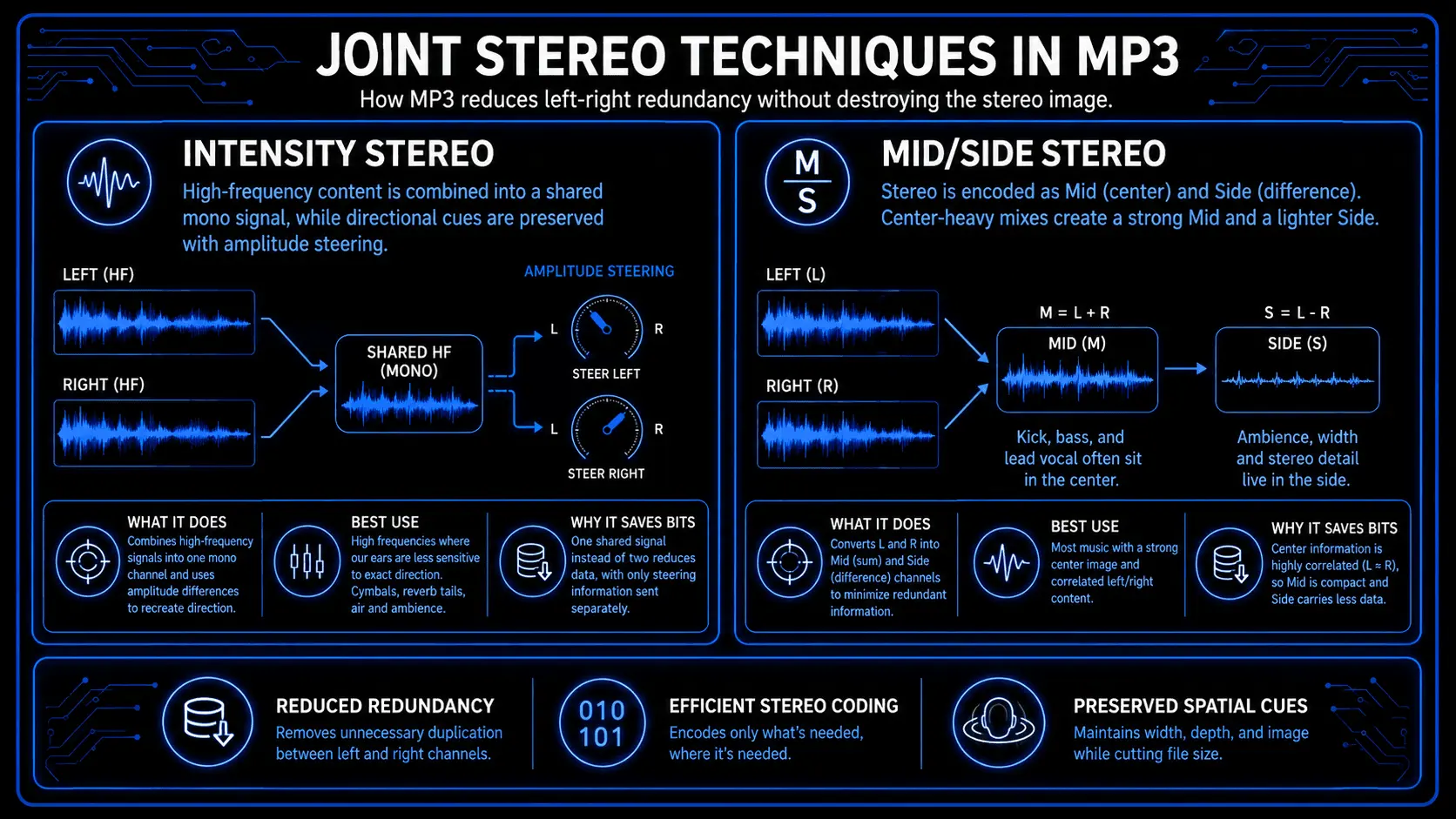
Standard stereo recordings contain a lot of identical data between the left and right channels. The MP3 standard uses two main joint stereo methods to strip out this spatial redundancy:
- Intensity Stereo Coding: This technique combines the high-frequency ranges into a single, shared mono channel. It preserves spatial imaging by embedding brief amplitude steering data, giving the brain enough direction cues without spending data on two separate high-frequency wave patterns.
- Mid/Side Stereo Coding: This strategy shifts the stereo field into a Center channel (the sum of left and right) and a Side channel (the difference between left and right). If a mix keeps the bass guitar, kick drum, and lead vocals dead-center, the Side channel stays nearly empty. The encoder shifts its bit allocation to the Center channel, cutting out a huge amount of redundant data.
Demystifying Audio Bitrates
An audio file's bitrate defines how much data is processed per second of playback. This variable directly controls the balance between local storage requirements and overall sound quality.
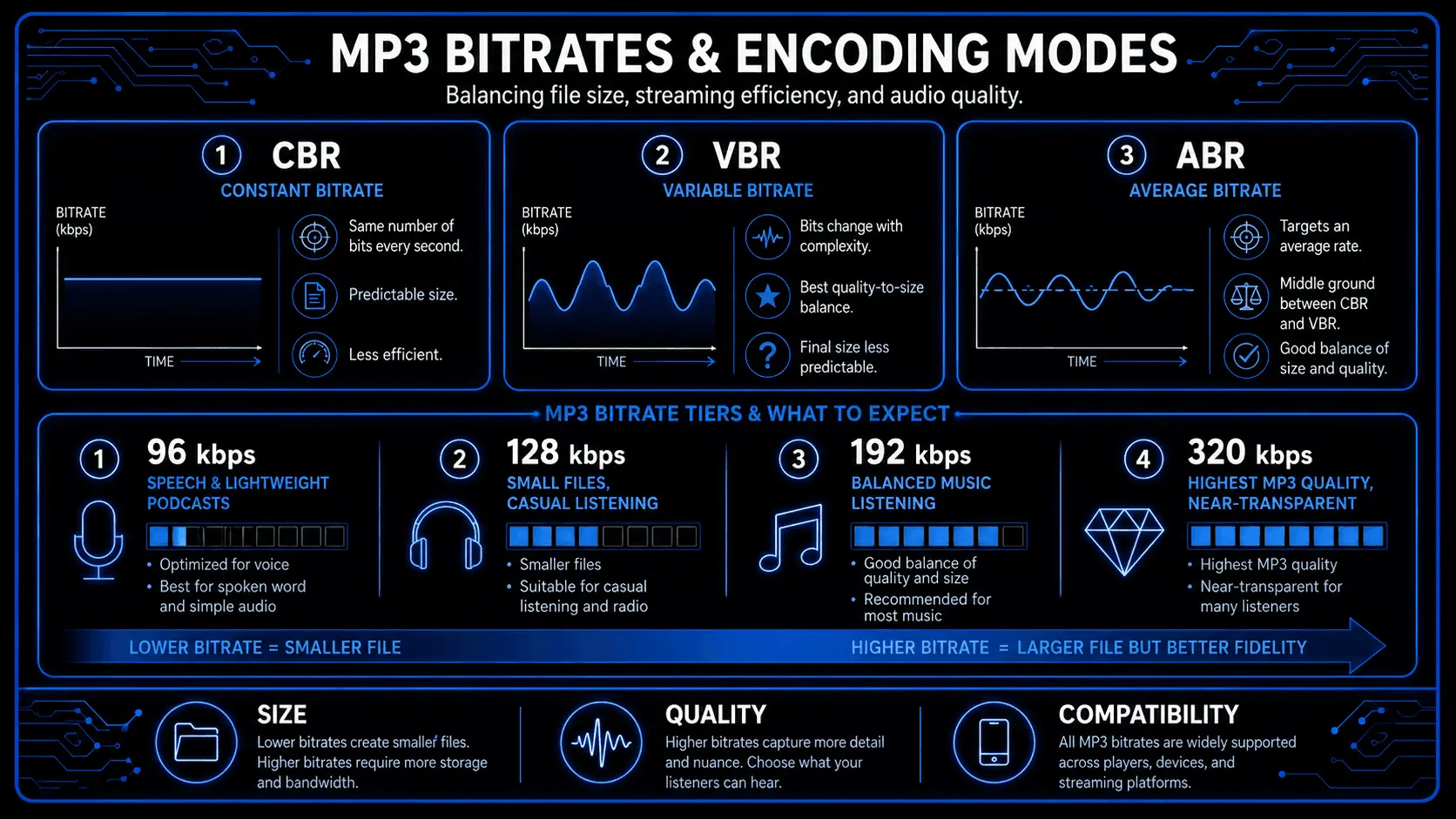
Data Management: CBR, VBR, and ABR
An encoder can distribute bits across a timeline using three primary distribution methods:
| Encoding Method | Operational Blueprint | Primary Technical Value | Disadvantage |
|---|---|---|---|
| Constant Bitrate (CBR) | Allocates the exact same number of bits to every single second of audio, regardless of complexity. | Offers predictable file sizes and stable stream requirements for simple network nodes. | Wastes bits during complete silence and struggles to encode dense, complex musical crescendos cleanly. |
| Variable Bitrate (VBR) | Constantly recalculates audio complexity, dropping the data rate down during solo instruments and ramping it up for dense stereo passages. | Delivers the best balance of sound quality to space by prioritizing bits only where they are needed. | Hard to predict final file sizes before encoding, and can cause issues with older media players. |
| Average Bitrate (ABR) | The encoder varies the data allocation frame by frame, but steers the entire timeline toward a pre-set target file size. | Combines the predictable file size advantages of CBR with the adaptive quality mapping of VBR. | Requires extra processing overhead and can introduce minor artifacting during abrupt sonic transitions. |
Choosing the Best MP3 Bitrate
Selecting a target data density requires matching the export parameters to the environment where the audio will be consumed:
- 128 kbps (Standard Quality): This setting was once a common compromise for web streaming, but it strips away significant high-frequency detail. It works fine for voice work, rough scratch tracks, or basic audio monitoring, but it can introduce noticeable phase issues on full musical arrangements.
- 192 kbps (Medium Quality): A solid mid-point option that performs well on consumer headphones and basic car stereo systems. Most listeners won't notice immediate compression issues here, though complex elements like stereo cymbals or acoustic rooms can lose some definition.
- 320 kbps (Maximum Quality): The absolute data ceiling for the MP3 format specification. It preserves structural audio definition across consumer monitoring rigs, keeping transients crisp and maintaining depth across the stereo field.
High-Frequency Roll-Off
To stay within tighter data limits at lower bitrates, encoders apply aggressive low-pass filtering.
At 128 kbps, the LAME encoder typically cuts off everything above 16,000 Hz with a steep brick-wall filter. This saves precious bits for the midrange where human hearing is most sensitive, but it robs the audio of top-end air and sheen. As you move up to 320 kbps, that filter threshold moves up past 20,000 Hz, preserving the full frequency spectrum of human hearing.
Optimizing Sound Quality for MP3 Export
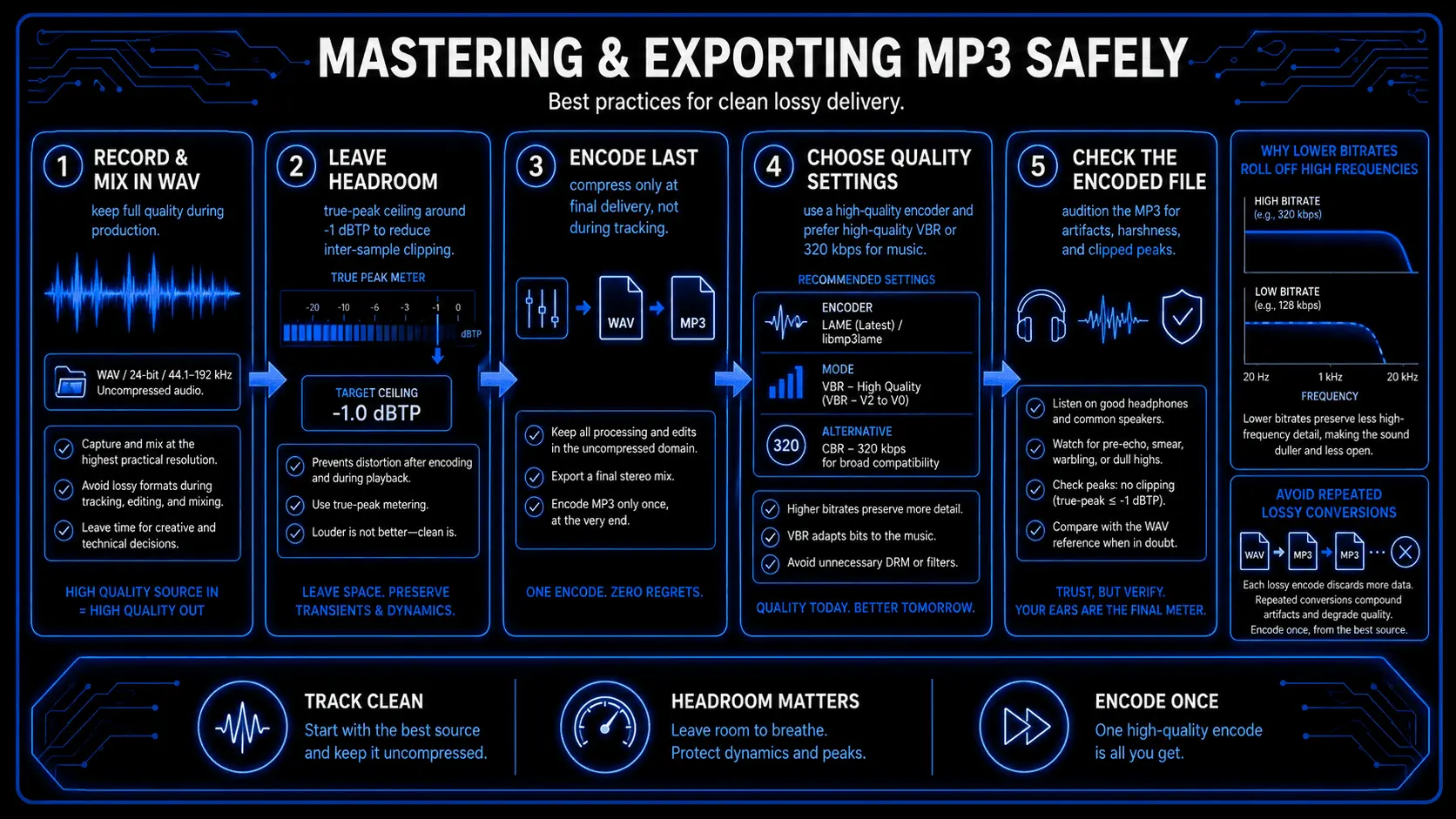
Converting audio to a lossy delivery format requires careful attention during mixing and mastering. If you simply export an uncompressed project mix down to a compressed target without adjusting parameters, the conversion process can introduce unexpected distortion.
Mastering Considerations for Lossy Formats
The interpolation math used by lossy decoders often creates a phenomenon called inter-sample peaks. When the compressed audio frames are reconstructed into a continuous analog wave, the peak levels can rise above the digital values recorded in the file.
If a mastering engineer sets a brick-wall limiter ceiling to exactly 0.0 dBFS on an uncompressed file, the subsequent decoding process will likely clip, causing audible distortion.
To prevent this issue, observe these professional mastering guidelines:
- Set Generous Headroom Ceilings: Keep the final true-peak output level between -1.0 dBFS and -1.5 dBFS. This extra space gives the decoder's reconstruction filters enough room to convert the data without clipping.
- Manage High-Frequency Energy: Avoid boosting bright top-end frequencies excessively. Heavy high-frequency material strains lossy encoders, forcing them to introduce phase artifacts or drop details to stay within your target bitrate.
- Check Core Mono Compatibility: Listen to your mix in mono before exporting to ensure that your phase relationships are clean and won't fall apart if the encoder uses Joint Stereo processing.
Encoder Settings and Best Practices
When rendering the final file asset, follow these software export settings:
- Always Use Updated Encoders: Rely on the latest version of the LAME encoder pipeline, which is standard in modern digital audio workstations and audio converters.
- Turn Off Dithering: If you are converting a 24-bit or 32-bit floating-point project directly down to a compressed asset, turn off traditional bit-depth dither. The quantization process handles its own noise shaping based on psychoacoustic thresholds, making conventional dither unnecessary and a waste of data.
- Match Source Sample Rates: Keep the sample rate set to the same value as your project master—typically 44.1 kHz or 48 kHz. Forcing the encoder to resample your audio during conversion adds extra mathematical artifacts that can degrade quality.
Comprehensive Advantages and Disadvantages
Deciding when to use this delivery format requires analyzing its functional strengths against its architectural limitations.
Major Advantages
- Universal Compatibility: This format works on virtually every digital media engine, web browser, car stereo, consumer appliance, and legacy device manufactured over the last thirty years.
- Low Storage Footprint: Because compressed files take up a fraction of the space of uncompressed media, creators can archive huge libraries without needing massive local storage arrays.
- Minimal Network Overhead: Small file sizes allow for fast data transfers, low hosting costs, and smooth playback over weak network connections.
- Rich Metadata Support: The ID3 metadata structure provides a reliable, universally readable way to embed copyright details, cover art, tracking numbers, and creator info directly inside the audio asset.
Significant Disadvantages
- Irreversible Quality Loss: The encoding process permanently discards acoustic data. You can never rebuild an original master recording from an exported lossy file.
- Phase Disruption: The sub-band filter banks and joint stereo processing can introduce subtle phase smearing, which reduces the precision of stereo imaging and softens sub-bass transients.
- Accumulative Degradation: If you open a compressed file, edit it, and export it back out to another compressed file, you compound the compression artifacts. This re-encoding chain quickly causes severe audible distortion.
- Inability to Loop Cleanly: The architecture introduces a tiny window of silence at the start and end of frames due to encoder delay and padding. This makes it impossible to create perfectly seamless, gapless audio loops for video games or web design assets.
Creator-Specific Use Cases
- Podcasters and Voiceover Artists: The format remains the default standard for podcasting distribution. Since human speech doesn't require extreme frequency ranges, you can compress episodes down to 96 kbps or 128 kbps in mono to keep file footprints small while maintaining perfect vocal clarity.
- Independent Music Creators: While you should never use compressed files for mixing assets, they are incredibly useful for sharing lightweight song demos, distributing rough reference tracks to band members, or emailing quick audition clips without overloading inboxes.
- Live Performance Archives: Recording long concerts or multihour board feeds can chew through hard drive space. Compressing these long reference recordings to a high-bitrate file offers a practical way to archive entire performances for review.
- Broadcast Automation Systems: Many commercial terrestrial radio networks use high-bitrate compressed tracks within their automated playback software to keep huge music libraries running reliably across local station storage networks.
Comparative Analysis: MP3 vs Modern Formats
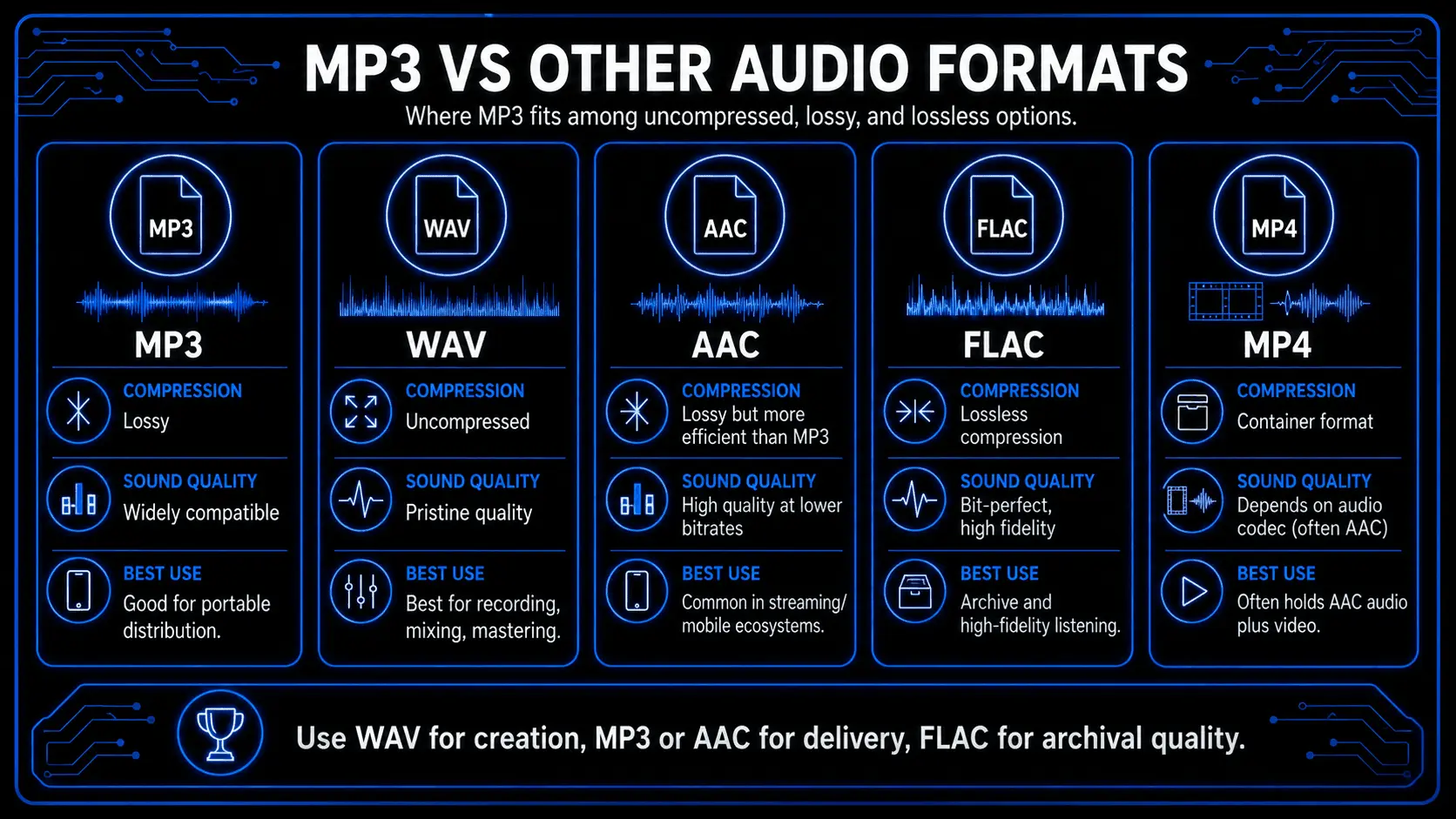
To understand where this legacy format stands today, it helps to compare its technical specifications against other modern audio formats.
MP3 vs WAV
WAV is an uncompressed audio container format that typically holds raw Pulse Code Modulation data. It preserves every single bit of the original recorded waveform, making it the industry standard for studio tracking, mixing, and mastering.
The trade-off is that a typical 16-bit, 44.1 kHz WAV file requires roughly 10.1 megabytes of space per minute of audio. A high-quality compressed alternative cuts that storage requirement down by nearly 90%, making it far more practical for consumer delivery, even though it cannot match the pristine technical fidelity of a WAV file.
MP3 vs MP4
These two formats serve completely different purposes. While the audio layer is a dedicated audio coding standard, MP4 is a multimedia container format based on the ISO base media file format specification.
An MP4 container can hold video tracks, subtitles, images, and multiple audio channels encoded in various formats like AAC or ALAC. You cannot simply change a file extension between the two; they use entirely different internal formatting architectures.
MP3 vs AAC, Ogg Vorbis, and FLAC
- Advanced Audio Coding (AAC): Designed to replace the aging MP3 standard, AAC uses more advanced filter banks and superior quantization coding rules. It delivers noticeably better clarity and high-frequency preservation than its predecessor at identical bitrates, which is why it is the default standard for Apple platforms and modern YouTube streaming.
- Ogg Vorbis: An open-source, patent-free lossy format that uses a variable bitrate model to handle complex acoustic transients efficiently. It is widely used across the gaming industry and serves as a core delivery format for platforms like Spotify.
- Free Lossless Audio Codec (FLAC): Unlike lossy options, FLAC uses mathematical compression algorithms that preserve every bit of the original file data. It functions like a ZIP archive designed specifically for audio, cutting file sizes roughly in half without sacrificing a single ounce of studio fidelity.
Technical Feature Comparison Sheet
| Architectural Evaluation Metric | MP3 Format | WAV Format | AAC Format | FLAC Format |
|---|---|---|---|---|
| Compression Typology | Lossy | None | Lossy | Lossless |
| Relative File Size | 10% – 15% | 100% Baseline | 10% – 12% | 50% – 60% |
| Universal Device Compatibility | Total | Universal | Wide Support | Moderate |
| High-Frequency Preservation | Limited Roll-off | Complete | Excellent | Pristine |
| Metadata Tagging Systems | ID3v1 & ID3v2 | Non-standard | Native MP4 Tags | Vorbis Comments |
| Looping Architecture | Pad Limitations | Gapless | Seamless | Seamless |
Practical Applications and Workflow Integration
Using compressed assets in professional workflows requires specific tools and safe conversion protocols.
How to Convert Files Legally and Safely
Converting uncompressed audio down to a compressed delivery format is a simple, straightforward process. You do not need expensive, proprietary software to handle it safely:
- Using a Digital Audio Workstation: Most modern production programs like Audacity, Reaper, or Logic Pro feature native export pipelines. When your project is ready, select the export menu, choose the format option, and set your target bitrate parameters.
- Using Command-Line Tools (FFmpeg): For high-volume processing or automated server tasks, the open-source FFmpeg utility offers unmatched precision. Running the command ffmpeg -i input.wav -b:a 320k output.mp3 converts a master file down to a clean, high-quality asset using optimal encoding pipelines.
- Using Dedicated Media Utilities: Desktop tools or specialized audio management applications let you safely batch-convert entire folders of audio files without dealing with ad-supported web conversion sites.
Can You Record Directly Into the Format?
Yes, many field recorders, broadcast systems, and voice software tools let you record straight to a compressed file to save storage space during long sessions. However, in a professional music studio environment, recording direct to a lossy format is highly discouraged.
Because lossy compression discards subtle details and softens transients right at the start, any downstream processing you apply during mixing—like time-stretching, pitch correction, heavy compression, or saturation—will amplify those hidden encoding flaws. This leads to a harsh, brittle final mix. Always record your primary tracking sessions in an uncompressed format like WAV, and save the compression step for your final distribution export.
Distribution Specs for Major Platforms
When you are ready to upload your finished content to the web, you need to match your assets to the technical requirements of each platform:
- SoundCloud: The platform accepts a wide variety of formats, but it transcodes your uploads down to its own internal streaming formats for playback. To ensure your tracks sound as clean as possible after this conversion, upload high-resolution, uncompressed WAV files rather than pre-compressed assets.
- Spotify: This service distributes music using Ogg Vorbis or AAC streams. Artists upload their music through digital aggregators using uncompressed 24-bit WAV masters, allowing Spotify's servers to handle the compression internally for different device networks.
- Apple Podcasts / Major Directories: For podcasting, sub-128 kbps files are standard and widely accepted across Apple Podcasts, Spotify, and Amazon Music networks. Keeping your files compact ensures smooth RSS distribution and quick downloads for mobile listeners.
Frequently Asked Questions
Can I record music in MP3 format?
You can configure field recorders or digital workstations to record directly to it, but you should avoid doing so for serious music production. The immediate data loss reduces your editing flexibility, messes with phase relationships, and can cause noticeable distortion artifacts when you try to apply creative mixing tools down the line.
When was the MP3 format invented?
The core research started in 1987 under the European EUREKA EU147 initiative. The international standard was officially published in 1993, and the definitive .mp3 extension name was locked in via an internal Fraunhofer institute vote on July 14, 1995.
Why is the MP3 format so widely used?
It became the dominant global standard because it struck a perfect balance between file size and acceptable sound quality right as the consumer internet started to explode. This efficiency made it incredibly easy to share files over early networks and store thousands of songs on early portable media players.
Can I upload MP3 files to platforms like SoundCloud and Spotify?
You can upload them directly to SoundCloud, but the site will transcode them again for streaming, which can lower your overall sound quality. For distribution on Spotify, Apple Music, and Tidal, you must submit uncompressed WAV files through a digital aggregator so the platforms can build high-quality streaming streams from a pristine master asset.
Are there different MP3 formats?
Yes, the specification includes several technical variations. The standard is split between MPEG-1 Audio Layer III (which handles standard sample rates like 44.1 kHz and 48 kHz) and MPEG-2 Audio Layer III (which extends to lower sample rates for speech clarity). There is also a non-standard extension called MPEG-2.5 that scales down even lower for specialized communication tasks.
When did the first MP3 player come out?
The world's first commercial portable media player was the SaeHan MPMan F10, released in March 1998. It featured 32 megabytes of integrated solid-state storage and ran on a basic internal dock interface.
Who still needs an MP3 player these days?
Dedicated digital audio players remain essential tools for audiophiles, field recording technicians, and studio engineers who want high-end digital-to-analog conversion and clean, isolated amplification without the background noise, notification interruptions, or battery drain of a consumer smartphone.