

Key Takeaways
- Wavetable synthesis generates sound by moving between a sequence of single-cycle waveforms, allowing the oscillator’s harmonic character to change over time.
- Modulating the wavetable position with LFOs, envelopes, macros, and random sources is the main technique for creating evolving, rhythmic, or expressive sounds.
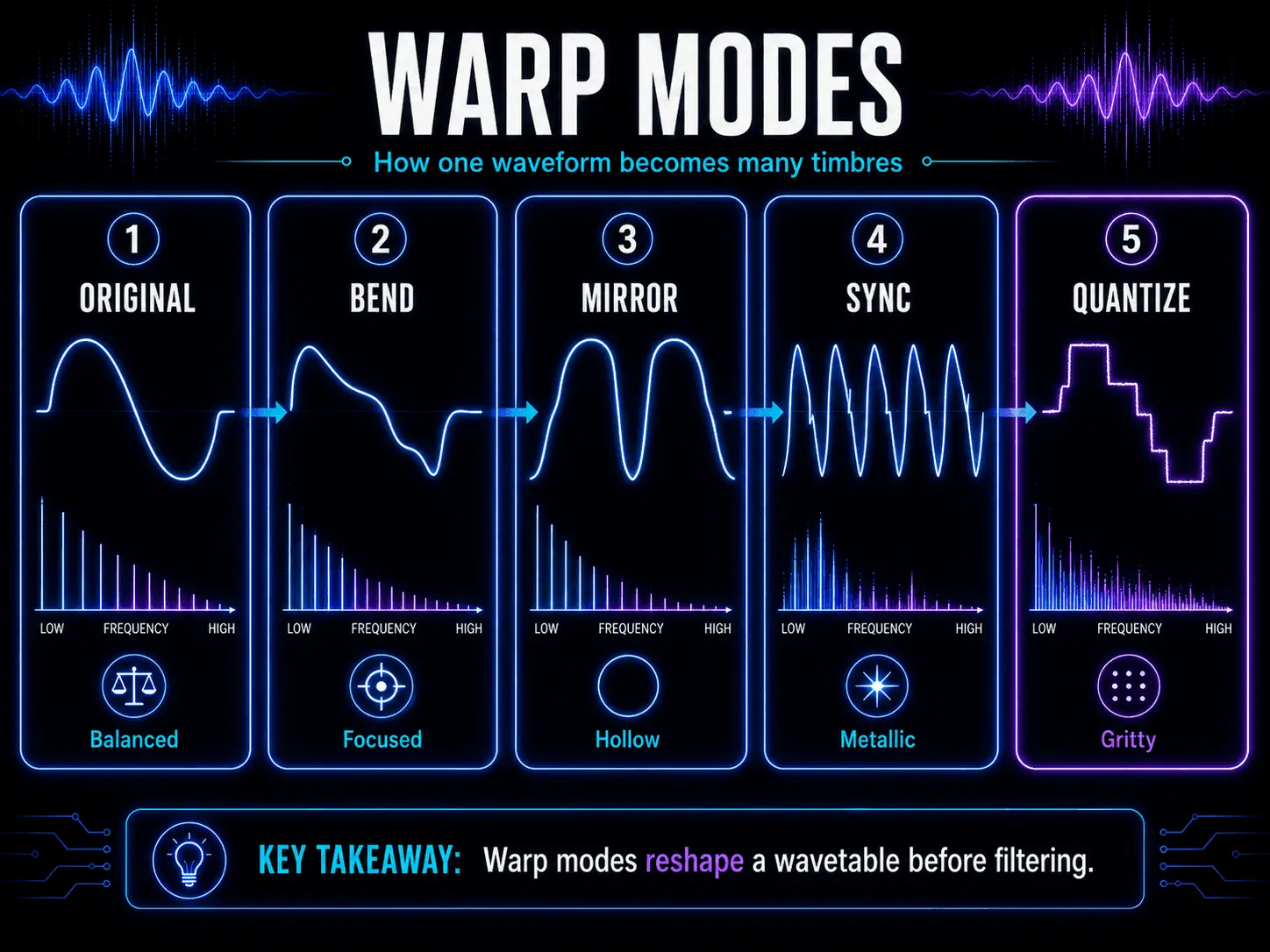
- Warp modes such as sync, phase distortion, bending, mirroring, and quantization reshape waveforms before filtering, greatly expanding the available sound palette.
- Modern wavetable synthesizers support advanced techniques such as cross-oscillator FM, custom audio imports, internal resampling, unison layering, and complex modulation routing.
- Wavetable synthesis is versatile enough for aggressive basses, cutting leads, cinematic pads, lo-fi textures, game sound effects, and expressive MPE performances.
Foundations of Audio Synthesis Methods
To understand wavetable synthesis completely, you must first comprehend its place within the wider landscape of digital audio and synthesis methods. Since the dawn of electronic music production, sound designers have sought techniques to generate, shape, and manipulate acoustic frequencies.
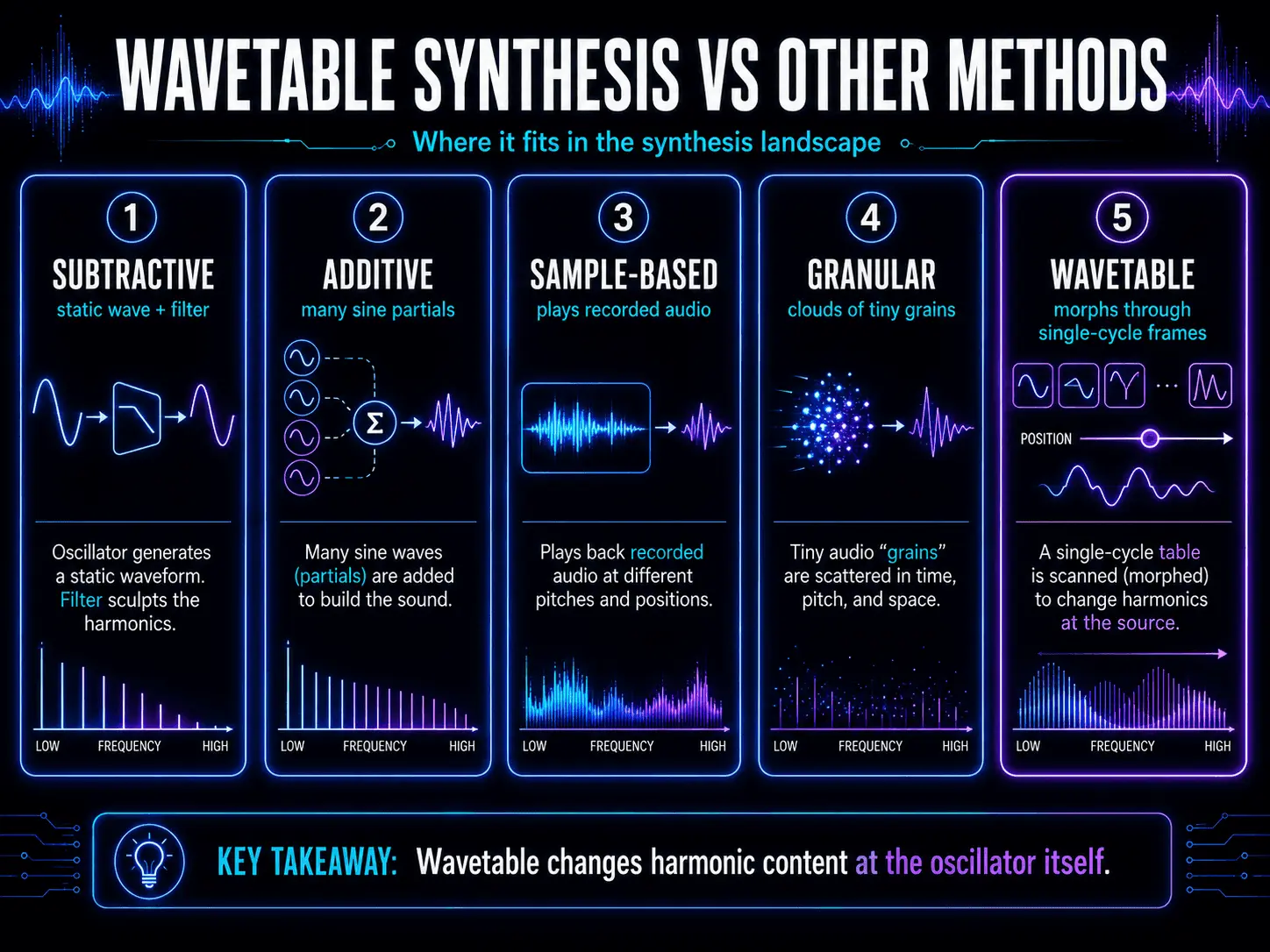
Subtractive Synthesis vs. Wavetable Architecture
Subtractive synthesis is the most common historic framework. It operates on a simple principle: start with a harmonically rich waveform generated by an analog or digital oscillator, such as a sawtooth, square, or triangle wave, and subtract harmonic content using a resonant low-pass, high-pass, or band-pass filter. The fundamental limitation of traditional subtractive synthesis lies in its source material. The oscillator waveform remains completely static over time. Any movement, variation, or evolution in sound texture must occur downstream via filters, amplifiers, or external effects processors.
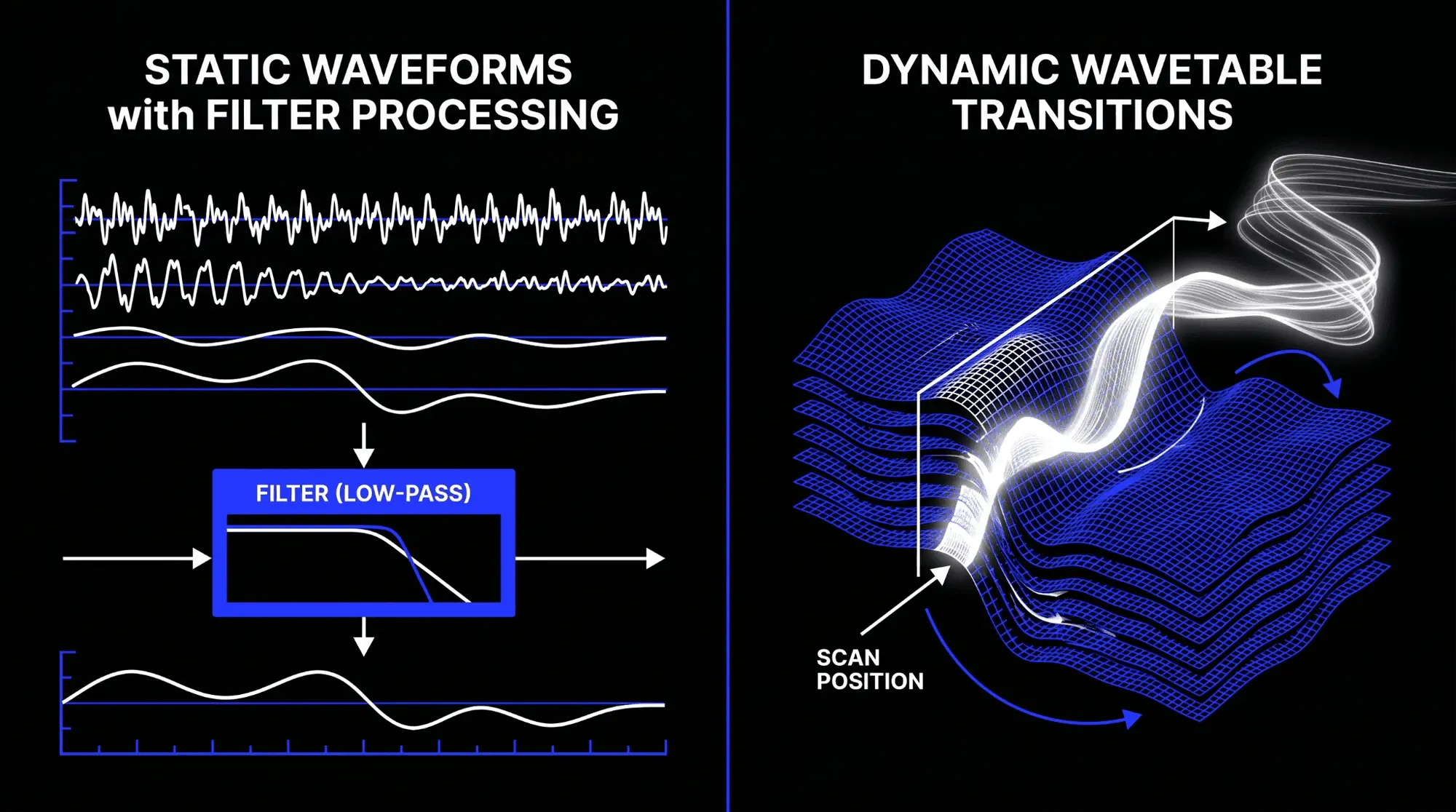
Wavetable synthesis completely bypasses this limitation at the source level. Instead of a static geometric wave, the wavetable oscillator reads a series of distinct waveforms stored sequentially. By shifting the playback point through this collection of waveforms, the source sound itself changes its harmonic profile before the signal ever reaches a filter or an effects matrix.
Additive Synthesis Mechanisms
Additive synthesis builds complex signals from the ground up by combining dozens, hundreds, or thousands of individual sine waves, each with its own independent frequency and amplitude envelope. While theoretically capable of replicating any sound perfectly, additive synthesis requires massive computational overhead and is notoriously tedious to program manually. Wavetable synthesis functions as a highly efficient bridge. It captures complex harmonic profiles that resemble the output of additive synthesis systems but stores them as pre-calculated single-cycle digital waveforms, minimizing central processing unit consumption while preserving immense sonic complexity.
Granular and Sample-Based Synthesis Comparison
Sample-based synthesis relies on playing back recorded audio files across a keyboard tracking matrix. It excels at reproducing realistic acoustic instruments but offers limited real-time waveform manipulation. If you stretch a sample too far from its original pitch, digital artifacts, time-stretching errors, and unnatural tonal shifts occur.
Granular synthesis splits an audio file into microscopic snippets called grains, playing them back in high-density clouds with randomized positions, pitches, and durations. This creates beautiful, unearthly textures, but lacks the precise harmonic tracking and clean periodic stability required for foundational musical elements like sub-bass patches or sharp lead sounds.
Wavetable synthesis solves these issues by constraining its data to perfectly periodic cycles. It does not play back raw audio samples across long time scales. Instead, it reads isolated single cycles of digital audio data back-to-end, guaranteeing perfect pitch tracking across the entire keyboard spectrum without temporal degradation.
Modular Synthesis Environments
In a modular synthesis ecosystem, individual voltage-controlled or digitally controlled modules are connected manually via patch cables. This philosophy prioritizes open-ended routing and complex cross-modulation. Modern wavetable synthesis software adapts this approach by integrating extensive internal modulation matrices. This lets producers patch low-frequency oscillators, envelopes, and random generators to waveform parameters, mirroring the unpredictable, evolving nature of large-scale modular synthesis setups within a stable digital environment.
Architecture of the Wavetable Oscillator
The mechanical core of this synthesis type relies on how digital systems read, organize, and interpret audio data.
The Spatial Matrix Structure
A wavetable is a three-dimensional data array. Imagine a physical booklet where every single page contains a visual drawing of a single cycle of an audio waveform. The vertical axis of each page represents amplitude values, the horizontal axis represents time or phase, and the depth axis represents the page number itself, which is technically referred to as the wavetable position or wavetable index.
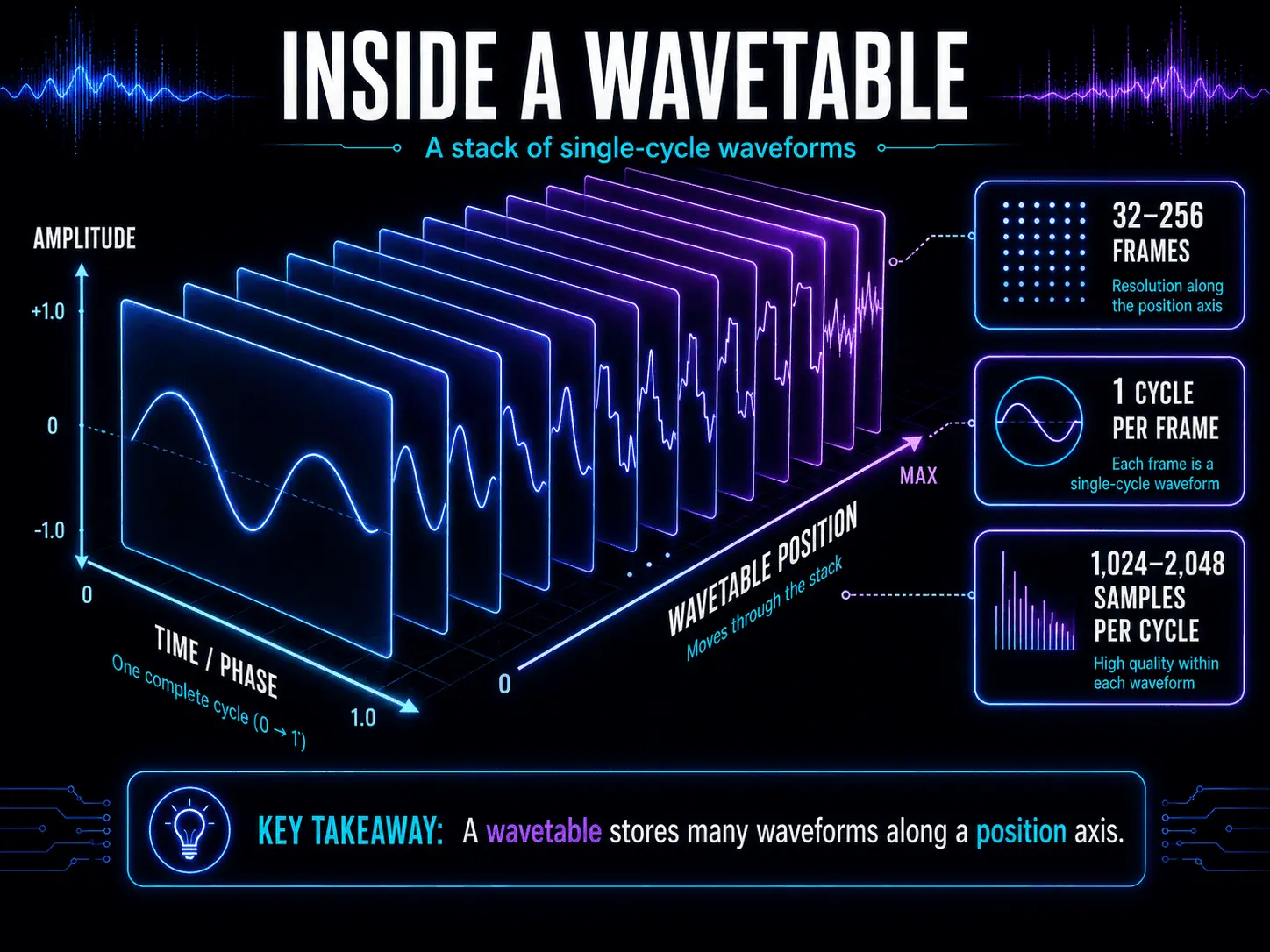
A standard modern wavetable file generally contains between 32 and 256 individual frames or slots. Each individual frame contains exactly one cycle of a specific waveform. These cycles are digitized as a specific sequence of sample points, often 1024 or 2048 samples per single cycle.
Digital Phase Accumulation and Index Tracking
When you press a key on a MIDI controller, the wavetable engine initializes a digital phase accumulator. The accumulator moves through the sample points of the currently selected waveform frame at a speed dictated by the desired musical pitch. If you play an A note at 440 Hertz, the phase accumulator cycles through all 2048 sample points of that specific frame exactly 440 times per second.
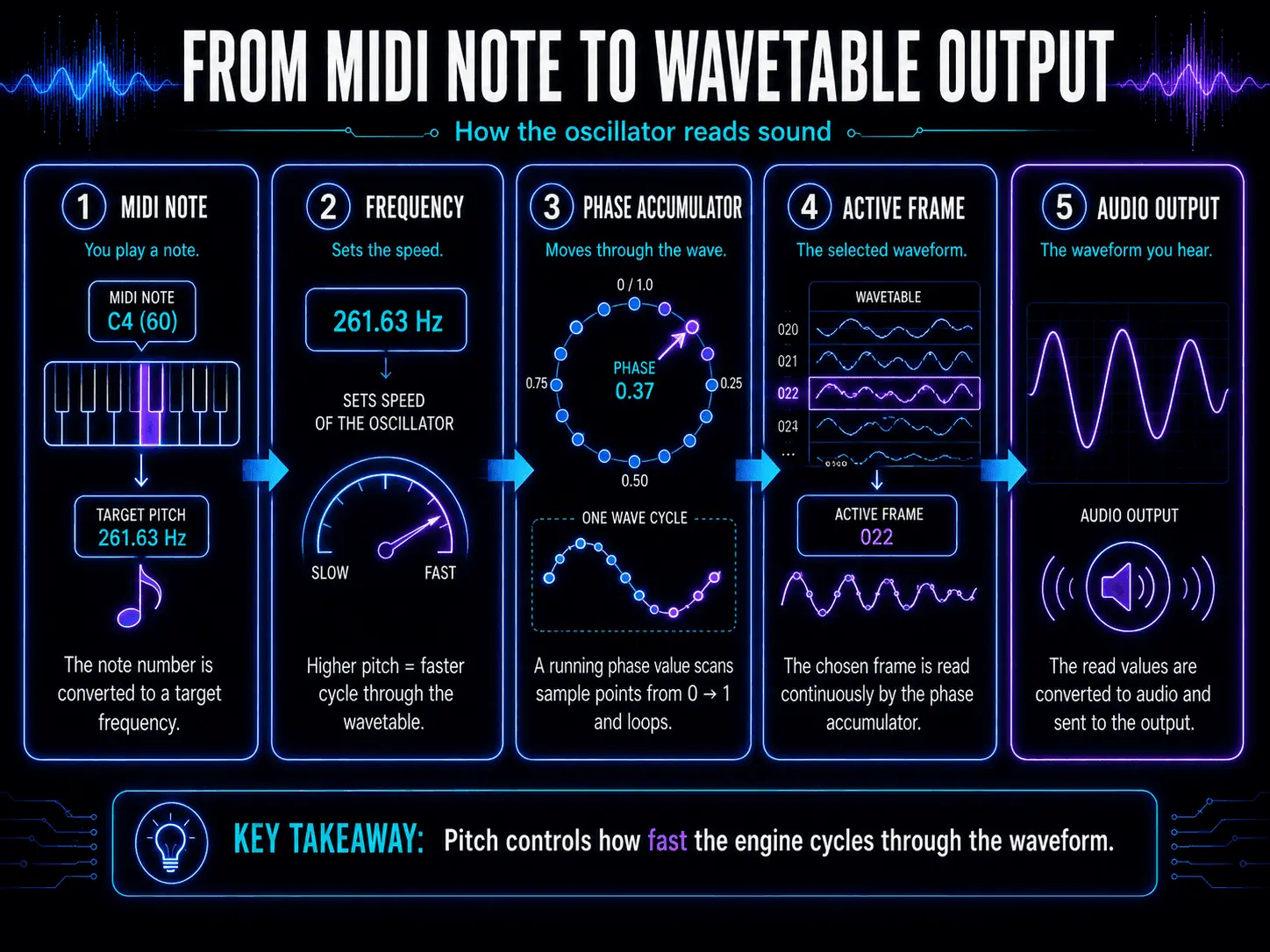
The true magic occurs when you adjust the wavetable index position. As you change this value, the synthesizer engine shifts its reading focus from one frame to another. If you transition from frame 10, which might contain a smooth sine wave, to frame 50, which might contain a bright, harmonically harsh buzzsaw wave, the overall harmonic output transitions from dark to bright.
Waveform Interpolation Algorithms
If a synthesizer engine could only jump directly from one distinct frame to the next, shifting positions would cause audible zipper noise, clicking, and digital audio artifacts. To prevent this, advanced wavetable oscillators utilize sophisticated real-time interpolation algorithms.
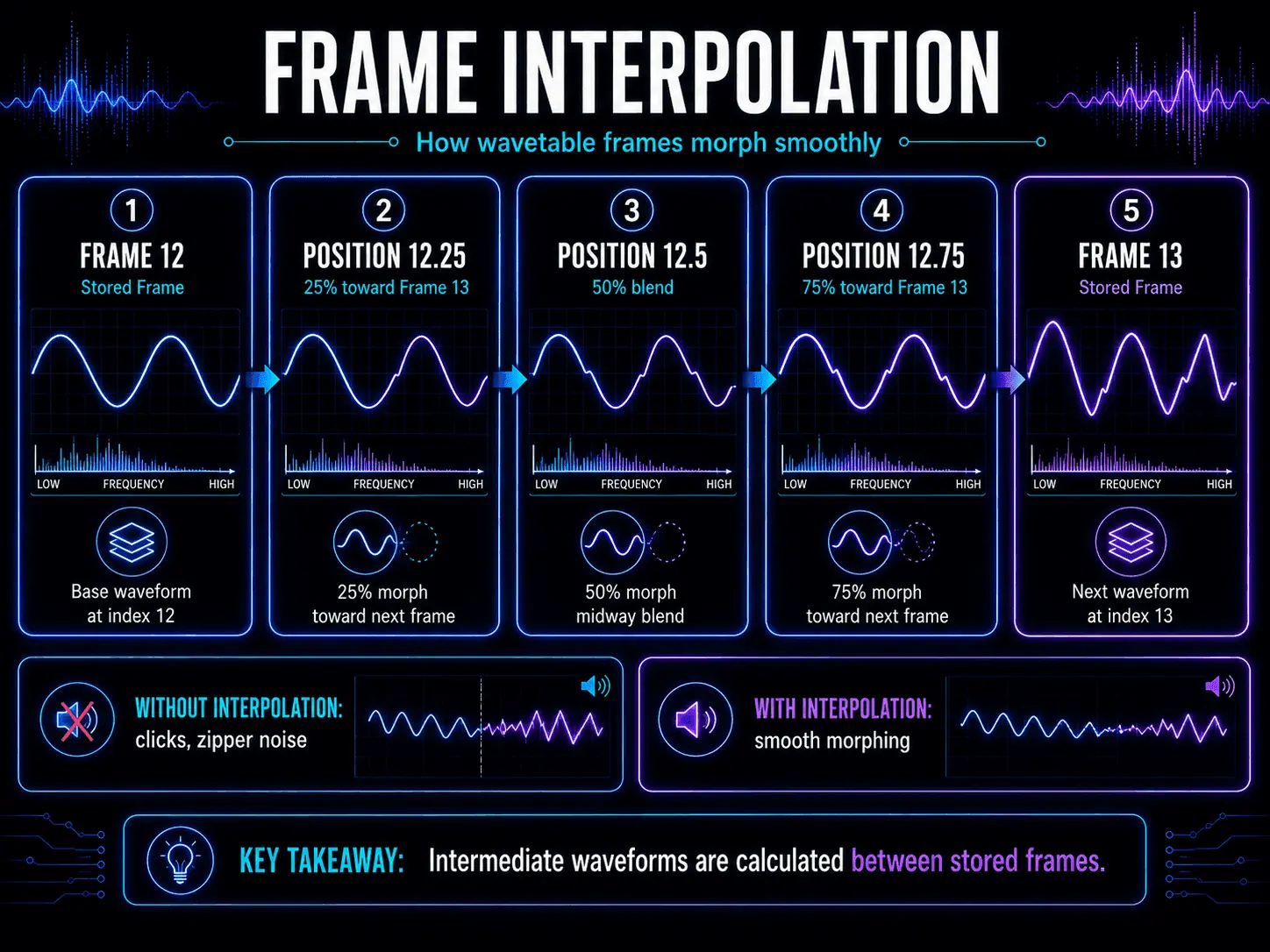
When the wavetable index rests between two integer frames, for example, at position 12.5, the engine reads both frame 12 and frame 13 simultaneously. It then applies linear, cubic, or hermite spline interpolation to calculate intermediate amplitude values for every single sample point. This continuous mathematical blending ensures that the waveform shapes morph smoothly, allowing for fluid sound design transitions devoid of unwanted digital interruptions.
Historical Genesis and Technical Transformation
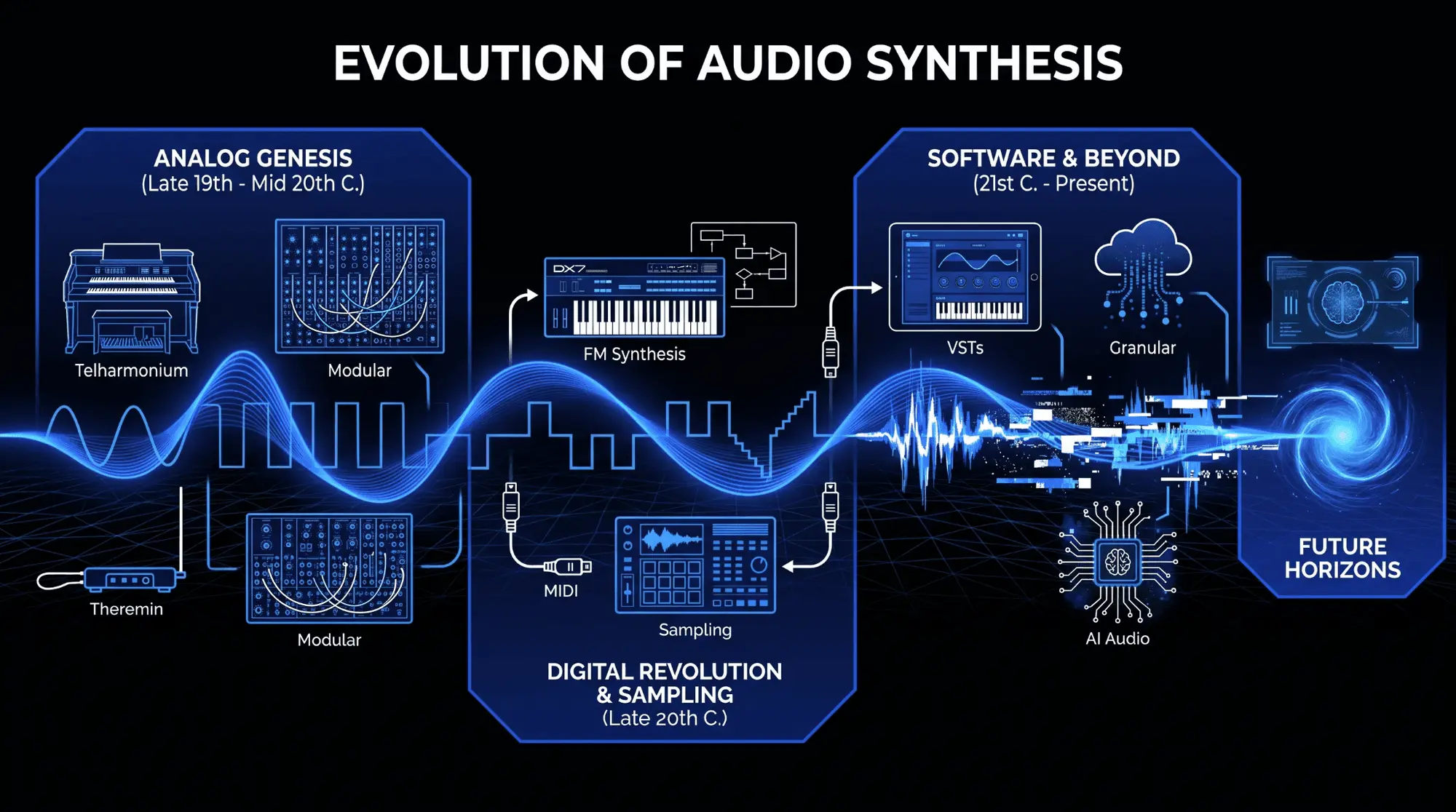
The journey of wavetable synthesis from a highly experimental digital luxury to a dominant force in modern electronic music production covers over four decades of engineering breakthroughs.
The Innovation of Wolfgang Palm
In the late 1970s, a German engineer named Wolfgang Palm realized that analog oscillators were fundamentally limited by component drift, temperature sensitivity, and basic geometric wave shapes. He recognized that digital microchip memory could store complex configurations of numbers representing precise amplitude values. This led to the creation of Palm Products GmbH, commonly known as PPG.
Palm developed the PPG Wave computer systems and the PPG Wave 2 series synthesizers. Because digital memory was incredibly expensive at the time, these early systems used strict technical constraints. Waveforms were stored at low bit depths, typically 8-bit resolution, and wavetables were restricted to a small number of frames, often containing just 64 cycles per table. Because the microprocessors lacked the computing power to perform complex real-time interpolation, these early instruments exhibited distinct stepping artifacts and digital aliasing, which added a cold, gritty, and metallic character to the audio. This digital aesthetic defined the sound of 1980s new wave, synth-pop, and industrial music.
The Hardware Expansion Era
In the 1990s, another German manufacturer, Waldorf Music, inherited Palm's synthesis concepts and integrated them into hardware instruments like the Waldorf Microwave and the massive Waldorf Wave synthesizer. These units improved digital-to-analog converter technology, offered higher bit resolutions, and added advanced analog resonant filters downstream from the digital oscillators. This marriage of digital wavetable clarity with warm analog filtering created highly sought-after sonic textures that were impossible to replicate using purely analog synthesizers.
As the industry transitioned into the early 2000s, companies like Access Music introduced virtual analog hardware synthesizers such as the Access Virus TI series. These synthesizers integrated extensive wavetable arrays alongside traditional virtual analog oscillators, solidifying wavetable modulation as an essential tool for creating complex sound design textures in progressive trance, drum and bass, and cinematic scoring styles.
The Software Revolution
The mid-2000s marked a major shift from physical hardware units to native software processing inside Digital Audio Workstations. Native Instruments released Massive, a software synthesizer that helped expand the use of wavetable synthesis in electronic music production. Massive utilized highly optimized digital audio engines that allowed users to modulate wavetable positions across complex step sequencers and macro setups with zero stability concerns. This instrument became the sonic foundation for the global explosion of dubstep, electro house, and modern bass music.
A few years later, Xfer Records released Serum, which introduced a high-resolution digital audio engine running at high internal oversampling rates. Serum eliminated unwanted aliasing artifacts almost entirely, providing a visual, real-time 3D interface that allowed producers to see exactly how waveforms morphed. This visual workflow democratized advanced sound design, turning wavetable synthesis into the industry standard across all modern commercial music production.
Essential Wavetable Manipulation and Warp Modes
To get the most out of modern wavetable synthesis software, a sound designer must master the secondary processes applied directly to the oscillator before filtering or mixing occurs. These processes are broadly categorized as warp modes or waveform manipulation tools.
Phase Distortion and Pulse-Width Modulation Simulation
Traditional pulse-width modulation varies the duty cycle of a standard square wave, altering its harmonic distribution to create a chorusing effect. Because wavetables can contain any irregular shape, standard pulse-width modulation cannot be applied uniformly.
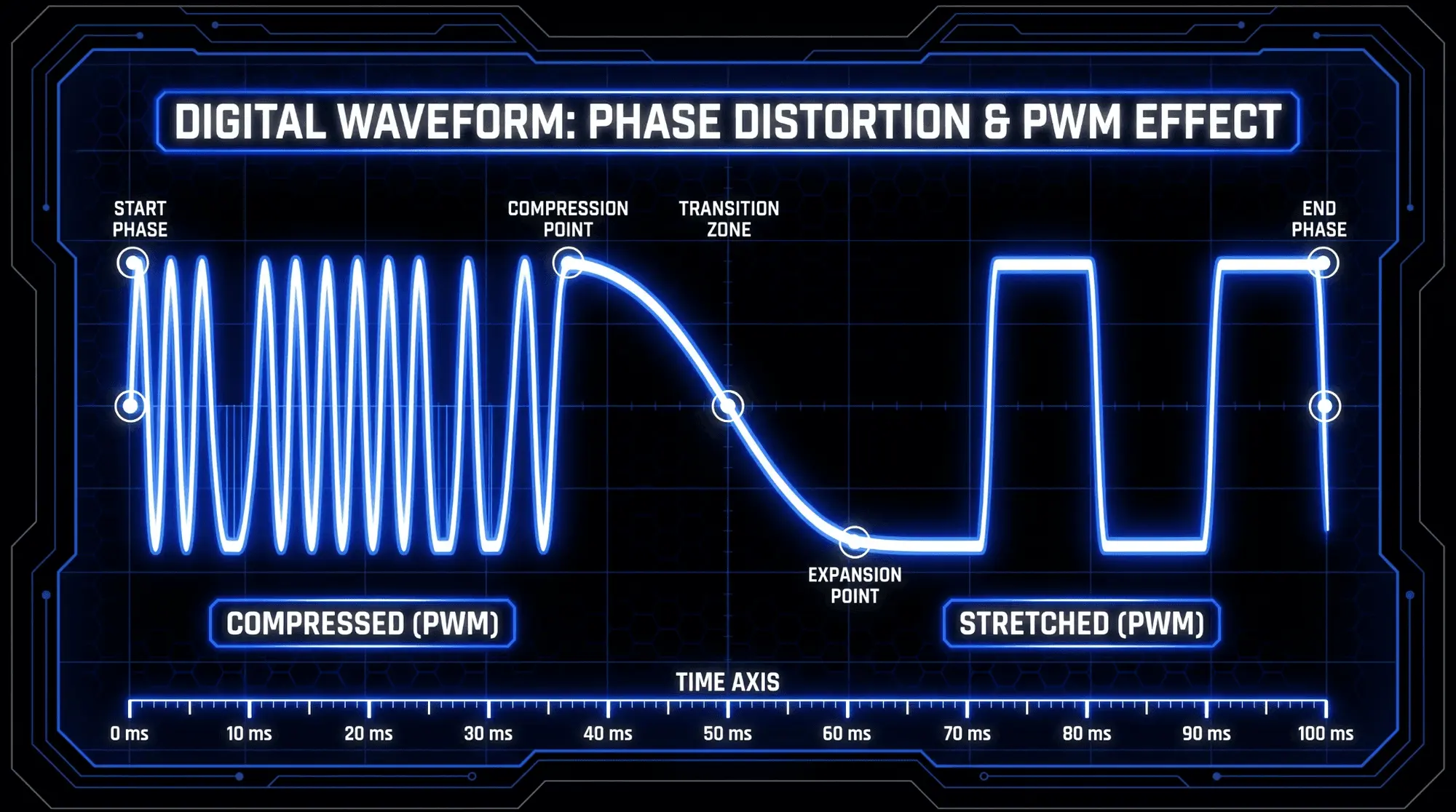
Synthesizers solve this using phase distortion warp algorithms. The warp engine alters the speed at which the digital phase accumulator travels across the waveform cycle. In a typical pulse-width modulation simulation warp mode, the engine compresses the first half of the wavetable frame into a smaller percentage of the total cycle time and stretches the second half to fill the remaining space. This introduces a classic asymmetrical thinning or thickening effect to any custom wavetable shape, injecting movement into the sound texture.
Oscillator Sync Emulation
In traditional dual-oscillator analog setups, hard sync forces a slave oscillator to reset its phase cycle every time a master oscillator completes its period. This creates aggressive, screaming mid-range harmonics when the pitch of the slave oscillator is modulated.
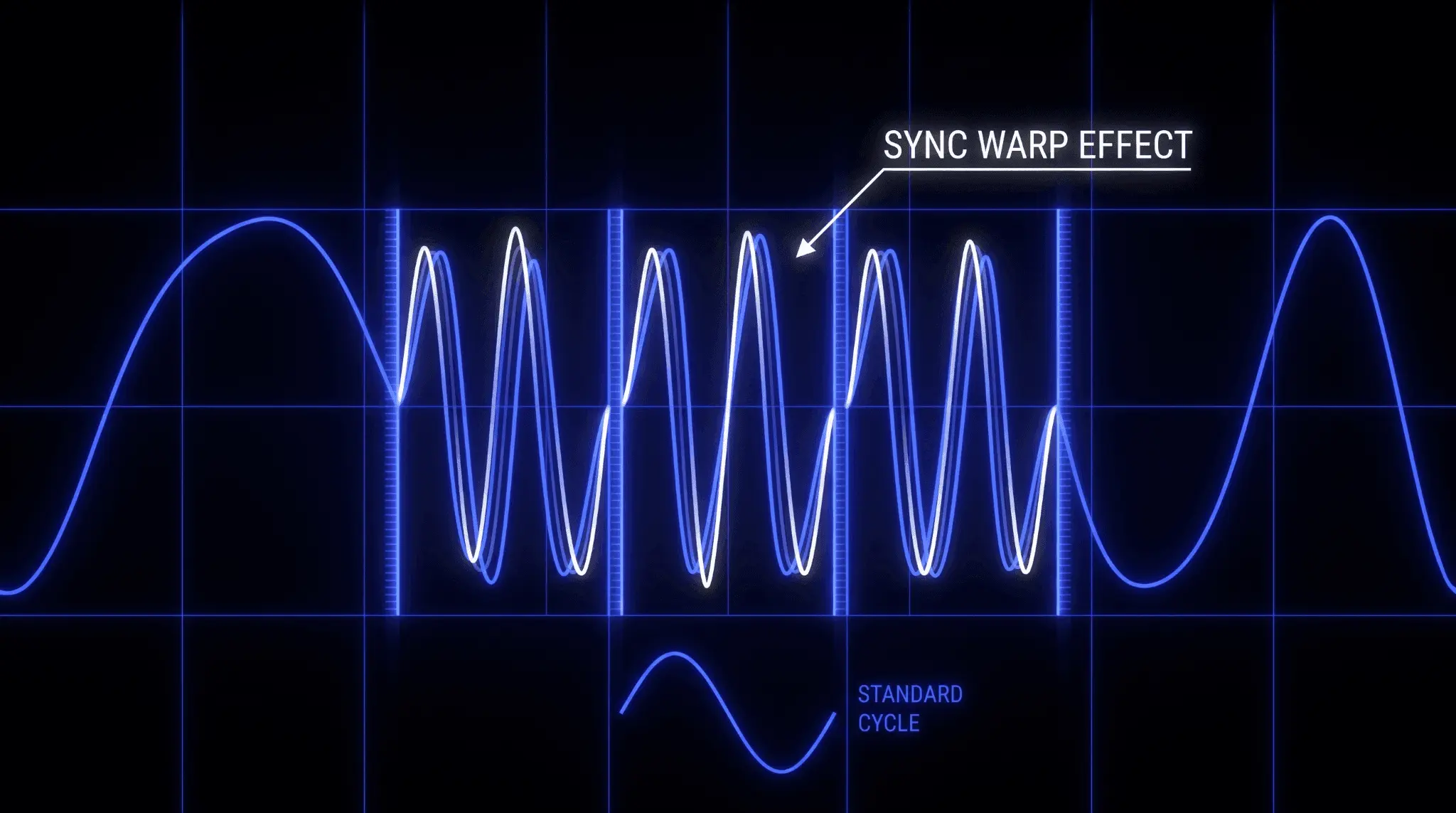
Wavetable software emulates this behavior within a single oscillator frame via sync warping. The warp engine compresses the entire wavetable cycle into a fraction of its normal duration and repeats the cycle multiple times within the boundaries of a single fundamental period. As you turn up the sync warp control, the waveform repeats more frequently within that period, generating a sharp, metallic sweep that cuts through dense musical mixes.
Advanced Geometrical Warping Modes
Modern synthesis engines offer a wide array of specialized geometric manipulation algorithms:
- Asymmetric Bend: This warps the phase timeline by pulling or pushing the center sample points toward the beginning or end of the cycle, emphasizing specific harmonic overtones while leaving the fundamental pitch intact.
- Mirror Warp: This takes the selected waveform frame, splits it down the exact middle axis, and mirrors the left side onto the right side, instantly eliminating all even-numbered harmonics and creating hollow, woodwind-like sound textures.
- Quantize / Bitcrush Warp: This reduces the digital amplitude resolution or the phase sample rate of the active wavetable frame in real-time. It introduces intentional retro digital grit, aliasing, and lo-fi crunch directly to the oscillator output.
Advanced Wavetable Modulation Strategies
A static wavetable patch is little more than an exotic digital organ sound. To unlock true sonic power, you must construct an intricate network of audio modulation systems.
Precision Modulation Routings
The heart of any modern software synthesizer is its internal modulation matrix. This digital patching sheet allows you to route any modulation source to any parameter destination with complete control over modulation depth, polarity, and response curves.
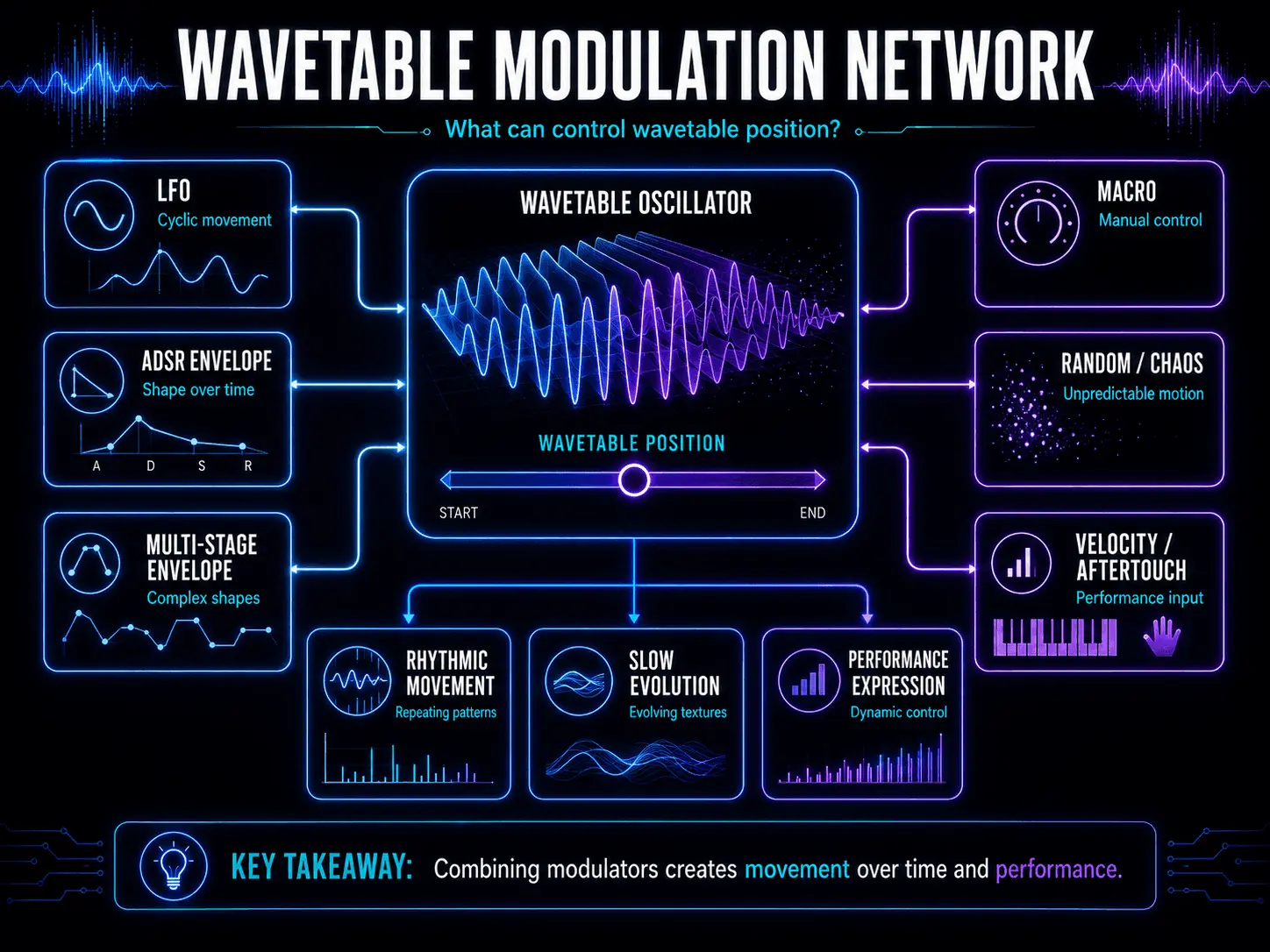
When setting up wavetable synthesis techniques, the most critical destination is the wavetable position index. By mapping multiple sources to this single parameter, you create evolving sound textures that never repeat exactly the same way twice.
Multi-Stage Envelopes and Evolving Timeframes
Standard Attack, Decay, Sustain, and Release envelopes are perfect for basic instrument articulation, but advanced wavetable sound design requires multi-stage envelope generators. These advanced envelopes allow you to plot dozens of individual nodes, custom geometric curves, and internal loop regions.
When you map a looping multi-stage envelope to a wavetable index, the sound can travel forward through the waveform frames during the initial key strike, cycle back and forth between frames 30 and 45 while the key is held down, and then rapidly cascade to the final frame upon key release. This capability is vital for generating cinematic soundscapes and evolving pad sounds that morph over extended periods.
Low-Frequency Oscillators and Complex Modulations
Low-frequency oscillators provide cyclical rhythmic movement. Modern wavetable systems allow you to draw completely custom low-frequency oscillator shapes rather than forcing you to use basic sine or triangle shapes. You can design an LFO shape that features sharp percussive spikes, step-sequenced patterns, or smooth logarithmic slopes.
To add another layer of complexity, use a secondary low-frequency oscillator to modulate the speed or overall depth of the primary low-frequency oscillator. This technique generates evolving polyrhythms and unpredictable organic fluctuations, preventing your synthesizer patches from sounding sterile or mechanically repetitive.
Macro Controls and Live Performance Integration
Macro controls are master knobs positioned on the interface of a synthesizer plugin that act as control aggregators. You can map a single macro knob to change the wavetable position of Oscillator 1, increase the sync warp depth of Oscillator 2, lower the downstream filter cutoff frequency, and boost the decay time of a reverb effect simultaneously.
During live performance or DAW automation passes, tweaking this single macro knob creates dramatic, highly coordinated sonic shifts. This provides immediate, expressive control without requiring you to record complex automation lines for dozens of individual parameters simultaneously.
Randomization and Chaos Systems
To break away from digital rigidity, advanced wavetable synthesizers incorporate chaos generators or sample-and-hold randomization engines. These sources inject subtle, unpredictable values on every single note event. By routing a chaos generator with a very low modulation depth to parameters like wavetable position, phase initialization, or oscillator detune, you mimic the organic drift and unpredictable behavior of physical analog hardware or acoustic instruments.
Comprehensive Patch-Building Tutorials
To bridge theory with practical application, here are three step-by-step sound design blueprints for creating staple tones from scratch using modern wavetable synthesis techniques.
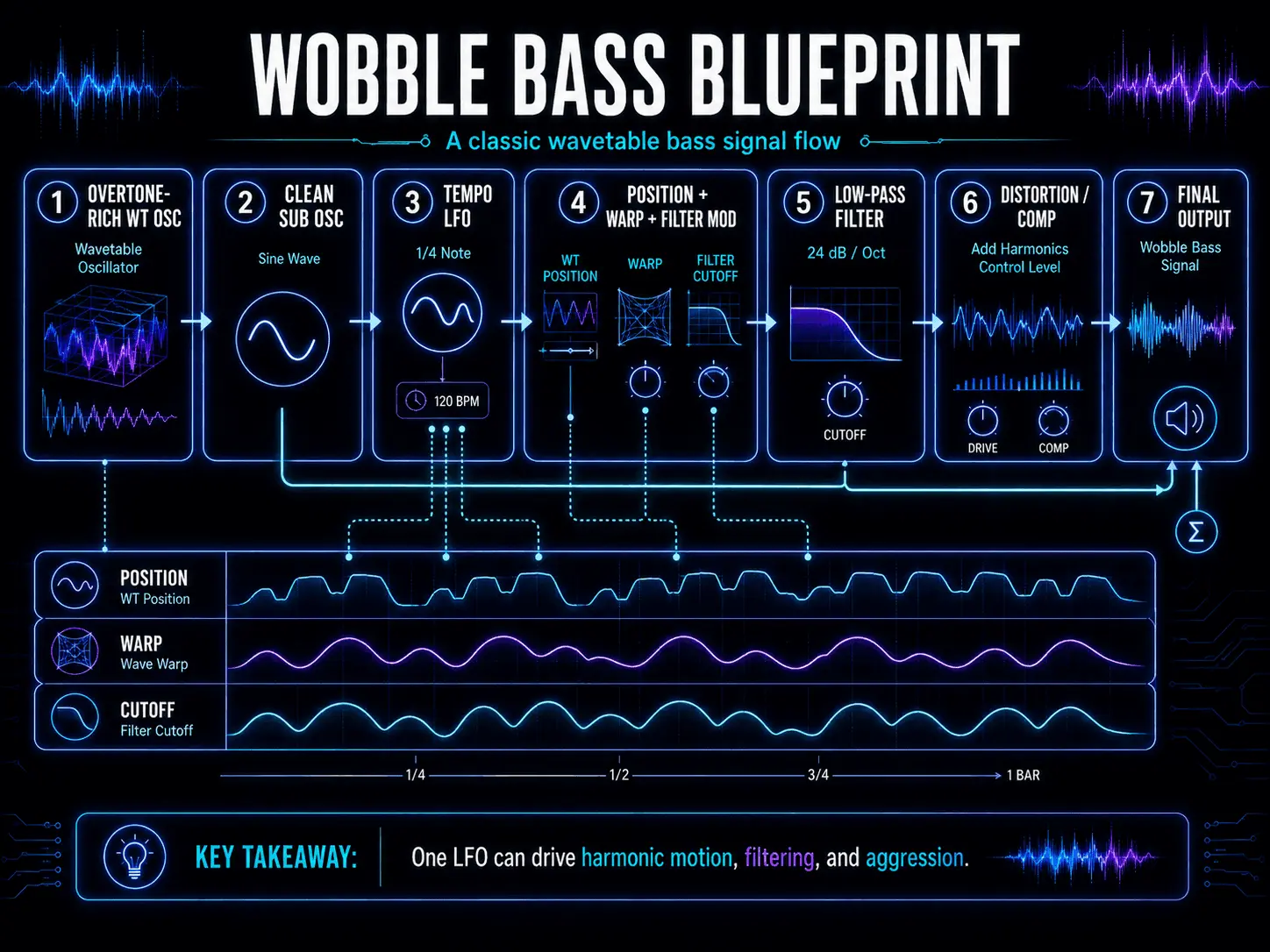
Step-by-Step Blueprint: The Dubstep Wobbly Bass
Objective
To create a high-impact, aggressive bass patch featuring a rhythmic, mid-range vocal texture backed by a rock-solid, undistorted sub-bass foundation.
Step 1: Oscillator Configuration
- Activate Oscillator 1 and select an aggressive digital wavetable rich in high-frequency overtones. Look for tables containing harsh digital processing profiles or vowel-like harmonic structures.
- Set the octave of Oscillator 1 to -1 or -2 depending on your starting note preference.
- Activate Oscillator 2, select a clean sine wave or a simple triangle wave, and drop its pitch to exactly -2 octaves. Route this oscillator directly to your master output, bypassing the main filter to ensure your sub-bass remains completely solid and free from phase issues.
Step 2: Warp and Position Setup
- Set the initial wavetable position index of Oscillator 1 to its lowest point.
- Select a warp mode such as Sync or Asymmetric Bend on Oscillator 1. Leave the initial warp amount knob at zero.
Step 3: Rhythmic Modulation Assignment
- Open your primary low-frequency oscillator (LFO 1) and set its rate to sync with your DAW project tempo. Choose a starting rate of 1/4 or 1/8 notes.
- Draw a sharp, downward exponential curve or a percussive triangle shape into the LFO 1 waveform editor.
- Assign LFO 1 to modulate the wavetable position index of Oscillator 1. Adjust the modulation depth slider so that when the LFO peaks, the index travels across at least 60% of the available waveform frames.
- Assign LFO 1 to modulate the warp mode parameter (Sync or Bend) with a moderate positive depth. This forces the sound to scream and distort harmonically precisely at the peak of the rhythmic wobble.
Step 4: Downstream Filtering and Processing
- Route Oscillator 1 through a steep low-pass filter, such as a 24-decibel-per-octave transistor ladder filter emulation.
- Assign LFO 1 to modulate the filter cutoff frequency. Set the baseline cutoff low, around 150 Hertz, and let the LFO pull the filter wide open up to around 3000 Hertz. Turn up the filter resonance slightly to emphasize the vocal qualities of the sweeping wavetable.
- Navigate to your effects section. Add a multi-band distortion or wavefolder effect to boost the mid-range harmonics, followed by a fast-acting compressor to glue the sub-bass and modulated mid-bass elements together.
Step-by-Step Blueprint: The Impactful Solo Lead
Objective
To design a sharp, soaring synthesizer lead line that cuts through dense arrangements without causing ear fatigue.
Step 1: Dual-Oscillator Matrix Setup
- Initialize Oscillator 1 with a bright, complex sawtooth-derivative wavetable. Set its pitch tracking to standard and its octave to 0.
- Initialize Oscillator 2 with a different but complementary wavetable containing square-wave properties or metallic characteristics. Set its octave to +1 to add immediate harmonic height to the patch.
- Slightly detune the two oscillators against each other. Change the fine-tuning of Oscillator 1 to -7 cents and Oscillator 2 to +7 cents. This micro-detuning creates a wide stereo image and a rich chorusing texture.
Step 2: Envelope Calibration
- Select your primary amplitude envelope (Envelope 1). Set the attack time to instantly fast (0 to 2 milliseconds) to guarantee an immediate percussive transient response when a MIDI note triggers.
- Set the decay time to roughly 250 milliseconds, drop the sustain level down to 75%, and set the release time to 150 milliseconds to ensure smooth note transitions.
- Select a secondary envelope (Envelope 2) to handle specialized modulation duties. Set its attack time to 50 milliseconds, its decay to 400 milliseconds, and its sustain level to 0%.
Step 3: Waveform Manipulation Routing
- Map Envelope 2 to modulate the wavetable position index of both Oscillator 1 and Oscillator 2. Set the modulation depth to a positive value. Now, every time you strike a note, the harmonic profile will rapidly morph bright before settling back down to a more focused sustain tone.
- Enable a subtle pulse-width modulation warp mode on Oscillator 1. Route a slow, independent low-frequency oscillator (LFO 2) running at a free rate of 1.5 Hertz to modulate this warp amount. This introduces continuous movement, preventing the lead sound from feeling static during held notes.
Step 4: Dynamics and Spatialization
- Engage a built-in limiter or saturation module to flatten out amplitude spikes, adding consistency to your performance.
- Add a tempo-synced ping-pong delay with a 1/4-note feedback loop to create stereo movement across the soundstage.
- Conclude the signal chain with a lush plate reverb plugin, filtering out the low end of the reverb tail below 200 Hertz to keep your mix clean.
Step-by-Step Blueprint: The Evolving Ambient Pad
Objective
To generate a deep, evolving, cinematic sound texture that changes over extended time horizons, making it perfect for scoring, ambient sound textures, or backdrops.
Step 1: Waveform Selection
- Choose wavetables derived from acoustic sources, such as pianos, strings, or vocal choirs, that have been digitally resampled into wavetables. These acoustic-derived tables contain irregular harmonic profiles that yield organic results.
- Load these rich selections into both Oscillator 1 and Oscillator 2. Set Oscillator 1 to octave 0 and Oscillator 2 to octave +1.
Step 2: Complex Unison Voices
- Turn up the unison voice count on both oscillators to between 5 and 9 independent voices.
- Slightly back off the unison detune control to roughly 10% or 12%. This spreads the unison voices across the stereo field without causing untuned pitch deviations, establishing a wide, silky wall of sound.
Step 3: Extended Temporal Modulation
- Select an available multi-stage envelope generator or draw a slow, long triangle shape on an LFO set to an unsynced, free-running time scale of approximately 12 seconds.
- Route this slow modulator to the wavetable position index of both oscillators. Set the modulation polarity so that Oscillator 1 moves forward through its table frames while Oscillator 2 moves backward through its frames. As the modulators cycle, the two oscillators blend, creating a continuously shifting sound texture.
- Assign a separate slow random chaos generator to subtly modulate the fine pitch and the filter cutoff frequency over time.
Step 4: Downstream Ambient Processing
- Pass the output into a warm, low-pass filter. Set the cutoff frequency low (around 400 Hertz).
- Map your slow main modulator to gently open the filter cutoff up to 1200 Hertz during the peak of its cycle, letting high frequencies gently breath in and out.
- Apply a stereo chorus or dimension expander effect to wash out any direct center-channel transients. Follow this with an expansive hall reverb effect with a long decay time of 6 to 8 seconds and the mix blend set to at least 50%.
Expert Production Techniques
For advanced sound designers looking to break away from factory presets, these professional workflows unlock the full potential of digital synthesis engines.
Cross-Wavetable Frequency Modulation Synthesis
While wavetable synthesis traditionally falls under the category of lookup-table synthesis, modern software architectures allow you to cross-route oscillators to perform real-time Frequency Modulation (FM). In this configuration, Oscillator 1 acts as the carrier wave (producing the audible output), while Oscillator 2 acts as the modulator wave.
Instead of modulating the carrier with a standard analog sine wave, you select FM from Osc 2 as a warp option on Oscillator 1. Because Oscillator 2 is a wavetable oscillator, its output wave shape changes based on its own index position. As you modulate the wavetable position of the modulator oscillator, the FM sidebands injected into the carrier oscillator shift dramatically. This hybrid synthesis approach creates complex bell tones, aggressive metallic growls, and industrial drum hits that are impossible to create via traditional synthesis methods alone.
Custom Wavetable Creation and Audio Serialization
One of the most powerful features of modern software synthesizers is the ability to import your own audio files and convert them into functional wavetables. You can drop a vocal phrase, an acoustic guitar recording, or a field recording directly into the wavetable editor window.
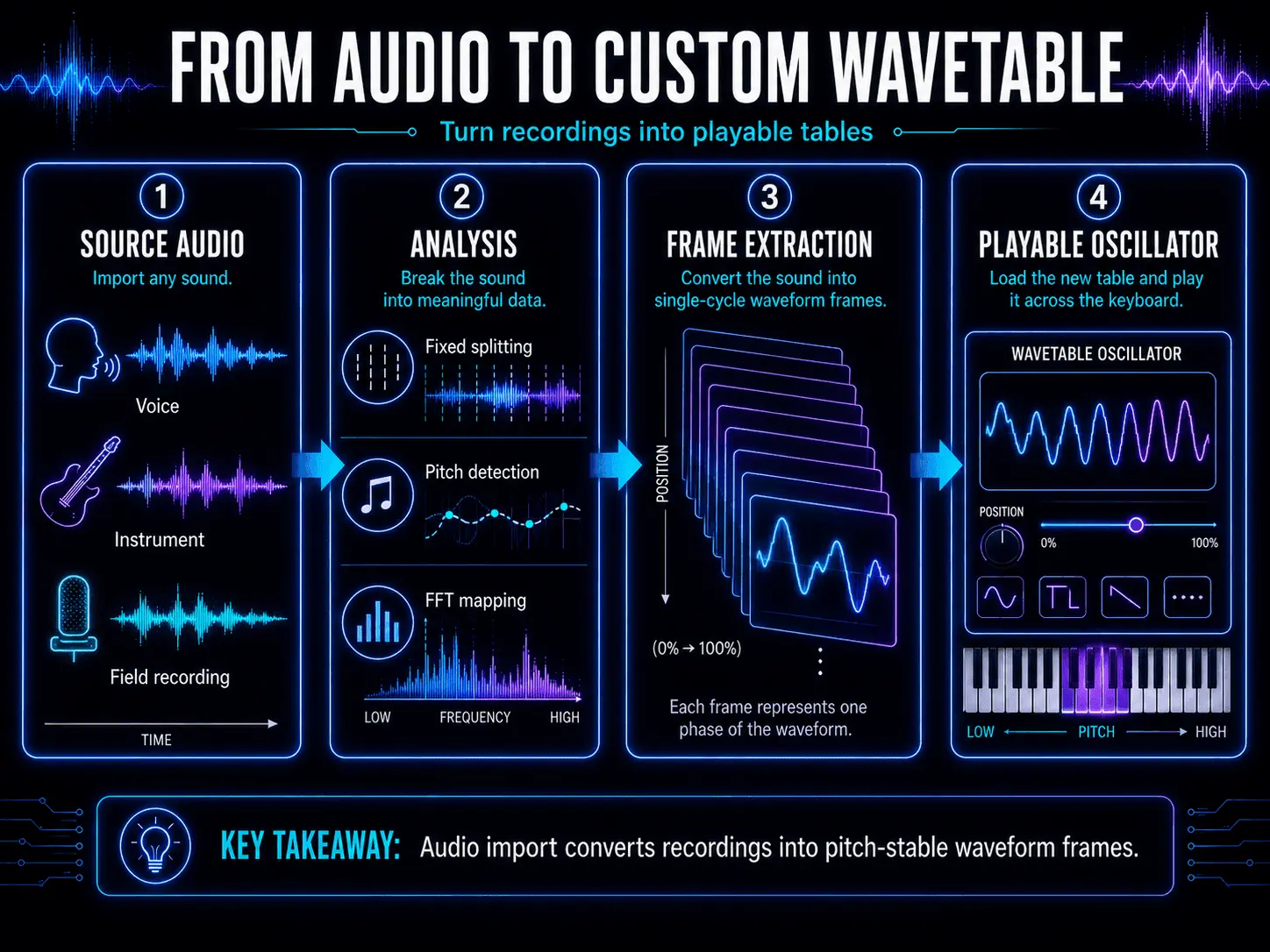
The synthesizer engine serializes this incoming audio file using one of several conversion protocols:
- Fixed Sample Size Splitting: The engine cuts the audio file into exact segments of 2048 samples, placing each segment into a sequential frame slot. This works best for clean, sustained single-pitch instrument recordings.
- Pitch Detection Analysis: The engine analyzes the fundamental pitch of the incoming audio file and dynamically resizes its frame extraction boundaries to match the shifting cycle lengths of the audio file. This is ideal for importing vocal phrases or speech samples.
- Linear FFT Mapping: The engine performs a Fast Fourier Transform on the audio file, extracting the changing harmonic amplitude and phase data, and reconstructs those spectral snapshots as clean digital tables.
Sound designers can also use additive drawing tools built directly into the software to build tables from scratch. You can select an empty frame, manually draw the amplitude heights of individual harmonics (the fundamental, the third harmonic, the fifth harmonic, etc.), and let the software compute the inverse Fourier transform to draw the resulting geometric waveform automatically.
Internal Resampling Workflows
Wavetable resampling is an expert-level sound design technique used to create highly complex, evolving wavetables from your own patches.
- Construct a patch using multiple oscillators, extensive warp modulations, complex filter routines, and spatial effects like delays, choruses, and distortion units.
- Trigger a single MIDI note and use your synthesizer's internal Resample Output function to capture the entire stereo audio stream as a new, singular wavetable file.
- Initialize a completely clean patch instance, load your newly resampled wavetable file into Oscillator 1, and clear all filters and effects.
You now possess a single wavetable oscillator that contains the entire, multi-layered, effected performance of your previous patch baked directly into its individual frames. You can now apply further warp modes, fresh filter sweeps, and a whole new layer of modulation matrices on top of this already complex source material, pushing your sound design into uncharted sonic territory.
How to Choose a Wavetable Synthesizer
The best wavetable synthesizer is not necessarily the one with the longest feature list. The right choice depends on the sounds you want to create, how deeply you plan to design your own patches, and how well the instrument fits into your existing production workflow.
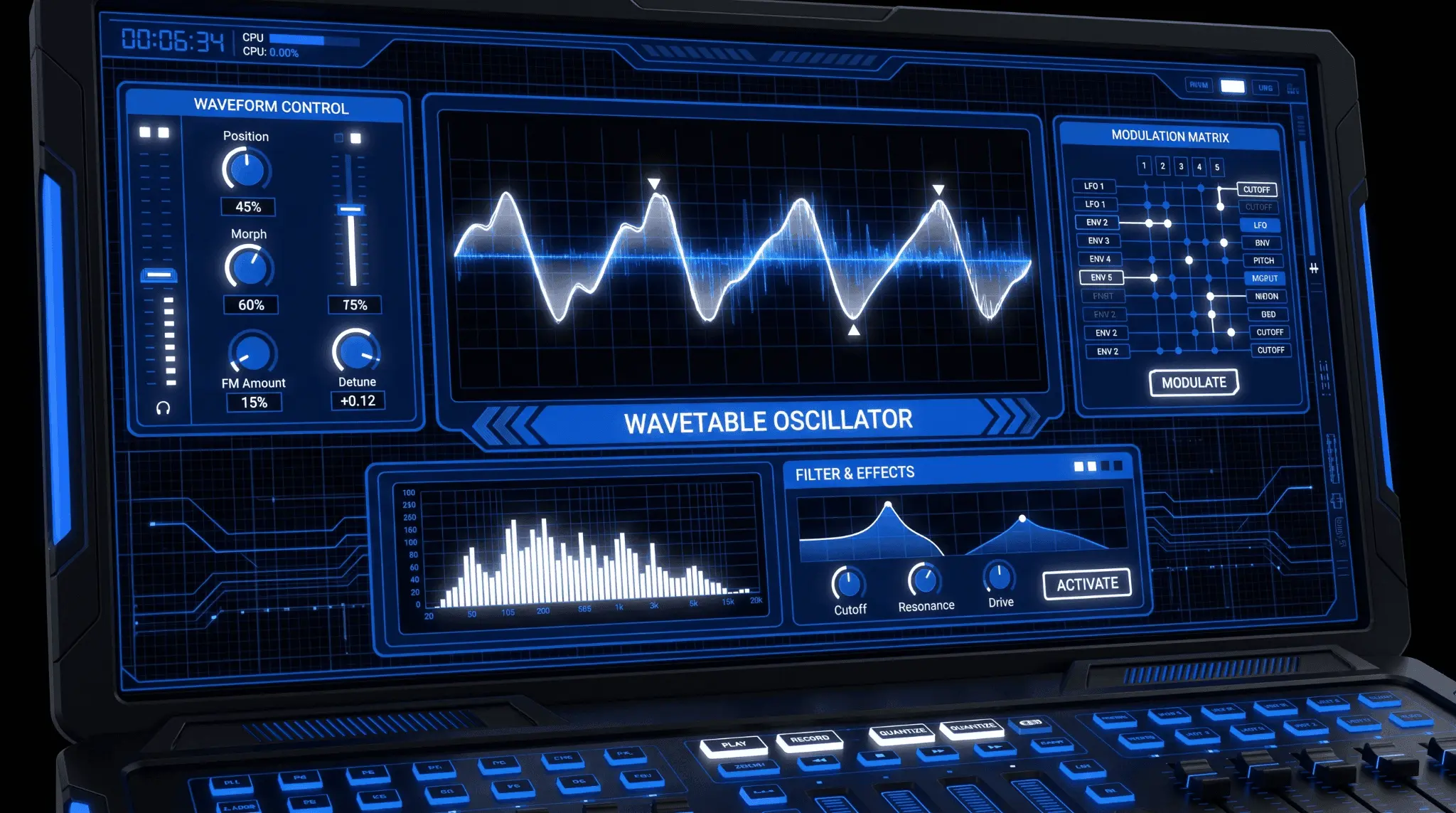
Beginners may benefit from a clear interface, strong preset organization, and visible modulation feedback. More experienced sound designers may prioritize custom wavetable creation, flexible routing, spectral processing, and advanced oscillator controls. Producers working on larger arrangements should also consider CPU efficiency, since unison voices, oversampling, modulation, and built-in effects can quickly increase processing demands.
Before selecting a wavetable synthesizer, compare the following capabilities and decide which ones are most important for your music.
| Feature | What to Consider |
|---|---|
| Oscillator Structure | Check how many wavetable oscillators the instrument provides and whether additional sub, noise, or sample-based sound sources are included. Multiple oscillators make it easier to layer contrasting tones and create more complex patches. |
| Wavetable Library | A varied library should cover basic analog shapes, digital textures, vocal-like tones, metallic spectra, and organic source material. A well-organized browser also makes it easier to find suitable starting points. |
| Position Modulation | Look for flexible control over wavetable position using envelopes, LFOs, velocity, macros, key tracking, and DAW automation. This movement is central to creating evolving wavetable sounds. |
| Warp Modes | Phase bending, oscillator synchronization, pulse-width-style processing, spectral warping, quantization, and other transformations expand the tonal range of each wavetable. |
| Custom Audio Import | Audio import allows producers to transform vocals, instruments, field recordings, and other source material into original wavetables. Review how the instrument analyzes, slices, and reconstructs imported audio. |
| Wavetable Editing | Some instruments allow users to draw waveforms, modify individual frames, edit harmonics, apply formulas, or blend several sources. These tools are valuable for producers who want to build sounds from the ground up. |
| Modulation Routing | A clear modulation system makes it easier to connect envelopes, LFOs, random generators, velocity, aftertouch, and performance controls to multiple parameters. Flexible depth and polarity controls provide greater precision. |
| Visual Feedback | Waveform, spectrum, modulation, and routing displays can make complex sound-design processes easier to understand. Clear visual feedback is particularly useful when several parameters are changing at once. |
| Unison and Stereo Control | Adjustable voice count, detuning, phase, panning, and stereo spread help create wider leads, pads, and bass textures. These controls should offer width without making the patch unstable or unfocused. |
| Filters and Effects | Built-in filters, distortion, compression, modulation effects, delay, and reverb can speed up patch creation. Flexible effect routing can also reduce the need for additional plugins. |
| Performance Controls | Macros, velocity sensitivity, aftertouch, pitch bend, and MPE support make patches more expressive. These features are especially important for live performance and detailed MIDI programming. |
| CPU Performance | Complex unison, oversampling, spectral processing, modulation, and effects can increase processor use. Test how the synthesizer performs when several instances are running in a larger project. |
| Preset Management | A searchable preset browser, tagging system, favorites, and user folders make it easier to organize sounds and return to useful patches later. |
| Workflow Integration | Consider DAW automation, MIDI mapping, preset sharing, audio export, plugin compatibility, and how quickly the instrument fits into your normal production process. |
A producer focused on quick songwriting may prioritize presets, visual clarity, and simple modulation controls. A dedicated sound designer may place greater value on wavetable editing, audio import, flexible routing, and spectral manipulation. Evaluating the instrument through your actual workflow will usually reveal more than comparing specifications alone.
Creator-Specific Applications and Case Studies
Wavetable synthesis is not confined to a single musical style. Its inherent architectural flexibility allows it to adapt to various professional creative fields.
Electronic Music Production Applications
In genres like dubstep, drum and bass, house, and techno, the dancefloor demands sounds that feel alive, energetic, and heavy. Electronic producers lean on wavetable synthesizers because they excel at creating mid-range frequencies with massive movement.
For instance, the signature sound of a modern dubstep drop relies on assigning an LFO to a wavetable index to automate the growl characteristics of a bass patch in lockstep with the track's tempo. The ability to switch between high-definition unison detuning and aggressive internal distortion inside the synth ensures that electronic productions sound wide, energetic, and professional on large club sound systems.
Cinematic and Game Sound Design
Film composers and video game sound designers face a different challenge: they need to create long, atmospheric textures that establish tension, emotion, and setting without distracting from dialogue or on-screen action.
Wavetable synthesis addresses this through its extensive time-based modulation systems. By loading organic audio sources, like an orchestral string section recording, into a wavetable engine and applying slow multi-stage envelopes that take 30 seconds to traverse the table frames, composers can create soundscapes that slowly evolve and shift over time. This keeps the background music interesting and dynamic, avoiding the flat repetition common with simple sample loops.
Lo-Fi, Hip-Hop, and Trap Workflows
Modern urban beats thrive on contrasting clean elements with vintage, weathered textures. While wavetable synthesis is naturally clean and digital, producers working in lo-fi and trap use warp modes to introduce intentional digital artifacts and grit.
By applying a quantize warp mode to downsample a wavetable oscillator down to a simulated 4-bit resolution, a trap producer can instantly add a crunchy, retro computer texture to a melody line. Pairing this lo-fi oscillator setup with a downstream low-pass filter captures the signature warm, dusty atmosphere crucial for lo-fi hip-hop beatmaking, while maintaining perfect digital pitch stability.
The Future of Digital Synthesis Platforms
As computing power increases, the technology behind wavetable synthesis continues to merge with cutting-edge digital signal processing advancements.
Multidimensional MPE Integration
MIDI Polyphonic Expression (MPE) is shifting how producers perform with software instruments. Traditional MIDI transmits pitch bend and modulation data globally across an entire instrument channel. MPE allows compatible hardware controllers to transmit continuous control data for every single individual finger note independently.
Modern wavetable software platforms are re-engineering their modulation matrices to fully support MPE data. This means a keyboardist can hold down a three-note chord and use their index finger to slide forward on the key to morph the wavetable position of just that single note, while their ring finger applies independent pressure to increase the sync warp amount of a separate note. This matches the expressive nuance of acoustic string quartets, bridging the gap between digital synthesis power and physical performance expression.
Artificial Intelligence Waveform Computation
The integration of machine learning and neural networks is introducing a new wave of custom wavetable creation tools. Future software builds are moving beyond traditional Fast Fourier Transforms for audio importing. Instead, built-in artificial intelligence modules analyze written descriptive user prompts or analyze reference audio files to generate custom 3D wavetable landscapes optimized for maximum harmonic balance. This evolution shortens the bridge between creative ideas and complex technical execution, reinforcing wavetable synthesis as an essential tool for future generations of sound designers and music producers worldwide.
FAQ
What is the fundamental difference between a standard oscillator and a wavetable oscillator?
A standard oscillator, like those found in traditional analog or virtual analog subtractive synthesizers, generates a single, static geometric wave shape, such as a sawtooth, square, or triangle wave, that cannot change its baseline harmonic structure. A wavetable oscillator uses a collection of multiple single-cycle waveforms stored sequentially in an index. This allows the oscillator to continuously morph between completely different wave shapes in real-time, changing its harmonic profile before any filtering or effects processing occurs.
Does using wavetable synthesis require a high-performance computer processor?
Historically, wavetable synthesis demanded significant computer processing power due to the complex mathematical interpolation required to smoothly transition between waveform frames without introducing digital artifacts. However, modern software plugins are highly optimized, and contemporary multi-core computer processors handle standard instances easily. The main impact on your CPU usually comes from turning up unison voice counts (stacking multiple detuned voices per note) and running high internal oversampling rates, rather than from the basic wavetable playback itself.
Can I import any standard audio file into a wavetable synthesizer?
Yes, most modern professional wavetable software plugins allow you to drag and drop standard WAV or AIFF audio files directly into their oscillator windows. The synthesizer's engine will analyze the file and cut it into sequential frame segments based on sample count or pitch detection. For the best and cleanest results, use clean, monophonic recordings with a clearly defined fundamental pitch, such as vocal phrases, isolated instrument notes, or simple synthesizer sweeps.
What does the term aliasing mean in digital audio synthesis?
Aliasing is an unwanted digital audio distortion that occurs when a synthesizer engine tries to generate high frequencies that exceed the Nyquist frequency limit, which is exactly half of your digital audio sample rate. Instead of rendering correctly, these super-high frequencies reflect backward down into the audible spectrum, creating unpleasant, metallic, and unharmonious digital noise. High-end modern wavetable plugins use advanced real-time oversampling and interpolation algorithms to eliminate aliasing, ensuring pristine high-frequency reproduction.
Why do sound designers often bypass the filter for sub-bass oscillators in wavetable patches?
When you apply heavy modulation to a primary wavetable oscillator, such as moving its index position, changing its warp modes, or sweeping a resonant low-pass filter, you introduce significant phase shifts and harmonic variations. If your sub-bass frequencies are processed through those same moving systems, your low end will lose its consistent energy, translate poorly on large club sound systems, and cause mix phase cancellations. Routing a clean sub-bass oscillator directly to the master output keeps your low-frequency foundation completely solid, consistent, and independent of your mid-range sound design.
How do spectral warp modes differ from standard geometric warp modes?
Standard geometric warp modes manipulate the timeline phase or amplitude of the waveform shape as a whole, stretching, bending, or mirroring the physical geometry of the cycle. Spectral warp modes operate within the frequency domain using real-time Fast Fourier Transforms. Instead of altering the physical wave shape directly, they manipulate the relationships between individual partials and harmonics, allowing you to filter out specific even harmonics, shift the harmonic balance up or down, or stretch the frequency distribution in ways that traditional geometric warping cannot achieve.