
We value your privacy

By clicking "Allow", you agree to the storing of cookies on your device to enhance site navigation, analyze site usage, and assist in our marketing efforts.

Consent Selection
Details
  • Necessary cookies help make a website usable by enabling basic functions like page navigation and access to secure areas of the website. The website cannot function properly without these cookies.
    • Learn more about this provideropens in a new window

      Some of the data collected by this provider is for the purposes of personalization and measuring advertising effectiveness. The provider may use the IP Addresses for ads measurement and ads personalization.

      test_cookieUsed to check if the user's browser supports cookies.
      Maximum Storage Duration: 1 dayType: HTTP Cookie
    • Learn more about this provideropens in a new window
      bcookieUsed in order to detect spam and improve the website's security.
      Maximum Storage Duration: 1 yearType: HTTP Cookie
      li_gcStores the user's cookie consent state for the current domain
      Maximum Storage Duration: 180 daysType: HTTP Cookie
    • Learn more about this provideropens in a new window
      datadomeUsed in context with the website's BotManager. The BotManager detects, categorizes and compiles reports on potential bots trying to access the website.
      Maximum Storage Duration: SessionType: HTTP Cookie
    • studio-web-language-keyPending
      Maximum Storage Duration: SessionType: HTML Local Storage
    • _cfuvid [x2]This cookie is a part of the services provided by Cloudflare - Including load-balancing, deliverance of website content and serving DNS connection for website operators.
      Maximum Storage Duration: SessionType: HTTP Cookie
    • __cf_bm [x5]This cookie is used to distinguish between humans and bots. This is beneficial for the website, in order to make valid reports on the use of their website.
      Maximum Storage Duration: 1 dayType: HTTP Cookie
    • CookieConsent [x2]Stores the user's cookie consent state for the current domain
      Maximum Storage Duration: 1 yearType: HTTP Cookie
    • guidPreserves users states across page requests.
      Maximum Storage Duration: 1 yearType: HTTP Cookie
    • ttRegisters the website's speed and performance. This function can be used in context with statistics and load-balancing.
      Maximum Storage Duration: 1 yearType: HTTP Cookie
    • sc_anonymous_idUsed in context with the 3D-view-function on the website.
      Maximum Storage Duration: 10 yearsType: HTTP Cookie
  • Preference cookies enable a website to remember information that changes the way the website behaves or looks, like your preferred language or the region that you are in.
    • Learn more about this provideropens in a new window
      lidcRegisters which server-cluster is serving the visitor. This is used in context with load balancing, in order to optimize user experience.
      Maximum Storage Duration: 1 dayType: HTTP Cookie
  • Statistic cookies help website owners to understand how visitors interact with websites by collecting and reporting information anonymously.
    • Learn more about this provideropens in a new window
      geoSaves the user's current geographical location based on the user's IP address.
      Maximum Storage Duration: SessionType: HTTP Cookie
    • Learn more about this provideropens in a new window
      ajs_anonymous_idThis cookie is used to identify a specific visitor - this information is used to identify the number of specific visitors on a website.
      Maximum Storage Duration: 1 yearType: HTTP Cookie
      ajs_anonymous_idThis cookie is used to count how many times a website has been visited by different visitors - this is done by assigning the visitor an ID, so the visitor does not get registered twice.
      Maximum Storage Duration: PersistentType: HTML Local Storage
    • Learn more about this provideropens in a new window
      _tt_enable_cookieUsed by the social networking service, TikTok, for tracking the use of embedded services.
      Maximum Storage Duration: 1 yearType: HTTP Cookie
    • Learn more about this provideropens in a new window
      personalization_idThis cookie is set by Twitter - The cookie allows the visitor to share content from the website onto their Twitter profile.
      Maximum Storage Duration: 400 daysType: HTTP Cookie
    • FPGSIDRegisters statistical data on users' behaviour on the website. Used for internal analytics by the website operator.
      Maximum Storage Duration: 1 dayType: HTTP Cookie
      FPIDRegisters statistical data on users' behaviour on the website. Used for internal analytics by the website operator.
      Maximum Storage Duration: 400 daysType: HTTP Cookie
      FPLCRegisters a unique ID that is used to generate statistical data on how the visitor uses the website.
      Maximum Storage Duration: 1 dayType: HTTP Cookie
      sajssdk_2015_cookie_access_testPending
      Maximum Storage Duration: 73000 daysType: HTTP Cookie
      sajssdk_2015_cross_new_userCollects statistics on the user's visits to the website, such as the number of visits, average time spent on the website and what pages have been read.
      Maximum Storage Duration: 1 dayType: HTTP Cookie
      sensorsdata_domain_testPending
      Maximum Storage Duration: SessionType: HTTP Cookie
      sensorsdata2015jssdkcrossCollects statistics on the user's visits to the website, such as the number of visits, average time spent on the website and what pages have been read.
      Maximum Storage Duration: 2 yearsType: HTTP Cookie
    • u_scsidRegisters data on visitors' website-behaviour. This is used for internal analysis and website optimization.
      Maximum Storage Duration: SessionType: HTML Local Storage
      X-ABThis cookie is used by the website’s operator in context with multi-variate testing. This is a tool used to combine or change content on the website. This allows the website to find the best variation/edition of the site.
      Maximum Storage Duration: 1 dayType: HTTP Cookie
    • SERVERCORSIDPending
      Maximum Storage Duration: SessionType: HTTP Cookie
      SERVERIDThis cookie is used to assign the visitor to a specific server - this function is necessary for the functionality of the website.
      Maximum Storage Duration: SessionType: HTTP Cookie
    • number(#)Used to track user’s interaction with embedded content.
      Maximum Storage Duration: SessionType: HTML Local Storage
  • Marketing cookies are used to track visitors across websites. The intention is to display ads that are relevant and engaging for the individual user and thereby more valuable for publishers and third party advertisers.
    • Learn more about this provideropens in a new window
      _fbpUsed by Facebook to deliver a series of advertisement products such as real time bidding from third party advertisers.
      Maximum Storage Duration: 3 monthsType: HTTP Cookie
      lastExternalReferrerDetects how the user reached the website by registering their last URL-address.
      Maximum Storage Duration: PersistentType: HTML Local Storage
      lastExternalReferrerTimeDetects how the user reached the website by registering their last URL-address.
      Maximum Storage Duration: PersistentType: HTML Local Storage
    • Learn more about this provideropens in a new window
      mtClientConfig_cachedSource_xp_amp_music_webplayerUsed to implement iTunes content and presentation of covers.
      Maximum Storage Duration: PersistentType: HTML Local Storage
    • Learn more about this provideropens in a new window
      __tld__Used to track visitors on multiple websites, in order to present relevant advertisement based on the visitor's preferences.
      Maximum Storage Duration: SessionType: HTTP Cookie
      ajs_user_idThis cookie is used to collect data on the visitor's behavior on the website - this information can be used to assign the visitor to a visitor segment, based on common preferences.
      Maximum Storage Duration: SessionType: HTTP Cookie
      ajs_user_idCollects data on visitors' preferences and behaviour on the website - This information is used make content and advertisement more relevant to the specific visitor.
      Maximum Storage Duration: PersistentType: HTML Local Storage
    • Learn more about this provideropens in a new window

      Some of the data collected by this provider is for the purposes of personalization and measuring advertising effectiveness. The provider may use the IP Addresses for ads measurement and ads personalization.

      _gaUsed to send data to Google Analytics about the visitor's device and behavior. Tracks the visitor across devices and marketing channels.
      Maximum Storage Duration: 2 yearsType: HTTP Cookie
      _ga_#Used to send data to Google Analytics about the visitor's device and behavior. Tracks the visitor across devices and marketing channels.
      Maximum Storage Duration: 2 yearsType: HTTP Cookie
      IDEUsed by Google DoubleClick to register and report the website user's actions after viewing or clicking one of the advertiser's ads with the purpose of measuring the efficacy of an ad and to present targeted ads to the user.
      Maximum Storage Duration: 400 daysType: HTTP Cookie
      ads/ga-audiencesUsed by Google AdWords to re-engage visitors that are likely to convert to customers based on the visitor's online behaviour across websites.
      Maximum Storage Duration: SessionType: Pixel Tracker
      pagead/1p-user-list/#Tracks if the user has shown interest in specific products or events across multiple websites and detects how the user navigates between sites. This is used for measurement of advertisement efforts and facilitates payment of referral-fees between websites.
      Maximum Storage Duration: SessionType: Pixel Tracker
    • Learn more about this provideropens in a new window
      _uetsidCollects data on visitor behaviour from multiple websites, in order to present more relevant advertisement - This also allows the website to limit the number of times that they are shown the same advertisement.
      Maximum Storage Duration: 1 dayType: HTTP Cookie
      _uetvidUsed to track visitors on multiple websites, in order to present relevant advertisement based on the visitor's preferences.
      Maximum Storage Duration: 1 yearType: HTTP Cookie
      _uetsidUsed to track visitors on multiple websites, in order to present relevant advertisement based on the visitor's preferences.
      Maximum Storage Duration: PersistentType: HTML Local Storage
      _uetsid_expContains the expiry-date for the cookie with corresponding name.
      Maximum Storage Duration: PersistentType: HTML Local Storage
      _uetvidUsed to track visitors on multiple websites, in order to present relevant advertisement based on the visitor's preferences.
      Maximum Storage Duration: PersistentType: HTML Local Storage
      _uetvid_expContains the expiry-date for the cookie with corresponding name.
      Maximum Storage Duration: PersistentType: HTML Local Storage
      MUIDUsed widely by Microsoft as a unique user ID. The cookie enables user tracking by synchronising the ID across many Microsoft domains.
      Maximum Storage Duration: 1 yearType: HTTP Cookie
    • Learn more about this provideropens in a new window
      _rdt_uuidUsed to track visitors on multiple websites, in order to present relevant advertisement based on the visitor's preferences.
      Maximum Storage Duration: 3 monthsType: HTTP Cookie
    • Learn more about this provideropens in a new window
      sc_atUsed by Snapchat to implement advertisement content on the website - The cookie detects the efficiency of the ads and collects visitor data for further visitor segmentation.
      Maximum Storage Duration: 1 yearType: HTTP Cookie
      pUsed to track visitors on multiple websites, in order to present relevant advertisement based on the visitor's preferences.
      Maximum Storage Duration: SessionType: Pixel Tracker
    • Learn more about this provideropens in a new window
      dd_testcookiePending
      Maximum Storage Duration: SessionType: HTTP Cookie
      ddSession_datadomePending
      Maximum Storage Duration: PersistentType: HTML Local Storage
    • Learn more about this provideropens in a new window
      _ttp [x2]Used by the social networking service, TikTok, for tracking the use of embedded services.
      Maximum Storage Duration: 1 yearType: HTTP Cookie
      ttcsidUsed to track visitors on multiple websites, in order to present relevant advertisement based on the visitor's preferences.
      Maximum Storage Duration: 1 yearType: HTTP Cookie
      ttcsid_#Tracks the conversion rate between the user and the advertisement banners on the website - This serves to optimise the relevance of the advertisements on the website.
      Maximum Storage Duration: 1 yearType: HTTP Cookie
      tt_appInfoUsed by the social networking service, TikTok, for tracking the use of embedded services.
      Maximum Storage Duration: SessionType: HTML Local Storage
      tt_pixel_session_indexUsed by the social networking service, TikTok, for tracking the use of embedded services.
      Maximum Storage Duration: SessionType: HTML Local Storage
      tt_sessionIdUsed by the social networking service, TikTok, for tracking the use of embedded services.
      Maximum Storage Duration: SessionType: HTML Local Storage
    • Learn more about this provideropens in a new window
      1/i/adsct [x2]Collects data on user behaviour and interaction in order to optimize the website and make advertisement on the website more relevant.
      Maximum Storage Duration: SessionType: Pixel Tracker
      muc_adsCollects data on user behaviour and interaction in order to optimize the website and make advertisement on the website more relevant.
      Maximum Storage Duration: 400 daysType: HTTP Cookie
      guest_idCollects data related to the user's visits to the website, such as the number of visits, average time spent on the website and which pages have been loaded, with the purpose of personalising and improving the Twitter service.
      Maximum Storage Duration: 400 daysType: HTTP Cookie
      guest_id_adsCollects information on user behaviour on multiple websites. This information is used in order to optimize the relevance of advertisement on the website.
      Maximum Storage Duration: 400 daysType: HTTP Cookie
      guest_id_marketingCollects information on user behaviour on multiple websites. This information is used in order to optimize the relevance of advertisement on the website.
      Maximum Storage Duration: 400 daysType: HTTP Cookie
    • Learn more about this provideropens in a new window
      __Secure-ROLLOUT_TOKENUsed to track user’s interaction with embedded content.
      Maximum Storage Duration: 180 daysType: HTTP Cookie
      __Secure-YECStores the user's video player preferences using embedded YouTube video
      Maximum Storage Duration: SessionType: HTTP Cookie
      __Secure-YNIDUsed to track user’s interaction with embedded content.
      Maximum Storage Duration: 180 daysType: HTTP Cookie
      LAST_RESULT_ENTRY_KEYUsed to track user’s interaction with embedded content.
      Maximum Storage Duration: SessionType: HTTP Cookie
      LogsDatabaseV2:V#||LogsRequestsStoreUsed to track user’s interaction with embedded content.
      Maximum Storage Duration: PersistentType: IndexedDB
      ServiceWorkerLogsDatabase#SWHealthLogNecessary for the implementation and functionality of YouTube video-content on the website.
      Maximum Storage Duration: PersistentType: IndexedDB
      TESTCOOKIESENABLEDUsed to track user’s interaction with embedded content.
      Maximum Storage Duration: 1 dayType: HTTP Cookie
      VISITOR_INFO1_LIVETries to estimate the users' bandwidth on pages with integrated YouTube videos.
      Maximum Storage Duration: 180 daysType: HTTP Cookie
      YSCRegisters a unique ID to keep statistics of what videos from YouTube the user has seen.
      Maximum Storage Duration: SessionType: HTTP Cookie
      yt-icons-last-purgedNecessary for the implementation and functionality of YouTube video-content on the website.
      Maximum Storage Duration: PersistentType: HTML Local Storage
      ytidb::LAST_RESULT_ENTRY_KEYUsed to track user’s interaction with embedded content.
      Maximum Storage Duration: PersistentType: HTML Local Storage
      YtIdbMeta#databasesUsed to track user’s interaction with embedded content.
      Maximum Storage Duration: PersistentType: IndexedDB
    • _gcl_auUsed by Google AdSense for experimenting with advertisement efficiency across websites using their services.
      Maximum Storage Duration: 3 monthsType: HTTP Cookie
      _/set_cookieUsed by server-side Google Tag Manager to set or update cookies required for analytics or marketing tags.
      Maximum Storage Duration: SessionType: Pixel Tracker
      _gcl_lsTracks the conversion rate between the user and the advertisement banners on the website - This serves to optimise the relevance of the advertisements on the website.
      Maximum Storage Duration: PersistentType: HTML Local Storage
    • _schn1Sets a unique ID for the visitor, that allows third party advertisers to target the visitor with relevant advertisement. This pairing service is provided by third party advertisement hubs, which facilitates real-time bidding for advertisers.
      Maximum Storage Duration: 1 dayType: HTTP Cookie
      _scidSets a unique ID for the visitor, that allows third party advertisers to target the visitor with relevant advertisement. This pairing service is provided by third party advertisement hubs, which facilitates real-time bidding for advertisers.
      Maximum Storage Duration: 13 monthsType: HTTP Cookie
      _scid_rSets a unique ID for the visitor, that allows third party advertisers to target the visitor with relevant advertisement. This pairing service is provided by third party advertisement hubs, which facilitates real-time bidding for advertisers.
      Maximum Storage Duration: 13 monthsType: HTTP Cookie
      _screloadUsed by Snapchat to implement advertisement content on the website - The cookie detects the efficiency of the ads and collects visitor data for further visitor segmentation.
      Maximum Storage Duration: SessionType: HTTP Cookie
      u_sclidSets a unique ID for the visitor, that allows third party advertisers to target the visitor with relevant advertisement. This pairing service is provided by third party advertisement hubs, which facilitates real-time bidding for advertisers.
      Maximum Storage Duration: PersistentType: HTML Local Storage
      u_sclid_rSets a unique ID for the visitor, that allows third party advertisers to target the visitor with relevant advertisement. This pairing service is provided by third party advertisement hubs, which facilitates real-time bidding for advertisers.
      Maximum Storage Duration: PersistentType: HTML Local Storage
      u_scsid_rSets a unique ID for the visitor, that allows third party advertisers to target the visitor with relevant advertisement. This pairing service is provided by third party advertisement hubs, which facilitates real-time bidding for advertisers.
      Maximum Storage Duration: SessionType: HTML Local Storage
  • Unclassified cookies are cookies that we are in the process of classifying, together with the providers of individual cookies.
    • Learn more about this provideropens in a new window
      _rdt_pnPending
      Maximum Storage Duration: 3 monthsType: HTTP Cookie
    • Learn more about this provideropens in a new window
      tt_pixel_is_enrich_ipv6_triggered_by_enrich_amPending
      Maximum Storage Duration: SessionType: HTML Local Storage
    • adjust-sdk#asPending
      Maximum Storage Duration: PersistentType: IndexedDB
      adjust-sdk#edPending
      Maximum Storage Duration: PersistentType: IndexedDB
      adjust-sdk#gpPending
      Maximum Storage Duration: PersistentType: IndexedDB
      adjust-sdk#qPending
      Maximum Storage Duration: PersistentType: IndexedDB
      adjust-sdk.pPending
      Maximum Storage Duration: PersistentType: HTML Local Storage
      redirectPathPending
      Maximum Storage Duration: SessionType: HTML Local Storage
      studio-web-web-uuidPending
      Maximum Storage Duration: PersistentType: HTML Local Storage
    • __oaiq_domain_probePending
      Maximum Storage Duration: SessionType: HTTP Cookie
      __obrefPending
      Maximum Storage Duration: SessionType: HTTP Cookie
      oaiq_cs:TMBW9u3qWVchcyxjFU4gVQPending
      Maximum Storage Duration: SessionType: HTML Local Storage
    • _vbPending
      Maximum Storage Duration: SessionType: HTTP Cookie
    • _twpidPending
      Maximum Storage Duration: SessionType: HTTP Cookie
      _twsidPending
      Maximum Storage Duration: SessionType: HTTP Cookie
    • pixel/sPending
      Maximum Storage Duration: SessionType: Pixel Tracker
Cookie declaration last updated on 9/17/26 by Cookiebot
[#IABV2_TITLE#]
[#IABV2_BODY_INTRO#]
[#IABV2_BODY_LEGITIMATE_INTEREST_INTRO#]
[#IABV2_BODY_PREFERENCE_INTRO#]
[#IABV2_BODY_PURPOSES_INTRO#]
[#IABV2_BODY_PURPOSES#]
[#IABV2_BODY_FEATURES_INTRO#]
[#IABV2_BODY_FEATURES#]
[#IABV2_BODY_PARTNERS_INTRO#]
[#IABV2_BODY_PARTNERS#]
About
Cookies are small text files that can be used by websites to make a user's experience more efficient.

The law states that we can store cookies on your device if they are strictly necessary for the operation of this site. For all other types of cookies we need your permission.

This site uses different types of cookies. Some cookies are placed by third party services that appear on our pages.

You can at any time change or withdraw your consent from the Cookie Declaration on our website.

Learn more about who we are, how you can contact us and how we process personal data in our Privacy Policy.

Please state your consent ID and date when you contact us regarding your consent.
Get Started

Inside an Audio Interface: The Heart of Your Studio

Learn how audio interfaces convert sound, reduce latency, power microphones, manage studio connections, plus support professional recording, monitoring, mixing, and AI-assisted music production today.

Inside an Audio Interface: The Heart of Your Studio

Key Takeaways

  • An audio interface converts analog signals from microphones and instruments into digital audio for recording, then converts digital audio back into an analog signal for monitoring.
  • Converter quality, microphone preamps, bit depth, sample rate, dynamic range, and headroom all influence the clarity and accuracy of a recording.
  • Low-latency drivers, smaller buffer settings, direct monitoring, and onboard DSP help musicians record while hearing their performance without distracting delays.
  • The right interface should provide enough microphone, instrument, line, headphone, and monitor connections for the current setup, along with digital expansion options such as ADAT.
  • An audio interface is not required to generate AI vocals or AI Instrument performances in ACE Studio, but it becomes valuable when recording live sources and monitoring AI-generated and recorded parts together.

Why the Audio Interface Is the Heart of the Modern Studio

Audio interface remains the most critical hardware anchor in the studio. Whether you are a bedroom producer, a professional foley artist, or a live-streaming content creator, understanding the mechanical and digital nuances of this device is paramount.

An audio interface is far more than a simple box with volume knobs; it is a sophisticated data converter, a high-fidelity amplifier, and a low-latency communication hub. This guide provides an exhaustive analysis of what an audio interface does, why it is superior to consumer-grade sound cards, and how it serves as the central nervous system of the modern recording environment.

Defining the Audio Interface

At its most fundamental level, an audio interface is a hardware device that facilitates the movement of audio signals into and out of a computer. While computers come equipped with internal sound cards, these are designed for general-purpose tasks like system alerts, video conferencing, and low-fidelity media playback. For professional audio applications, these internal components fail to meet the required standards for dynamic range, signal-to-noise ratio, and computational latency.
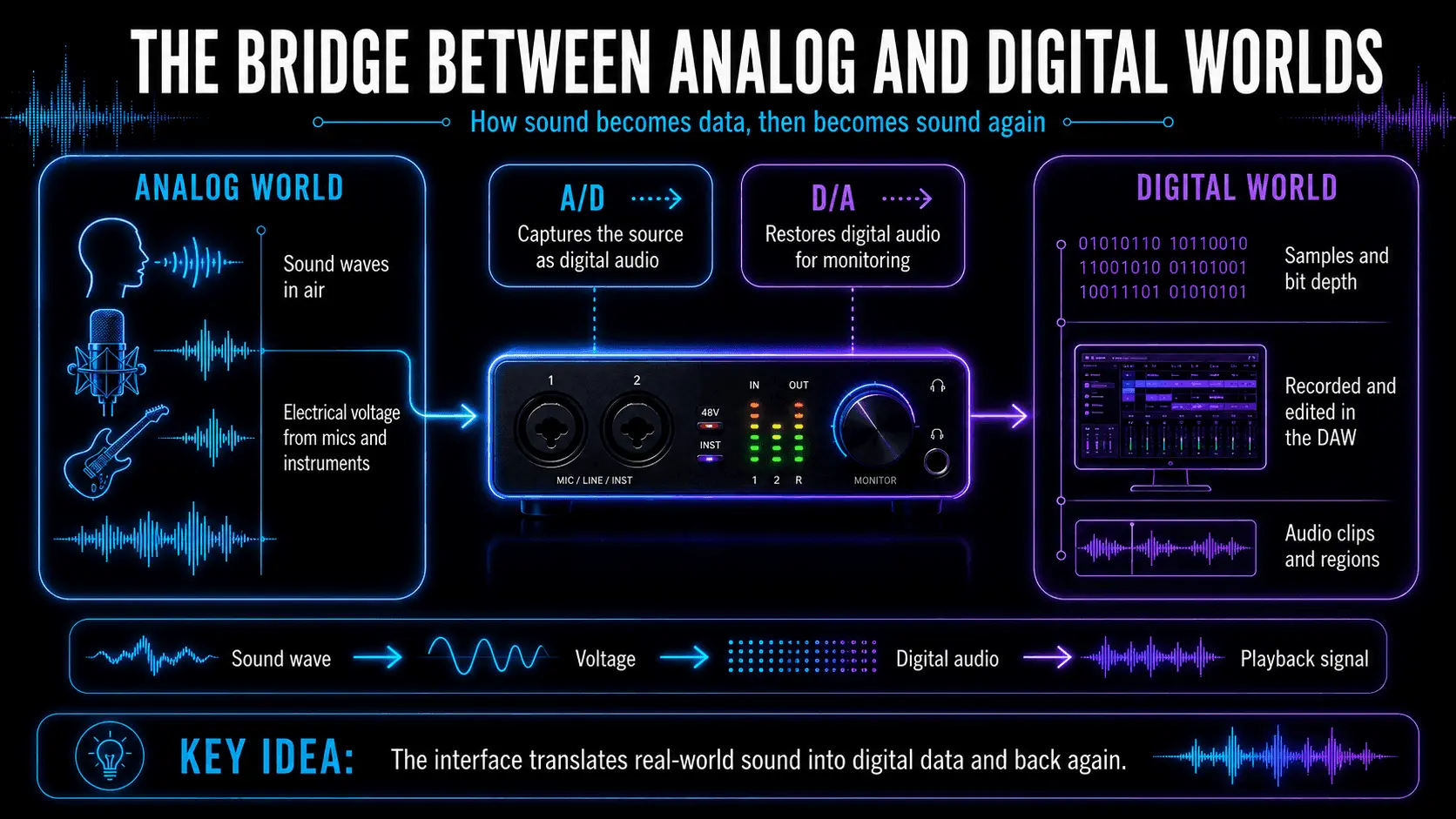
Diagram showing analog sound entering an audio interface, A/D and D/A conversion, digital recording in a DAW, and playback.

How an audio interface converts real-world sound into digital audio and back.

The Bridge Between Analog and Digital Worlds

The physical world operates in analog waves—continuous fluctuations in air pressure. Computers, conversely, operate in digital bits—discrete binary code (0s and 1s). The primary responsibility of an audio interface is to act as a high-fidelity translator between these two disparate realms.

When you speak into a microphone, the microphone converts sound waves into a fluctuating electrical voltage. This analog signal travels through a cable to the audio interface. The interface then performs a series of operations to "quantize" this voltage into a digital format that your Digital Audio Workstation (DAW), such as Ableton Live, Logic Pro, or Pro Tools, can record and manipulate.

How Audio Interfaces Work: The Technical Architecture

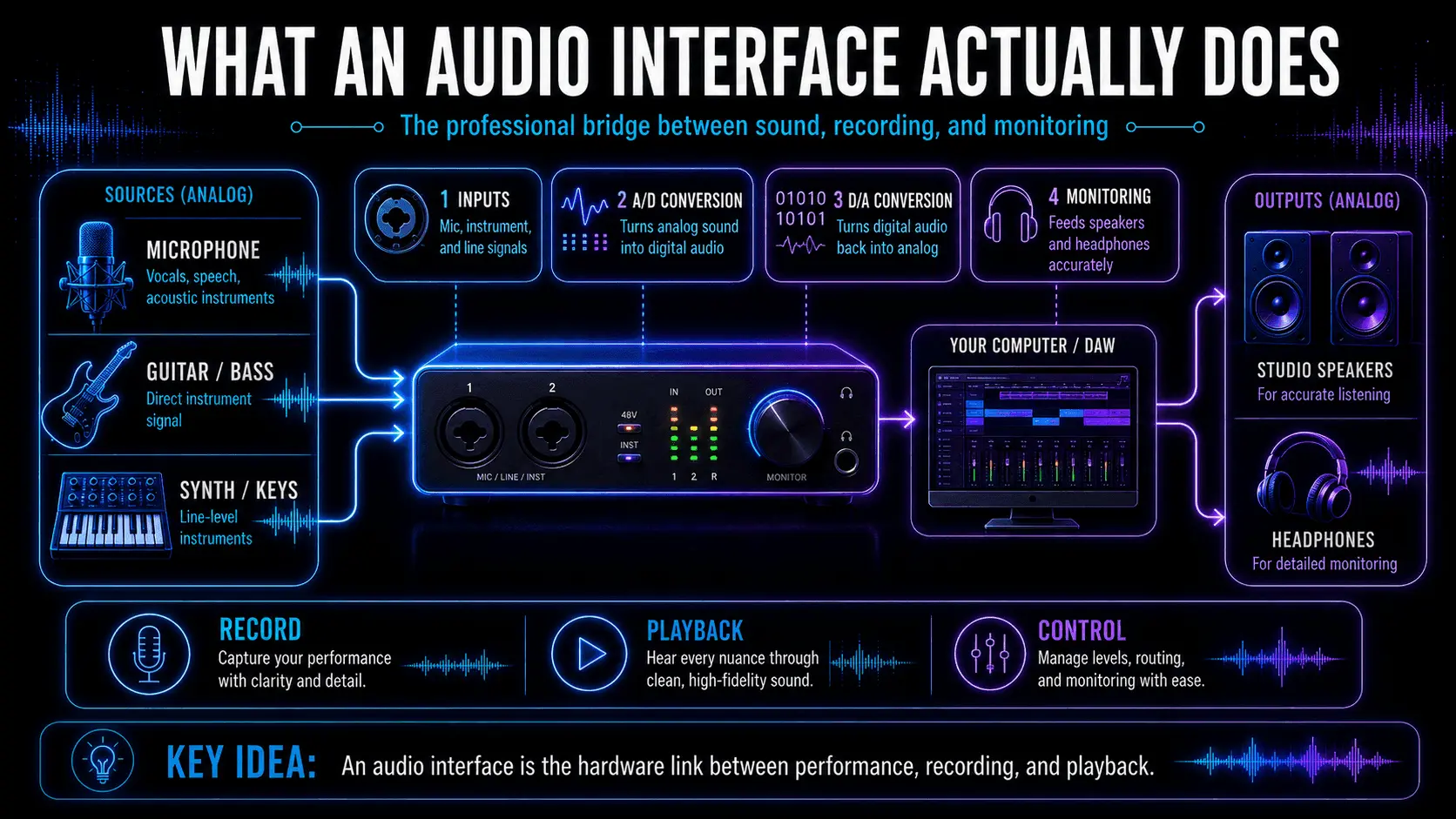
To understand what an audio interface does, one must look under the hood at the signal path. The quality of a recording is determined by how accurately the interface handles the signal at each stage of this journey.
Audio interface workflow connecting a microphone, guitar, and synthesizer to a DAW, studio speakers, and headphones.

The complete signal path from microphones and instruments to recording and monitoring.

Analog-to-Digital (A/D) Conversion: Capturing the Source

The A/D Converter is the gatekeeper. It takes the continuous electrical voltage from an instrument or microphone and "samples" it thousands of times per second.

The precision of this process is governed by two factors: Sample Rate and Bit Depth.

  • Sample Rate: This defines how many times per second the audio is measured. According to the Nyquist-Shannon Sampling Theorem, to accurately represent a frequency (f), the sampling rate (f_s) must be at least twice the highest frequency present in the signal.
  • Since the human hearing range extends to approximately 20 kHz, the industry standard of 44.1 kHz (CD quality) or 48 kHz (video standard) is the baseline. High-end interfaces often support 96 kHz or 192 kHz to capture ultrasonic harmonics and allow for cleaner digital processing.
  • Bit Depth: This determines the resolution of each sample's amplitude. A higher bit depth provides a wider dynamic range and a lower noise floor. Most professional interfaces today operate at 24-bit or 32-bit float, which theoretically offers a dynamic range of up to 144 dB and beyond, ensuring that the quietest whispers and the loudest drum hits are captured without distortion or hiss.

Digital-to-Analog (D/A) Conversion: The Monitoring Path

The inverse process occurs during playback. Your DAW sends digital data to the interface, where the D/A Converter reconstructs the binary code into a continuous electrical voltage. This voltage is then sent to your studio monitors or headphones.

The accuracy of the D/A conversion is what allows a producer to hear a "true" representation of their mix. Low-quality converters can introduce jitter—microscopic timing errors that result in a loss of stereo imaging, reduced clarity in the high frequencies, and a "muddied" low end. Professional-grade interfaces utilize high-stability internal clocks to ensure that the D/A process is perfectly timed.

Internal Components and Circuitry

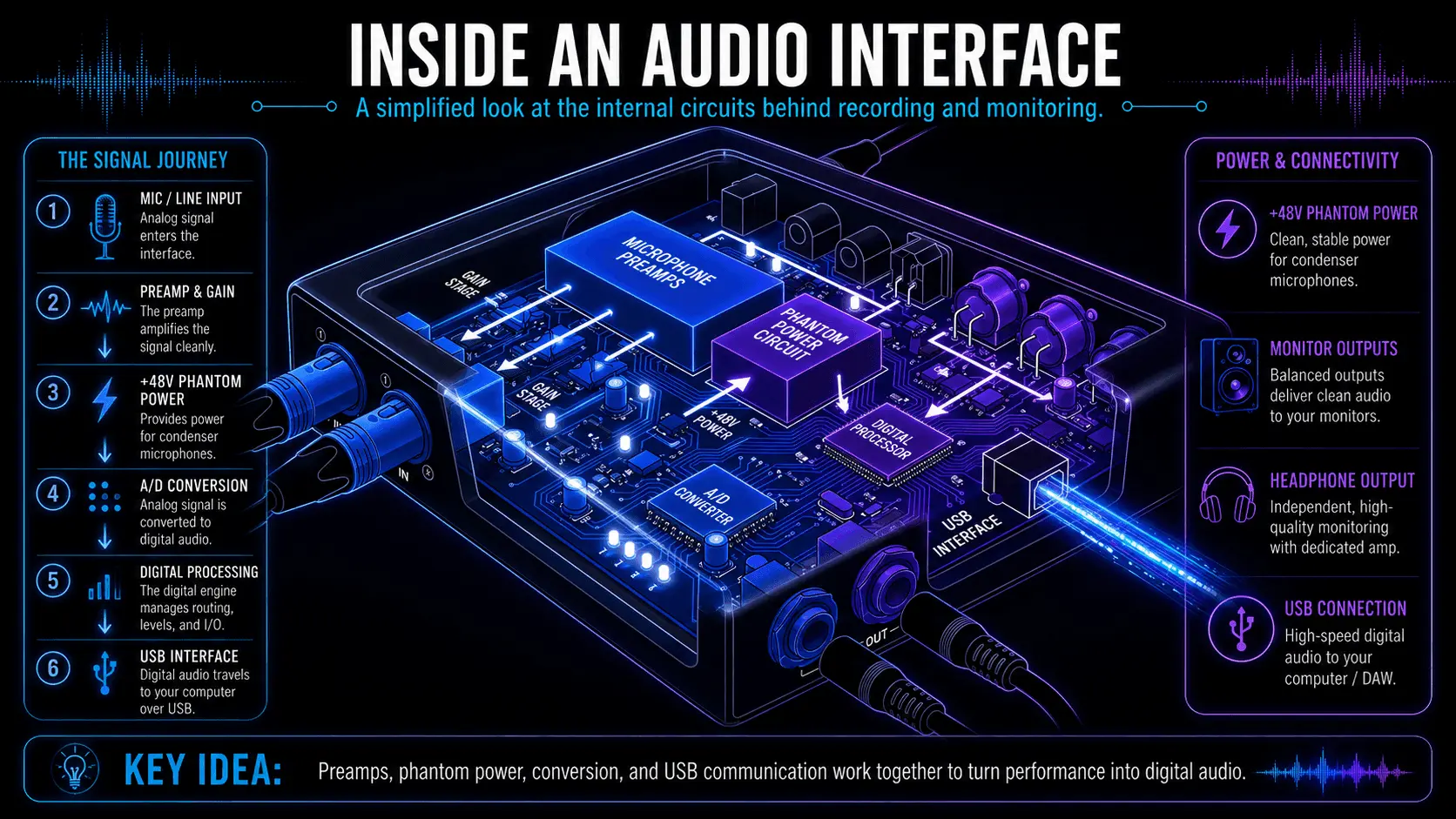
Beyond conversion, an audio interface houses several critical analog components that define the "character" and "quality" of your sound.
Cutaway diagram of an audio interface showing microphone preamps, phantom power, A/D conversion, digital processing, USB, and outputs.

The internal components that amplify, convert, process, and route audio signals.

Microphone Preamplification: Gain and Impedance

Microphones produce a very weak electrical signal, known as Mic Level. If you were to record this signal directly, it would be buried under the electronic noise of your computer. The Microphone Preamp (or simply "preamp") is a circuit designed to boost this weak signal to a robust Line Level.

What distinguishes a professional audio interface from a cheap adapter is the quality of these preamps. A high-quality preamp provides Clean Gain—the ability to amplify a signal without adding unwanted hiss or distortion.

  • Transparent Preamps aim to capture the sound exactly as it is, with zero coloration.
  • Character Preamps use circuitry (often emulating vintage vacuum tubes or transformers) to add "warmth" and "weight" to a recording.

Phantom Power (+48V)

Most professional studio microphones are Condenser Microphones, which require an external power source to charge the internal capacitor and power the onboard circuitry. An audio interface provides this through the Phantom Power switch, which sends +48 Volts up the XLR cable. Without an interface, using these industry-standard microphones is impossible.
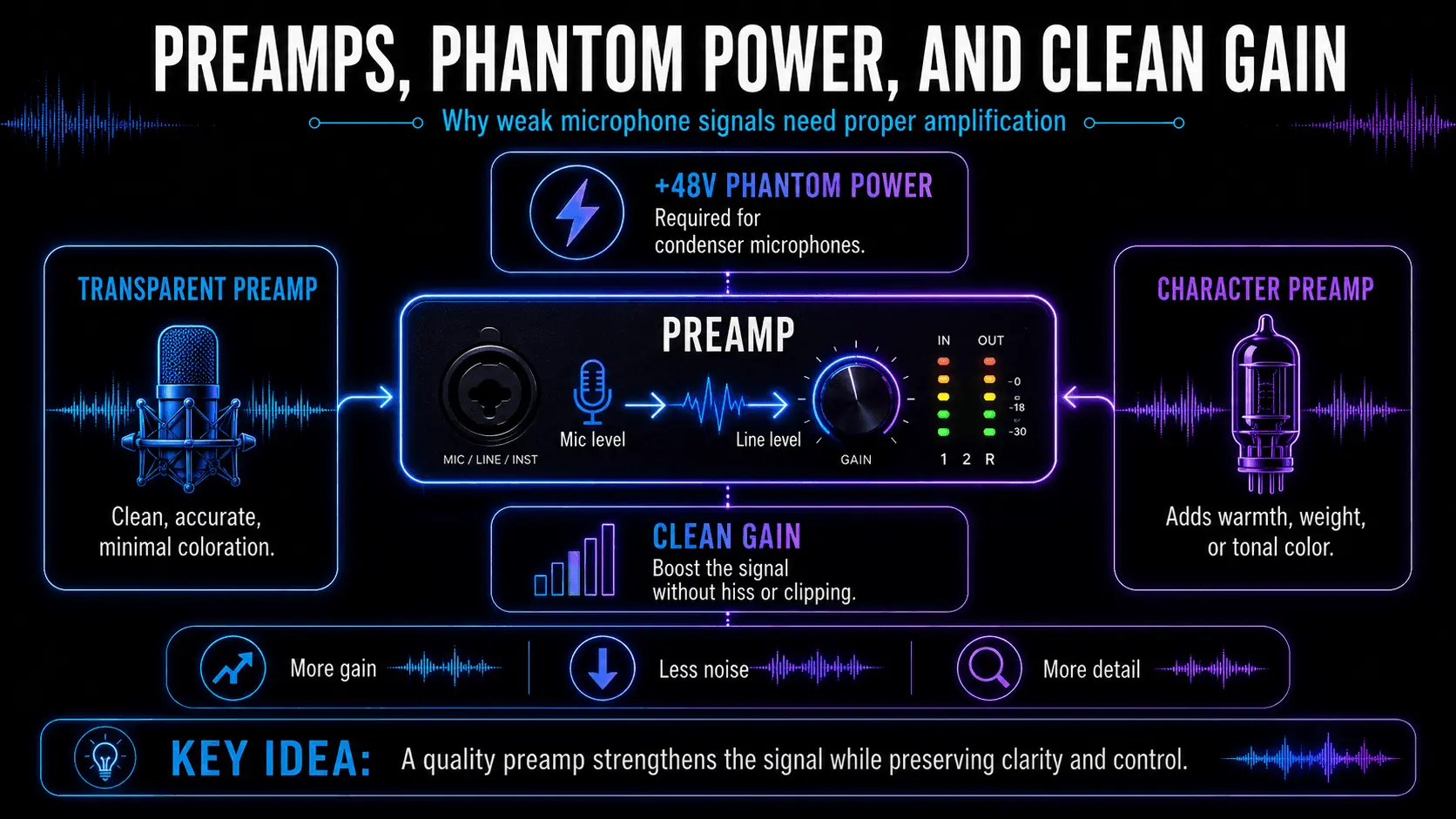
Diagram explaining transparent and character preamps, clean gain, and 48V phantom power for condenser microphones.

How preamps strengthen microphone signals while preserving clarity, detail, and headroom.

Dynamic Range and Headroom

Headroom is the safety zone between your normal signal level and the point where the hardware begins to "clip" or distort. A high-quality interface offers more headroom, allowing you to record dynamic performances (like a passionate vocalist) without the fear of digital clipping, which is irreversible and sonically unpleasant.

Connectivity and Input/Output (I/O) Management

An audio interface acts as the traffic controller for your studio. The number and type of inputs and outputs (I/O) determine how many instruments you can record at once and how many sets of speakers you can control.

Physical Connections

As of today, the industry has largely converged on high-speed protocols to handle the massive data requirements of high-resolution audio and spatial audio projects.

Connection TypeBandwidthBest Use Case
USB-C (USB 3.2/4.0)Up to 40 GbpsStandard for Home and Mobile Studios; High Compatibility.
Thunderbolt 4 / 540–80 GbpsProfessional Studios Requiring Extremely Low Latency and High Track Counts.
Ethernet (Dante/AVB)1 Gbps+Large-Scale Facilities, Live Venues, and Multi-Room Studio Complexes.

Input Types

  1. XLR Inputs: Used for microphones. They are balanced connections, meaning they cancel out electromagnetic interference and hum over long cable runs.
  2. 1/4-inch (TRS) Line Inputs: Used for synthesizers, drum machines, and outboard hardware (like compressors).
  3. Hi-Z (Instrument) Inputs: Specifically designed for electric guitars and basses. These inputs have high impedance to ensure the instrument's tone doesn't become dull or "loaded down."
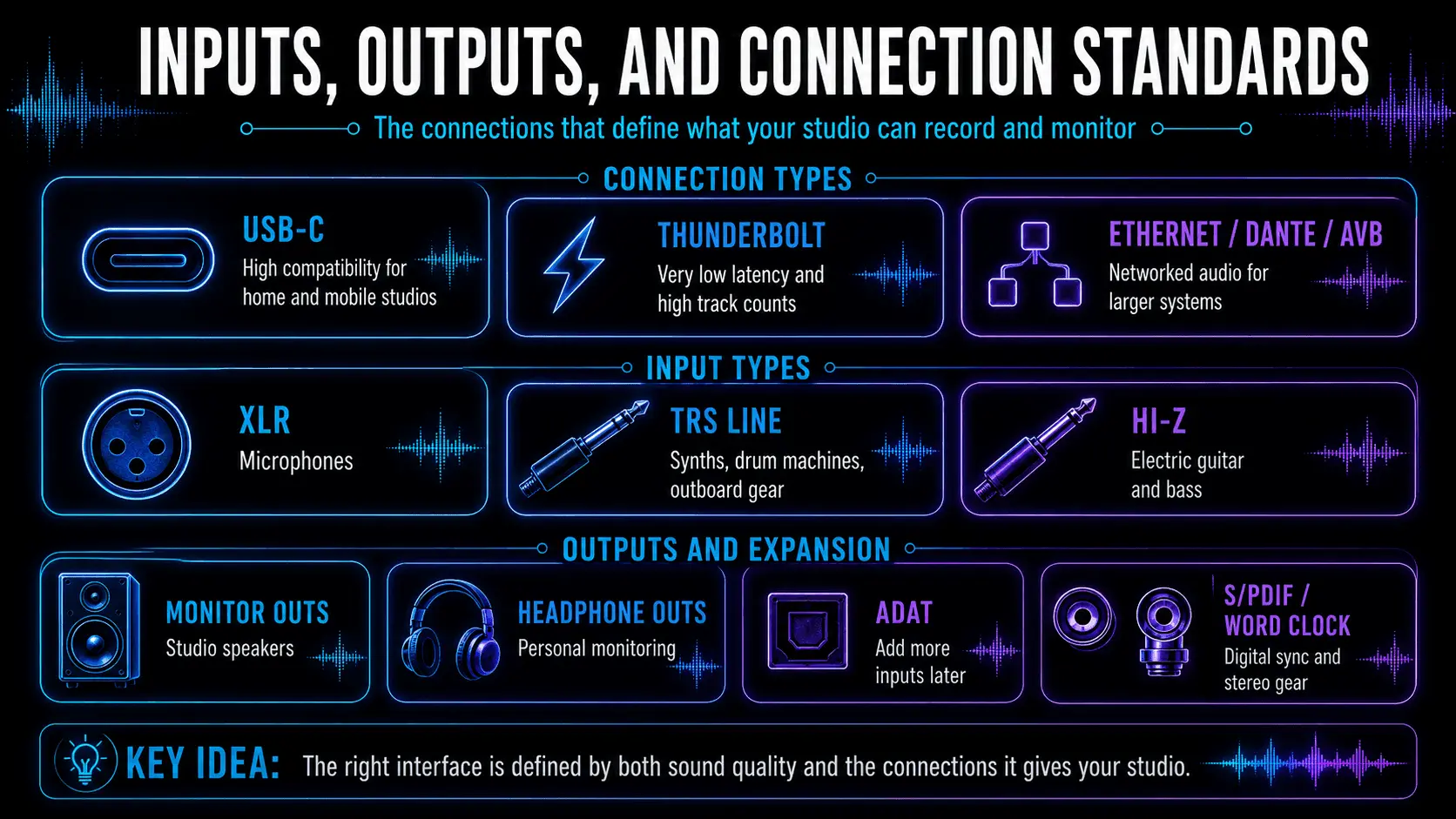
Audio interface connection guide showing USB-C, Thunderbolt, Ethernet, XLR, TRS, Hi-Z, monitor, headphone, ADAT, and S/PDIF ports.

The essential connections that determine what a studio can record and monitor.

Output Types

  1. Monitor Outputs: Balanced TRS or XLR outputs that connect to your studio monitors.
  2. Headphone Outputs: Dedicated high-current amplifiers designed to drive everything from sensitive in-ear monitors to high-impedance open-back headphones.
  3. DC-Coupled Outputs: A specialized feature in modern interfaces that allows the DAW to send control voltages (CV) to modular synthesizers.

The Latency Challenge: Why it Matters

Latency is the delay between sound entering the interface and sound coming out of the speakers. In a digital system, this is unavoidable because the computer needs time to process the data. However, high latency makes it impossible for a musician to record. Imagine singing into a mic and hearing your voice in your headphones 100 milliseconds later—it is impossible to stay in time.
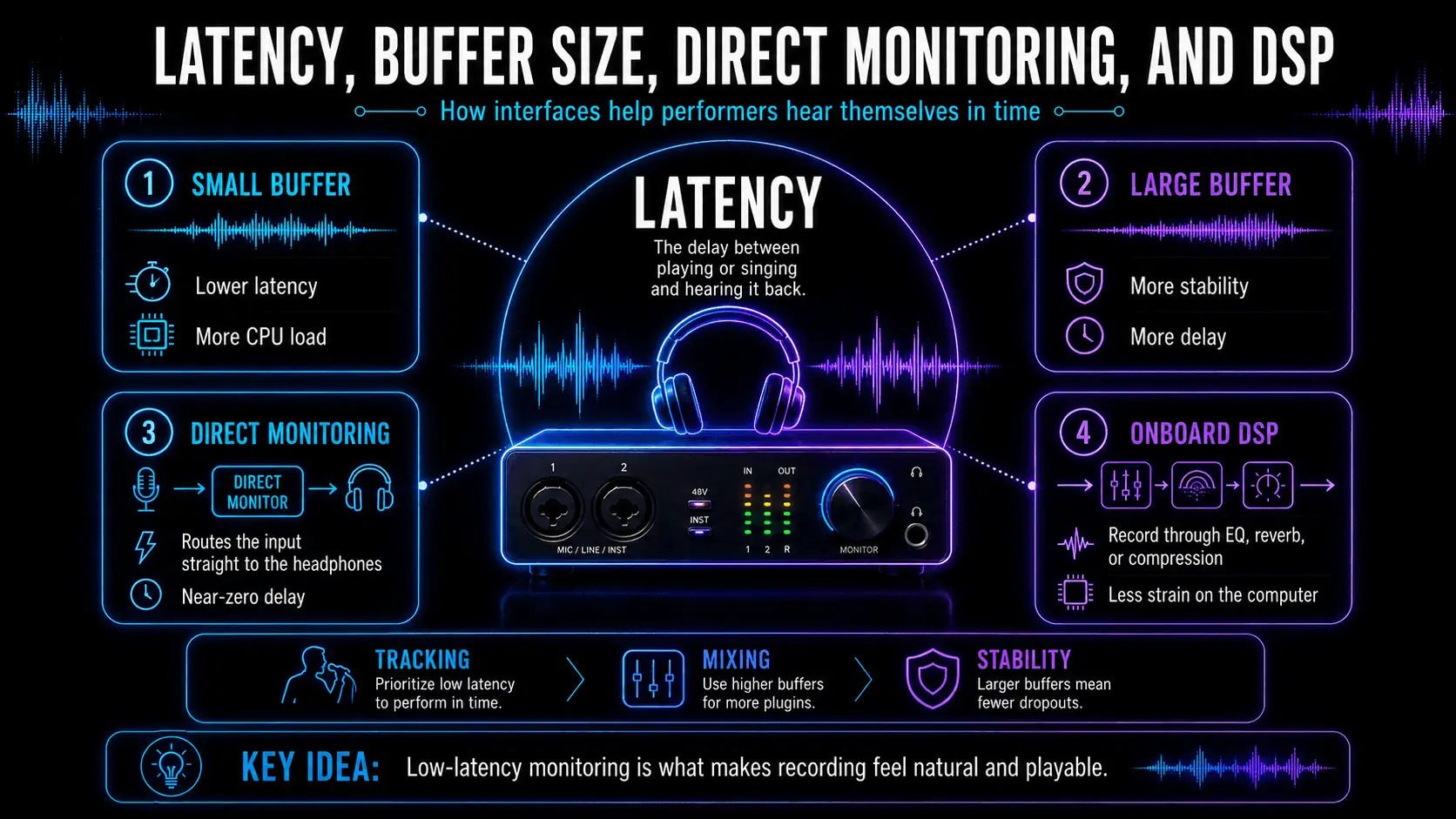
Infographic comparing small and large audio buffers, direct monitoring, onboard DSP, latency, CPU load, and recording stability.

How buffer settings and monitoring options balance responsiveness, stability, and processing power.

Buffer Size vs. Sample Rate

Latency is managed by the Buffer Size. A smaller buffer (e.g., 32 or 64 samples) results in lower latency but puts a massive strain on your computer's CPU. If the CPU cannot keep up, you will hear "pops" and "clicks."

Direct Monitoring and Onboard DSP

To solve the latency problem, many interfaces offer Direct Monitoring. This routes the incoming analog signal directly to the headphone output before it is sent to the computer, providing zero-latency monitoring.

Advanced interfaces (like the Universal Audio Apollo or Antelope Audio Synergy Core) feature Onboard DSP (Digital Signal Processing). These devices have dedicated microchips that handle the processing of plugins (EQ, Reverb, Compression) inside the interface itself, allowing producers to record through high-end signal chains with no lag, regardless of how slow their computer is.

Audio Interface vs. USB Microphones: A Performance Comparison

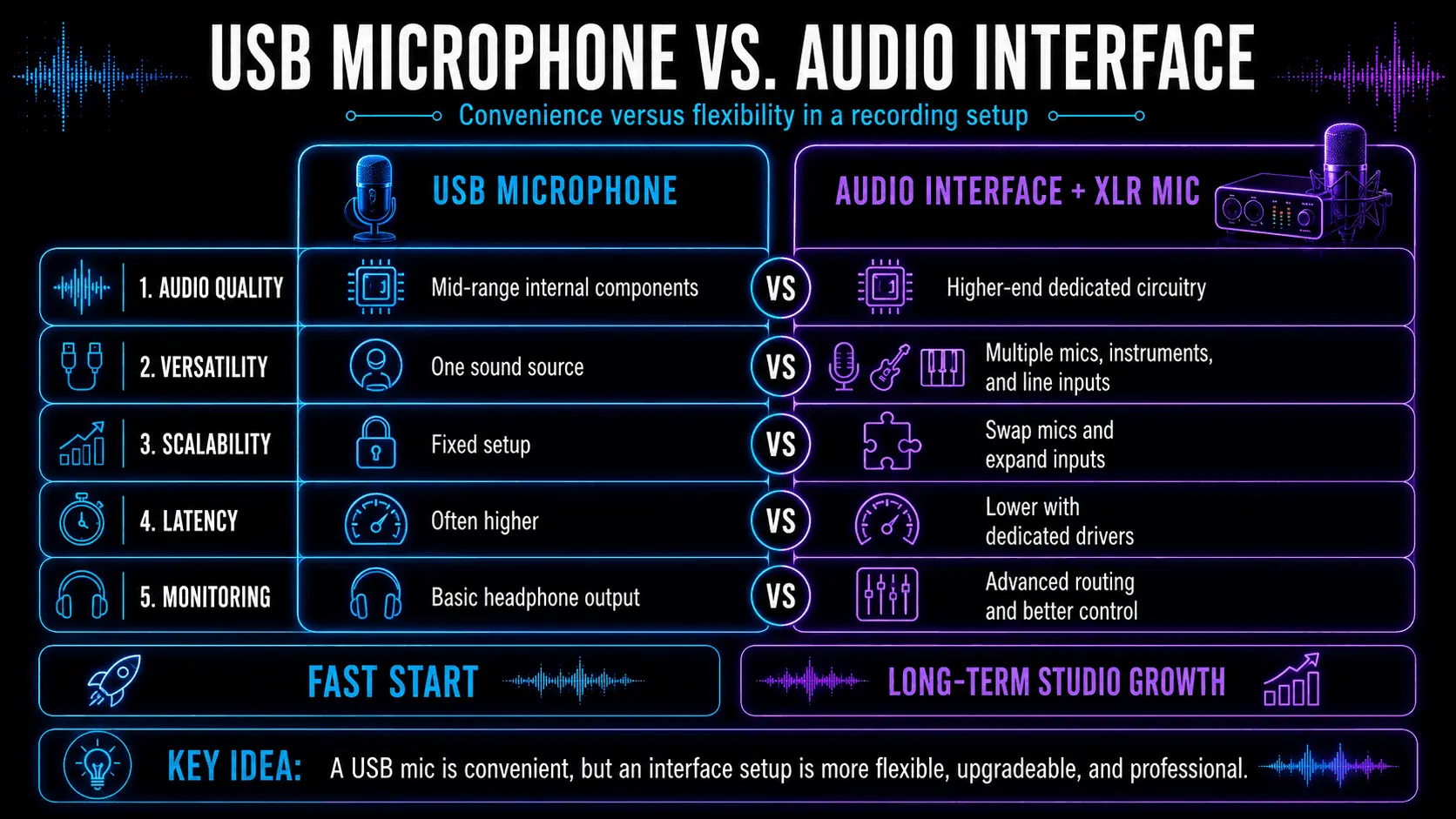
Many beginners start with a USB Microphone, which is essentially a microphone, preamp, and converter built into a single chassis. While convenient, they are significantly limited compared to a dedicated interface setup.

FeatureUSB MicrophoneAudio Interface + XLR Mic
Audio QualityMid-range; limited by small internal components.High-end; dedicated professional circuitry.
VersatilityOnly one sound source.Can connect multiple mics, guitars, and synths.
ScalabilityCannot be upgraded; must buy a new mic.Can swap microphones or add more inputs via ADAT.
LatencyUsually higher; relies on generic drivers.Very low; uses dedicated ASIO/Core Audio drivers.
MonitoringBasic headphone out; often lacks mix control.Advanced routing for multiple monitor sets.

Comparison of a USB microphone and an audio interface with XLR microphone across sound quality, versatility, scalability, latency, and monitoring.

USB microphones offer convenience, while interfaces provide flexibility and long-term studio growth.

Plan For Expansion: Future-Proofing Your Studio

One of the most overlooked functions of an audio interface is its ability to grow with your needs. This is achieved through Digital I/O.

ADAT (Optical) Connectivity

The ADAT port allows you to add more analog inputs to your interface via a single fiber-optic cable. For example, if you have a 2-channel interface with an ADAT input, you can connect an 8-channel preamp with ADAT output to record a full drum kit, bringing your total input count to 10.

S/PDIF and Word Clock

S/PDIF is used for connecting stereo digital gear, while Word Clock is a BNC connection that ensures all digital devices in a studio "tick" at the exact same time. In 2026, where hybrid setups (mixing analog hardware with digital software) are standard, these synchronization features are vital for preventing digital artifacts.

Immersive Audio and AI Integration

As we move deeper into the 2020s, the role of the audio interface is expanding into two new territories: Spatial Audio and AI-Driven Gain.
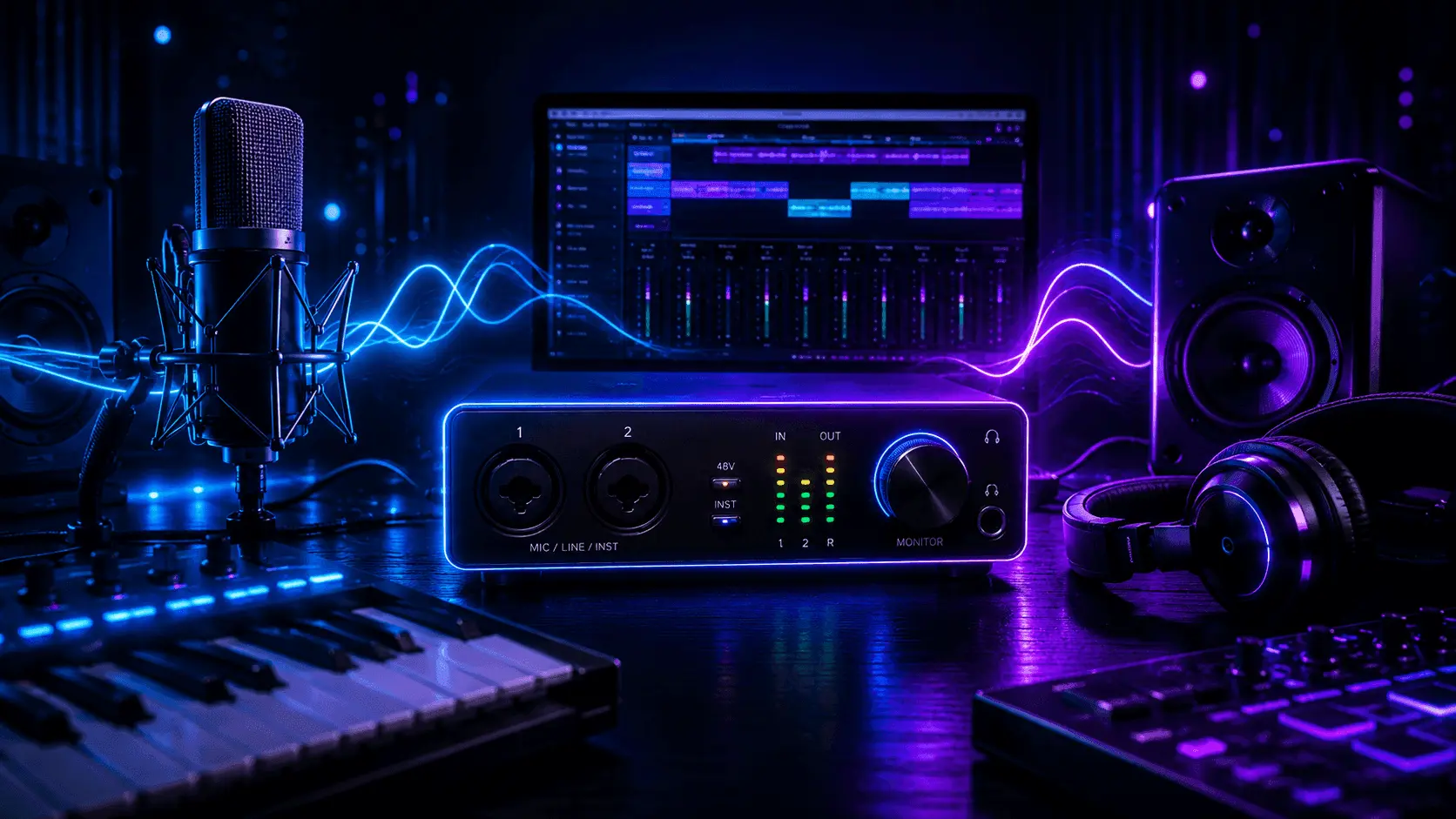
Modern home recording studio with an audio interface, condenser microphone, headphones, speakers, MIDI keyboard, pads, and a DAW.

Where sound, technology, and creative possibility come together.

Mixing for Dolby Atmos

The rise of Dolby Atmos and Apple Spatial Audio means that many producers are moving from 2.0 Stereo to 7.1.4 surround setups. Modern interfaces now feature advanced monitor controllers that can manage 12 or more speakers simultaneously, allowing for precise calibration of immersive environments.

AI Smart Gain and Synthesis

Modern interfaces now incorporate AI algorithms to assist in the recording process. Features like Auto-Gain analyze a performer’s sound check and automatically set the preamp levels to the "sweet spot"—preventing clipping while maximizing signal-to-noise ratio.

Furthermore, as AI Music Synthesis becomes a real-time tool, interfaces are being optimized with dedicated processing lanes to handle AI-generated instrument models with the same priority as traditional audio streams.

Using an Audio Interface with ACE Studio

An audio interface can support several stages of an ACE Studio production workflow. It provides accurate headphone and speaker monitoring, allows creators to record microphones and instruments, and helps route audio between ACE Studio, a DAW, and other studio equipment.
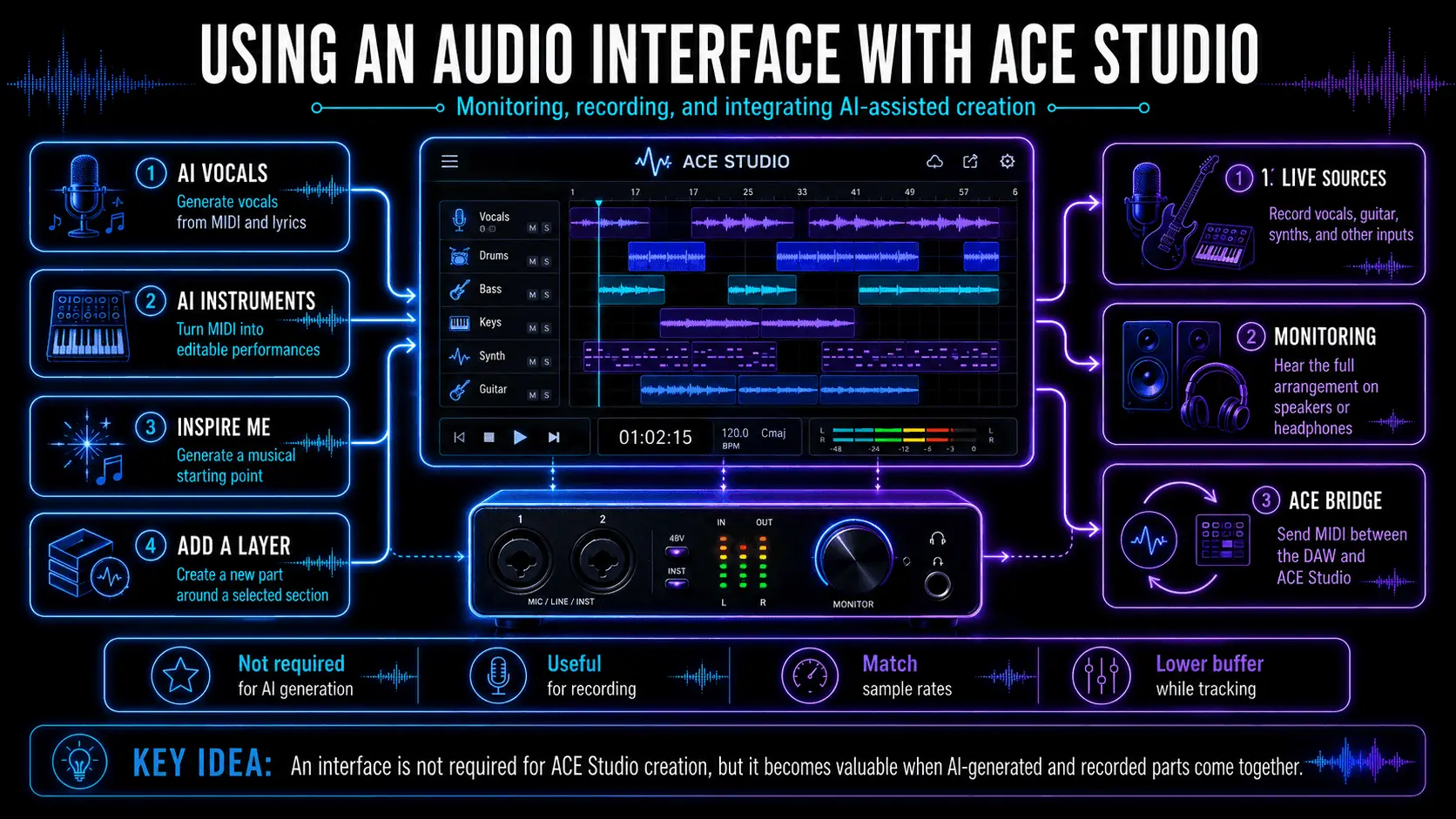
ACE Studio workflow showing AI vocals, AI Instruments, Inspire Me, Add a Layer, live recording, monitoring, and ACE Bridge integration.

Combining ACE Studio’s AI-generated parts with live recording, monitoring, and DAW integration.

An interface is not required to generate AI vocals or AI Instrument performances in ACE Studio. AI vocals can be created from MIDI and lyrics, while AI Instruments turn MIDI parts into editable instrument performances. However, an interface becomes valuable when these generated parts are combined with recorded vocals, guitars, synthesizers, or other live sources.

Prompt-based tools can extend this workflow beyond recording. Inspire Me can generate a musical starting point from a description or lyrics, giving producers material to develop before recording additional parts. Add a Layer can then generate an instrumental element, vocal layer, texture, or sample loop around a selected section of the project.

These tools do not require an audio interface to generate music. However, an interface becomes useful when the generated material is combined with live vocals, guitars, synthesizers, or other external sources. Producers can monitor the complete arrangement through studio headphones or speakers while recording new parts alongside the AI-generated layers.

For consistent playback, set the audio interface, operating system, ACE Studio project, and DAW to the same sample rate. Lower buffer settings are useful while recording or performing MIDI parts, while higher buffer settings can provide more stability during arrangement and mixing.

Producers working primarily inside a DAW can also use ACE Bridge to connect their existing session with ACE Studio. MIDI can be sent to AI Instrument tracks while the main composition remains inside the producer’s usual DAW environment.

Best Practices for Setup and Use

To get the most out of your audio interface, follow these professional deployment steps:

  1. Install Dedicated Drivers: Never rely on "Plug and Play" or generic Windows drivers. Always download the manufacturer's ASIO (Windows) or Core Audio (Mac) drivers for maximum stability.
  2. Gain Staging: Aim for your signal to peak around -12 dBFS to -6 dBFS in your DAW. This leaves enough headroom for the mixing stage and prevents analog saturation in the preamp.
  3. Balanced Cables: Always use TRS (Tip-Ring-Sleeve) or XLR cables for your speakers and microphones to prevent hum and radio interference.
  4. Sample Rate Consistency: Ensure your DAW project, your operating system settings, and your interface hardware are all set to the same sample rate (e.g., all at 48 kHz) to avoid "pitch-shift" errors or playback crashes.
  5. Phantom Power Safety: Always turn off +48V before unplugging a ribbon microphone, as some older or specialized models can be damaged by the sudden voltage.

Frequently Asked Questions

Can I use an audio interface for gaming and streaming?

Absolutely. In 2026, many interfaces feature Loopback functionality. This allows you to route your computer's audio (game sound, Discord, or music) back into your streaming software alongside your microphone. This eliminates the need for complex virtual routing software and provides a tactile, hardware-based way to control your levels while live.

What is the difference between a 2-in/2-out and a 4-in/4-out interface?

These numbers refer to the simultaneous Input and Output capacity:

2-in/2-out: Allows you to record two separate sources at once (e.g., a vocal mic and an acoustic guitar) and output to one pair of speakers.

4-in/4-out: Allows for four simultaneous inputs (ideal for a small podcast or a multi-mic guitar setup) and provides four outputs, which can be used to send audio to external hardware processors or a second pair of reference monitors.

Is 32-bit float recording necessary in an audio interface?

While 24-bit remains the professional standard for most studio work, 32-bit float is becoming more common in high-end interfaces and field recorders. The primary benefit of 32-bit float is its "infinite" dynamic range; it is virtually impossible to clip the audio at the digital stage. For unpredictable recording environments—such as live location recording or highly dynamic vocalists—32-bit float offers a safety net that traditional 24-bit systems cannot provide.

Do I need an interface if I already have a USB microphone?

If your goal is simple voiceovers or basic conferencing, a USB microphone is sufficient. However, if you plan to record instruments, use professional-grade XLR microphones, or require low-latency monitoring for music production, a dedicated interface is mandatory. An interface allows you to upgrade your microphone without replacing your entire conversion system, providing a far more sustainable and professional upgrade path.

Maxine Zhang
Written by
Maxine Zhang
Maxine Zhang is Head of Operations at ACE Studio, where she bridges AI technology and creative music applications. With deep expertise in user experience and product development, she champions the needs of musicians in the age of AI.
View full profile →